lock HYUNDAI ELANTRA 2021 Owner's Manual
[x] Cancel search | Manufacturer: HYUNDAI, Model Year: 2021, Model line: ELANTRA, Model: HYUNDAI ELANTRA 2021Pages: 570, PDF Size: 52.21 MB
Page 97 of 570
04
4-11
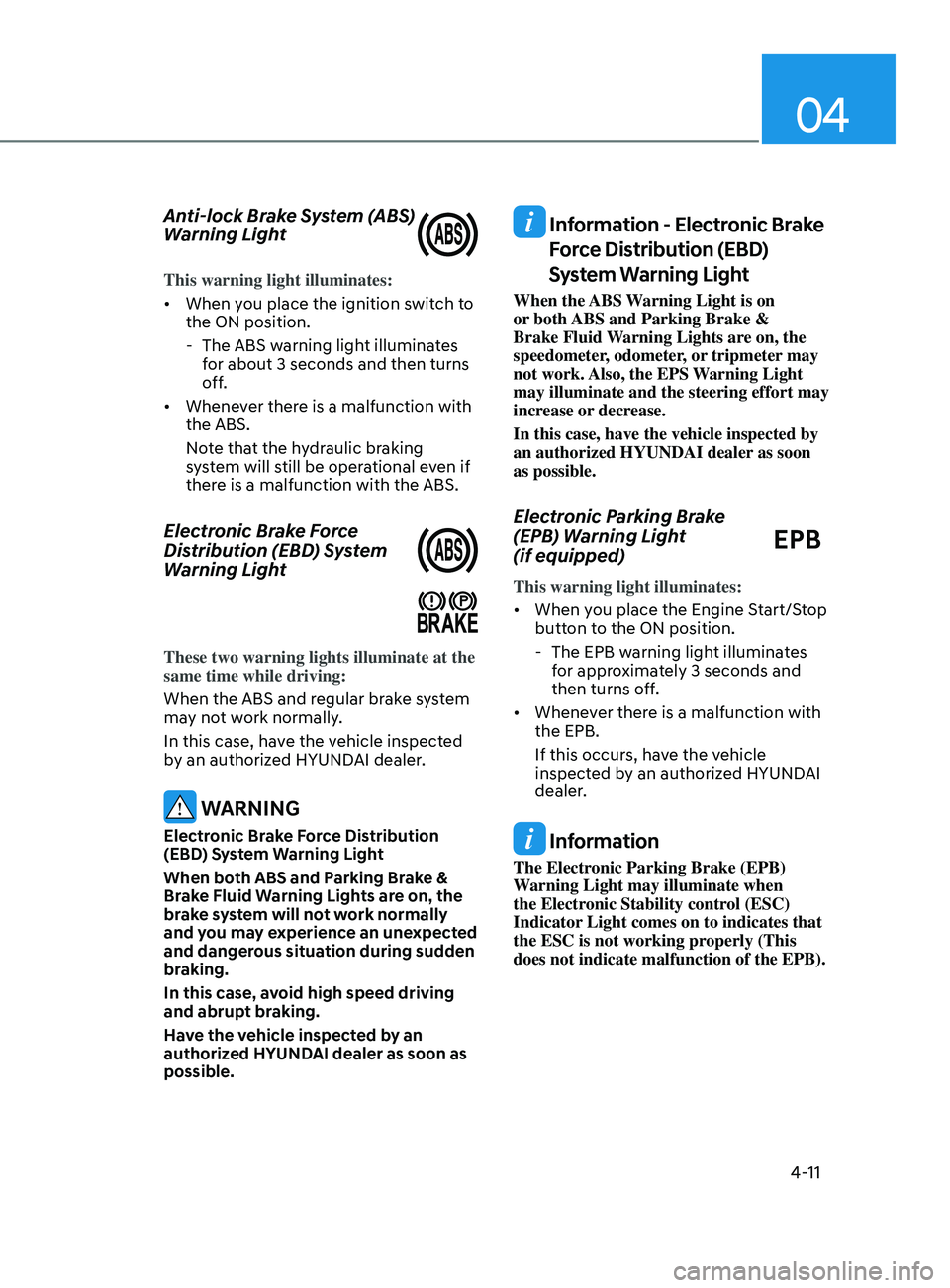
Anti-lock Brake System (ABS)
Warning Light
This warning light illuminates:
• When you place the ignition switch to
the ON position.
- The ABS warning ligh
t illuminates
for about 3 seconds and then turns
off.
• Whenever there is a malfunction with
the ABS.
Note that the hydraulic braking
system will still be operational even if
there is a malfunction with the ABS.
Electronic Brake Force
Distribution (EBD) System
Warning Light
These two warning lights illuminate at the
same time while driving:
When the ABS and regular brake system
may not work normally.
In this case, have the vehicle inspected
by an authorized HYUNDAI dealer.
WARNING
Electronic Brake Force Distribution
(EBD) System Warning Light
When both ABS and Parking Brake &
Brake Fluid Warning Lights are on, the
brake system will not work normally
and you may experience an unexpected
and dangerous situation during sudden
braking.
In this case, avoid high speed driving
and abrupt braking.
Have the vehicle inspected by an
authorized HYUNDAI dealer as soon as
possible.
Information - Electronic Brake
Force Distribution (EBD)
System Warning Light
When the ABS Warning Light is on
or both ABS and Parking Brake &
Brake Fluid Warning Lights are on, the
speedometer, odometer, or tripmeter may
not work. Also, the EPS Warning Light
may illuminate and the steering effort may
increase or decrease.
In this case, have the vehicle inspected by
an authorized HYUNDAI dealer as soon
as possible.
Electronic Parking Brake
(EPB) Warning Light
(if equipped)
EPB
This warning light illuminates:
• When you place the Engine Start/Stop
button to the ON position.
- The EPB warning ligh
t illuminates
for approximately 3 seconds and
then turns off.
• Whenever there is a malfunction with
the EPB.
If this occurs, have the vehicle
inspected by an authorized HYUNDAI
dealer.
Information
The Electronic Parking Brake (EPB)
Warning Light may illuminate when
the Electronic Stability control (ESC)
Indicator Light comes on to indicates that
the ESC is not working properly (This
does not indicate malfunction of the EPB).
Page 100 of 570
Instrument Cluster
4-14
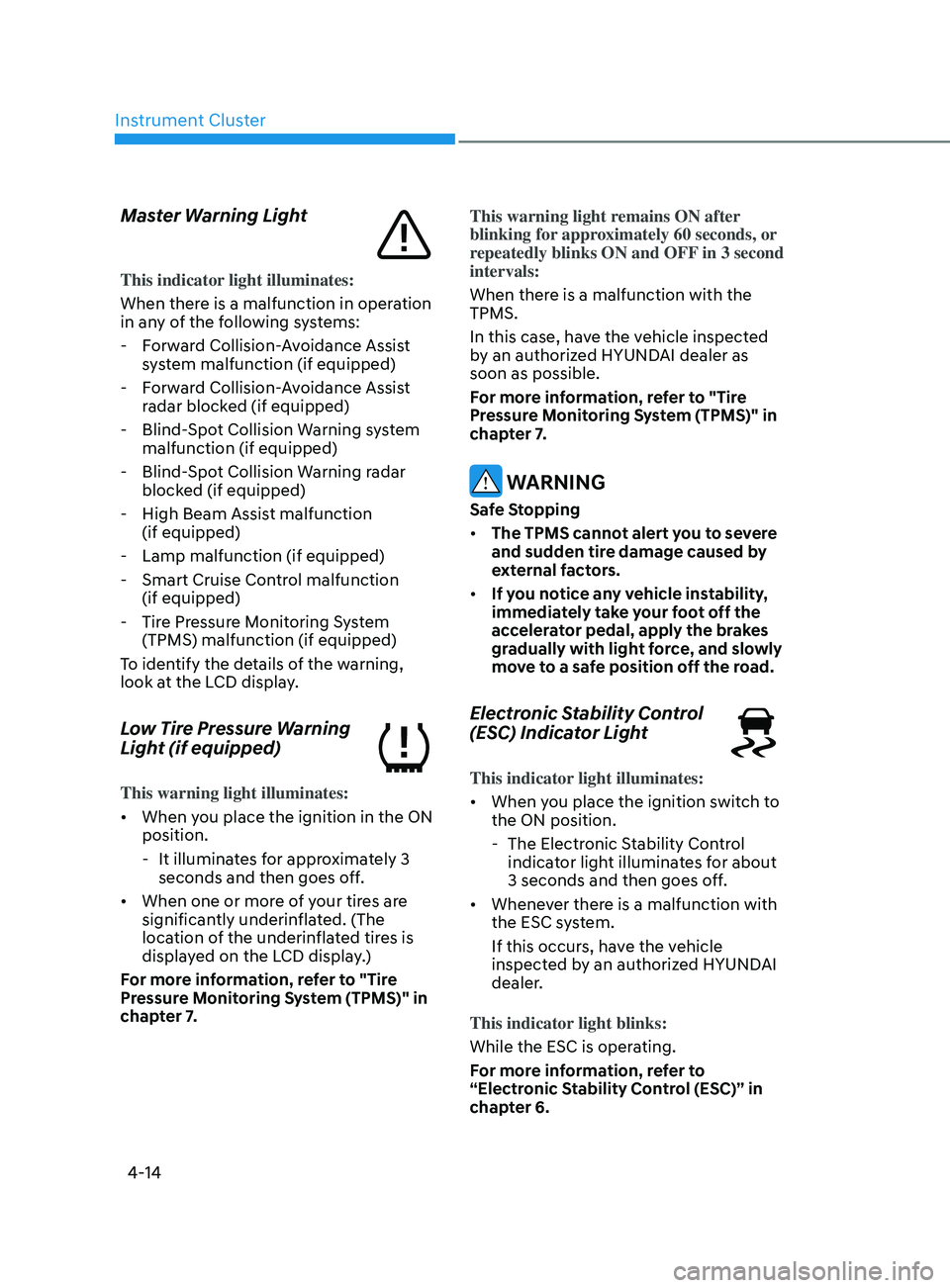
Master Warning Light
This indicator light illuminates:
When there is a malfunction in operation
in any of the following systems:
- Forw
ard Collision-Avoidance Assist
system malfunction (if equipped)
- Forw
ard Collision-Avoidance Assist
radar blocked (if equipped)
- Blind-Spo
t Collision Warning system
malfunction (if equipped)
- Blind-Spo
t Collision Warning radar
blocked (if equipped)
- High Beam Assist malfunction (if equipped)
- Lamp malfunction (if equipped)
- Smart Cruise Contr
ol malfunction
(if equipped)
- Tire Pr
essure Monitoring System
(TPMS) malfunction (if equipped)
To identify the details of the warning,
look at the LCD display.
Low Tire Pressure Warning
Light (if equipped)
This warning light illuminates:
• When you place the ignition in the ON
position.
- It illuminat
es for approximately 3
seconds and then goes off.
• When one or more of your tires are
significantly underinflated. (The
location of the underinflated tires is
displayed on the LCD display.)
For more information, refer to "Tire
Pressure Monitoring System (TPMS)" in
chapter 7. This warning light remains ON after
blinking for approximately 60 seconds, or
repeatedly blinks ON and OFF in 3 second
intervals:
When there is a malfunction with the
TPMS.
In this case, have the vehicle inspected
by an authorized HYUNDAI dealer as
soon as possible.
For more information, refer to "Tire
Pressure Monitoring System (TPMS)" in
chapter 7.
WARNING
Safe Stopping
•
The TPMS cannot alert you to severe
and sudden tire damage caused by
external factors.
• If you notice any vehicle instability,
immediately take your foot off the
accelerator pedal, apply the brakes
gradually with light force, and slowly
move to a safe position off the road.
Electronic Stability Control
(ESC) Indicator Light
This indicator light illuminates:
• When you place the ignition switch to
the ON position.
- The Electronic S
tability Control
indicator light illuminates for about
3 seconds and then goes off.
• Whenever there is a malfunction with
the ESC system.
If this occurs, have the vehicle
inspected by an authorized HYUNDAI
dealer.
This indicator light blinks:
While the ESC is operating.
For more information, refer to
“Electronic Stability Control (ESC)” in
chapter 6.
Page 114 of 570
Instrument Cluster4-28
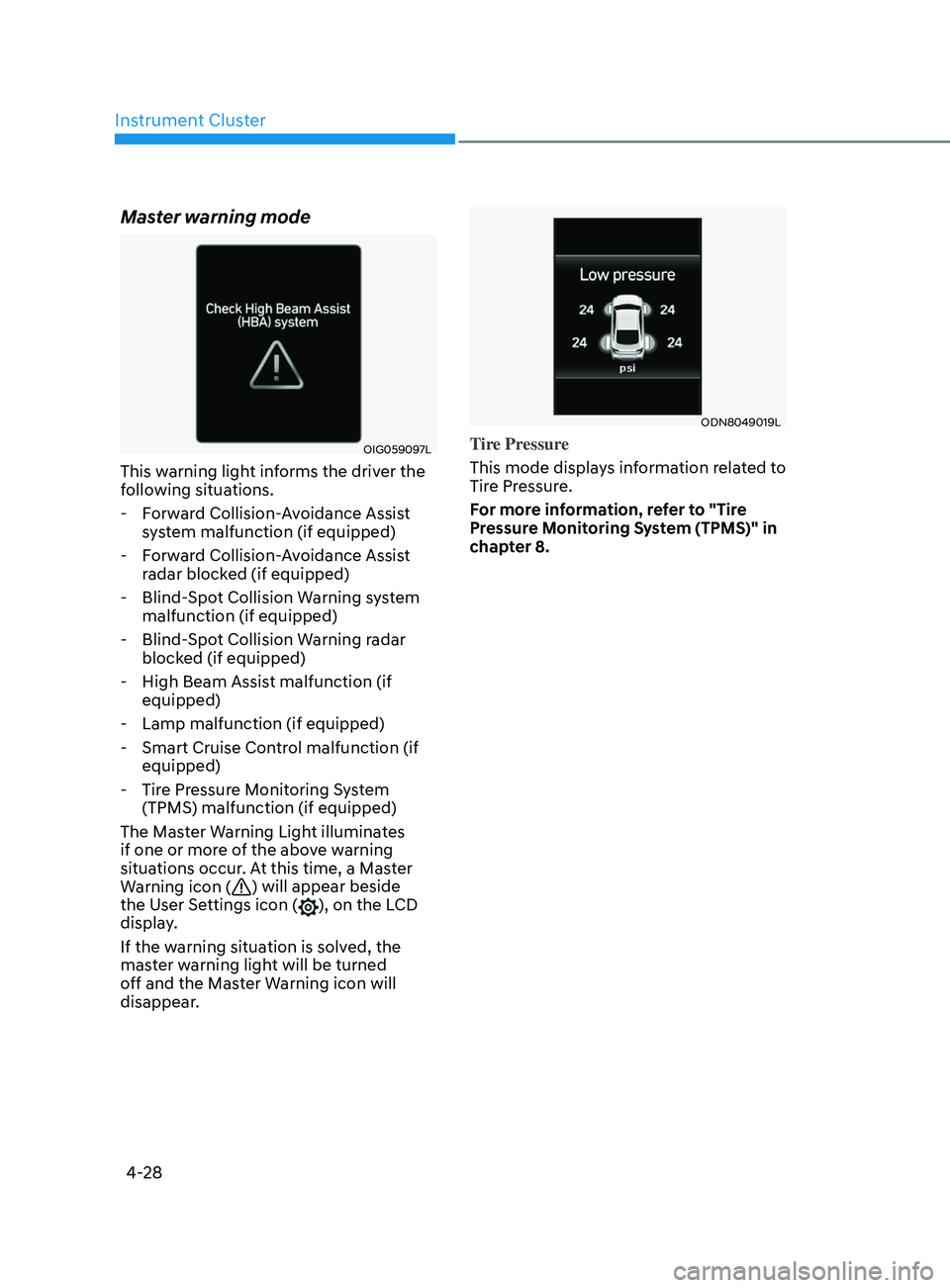
Master warning mode
OIG059097L
This warning light informs the driver the
following situations. - Forward Collision-Avoidance Assist system malfunction (if equipped)
- Forward Collision-Avoidance Assist radar blocked (if equipped)
- Blind-Spot Collision Warning system malfunction (if equipped)
- Blind-Spot Collision Warning radar blocked (if equipped)
- High Beam Assist malfunction (if equipped)
- Lamp malfunction (if equipped)
- Smart Cruise Control malfunction (if equipped)
- Tire Pressure Monitoring System (TPMS) malfunction (if equipped)
The Master Warning Light illuminates
if one or more of the above warning
situations occur. At this time, a Master
Warning icon (
) will appear beside
the User Settings icon (), on the LCD
display.
If the warning situation is solved, the
master warning light will be turned
off and the Master Warning icon will
disappear.
ODN8049019L
Tire Pressure
This mode displays information related to
Tire Pressure.
For more information, refer to "Tire
Pressure Monitoring System (TPMS)" in
chapter 8.
Page 118 of 570
Instrument Cluster
4-32
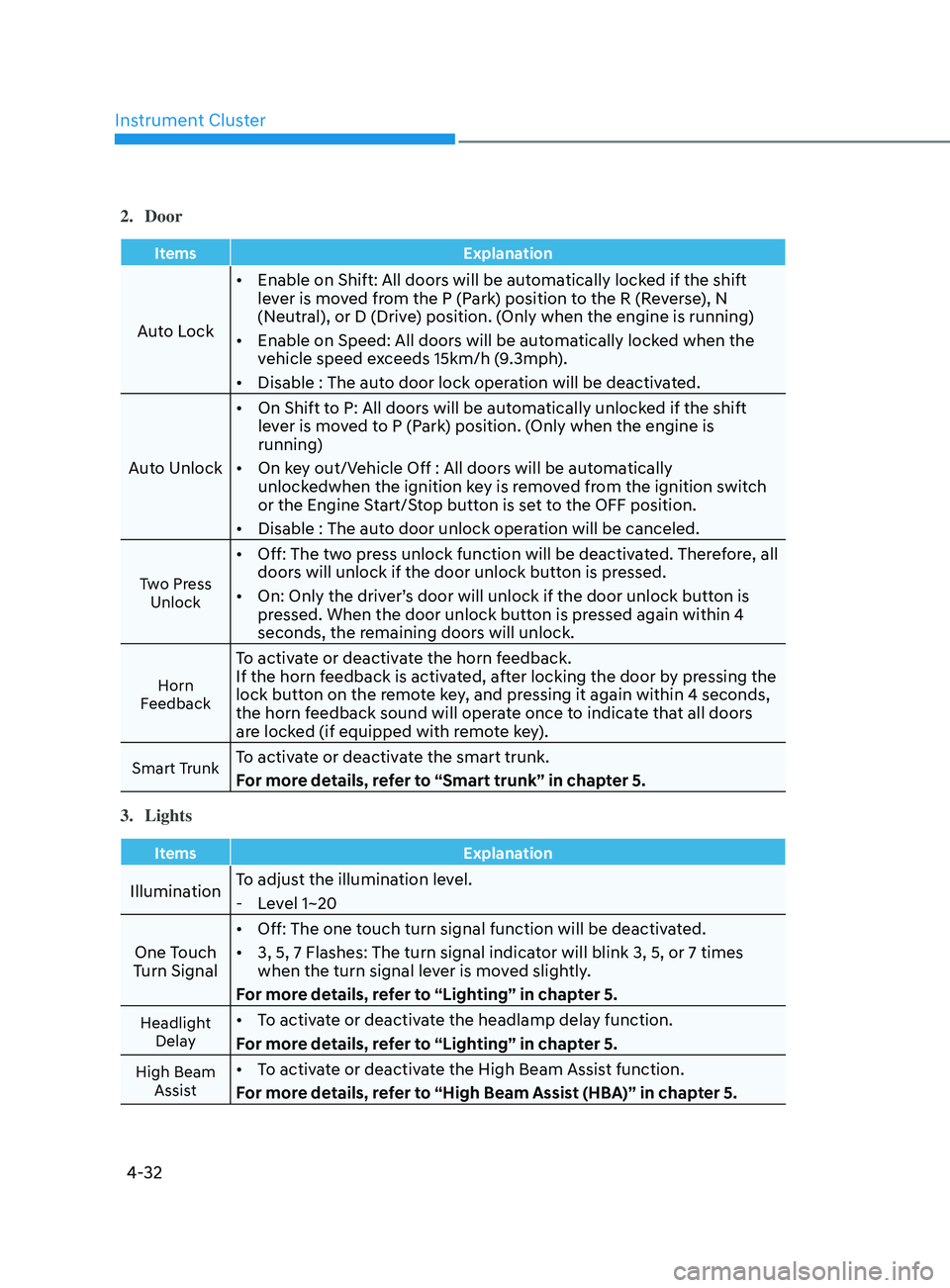
2. Door
ItemsExplanation
Auto Lock•
Enable on Shift: All doors will be automatically locked if the shift
lever is moved from the P (Park) position to the R (Reverse), N
(Neutral), or D (Drive) position. (Only when the engine is running)
• Enable on Speed: All doors will be automatically locked when the
vehicle speed exceeds 15km/h (9.3mph).
• Disable : The auto door lock operation will be deactivated.
Auto Unlock •
On Shift to P: All doors will be automatically unlocked if the shift
lever is moved to P (Park) position. (Only when the engine is
running)
• On key out/Vehicle Off : All doors will be automatically
unlockedwhen the ignition key is removed from the ignition switch
or the Engine Start/Stop button is set to the OFF position.
• Disable : The auto door unlock operation will be canceled.
Two Press
Unlock
• Off: The two press unlock function will be deactivated. Therefore, all
doors will unlock if the door unlock button is pressed.
• On: Only the driver’s door will unlock if the door unlock button is
pressed. When the door unlock button is pressed again within 4
seconds, the remaining doors will unlock.
Horn
Feedback
To activate or deactivate the horn feedback.
If the horn feedback is activated, after locking the door by pressing the
lock button on the remote key, and pressing it again within 4 seconds,
the horn feedback sound will operate once to indicate that all doors
are locked (if equipped with remote key).
Smart TrunkTo activate or deactivate the smart trunk.
For more details, refer to “Smart trunk” in chapter 5.
3.
Lights
Items Explanation
IlluminationTo adjust the illumination level. - Le
vel 1~20
One Touch
Turn Signal •
Off: The one touch turn signal function will be deactivated.
• 3, 5, 7 Flashes: The turn signal indicator will blink 3, 5, or 7 times
when the turn signal lever is moved slightly.
For more details, refer to “Lighting” in chapter 5.
Headlight Delay• To activate or deactivate the headlamp delay function.
For more details, refer to “Lighting” in chapter 5.
High Beam Assist• To activate or deactivate the High Beam Assist function.
For more details, refer to “High Beam Assist (HBA)” in chapter 5.
Page 119 of 570
04
4-33
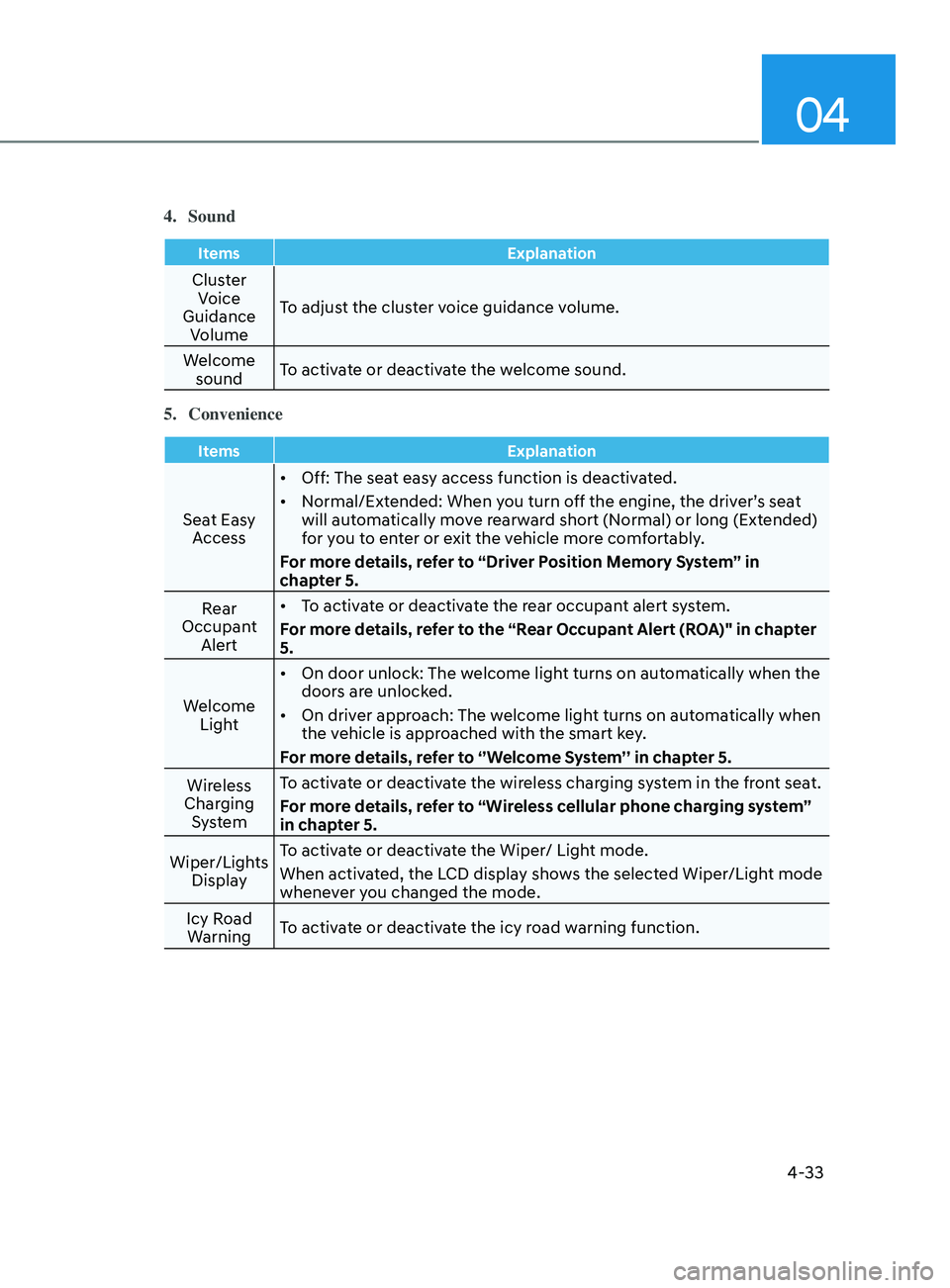
4. Sound
ItemsExplanation
Cluster
Voice
Guidance Volume To adjust the cluster voice guidance volume.
Welcome sound To activate or deactivate the welcome sound.
5.
Convenience
Items Explanation
Seat Easy
Access •
Off: The seat easy access function is deactivated.
• Normal/Extended: When you turn off the engine, the driver’s seat
will automatically move rearward short (Normal) or long (Extended)
for you to enter or exit the vehicle more comfortably.
For more details, refer to “Driver Position Memory System” in
chapter 5.
Rear
Occupant Alert •
To activate or deactivate the rear occupant alert system.
For more details, refer to the “Rear Occupant Alert (ROA)" in chapter
5.
Welcome Light •
On door unlock: The welcome light turns on automatically when the
doors are unlocked.
• On driver approach: The welcome light turns on automatically when
the vehicle is approached with the smart key.
For more details, refer to ‘’Welcome System’’ in chapter 5.
Wireless
Charging System To activate or deactivate the wireless charging system in the front seat.
For more details, refer to “Wireless cellular phone charging system”
in chapter 5.
Wiper/Lights Display To activate or deactivate the Wiper/ Light mode.
When activated, the LCD display shows the selected Wiper/Light mode
whenever you changed the mode.
Icy Road Warning To activate or deactivate the icy road warning function.
Page 133 of 570
04
4-47
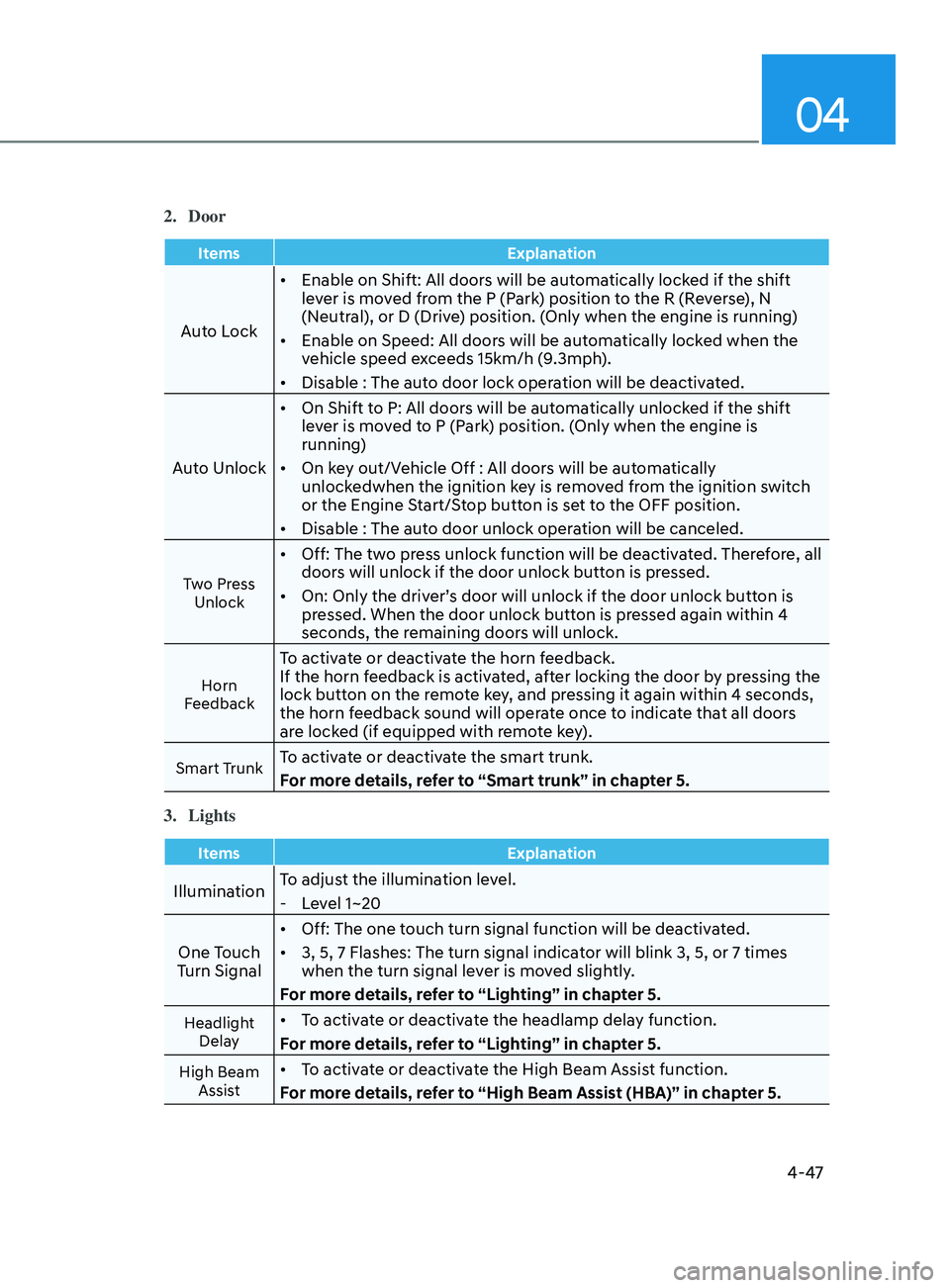
2. Door
ItemsExplanation
Auto Lock•
Enable on Shift: All doors will be automatically locked if the shift
lever is moved from the P (Park) position to the R (Reverse), N
(Neutral), or D (Drive) position. (Only when the engine is running)
• Enable on Speed: All doors will be automatically locked when the
vehicle speed exceeds 15km/h (9.3mph).
• Disable : The auto door lock operation will be deactivated.
Auto Unlock •
On Shift to P: All doors will be automatically unlocked if the shift
lever is moved to P (Park) position. (Only when the engine is
running)
• On key out/Vehicle Off : All doors will be automatically
unlockedwhen the ignition key is removed from the ignition switch
or the Engine Start/Stop button is set to the OFF position.
• Disable : The auto door unlock operation will be canceled.
Two Press
Unlock
• Off: The two press unlock function will be deactivated. Therefore, all
doors will unlock if the door unlock button is pressed.
• On: Only the driver’s door will unlock if the door unlock button is
pressed. When the door unlock button is pressed again within 4
seconds, the remaining doors will unlock.
Horn
Feedback
To activate or deactivate the horn feedback.
If the horn feedback is activated, after locking the door by pressing the
lock button on the remote key, and pressing it again within 4 seconds,
the horn feedback sound will operate once to indicate that all doors
are locked (if equipped with remote key).
Smart TrunkTo activate or deactivate the smart trunk.
For more details, refer to “Smart trunk” in chapter 5.
3.
Lights
Items Explanation
IlluminationTo adjust the illumination level. - Le
vel 1~20
One Touch
Turn Signal •
Off: The one touch turn signal function will be deactivated.
• 3, 5, 7 Flashes: The turn signal indicator will blink 3, 5, or 7 times
when the turn signal lever is moved slightly.
For more details, refer to “Lighting” in chapter 5.
Headlight Delay• To activate or deactivate the headlamp delay function.
For more details, refer to “Lighting” in chapter 5.
High Beam Assist• To activate or deactivate the High Beam Assist function.
For more details, refer to “High Beam Assist (HBA)” in chapter 5.
Page 134 of 570
Instrument Cluster
4-48
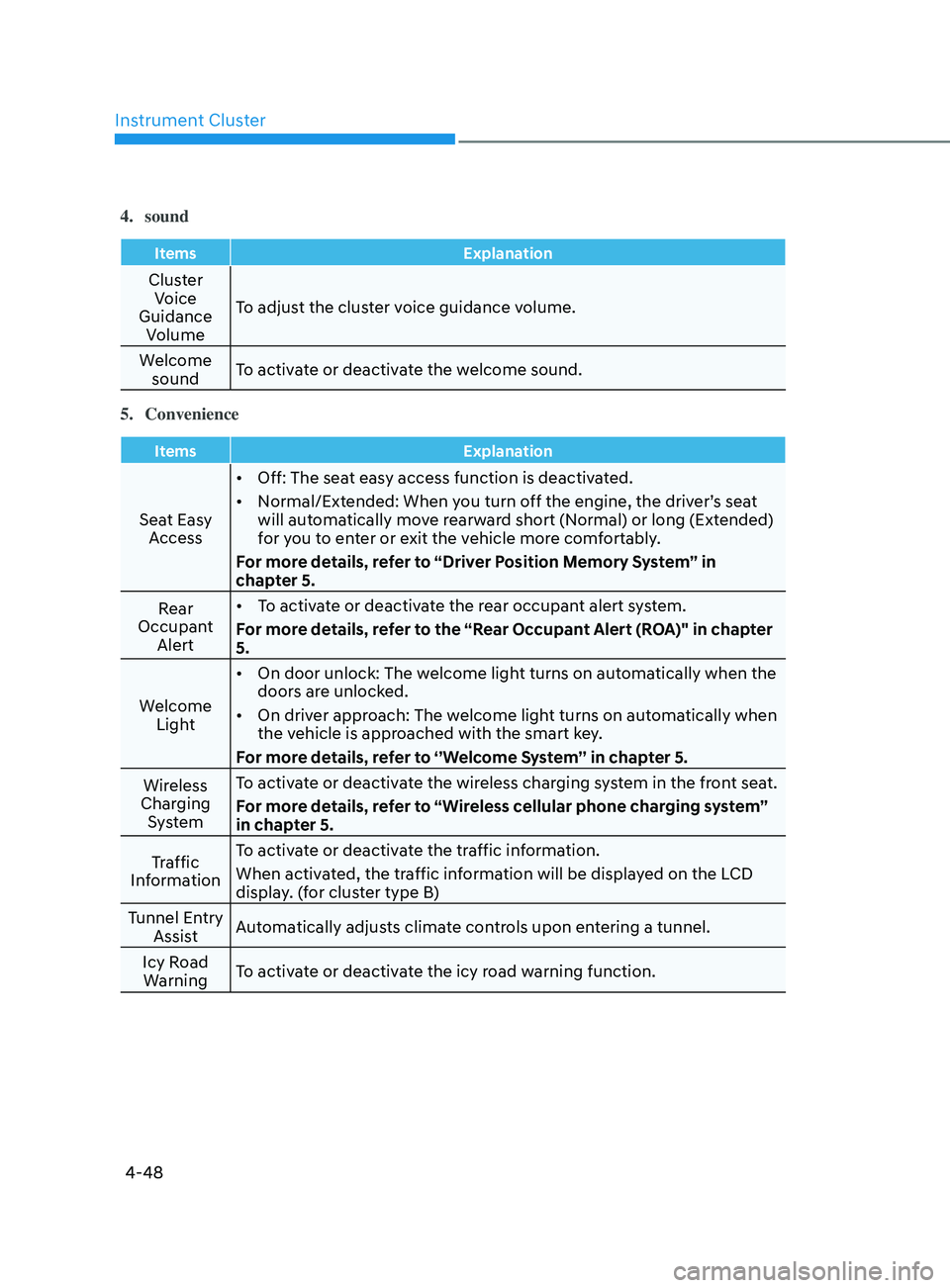
4. sound
ItemsExplanation
Cluster
Voice
Guidance Volume To adjust the cluster voice guidance volume.
Welcome sound To activate or deactivate the welcome sound.
5.
Convenience
Items Explanation
Seat Easy
Access •
Off: The seat easy access function is deactivated.
• Normal/Extended: When you turn off the engine, the driver’s seat
will automatically move rearward short (Normal) or long (Extended)
for you to enter or exit the vehicle more comfortably.
For more details, refer to “Driver Position Memory System” in
chapter 5.
Rear
Occupant Alert •
To activate or deactivate the rear occupant alert system.
For more details, refer to the “Rear Occupant Alert (ROA)" in chapter
5.
Welcome Light •
On door unlock: The welcome light turns on automatically when the
doors are unlocked.
• On driver approach: The welcome light turns on automatically when
the vehicle is approached with the smart key.
For more details, refer to ‘’Welcome System’’ in chapter 5.
Wireless
Charging System To activate or deactivate the wireless charging system in the front seat.
For more details, refer to “Wireless cellular phone charging system”
in chapter 5.
Traffic
Information To activate or deactivate the traffic information.
When activated, the traffic information will be displayed on the LCD
display. (for cluster type B)
Tunnel Entry Assist Automatically adjusts climate controls upon entering a tunnel.
Icy Road Warning To activate or deactivate the icy road warning function.
Page 137 of 570

5. Convenient Features
Convenient Features
Accessing Your Vehicle ........................................................................\
..........5-4Remote Key ........................................................................\
....................................... 5-4
Smart Ke y ........................................................................\
........................................... 5
-7
Immobilizer System
........................................................................\
........................ 5-
14
Hyundai Digital Key
........................................................................\
......................... 5-
15
Operating Door Locks from Outside the Vehicle
.................................................. 5-
31
Operating Door Locks from Inside the Vehicle
.................................................... 5-
33
Automatic Door Lock and Unlock Features
.......................................................... 5-
35
Child-Protector Rear Door Locks
........................................................................\
.. 5-35
R
ear Occupant Alert (ROA) System
....................................................................... 5-
36
Steering Wheel ........................................................................\
.....................5-38Electric Power Steering (EPS) ........................................................................\
........5-38
Tilt S teering / Telescope Steering ........................................................................\
. 5-39
H
orn........................................................................\
.................................................5-40
Mirrors ........................................................................\
................................... 5-41Inside Rearview Mirror ........................................................................\
....................5-41
Side Vie w Mirrors ........................................................................\
........................... 5-49
Windows ........................................................................\
................................ 5-51Power Windows ........................................................................\
..............................5-52
Sunroof ........................................................................\
................................. 5-55Sunroof opening and closing ........................................................................\
........5-56
Tilting the sunroo f ........................................................................\
.......................... 5-57
Sunshade ........................................................................\
........................................ 5-57
R
esetting the sunroof
........................................................................\
.................... 5-58
Sunr
oof open warning
........................................................................\
................... 5-58
Hood ........................................................................\
..................................... 5-59
Trunk
........................................................................\
..................................... 5-61
Emergency trunk safety release ........................................................................\
....5-62
Smart Trunk r elease ........................................................................\
....................... 5-63
Fuel filler door ........................................................................\
......................5-66
Exterior Ligh ts
........................................................................\
...................... 5-68
Lighting control ........................................................................\
.............................. 5-68
High beam opera tion ........................................................................\
..................... 5-69
T
urn signals and lane change signals
................................................................... 5-70
Ba
ttery saver function
........................................................................\
..................... 5-
71
Headlamp delay function
........................................................................\
............... 5-
71
5
Page 139 of 570

5
Interior Features ........................................................................\
...................5-111Cup Holder ........................................................................\
...................................... 5-111
Sun visor ........................................................................\
.......................................... 5-
112
Power Outlet
........................................................................\
................................... 5-
112
USB Charger
........................................................................\
................................... 5-
113
Wireless Cellular Phone Charging System
.......................................................... 5-
114
Clock
........................................................................\
.............................................. 5-
116
Clothes Hanger
........................................................................\
.............................. 5-
116
Infotainment System ........................................................................\
...........5-117USB Port ........................................................................\
.......................................... 5-117
An tenna ........................................................................\
..................................... .....5-118
Steering wheel audio control
........................................................................\
....... 5-
119
Infotainment system
........................................................................\
..................... 5-
120
Voice recognition
........................................................................\
.................................. 5-
120
Bluetooth® Wireless Technology hands-free
....................................................... 5-
120
How vehicle radio works
........................................................................\
................ 5-
121
High Beam Assist (HBA) ........................................................................\
.....5-72Detecting sensor (Front view camera) ................................................................... 5-72
Function settings ........................................................................\
............................. 5-72
Function operation ........................................................................\
.......................... 5-73
Function malfunction and limitations .................................................................... 5-73
Interior Lights ........................................................................\
....................... 5-75Interior lamp AUTO cut ........................................................................\
................... 5-75
Front lamps ........................................................................\
...................................... 5-75
Rear lamp ........................................................................\
........................................ 5 -76
Luggage compartment lamp ........................................................................\
......... 5-77
Vanity mirror lamp ........................................................................\
........................... 5-77
Welcome system ........................................................................\
............................ 5-78
Wipers and Washers ........................................................................\
............5-79Windshield Wipers ........................................................................\
......................... 5-79
Windshield Washers ........................................................................\
....................... 5-80
Manual Climate Control System ................................................................. 5-81Heating and Air Conditioning ........................................................................\
........ 5-82
System operation ........................................................................\
........................... 5-88
System Maintenance ........................................................................\
..................... 5-90
Automatic Climate Control System ............................................................5-92Automatic heating and air conditioning ............................................................... 5-93
Manual heating and air conditioning .................................................................... 5-94
System operation ........................................................................\
......................... 5-100
System Maintenance ........................................................................\
.................... 5-102
Windshield defrosting and defogging ......................................................5-104Manual climate control system ........................................................................\
... 5-104
Automatic climate control system ....................................................................... 5-105
Defogging logic ........................................................................\
........................... 5-106
Auto defogging system (only for automatic climate control system) ............... 5-107
Defroster ........................................................................\
....................................... 5-108
Climate control additional features ..........................................................5-109Sunroof inside air recirculation ........................................................................\
... 5-109
Auto comfort control (for driver’s seat) .............................................................. 5-109
Automatic ventilation ........................................................................\
................... 5-109
Storage compartment ........................................................................\
........5-110Center console storage ........................................................................\
................. 5-110
Glove box ........................................................................\
....................................... 5-110
5. Convenient Features
Page 140 of 570
Convenient Features
5-4
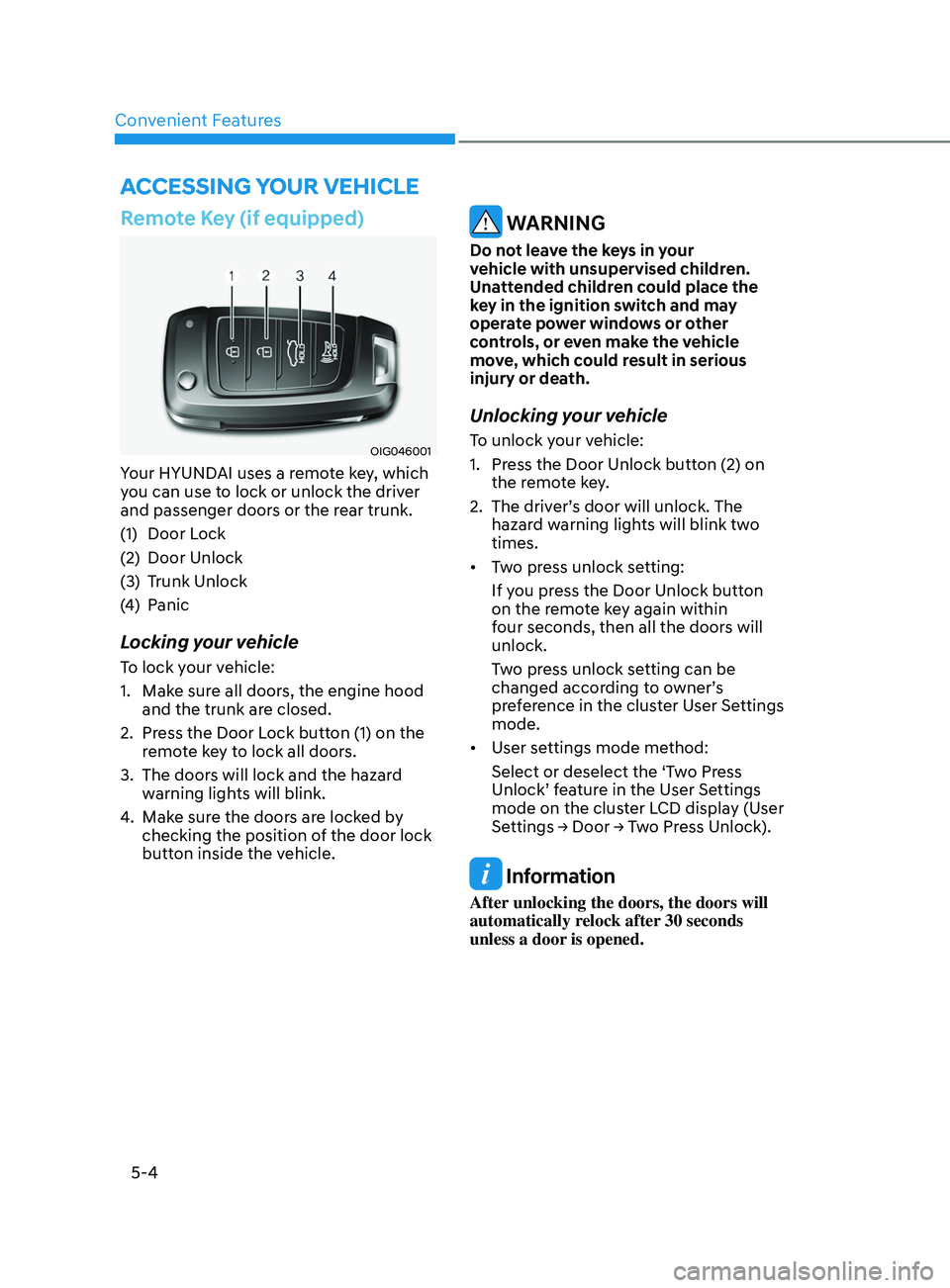
Remote Key (if equipped)
OIG046001
Your HYUNDAI uses a remote key, which
you can use to lock or unlock the driver
and passenger doors or the rear trunk.
(1)
Door Lock
(2)
Door Unlock
(3)
Trunk Unlock
(4
)
Panic
Locking your vehicle
To lock your vehicle:
1.
Make sur
e all doors, the engine hood
and the trunk are closed.
2.
Press the Door L
ock button (1) on the
remote key to lock all doors.
3.
The doors will lock and the hazar
d
warning lights will blink.
4.
Make sur
e the doors are locked by
checking the position of the door lock
button inside the vehicle.
WARNING
Do not leave the keys in your
vehicle with unsupervised children.
Unattended children could place the
key in the ignition switch and may
operate power windows or other
controls, or even make the vehicle
move, which could result in serious
injury or death.
Unlocking your vehicle
To unlock your vehicle:
1.
Press the Door Unlock butt
on (2) on
the remote key.
2.
The driver’
s door will unlock. The
hazard warning lights will blink two
times.
• Two press unlock setting:
If you press the Door Unlock button
on the remote key again within
four seconds, then all the doors will
unlock.
Two press unlock setting can be
changed according to owner’s
preference in the cluster User Settings
mode.
• User settings mode method:
Select or deselect the ‘Two Press
Unlock’ feature in the User Settings
mode on the cluster LCD display (User
Settings
→ Door → T
wo
Pr
ess
Unlock
).
Information
After unlocking the doors, the doors will
automatically relock after 30 seconds
unless a door is opened.
Accessing Your Vehicle