usb Hyundai Elantra Coupe 2014 Owner's Guide
[x] Cancel search | Manufacturer: HYUNDAI, Model Year: 2014, Model line: Elantra Coupe, Model: Hyundai Elantra Coupe 2014Pages: 550, PDF Size: 45.11 MB
Page 326 of 550
Features of your vehicle
240 4
0~255
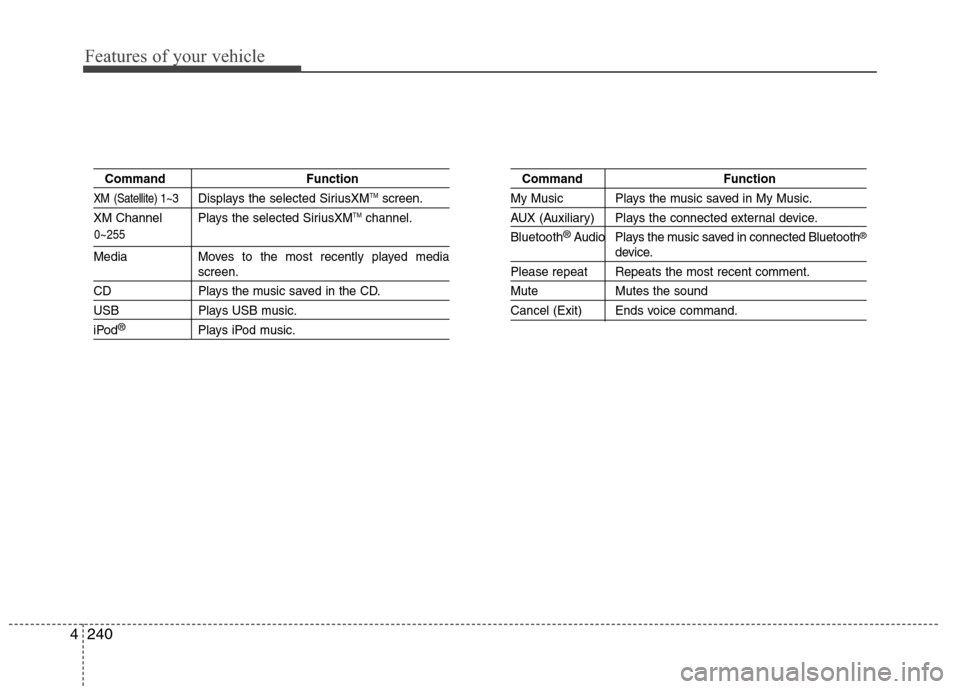
Command Function
XM (Satellite) 1~3Displays the selected SiriusXMTMscreen.
XM Channel Plays the selected SiriusXMTMchannel.
Media Moves to the most recently played mediascreen.
CD Plays the music saved in the CD.
USB Plays USB music.
iPod®Plays iPod music.
Command Function
My Music Plays the music saved in My Music.
AUX (Auxiliary) Plays the connected external device.
Bluetooth
®Audio Plays the music saved in connected Bluetooth®
device.
Please repeat Repeats the most recent comment.
Mute Mutes the sound
Cancel (Exit) Ends voice command.
Page 328 of 550
Features of your vehicle
242 4
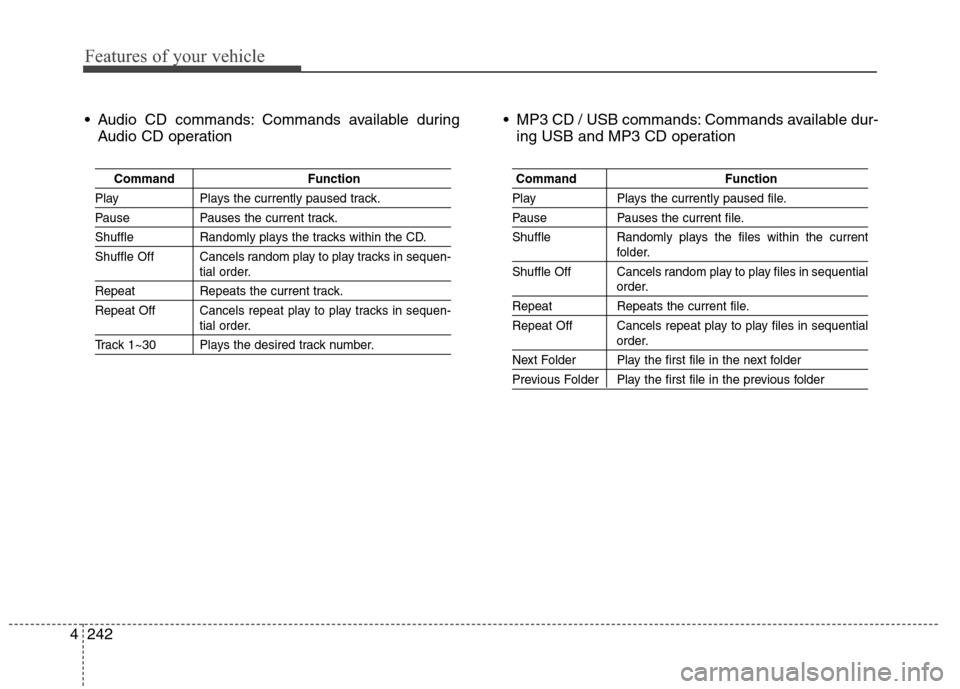
Audio CD commands: Commands available during
Audio CD operation MP3 CD / USB commands: Commands available dur-
ing USB and MP3 CD operation
Command Function
Play Plays the currently paused track.
Pause Pauses the current track.
Shuffle Randomly plays the tracks within the CD.
Shuffle Off Cancels random play to play tracks in sequen-
tial order.
Repeat Repeats the current track.
Repeat Off Cancels repeat play to play tracks in sequen-
tial order.
Track 1~30 Plays the desired track number.
Command Function
Play Plays the currently paused file.
Pause Pauses the current file.
Shuffle Randomly plays the files within the current
folder.
Shuffle Off Cancels random play to play files in sequential
order.
Repeat Repeats the current file.
Repeat Off Cancels repeat play to play files in sequential
order.
Next Folder Play the first file in the next folder
Previous Folder Play the first file in the previous folder
Page 331 of 550
![Hyundai Elantra Coupe 2014 Owners Guide 4245
Features of your vehicle
Text Scroll
Press the key Select
[Display] Select [Text Scroll]
This feature is used to scroll text dis-
played on the screen when it is too
long to be displayed at onc](/img/35/14621/w960_14621-330.png "Hyundai Elantra Coupe 2014 Owners Guide 4245
Features of your vehicle
Text Scroll
Press the key Select
[Display] Select [Text Scroll]
This feature is used to scroll text dis-
played on the screen when it is too
long to be displayed at onc")
4245
Features of your vehicle
Text Scroll
Press the key Select
[Display] Select [Text Scroll]
This feature is used to scroll text dis-
played on the screen when it is too
long to be displayed at once.
When turned on, the text is repeat-
edly scrolled. When turned off, the
text is scrolled just once.
MP3 Information Display
Press the key Select
[Display] Select [Media Display]
This feature is used to change the
information displayed within USB
and MP3 CD modes.
1) Folder File : Displays file name
and folder name
2) Album Artist Song : Displays
album name/artist name/song
Sound Settings
Sound Settings
Press the key Select
[Sound] Select [Sound Setting]SETUP
SETUP SETUP
Page 540 of 550
I3
Index
Manual heating and air conditioning ..........................4-96
Mode selection ............................................................4-96
OFF mode ..................................................................4-101
Temperature control ....................................................4-97
Automatic transaxle ........................................................5-22
Good driving practices ................................................5-27
Ignition key interlock system ......................................5-27
Parking ........................................................................5-27
Shift lock system ........................................................5-25
Shift-lock release ........................................................5-26
Sports mode ................................................................5-24
Automatic turn off function ............................................4-78
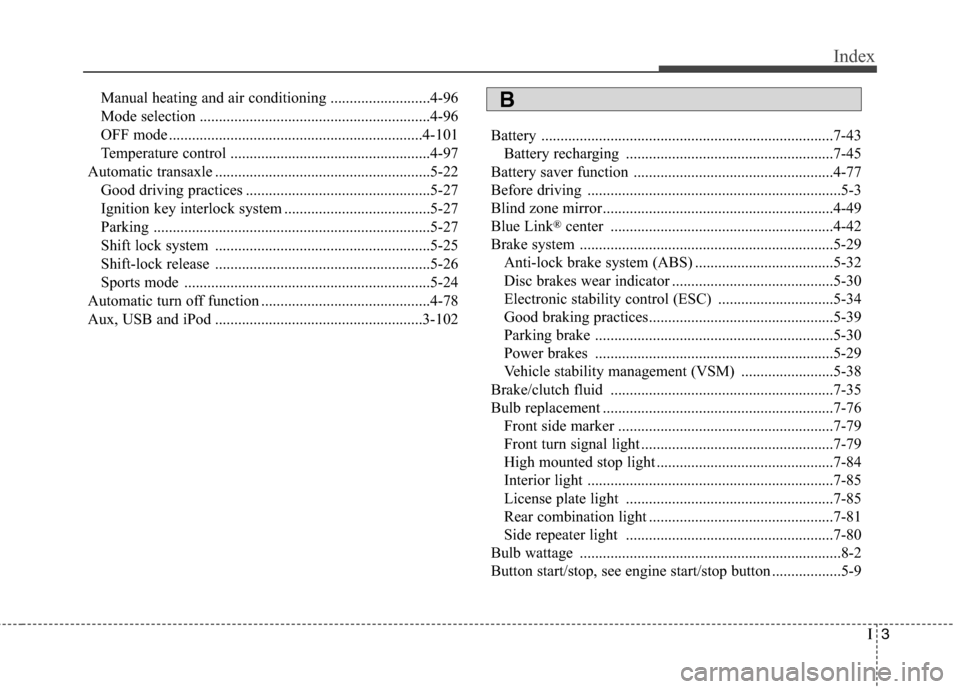
Aux, USB and iPod ......................................................3-102Battery ............................................................................7-43
Battery recharging ......................................................7-45
Battery saver function ....................................................4-77
Before driving ..................................................................5-3
Blind zone mirror............................................................4-49
Blue Link
®center ..........................................................4-42
Brake system ..................................................................5-29
Anti-lock brake system (ABS) ....................................5-32
Disc brakes wear indicator ..........................................5-30
Electronic stability control (ESC) ..............................5-34
Good braking practices................................................5-39
Parking brake ..............................................................5-30
Power brakes ..............................................................5-29
Vehicle stability management (VSM) ........................5-38
Brake/clutch fluid ..........................................................7-35
Bulb replacement ............................................................7-76
Front side marker ........................................................7-79
Front turn signal light ..................................................7-79
High mounted stop light ..............................................7-84
Interior light ................................................................7-85
License plate light ......................................................7-85
Rear combination light ................................................7-81
Side repeater light ......................................................7-80
Bulb wattage ....................................................................8-2
Button start/stop, see engine start/stop button ..................5-9
B
Page 544 of 550
I7
Index
If the engine doesn't turn over or turns over slowly ........6-4
If the engine overheats ......................................................6-8
If the engine stalls at a crossroad or crossing ..................6-3
If the engine stalls while driving ......................................6-3
If the engine turns over normally but doesn’t start ..........6-4
If the engine will not start ................................................6-4
If you have a flat tire ......................................................6-15
If you have a flat tire while driving ..................................6-3
Ignition key interlock system ........................................5-27
Ignition switch ..................................................................5-5
Engine Start/Stop button................................................5-9
Key ignition switch ......................................................5-5
Immobilizer system ........................................................4-12
Impact sensing door unlock system ................................4-18
Improtant safety precautions ............................................3-2
Air bag hazards..............................................................3-2
Always wear your seat belt ..........................................3-2
Control your speed ........................................................3-3
Driver distraction ..........................................................3-2
Keep your vehicle in safe condition..............................3-3
Restrain all children ......................................................3-2
In case of emergency while driving..................................6-3
Inside rearview mirror ....................................................4-42Instrument cluster ..........................................................4-51
ECO ON/OFF mode ....................................................4-59
Gauges ........................................................................4-53
Instrument panel illumination ....................................4-45
Manual transaxle shift indicator ..................................4-59
Transaxle shift indicator ..............................................4-56
Trip computer ..............................................................4-93
Warnings and indicators ..............................................4-60
Instrument panel fuse......................................................7-64
Instrument panel overview ..............................................2-5
Interior care ....................................................................7-92
Interior features ............................................................4-113
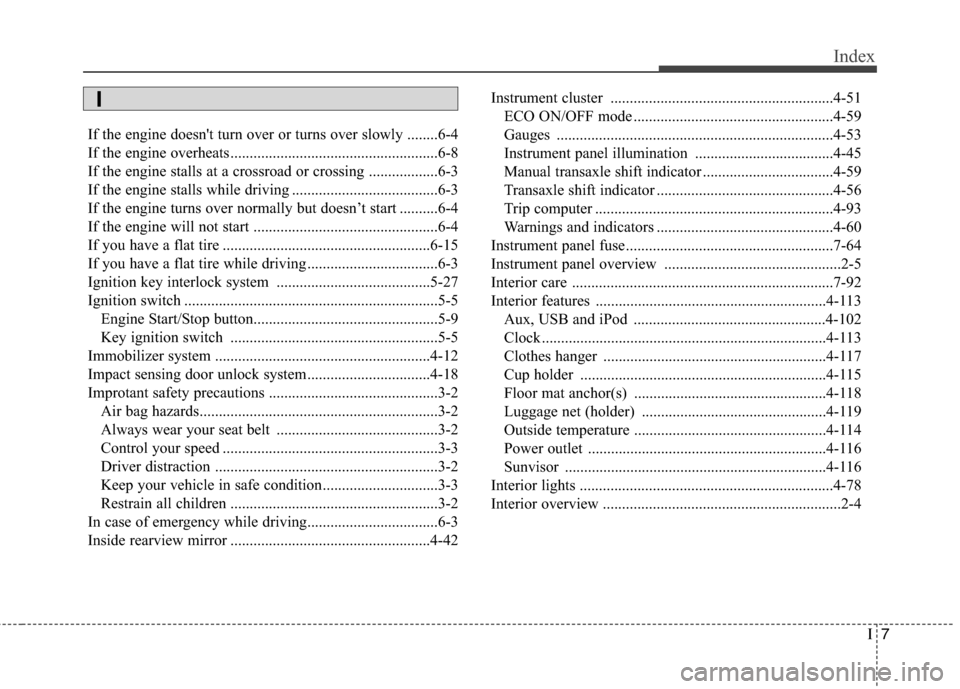
Aux, USB and iPod ..................................................4-102
Clock ..........................................................................4-113
Clothes hanger ..........................................................4-117
Cup holder ................................................................4-115
Floor mat anchor(s) ..................................................4-118
Luggage net (holder) ................................................4-119
Outside temperature ..................................................4-114
Power outlet ..............................................................4-116
Sunvisor ....................................................................4-116
Interior lights ..................................................................4-78
Interior overview ..............................................................2-4
I