Light Hyundai Elantra Coupe 2014 Workshop Manual
[x] Cancel search | Manufacturer: HYUNDAI, Model Year: 2014, Model line: Elantra Coupe, Model: Hyundai Elantra Coupe 2014Pages: 550, PDF Size: 45.11 MB
Page 157 of 550
471
Features of your vehicle
KEY OUT Indicator Light
(if equipped)
When the ENGINE START/STOP
button is in the ACC or ON position,
if any door is open, the system
checks for the smart key.
This indicator light blinks:
When the smart key is not in the
vehicle and any door is open with the
ignition switch or Engine Start/Stop
button in the ACC or ON position.
- At this time, if you close all doors,
the chime will also sound for
approximately 5 seconds.
- The indicator will go off while the
vehicle is moving.
KEY
OUT
Page 158 of 550
Features of your vehicle
72 4
LIGHT
Exterior lights
Lighting control
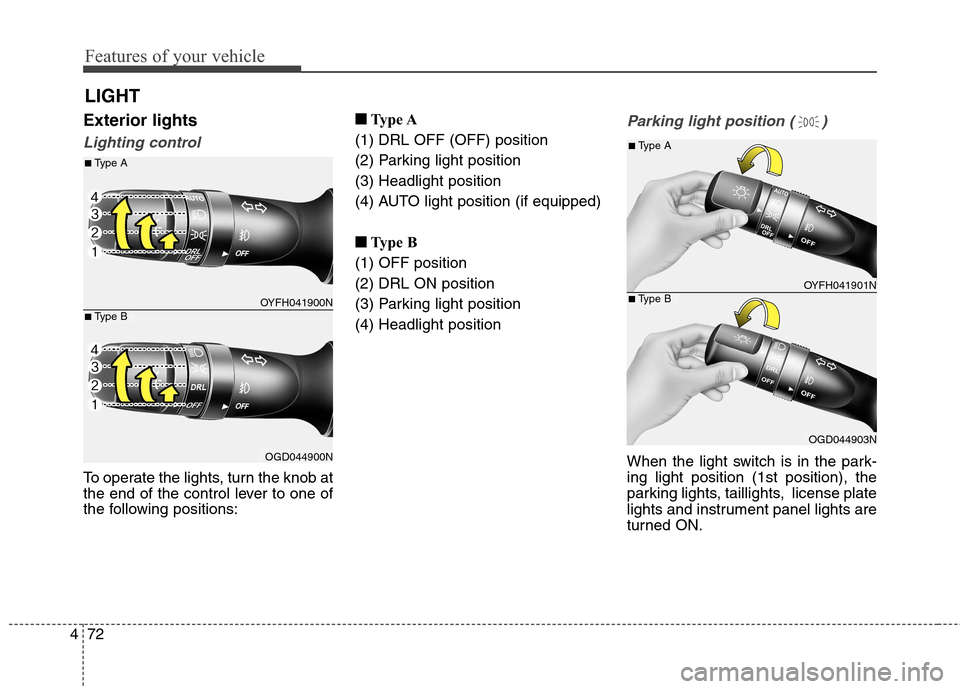
To operate the lights, turn the knob at
the end of the control lever to one of
the following positions:■ ■
Type A
(1) DRL OFF (OFF) position
(2) Parking light position
(3) Headlight position
(4) AUTO light position (if equipped)
■ ■
Type B
(1) OFF position
(2) DRL ON position
(3) Parking light position
(4) Headlight position
Parking light position ( )
When the light switch is in the park-
ing light position (1st position), the
parking lights, taillights, license plate
lights and instrument panel lights are
turned ON.
OYFH041900N
OGD044900N
■Type A
■Type B
OYFH041901N
OGD044903N
■Type A
■Type B
Page 159 of 550
473
Features of your vehicle
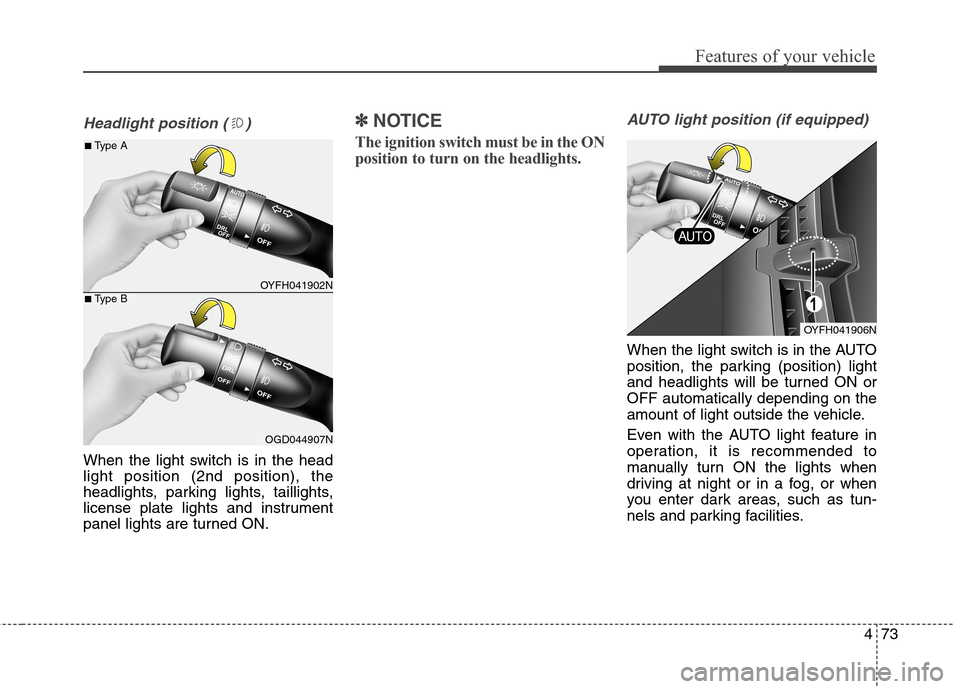
Headlight position ( )
When the light switch is in the head
light position (2nd position), the
headlights, parking lights, taillights,
license plate lights and instrument
panel lights are turned ON.
✽ ✽
NOTICE
The ignition switch must be in the ON
position to turn on the headlights.
AUTO light position (if equipped)
When the light switch is in the AUTO
position, the parking (position) light
and headlights will be turned ON or
OFF automatically depending on the
amount of light outside the vehicle.
Even with the AUTO light feature in
operation, it is recommended to
manually turn ON the lights when
driving at night or in a fog, or when
you enter dark areas, such as tun-
nels and parking facilities.
OYFH041902N
OGD044907N
■Type A
■Type B
OYFH041906N
Page 160 of 550
Features of your vehicle
74 4
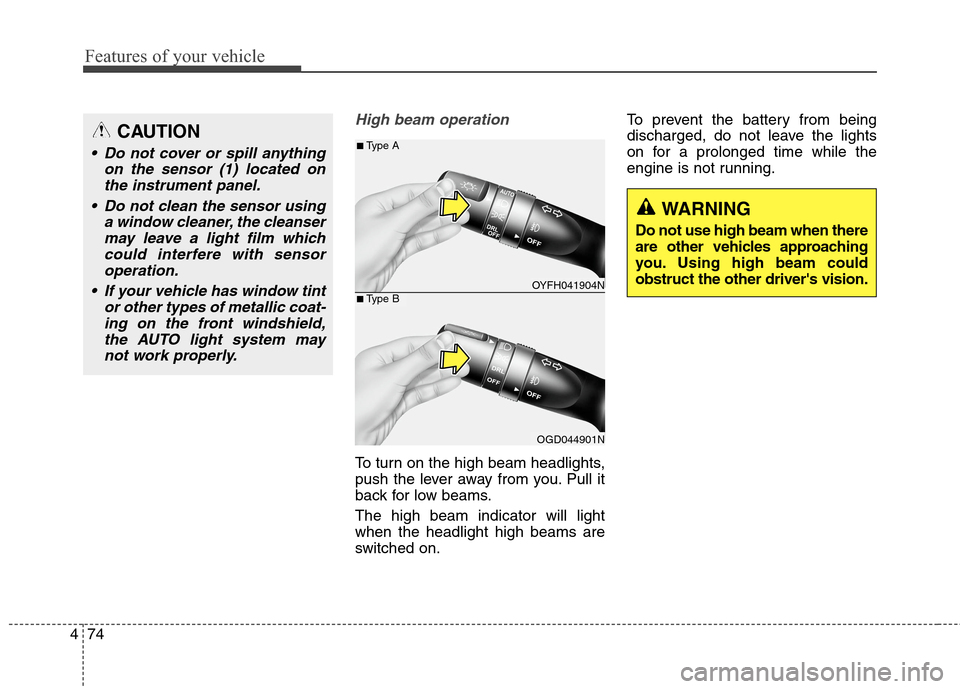
High beam operation
To turn on the high beam headlights,
push the lever away from you. Pull it
back for low beams.
The high beam indicator will light
when the headlight high beams are
switched on.To prevent the battery from being
discharged, do not leave the lights
on for a prolonged time while the
engine is not running.
CAUTION
Do not cover or spill anything
on the sensor (1) located on
the instrument panel.
Do not clean the sensor using
a window cleaner, the cleanser
may leave a light film which
could interfere with sensor
operation.
If your vehicle has window tint
or other types of metallic coat-
ing on the front windshield,
the AUTO light system may
not work properly.
OYFH041904N
OGD044901N
■Type A
■Type B
WARNING
Do not use high beam when there
are other vehicles approaching
you. Using high beam could
obstruct the other driver's vision.
Page 161 of 550
475
Features of your vehicle
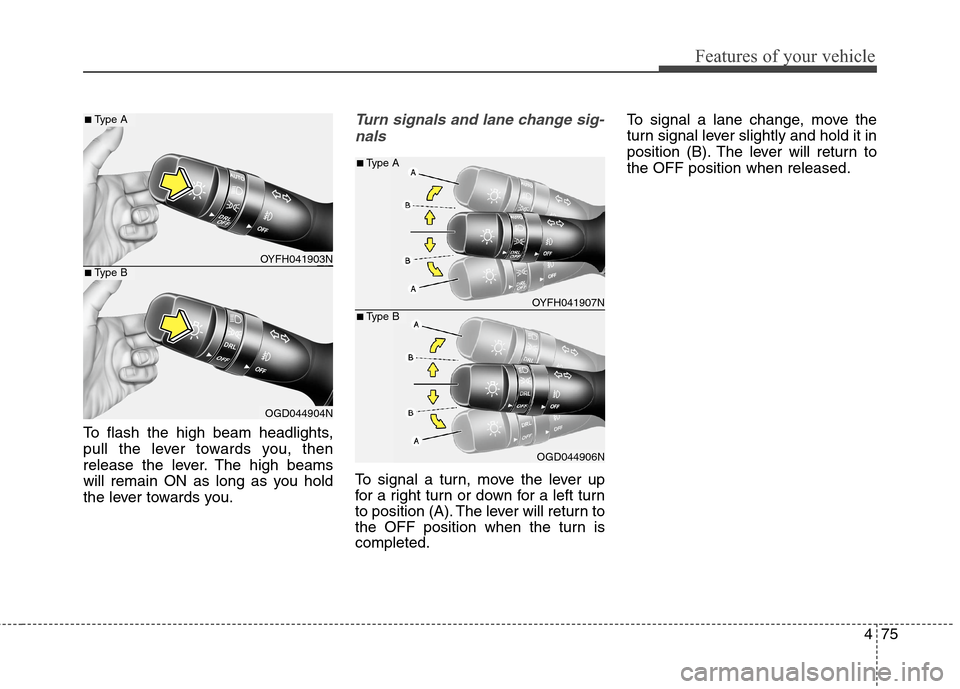
To flash the high beam headlights,
pull the lever towards you, then
release the lever. The high beams
will remain ON as long as you hold
the lever towards you.
Turn signals and lane change sig-
nals
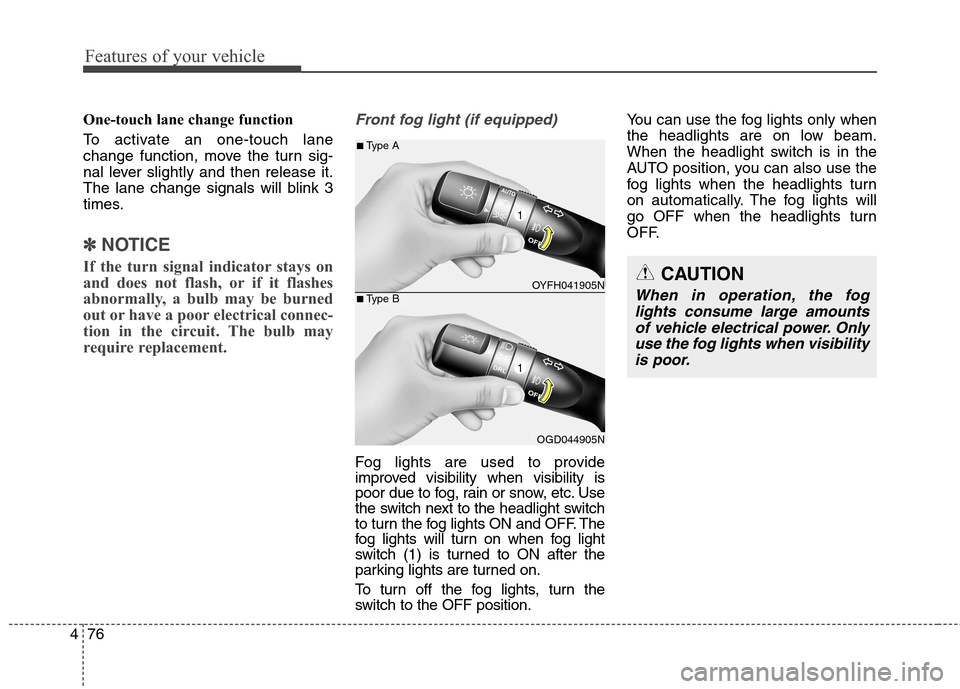
To signal a turn, move the lever up
for a right turn or down for a left turn
to position (A). The lever will return to
the OFF position when the turn is
completed.To signal a lane change, move the
turn signal lever slightly and hold it in
position (B). The lever will return to
the OFF position when released.
OYFH041903N
OGD044904N
■Type A
■Type B
OYFH041907N
OGD044906N
■Type A
■Type B
Page 162 of 550
Features of your vehicle
76 4
One-touch lane change function
To activate an one-touch lane
change function, move the turn sig-
nal lever slightly and then release it.
The lane change signals will blink 3
times.
✽ ✽
NOTICE
If the turn signal indicator stays on
and does not flash, or if it flashes
abnormally, a bulb may be burned
out or have a poor electrical connec-
tion in the circuit. The bulb may
require replacement.
Front fog light (if equipped)
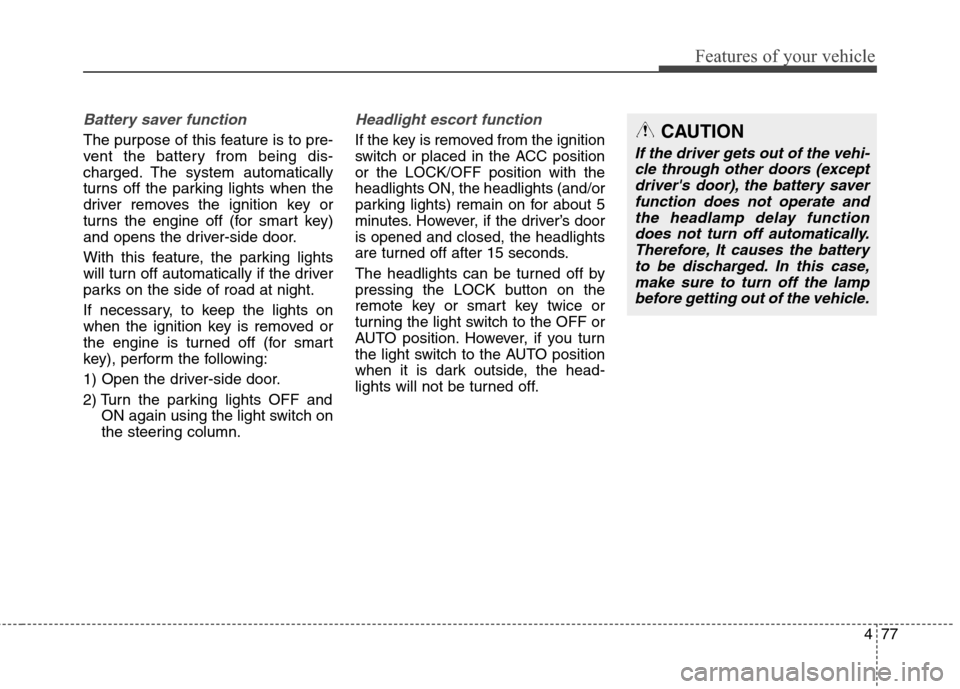
Fog lights are used to provide
improved visibility when visibility is
poor due to fog, rain or snow, etc. Use
the switch next to the headlight switch
to turn the fog lights ON and OFF. The
fog lights will turn on when fog light
switch (1) is turned to ON after the
parking lights are turned on.
To turn off the fog lights, turn the
switch to the OFF position.You can use the fog lights only when
the headlights are on low beam.
When the headlight switch is in the
AUTO position, you can also use the
fog lights when the headlights turn
on automatically. The fog lights will
go OFF when the headlights turn
OFF.
CAUTION
When in operation, the fog
lights consume large amounts
of vehicle electrical power. Only
use the fog lights when visibility
is poor.OYFH041905N
OGD044905N
■Type A
■Type B
Page 163 of 550
477
Features of your vehicle
Battery saver function
The purpose of this feature is to pre-
vent the battery from being dis-
charged. The system automatically
turns off the parking lights when the
driver removes the ignition key or
turns the engine off (for smart key)
and opens the driver-side door.
With this feature, the parking lights
will turn off automatically if the driver
parks on the side of road at night.
If necessary, to keep the lights on
when the ignition key is removed or
the engine is turned off (for smart
key), perform the following:
1) Open the driver-side door.
2) Turn the parking lights OFF and
ON again using the light switch on
the steering column.
Headlight escort function
If the key is removed from the ignition
switch or placed in the ACC position
or the LOCK/OFF position with the
headlights ON, the headlights (and/or
parking lights) remain on for about 5
minutes. However, if the driver’s door
is opened and closed, the headlights
are turned off after 15 seconds.
The headlights can be turned off by
pressing the LOCK button on the
remote key or smart key twice or
turning the light switch to the OFF or
AUTO position. However, if you turn
the light switch to the AUTO position
when it is dark outside, the head-
lights will not be turned off.
CAUTION
If the driver gets out of the vehi-
cle through other doors (except
driver's door), the battery saver
function does not operate and
the headlamp delay function
does not turn off automatically.
Therefore, It causes the battery
to be discharged. In this case,
make sure to turn off the lamp
before getting out of the vehicle.
Page 164 of 550
Features of your vehicle
78 4
Daytime running light (DRL)
(if equipped)
The Daytime Running Lights (DRL)
can make it easier for others to see
the front of your vehicle during the
day, especially after dawn and before
sunset.
The DRL will turn off when:
1. The headlight is ON.
2. The light switch is in the DRL OFF
(OFF) position.
3. The parking brake is applied.
4. The engine is turned off.
Interior lightsAutomatic turn off function
(if equipped)
When all doors are closed, if you lock
the vehicle by using the remote key
or smart key, all interior lamp will be
off within 5 seconds.
If you do not operate anything in the
vehicle after turning off the engine,
the lights will turn off after 20 minutes.
CAUTION
Do not use the interior lights for
extended periods when the
engine is turned off or the bat-
tery will discharge.
WARNING
Do not use the interior lights
when driving in the dark. The
interior lights may obscure your
view and cause an accident.
Page 165 of 550
479
Features of your vehicle
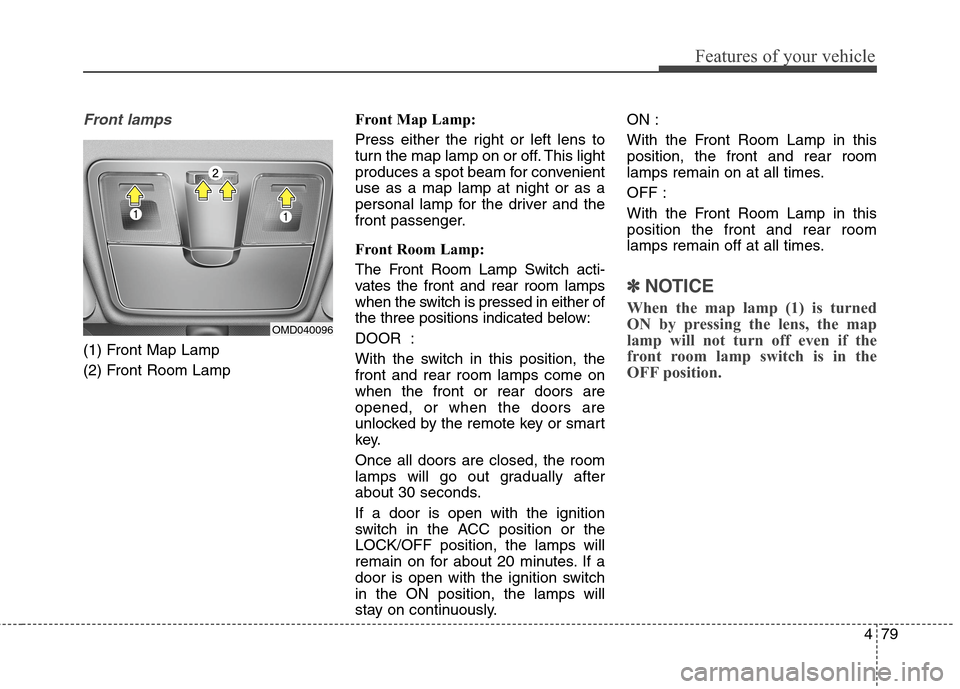
Front lamps
(1) Front Map Lamp
(2) Front Room LampFront Map Lamp:
Press either the right or left lens to
turn the map lamp on or off. This light
produces a spot beam for convenient
use as a map lamp at night or as a
personal lamp for the driver and the
front passenger.
Front Room Lamp:
The Front Room Lamp Switch acti-
vates the front and rear room lamps
when the switch is pressed in either of
the three positions indicated below:
DOOR :
With the switch in this position, the
front and rear room lamps come on
when the front or rear doors are
opened, or when the doors are
unlocked by the remote key or smart
key.
Once all doors are closed, the room
lamps will go out gradually after
about 30 seconds.
If a door is open with the ignition
switch in the ACC position or the
LOCK/OFF position, the lamps will
remain on for about 20 minutes. If a
door is open with the ignition switch
in the ON position, the lamps will
stay on continuously.ON :
With the Front Room Lamp in this
position, the front and rear room
lamps remain on at all times.
OFF :
With the Front Room Lamp in this
position the front and rear room
lamps remain off at all times.
✽ ✽
NOTICE
When the map lamp (1) is turned
ON by pressing the lens, the map
lamp will not turn off even if the
front room lamp switch is in the
OFF position.
OMD040096
Page 166 of 550
Features of your vehicle
80 4
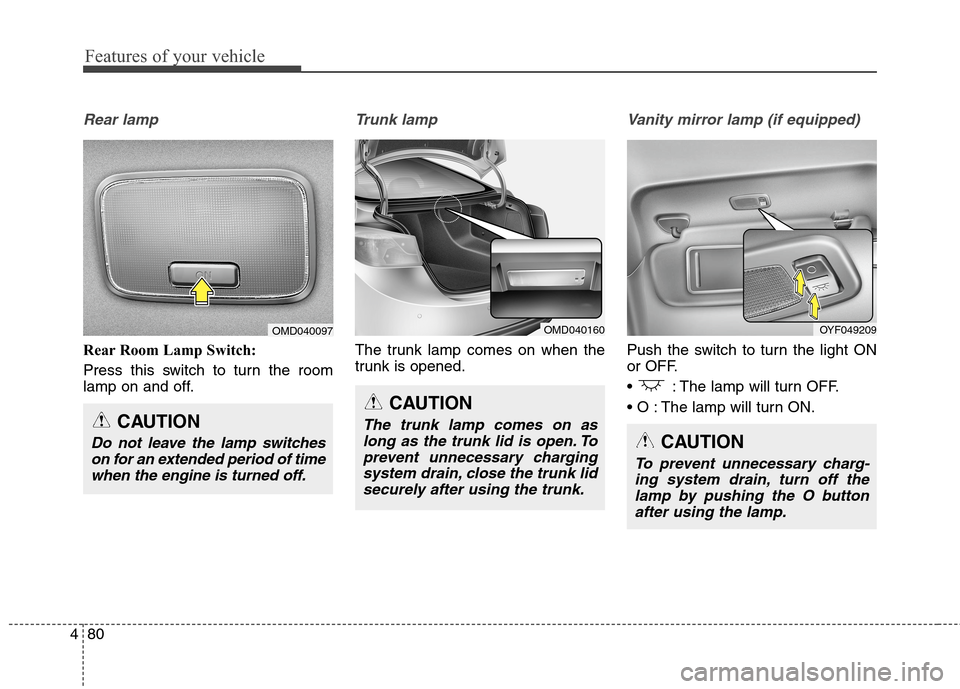
Rear lamp
Rear Room Lamp Switch:
Press this switch to turn the room
lamp on and off.
Trunk lamp
The trunk lamp comes on when the
trunk is opened.
Vanity mirror lamp (if equipped)
Push the switch to turn the light ON
or OFF.
: The lamp will turn OFF.
The lamp will turn ON.
CAUTION
Do not leave the lamp switches
on for an extended period of time
when the engine is turned off.
OMD040097
CAUTION
The trunk lamp comes on as
long as the trunk lid is open. To
prevent unnecessary charging
system drain, close the trunk lid
securely after using the trunk.
OMD040160OYF049209
CAUTION
To prevent unnecessary charg-
ing system drain, turn off the
lamp by pushing the O button
after using the lamp.