AUX Hyundai Elantra Coupe 2016 Owner's Manual
[x] Cancel search | Manufacturer: HYUNDAI, Model Year: 2016, Model line: Elantra Coupe, Model: Hyundai Elantra Coupe 2016Pages: 526, PDF Size: 9.99 MB
Page 87 of 526
Wipers and washers . . . . . . . . . . . . . . . . . . . . . . . 4-80
• Windshield wipers . . . . . . . . . . . . . . . . . . . . . . . . . . . 4-80
• Windshield washers. . . . . . . . . . . . . . . . . . . . . . . . . . . 4-81
Defroster . . . . . . . . . . . . . . . . . . . . . . . . . . . . . . . . . 4-82
• Rear window defroster . . . . . . . . . . . . . . . . . . . . . . . . 4-82
Manual climate control system . . . . . . . . . . . . . . 4-83
• Heating and air conditioning . . . . . . . . . . . . . . . . . . . 4-84
• System operation . . . . . . . . . . . . . . . . . . . . . . . . . . . . . 4-99
• Climate control air filter . . . . . . . . . . . . . . . . . . . . . . . 4-91
Automatic climate control system. . . . . . . . . . . . . 4-93
• Automatic heating and air conditioning . . . . . . . . . . 4-94
• Manual heating and air conditioning . . . . . . . . . . . . 4-95
• System operation . . . . . . . . . . . . . . . . . . . . . . . . . . . . 4-100
• Climate control air filter . . . . . . . . . . . . . . . . . . . . . . 4-102
Windshield defrosting and defogging . . . . . . . . 4-104
• Manual climate control system . . . . . . . . . . . . . . . . 4-104
• Automatic climate control system . . . . . . . . . . . . . . 4-105
• Defogging logic. . . . . . . . . . . . . . . . . . . . . . . . . . . . . . 4-106
Storage compartment . . . . . . . . . . . . . . . . . . . . . 4-109
• Center console storage . . . . . . . . . . . . . . . . . . . . . . . 4-109
• Sliding armrest . . . . . . . . . . . . . . . . . . . . . . . . . . . . . 4-110
• Glove box . . . . . . . . . . . . . . . . . . . . . . . . . . . . . . . . . . 4-110
• Sunglass holder . . . . . . . . . . . . . . . . . . . . . . . . . . . . . 4-111
Interior features . . . . . . . . . . . . . . . . . . . . . . . . . 4-112
• Clock . . . . . . . . . . . . . . . . . . . . . . . . . . . . . . . . . . . . . . 4-112
• Outside temperature . . . . . . . . . . . . . . . . . . . . . . . . . 4-113
• Cup holder . . . . . . . . . . . . . . . . . . . . . . . . . . . . . . . . . 4-114
• Sunvisor . . . . . . . . . . . . . . . . . . . . . . . . . . . . . . . . . . . 4-115
• Power outlet . . . . . . . . . . . . . . . . . . . . . . . . . . . . . . . 4-115
• Clothes hanger . . . . . . . . . . . . . . . . . . . . . . . . . . . . . . 4-116
• Floor mat anchor(s). . . . . . . . . . . . . . . . . . . . . . . . . . 4-117
• Luggage net holder . . . . . . . . . . . . . . . . . . . . . . . . . . 4-118
Audio system . . . . . . . . . . . . . . . . . . . . . . . . . . . . . 4-119
• Antenna . . . . . . . . . . . . . . . . . . . . . . . . . . . . . . . . . . . 4-119
• Steering wheel audio control . . . . . . . . . . . . . . . . . . 4-120
• Aux, USB and iPod
®port . . . . . . . . . . . . . . . . . . . . . 4-121
• How vehicle audio works . . . . . . . . . . . . . . . . . . . . . 4-122
• Caring for disc . . . . . . . . . . . . . . . . . . . . . . . . . . . . . . 4-124
4
Page 206 of 526
4121
Features of your vehicle
3. MODE
Press the button to change audio
source.
- FM(1~2)
➟ AM ➟ SAT(1~3) ➟ CD
➟ USB AUX(iPod) FM...
4. MUTE (if equipped)
• Press the button to mute the
sound.
• Press the button to turn off the
microphone during a telephone
call.
Detailed information for audio control
buttons are described in the following
pages in this chapter.
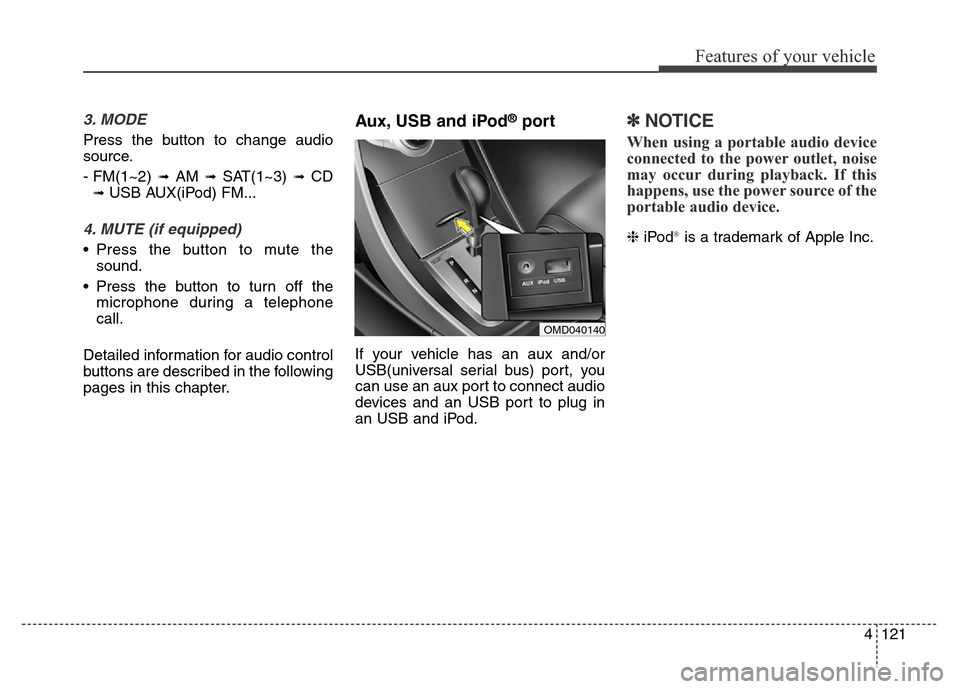
Aux, USB and iPod®port
If your vehicle has an aux and/or
USB(universal serial bus) port, you
can use an aux port to connect audio
devices and an USB port to plug in
an USB and iPod.
✽NOTICE
When using a portable audio device
connected to the power outlet, noise
may occur during playback. If this
happens, use the power source of the
portable audio device.
❈iPod®is a trademark of Apple Inc.
OMD040140
Page 219 of 526
Features of your vehicle
134 4
SYSTEM CONTROLLERS
AND FUNCTIONS
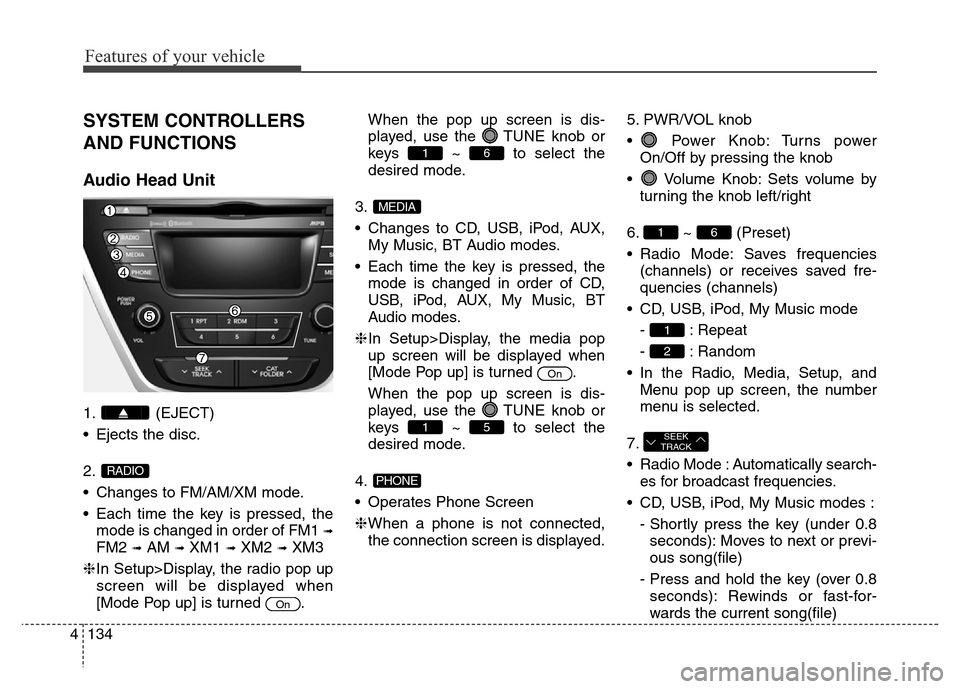
Audio Head Unit
1. (EJECT)
• Ejects the disc.
2.
• Changes to FM/AM/XM mode.
• Each time the key is pressed, the
mode is changed in order of FM1
➟
FM2 ➟AM ➟XM1 ➟XM2 ➟XM3
❈In Setup>Display, the radio pop up
screen will be displayed when
[Mode Pop up] is turned .When the pop up screen is dis-
played, use the TUNE knob or
keys ~ to select the
desired mode.
3.
• Changes to CD, USB, iPod, AUX,
My Music, BT Audio modes.
• Each time the key is pressed, the
mode is changed in order of CD,
USB, iPod, AUX, My Music, BT
Audio modes.
❈In Setup>Display, the media pop
up screen will be displayed when
[Mode Pop up] is turned .
When the pop up screen is dis-
played, use the TUNE knob or
keys ~ to select the
desired mode.
4.
• Operates Phone Screen
❈When a phone is not connected,
the connection screen is displayed.5. PWR/VOL knob
• Power Knob: Turns power
On/Off by pressing the knob
• Volume Knob: Sets volume by
turning the knob left/right
6. ~ (Preset)
• Radio Mode: Saves frequencies
(channels) or receives saved fre-
quencies (channels)
• CD, USB, iPod, My Music mode
- : Repeat
- : Random
• In the Radio, Media, Setup, and
Menu pop up screen, the number
menu is selected.
7.
• Radio Mode : Automatically search-
es for broadcast frequencies.
• CD, USB, iPod, My Music modes :
- Shortly press the key (under 0.8
seconds): Moves to next or previ-
ous song(file)
- Press and hold the key (over 0.8
seconds): Rewinds or fast-for-
wards the current song(file)
SEEK
TRACK
2
1
61
PHONE
51
On
MEDIA
61
On
RADIO
Page 224 of 526
4139
Features of your vehicle
SYSTEM CONTROLLERS
AND FUNCTIONS
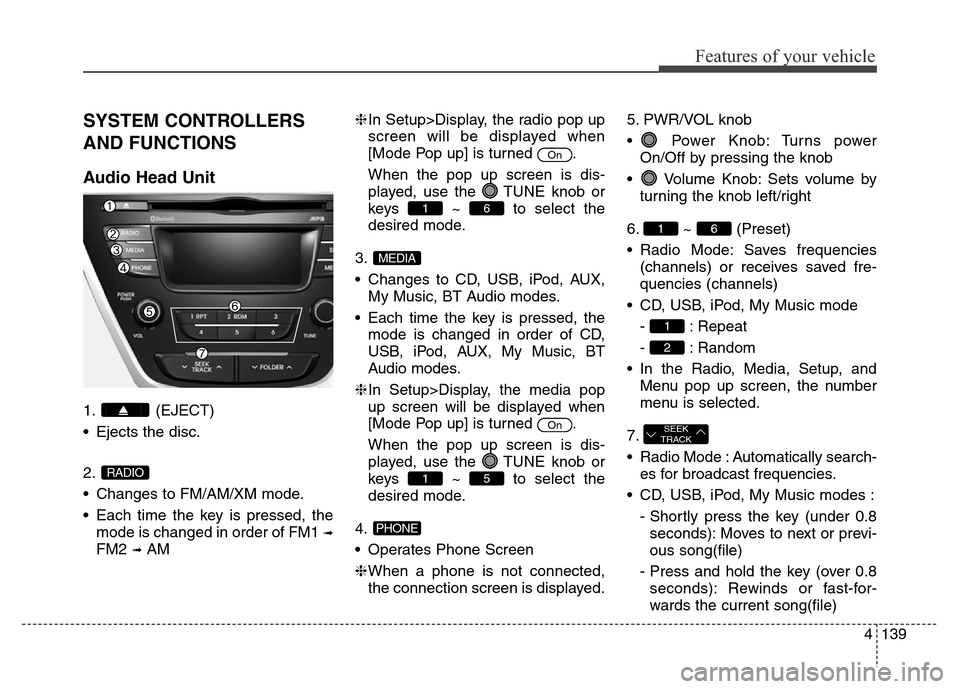
Audio Head Unit
1. (EJECT)
• Ejects the disc.
2.
• Changes to FM/AM/XM mode.
• Each time the key is pressed, the
mode is changed in order of FM1
➟
FM2 ➟AM❈In Setup>Display, the radio pop up
screen will be displayed when
[Mode Pop up] is turned .
When the pop up screen is dis-
played, use the TUNE knob or
keys ~ to select the
desired mode.
3.
• Changes to CD, USB, iPod, AUX,
My Music, BT Audio modes.
• Each time the key is pressed, the
mode is changed in order of CD,
USB, iPod, AUX, My Music, BT
Audio modes.
❈In Setup>Display, the media pop
up screen will be displayed when
[Mode Pop up] is turned .
When the pop up screen is dis-
played, use the TUNE knob or
keys ~ to select the
desired mode.
4.
• Operates Phone Screen
❈When a phone is not connected,
the connection screen is displayed.5. PWR/VOL knob
• Power Knob: Turns power
On/Off by pressing the knob
• Volume Knob: Sets volume by
turning the knob left/right
6. ~ (Preset)
• Radio Mode: Saves frequencies
(channels) or receives saved fre-
quencies (channels)
• CD, USB, iPod, My Music mode
- : Repeat
- : Random
• In the Radio, Media, Setup, and
Menu pop up screen, the number
menu is selected.
7.
• Radio Mode : Automatically search-
es for broadcast frequencies.
• CD, USB, iPod, My Music modes :
- Shortly press the key (under 0.8
seconds): Moves to next or previ-
ous song(file)
- Press and hold the key (over 0.8
seconds): Rewinds or fast-for-
wards the current song(file)
SEEK
TRACK
2
1
61
PHONE
51
On
MEDIA
61
On
RADIO
Page 235 of 526
Features of your vehicle
150 4
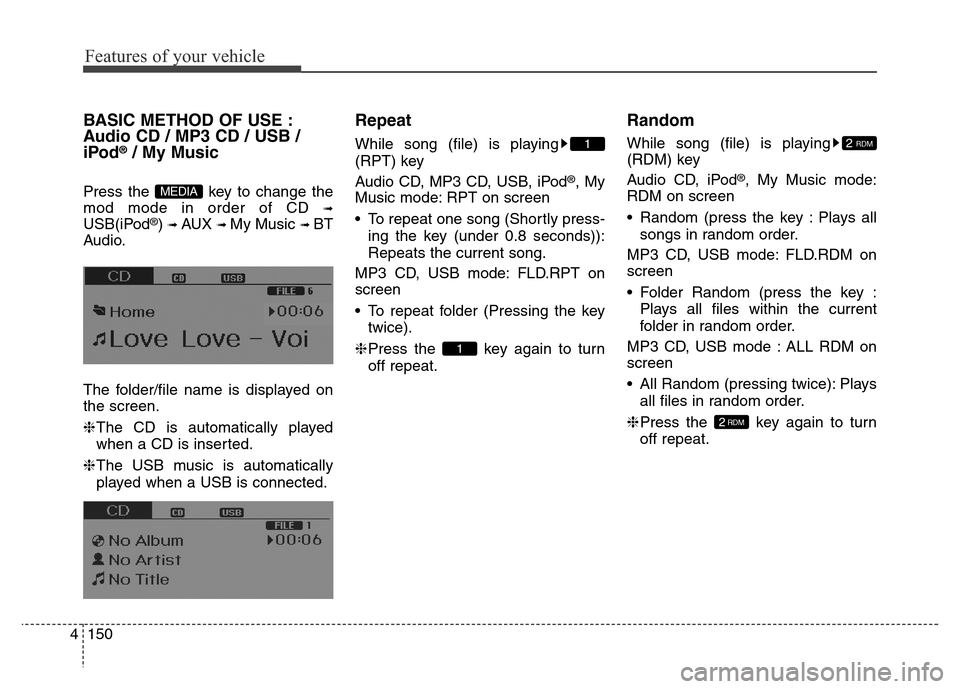
BASIC METHOD OF USE :
Audio CD / MP3 CD / USB /
iPod
®/ My Music
Press the key to change the
mod mode in order of CD
➟
USB(iPod®) ➟ AUX ➟ My Music ➟ BT
Audio.
The folder/file name is displayed on
the screen.
❈The CD is automatically played
when a CD is inserted.
❈The USB music is automatically
played when a USB is connected.
Repeat
While song (file) is playing
(RPT) key
Audio CD, MP3 CD, USB, iPod
®, My
Music mode: RPT on screen
• To repeat one song (Shortly press-
ing the key (under 0.8 seconds)):
Repeats the current song.
MP3 CD, USB mode: FLD.RPT on
screen
• To repeat folder (Pressing the key
twice).
❈Press the key again to turn
off repeat.
Random
While song (file) is playing
(RDM) key
Audio CD, iPod
®, My Music mode:
RDM on screen
• Random (press the key : Plays all
songs in random order.
MP3 CD, USB mode: FLD.RDM on
screen
• Folder Random (press the key :
Plays all files within the current
folder in random order.
MP3 CD, USB mode : ALL RDM on
screen
• All Random (pressing twice): Plays
all files in random order.
❈Press the key again to turn
off repeat.
2RDM
2 RDM
1
1
MEDIA
Page 238 of 526
4153
Features of your vehicle
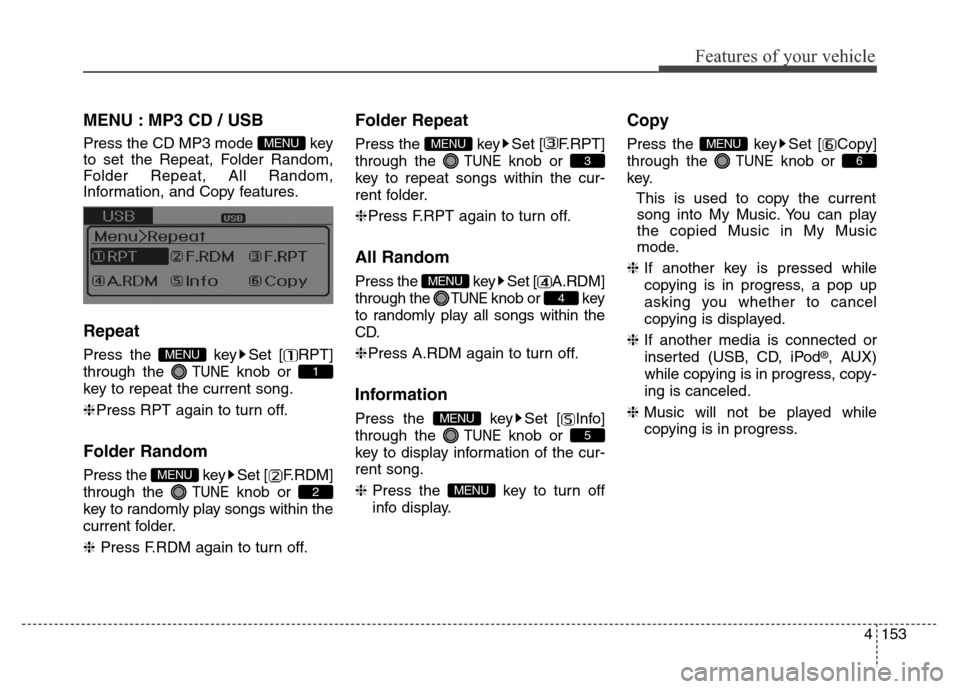
MENU : MP3 CD / USB
Press the CD MP3 mode key
to set the Repeat, Folder Random,
Folder Repeat, All Random,
Information, and Copy features.
Repeat
Press the key Set [ RPT]
through the
TUNEknob or
key to repeat the current song.
❈Press RPT again to turn off.
Folder Random
Press the key Set [ F.RDM]
through the
TUNEknob or
key to randomly play songs within the
current folder.
❈ Press F.RDM again to turn off.
Folder Repeat
Press the key Set [ F.RPT]
through the
TUNEknob or
key to repeat songs within the cur-
rent folder.
❈Press F.RPT again to turn off.
All Random
Press the key Set [ A.RDM]
through the
TUNEknob or key
to randomly play all songs within the
CD.
❈Press A.RDM again to turn off.
Information
Press the key Set [ Info]
through the
TUNEknob or
key to display information of the cur-
rent song.
❈Press the key to turn off
info display.
Copy
Press the key Set [ Copy]
through the
TUNEknob or
key.
This is used to copy the current
song into My Music. You can play
the copied Music in My Music
mode.
❈If another key is pressed while
copying is in progress, a pop up
asking you whether to cancel
copying is displayed.
❈If another media is connected or
inserted (USB, CD, iPod
®, AUX)
while copying is in progress, copy-
ing is canceled.
❈Music will not be played while
copying is in progress.
6
MENU
MENU
5
MENU
4
MENU
3
MENU
2
MENU
1
MENU
MENU
Page 240 of 526
![Hyundai Elantra Coupe 2016 Owners Manual 4155
Features of your vehicle
Information
Press the key Set [ Info]
through the
TUNEknob or key.
Displays information of the current
song.
❈Press the key to turn off
info display.
Delete
Press t](/img/35/14620/w960_14620-239.png "Hyundai Elantra Coupe 2016 Owners Manual 4155
Features of your vehicle
Information
Press the key Set [ Info]
through the
TUNEknob or key.
Displays information of the current
song.
❈Press the key to turn off
info display.
Delete
Press t")
4155
Features of your vehicle
Information
Press the key Set [ Info]
through the
TUNEknob or key.
Displays information of the current
song.
❈Press the key to turn off
info display.
Delete
Press the key Set [ Delete]
through the TUNEknob or key.
• Deletes currently playing file
In the play screen, pressing delete
will delete the currently playing song.
• Deletes file from list
➀Select the file you wish to delete by
using the TUNE knob.
➁Press the key and select
the delete menu to delete the
selected file.
Delete All
Press the key Set [ Del.All]
through the TUNEknob or key.
Deletes all songs of My Music.
Delete Selection
Press the key Set [ Del.Sel]
through the TUNEknob or key.
Songs within My Music are selected
and deleted.
➀Select the songs you wish to
delete from the list.
➁After selecting, press the
key and select the delete menu.
AUX
AUX is used to play external MEDIA
currently connected with the AUX
terminal.
AUX mode will automatically start
when an external device is connect-
ed to the AUX terminal.
If an external device is connected,
you can also press the key to
change to AUX mode.
❈AUX mode cannot be started
unless there is an external device
connected to the AUX terminal.
MEDIA
MENU
6
MENU
5
MENU
MENU
4
MENU
MENU
3
MENU
Page 241 of 526
Features of your vehicle
156 4
Bluetooth®Wireless
Technology AUDIO
What is
Bluetooth®Wireless
Technology?
Bluetooth®Wireless Technology allows
devices to be connected in a short dis-
tance, including hands-free devices,
stereo headsets, wireless remote con-
trollers, etc. For more information, visit
the
Bluetooth®Wireless Technology
website
at www.Bluetooth.com
Before using Bluetooth®Wireless
Technology audio features
•
Bluetooth®Wireless Technology
audio may not be supported
depending on the compatibility of
your
Bluetooth®Wireless
Technology mobile phone.
• In order to use
Bluetooth®Wireless
Technology audio, you must first
pair and connect the
Bluetooth®
Wireless Technology mobile phone.•
Bluetooth®Wireless Technology
audio can be used only when the
[Audio Streaming] of Phone is
turned .
❈Setting
Bluetooth®Wireless
Technology Audio Streaming :
Press the key Select
[Phone] through the tune knob or
key Select [Audio Streaming]
through the TUNE knob Set
/
Starting Bluetooth®Wireless
Technology Audio
• Press the key to change
the mode in order of CD ➟ USB ➟
AUX ➟ My Music ➟ BT Audio.
• If BT Audio is selected,
Bluetooth®
Wireless Technology audio will
start playing.
❈Audio may not automatically start
playing in some mobile phones.
Using the Bluetooth®Wireless
Technology audio features
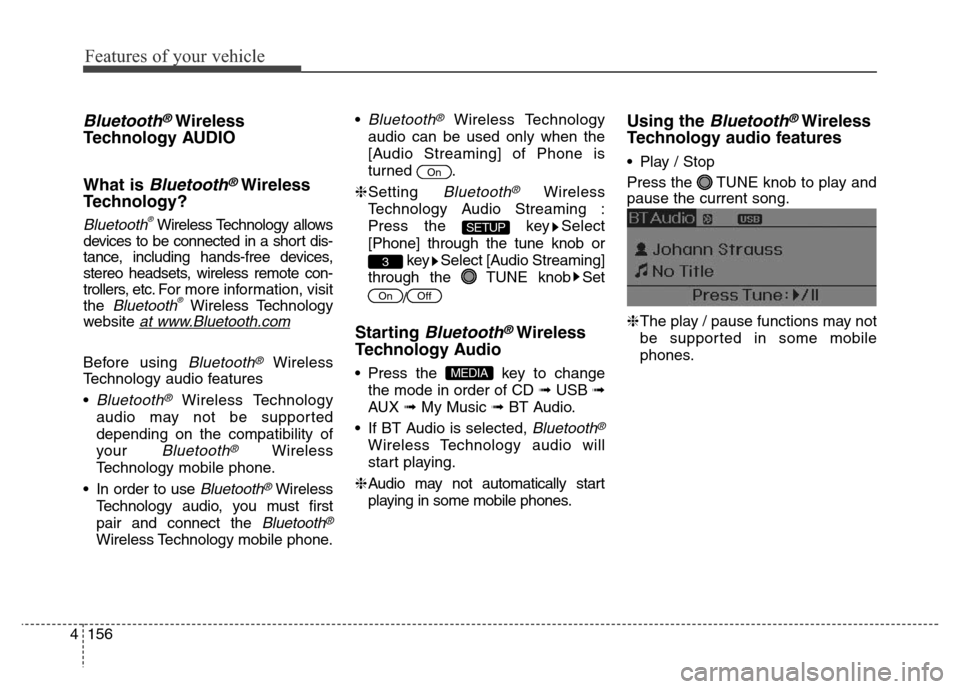
• Play / Stop
Press the TUNE knob to play and
pause the current song.
❈The play / pause functions may not
be supported in some mobile
phones.
MEDIA
OffOn
3
SETUP
On
Page 260 of 526
4175
Features of your vehicle
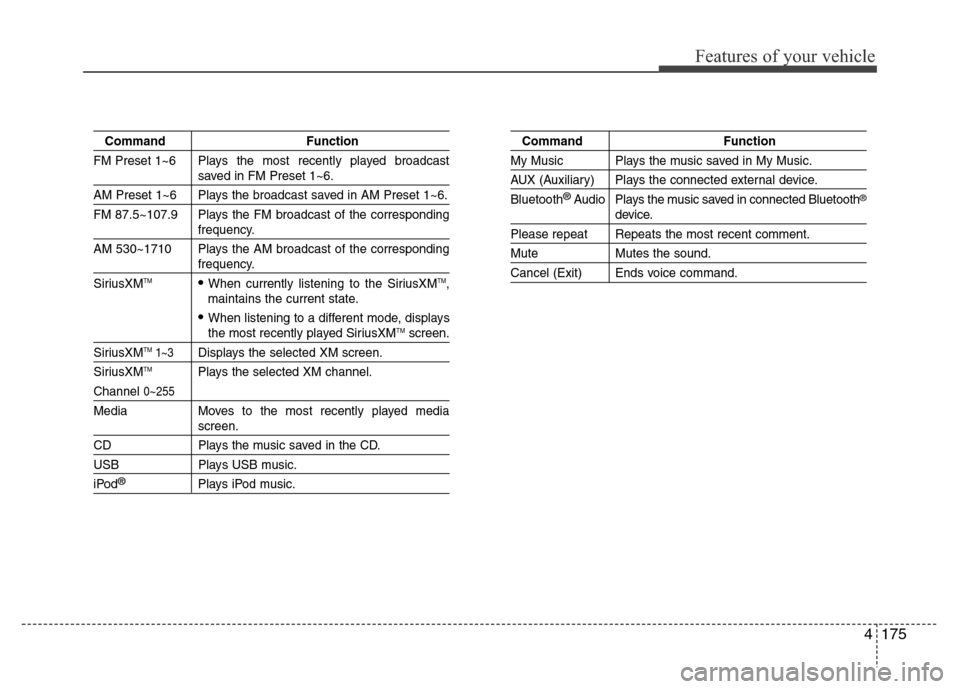
Command Function
FM Preset 1~6 Plays the most recently played broadcast
saved in FM Preset 1~6.
AM Preset 1~6 Plays the broadcast saved in AM Preset 1~6.
FM 87.5~107.9 Plays the FM broadcast of the corresponding
frequency.
AM 530~1710 Plays the AM broadcast of the corresponding
frequency.
SiriusXMTM• When currently listening to the SiriusXMTM,
maintains the current state.
• When listening to a different mode, displaysthe most recently played SiriusXMTMscreen.
SiriusXMTM1~3Displays the selected XM screen.
SiriusXMTMPlays the selected XM channel.
Channel 0~255
Media Moves to the most recently played mediascreen.
CD Plays the music saved in the CD.
USB Plays USB music.
iPod®Plays iPod music.
Command Function
My Music Plays the music saved in My Music.
AUX (Auxiliary) Plays the connected external device.
Bluetooth
®Audio Plays the music saved in connected Bluetooth®
device.
Please repeat Repeats the most recent comment.
Mute Mutes the sound.
Cancel (Exit) Ends voice command.
Page 267 of 526
Features of your vehicle
182 4
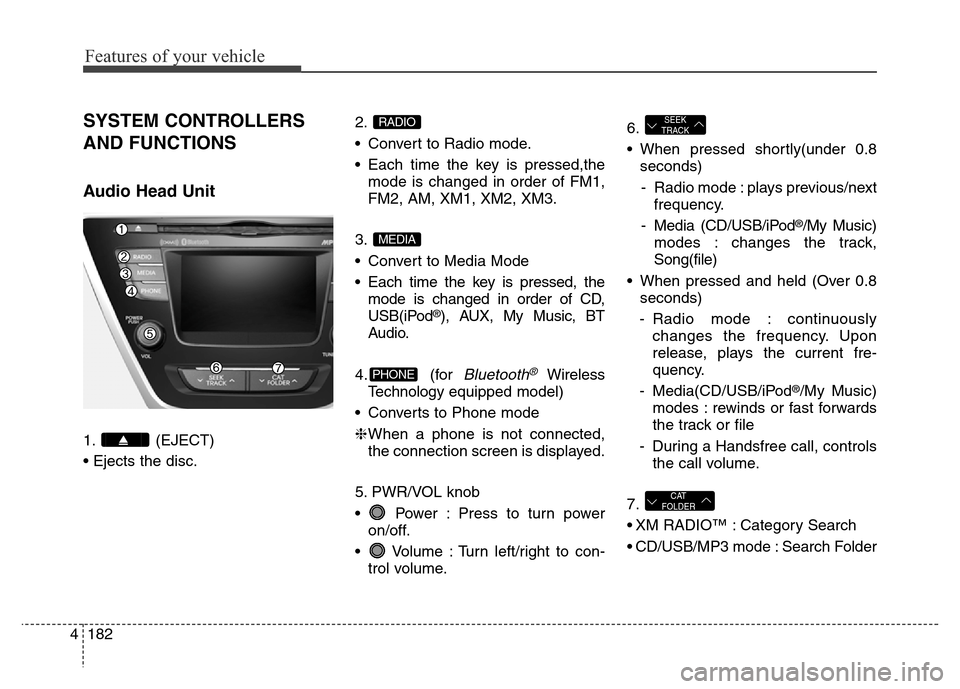
SYSTEM CONTROLLERS
AND FUNCTIONS
Audio Head Unit
1. (EJECT)
• Ejects the disc.2.
• Convert to Radio mode.
• Each time the key is pressed,the
mode is changed in order of FM1,
FM2, AM, XM1, XM2, XM3.
3.
• Convert to Media Mode
• Each time the key is pressed, the
mode is changed in order of CD,
USB(iPod
®), AUX, My Music, BT
Audio.
4. (for
Bluetooth®Wireless
Technologyequipped model)
• Converts to Phone mode
❈When a phone is not connected,
the connection screen is displayed.
5. PWR/VOL knob
• Power : Press to turn power
on/off.
• Volume : Turn left/right to con-
trol volume.6.
• When pressed shortly(under 0.8
seconds)
- Radio mode : plays previous/next
frequency.
- Media (CD/USB/iPod
®/My Music)
modes : changes the track,
Song(file)
• When pressed and held (Over 0.8
seconds)
- Radio mode : continuously
changes the frequency. Upon
release, plays the current fre-
quency.
- Media(CD/USB/iPod
®/My Music)
modes : rewinds or fast forwards
the track or file
- During a Handsfree call, controls
the call volume.
7.
• XM RADIO™ : Category Search
• CD/USB/MP3 mode : Search Folder
CAT
FOLDER
SEEK
TRACK
PHONE
MEDIA
RADIO