ignition Hyundai Elantra GT 2013 Workshop Manual
[x] Cancel search | Manufacturer: HYUNDAI, Model Year: 2013, Model line: Elantra GT, Model: Hyundai Elantra GT 2013Pages: 476, PDF Size: 31.71 MB
Page 187 of 476
Features of your vehicle
102 4
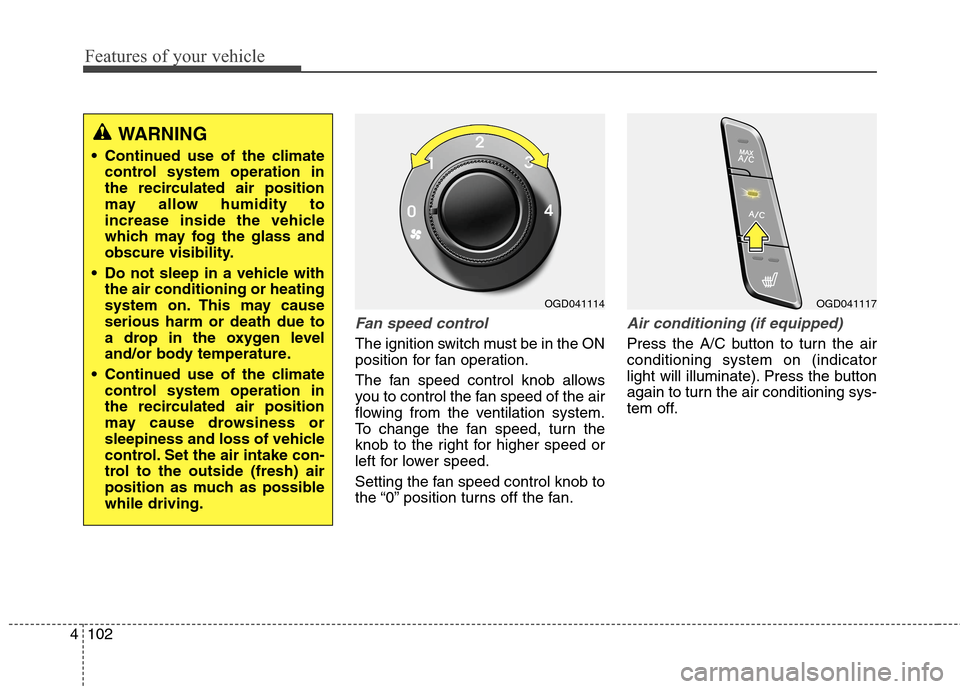
Fan speed control
The ignition switch must be in the ON
position for fan operation.
The fan speed control knob allows
you to control the fan speed of the air
flowing from the ventilation system.
To change the fan speed, turn the
knob to the right for higher speed or
left for lower speed.
Setting the fan speed control knob to
the “0” position turns off the fan.
Air conditioning (if equipped)
Press the A/C button to turn the air
conditioning system on (indicator
light will illuminate). Press the button
again to turn the air conditioning sys-
tem off.
OGD041117OGD041114
WARNING
Continued use of the climate
control system operation in
the recirculated air position
may allow humidity to
increase inside the vehicle
which may fog the glass and
obscure visibility.
Do not sleep in a vehicle with
the air conditioning or heating
system on. This may cause
serious harm or death due to
a drop in the oxygen level
and/or body temperature.
Continued use of the climate
control system operation in
the recirculated air position
may cause drowsiness or
sleepiness and loss of vehicle
control. Set the air intake con-
trol to the outside (fresh) air
position as much as possible
while driving.
Page 258 of 476
4173
Features of your vehicle
CAUTION USING
BLUETOOTH®WIRE-
LESS TECHNOLOGY
CELLULAR PHONE
Do not perform Bluetooth®
Wireless Technology settings
(e.g. pairing a phone) while
driving.
Some Bluetooth
®Wireless
Technology-enabled phones
may not be recognized by the
system or fully compatible
with the system.
Before using Bluetooth
®
Wireless Technology related
features of the audio system,
refer your phone’s User’s
Manual for phone-side
Bluetooth
®Wireless
Technology operations.
The phone must be paired to
the audio system to use
Bluetooth
®Wireless
Technology related features.
(Continued)
(Continued)
You will not be able to use the
hands-free feature when your
phone (in the car) is outside of
the cellular service area (e.g.
in a tunnel, in a underground,
in a mountainous area, etc.).
If the cellular phone signal is
poor or the vehicles interior
noise is too loud, it may be dif-
ficult to hear the other per-
son’s voice during a call.
Do not place the phone near or
inside metallic objects, other-
wise communications with
Bluetooth
®Wireless Technology
system or cellular service sta-
tions can be disturbed.
While a phone is connected
through Bluetooth
®Wireless
Technology your phone may
discharge quicker than usual
for additional Bluetooth
®
Wireless Technology-related
operations.
(Continued)
(Continued)
Some cellular phones or other
devices may cause interference
noise or malfunction to audio
system. In this case, store the
device in a different location
may resolve the condition.
Phone contact names should
be saved in English or they
may not be displayed correctly.
If Priority is set upon vehicle
ignition(IGN/ACC ON), the
Bluetooth
®Wireless Technology
phone will be automatically
connected.
Even if you are outside, the
Bluetooth
®Wireless Technology
phone will be automatically
connected once you are in the
vicinity of the vehicle.
If you do not want automatic
Bluetooth
®Wireless Technology
connection, turn the Bluetooth®
Wireless Technology feature off.
The hands-free call volume
and quality may differ depend-
ing on the mobile phone type.
Page 259 of 476
Features of your vehicle
174 4
CAUTION
Bluetooth®Wireless Technology
features can be used only when
the mobile phone has been
paired and connected with the
device. For more information on
pairing and connecting
Bluetooth
®Wireless Technology
enabled mobile phones, refer to
the “Phone Setup” section.
When a Bluetooth
®Wireless
Technology mobile phone is
connected, a ( ) icon will
appear at the top of the screen.
If a ( ) icon is not displayed,
this indicates that a Bluetooth
®
Wireless Technology enabled
device has not been connected
if a ( ) icon is displayed. This
means that Bluetooth
®Wireless
Technology enable device has
just been connected with A2DP
(Advanced Audio Distribution
Profile). Your must connect the
device before use.
(Continued)
(Continued)
For more information on
Bluetooth
®Wireless Technology
mobile phones, refer to the
“Phone Setup” section.
Pairing and connecting a
Bluetooth
®Wireless Technology
enabled mobile phone will work
only when the Bluetooth
®
Wireless Technology option
within your mobile phone has
been turned on. (Methods of
turning on the Bluetooth
®
Wireless Technology enabled
feature may differ depending on
the mobile phone.)
In some mobile phones, start-
ing the ignition while talking
through Bluetooth
®Wireless
Technology enabled handsfree
call will result in the call becom-
ing disconnected. (Switch the
call back to your mobile phone
when starting the ignition.)
(Continued)
(Continued)
Some features may not be
supported in some Bluetooth
®
Wireless Technology mobile
phone and devices.
Bluetooth
®Wireless Technology
enabled operation may be
unstable depending on the
communication state.
CAUTION
Placing the audio system within
an electromagnetic environment
may result in noise interference.
Page 272 of 476
4187
Features of your vehicle
zontal line mean?
The horizontal line is adjusted once
per month or at each tank full, based
on your preference; it represents the
EPA combined average or communi-
ty average fuel economy target.
Your actual fuel economy average
over 2.5 minutes.
This value is also shown in bar graph
as your “now” rating.
If you beat the average (the EPA or
community), you will receive an Eco
Reward point.
See your my Hyundai web page for
more information.
[Eco Driving] will not operate if the
vehicle ignition is not turned on.
Please operate with the ignition
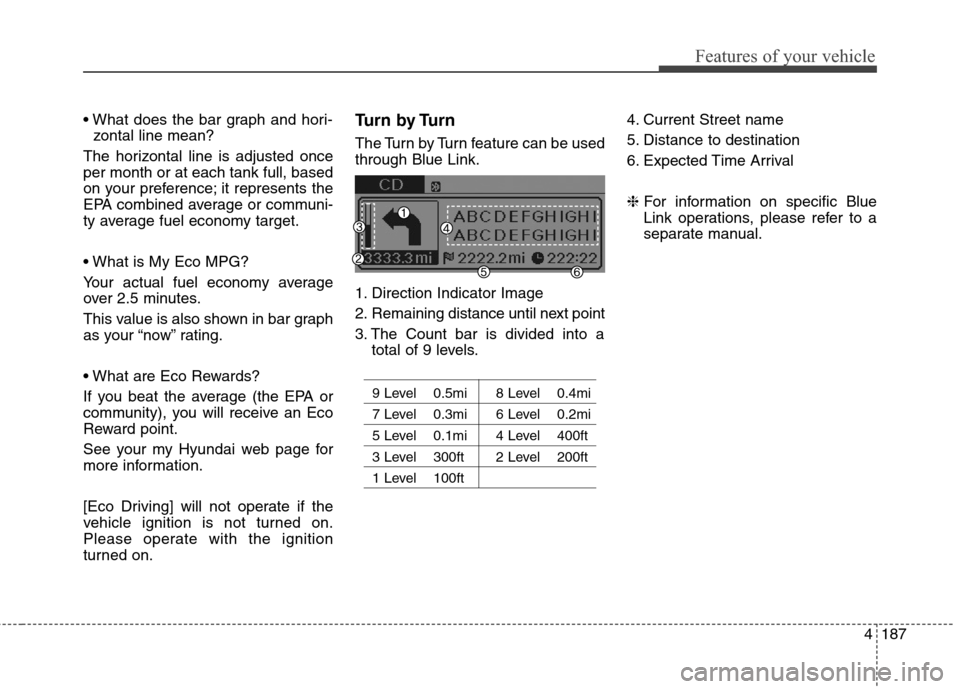
turned on.Turn by Turn
The Turn by Turn feature can be used
through Blue Link.
1. Direction Indicator Image
2. Remaining distance until next point
3. The Count bar is divided into a
total of 9 levels.
9 Level 0.5mi 8 Level 0.4mi
7 Level 0.3mi 6 Level 0.2mi
5 Level 0.1mi 4 Level 400ft
3 Level 300ft 2 Level 200ft
1 Level 100ft
4. Current Street name
5. Distance to destination
6. Expected Time Arrival
❈For information on specific Blue
Link operations, please refer to a
separate manual.
Page 277 of 476
55
Driving your vehicle
Before starting
Close and lock all doors.
Position the seat so that all con-
trols are easily reached.
Adjust the inside and outside
rearview mirrors.
Be sure that all lights work.
Check all gauges.
Check the operation of warning
lights when the ignition switch is
turned to the ON position.
Release the parking brake and
make sure the brake warning light
goes out.
For safe operation, be sure you are
familiar with your vehicle and its
equipment.WARNING
Always check the surrounding
areas near your vehicle for peo-
ple, especially children, before
putting a car into D (Drive) or R
(Reverse).
WARNING -
Driving under the influence
of alcohol or drugs
Drinking and driving is danger-
ous. Impaired driving is the
number one contributor to the
highway death toll each year.
Even a small amount of alcohol
will affect your reflexes, percep-
tions and judgment. Driving
while under the influence of
drugs is as dangerous or more
dangerous than driving drunk.
You are much more likely to
have a serious accident if you
drink or take drugs and drive.
If you are drinking or taking
drugs, don’t drive. Do not ride
with a driver who has been drink-
ing or taking drugs. Choose a
designated driver or call a cab.
WARNING
All passengers must be proper-
ly belted whenever the vehicle
is moving. Refer to “Seat belts”
in section 3 for more informa-
tion on their proper use.
WARNING
When you intend to park or
stop the vehicle with the
engine on, be careful not to
depress the accelerator pedal
for a long period of time. It may
overheat the engine or exhaust
system and cause fire.
When you make a sudden
stop or turn the steering
wheel rapidly, loose objects
may drop on the floor and it
could interfere with the opera-
tion of the foot pedals, possi-
bly causing an accident. Keep
all things in the vehicle safely
stored.
If you do not focus on driving,
it may cause an accident. Be
careful when operating
devices that may disturb driv-
ing such as the audio system
or the heater. It is the respon-
sibility of the driver to always
drive safely.
Page 278 of 476
Driving your vehicle
6 5
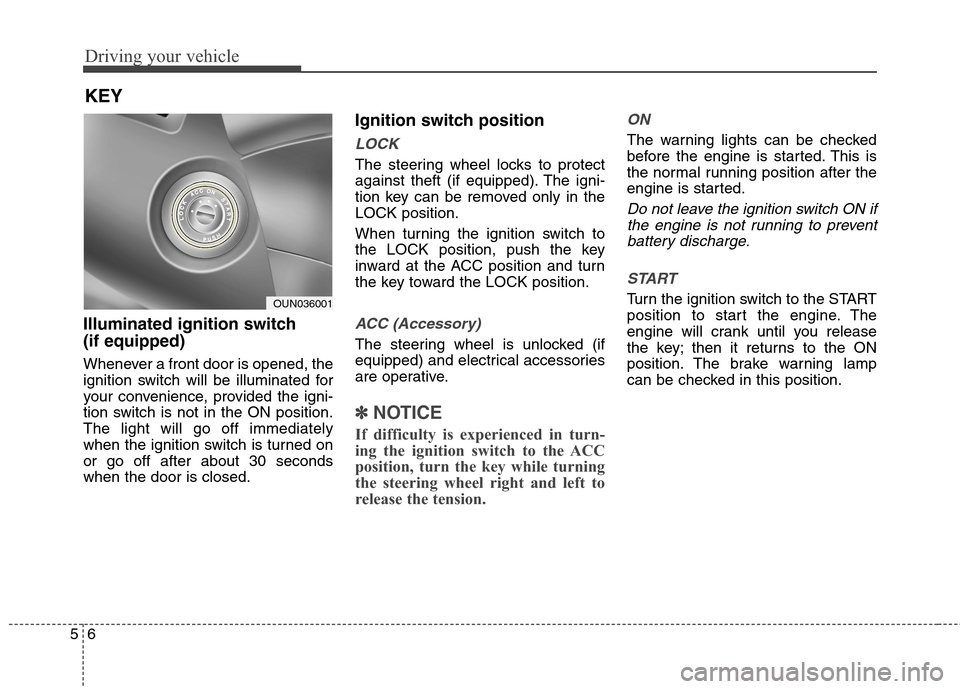
Illuminated ignition switch
(if equipped)
Whenever a front door is opened, the
ignition switch will be illuminated for
your convenience, provided the igni-
tion switch is not in the ON position.
The light will go off immediately
when the ignition switch is turned on
or go off after about 30 seconds
when the door is closed.
Ignition switch position
LOCK
The steering wheel locks to protect
against theft (if equipped). The igni-
tion key can be removed only in the
LOCK position.
When turning the ignition switch to
the LOCK position, push the key
inward at the ACC position and turn
the key toward the LOCK position.
ACC (Accessory)
The steering wheel is unlocked (if
equipped) and electrical accessories
are operative.
✽ ✽
NOTICE
If difficulty is experienced in turn-
ing the ignition switch to the ACC
position, turn the key while turning
the steering wheel right and left to
release the tension.
ON
The warning lights can be checked
before the engine is started. This is
the normal running position after the
engine is started.
Do not leave the ignition switch ON if
the engine is not running to prevent
battery discharge.
START
Turn the ignition switch to the START
position to start the engine. The
engine will crank until you release
the key; then it returns to the ON
position. The brake warning lamp
can be checked in this position.
KEY
OUN036001
Page 279 of 476
57
Driving your vehicle
Starting the engine
1. Make sure the parking brake is
applied.
2.Manual Transaxle- Depress the
clutch pedal fully and shift the
transaxle into Neutral. Keep the
clutch pedal and brake pedal
depressed while turning the igni-
tion switch to the start position.
The starter will not operate if the
clutch pedal is not fully depressed.
Automatic Transaxle- Place the
transaxle shift lever in P (Park).
Depress the brake pedal fully.
You can also start the engine
when the shift lever is in the N
(Neutral) position.
WARNING - Ignition
switch
Never turn the ignition switch
to LOCK or ACC while the vehi-
cle is moving. This can result in
loss of directional control and
braking function, which could
cause an accident.
Before leaving the driver’s
seat, always make sure the
shift lever is engaged in 1st
gear for the manual transaxle
or P (Park) for automatic
transaxle, set the parking
brake fully and shut the
engine off. Unexpected and
sudden vehicle movement
may occur if these precau-
tions are not taken.
(Continued)(Continued)
Never reach for the ignition
switch, or any other controls
through the steering wheel
while the vehicle is in motion.
The presence of your hand or
arm in this area could cause a
loss of vehicle control, an
accident and serious bodily
injury or death.
Do not place any movable
objects around the driver’s
seat as they may move while
driving, interfere with the driv-
er and lead to an accident.
WARNING
Always wear appropriate shoes
when operating your vehicle.
Unsuitable shoes (high heels,
ski boots,etc.) may interfere
with your ability to use the
brake, accelerator pedal, and
clutch (if equipped).
Page 280 of 476
Driving your vehicle
8 5
3. Turn the ignition switch to START
and hold it there until the engine
starts (a maximum of 10 seconds),
then release the key.
4. In extremely cold weather (below
0°F / -18°C) or after the vehicle
has not been operated for several
days, let the engine warm up with-
out depressing the accelerator.
Whether the engine is cold or warm,
it should be started without
depressing the accelerator.
CAUTION
If the engine stalls while the
vehicle is in motion, do not
attempt to move the shift lever
to the P (Park) position. If traffic
and road conditions permit, you
may put the shift lever in the N
(Neutral) position while the
vehicle is still moving and turn
the ignition switch to the START
position in an attempt to restart
the engine.
CAUTION
Do not engage the starter for
more than 10 seconds. If the
engine stalls or fails to start,
wait 5 to 10 seconds before re-
engaging the starter. Improper
use of the starter may damage it.
Page 290 of 476
Driving your vehicle
18 5
For smooth operation, depress the
brake pedal when shifting from N
(Neutral) to a forward or reverse gear.Transaxle ranges
The indicator in the instrument clus-
ter displays the shift lever position
when the ignition switch is in the ON
position.
P (Park)
Always come to a complete stop
before shifting into P (Park). This
position locks the transaxle and pre-
vents the drive wheels from rotating.
WARNING- Automatic
transaxle
Always check the surrounding
areas near your vehicle for
people, especially children,
before shifting a car into D
(Drive) or R (Reverse).
Before leaving the driver’s
seat, always make sure the
shift lever is in the P (Park)
position; then set the parking
brake fully and shut the
engine off. Unexpected and
sudden vehicle movement
can occur if these precautions
are not followed in the order
identified.
CAUTION
To avoid damage to your
transaxle, do not accelerate
the engine in R (Reverse) or
any forward gear position with
the brakes on.
When stopped on an incline,
do not hold the vehicle sta-
tionary with engine power.
Use the service brake or the
parking brake.
Do not shift from N (Neutral)
or P (Park) into D (Drive), or R
(Reverse) when the engine is
above idle speed.
Page 292 of 476
Driving your vehicle
20 5
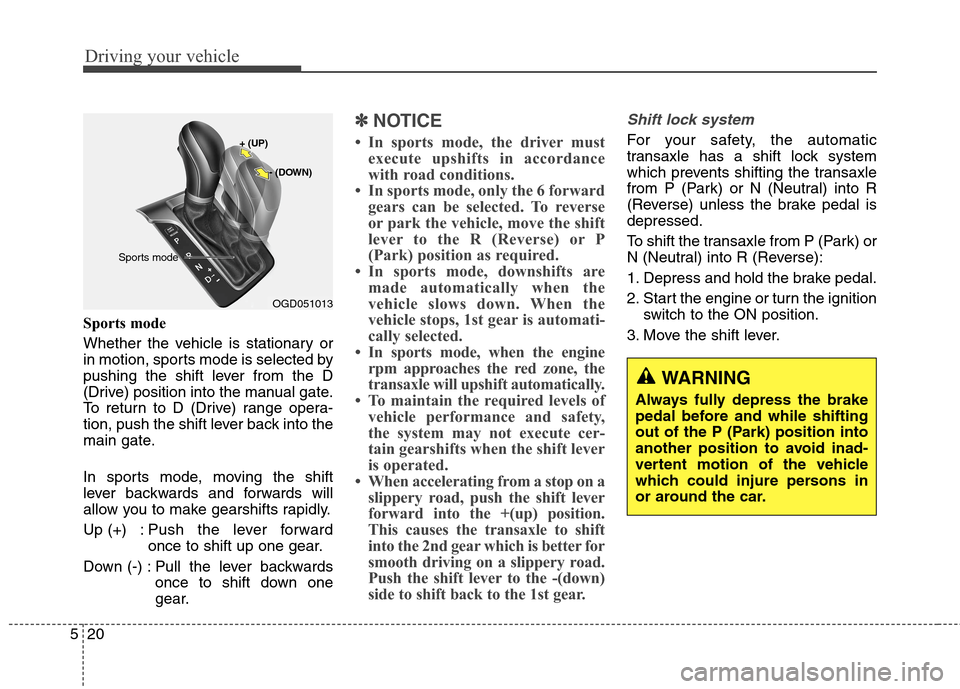
Sports mode
Whether the vehicle is stationary or
in motion, sports mode is selected by
pushing the shift lever from the D
(Drive) position into the manual gate.
To return to D (Drive) range opera-
tion, push the shift lever back into the
main gate.
In sports mode, moving the shift
lever backwards and forwards will
allow you to make gearshifts rapidly.
Up (+) : Push the lever forward
once to shift up one gear.
Down (-) : Pull the lever backwards
once to shift down one
gear.
✽ ✽
NOTICE
• In sports mode, the driver must
execute upshifts in accordance
with road conditions.
• In sports mode, only the 6 forward
gears can be selected. To reverse
or park the vehicle, move the shift
lever to the R (Reverse) or P
(Park) position as required.
• In sports mode, downshifts are
made automatically when the
vehicle slows down. When the
vehicle stops, 1st gear is automati-
cally selected.
• In sports mode, when the engine
rpm approaches the red zone, the
transaxle will upshift automatically.
• To maintain the required levels of
vehicle performance and safety,
the system may not execute cer-
tain gearshifts when the shift lever
is operated.
• When accelerating from a stop on a
slippery road, push the shift lever
forward into the +(up) position.
This causes the transaxle to shift
into the 2nd gear which is better for
smooth driving on a slippery road.
Push the shift lever to the -(down)
side to shift back to the 1st gear.
Shift lock system
For your safety, the automatic
transaxle has a shift lock system
which prevents shifting the transaxle
from P (Park) or N (Neutral) into R
(Reverse) unless the brake pedal is
depressed.
To shift the transaxle from P (Park) or
N (Neutral) into R (Reverse):
1. Depress and hold the brake pedal.
2. Start the engine or turn the ignition
switch to the ON position.
3. Move the shift lever.
WARNING
Always fully depress the brake
pedal before and while shifting
out of the P (Park) position into
another position to avoid inad-
vertent motion of the vehicle
which could injure persons in
or around the car.
OGD051013
+ (UP)
- (DOWN)
Sports mode