ECO mode HYUNDAI ELANTRA GT 2014 User Guide
[x] Cancel search | Manufacturer: HYUNDAI, Model Year: 2014, Model line: ELANTRA GT, Model: HYUNDAI ELANTRA GT 2014Pages: 476, PDF Size: 31.71 MB
Page 166 of 476
481
Features of your vehicle
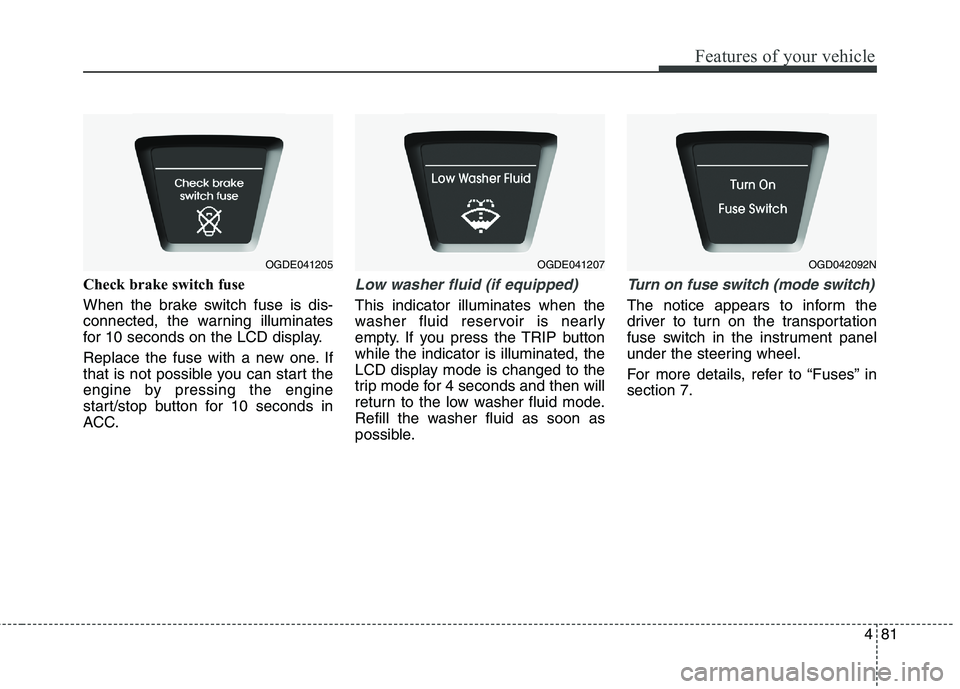
Check brake switch fuse
When the brake switch fuse is dis-
connected, the warning illuminates
for 10 seconds on the LCD display.
Replace the fuse with a new one. If
that is not possible you can start the
engine by pressing the engine
start/stop button for 10 seconds in
ACC.Low washer fluid (if equipped)
This indicator illuminates when the
washer fluid reservoir is nearly
empty. If you press the TRIP button
while the indicator is illuminated, the
LCD display mode is changed to the
trip mode for 4 seconds and then will
return to the low washer fluid mode.
Refill the washer fluid as soon as
possible.
Turn on fuse switch (mode switch)
The notice appears to inform the
driver to turn on the transportation
fuse switch in the instrument panel
under the steering wheel.
For more details, refer to “Fuses” in
section 7.
OGDE041205OGDE041207OGD042092N
Page 189 of 476
Features of your vehicle
104 4
✽
✽
NOTICE
• While using the air conditioning
system, monitor the engine tem-
perature gauge closely while driv-
ing up hills or in heavy traffic
when outside temperatures are
high. Air conditioning system
operation may cause engine over-
heating. Continue to use the blow-
er fan but turn the air condition-
ing system off if the engine tem-
perature gauge indicates engine
overheating.
• Opening the windows in humid
weather while the air conditioning
operates may create water
droplets inside the vehicle. Since
excessive water droplets may
cause damage to electrical equip-
ment, air conditioning should only
be used with the windows closed.
Air conditioning system operation tips
If the vehicle has been parked in
direct sunlight during hot weather,
open the windows for a short time
to let the hot air inside the vehicle
escape.
To help reduce moisture inside of
the windows on rainy or humid
days, decrease the humidity inside
the vehicle by operating the air
conditioning system.
During air conditioning system
operation, you may occasionally
notice a slight change in engine
speed as the air conditioning com-
pressor cycles. This is a normal
system operation characteristic.
During the winter months, use the
air conditioning system every
month for a few minutes to ensure
maximum system performance.
When using the air conditioning
system, you may notice clear water
dripping (or even puddling) on the
ground under the passenger side
of the vehicle. This condensation a
normal system operation charac-
teristic. Operating the air conditioning sys-
tem in the recirculated air position
provides maximum cooling, how-
ever, continual operation in this
mode may cause the air inside the
vehicle to become stale.
During cooling operation, you may
occasionally notice a misty air flow
because of rapid cooling and
humid air intake. This is a normal
system operation characteristic.
If you operate air conditioner
excessively, the difference
between the temperature of the
outside air and that of the wind-
shield could cause the outer sur-
face of the windshield to fog up,
causing loss of visibility. In this
case, set the mode selection knob
or button to the position and
fan speed control to the lower
speed.
Page 216 of 476
4131
Features of your vehicle
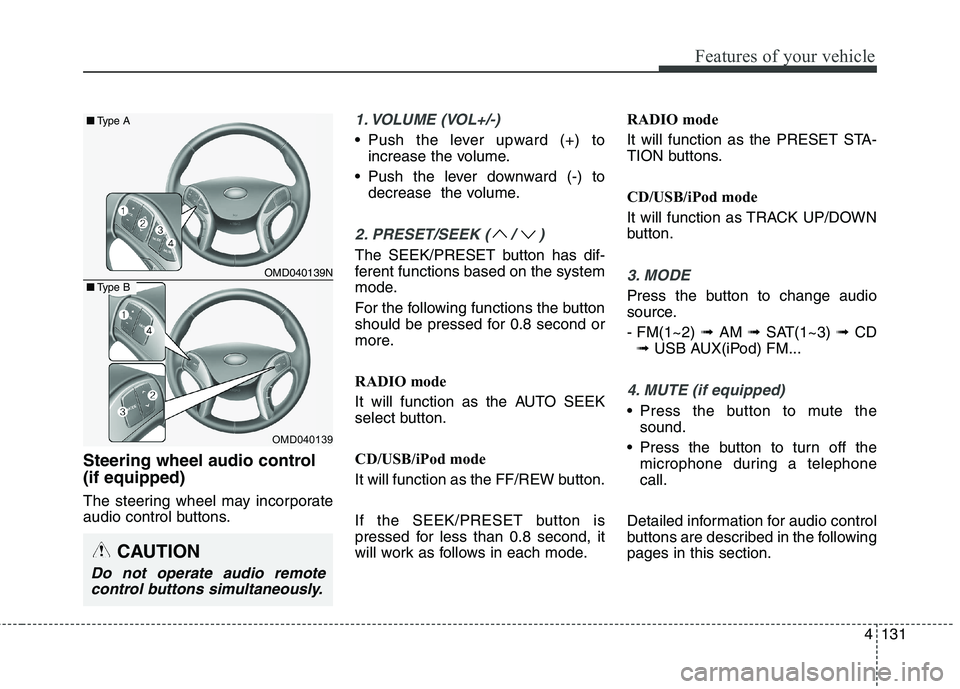
Steering wheel audio control
(if equipped)
The steering wheel may incorporate
audio control buttons.
1. VOLUME (VOL+/-)
• Push the lever upward (+) to
increase the volume.
Push the lever downward (-) to
decrease the volume.
2. PRESET/SEEK ( / )
The SEEK/PRESET button has dif-
ferent functions based on the system
mode.
For the following functions the button
should be pressed for 0.8 second or
more.
RADIO mode
It will function as the AUTO SEEK
select button.
CD/USB/iPod mode
It will function as the FF/REW button.
If the SEEK/PRESET button is
pressed for less than 0.8 second, it
will work as follows in each mode.RADIO mode
It will function as the PRESET STA-
TION buttons.
CD/USB/iPod mode
It will function as TRACK UP/DOWN
button.
3. MODE
Press the button to change audio
source.
- FM(1~2) ➟ AM ➟ SAT(1~3) ➟ CD
➟ USB AUX(iPod) FM...
4. MUTE (if equipped)
Press the button to mute the
sound.
Press the button to turn off the
microphone during a telephone
call.
Detailed information for audio control
buttons are described in the following
pages in this section.
OMD040139N
OMD040139
■Type A
■Type B
CAUTION
Do not operate audio remote
control buttons simultaneously.
Page 219 of 476
Features of your vehicle
134 4
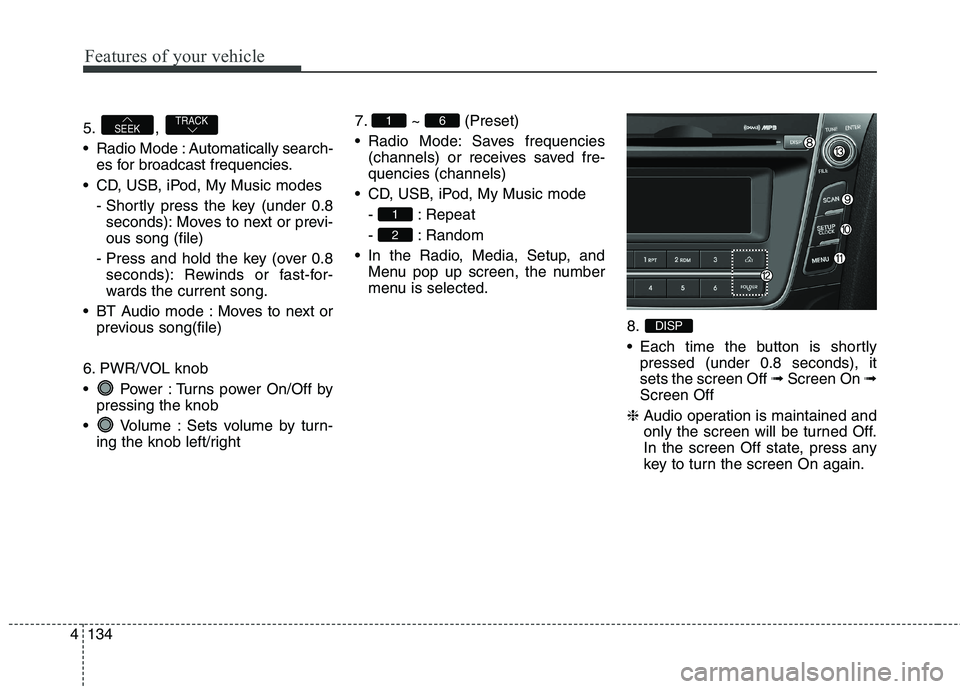
5. ,
Radio Mode : Automatically search-
es for broadcast frequencies.
CD, USB, iPod, My Music modes
- Shortly press the key (under 0.8
seconds): Moves to next or previ-
ous song (file)
- Press and hold the key (over 0.8
seconds): Rewinds or fast-for-
wards the current song.
BT Audio mode : Moves to next or
previous song(file)
6. PWR/VOL knob
Power : Turns power On/Off by
pressing the knob
Volume : Sets volume by turn-
ing the knob left/right7. ~ (Preset)
Radio Mode: Saves frequencies
(channels) or receives saved fre-
quencies (channels)
CD, USB, iPod, My Music mode
- : Repeat
- : Random
In the Radio, Media, Setup, and
Menu pop up screen, the number
menu is selected.
8.
Each time the button is shortly
pressed (under 0.8 seconds), it
sets the screen Off ➟Screen On ➟
Screen Off
❈Audio operation is maintained and
only the screen will be turned Off.
In the screen Off state, press any
key to turn the screen On again.
DISP
2
1
61TRACKSEEK
Page 220 of 476
4135
Features of your vehicle
9.
Radio Mode
- Shortly press the key (under 0.8
seconds): Previews each broadcast
for 5 seconds each.
- Press and hold the key (over 0.8
seconds): Previews the broadcasts
saved in Preset ~ for 5
seconds each.
❈Press the key again to
continue listening to the current
frequency.
❈XM Radio does not support the
Preset scan feature.
CD, USB, iPod mode
- Shortly press the key (under 0.8
seconds): Previews each song (file)
for 10 seconds each
❈Press the key again to
continue listening to the current
song (file).10.
Shortly press the key (under 0.8
seconds) : Moves to the Display,
Sound, Clock, Phone, System set-
ting modes
Press and hold the key (over 0.8
seconds) : Move to the Time set-
ting screen
11.
Displays menus for the current mode.
12. ,
Radio Mode
- XM RADIO : Category Search
MP3, CD, USB mode : Folder Search
iPod mode: Moves to parent folder
❈May differ depending on the
selected audio.13. TUNE knob
Radio mode : Changes frequency
by turning the knob left/right
CD, USB, iPod mode: Searches
songs (files) by turning the knob
left/right
❈When the desired song is displayed,
press the knob to play the song.
Moves focus in all selection menus
and selects menus.
FOLDERCAT
MENU
SETUPCLOCK
SCAN
SCAN
61
SCAN
Page 224 of 476
![HYUNDAI ELANTRA GT 2014 User Guide 4139
Features of your vehicle
Voice Recognition Volume
(❈For
Bluetooth®Wireless Technology
equipped Model)
Adjusts voice recognition volume.
Select [Voice Recognition Vol.] Set
volume of TUNE kno](/img/35/56097/w960_56097-223.png "HYUNDAI ELANTRA GT 2014 User Guide 4139
Features of your vehicle
Voice Recognition Volume
(❈For
Bluetooth®Wireless Technology
equipped Model)
Adjusts voice recognition volume.
Select [Voice Recognition Vol.] Set
volume of TUNE kno")
4139
Features of your vehicle
Voice Recognition Volume
(❈For
Bluetooth®Wireless Technology
equipped Model)
Adjusts voice recognition volume.
Select [Voice Recognition Vol.] Set
volume of TUNE knobBlue Link Voice Volume
(❈For TMU supported Model)
Sets the Blue Link voice recognition
volume.
❈While using Blue Link voice recog-
nition, turning the tune knob will
display the volume control popup
screen.
❈May differ depending on the
selected audio.
Page 234 of 476
4149
Features of your vehicle
RADIO : FM, AM, OR XM
Changing RADIO mode
(FM, AM, or XM)
Press the key to change the
mode in order of FM1 ➟ FM2 ➟ AM
➟ XM1 ➟ XM2 ➟ XM3.
(❈For XM Radio equipped Model)
Press the key to change the
mode in order of FM1 ➟FM2 ➟AM.Press the key to change the
mode in order of FM1 ➟FM2 ➟AM
( )key to turn on the
audio system and receive radio
broadcasts.
Displays
the change radio mode pop up
screen. While the pop up screen is
displayed, you can change the radio
mode (RADIO : FM1 ➟FM2 ➟ AM
➟ XM1 ➟ XM2 ➟ XM3 or FM1 ➟
FM2 ➟ AM) through the tune knob
or ~ keys.
Adjust Volume
Turn the VOL knob left/right to
adjust the volume.SEEK
Press the ( )key
,
seconds): Changes the frequency.
0.8 seconds): Automatically
searches for the next frequency.
Preset SEEK
Press the ( )key
~
seconds): Plays the frequency
saved in the corresponding key.
0.8 seconds): Pressing and holding
the desired key from ~
will save the currently playing
broadcast to the selected key and
sound a BEEP.
61
6
1FM/AMRADIO
TRACKSEEK
FM/AMRADIO
61
FM/AMRADIO
FM/AM
RADIO
RADIO
Page 236 of 476
4151
Features of your vehicle
XM RADIO
Using XM satellite Radio
Your vehicle is equipped with a 3
month complimentary period of XM
Satellite Radio. XM provides access to
over 130 channels of music, informa-
tion, and entertainment programming.SEEK
Press the key
,
seconds): select previous or next
channel.
0.8 seconds): continuously move to
previous or next channel.
❈If the “Category” icon is displayed,
channels are changed within the
current category.
SCAN
Press the key
seconds): Previews each broadcast
for 5 seconds each
❈Press the key again to
continue listening to the current
frequency
❈If the “Category” icon is displayed,
channels are changed within the
current category.Category
Press the , key Set
through the TUNE knob
ry menus, highlight the category
that the current channel belongs to.
In the Category List Mode, press the
, key to navigate
category list.
lowest channel in the highlighted
category.
❈If channel is selected by selecting
category, then the “CATEGORY”
icon is displayed at the top of the
screen.FOLDERCAT
FOLDERCAT
SCAN
SCANRADIO
TRACKSEEKRADIO
Page 242 of 476
4157
Features of your vehicle
All Random (Press the key, when it
is FLD.RDM mode): Plays all files in
random order.
❈Press the key again to turn
off repeat.
❈RANDOM mode changes
RDM(FLD.RDM) ➟ ALB.RDM(ALL
RDM) ➟ OFF whenever it is
pressed “2/RDM” button.Changing Song/File
While song (file) is playing
key
seconds): Plays the current song
from the beginning.
❈If the key is pressed again
within 1 second, the previous song
is played.
0.8 seconds): Rewinds the song.
While song (file) is playing
key
seconds): Plays the next song.
0.8 seconds): Fast forwards the
song.Scan
While song (file) is playing
key
Scans all songs for 10 seconds start-
ing from the next song.
❈Press the key again to turn
off.
❈The SCAN function is not support-
ed in iPod mode.
SCAN
SCAN
SEEK
TRACK
TRACK
2
Page 250 of 476
4165
Features of your vehicle
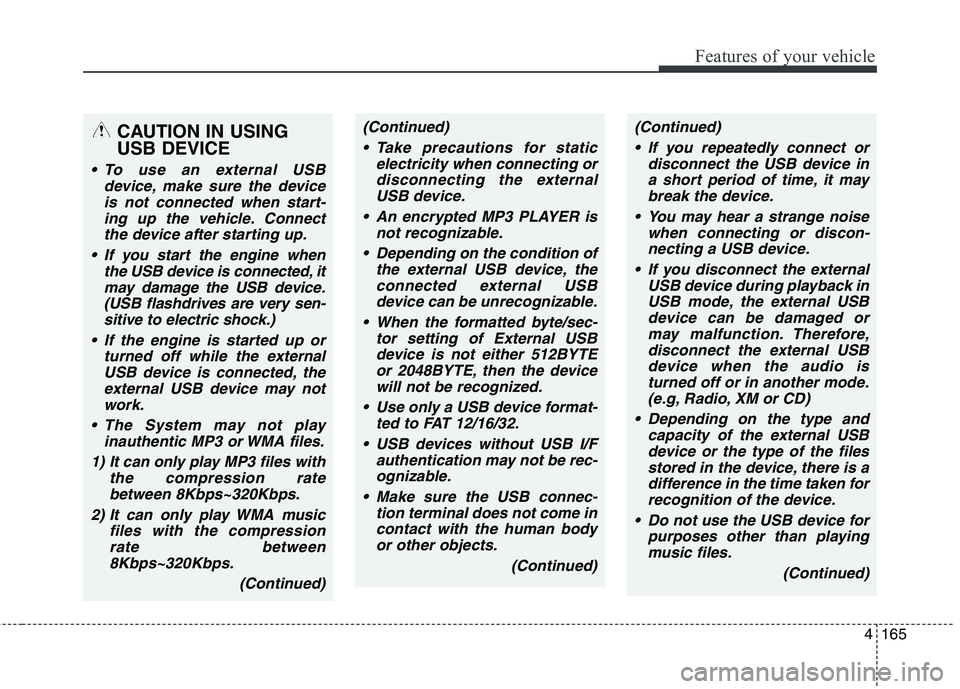
CAUTION IN USING
USB DEVICE
To use an external USB
device, make sure the device
is not connected when start-
ing up the vehicle. Connect
the device after starting up.
If you start the engine when
the USB device is connected, it
may damage the USB device.
(USB flashdrives are very sen-
sitive to electric shock.)
If the engine is started up or
turned off while the external
USB device is connected, the
external USB device may not
work.
The System may not play
inauthentic MP3 or WMA files.
1) It can only play MP3 files with
the compression rate
between 8Kbps~320Kbps.
2) It can only play WMA music
files with the compression
rate between
8Kbps~320Kbps.
(Continued)
(Continued)
Take precautions for static
electricity when connecting or
disconnecting the external
USB device.
An encrypted MP3 PLAYER is
not recognizable.
Depending on the condition of
the external USB device, the
connected external USB
device can be unrecognizable.
When the formatted byte/sec-
tor setting of External USB
device is not either 512BYTE
or 2048BYTE, then the device
will not be recognized.
Use only a USB device format-
ted to FAT 12/16/32.
USB devices without USB I/F
authentication may not be rec-
ognizable.
Make sure the USB connec-
tion terminal does not come in
contact with the human body
or other objects.
(Continued)(Continued)
If you repeatedly connect or
disconnect the USB device in
a short period of time, it may
break the device.
You may hear a strange noise
when connecting or discon-
necting a USB device.
If you disconnect the external
USB device during playback in
USB mode, the external USB
device can be damaged or
may malfunction. Therefore,
disconnect the external USB
device when the audio is
turned off or in another mode.
(e.g, Radio, XM or CD)
Depending on the type and
capacity of the external USB
device or the type of the files
stored in the device, there is a
difference in the time taken for
recognition of the device.
Do not use the USB device for
purposes other than playing
music files.
(Continued)