radio HYUNDAI ELANTRA GT 2014 User Guide
[x] Cancel search | Manufacturer: HYUNDAI, Model Year: 2014, Model line: ELANTRA GT, Model: HYUNDAI ELANTRA GT 2014Pages: 476, PDF Size: 31.71 MB
Page 235 of 476
Features of your vehicle
150 4
SCAN
Press the ( ) key
seconds): The broadcast frequency
increases and previews each
broadcast for 5 seconds each. After
scanning all frequencies, returns
and plays the current broadcast fre-
quency.
0.8 seconds): Previews the broad-
casts saved in Preset ~
for 5 seconds each.Selecting through manual search
Turn the TUNE knob left/right to
adjust the frequency.
Changes by 200KHz
Changes by 10MHz
(❈AC103A5GG / AC110A5GG :
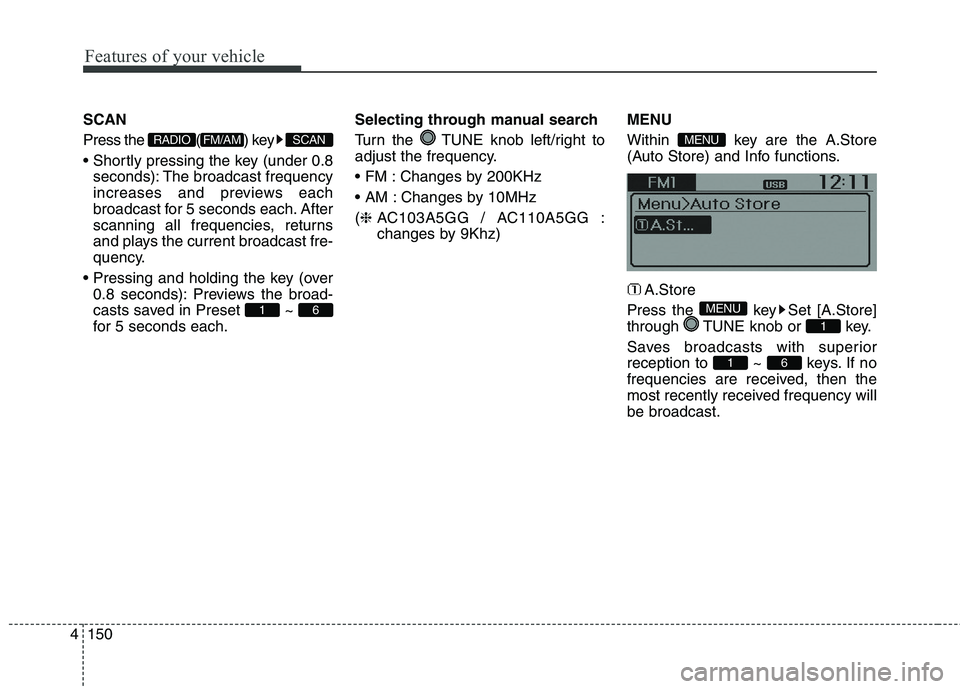
changes by 9Khz)MENU
Within key are the A.Store
(Auto Store) and Info functions.
A.Store
Press the key Set [A.Store]
through TUNE knob or key.
Saves broadcasts with superior
reception to ~ keys. If no
frequencies are received, then the
most recently received frequency will
be broadcast.
61
1
MENU
MENU
61
SCANFM/AMRADIO
Page 236 of 476
4151
Features of your vehicle
XM RADIO
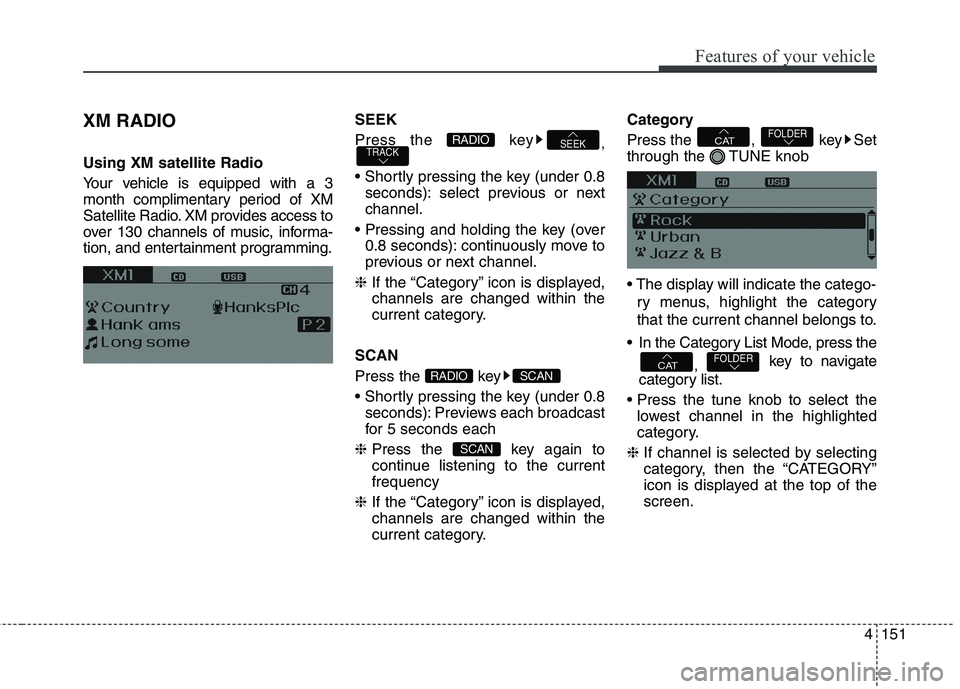
Using XM satellite Radio
Your vehicle is equipped with a 3
month complimentary period of XM
Satellite Radio. XM provides access to
over 130 channels of music, informa-
tion, and entertainment programming.SEEK
Press the key
,
seconds): select previous or next
channel.
0.8 seconds): continuously move to
previous or next channel.
❈If the “Category” icon is displayed,
channels are changed within the
current category.
SCAN
Press the key
seconds): Previews each broadcast
for 5 seconds each
❈Press the key again to
continue listening to the current
frequency
❈If the “Category” icon is displayed,
channels are changed within the
current category.Category
Press the , key Set
through the TUNE knob
ry menus, highlight the category
that the current channel belongs to.
In the Category List Mode, press the
, key to navigate
category list.
lowest channel in the highlighted
category.
❈If channel is selected by selecting
category, then the “CATEGORY”
icon is displayed at the top of the
screen.FOLDERCAT
FOLDERCAT
SCAN
SCANRADIO
TRACKSEEKRADIO
Page 237 of 476
Features of your vehicle
152 4
Preset
Press the key ~
seconds): Plays the frequency
saved in the corresponding key.
0.8 seconds): Pressing and holding
the desired key from ~
will save the current broadcast to
the selected key and sound a
BEEP.
Tune
TUNE knob : Changes
the channel number or scrolls cate-
gory list.
TUNE knob : Selects the
menu.Menu
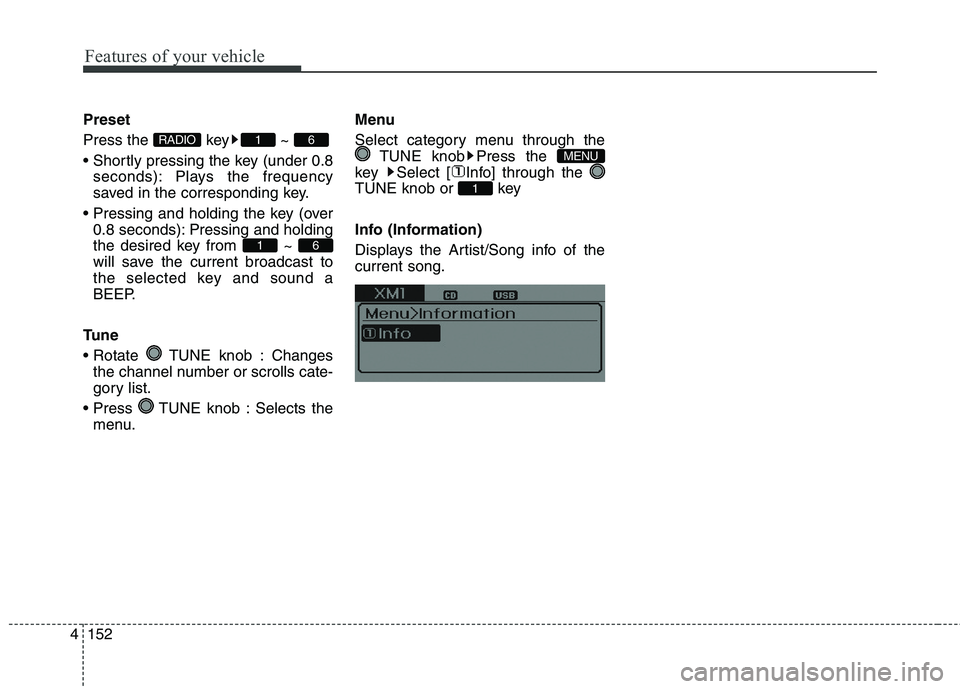
Select category menu through the
TUNE knob Press the
key Select [ Info] through the
TUNE knob or key
Info (Information)
Displays the Artist/Song info of the
current song.
1
MENU
61
61RADIO
Page 238 of 476
4153
Features of your vehicle
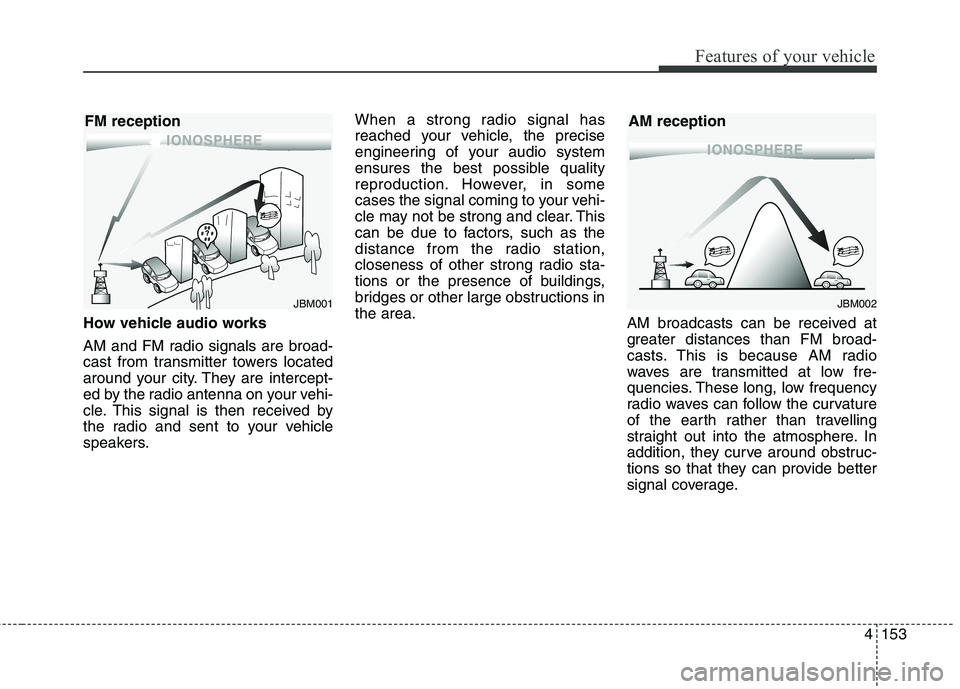
How vehicle audio works
AM and FM radio signals are broad-
cast from transmitter towers located
around your city. They are intercept-
ed by the radio antenna on your vehi-
cle. This signal is then received by
the radio and sent to your vehicle
speakers.When a strong radio signal has
reached your vehicle, the precise
engineering of your audio system
ensures the best possible quality
reproduction. However, in some
cases the signal coming to your vehi-
cle may not be strong and clear. This
can be due to factors, such as the
distance from the radio station,
closeness of other strong radio sta-
tions or the presence of buildings,
bridges or other large obstructions in
the area.
AM broadcasts can be received at
greater distances than FM broad-
casts. This is because AM radio
waves are transmitted at low fre-
quencies. These long, low frequency
radio waves can follow the curvature
of the earth rather than travelling
straight out into the atmosphere. In
addition, they curve around obstruc-
tions so that they can provide better
signal coverage.
JBM002
AM reception
JBM001
FM reception
Page 239 of 476
Features of your vehicle
154 4
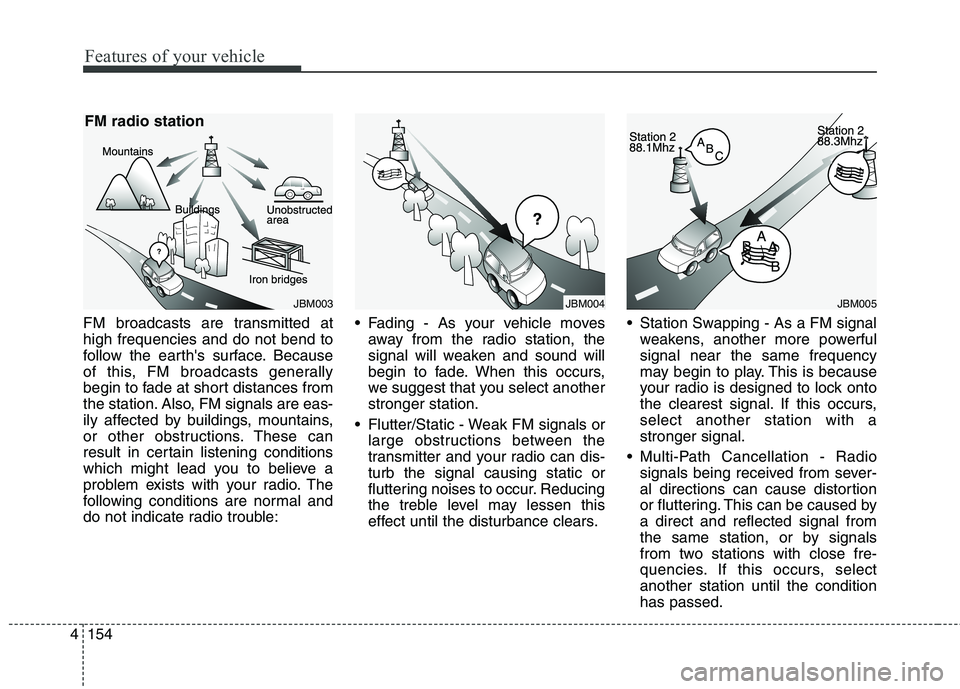
FM broadcasts are transmitted at
high frequencies and do not bend to
follow the earth's surface. Because
of this, FM broadcasts generally
begin to fade at short distances from
the station. Also, FM signals are eas-
ily affected by buildings, mountains,
or other obstructions. These can
result in certain listening conditions
which might lead you to believe a
problem exists with your radio. The
following conditions are normal and
do not indicate radio trouble: Fading - As your vehicle moves
away from the radio station, the
signal will weaken and sound will
begin to fade. When this occurs,
we suggest that you select another
stronger station.
Flutter/Static - Weak FM signals or
large obstructions between the
transmitter and your radio can dis-
turb the signal causing static or
fluttering noises to occur. Reducing
the treble level may lessen this
effect until the disturbance clears. Station Swapping - As a FM signal
weakens, another more powerful
signal near the same frequency
may begin to play. This is because
your radio is designed to lock onto
the clearest signal. If this occurs,
select another station with a
stronger signal.
Multi-Path Cancellation - Radio
signals being received from sever-
al directions can cause distortion
or fluttering. This can be caused by
a direct and reflected signal from
the same station, or by signals
from two stations with close fre-
quencies. If this occurs, select
another station until the condition
has passed.
JBM005JBM004JBM003
FM radio station
Page 240 of 476
4155
Features of your vehicle
Using a cellular phone or a two-
way radio
When a cellular phone is used inside
the vehicle, noise may be produced
from the audio system. This does not
mean that something is wrong with the
audio equipment. In such a case, use
the cellular phone at a place as far as
possible from the audio equipment.
Satellite radio reception
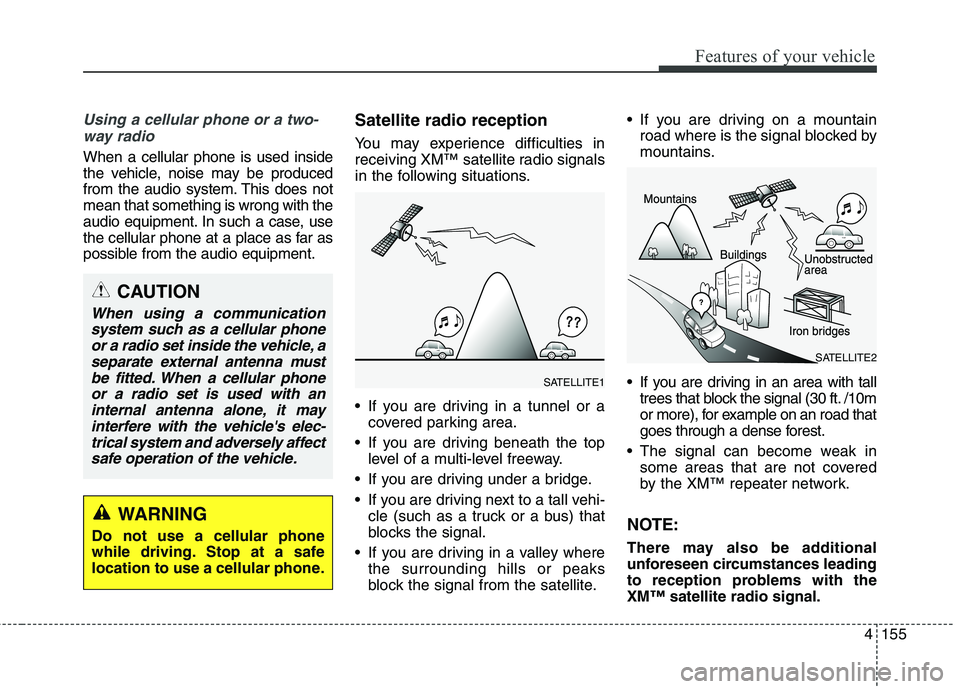
You may experience difficulties in
receiving XM™ satellite radio signals
in the following situations.
If you are driving in a tunnel or a
covered parking area.
If you are driving beneath the top
level of a multi-level freeway.
If you are driving under a bridge.
If you are driving next to a tall vehi-
cle (such as a truck or a bus) that
blocks the signal.
If you are driving in a valley where
the surrounding hills or peaks
block the signal from the satellite. If you are driving on a mountain
road where is the signal blocked by
mountains.
If you are driving in an area with tall
trees that block the signal (30 ft. /10m
or more), for example on an road that
goes through a dense forest.
The signal can become weak in
some areas that are not covered
by the XM™ repeater network.
NOTE:
There may also be additional
unforeseen circumstances leading
to reception problems with the
XM™ satellite radio signal.
CAUTION
When using a communication
system such as a cellular phone
or a radio set inside the vehicle, a
separate external antenna must
be fitted. When a cellular phone
or a radio set is used with an
internal antenna alone, it may
interfere with the vehicle's elec-
trical system and adversely affect
safe operation of the vehicle.
WARNING
Do not use a cellular phone
while driving. Stop at a safe
location to use a cellular phone.
SATELLITE2
SATELLITE1
Page 250 of 476
4165
Features of your vehicle
CAUTION IN USING
USB DEVICE
To use an external USB
device, make sure the device
is not connected when start-
ing up the vehicle. Connect
the device after starting up.
If you start the engine when
the USB device is connected, it
may damage the USB device.
(USB flashdrives are very sen-
sitive to electric shock.)
If the engine is started up or
turned off while the external
USB device is connected, the
external USB device may not
work.
The System may not play
inauthentic MP3 or WMA files.
1) It can only play MP3 files with
the compression rate
between 8Kbps~320Kbps.
2) It can only play WMA music
files with the compression
rate between
8Kbps~320Kbps.
(Continued)
(Continued)
Take precautions for static
electricity when connecting or
disconnecting the external
USB device.
An encrypted MP3 PLAYER is
not recognizable.
Depending on the condition of
the external USB device, the
connected external USB
device can be unrecognizable.
When the formatted byte/sec-
tor setting of External USB
device is not either 512BYTE
or 2048BYTE, then the device
will not be recognized.
Use only a USB device format-
ted to FAT 12/16/32.
USB devices without USB I/F
authentication may not be rec-
ognizable.
Make sure the USB connec-
tion terminal does not come in
contact with the human body
or other objects.
(Continued)(Continued)
If you repeatedly connect or
disconnect the USB device in
a short period of time, it may
break the device.
You may hear a strange noise
when connecting or discon-
necting a USB device.
If you disconnect the external
USB device during playback in
USB mode, the external USB
device can be damaged or
may malfunction. Therefore,
disconnect the external USB
device when the audio is
turned off or in another mode.
(e.g, Radio, XM or CD)
Depending on the type and
capacity of the external USB
device or the type of the files
stored in the device, there is a
difference in the time taken for
recognition of the device.
Do not use the USB device for
purposes other than playing
music files.
(Continued)
Page 262 of 476
4177
Features of your vehicle
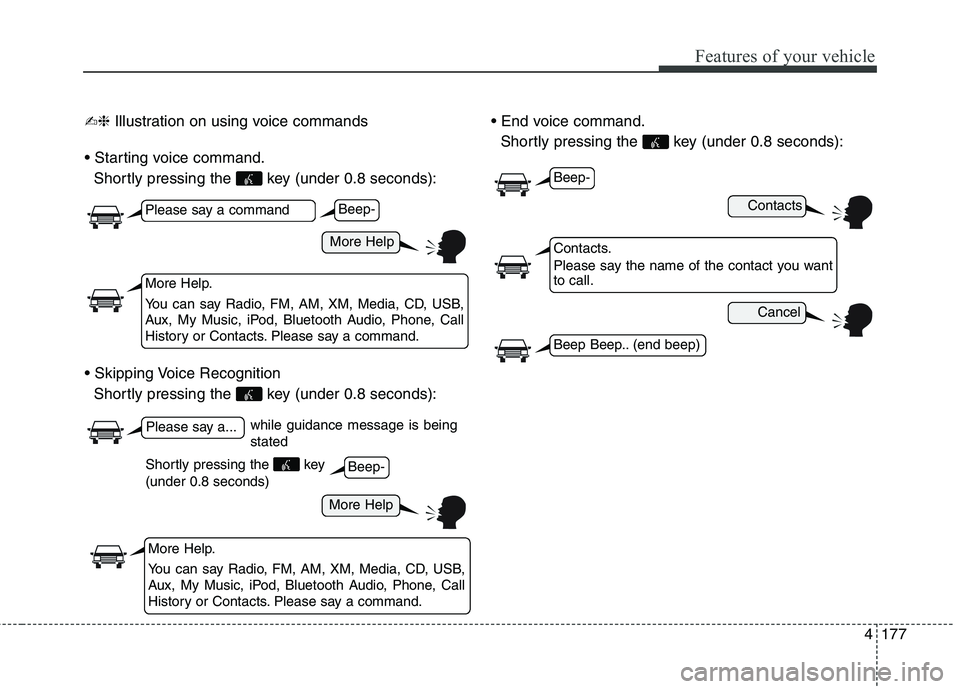
✍❈Illustration on using voice commands
Shortly pressing the key (under 0.8 seconds):
Shortly pressing the key (under 0.8 seconds):
Shortly pressing the key (under 0.8 seconds):
while guidance message is being
stated
More Help
Contacts
Cancel
More Help
Please say a command
Please say a...
More Help.
You can say Radio, FM, AM, XM, Media, CD, USB,
Aux, My Music, iPod, Bluetooth Audio, Phone, Call
History or Contacts. Please say a command.
Contacts.
Please say the name of the contact you want
to call.
More Help.
You can say Radio, FM, AM, XM, Media, CD, USB,
Aux, My Music, iPod, Bluetooth Audio, Phone, Call
History or Contacts. Please say a command.
Beep-
Beep-
Beep-
Beep Beep.. (end beep)
Shortly pressing the key
(under 0.8 seconds)
Page 263 of 476
Features of your vehicle
178 4
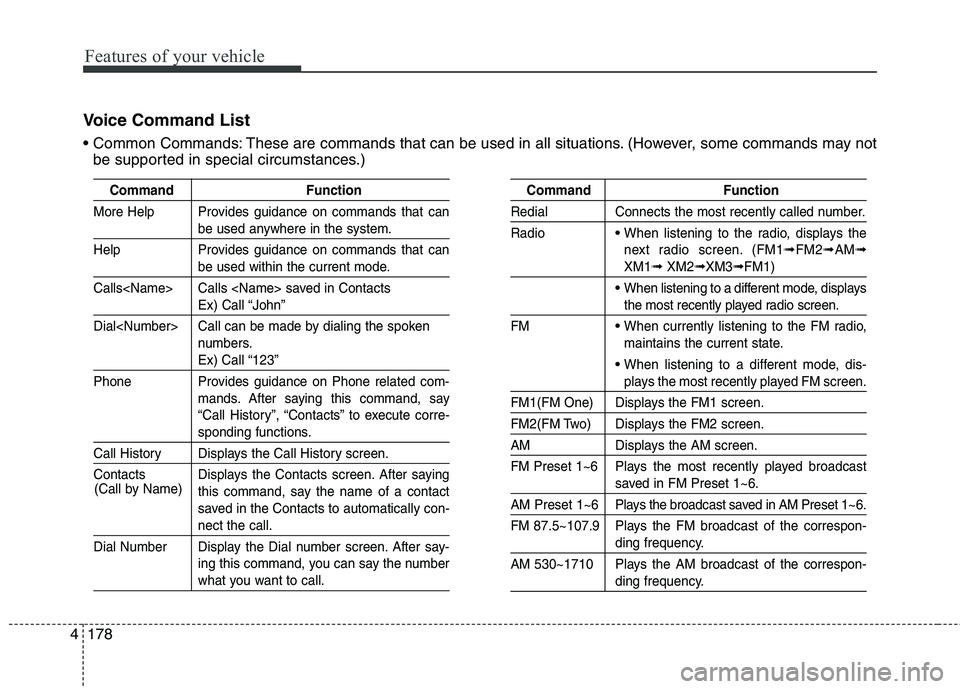
Voice Command List
These are commands that can be used in all situations. (However, some commands may not
be supported in special circumstances.)
Command Function
More Help Provides guidance on commands that can
be used anywhere in the system.
Help Provides guidance on commands that can
be used within the current mode.
Calls
Ex) Call “John”
Dial
numbers.
Ex) Call “123”
Phone Provides guidance on Phone related com-
mands. After saying this command, say
“Call History”, “Contacts” to execute corre-
sponding functions.
Call History Displays the Call History screen.
Contacts Displays the Contacts screen. After saying
this command, say the name of a contact
saved in the Contacts to automatically con-
nect the call.
Dial Number Display the Dial number screen. After say-
ing this command, you can say the number
what you want to call.
Command Function
Redial Connects the most recently called number.
Radio
When listening to the radio, displays the
next radio screen. (FM1
➟FM2➟AM➟
XM1➟XM2➟XM3➟FM1)
When listening to a different mode, displays
the most recently played radio screen.
FM
When currently listening to the FM radio,
maintains the current state.
When listening to a different mode, dis-
plays the most recently played FM screen.
FM1(FM One) Displays the FM1 screen.
FM2(FM Two) Displays the FM2 screen.
AM Displays the AM screen.
FM Preset 1~6 Plays the most recently played broadcast
saved in FM Preset 1~6.
AM Preset 1~6 Plays the broadcast saved in AM Preset 1~6.
FM 87.5~107.9 Plays the FM broadcast of the correspon-
ding frequency.
AM 530~1710 Plays the AM broadcast of the correspon-
ding frequency. (Call by Name)
Page 264 of 476
4179
Features of your vehicle
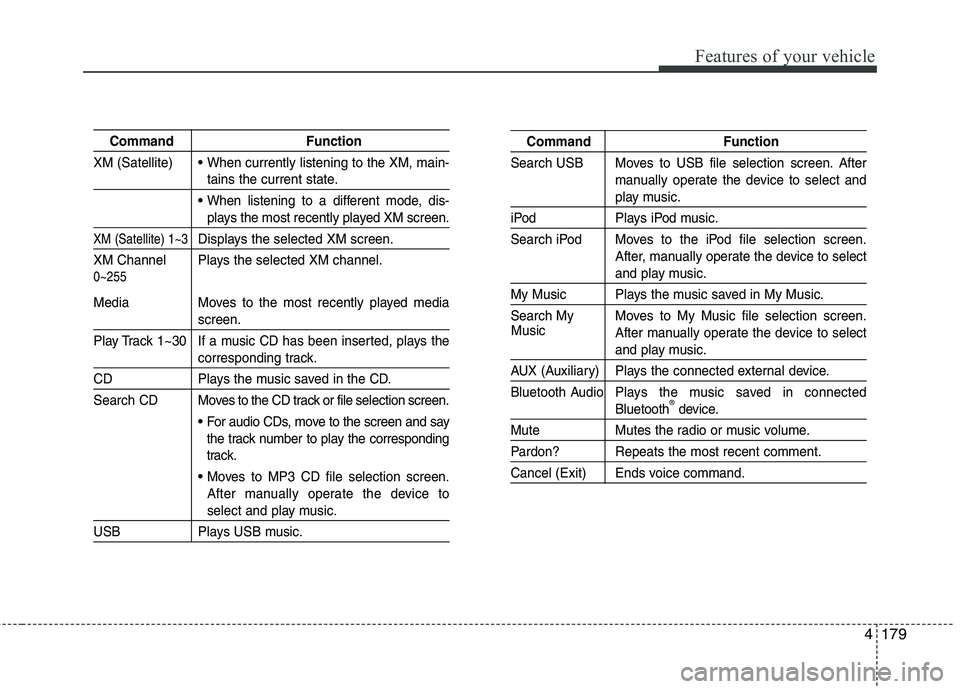
Command Function
XM (Satellite)
When currently listening to the XM, main-
tains the current state.
When listening to a different mode, dis-
plays the most recently played XM screen.
XM (Satellite) 1~3Displays the selected XM screen.
XM Channel Plays the selected XM channel.
Media Moves to the most recently played media
screen.
Play Track 1~30 If a music CD has been inserted, plays the
corresponding track.
CD Plays the music saved in the CD.
Search CD Moves to the CD track or file selection screen.
For audio CDs, move to the screen and say
the track number to play the corresponding
track.
Moves to MP3 CD file selection screen.
After manually operate the device to
select and play music.
USB Plays USB music.
Command Function
Search USB Moves to USB file selection screen. After
manually operate the device to select and
play music.
iPod Plays iPod music.
Search iPod Moves to the iPod file selection screen.
After, manually operate the device to select
and play music.
My Music Plays the music saved in My Music.
Search My Moves to My Music file selection screen.
After manually operate the device to select
and play music.
AUX (Auxiliary) Plays the connected external device.
Bluetooth Audio Plays the music saved in connected
Bluetooth®device.
Mute Mutes the radio or music volume.
Pardon? Repeats the most recent comment.
Cancel (Exit) Ends voice command.
0~255
Music