roof HYUNDAI ELANTRA GT 2014 User Guide
[x] Cancel search | Manufacturer: HYUNDAI, Model Year: 2014, Model line: ELANTRA GT, Model: HYUNDAI ELANTRA GT 2014Pages: 476, PDF Size: 31.71 MB
Page 126 of 476
441
Features of your vehicle
Resetting the sunroof
Whenever the vehicle battery is dis-
connected or discharged, or related
fuse is blown, you must reset your
sunroof system as follows:
1. Turn the engine on and close the
sunroof glass and sunshade com-
pletely.
2. Release the control lever.
3. Push the sunroof control lever for-
ward in the direction of close
(about 10 seconds) until the sun-
roof operates as follows;
SUNSHADE OPEN →TILT OPEN
Then, release the control lever.
CAUTION - Sunroof motor
damage
If you try to open the sunroof
when the temperature is below
freezing or when the sunroof is
covered with snow or ice, the
glass or the motor could be
damaged.
CAUTION
Periodically remove any dirt
that may accumulate on the
guide rail.
If you drive with the sunroof
opened right after a car wash
or rain, water may get inside
the vehicle.
WARNING - Sunroof
Be careful that someone’s
head, hands and body are not
trapped by a closing sunroof.
Do not extend the face, neck,
arms or body outside through
an opened sunroof while driv-
ing.
Make sure your hands and
face are safely out of the way
before closing a sunroof.
The panorama sunroof is
made of glass, and it may
break in an accident. If you do
not have your seat belt on, in
an accident, your body could
move past the roof area and
result in serious injury or
death. All passengers should
wear seat belts at all time.
Page 127 of 476
Features of your vehicle
42 4
4. Push the sunroof control lever for-
ward in the close direction until the
sunroof operates as follows;
SLIDE OPEN →SLIDE CLOSE
Then, release the control lever.
When this is complete, the sunroof
system is reset.
For more detailed information, we
recommend that you contact an
authorized HYUNDAI dealer.
✽ ✽
NOTICE
If you do not reset the sunroof, it
may not work properly.
Page 213 of 476
Features of your vehicle
128 4
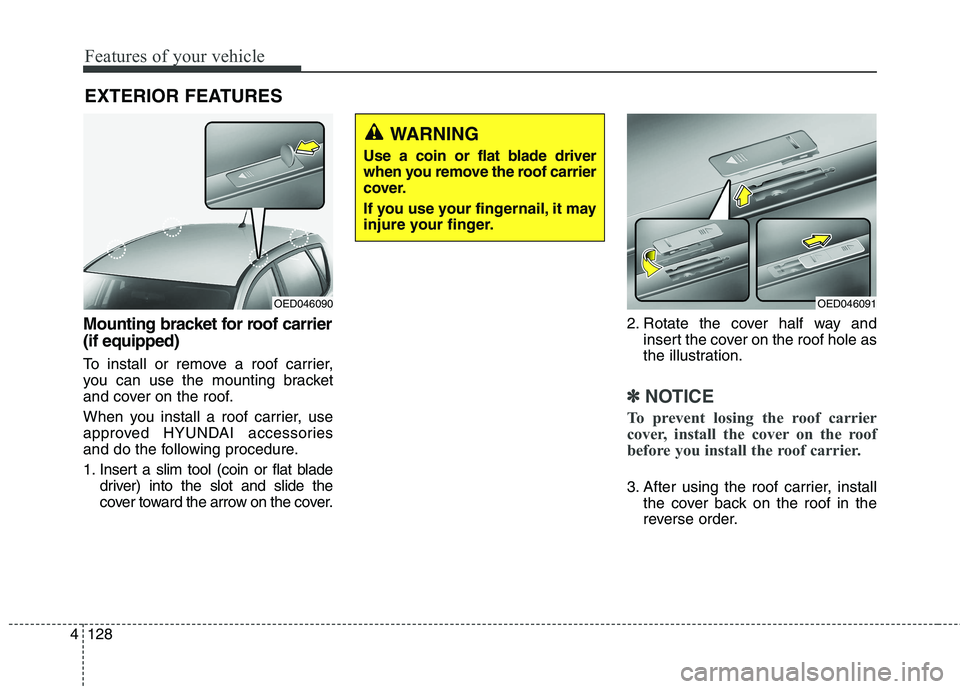
Mounting bracket for roof carrier
(if equipped)
To install or remove a roof carrier,
you can use the mounting bracket
and cover on the roof.
When you install a roof carrier, use
approved HYUNDAI accessories
and do the following procedure.
1. Insert a slim tool (coin or flat blade
driver) into the slot and slide the
cover toward the arrow on the cover.2. Rotate the cover half way and
insert the cover on the roof hole as
the illustration.
✽ ✽
NOTICE
To prevent losing the roof carrier
cover, install the cover on the roof
before you install the roof carrier.
3. After using the roof carrier, install
the cover back on the roof in the
reverse order.
EXTERIOR FEATURES
OED046091OED046090
WARNING
Use a coin or flat blade driver
when you remove the roof carrier
cover.
If you use your fingernail, it may
injure your finger.
Page 214 of 476
4129
Features of your vehicle
✽ ✽
NOTICE
If the vehicle is equipped with a sun-
roof, be sure not to position cargo
onto the roof in such a way that it
could interfere with sunroof opera-
tion.WARNING
The vehicle center of gravity will
be higher when items are
loaded onto the roof. Avoid sud-
den starts, braking, sharp turns,
abrupt maneuvers or high
speeds that may result in loss
of vehicle control or rollover
resulting in an accident.
Always drive slowly and turn
corners carefully when carry-
ing items on the roof. Severe
wind updrafts, caused by pass-
ing vehicles or natural causes,
can cause sudden upward
pressure on items loaded on
the roof. This is especially true
when carrying large, flat items
such as wood panels or mat-
tresses. This could cause the
items to fall off the roof and
cause damage to your vehicle
or others around you.
To prevent damage or loss of
cargo while driving, check fre-
quently before or while driving
to make sure the items on the
roof are securely fastened.
CAUTION
When carrying cargo on the
roof, take the necessary pre-
cautions to make sure the
cargo does not damage the
roof of the vehicle.
When carrying large objects
on the roof, make sure they do
not exceed the overall roof
length or width.
Page 215 of 476
Features of your vehicle
130 4
✽
✽
NOTICE
If you install an aftermarket HID
headlamp, your vehicle's audio and
electronic device may malfunction.
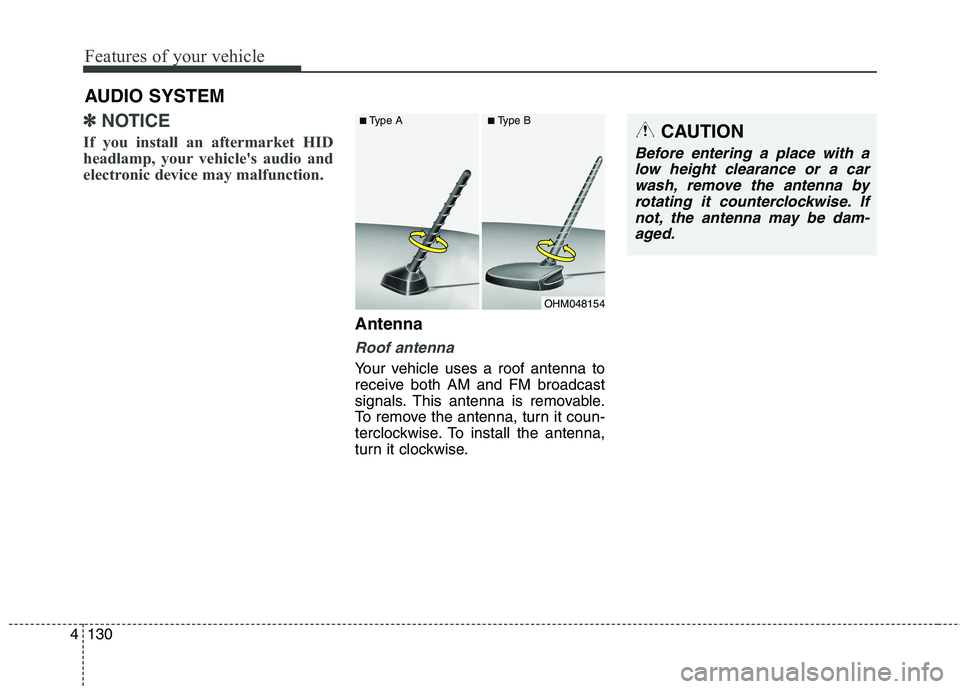
Antenna
Roof antenna
Your vehicle uses a roof antenna to
receive both AM and FM broadcast
signals. This antenna is removable.
To remove the antenna, turn it coun-
terclockwise. To install the antenna,
turn it clockwise.
AUDIO SYSTEM
OHM048154
■Type A■Type BCAUTION
Before entering a place with a
low height clearance or a car
wash, remove the antenna by
rotating it counterclockwise. If
not, the antenna may be dam-
aged.
Page 261 of 476
Features of your vehicle
176 4
(Continued)
Voice recognition may not
function properly due to out-
side noise. The following con-
ditions can affect the perform-
ance of Voice Recognition:
- When the windows and sun-
roof are open
- When the heating/cooling
system is on
- When passing a tunnel
- When driving on rugged and
uneven roads
After downloading Bluetooth
®
Wireless Technology contacts,
the system requires some
times to convert the contacts
into voice information. During
this time, voice recognition
may not operate properly.
Upon inputting your contacts,
special symbols and numbers
cannot be recognized by
voice. For example, “# John
Doe%&” will be recognized as
“John Doe”.
CAUTION IN USING
VOICE COMMAND
The voice recognition feature
of this product supports recog-
nition of the commands listed
within this user’s manual.
While using voice recognition,
operating the steering remote
control or the device will ter-
minate voice recognition and
allow you to manually operate
desired functions.
Position the microphone
above the head of the driver’s
seat. For superior perform-
ance, maintain good posture
when saying voice commands.
(Continued)
Page 383 of 476
Maintenance
22 7
MAINTENANCE ITEMMAINTENANCE
OPERATIONMAINTENANCE INTERVALSDRIVING
CONDITION
DRIVE SHAFTS AND BOOTSIEVERY 7,500 MILES (12,000 KM) OR 6 MONTHSC, D, E, F, G, H, I
CLIMATE CONTROL
AIR FILTER (FOR EVAPORATOR
AND BLOWER UNIT)
RMORE FREQUENTLYC, E
SEVERE DRIVING CONDITIONS
A - Repeatedly driving short distances of less than 5
miles (8 km) in normal temperature or less than 10
miles (16 km) in freezing temperature
B - Extensive engine idling or low speed driving for long
distances
C - Driving on rough, dusty, muddy, unpaved, graveled or
salt- spread roads
D - Driving in areas using salt or other corrosive materi-
als or in very cold weatherE - Driving in sandy areas
F - Driving in heavy traffic area over 90°F (32°C)
G - Driving on uphill, downhill, or mountain road
H - Towing a Trailer, or using a camper, or roof rack
I - Driving as a patrol car, taxi, other commercial use or
vehicle towing
J - Driving over 106 mph (170 km/h)
K - Frequently driving in stop-and-go conditions
Page 404 of 476
743
Maintenance
Reset items
Items should be reset after the bat-
tery has been discharged or the bat-
tery has been disconnected.
Sunroof (See section 4)
Trip computer (See section 4)
Climate control system
(See section 4)
Audio (See section 4)
WARNING
Before performing mainte-
nance or recharging the bat-
tery, turn off all accessories
and stop the engine.
The negative battery cable
must be removed first and
installed last when the battery
is disconnected.
Operation related to the bat-
tery should be done at an
authorized HYUNDAI dealer.
WARNING- Recharging
battery
When recharging the battery,
observe the following precau-
tions:
The battery must be removed
from the vehicle and placed in
an area with good ventilation.
Do not allow cigarettes, sparks,
or flame near the battery.
Watch the battery during
charging, and stop or reduce
the charging rate if the battery
cells begin gassing (boiling)
violently or if the temperature
of the electrolyte of any cell
exceeds 120°F (49°C).
Wear eye protection when
checking the battery during
charging.
Disconnect the battery charg-
er in the following order.
(Continued)(Continued)
1. Turn off the battery charger
main switch.
2. Unhook the negative clamp
from the negative battery ter-
minal.
3. Unhook the positive clamp
from the positive battery ter-
minal.
Page 425 of 476
Maintenance
64 7
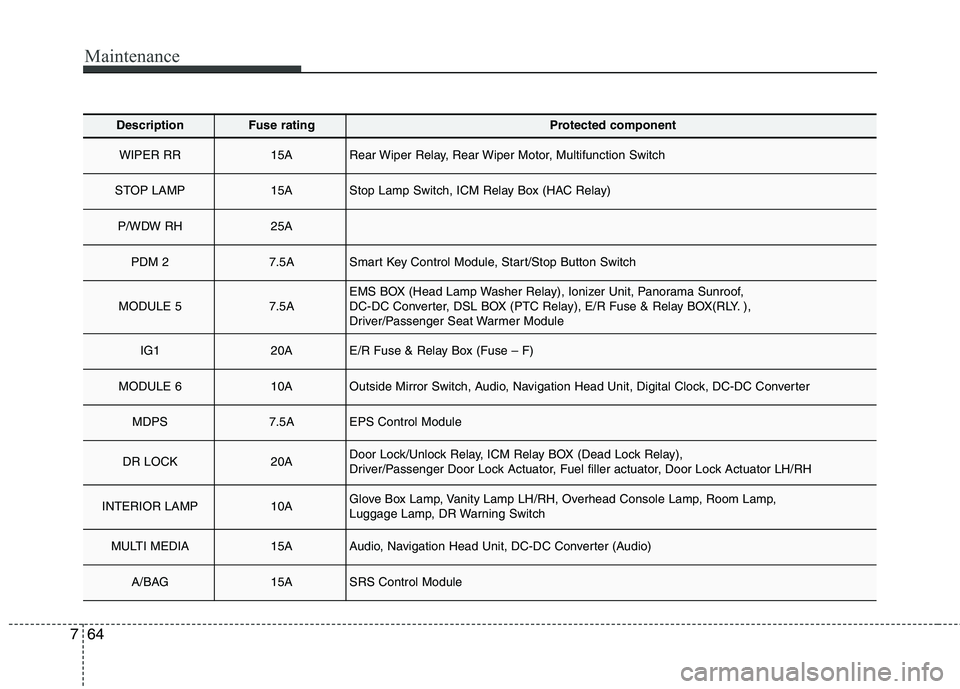
DescriptionFuse ratingProtected component
WIPER RR15ARear Wiper Relay, Rear Wiper Motor, Multifunction Switch
STOP LAMP15AStop Lamp Switch, ICM Relay Box (HAC Relay)
P/WDW RH25A
PDM 27.5ASmart Key Control Module, Start/Stop Button Switch
MODULE 57.5AEMS BOX (Head Lamp Washer Relay), Ionizer Unit, Panorama Sunroof,
DC-DC Converter, DSL BOX (PTC Relay), E/R Fuse & Relay BOX(RLY. ),
Driver/Passenger Seat Warmer Module
IG120AE/R Fuse & Relay Box (Fuse – F)
MODULE 610AOutside Mirror Switch, Audio, Navigation Head Unit, Digital Clock, DC-DC Converter
MDPS7.5AEPS Control Module
DR LOCK20ADoor Lock/Unlock Relay, ICM Relay BOX (Dead Lock Relay),
Driver/Passenger Door Lock Actuator, Fuel filler actuator, Door Lock Actuator LH/RH
INTERIOR LAMP10AGlove Box Lamp, Vanity Lamp LH/RH, Overhead Console Lamp, Room Lamp,
Luggage Lamp, DR Warning Switch
MULTI MEDIA15AAudio, Navigation Head Unit, DC-DC Converter (Audio)
A/BAG15ASRS Control Module
Page 426 of 476
765
Maintenance
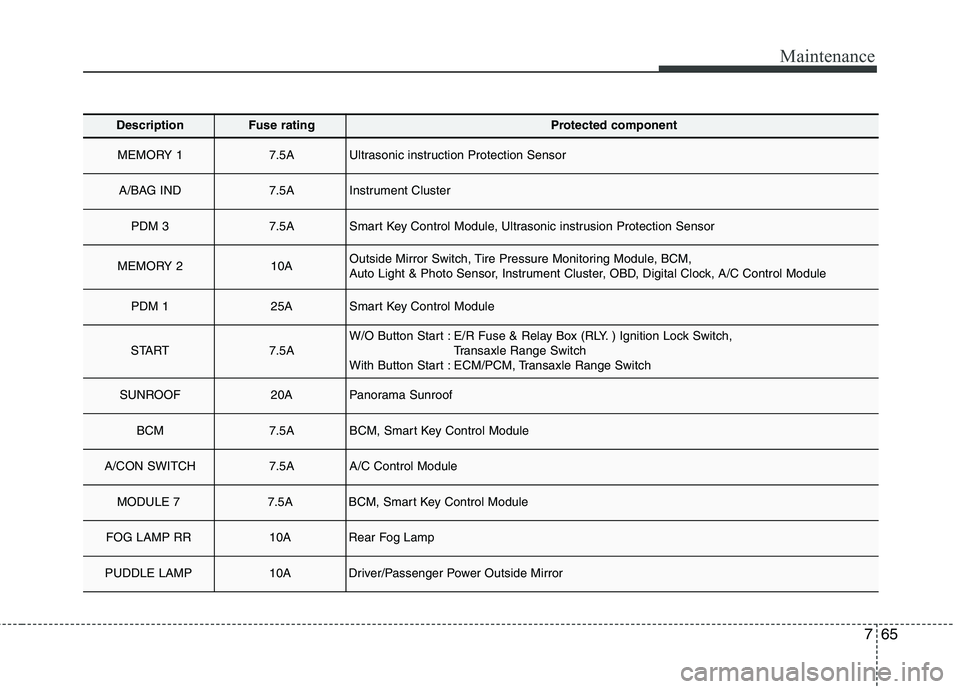
DescriptionFuse ratingProtected component
MEMORY 17.5AUltrasonic instruction Protection Sensor
A/BAG IND7.5AInstrument Cluster
PDM 37.5ASmart Key Control Module, Ultrasonic instrusion Protection Sensor
MEMORY 210AOutside Mirror Switch, Tire Pressure Monitoring Module, BCM,
Auto Light & Photo Sensor, Instrument Cluster, OBD, Digital Clock, A/C Control Module
PDM 125ASmart Key Control Module
START7.5AW/O Button Start : E/R Fuse & Relay Box (RLY. ) Ignition Lock Switch,
Transaxle Range Switch
With Button Start : ECM/PCM, Transaxle Range Switch
SUNROOF20APanorama Sunroof
BCM7.5ABCM, Smart Key Control Module
A/CON SWITCH7.5AA/C Control Module
MODULE 77.5ABCM, Smart Key Control Module
FOG LAMP RR10ARear Fog Lamp
PUDDLE LAMP10ADriver/Passenger Power Outside Mirror