wheel HYUNDAI ELANTRA GT 2014 User Guide
[x] Cancel search | Manufacturer: HYUNDAI, Model Year: 2014, Model line: ELANTRA GT, Model: HYUNDAI ELANTRA GT 2014Pages: 476, PDF Size: 31.71 MB
Page 75 of 476
Safety features of your vehicle
56 3
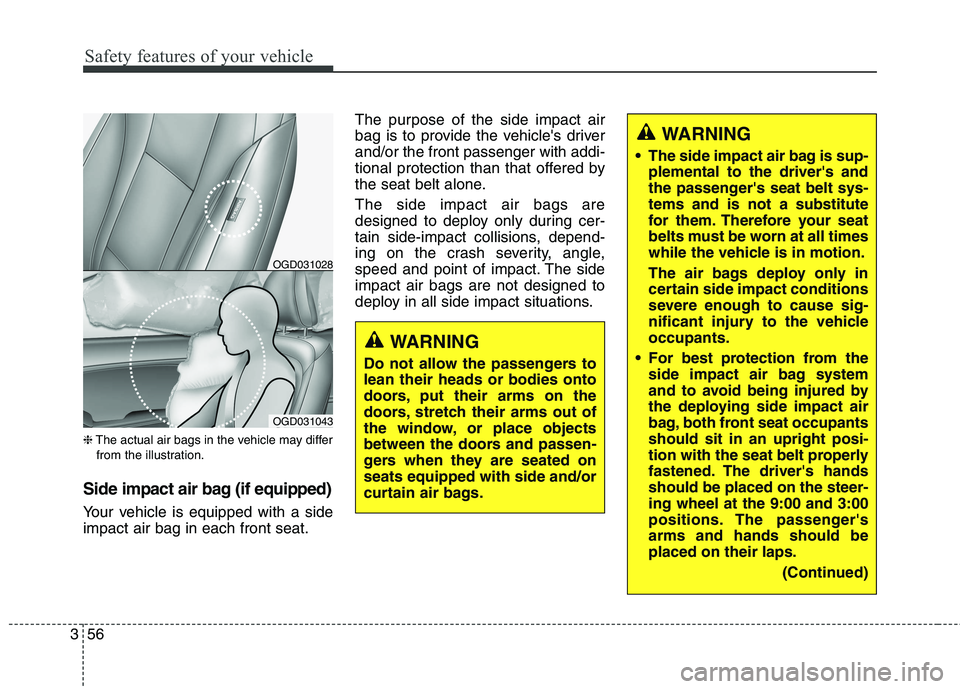
❈The actual air bags in the vehicle may differ
from the illustration.
Side impact air bag (if equipped)
Your vehicle is equipped with a side
impact air bag in each front seat.The purpose of the side impact air
bag is to provide the vehicle's driver
and/or the front passenger with addi-
tional protection than that offered by
the seat belt alone.
The side impact air bags are
designed to deploy only during cer-
tain side-impact collisions, depend-
ing on the crash severity, angle,
speed and point of impact. The side
impact air bags are not designed to
deploy in all side impact situations.
WARNING
Do not allow the passengers to
lean their heads or bodies onto
doors, put their arms on the
doors, stretch their arms out of
the window, or place objects
between the doors and passen-
gers when they are seated on
seats equipped with side and/or
curtain air bags.
WARNING
The side impact air bag is sup-
plemental to the driver's and
the passenger's seat belt sys-
tems and is not a substitute
for them. Therefore your seat
belts must be worn at all times
while the vehicle is in motion.
The air bags deploy only in
certain side impact conditions
severe enough to cause sig-
nificant injury to the vehicle
occupants.
For best protection from the
side impact air bag system
and to avoid being injured by
the deploying side impact air
bag, both front seat occupants
should sit in an upright posi-
tion with the seat belt properly
fastened. The driver's hands
should be placed on the steer-
ing wheel at the 9:00 and 3:00
positions. The passenger's
arms and hands should be
placed on their laps.
(Continued)
OGD031028
OGD031043
Page 83 of 476
Safety features of your vehicle
64 3
SRS Care
The SRS is virtually maintenance-
free and so there are no parts you
can safely service by yourself. If the
SRS air bag warning light " " does
not illuminate, when you turn the
ignition on, or continuously remains
on, have your vehicle immediately
inspected by an authorized
HYUNDAI dealer.
Any work on the SRS system, such
as removing, installing, repairing, or
any work on the steering wheel, the
front passenger's panel, front seats
and roof rails must be performed by
an authorized HYUNDAI dealer.
Improper handling of the SRS system
may result in serious personal injury.
For cleaning the air bag pad covers,
use only a soft, dry cloth or one
which has been moistened with plain
water. Solvents or cleaners could
adversely affect the air bag covers
and proper deployment of the sys-
tem.WARNING
Modification to SRS compo-
nents or wiring, including the
addition of any kind of badges
to the pad covers or modifica-
tions to the body structure,
can adversely affect SRS per-
formance and lead to possible
injury.
Not only the modification of
the parts where the SRS sen-
sors are but also the modifica-
tion of other parts of the vehi-
cle may affect the SRS per-
formance and lead to possible
injury.
No objects should be placed
over or near the air bag mod-
ules on the steering wheel,
instrument panel, and the
front passenger's panel above
the glove box, because any
such object could cause harm
if the vehicle is in a crash
severe enough to cause the
air bags to inflate.
(Continued)
(Continued)
If the air bags inflate, they
must be replaced by an
authorized HYUNDAI dealer.
Do not tamper with or discon-
nect SRS wiring, or other
components of the SRS sys-
tem. Doing so could result in
injury, due to accidental infla-
tion of the air bags or by ren-
dering the SRS inoperative.
If your car was flooded and
has soaked carpeting or water
on the flooring, you shouldn't
try to start the engine; have
the car towed to an authorized
HYUNDAI dealer.
Page 86 of 476
Features of your vehicle
Keys ............................................................................4-4
• Record your key number ..............................................4-4
................................................................4-4
........................................................4-5
Smart key ..................................................................4-7
........................................................4-7
..................................................4-10
................................................4-10
....................................4-11
....................................................4-12
............4-13
Remote keyless entry ..............................................4-14
..............................................4-15
....................................................4-16
Theft-alarm system ................................................4-17
stage ..................................................................4-17
........................................................4-19
Door locks ................................................................4-21
................................................................4-21
..................................................................4-22
..................................4-24
Tailgate ....................................................................4-25
....................................................4-25
......................................................4-25
..............................4-26
Windows ..................................................................4-27
Hood..........................................................................4-32
........................................................4-32
..........................................................4-33
Fuel filler lid ............................................................4-34
............................................4-34
..............................................4-35
Panorama sunroof ..................................................4-38
......................................................................4-39
......................................................4-39
........................................................4-40
......................................................4-40
..................................................4-41
Steering wheel ..........................................................4-43
................................................4-43
............................................4-44
..............................................................................4-45
......................................................................4-45
4
Page 128 of 476
443
Features of your vehicle
Electric power steering (EPS)
The power steering uses an electric
motor to assist you in steering the
vehicle. If the engine is off or if the
power steering system becomes
inoperative, the vehicle may still be
steered, but it will require increased
steering effort.
The motor driven power steering is
controlled by a power steering con-
trol unit which senses the steering
wheel torque and vehicle speed to
command the motor.
The steering becomes slightly heav-
ier as the vehicle’s speed increases
and becomes lighter as the vehicle’s
speed decreases for optimum steer-
ing control.
Should you notice any change in the
effort required to steer during normal
vehicle operation, have the power
steering checked by an authorized
HYUNDAI dealer.
✽ ✽
NOTICE
The following may occur during
normal vehicle operation:
• The EPS warning light does not
illuminate when turning the igni-
tion to the ON position.
• The steering gets heavy immedi-
ately after turning the ignition
switch on. This happens as the sys-
tem performs the EPS system
diagnostics. When the diagnostics
are completed, the steering wheel
will return to its normal condition.
• A click noise may be heard from
the EPS relay after the ignition
switch is turned to the ON or
LOCK (OFF) position.
• A motor noise may be heard when
the vehicle is at a stop or at a low
driving speed.
• When the vehicle is stationary, if
you turn the steering wheel all the
way to the left or right repeatedly,
the steering wheel assist may tem-
porarily be reduced, not a system
malfunction. As time passes. The
steering wheel return to normal
operation.
(Continued)(Continued)
• When you operate the steering
wheel in very low temperatures,
system noise may occur. When the
temperature rises, the noise will dis-
appear. This is a normal condition.
• When the charging system warn-
ing light comes on or the system
voltage is low, the steering wheel
assist may be reduced.
STEERING WHEEL
Page 129 of 476
Features of your vehicle
44 4
✽
✽
NOTICE
If the Electric Power Steering sys-
tem does not operate normally, EPS
assist will stop to prevent accidents
and the EPS warning light on the
cluster will illuminate or blink. Take
your vehicle to an authorized
HYUNDAI dealer and have the
vehicle checked as soon as possible.
Tilt and telescope steering
Tilt steering allows you to adjust the
steering wheel before you drive. You
can also raise it to give your body
more room when you exit and enter
the vehicle.
The steering wheel should be posi-
tioned so that it is comfortable for
you to drive, while permitting you to
see the instrument panel warning
lights and gauges.
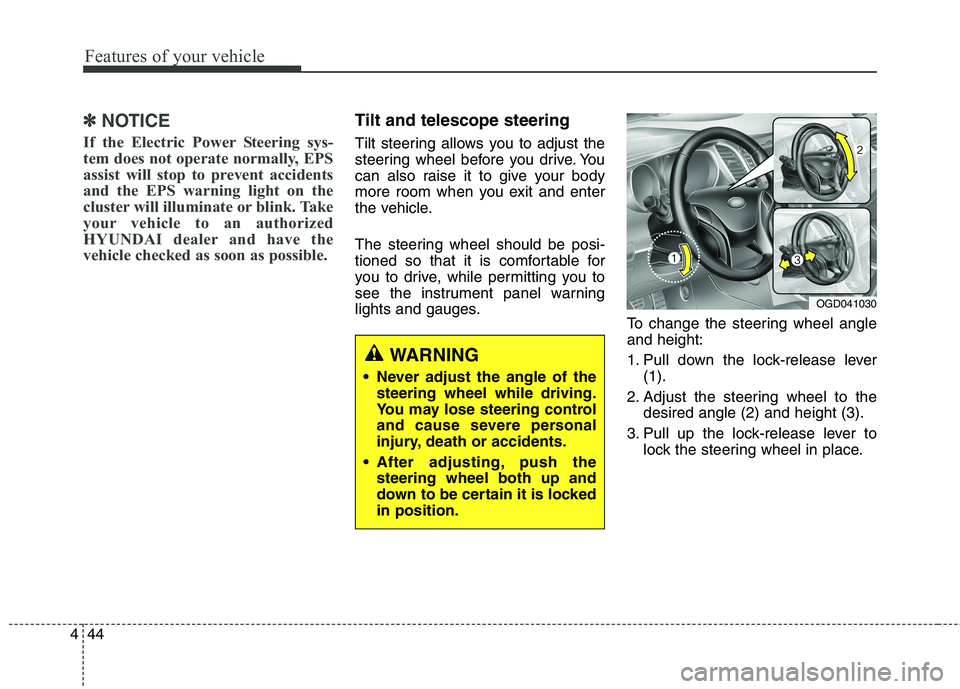
To change the steering wheel angle
and height:
1. Pull down the lock-release lever
(1).
2. Adjust the steering wheel to the
desired angle (2) and height (3).
3. Pull up the lock-release lever to
lock the steering wheel in place.
OGD041030
WARNING
Never adjust the angle of the
steering wheel while driving.
You may lose steering control
and cause severe personal
injury, death or accidents.
After adjusting, push the
steering wheel both up and
down to be certain it is locked
in position.
Page 130 of 476
445
Features of your vehicle
Horn
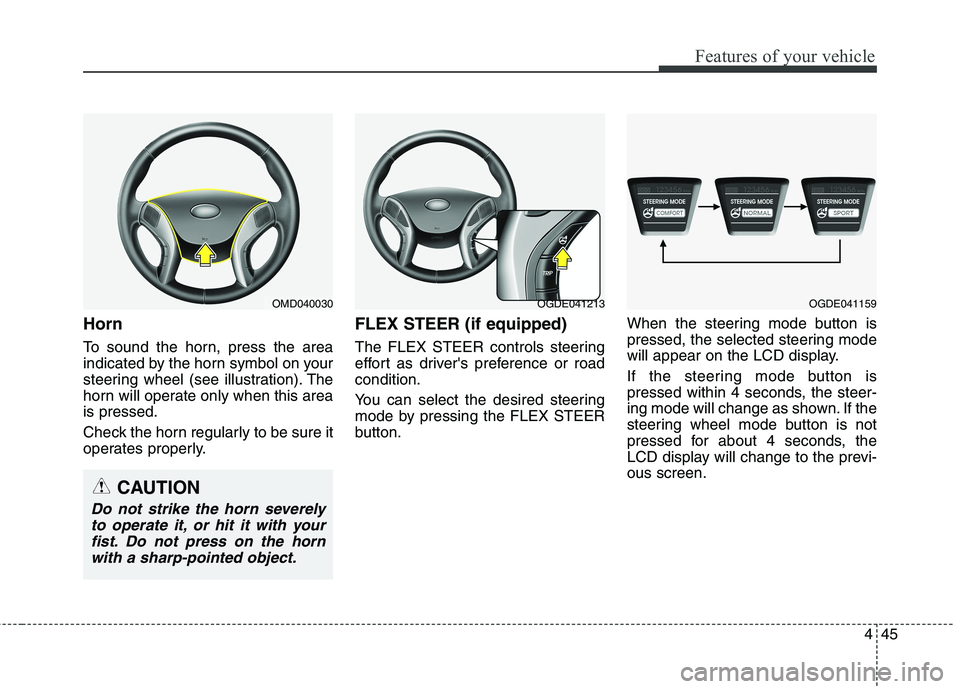
To sound the horn, press the area
indicated by the horn symbol on your
steering wheel (see illustration). The
horn will operate only when this area
is pressed.
Check the horn regularly to be sure it
operates properly.
FLEX STEER (if equipped)
The FLEX STEER controls steering
effort as driver's preference or road
condition.
You can select the desired steering
mode by pressing the FLEX STEER
button.When the steering mode button is
pressed, the selected steering mode
will appear on the LCD display.
If the steering mode button is
pressed within 4 seconds, the steer-
ing mode will change as shown. If the
steering wheel mode button is not
pressed for about 4 seconds, the
LCD display will change to the previ-
ous screen.
OGDE041213OGDE041159OMD040030
CAUTION
Do not strike the horn severely
to operate it, or hit it with your
fist. Do not press on the horn
with a sharp-pointed object.
Page 132 of 476
447
Features of your vehicle
CAUTION
If you press the steering mode
button while operating the
steering wheel, the LCD dis-
play will change, but the steer-
ing effort will not change
immediately. After operating
the steering wheel, the steer-
ing effort will change automat-
ically to the selected mode.
Be careful when changing the
steering mode while driving.
If there is a malfunction of the
electric power steering, the
FLEX STEER will not function.
Page 156 of 476
471
Features of your vehicle
Parking brake & brake
fluid warning light
Parking brake warning
This light is illuminated when the
parking brake is applied with the igni-
tion switch in the START or ON posi-
tion. The warning light should go off
when the parking brake is released.
Low brake fluid level warning
If the warning light remains on, it may
indicate that the brake fluid level in
the reservoir is low.
If the warning light remains on:
1. Drive carefully to the nearest safe
location and stop your vehicle.
2. With the engine stopped, check the
brake fluid level immediately and
add fluid as required. Then check all
brake components for fluid leaks.
3. Do not drive the vehicle if leaks are
found, the warning light remains on
or the brakes do not operate prop-
erly. Have the vehicle towed to any
authorized HYUNDAI dealer for a
brake system inspection and nec-
essary repairs.Your vehicle is equipped with a dual-
diagonal braking system. This means
you still have braking on two wheels
even if one of the brake circuits is
damaged or malfunctions. With only
one of the circuits working, more
than normal pedal travel and greater
pedal pressure are required to stop
the car. Also, the car will not stop in
as short a distance with only a por-
tion of the brake system working. If
the brakes fail while you are driving,
shift to a lower gear for additional
engine braking and stop the car as
soon as it is safe to do so.
To check bulb operation, check
whether the parking brake and brake
fluid warning light illuminates when the
ignition switch is in the ON position.
CAUTION
If the oil pressure warning light
stays on while the engine is run-
ning, serious engine damage may
result. The oil pressure warning
light comes on whenever there is
insufficient oil pressure. In nor-
mal operation, it should come on
when the ignition switch is turned
on, then go out when the engine
is started. If the oil pressure warn-
ing light stays on while the
engine is running, there is a seri-
ous malfunction.
If this happens, stop the car as
soon as it is safe to do so, turn
off the engine and check the oil
level. If the oil level is low, fill the
engine oil to the proper level
and start the engine again. If the
light stays on with the engine
running, turn the engine off
immediately. In any instance
where the oil light stays on
when the engine is running, the
engine should be checked by an
authorized HYUNDAI dealer
before the car is driven again.
WARNING
Driving the vehicle with a warn-
ing light on is dangerous. If the
brake warning light remains on,
have the brakes checked and
repaired immediately by an
authorized HYUNDAI dealer.
Page 161 of 476
Features of your vehicle
76 4
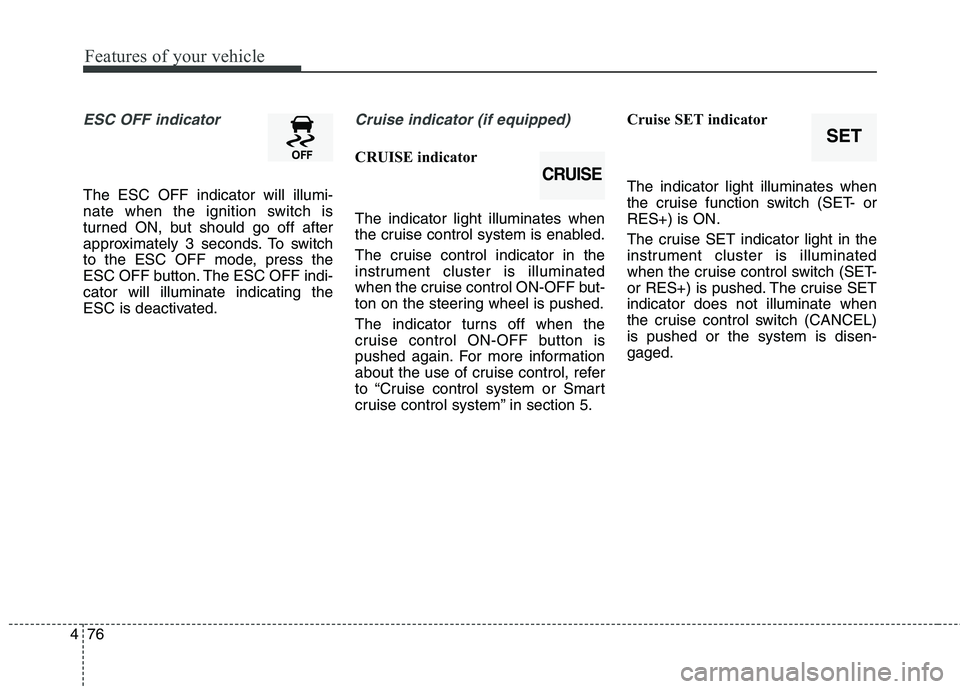
ESC OFF indicator
The ESC OFF indicator will illumi-
nate when the ignition switch is
turned ON, but should go off after
approximately 3 seconds. To switch
to the ESC OFF mode, press the
ESC OFF button. The ESC OFF indi-
cator will illuminate indicating the
ESC is deactivated.
Cruise indicator (if equipped)
CRUISE indicator
The indicator light illuminates when
the cruise control system is enabled.
The cruise control indicator in the
instrument cluster is illuminated
when the cruise control ON-OFF but-
ton on the steering wheel is pushed.
The indicator turns off when the
cruise control ON-OFF button is
pushed again. For more information
about the use of cruise control, refer
to “Cruise control system or Smart
cruise control system” in section 5.Cruise SET indicator
The indicator light illuminates when
the cruise function switch (SET- or
RES+) is ON.
The cruise SET indicator light in the
instrument cluster is illuminated
when the cruise control switch (SET-
or RES+) is pushed. The cruise SET
indicator does not illuminate when
the cruise control switch (CANCEL)
is pushed or the system is disen-
gaged.
CRUISE
SET
Page 166 of 476
481
Features of your vehicle
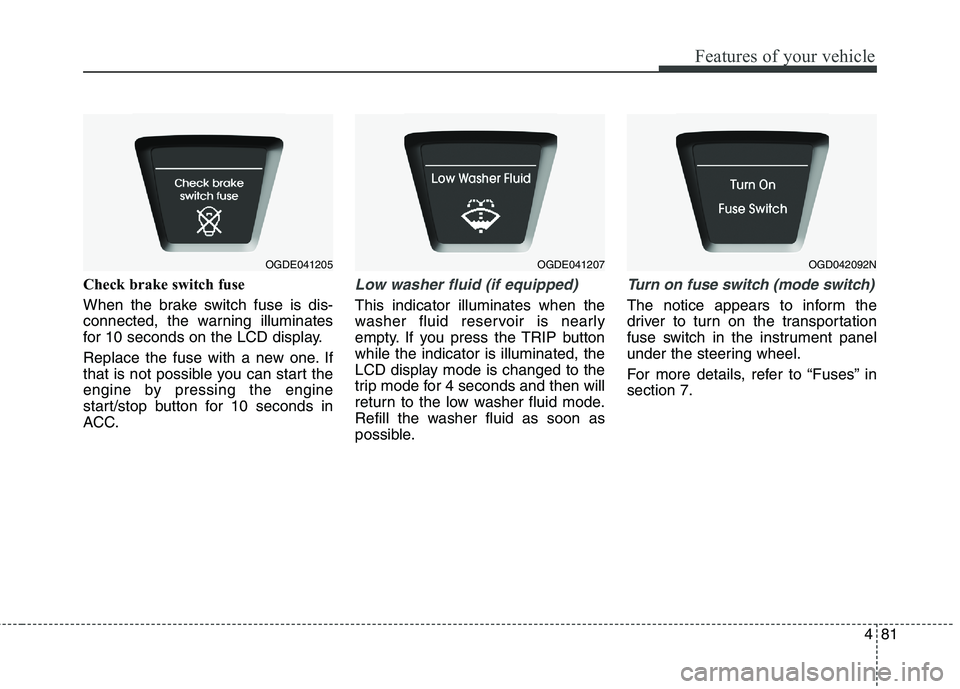
Check brake switch fuse
When the brake switch fuse is dis-
connected, the warning illuminates
for 10 seconds on the LCD display.
Replace the fuse with a new one. If
that is not possible you can start the
engine by pressing the engine
start/stop button for 10 seconds in
ACC.Low washer fluid (if equipped)
This indicator illuminates when the
washer fluid reservoir is nearly
empty. If you press the TRIP button
while the indicator is illuminated, the
LCD display mode is changed to the
trip mode for 4 seconds and then will
return to the low washer fluid mode.
Refill the washer fluid as soon as
possible.
Turn on fuse switch (mode switch)
The notice appears to inform the
driver to turn on the transportation
fuse switch in the instrument panel
under the steering wheel.
For more details, refer to “Fuses” in
section 7.
OGDE041205OGDE041207OGD042092N