cord Hyundai Elantra GT 2017 Owner's Guide
[x] Cancel search | Manufacturer: HYUNDAI, Model Year: 2017, Model line: Elantra GT, Model: Hyundai Elantra GT 2017Pages: 493, PDF Size: 11.53 MB
Page 227 of 493
Features of your vehicle
140
4
Caring for disc
If the temperature inside the car is
too high, open the car windows to
ventilate before using the system.
It is illegal to copy and use MP3/WMA files without permis-
sion. Use CDs that are created
only by lawful means.
Do not apply volatile agents, such as benzene and thinner, normal
cleaners and magnetic sprays
made for analogue disc onto CDs.
To prevent the disc surface from getting damaged, hold CDs by the
edges or the center hole only.
Clean the disc surface with a piece of soft cloth before playback (wipe
it from the center to the outside
edge).
Do not damage the disc surface or attach pieces of sticky tape or
paper.
Make certain only CDs are insert- ed into the CD player (Do not insert
more than one CD at a time).
Keep CDs in their cases after use to protect them from scratches or
dirt. Depending on the type of CD-
R/CD-RW CDs, certain CDs may
not operate normally according to
the manufacturing companies. In
such circumstances, continued
use may cause malfunctions to
your audio system.
✽ ✽ NOTICE
- Playing an Incompatible Copy
Protected Audio CD
Some copy protected CDs, which do
not comply with international audio
CD standards (Red Book), may not
play on your car audio. Please note
that inabilities to properly play a
copy protected CD may indicate
that the CD is defective, not the CD
player.
Page 248 of 493
![Hyundai Elantra GT 2017 Owners Guide 4161
Features of your vehicle
Position
This menu allows you to set the
Fader, Balance.
Select [Position] Select menu
through
TUNE knobTu r n
TUNE knobleft/right to set
Fader, Balance : Selects the](/img/35/14626/w960_14626-247.png "Hyundai Elantra GT 2017 Owners Guide 4161
Features of your vehicle
Position
This menu allows you to set the
Fader, Balance.
Select [Position] Select menu
through
TUNE knobTu r n
TUNE knobleft/right to set
Fader, Balance : Selects the")
4161
Features of your vehicle
Position
This menu allows you to set the
Fader, Balance.
Select [Position] Select menu
through
TUNE knobTu r n
TUNE knobleft/right to set
Fader, Balance : Selects the sound fader and balance
Default : Restores default settings.
❈ Return : While adjusting values,
pressing the TUNE knob will
restore the parent menu.
Speed Dependent Volume
Control
This feature is used to automatically
control the volume level according to
the speed of the vehicle.
Select [Speed Dependent Vol.] Set
in [On / Off] of
TUNEknob
Voice Recognition Volume
(if equipped)
Adjusts voice recognition volume.
Select [Voice Recognition Vol.] Set
volume of
TUNEknob
Blue Link®Voice Volume
(for Blue Link®equipped model)
Sets the Blue Link®voice recognition
volume.
❈ While using Blue Link
®voice
recognition, turning the tune knob
will display the volume control
popup screen.
❈ May differ depending on the
selected audio.
Page 254 of 493
4167
Features of your vehicle
Satellite Radio channels:
Enjoy SiriusXM Satellite Radio with a 3-
month trial subscription to the Sirius
Select package. You'll get over 140
channels, including commercial-free
music, plus all your favorite sports,
exclusive talk, entertainment, and a
selection of premium programming.
For more information and a complete
list of SiriusXM channels, visit
siriusxm.com in the United States,
siriusxm.ca in Canada, or call SiriusXM
at 1-888-539-7474.
Satellite Radio reception factors:
To receive the satellite signal, your vehi-
cle has been equipped with a satellite
radio antenna located on the roof of
your vehicle. The vehicle roof provides
the best location for an unobstructed,
open view of the sky, a requirement of
a satellite radio system. Like AM/FM,
there are several factors that can affect
satellite radio reception performance:
Antenna obstructions: For optimalreception performance, keep the
antenna clear of snow and ice build-
up and keep luggage and other
material as far away from the anten-
na as possible. Terrain: Hills, mountains, tall build-
ings, bridges, tunnels, freeway
overpasses, parking garages,
dense tree foliage and thunder-
storms can interfere with your
reception.
SiriusXM Satellite Radio service:
SiriusXM is a subscription-based satel-
lite radio service that broad-casts
music, sports, news and entertainment
programming to radio receivers, which
are available for installation in motor
vehicles or factory installed, as well as
for the home, portable and wireless
devices, and through an Internet con-
nection on personal computer. Vehicles
that are equipped with a factory
installed SiriusXM Satellite Radio sys-
tem include:
Hardware and an introductory trial subscription term, which begins on
the date of sale or lease of the
vehicle.
For a small upgrade fee, access to SiriusXM music channels, and other
select channels over the Internet using
any computer connected to the
Internet (U.S. customers only). For information on extended sub-
scription terms, contact SiriusXM
at 1-888-539-7474.
NOTE:
SiriusXM services require a sub-
scription sold separately, or as a
package, by Sirius XM Radio Inc. If
you decide to continue service
after your trial, the subscription
plan you choose will automatical-
ly renew thereafter and you will be
charged according to your chosen
payment method at then-current
rates. Fees and taxes apply. To
cancel you must call SiriusXM at
1-866-635-2349. See SiriusXM
Customer Agreement for com-
plete terms at www.siriusxm.
com. SiriusXM U.S. satellite and
data services are available only in
the 48 contiguous USA, DC and
PR (with coverage limitations).
SiriusXM satellite service is also
available in Canada; see www.sir-
iusxm.ca. All fees and program-
ming subject to change. Sirius,
XM and all related marks and
logos are trademarks of Sirius XM
Radio Inc.
SiriusXM®Satellite Radio information
Page 290 of 493
4203
Features of your vehicle
iPod®is a registered trademark of
Apple Inc. iPod®mobile digital
device sold separately. The
Bluetooth
®word mark and logos
are registered trademarks owned
by Bluetooth SIG, Inc. and any use
of such marks by Hyundai is
under license. SiriusXM services
require a subscription sold sepa-
rately, or as a package, by Sirius
XM Radio Inc. If you decide to con-
tinue service after your trial, the
subscription plan you choose will
automatically renew thereafter
and you will be charged according
to your chosen payment method
at then-current rates. Fees and
taxes apply. To cancel you must
call SiriusXM at 1-866-635-2349.
See SiriusXM Customer
Agreement for complete terms at
www.siriusxm.com. SiriusXM U.S.
satellite and data services are
available only in the 48 contigu-
ous USA, DC and PR (with cover-
age limitations). SiriusXM satellite
service is also available in
Canada; see www.siriusxm.ca. All
fees and programming subject to
change. Sirius, XM and all related marks
and logos are trademarks of Sirius
XM Radio Inc. Android™ is a
trademark of Google, Inc.
BlackBerry is a registered trade-
mark of Research In Motion
Limited (RIM). All other marks,
channel names and logos are the
property of their respective own-
ers. All rights reserved.
Page 291 of 493
Features of your vehicle
204
4
FCC
This equipment has been tested and found to comply with the limits for a Class B digital device, pursuant to part 15
of the FCC Rules. These limits are designed to provide reasonable protection against harmful interference in a resi-
dential installation.
This equipment generates, uses and can radiate radio frequency energy and, if not installed and used in accordance
with the instructions,may cause harmful interference to radio communications. However, there is no guarantee that
interference will not occur in a particular installation. If this equipment does cause harmful interference to radio or tel-
evision reception, which can be determined by turning the equipment off and on, the user is encouraged to try to cor-
rect the interference by one ormore of the following measures:
Reorient or relocate the receiving antenna.
Increase the separation between the equipment and receiver.
Connect the equipment into an outlet on a circuit different from that to which the receiver is connected.
Consult the dealer or an experienced radio/TV technician for help.
Caution: Any changes or modifications to this device not explicitly approved by manufacturer could void
your authority to operate this equipment.
DECLARATION OF CONFORMITY
Page 312 of 493
Driving your vehicle
20
5
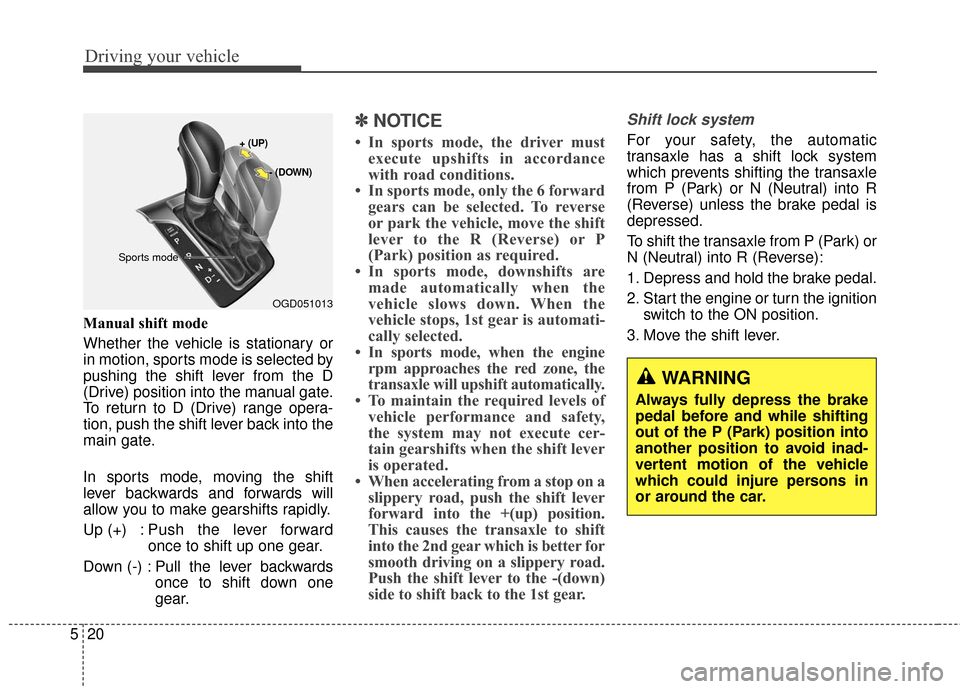
Manual shift mode
Whether the vehicle is stationary or
in motion, sports mode is selected by
pushing the shift lever from the D
(Drive) position into the manual gate.
To return to D (Drive) range opera-
tion, push the shift lever back into the
main gate.
In sports mode, moving the shift
lever backwards and forwards will
allow you to make gearshifts rapidly.
Up (+) : Push the lever forward
once to shift up one gear.
Down (-) : Pull the lever backwards once to shift down one
gear.
✽ ✽NOTICE
• In sports mode, the driver must
execute upshifts in accordance
with road conditions.
• In sports mode, only the 6 forward gears can be selected. To reverse
or park the vehicle, move the shift
lever to the R (Reverse) or P
(Park) position as required.
• In sports mode, downshifts are made automatically when the
vehicle slows down. When the
vehicle stops, 1st gear is automati-
cally selected.
• In sports mode, when the engine rpm approaches the red zone, the
transaxle will upshift automatically.
• To maintain the required levels of vehicle performance and safety,
the system may not execute cer-
tain gearshifts when the shift lever
is operated.
• When accelerating from a stop on a slippery road, push the shift lever
forward into the +(up) position.
This causes the transaxle to shift
into the 2nd gear which is better for
smooth driving on a slippery road.
Push the shift lever to the -(down)
side to shift back to the 1st gear.
Shift lock system
For your safety, the automatic
transaxle has a shift lock system
which prevents shifting the transaxle
from P (Park) or N (Neutral) into R
(Reverse) unless the brake pedal is
depressed.
To shift the transaxle from P (Park) or
N (Neutral) into R (Reverse):
1. Depress and hold the brake pedal.
2. Start the engine or turn the ignition
switch to the ON position.
3. Move the shift lever.
WARNING
Always fully depress the brake
pedal before and while shifting
out of the P (Park) position into
another position to avoid inad-
vertent motion of the vehicle
which could injure persons in
or around the car.
OGD051013
+ (UP)
- (DOWN)
Sports mode
Page 326 of 493
Driving your vehicle
34
5
Malfunction indicator
The VSM can be deactivated even if
you don’t cancel the VSM operation
by pressing the ESC OFF button. It
indicates that a malfunction has
been detected somewhere in the
Electric Power Steering system or
VSM system. If the ESC indicator
light ( ) or EPS warning light ( )
remains on, take your vehicle to an
authorized HYUNDAI dealer and
have the system checked.
✽ ✽
NOTICE
• The VSM is designed to function
above approximately 9 mph (15
km/h) on curves.
• The VSM is designed to function above approximately 18 mph (30
km/h) when a vehicle is braking on
a road with a surface of varying
friction levels.
Good braking practicesWARNING
The Vehicle Stability
Management system is not a
substitute for safe driving
practices but a supplemen-
tary function only. It is the
responsibility of the driver to
always check the speed and
the distance to the vehicle
ahead. Always hold the steer-
ing wheel firmly while driving.
Your vehicle is designed to activate according to the dri-
ver’s intention, even with
installed VSM. Always follow
all the normal precautions for
driving at safe speeds for the
conditions – including driving
in inclement weather and on a
slippery road.
Driving with varying tire or wheel sizes may cause the
VSM system to malfunction.
When replacing tires, make
sure they are the same size as
your original tires.WARNING
Whenever you leave or parkyour vehicle, always set the
parking brake as far as possi-
ble and fully engage the vehi-
cle's transaxle into the P
(Park) position. If the parking
brake is not fully engaged, the
vehicle may move inadver-
tently and injure yourself and
others.
All vehicles should always have the parking brake fully
engaged when parking to
avoid inadvertent movement
of the vehicle which can injure
occupants or pedestrians.
Page 333 of 493
541
Driving your vehicle
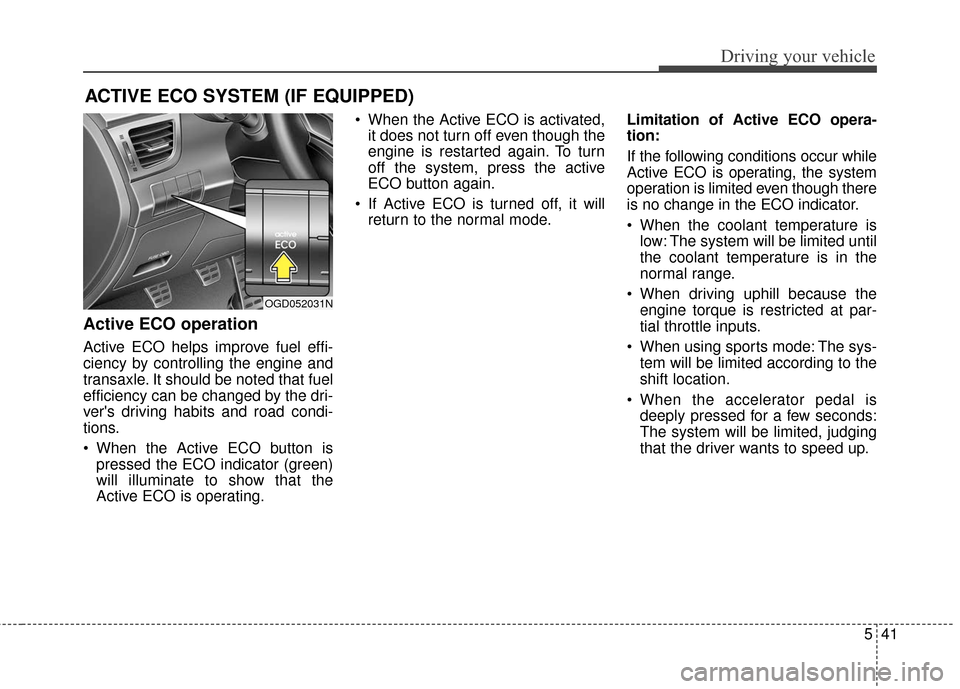
Active ECO operation
Active ECO helps improve fuel effi-
ciency by controlling the engine and
transaxle. It should be noted that fuel
efficiency can be changed by the dri-
ver's driving habits and road condi-
tions.
When the Active ECO button ispressed the ECO indicator (green)
will illuminate to show that the
Active ECO is operating. When the Active ECO is activated,
it does not turn off even though the
engine is restarted again. To turn
off the system, press the active
ECO button again.
If Active ECO is turned off, it will return to the normal mode. Limitation of Active ECO opera-
tion:
If the following conditions occur while
Active ECO is operating, the system
operation is limited even though there
is no change in the ECO indicator.
When the coolant temperature is
low: The system will be limited until
the coolant temperature is in the
normal range.
When driving uphill because the engine torque is restricted at par-
tial throttle inputs.
When using sports mode: The sys- tem will be limited according to the
shift location.
When the accelerator pedal is deeply pressed for a few seconds:
The system will be limited, judging
that the driver wants to speed up.
ACTIVE ECO SYSTEM (IF EQUIPPED)
OGD052031N
Page 334 of 493
Driving your vehicle
42
5
Your vehicle's fuel economy depends
mainly on your style of driving, where
you drive and when you drive.
Each of these factors affects how
many miles (kilometers) you can get
from a gallon (liter) of fuel. To operate
your vehicle as economically as pos-
sible, use the following driving sug-
gestions to help save money in both
fuel and repairs:
Drive smoothly. Accelerate at a
moderate rate. Don't make "jack-
rabbit" starts or full-throttle shifts
and maintain a steady cruising
speed. Don't race between stop-
lights. Try to adjust your speed to
that of the other traffic so you don't
have to change speeds unneces-
sarily. Avoid heavy traffic whenever
possible. Always maintain a safe
distance from other vehicles so
you can avoid unnecessary brak-
ing. This also reduces brake wear.
Drive at a moderate speed. The faster you drive, the more fuel your
car uses. Driving at a moderate
speed, especially on the highway,
is one of the most effective ways to
reduce fuel consumption. Don't "ride" the brake pedal. This
can increase fuel consumption and
also increase wear on these com-
ponents. In addition, driving with
your foot resting on the brake pedal
may cause the brakes to overheat,
which reduces their effectiveness
and may lead to more serious con-
sequences.
Take care of your tires. Keep them inflated to the recommended pres-
sure. Incorrect inflation, either too
much or too little, results in unnec-
essary tire wear. Check the tire
pressures at least once a month.
Be sure that the wheels are aligned correctly. Improper align-
ment can result from hitting curbs
or driving too fast over irregular
surfaces. Poor alignment causes
faster tire wear and may also result
in other problems as well as
greater fuel consumption. Keep your car in good condition. For
better fuel economy and reduced
maintenance costs, maintain your
car in accordance with the mainte-
nance schedule in section 7. If you
drive your car in severe conditions,
more frequent maintenance is
required (see section 7 for details).
Keep your car clean. For maximum service, your vehicle should be kept
clean and free of corrosive materi-
als. It is especially important that
mud, dirt, ice, etc. not be allowed to
accumulate on the underside of the
car. This extra weight can result in
increased fuel consumption and
also contribute to corrosion.
Travel lightly. Don't carry unneces- sary weight in your car. Weight
reduces fuel economy.
Don't let the engine idle longer than necessary. If you are waiting
(and not in traffic), turn off your
engine and restart only when
you're ready to go.
ECONOMICAL OPERATION
Page 343 of 493
551
Driving your vehicle
Use high quality ethylene glycol
coolant
Your vehicle is delivered with high
quality ethylene glycol coolant in the
cooling system. It is the only type of
coolant that should be used because
it helps prevent corrosion in the cool-
ing system, lubricates the water
pump and prevents freezing. Be sure
to replace or replenish your coolant
in accordance with the maintenance
schedule in section 7. Before winter,
have your coolant tested to assure
that its freezing point is sufficient for
the temperatures anticipated during
the winter.
Check battery and cables
Winter puts additional burdens on
the battery system. Visually inspect
the battery and cables as described
in section 7. The level of charge in
your battery can be checked by an
authorized HYUNDAI dealer or a
service station.
Change to "winter weight" oil
if necessary
In some climates it is recommended
that a lower viscosity "winter weight"
oil be used during cold weather. See
section 8 for recommendations. If
you aren't sure what weight oil you
should use, consult an authorized
HYUNDAI dealer.
Check spark plugs and igni-
tion system
Inspect your spark plugs as
described in section 7 and replace
them if necessary. Also check all
ignition wiring and components to be
sure they are not cracked, worn or
damaged in any way.
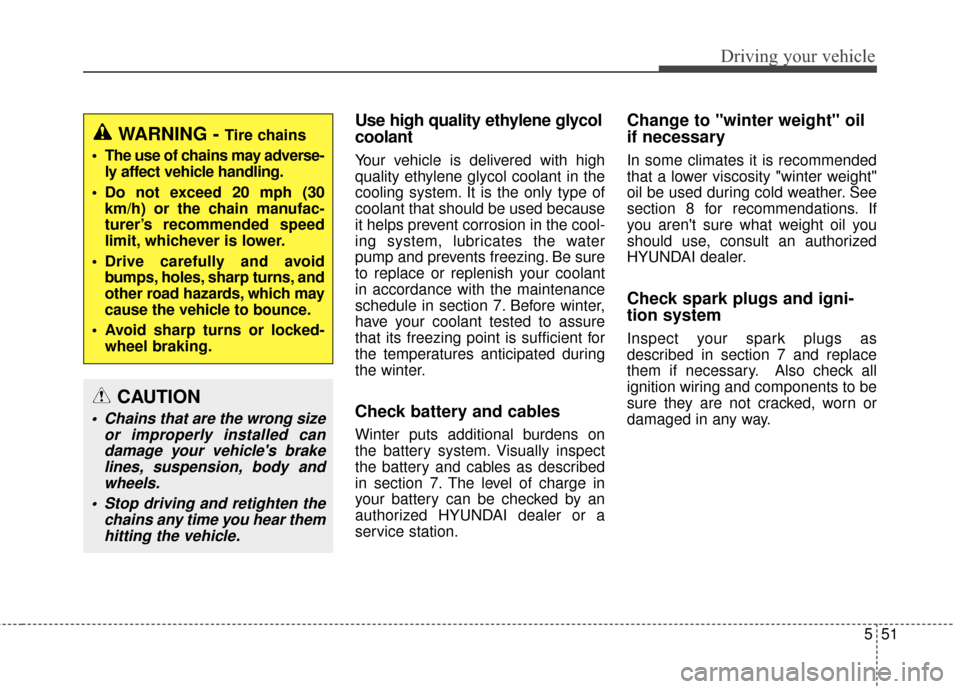
WARNING - Tire chains
The use of chains may adverse- ly affect vehicle handling.
Do not exceed 20 mph (30 km/h) or the chain manufac-
turer’s recommended speed
limit, whichever is lower.
Drive carefully and avoid bumps, holes, sharp turns, and
other road hazards, which may
cause the vehicle to bounce.
Avoid sharp turns or locked- wheel braking.
CAUTION
Chains that are the wrong size or improperly installed candamage your vehicle's brakelines, suspension, body andwheels.
Stop driving and retighten the chains any time you hear themhitting the vehicle.