mirror HYUNDAI ELANTRA GT 2019 User Guide
[x] Cancel search | Manufacturer: HYUNDAI, Model Year: 2019, Model line: ELANTRA GT, Model: HYUNDAI ELANTRA GT 2019Pages: 486, PDF Size: 78.59 MB
Page 202 of 486
3-117
Convenient features of your vehicle
3
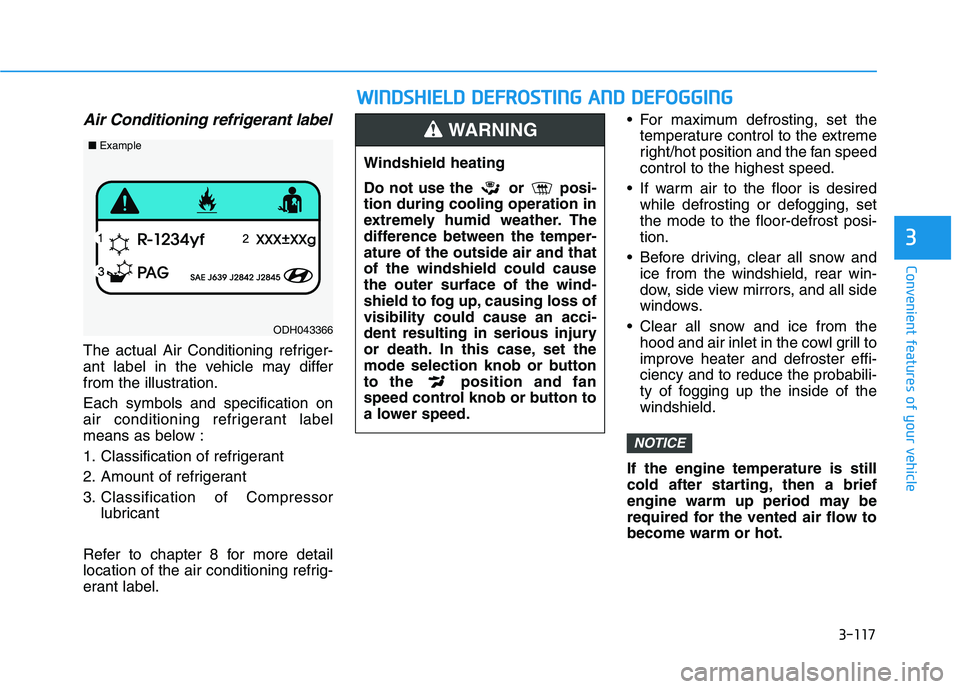
Air Conditioning refrigerant label
The actual Air Conditioning refriger-
ant label in the vehicle may differ
from the illustration. Each symbols and specification on
air conditioning refrigerant label
means as below :
1. Classification of refrigerant
2. Amount of refrigerant
3. Classification of Compressorlubricant
Refer to chapter 8 for more detail
location of the air conditioning refrig-
erant label. For maximum defrosting, set the
temperature control to the extreme
right/hot position and the fan speedcontrol to the highest speed.
If warm air to the floor is desired while defrosting or defogging, setthe mode to the floor-defrost posi-tion.
Before driving, clear all snow and ice from the windshield, rear win-
dow, side view mirrors, and all side
windows.
Clear all snow and ice from the hood and air inlet in the cowl grill to
improve heater and defroster effi-ciency and to reduce the probabili-
ty of fogging up the inside of thewindshield.
If the engine temperature is still
cold after starting, then a brief
engine warm up period may be
required for the vented air flow tobecome warm or hot.
NOTICE
ODH043366
■ Example
WW IINN DDSSHH IIEE LLDD DD EEFFRR OO SSTT IINN GG AA NN DD DD EEFFOO GGGGIINN GG
Windshield heating
Do not use the or posi- tion during cooling operation in
extremely humid weather. The
difference between the temper-ature of the outside air and thatof the windshield could causethe outer surface of the wind-
shield to fog up, causing loss ofvisibility could cause an acci-
dent resulting in serious injury
or death. In this case, set the
mode selection knob or button
to the position and fan
speed control knob or button to
a lower speed.
WARNING
Page 206 of 486
3-121
Convenient features of your vehicle
Rear Window Defroster
To prevent damage to the conduc-
tors bonded to the inside surface
of the rear window, never use
sharp instruments or window
cleaners containing abrasives to
clean the window.
If you want to defrost and defog
the front windshield, refer to the
"Windshield Defrosting and
Defogging" section in this chap-
ter.The defroster heats the window to
remove frost, fog and thin ice from
the interior and exterior of the rear
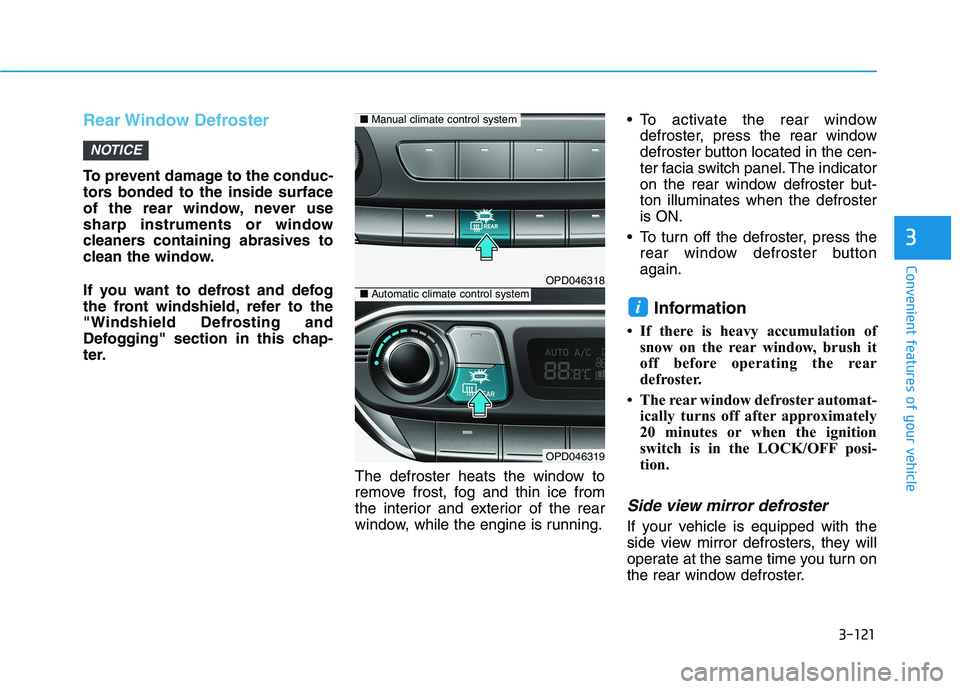
window, while the engine is running. To activate the rear window
defroster, press the rear window
defroster button located in the cen-
ter facia switch panel. The indicator
on the rear window defroster but-ton illuminates when the defrosteris ON.
To turn off the defroster, press the rear window defroster buttonagain.
Information
If there is heavy accumulation of snow on the rear window, brush it
off before operating the rear
defroster.
The rear window defroster automat- ically turns off after approximately
20 minutes or when the ignition
switch is in the LOCK/OFF posi-
tion.
Side view mirror defroster
If your vehicle is equipped with the
side view mirror defrosters, they will
operate at the same time you turn on
the rear window defroster.
i
NOTICE
33
OPD046318
OPD046319
■Manual climate control system
■Automatic climate control system
Page 209 of 486
3-124
Convenient features of your vehicle
Sunglass Holder
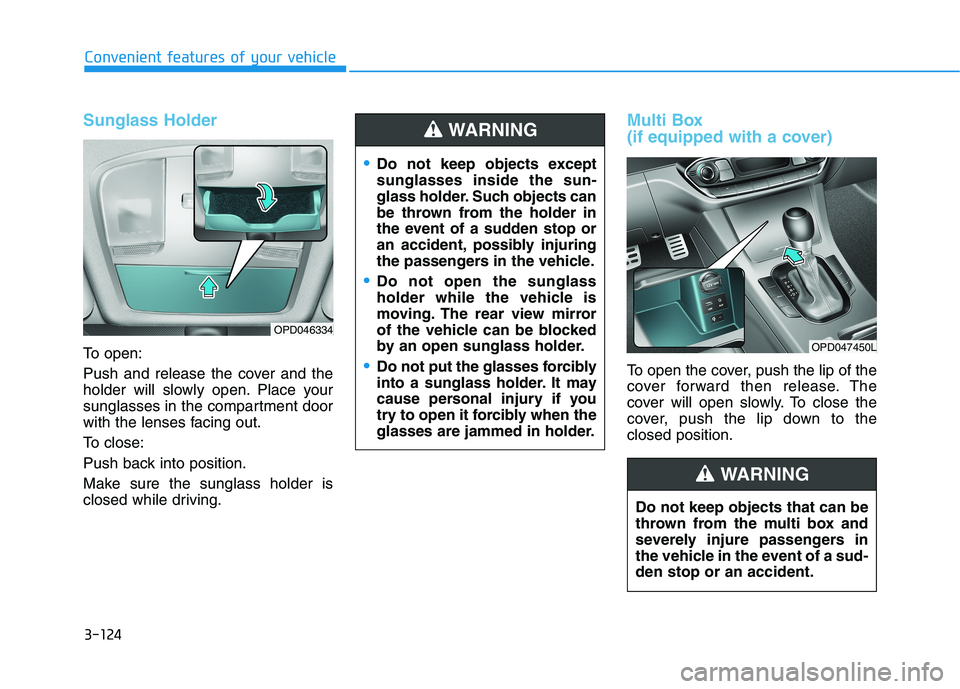
To open:
Push and release the cover and the
holder will slowly open. Place your
sunglasses in the compartment door
with the lenses facing out.
To close:
Push back into position.
Make sure the sunglass holder is
closed while driving.
Multi Box
(if equipped with a cover)
To open the cover, push the lip of the
cover forward then release. The
cover will open slowly. To close the
cover, push the lip down to theclosed position.
OPD046334
OPD047450L
Do not keep objects except sunglasses inside the sun-
glass holder. Such objects can
be thrown from the holder in
the event of a sudden stop or
an accident, possibly injuring
the passengers in the vehicle.
Do not open the sunglass
holder while the vehicle is
moving. The rear view mirror
of the vehicle can be blocked
by an open sunglass holder.
Do not put the glasses forcibly
into a sunglass holder. It may
cause personal injury if you
try to open it forcibly when the
glasses are jammed in holder.
WARNING
Do not keep objects that can be
thrown from the multi box and
severely injure passengers in
the vehicle in the event of a sud-den stop or an accident.
WARNING
Page 211 of 486
3-126
Convenient features of your vehicle
Keep your drinks sealed whiledriving to prevent spilling your
drink. If liquid spills, it may get
into the vehicle's electrical/elec-
tronic system and damage elec-
trical/electronic parts.
When cleaning spilled liquids, do not dry the cup holder at high
temperature. This may damage
the cup holder.
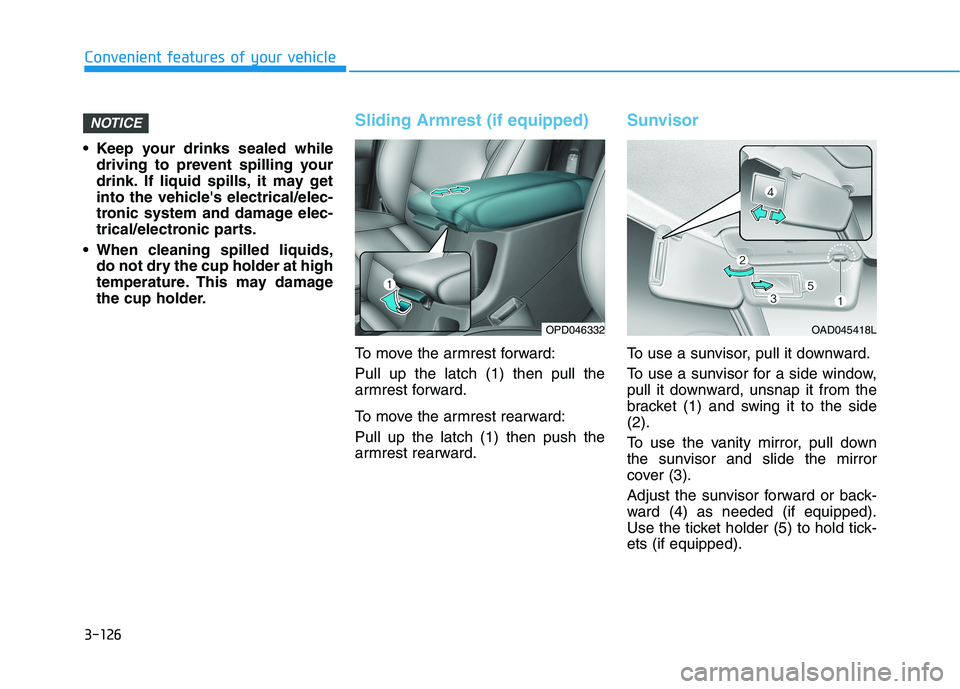
Sliding Armrest (if equipped)
To move the armrest forward: Pull up the latch (1) then pull the
armrest forward.
To move the armrest rearward: Pull up the latch (1) then push the
armrest rearward.
Sunvisor
To use a sunvisor, pull it downward.
To use a sunvisor for a side window,
pull it downward, unsnap it from the
bracket (1) and swing it to the side(2).
To use the vanity mirror, pull down
the sunvisor and slide the mirror
cover (3).
Adjust the sunvisor forward or back-
ward (4) as needed (if equipped).
Use the ticket holder (5) to hold tick-ets (if equipped).
NOTICE
OAD045418LOPD046332
Page 212 of 486
3-127
Convenient features of your vehicle
3
Close the vanity mirror cover
securely and return the sunvisor
to its original position after use.
Do not put several tickets in the
ticket holder at one time. This
could cause damage to the ticket
holder.
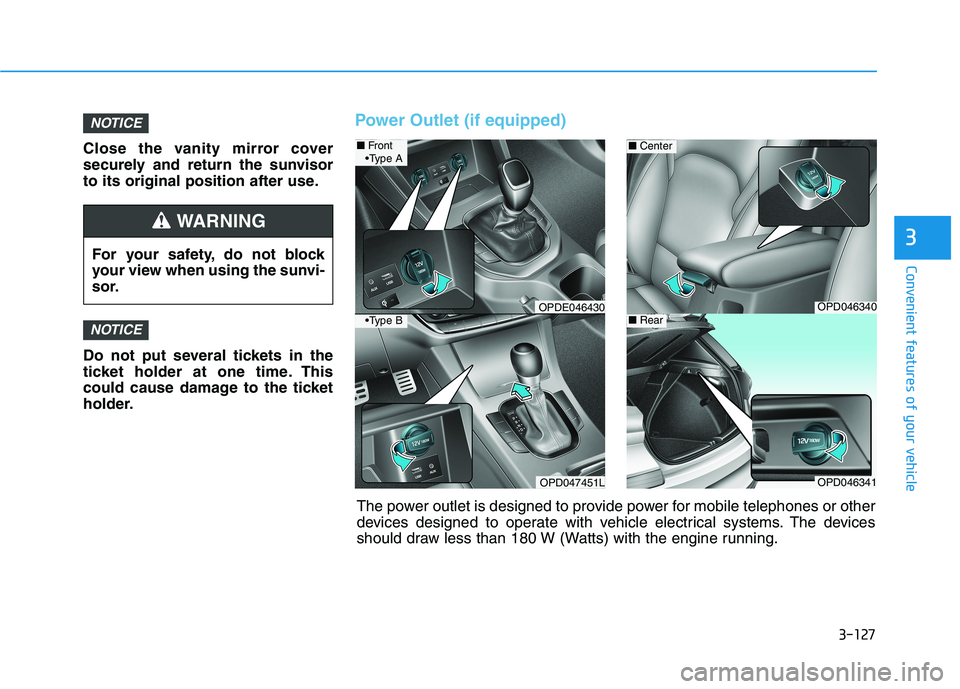
Power Outlet (if equipped)
NOTICE
NOTICE
For your safety, do not block
your view when using the sunvi-
sor.
WARNING
OPD046340
■Center
OPD046341
■Rear
OPD047451L
■Front
OPDE046430
A
B
The power outlet is designed to provide power for mobile telephones or other
devices designed to operate with vehicle electrical systems. The devices
should draw less than 180 W (Watts) with the engine running.
Page 225 of 486
5-4
Driving your vehicle
Before Entering the Vehicle
• Be sure all windows, outside mir-ror(s), and outside lights are clean
and unobstructed.
Remove frost, snow, or ice.
Visually check the tires for uneven wear and damage.
Check under the vehicle for any sign of leaks.
Be sure there are no obstacles behind you if you intend to back up.
Before Starting
Make sure the hood, the tailgate,and the doors are securely closed
and locked.
Adjust the position of the seat and steering wheel.
Adjust the inside and outside rearview mirrors.
Verify all the lights work.
Fasten your seatbelt. Check that all passengers have fastened their
seatbelts.
Check the gauges and indicators in the instrument panel and the mes-
sages on the instrument display
when the ignition switch is in theON position.
Check that any items you are car- rying are stored properly or fas-
tened down securely.
BBEEFFOO RREE DD RRIIVV IINN GG
To reduce the risk of SERIOUS
INJURY or DEATH, take the fol-
lowing precautions:
•ALWAYS wear your seat belt.
All passengers must be prop-
erly belted whenever the vehi-
cle is moving. For more infor-
mation, refer to "Seat Belts" in
chapter 2.
Always drive defensively.
Assume other drivers or pedes-
trians may be careless andmake mistakes.
Stay focused on the task of
driving. Driver distraction cancause accidents.
Leave plenty of space between
you and the vehicle in front of
you.
WARNING
Page 278 of 486
5-57
Driving your vehicle
5
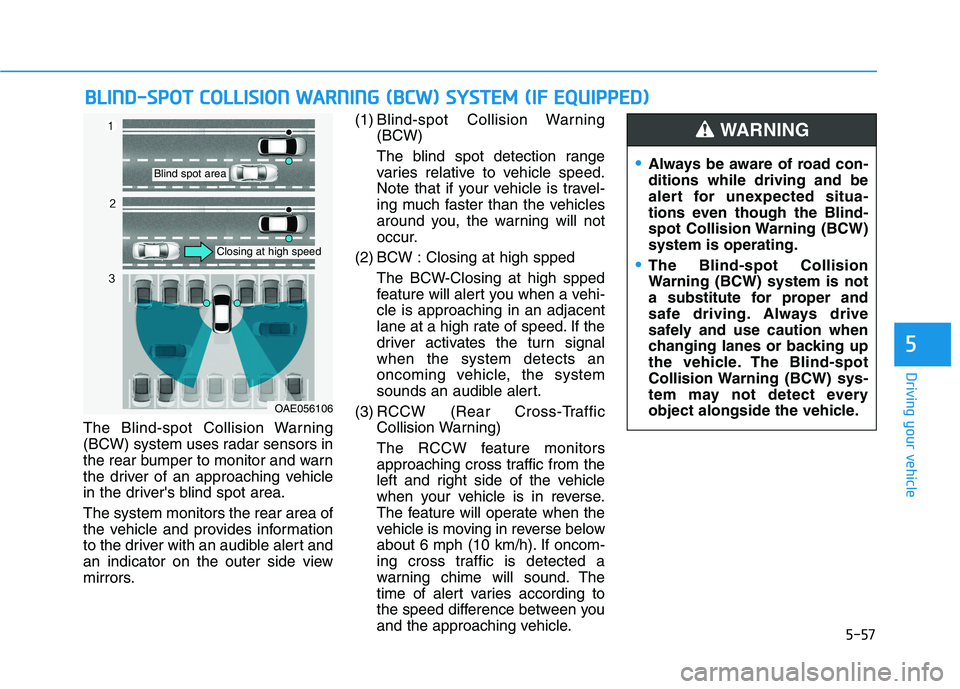
The Blind-spot Collision Warning
(BCW) system uses radar sensors in
the rear bumper to monitor and warn
the driver of an approaching vehicle
in the driver's blind spot area. The system monitors the rear area of
the vehicle and provides information
to the driver with an audible alert and
an indicator on the outer side view
mirrors.(1) Blind-spot Collision Warning
(BCW)
The blind spot detection range
varies relative to vehicle speed.
Note that if your vehicle is travel-
ing much faster than the vehicles
around you, the warning will not
occur.
(2) BCW : Closing at high spped The BCW-Closing at high spped
feature will alert you when a vehi-cle is approaching in an adjacent
lane at a high rate of speed. If the
driver activates the turn signalwhen the system detects an
oncoming vehicle, the system
sounds an audible alert.
(3) RCCW (Rear Cross-Traffic Collision Warning)
The RCCW feature monitors
approaching cross traffic from the
left and right side of the vehicle
when your vehicle is in reverse.
The feature will operate when the
vehicle is moving in reverse below
about 6 mph (10 km/h). If oncom-
ing cross traffic is detected a
warning chime will sound. The
time of alert varies according to
the speed difference between you
and the approaching vehicle.
BBLLIINN DD--SS PP OO TT CC OO LLLLIISS IIOO NN WW AARRNN IINN GG (( BB CCWW )) SS YY SSTT EEMM (( IIFF EE QQ UUIIPP PPEEDD ))
OAE056106
Blind spot area
Closing at high speed
Always be aware of road con- ditions while driving and be
alert for unexpected situa-
tions even though the Blind-
spot Collision Warning (BCW)system is operating.
The Blind-spot Collision
Warning (BCW) system is not
a substitute for proper and
safe driving. Always drive
safely and use caution when
changing lanes or backing up
the vehicle. The Blind-spot
Collision Warning (BCW) sys-
tem may not detect every
object alongside the vehicle.
WARNING
Page 279 of 486
5-58
Driving your vehicle
BCW (Blind-spot Collision
Warning)
Operating conditions
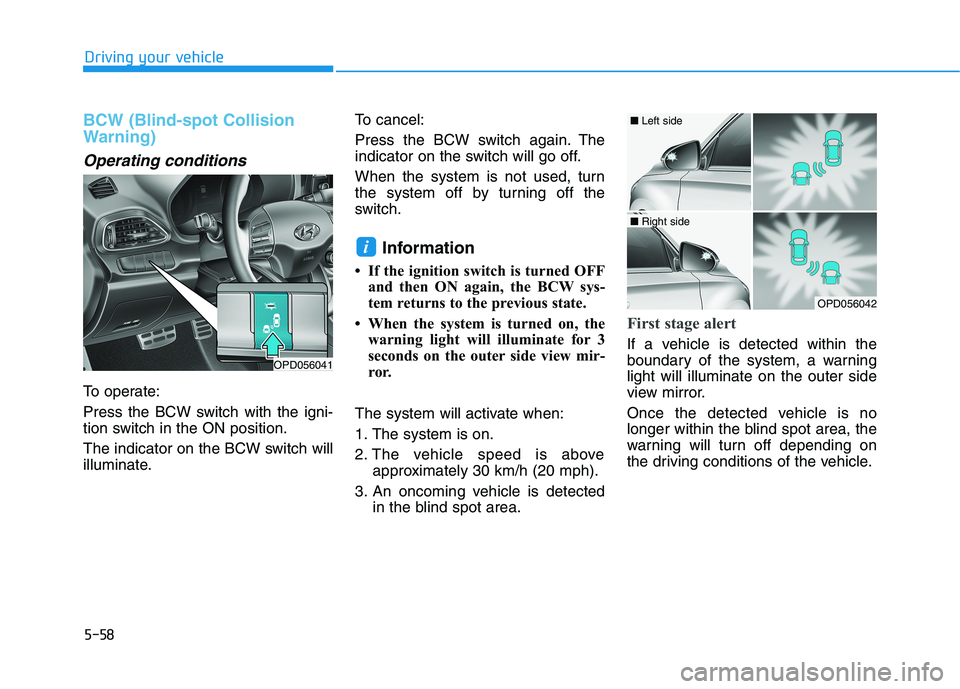
To operate:
Press the BCW switch with the igni-
tion switch in the ON position.
The indicator on the BCW switch will
illuminate.To cancel:
Press the BCW switch again. The
indicator on the switch will go off.
When the system is not used, turn
the system off by turning off the
switch.
Information
If the ignition switch is turned OFF and then ON again, the BCW sys-
tem returns to the previous state.
When the system is turned on, the warning light will illuminate for 3
seconds on the outer side view mir-
ror.
The system will activate when:
1. The system is on.
2. The vehicle speed is above approximately 30 km/h (20 mph).
3. An oncoming vehicle is detected in the blind spot area.
First stage alert
If a vehicle is detected within the
boundary of the system, a warninglight will illuminate on the outer side
view mirror.
Once the detected vehicle is no
longer within the blind spot area, the
warning will turn off depending on
the driving conditions of the vehicle.
i
OPD056041
OPD056042
■ Left side
■ Right side
Page 280 of 486
5-59
Driving your vehicle
5
The second stage alarm may bedeactivated.
- To deactivate the warning chime:Go to the 'User Settings Driver
Assistance and deselect Blind-spot
Collision Warning Sound' on the
LCD display.
- To activate the warning chime:Go to the 'User Settings Driver
Assistance and select Blind-spot
Collision Warning Sound' on the
LCD display.
Information
The warning chime function helps
alert the driver. Deactivate this func-
tion only when it is necessary.
i
OPD056043
■ Left side
OPD056044
■ Right side
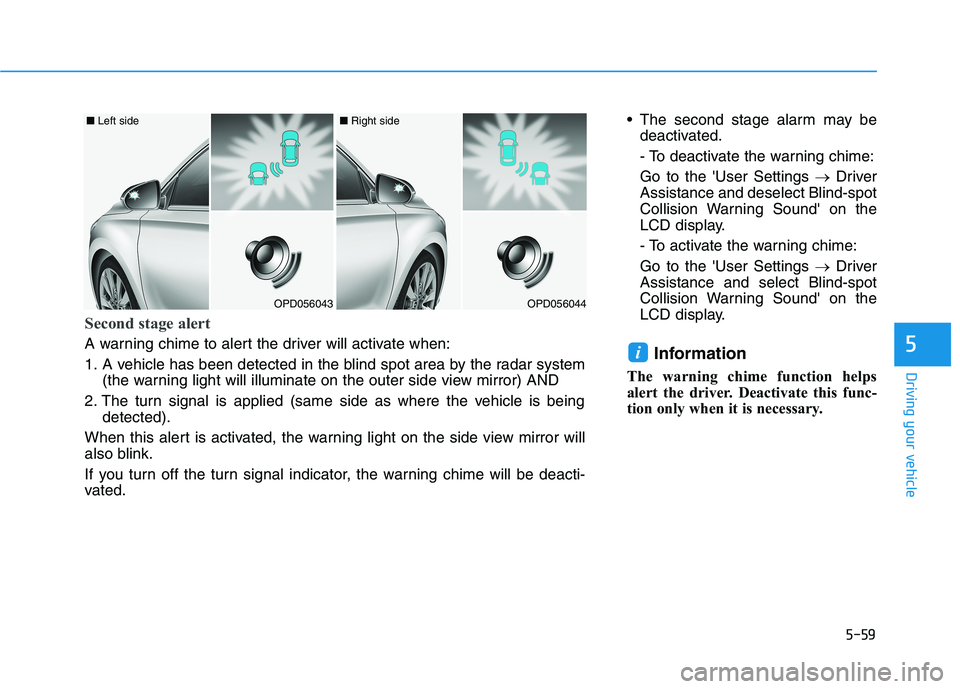
Second stage alert
A warning chime to alert the driver will activate when:
1. A vehicle has been detected in the blind spot area by the radar system
(the warning light will illuminate on the outer side view mirror) AND
2. The turn signal is applied (same side as where the vehicle is being detected).
When this alert is activated, the warning light on the side view mirror will
also blink.
If you turn off the turn signal indicator, the warning chime will be deacti-
vated.
Page 283 of 486
5-62
Driving your vehicle
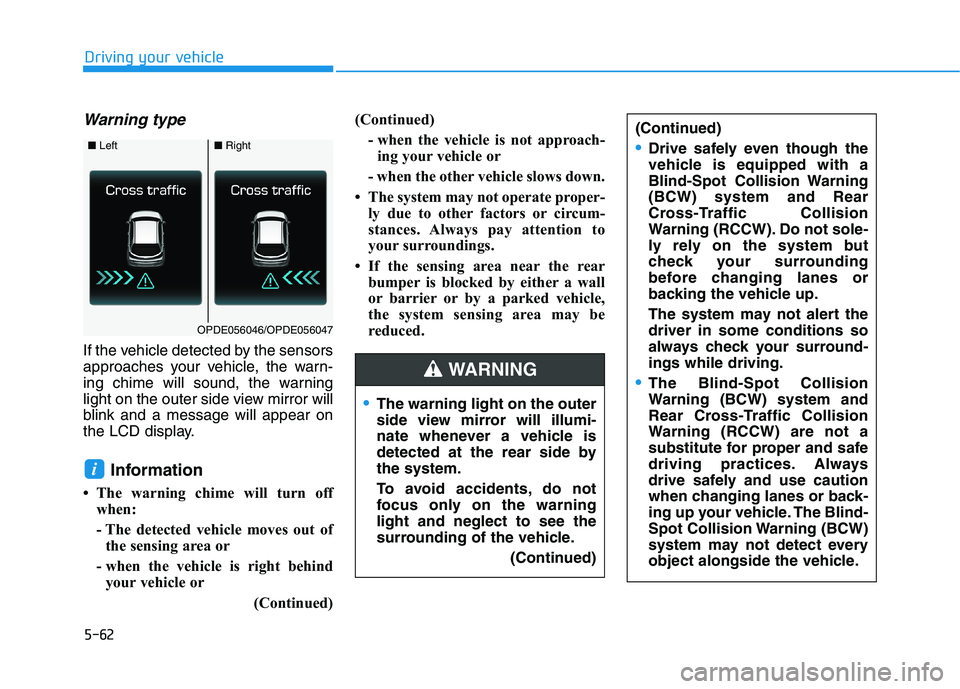
Warning type
If the vehicle detected by the sensors
approaches your vehicle, the warn-
ing chime will sound, the warning
light on the outer side view mirror will
blink and a message will appear on
the LCD display.Information
The warning chime will turn off when:
- The detected vehicle moves out ofthe sensing area or
- when the vehicle is right behind your vehicle or
(Continued)(Continued)
- when the vehicle is not approach-ing your vehicle or
- when the other vehicle slows down.
The system may not operate proper- ly due to other factors or circum-
stances. Always pay attention to
your surroundings.
If the sensing area near the rear bumper is blocked by either a wall
or barrier or by a parked vehicle,
the system sensing area may be
reduced.
i
■ Left■Right
OPDE056046/OPDE056047
The warning light on the outer
side view mirror will illumi-
nate whenever a vehicle is
detected at the rear side bythe system.
To avoid accidents, do not
focus only on the warninglight and neglect to see the
surrounding of the vehicle.
(Continued)
(Continued)
Drive safely even though the
vehicle is equipped with a
Blind-Spot Collision Warning(BCW) system and Rear
Cross-Traffic Collision
Warning (RCCW). Do not sole-
ly rely on the system but
check your surrounding
before changing lanes or
backing the vehicle up.
The system may not alert the driver in some conditions so
always check your surround-ings while driving.
The Blind-Spot Collision
Warning (BCW) system and
Rear Cross-Traffic Collision
Warning (RCCW) are not a
substitute for proper and safe
driving practices. Always
drive safely and use caution
when changing lanes or back-
ing up your vehicle. The Blind-
Spot Collision Warning (BCW)
system may not detect every
object alongside the vehicle.WARNING