chapter 7 HYUNDAI ELANTRA GT 2019 Owners Manual
[x] Cancel search | Manufacturer: HYUNDAI, Model Year: 2019, Model line: ELANTRA GT, Model: HYUNDAI ELANTRA GT 2019Pages: 486, PDF Size: 78.59 MB
Page 6 of 486
F6
Introduction
We want to help you get the greatest
possible driving pleasure from your
vehicle. Your Owner's Manual can
assist you in many ways. To gain an
overview of the contents of your
Owner's Manual, use the Table of
Contents in the front of the manual.The first page of each Chapter
includes a detailed Table of Contents
of the topics in that Chapter.
To quickly locate information about
your vehicle, use the Index in the
back of the manual. It is an alphabet-
ical list of what is in this manual and
the page number where it can be
found.
For your convenience, we have
incorporated tabs on the right-hand
page edges. These tabs are coded
with the Chapter titles to assist you
with navigating through the manual.Your safety, and the safety of others,
is very important. This Owner's
Manual provides you with many safe-
ty precautions and operating proce-
dures. This information alerts you to
potential hazards that may hurt you
or others, as well as damage to your
vehicle.
Safety messages found on vehicle
labels and in this manual describethese hazards and what to do to
avoid or reduce the risks.
Warnings and instructions contained
in this manual are for your safety.
Failure to follow safety warnings and
instructions can lead to serious injuryor death.
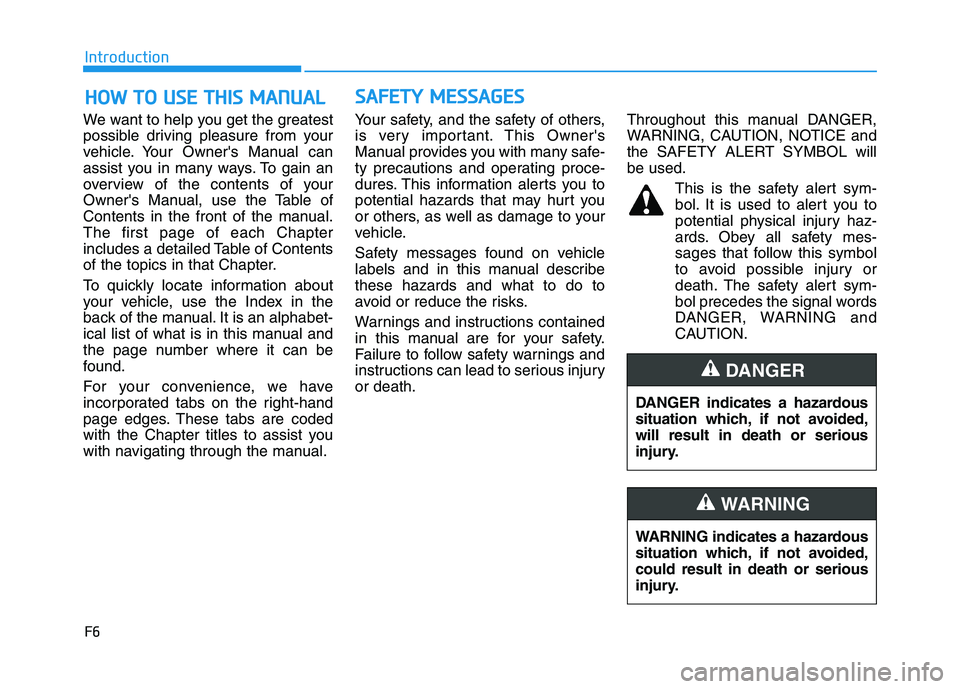
Throughout this manual DANGER,
WARNING, CAUTION, NOTICE and
the SAFETY ALERT SYMBOL willbe used.
This is the safety alert sym-bol. It is used to alert you to
potential physical injury haz-
ards. Obey all safety mes-
sages that follow this symbol
to avoid possible injury or
death. The safety alert sym-
bol precedes the signal words
DANGER, WARNING and
CAUTION.
HH OO WW TT OO UU SSEE TT HH IISS MM AANN UU AALL
DANGER indicates a hazardous
situation which, if not avoided,will result in death or serious
injury.
DANGER
WARNING indicates a hazardous
situation which, if not avoided,could result in death or serious
injury.
WARNING
SSAA FFEE TT YY MM EESSSSAA GG EESS
Page 19 of 486
Safety system of your vehicle
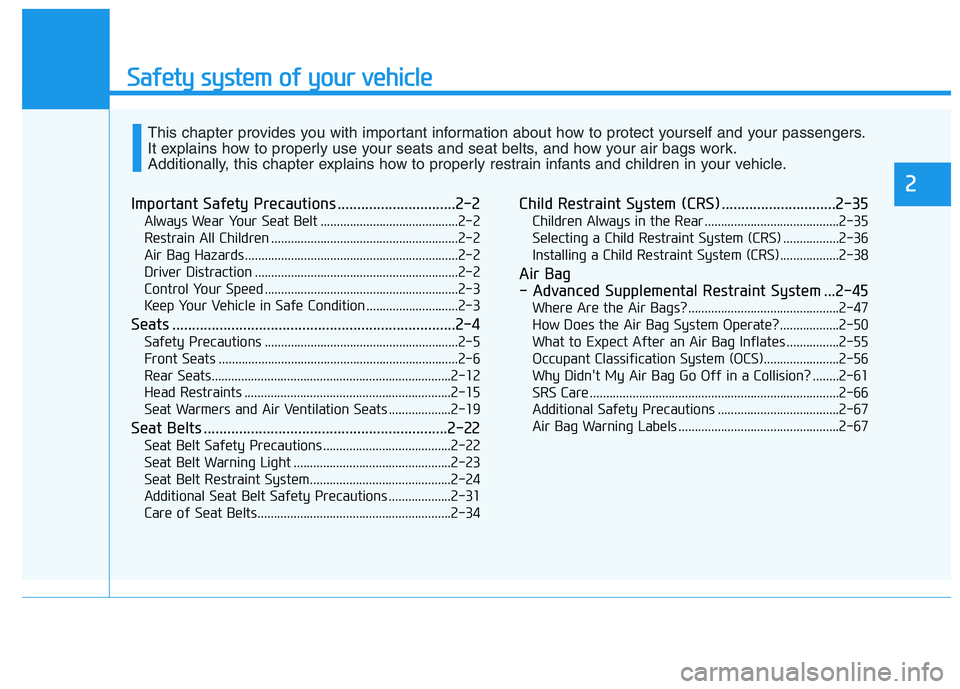
Important Safety Precautions ..............................2-2Always Wear Your Seat Belt ..........................................2-2
Restrain All Children .........................................................2-2
Air Bag Hazards .................................................................2-2
Driver Distraction ..............................................................2-2
Control Your Speed ...........................................................2-3
Keep Your Vehicle in Safe Condition ............................2-3
Seats ........................................................................2-4 Safety Precautions ...........................................................2-5
Front Seats .........................................................................2-6
Rear Seats.........................................................................2-12
Head Restraints ...............................................................2-15
Seat Warmers and Air Ventilation Seats ...................2-19
Seat Belts ..............................................................2-22 Seat Belt Safety Precautions .......................................2-22
Seat Belt Warning Light ................................................2-23
Seat Belt Restraint System...........................................2-24
Additional Seat Belt Safety Precautions ...................2-31
Care of Seat Belts...........................................................2-34 Child Restraint System (CRS) .............................2-35
Children Always in the Rear .........................................2-35
Selecting a Child Restraint System (CRS) .................2-36
Installing a Child Restraint System (CRS)..................2-38
Air Bag
- Advanced Supplemental Restraint System ...2-45 Where Are the Air Bags? ..............................................2-47
How Does the Air Bag System Operate?..................2-50
What to Expect After an Air Bag Inflates ................2-55
Occupant Classification System (OCS).......................2-56
Why Didn't My Air Bag Go Off in a Collision? ........2-61
SRS Care ............................................................................2-66
Additional Safety Precautions .....................................2-67
Air Bag Warning Labels .................................................2-67
This chapter provides you with important information about how to protect yourself and your passengers.
It explains how to properly use your seats and seat belts, and how your air bags work.
Additionally, this chapter explains how to properly restrain infants and children in your vehicle.
2
Page 45 of 486
2-27
Safety system of your vehicle
2
Rear Seat Belt – Passenger's 3-point system with convertible
locking retractor
This type of seat belt combines the
features of both an emergency lock-
ing retractor seat belt and an auto-
matic locking retractor seat belt.
Convertible retractor type seat beltsare installed in the rear seat posi-tions to help accommodate the
installation of child restraint systems.
Although a convertible retractor isalso installed in the front passenger
seat position, NEVER place any
infant/child restraint system in the
front seat of the vehicle.
To fasten your seat belt:
Pull the seat belt out of the retractor
and insert the metal tab into the
buckle. There will be an audible
"click" when the tab locks into the
buckle. When not securing a child
restraint, the seat belt operates in the
same way as the driver's seat belt
(Emergency Locking Retractor
Type). It automatically adjusts to theproper length only after the lap belt
portion of the seat belt is adjusted
manually so that it fits snugly across
your hips.
When the seat belt is fully extended
from the retractor to allow the instal-
lation of a child restraint system, the
seat belt operation changes to allow
the belt to retract, but not to extend
(Automatic Locking Retractor Type).
Refer to the "Using a Child Restraint
System" section in this chapter. Although the seat belt retractor
provides the same level of protec-
tion for seated passengers in
either emergency or automatic
locking modes, the emergency
locking mode allows seated pas-
sengers to move freely in theirseat while keeping some tension
on the belt. During a collision or
sudden stop, the retractor auto-
matically locks the belt to help
restrain your body.
To deactivate the automatic lock-
ing mode, unbuckle the seat belt
and allow the belt to fully retract.
NOTICE
Page 50 of 486
2-32
Safety system of your vehicle
Seat belt use and children
Infant and small children
Most countries have child restraint
laws which require children to travel
in approved child restraint devices,
including booster seats. The age atwhich seat belts can be used instead
of child restraints differs among
countries, so you should be aware of
the specific requirements in your
country, and where you are travel-
ling. Infant and child restraints must
be properly placed and installed in a
rear seat. For more information refer
to the "Child Restraint Systems" sec-
tion in this chapter.Small children are best protected
from injury in an accident when prop-
erly restrained in the rear seat by a
child restraint system that meets the
requirements of the Safety Standards
of your country. Before buying any
child restraint system, make sure that
it has a label certifying that it meets
Safety Standards of your country. The
restraint must be appropriate for your
child’s height and weight. Check the
label on the child restraint for this
information. Refer to the "Child
Restraint Systems"
section in this
chapter.
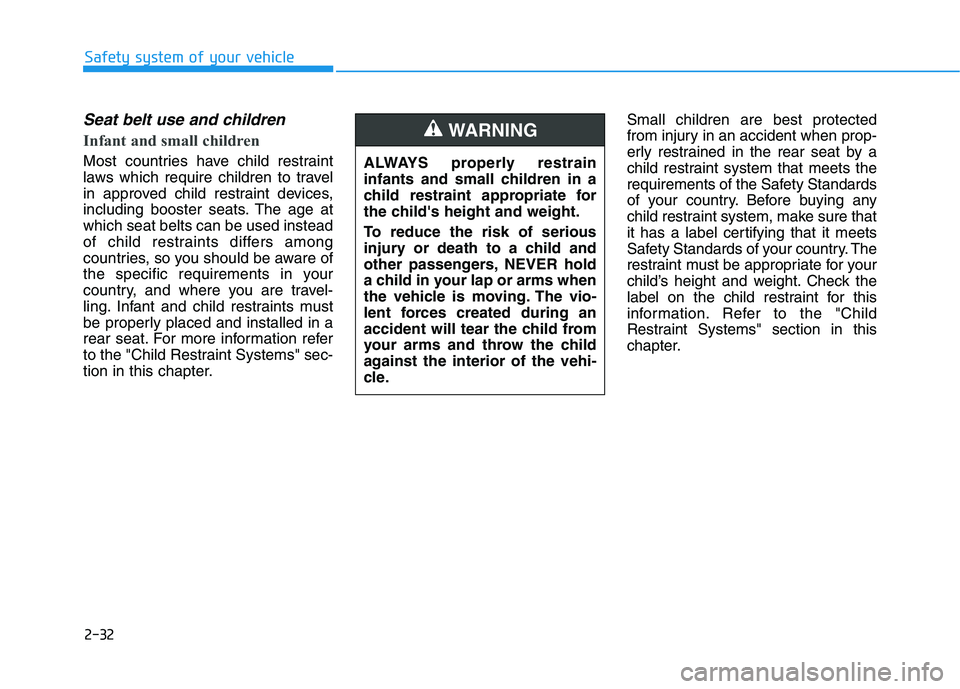
ALWAYS properly restrain
infants and small children in a
child restraint appropriate for
the child's height and weight.
To reduce the risk of serious
injury or death to a child and
other passengers, NEVER hold
a child in your lap or arms when
the vehicle is moving. The vio-
lent forces created during an
accident will tear the child from
your arms and throw the child
against the interior of the vehi-
cle.
WARNING
Page 61 of 486
2-43
Safety system of your vehicle
2
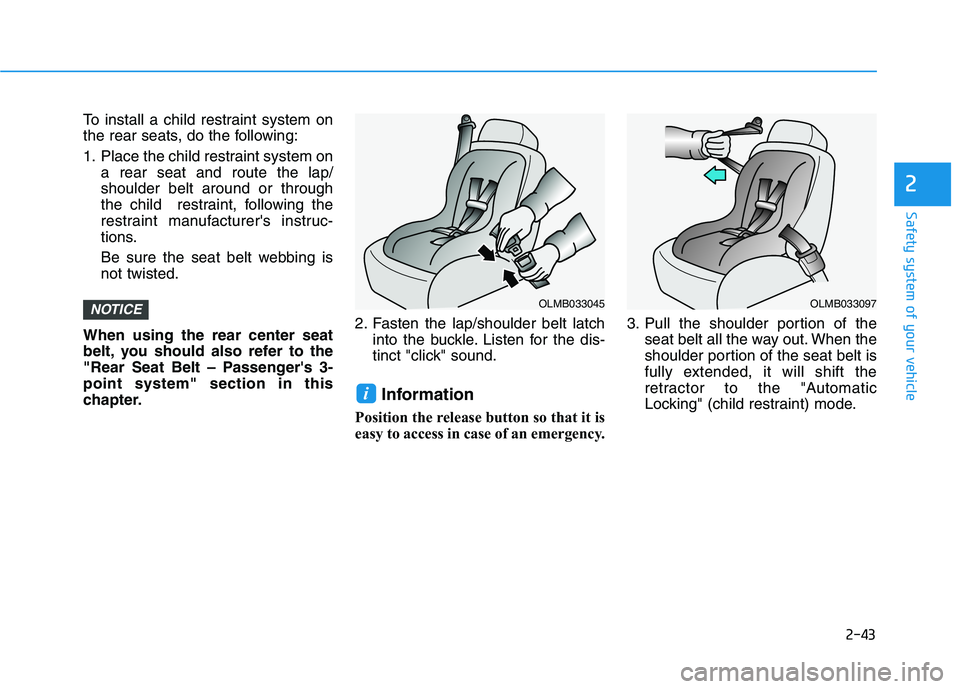
To install a child restraint system on
the rear seats, do the following:
1. Place the child restraint system ona rear seat and route the lap/ shoulder belt around or through
the child restraint, following the
restraint manufacturer's instruc-
tions.
Be sure the seat belt webbing is not twisted.
When using the rear center seat
belt, you should also refer to the
"Rear Seat Belt – Passenger's 3-point system" section in this
chapter. 2. Fasten the lap/shoulder belt latch
into the buckle. Listen for the dis-
tinct "click" sound.
Information
Position the release button so that it is
easy to access in case of an emergency. 3. Pull the shoulder portion of the
seat belt all the way out. When the
shoulder portion of the seat belt is
fully extended, it will shift the
retractor to the "Automatic
Locking" (child restraint) mode.
i
NOTICEOLMB033045OLMB033097
Page 89 of 486
3-4
Unlocking
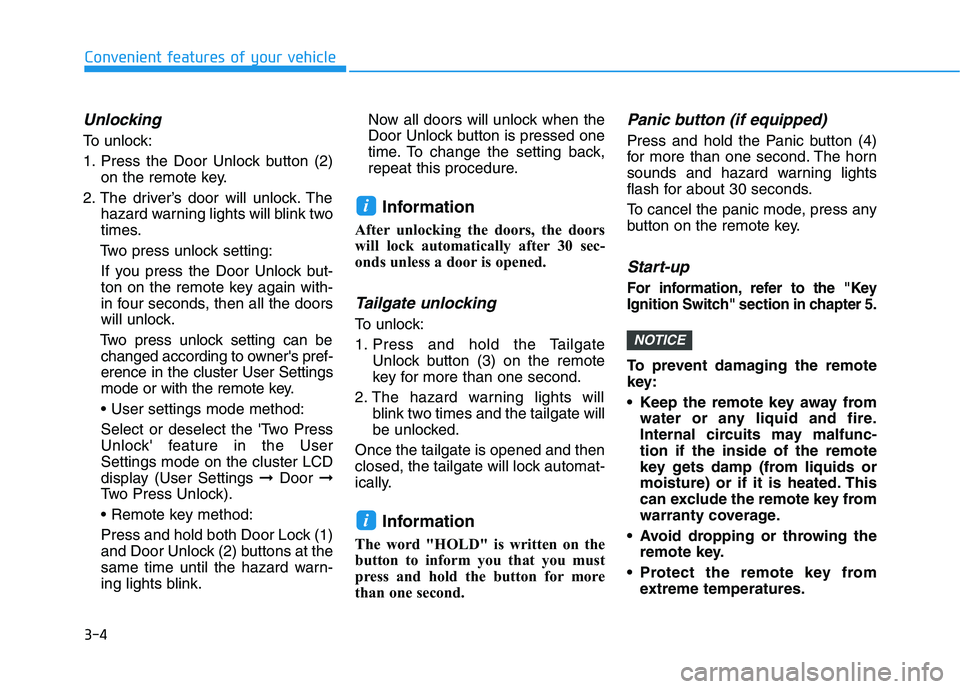
To unlock:
1. Press the Door Unlock button (2)on the remote key.
2. The driver’s door will unlock. The hazard warning lights will blink two
times.
Two press unlock setting:
If you press the Door Unlock but-
ton on the remote key again with-
in four seconds, then all the doors
will unlock.
Two press unlock setting can be changed according to owner's pref-erence in the cluster User Settings
mode or with the remote key.
Select or deselect the 'Two Press
Unlock' feature in the UserSettings mode on the cluster LCD
display (User Settings ➞Door ➞
Two Press Unlock).
Press and hold both Door Lock (1)
and Door Unlock (2) buttons at the
same time until the hazard warn-
ing lights blink. Now all doors will unlock when the
Door Unlock button is pressed one
time. To change the setting back,
repeat this procedure.
Information
After unlocking the doors, the doors
will lock automatically after 30 sec-
onds unless a door is opened.
Tailgate unlocking
To unlock:
1. Press and hold the Tailgate Unlock button (3) on the remote
key for more than one second.
2. The hazard warning lights will blink two times and the tailgate will
be unlocked.
Once the tailgate is opened and then
closed, the tailgate will lock automat-
ically.
Information
The word "HOLD" is written on the
button to inform you that you must
press and hold the button for more
than one second.
Panic button (if equipped)
Press and hold the Panic button (4)
for more than one second. The horn
sounds and hazard warning lights
flash for about 30 seconds.
To cancel the panic mode, press any
button on the remote key.
Start-up
For information, refer to the "Key
Ignition Switch" section in chapter 5.
To prevent damaging the remote
key:
• Keep the remote key away from water or any liquid and fire.
Internal circuits may malfunc-tion if the inside of the remote
key gets damp (from liquids or
moisture) or if it is heated. This
can exclude the remote key from
warranty coverage.
Avoid dropping or throwing the remote key.
Protect the remote key from extreme temperatures.
NOTICE
i
i
Convenient features of your vehicle
Page 94 of 486
3-9
Convenient features of your vehicle
Panic button
Press and hold the Panic button (4)
for more than one second. The horn
sounds and hazard warning lights
blink for about 30 seconds. To cancel
the panic mode, press any button on
the Smart Key.
Start-up
You can start the vehicle without
inserting the key.
For information, refer to the
"Engine Start/Stop Button" sec-
tion in chapter 5.
To prevent damaging the smart key:
Keep the smart key away fromany liquid or fire. Internal circuits
may malfunction if the inside of
the smart key gets damp (fromliquids or moisture) or if it is heat-
ed. This can exclude the smart
key from warranty coverage.
Avoid dropping or throwing the smart key.
Protect the smart key from extreme temperatures.
Mechanical key
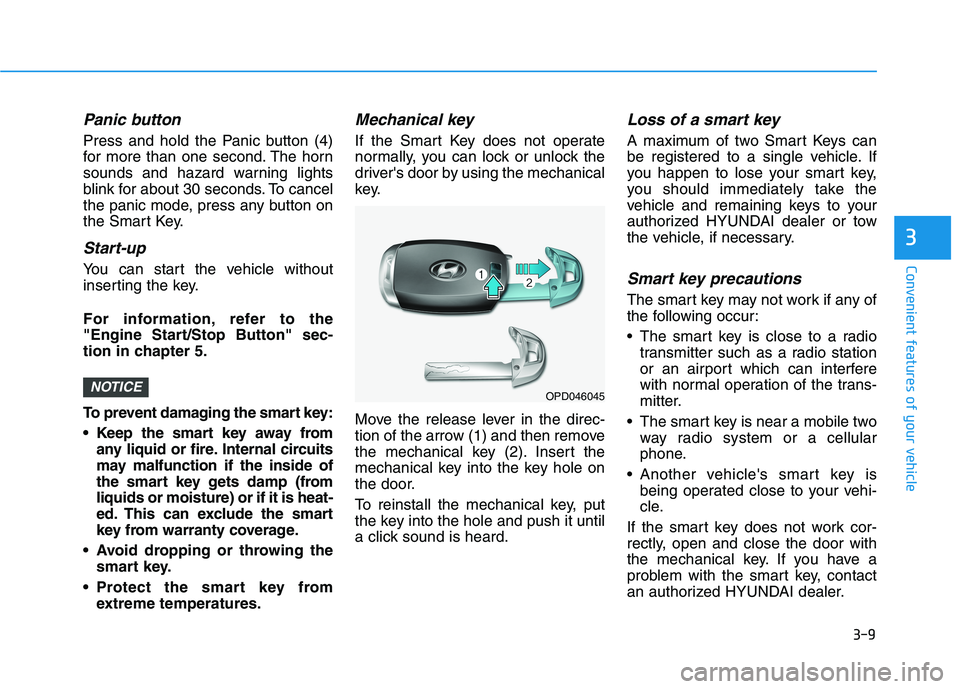
If the Smart Key does not operate
normally, you can lock or unlock the
driver's door by using the mechanical
key.
Move the release lever in the direc-
tion of the arrow (1) and then remove
the mechanical key (2). Insert the
mechanical key into the key hole on
the door.
To reinstall the mechanical key, put
the key into the hole and push it until
a click sound is heard.
Loss of a smart key
A maximum of two Smart Keys can
be registered to a single vehicle. If
you happen to lose your smart key,
you should immediately take the
vehicle and remaining keys to your
authorized HYUNDAI dealer or tow
the vehicle, if necessary.
Smart key precautions
The smart key may not work if any of
the following occur:
The smart key is close to a radiotransmitter such as a radio station
or an airport which can interfere
with normal operation of the trans-
mitter.
The smart key is near a mobile two way radio system or a cellular
phone.
Another vehicle's smart key is being operated close to your vehi-
cle.
If the smart key does not work cor-
rectly, open and close the door with
the mechanical key. If you have a
problem with the smart key, contact
an authorized HYUNDAI dealer.
NOTICE
3
OPD046045
Page 103 of 486
3-18
Convenient features of your vehicle
Auto Door Lock/Unlock Features
Impact sensing door unlock
All doors will be automatically
unlocked when an impact causes the
air bags to deploy.
Speed sensing door lock
All doors will be automatically locked
(when set on cluster) when vehicle
speed exceeds 15 km/h (9 mph). All of the doors will be automatically
unlocked after the vehicle is turned
off.
You can activate or deactivate the
Auto Door Lock/Unlock features fromthe User Settings mode on the LCD
display.
For more information, refer to the
"LCD Display" section in this
chapter.
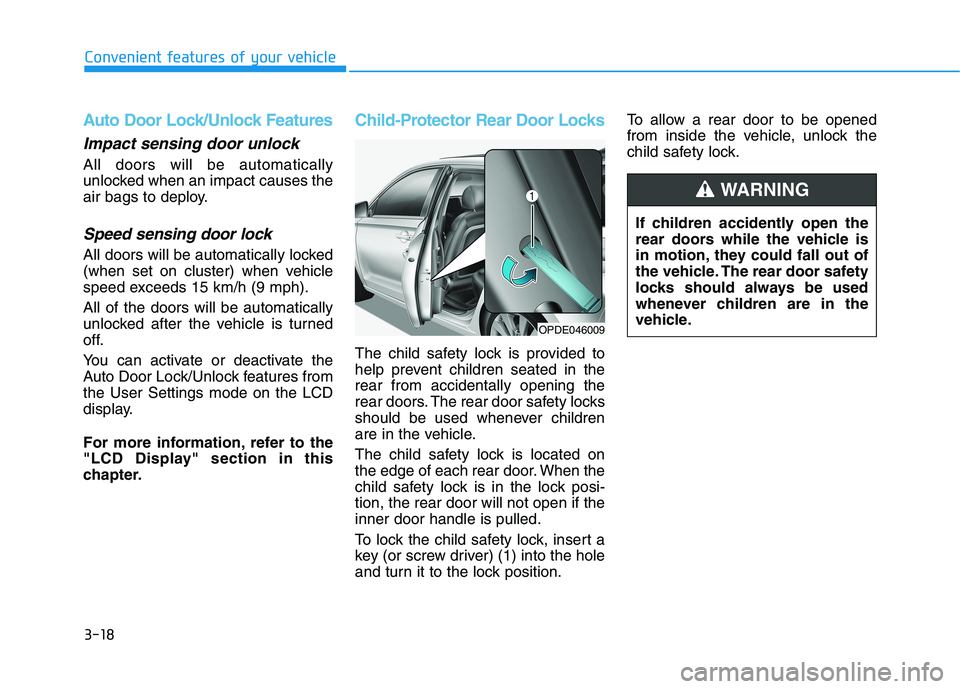
Child-Protector Rear Door Locks
The child safety lock is provided to
help prevent children seated in therear from accidentally opening the
rear doors. The rear door safety locks
should be used whenever children
are in the vehicle.
The child safety lock is located on
the edge of each rear door. When the
child safety lock is in the lock posi-tion, the rear door will not open if theinner door handle is pulled.
To lock the child safety lock, insert a
key (or screw driver) (1) into the hole
and turn it to the lock position.To allow a rear door to be opened
from inside the vehicle, unlock the
child safety lock.
If children accidently open the
rear doors while the vehicle is
in motion, they could fall out of
the vehicle. The rear door safety
locks should always be used
whenever children are in the
vehicle.
WARNING
OPDE046009
Page 113 of 486
3-28
Convenient features of your vehicle
Information
Some devices may require you to
replace this Programming step 3 with
procedures noted in the "Gate
Operator/Canadian Programming"
chapter. If the HomeLink ®
indicator
light does not change to a rapidly
blinking light after performing these
steps, contact HomeLink ®
at
www.homelink.com. 4. Press and hold for 5 seconds then
release the programmedHomeLink ®
button up to two sepa-
rate times to activate the door. If
the door does not activate, press
and hold the just-trainedHomeLink ®
button and observe
the indicator light.
stantly, programming is complete
and your device should activatewhen the HomeLink ®
button is
pressed and released.
for 2 seconds and then turns to a
constant light, continue with
"Programming" steps 5-7 to
complete the programming of a
rolling code equipped device
(most commonly a garage dooropener).
5. At the garage door opener receiv- er (motor-head unit) in the garage,
locate the "learn" or "smart" but-
ton. This can usually be foundwhere the hanging antenna wire isattached to the motor-head unit. 6. Firmly press and release the
"learn" or "smart" button. (The
name and color of the button vary
by manufacturer). There are 30seconds to initiate step 7.
7. Return to the vehicle and firmly press, hold for 2 seconds and
release the programmedHomeLink ®
button. Repeat the
"press/hold/release" sequence a
second time, and, depending on
the brand of the garage dooropener (or other rolling code
equipped device), repeat thissequence a third time to complete
the programming process.
HomeLink ®
should now activate your
rolling code equipped device.i
Page 114 of 486
3-29
Convenient features of your vehicle
3
Gate operator & Canadian program-ming
During programming, your handheld
transmitter may automatically stop
transmitting. Continue to press the
Integrated HomeLink ®
Wireless
Control System button (note steps 2
through 3 in the Programming por-
tion of this document) while you
press and re-press ("cycle") your
handheld transmitter every two sec-onds until the frequency signal has
been learned. The indicator light will
flash slowly and then rapidly after
several seconds upon successful
training.
Operating HomeLink®
To operate, simply press and release
the programmed HomeLink ®
button.
Activation will now occur for the
trained device (i.e. garage door
opener, gate operator, security sys-
tem, entry door lock, home/office
lighting, etc.). For convenience, the
hand-held transmitter of the device
may also be used at any time.
Reprogramming a single HomeLink®
button
To program a device to HomeLink ®
using a HomeLink ®
button previously
trained, follow these steps:
1. Press and hold the desired HomeLink ®
button. DO NOT
release the button.
2. The indicator light will begin to flash after 20 seconds. Without releasing the HomeLink ®
button,
proceed with "Programming" step2.
For questions or comments, contactHomeLink ®
at www
.homelink.comor
1-800-355-3515.
Erasing HomeLink®buttons
Individual buttons cannot be erased.
However, to erase all three pro-
grammed buttons:
1. Press and hold the two outer HomeLink ®
buttons until the indi-
cator light begins to flash after 10
seconds.
2. Release both buttons. Do not hold for longer than 20 seconds.
The Integrated HomeLink ®
Wireless
Control System is now in the training
(learn) mode and can be pro-
grammed at any time following the
appropriate steps in the
Programming chapters above. NVS ®
is a registered trademark and
Z-Nav™ is a trademark of the Gentex
Corporation, Zeeland, Michigan.HomeLink ®
is a registered trademark
owned by Johnson Controls,
Incorporated, Milwaukee, Wisconsin.
RSS ID: NZLTLMHL4
IC: 4112A-TLMHL4