audio HYUNDAI ELANTRA GT 2020 User Guide
[x] Cancel search | Manufacturer: HYUNDAI, Model Year: 2020, Model line: ELANTRA GT, Model: HYUNDAI ELANTRA GT 2020Pages: 495, PDF Size: 15.22 MB
Page 295 of 495
5-72
Driving your vehicle
NEVER install any accessories or stickers on the front wind-
shield, nor tint the front wind-
shield.
NEVER locate any reflective objects (i.e. white paper, mirror)
over the dashboard. Any light
reflection may cause a malfunc-
tion of the system.
Pay extreme caution to keep the camera out of water.
NEVER disassemble the camera assembly, nor apply any impact
on the camera assembly.
Playing the vehicle audio sys- tem at high volume may offset
the system warning sounds.
Information
Have the system checked by an
authorized HYUNDAI dealer when:
• The windshield glass is replaced.
• The sensor cover or sensor getsdamaged or replaced.
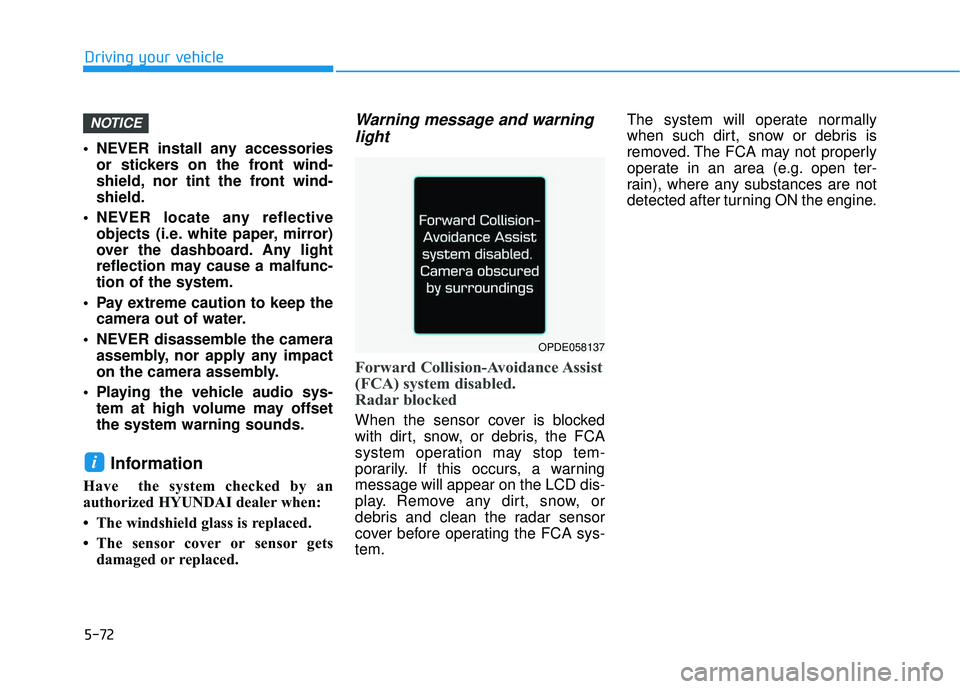
Warning message and warninglight
Forward Collision-Avoidance Assist
(FCA) system disabled.
Radar blocked
When the sensor cover is blocked
with dirt, snow, or debris, the FCA
system operation may stop tem-
porarily. If this occurs, a warning
message will appear on the LCD dis-
play. Remove any dirt, snow, or
debris and clean the radar sensor
cover before operating the FCA sys-
tem. The system will operate normally
when such dirt, snow or debris is
removed. The FCA may not properly
operate in an area (e.g. open ter-
rain), where any substances are not
detected after turning ON the engine.
i
NOTICE
OPDE058137
Page 304 of 495
5-81
Driving your vehicle
5
(Continued)
The system detects lane lines
and controls the steering
wheel by a camera, therefore,
if the lane lines are hard to
detect, the system may not
work properly.
Please refer to "Limitations of
the system".
Do not remove or damage the
related parts of LKA system.
You may not hear a warning
sound of LKA system because
of excessive audio sound.
Do not place objects on the
dashboard that reflects light
such as mirrors, white paper,
etc. The system may malfunc-
tion if the sunlight is reflected.
(Continued)
LKA system Operation
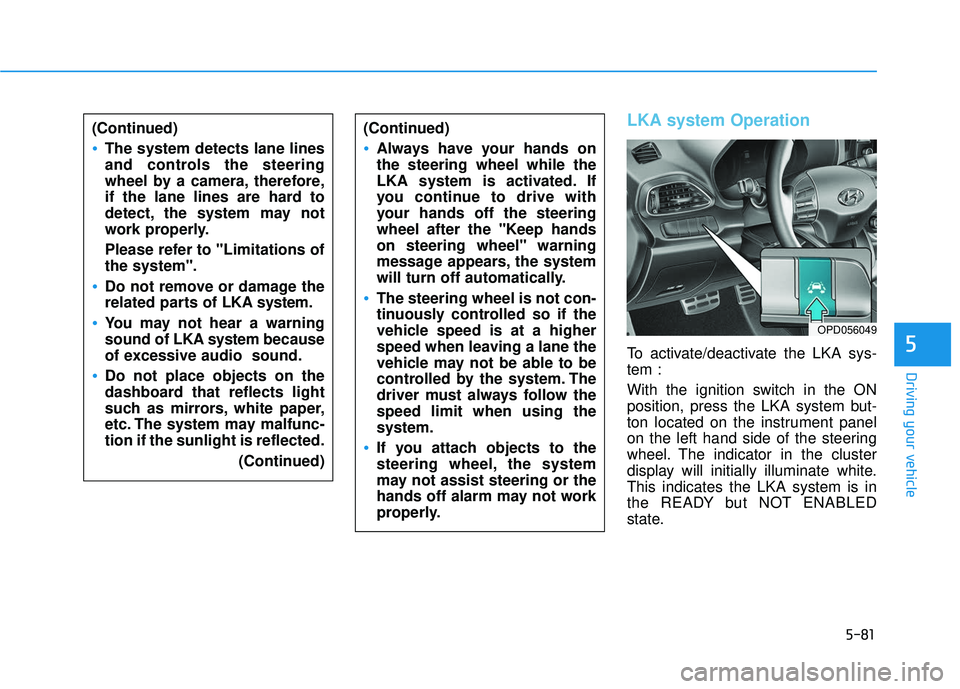
To activate/deactivate the LKA sys-
tem :
With the ignition switch in the ON
position, press the LKA system but-
ton located on the instrument panel
on the left hand side of the steering
wheel. The indicator in the cluster
display will initially illuminate white.
This indicates the LKA system is in
the READY but NOT ENABLED
state.
(Continued)
Always have your hands on
the steering wheel while the
LKA system is activated. If
you continue to drive with
your hands off the steering
wheel after the "Keep hands
on steering wheel" warning
message appears, the system
will turn off automatically.
The steering wheel is not con-
tinuously controlled so if the
vehicle speed is at a higher
speed when leaving a lane the
vehicle may not be able to be
controlled by the system. The
driver must always follow the
speed limit when using the
system.
If you attach objects to the
steering wheel, the system
may not assist steering or the
hands off alarm may not work
properly.
OPD056049
Page 314 of 495
5-91
Driving your vehicle
5
The Driver Attention Warning
(DAW) system utilizes the camera
sensor on the front windshield for
its operation. To keep the camera
sensor in the best condition, you
should observe the followings:
NEVER install any accessoriesor stickers on the front wind-
shield, nor tint the front wind-
shield.
NEVER locate any reflective objects (i.e. white paper, mirror)
over the dashboard. Any light
reflection may cause a malfunc-
tion of the Driver Attention
Warning (DAW) system system.
Pay extreme caution to keep the camera sensor out of water.
NEVER arbitrarily disassemble the camera assembly, nor apply
any impact on the camera
assembly.
NOTICE
The Driver Attention Warning
(DAW) system may not properly
operate with limited alerting in
the following situations:
The lane detection perform-
ance is limited. (For more infor-
mation, refer to "Lane Keeping
Assist (LKA) system" in this
chapter.)
The vehicle is violently driven
or is abruptly turned for obsta-
cle avoidance (e.g. construc-
tion area, other vehicles, fallen
objects, bumpy road).
Forward drivability of the vehi-
cle is severely undermined
(possibly due to wide variation
in tire pressures, uneven tire
wear-out, toe-in/toe-out align-
ment).
The vehicle drives on a curvy
road.
The vehicle drives on a bumpy
road.
(Continued)
(Continued)
The vehicle drives through a
windy area.
The vehicle is controlled by
the following driving assist
systems:
- Lane Keeping Assist (LKA)system
- Forward Collision- Avoidance Assist (FCA) sys-
tem
- Smart Cruise Control (SCC) System
CAUTION
Playing the vehicle audio sys-
tem at high volume may offset
the Driver Attention Warning
(DAW) system warning sounds.
CAUTION
Page 328 of 495
5-105
Driving your vehicle
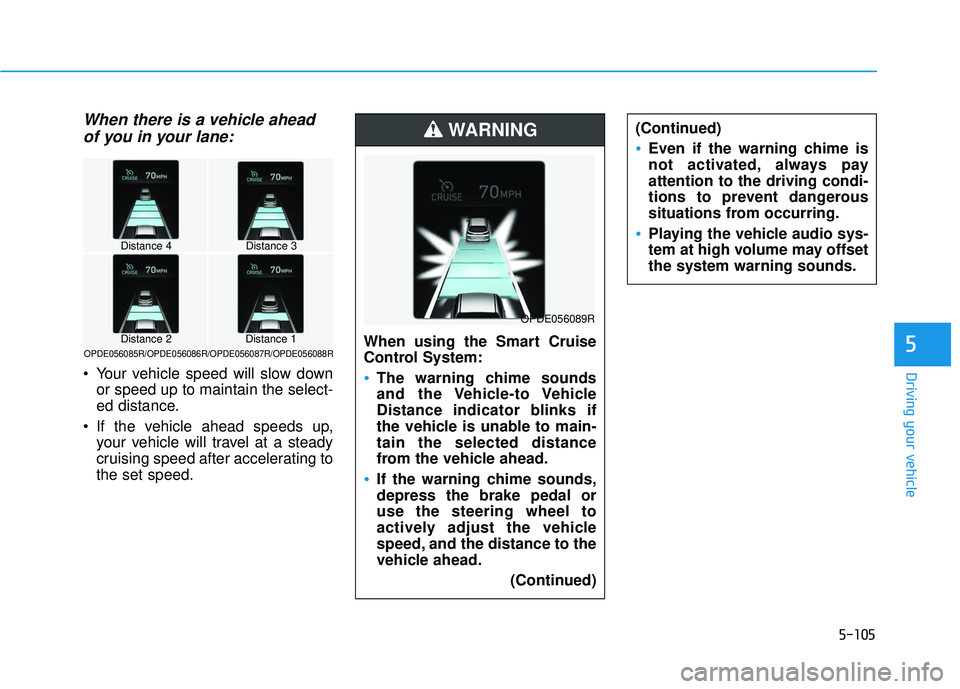
When there is a vehicle aheadof you in your lane:
Your vehicle speed will slow down
or speed up to maintain the select-
ed distance.
If the vehicle ahead speeds up, your vehicle will travel at a steady
cruising speed after accelerating to
the set speed.
5When using the Smart Cruise
Control System:
The warning chime sounds
and the Vehicle-to Vehicle
Distance indicator blinks if
the vehicle is unable to main-
tain the selected distance
from the vehicle ahead.
If the warning chime sounds,
depress the brake pedal or
use the steering wheel to
actively adjust the vehicle
speed, and the distance to the
vehicle ahead.
(Continued)
WARNING
OPDE056089R
Distance 4Distance 3
Distance 1Distance 2OPDE056085R/OPDE056086R/OPDE056087R/OPDE056088R
(Continued)
Even if the warning chime is
not activated, always pay
attention to the driving condi-
tions to prevent dangerous
situations from occurring.
Playing the vehicle audio sys-
tem at high volume may offset
the system warning sounds.
Page 411 of 495
7-37
7
Maintenance
By jump starting
After a jump start from a good bat-
tery, drive the vehicle for 20-30 min-
utes before it is shutoff. The vehicle
may not restart if you shut it off
before the battery had a chance to
adequately recharge. See "Jump
Starting" in chapter 6 for more infor-
mation on jump starting procedures.
Information
An inappropriately disposedbattery can be harmful to
the environment and human
health. Dispose of the bat-
tery according to your local
law(s) or regulations.
Reset Features
The following items may need to be
reset after the battery has been dis-
charged or the battery has been dis-
connected. See chapter 3 or 4 for:
Power Windows
Trip Computer
Climate Control System
Clock
Audio System
Sunroof
i
(Continued)
Watch the battery during
charging, and stop or reduce
the charging rate if the battery
cells begin boiling violently.
The negative battery cable
must be removed first and
installed last when the battery
is disconnected. Disconnect
the battery charger in the fol-
lowing order:
(1) Turn off the battery charg- er main switch.
(2) Unhook the negative
clamp from the negative
battery terminal.
(3) Unhook the positive clamp from the positive battery
terminal.
Always use a genuine
HYUNDAI approved battery
when you replace the battery.
Page 431 of 495
7-57
7
Maintenance
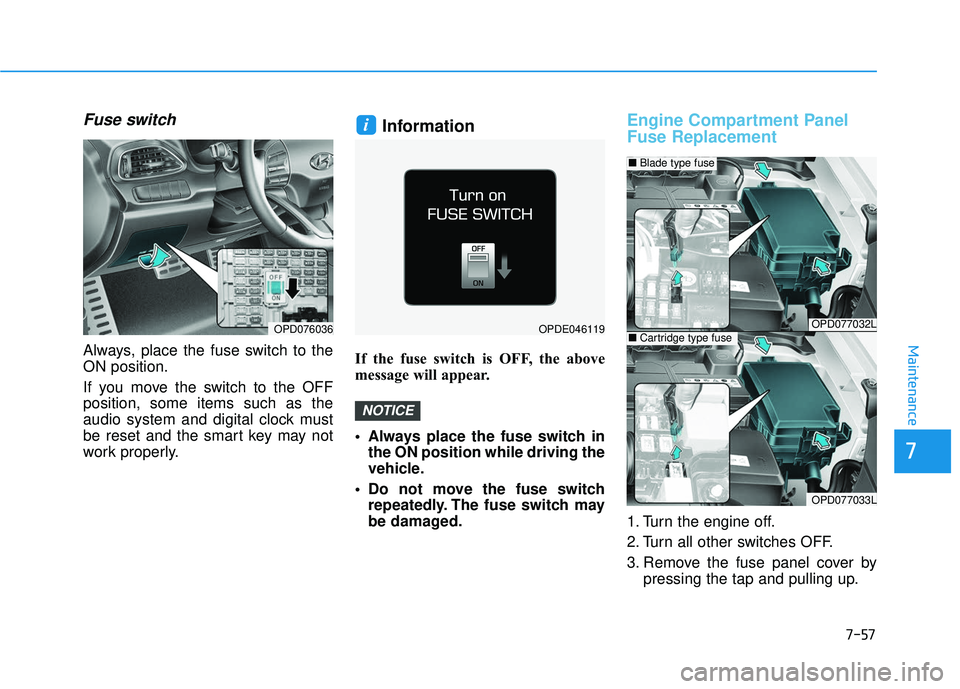
Fuse switch
Always, place the fuse switch to the
ON position.
If you move the switch to the OFF
position, some items such as the
audio system and digital clock must
be reset and the smart key may not
work properly.
Information
If the fuse switch is OFF, the above
message will appear.
Always place the fuse switch inthe ON position while driving the
vehicle.
Do not move the fuse switch repeatedly. The fuse switch may
be damaged.
Engine Compartment Panel
Fuse Replacement
1. Turn the engine off.
2. Turn all other switches OFF.
3. Remove the fuse panel cover by pressing the tap and pulling up.
NOTICE
i
OPD076036OPDE046119OPD077032L
OPD077033L
■Blade type fuse
■Cartridge type fuse
Page 482 of 495

I-2
Air bag warning labels ....................................................2-67
Air bags ........................................................................\
...2-45Additional safety precautions .....................................2-67
Air bag collision sensors ............................................2-61
Air bag inflation conditions .......................................2-63
Air bag non-inflation conditions ................................2-64
Air bag warning labels ...............................................2-67
Curtain air bags ..........................................................2-49
Do not install a child restraint on the front passenger's seat .......................................................2-60
Driver's air bag ...........................................................2-47
Driver's knee airbag....................................................2-47
How does the air bags system operate? .....................2-50
Occupant Classification System (OCS) .....................2-56
Passenger's front air bag.............................................2-47
Side air bags ...............................................................2-48
SRS Care ....................................................................2-66\
SRS components and functions..................................2-50
SRS warning light ......................................................2-51
What to expect after an air bag inflates .....................2-55
Why didn't my air bag go off in a collision ...............2-61
Air cleaner replacement ..................................................7-29
Air conditioning refrigerant label ......................3-107, 3-119
Air conditioning system specification ..............................8-7 Air ventilation seats ........................................................2-20
Alarm system ..................................................................3-16
Antenna ........................................................................\
.....4-3
Anti-lock brake system (ABS) .......................................5-47
Appearance care..............................................................7-80
Exterior care ...............................................................7-80
Interior care ................................................................7-85
Armrest ........................................................................\
...2-14
Audio/Video/Navigation system .......................................4-4
Auto defogging system .................................................3-122
Auto hold ........................................................................\
5-43
Auto light position ..........................................................3-85
Automatic climate control system ................................3-108 Air conditioning........................................................\
3-115
Air conditioning refrigerant label.............................3-119
Air intake control......................................................3-114
Automatic heating and air conditioning ...................3-109
Fan speed control......................................................3-115
Instrument panel vents..............................................3-112
Manual heating and air conditioning........................3-110
Mode selection..........................................................3-111
OFF mode .................................................................3-116
SYNC button ............................................................3-113
System maintenance .................................................3-118
Temperature control..................................................3-113
Index
A
Page 490 of 495
I-10
Manual transmission .......................................................5-16Downshifting ..............................................................5-17
Good driving practices ...............................................5-18
Using the clutch..........................................................5-16
Mirrors ........................................................................\
....3-19 Blind spot mirror ........................................................3-31
Blue Link
®center .......................................................3-20
Day/night rearview mirror..........................................3-20
Electric chromic mirror (ECM) with HomeLink
®
system, compass and Blue Link®...........................3-20
Folding the side view mirrors ....................................3-33
Inside rearview mirror ................................................3-19
Side view mirror control ............................................3-32
Side view mirrors .......................................................3-31
Moonroof, see sunroof ....................................................3-38
Multi box.......................................................................3\
-126
Multi fuse ........................................................................\
7-58
Multimedia system............................................................4-2 Antenna ........................................................................\
4-3
Audio/Video/Navigation system ..................................4-4
Aux, USB and iPod
®port ............................................4-2
Bluetooth®Wireless Technology hands-free................4-4
Steering wheel audio control........................................4-3 Odometer........................................................................\
.3-53
Oil (Engine) ....................................................................7-21\
Outside temperature gauge .............................................3-53
Owner maintenance ..........................................................7-5
Paddle shifter ..................................................................5-31
Panoramic sunroof, see sunroof......................................3-38
Parking lamp position .....................................................3-86
Passenger's front air bag .................................................2-47
Power brakes ...................................................................5-35
Power outlet ..................................................................3-129
Power steering.................................................................3-17
Power window lock switch .............................................3-37
Pre-tensioner seat belt .....................................................2-27
Range ........................................................................\
......3-54
Rear center seat belt ........................................................2-27
Rear seat adjustment .......................................................2-11
Armrest .......................................................................2\
-14
Folding the rear seat ...................................................2-11
Rear seat head restraints .................................................2-17 Adjusting the height up and down .............................2-17
Index
O
P
R
Page 492 of 495

I-12
Seats ........................................................................\
..........2-3Air ventilation seats....................................................2-20
Front seat adjustment ...................................................2-5
Head restraints ............................................................2-14
Rear seat adjustment...................................................2-11
Safety precautions ........................................................2-4
Seat warmers ..............................................................2-18
Side air bags....................................................................2-48\
Side view mirrors............................................................3-31
Sliding armrest ..............................................................3-128
Smart cruise control system............................................5-98
Smart high beam .............................................................3-87
Smart key ........................................................................\
..3-6 Battery replacement....................................................3-10
Liftgate unlocking ........................................................3-8
Locking........................................................................\
.3-7
Mechanical key ............................................................3-9
Panic button ..................................................................3-9
Unlocking .....................................................................3-7\
Smooth cornering ..........................................................5-116
Snow tires......................................................................5-\
118
Spare tire Compact spare tire replacement .................................7-44
Special driving conditions Driving at night ........................................................5-116
Driving in flooded areas ...........................................5-117
Driving in the rain ....................................................5-116
Hazardous driving conditions...................................5-115
Highway driving .......................................................5-117 Rocking the vehicle ..................................................5-115
Smooth cornering .....................................................5-116
Speed sensing door lock .................................................3-15
Speedometer....................................................................3-51\
SPORT mode ..................................................................5-54
Starting difficulties, see engine will not start ...................6-3
Steering wheel Electric power steering (EPS) ....................................3-17
Horn ........................................................................\
....3-18
Power steering ............................................................3-17
Tilt steering / Telescope steering................................3-18
Steering wheel audio control ............................................4-3
Storage compartment ....................................................3-125 Center console storage .............................................3-125
Glove box .................................................................3-125
Multi box ..................................................................3-126
Sunglass holder ........................................................3-126
Sunglass holder .............................................................3-126
Sunroof........................................................................\
....3-38 Automatic reverse ......................................................3-40
Closing the sunroof ....................................................3-40
Resetting the sunroof..................................................3-41
Sliding the sunroof .....................................................3-39
Sunroof open warning ................................................3-42
Sunshade.....................................................................3-3\
9
Tilting the sunroof ......................................................3-40
Sunroof inside air recirculation ....................................3-124
Sunvisor ........................................................................\
3-128
Index