start stop button HYUNDAI ELANTRA GT 2020 Owner's Manual
[x] Cancel search | Manufacturer: HYUNDAI, Model Year: 2020, Model line: ELANTRA GT, Model: HYUNDAI ELANTRA GT 2020Pages: 495, PDF Size: 15.22 MB
Page 261 of 495
5-38
Electronic Parking Brake (EPB)
(if equipped)
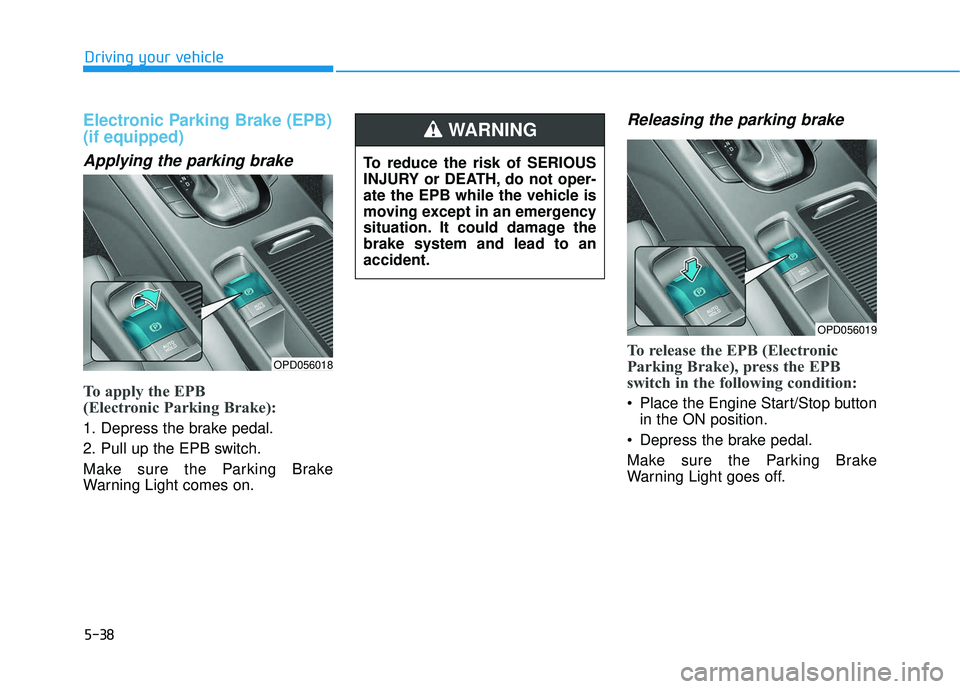
Applying the parking brake
To apply the EPB
(Electronic Parking Brake):
1. Depress the brake pedal.
2. Pull up the EPB switch.
Make sure the Parking Brake
Warning Light comes on.
Releasing the parking brake
To release the EPB (Electronic
Parking Brake), press the EPB
switch in the following condition:
Place the Engine Start/Stop buttonin the ON position.
Depress the brake pedal.
Make sure the Parking Brake
Warning Light goes off.
Driving your vehicle
OPD056018
To reduce the risk of SERIOUS
INJURY or DEATH, do not oper-
ate the EPB while the vehicle is
moving except in an emergency
situation. It could damage the
brake system and lead to an
accident.
WARNING
OPD056019
Page 262 of 495
5-39
Driving your vehicle
To release EPB (Electronic Parking
Brake) automatically:
Shift lever in P (Park)With the engine running depress
the brake pedal and shift out of P
(Park) to R (Reverse) or D (Drive).
Shift lever in N (Neutral) With the engine running depress
the brake pedal and shift out of N
(Neutral) to R (Reverse) or D
(Drive).
Manual transmission vehicle 1. Ensure seat belts are fastened and the doors, hood and liftgate
are closed.
2. With the engine running, depress the clutch pedal and move the
shift lever to 1 (First) gear or R
(Reverse).
3. Depress the accelerator pedal while releasing the clutch pedal. Automatic transmission/Dual clutch
transmission vehicle
1. Ensure seat belts are fastened and the doors, hood and liftgate
are closed.
2. With the engine running, depress the brake pedal and shift out of P
(Park) to R (Reverse) or D
(Drive).
3. Depress the accelerator pedal.
Make sure the Parking Brake
Warning light goes off.
Information
• For your safety, you can engage the EPB even though the Engine Stop/
Start button is in the OFF position,
but you cannot release it.
• For your safety, depress the brake pedal and release the parking brake
manually with the EPB switch when
you drive downhill or when backing
up the vehicle.
Information - Manual trans-mission
A vehicle towing a trailer on a hill or
on an incline may slightly roll back-
wards when starting the vehicle. To
prevent the situation follow the below
instructions.
1. Depress the clutch pedal and select a gear.
2. Keep pulling up the EPB switch.
3. Depress the accelerator pedal and slowly release the clutch pedal.
4. If the vehicle starts off with enough driving power release the EPB
switch.
Do not follow the above procedure
when driving on a flat level ground.
The vehicle may suddenly move for-
ward.i
i5
Page 263 of 495
5-40
If the parking brake warninglight is still on even though the
EPB has been released, have the
system checked by an author-
ized HYUNDAI dealer.
Do not drive your vehicle with the EPB applied. It may cause
excessive brake pad and brake
rotor wear.
EPB (Electronic Parking Brake)
may be automatically applied
when:
Requested by other systems
If the driver turns the engine offwhile Auto Hold is operating, EPB
will be automatically applied.
Warning messages
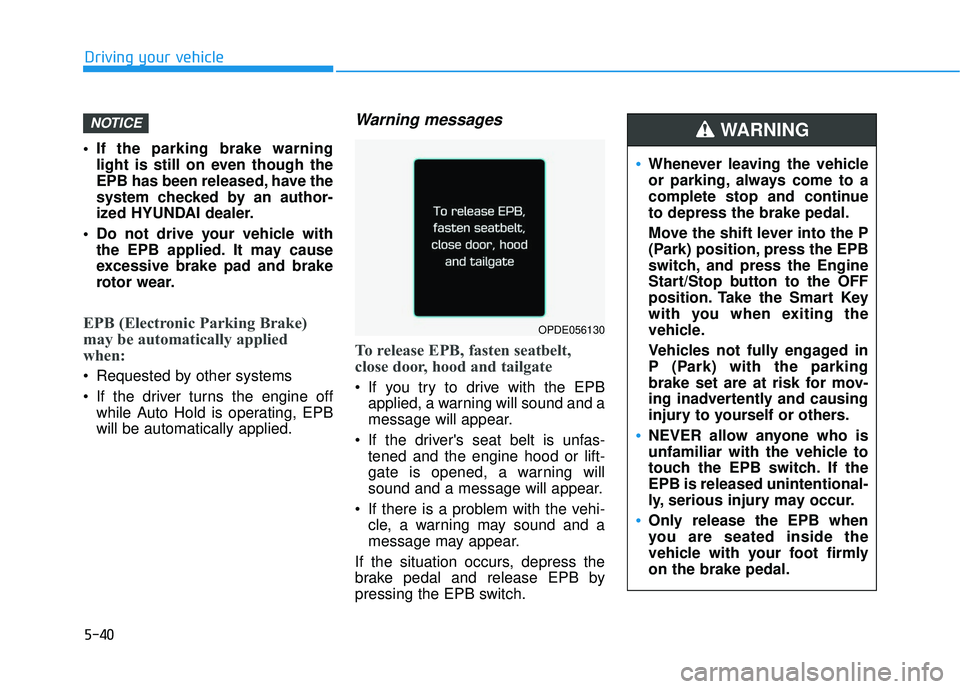
To release EPB, fasten seatbelt,
close door, hood and tailgate
If you try to drive with the EPBapplied, a warning will sound and a
message will appear.
If the driver's seat belt is unfas- tened and the engine hood or lift-
gate is opened, a warning will
sound and a message will appear.
If there is a problem with the vehi- cle, a warning may sound and a
message may appear.
If the situation occurs, depress the
brake pedal and release EPB by
pressing the EPB switch.
NOTICE
Driving your vehicle
OPDE056130
Whenever leaving the vehicle
or parking, always come to a
complete stop and continue
to depress the brake pedal.
Move the shift lever into the P
(Park) position, press the EPB
switch, and press the Engine
Start/Stop button to the OFF
position. Take the Smart Key
with you when exiting the
vehicle.
Vehicles not fully engaged in
P (Park) with the parking
brake set are at risk for mov-
ing inadvertently and causing
injury to yourself or others.
NEVER allow anyone who is
unfamiliar with the vehicle to
touch the EPB switch. If the
EPB is released unintentional-
ly, serious injury may occur.
Only release the EPB when
you are seated inside the
vehicle with your foot firmly
on the brake pedal.
WARNING
Page 265 of 495
5-42
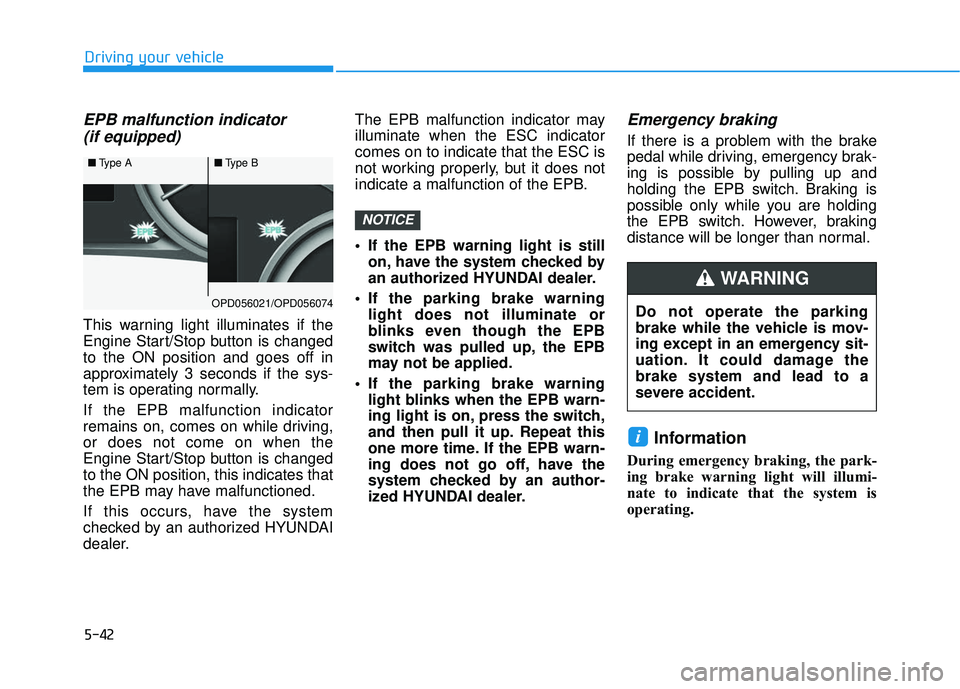
EPB malfunction indicator (if equipped)
This warning light illuminates if the
Engine Start/Stop button is changed
to the ON position and goes off in
approximately 3 seconds if the sys-
tem is operating normally.
If the EPB malfunction indicator
remains on, comes on while driving,
or does not come on when the
Engine Start/Stop button is changed
to the ON position, this indicates that
the EPB may have malfunctioned.
If this occurs, have the system
checked by an authorized HYUNDAI
dealer. The EPB malfunction indicator may
illuminate when the ESC indicator
comes on to indicate that the ESC is
not working properly, but it does not
indicate a malfunction of the EPB.
If the EPB warning light is still
on, have the system checked by
an authorized HYUNDAI dealer.
If the parking brake warning light does not illuminate or
blinks even though the EPB
switch was pulled up, the EPB
may not be applied.
If the parking brake warning light blinks when the EPB warn-
ing light is on, press the switch,
and then pull it up. Repeat this
one more time. If the EPB warn-
ing does not go off, have the
system checked by an author-
ized HYUNDAI dealer.
Emergency braking
If there is a problem with the brake
pedal while driving, emergency brak-
ing is possible by pulling up and
holding the EPB switch. Braking is
possible only while you are holding
the EPB switch. However, braking
distance will be longer than normal.
Information
During emergency braking, the park-
ing brake warning light will illumi-
nate to indicate that the system is
operating.
i
NOTICE
Driving your vehicle
■ Type A■Type B
OPD056021/OPD056074Do not operate the parking
brake while the vehicle is mov-
ing except in an emergency sit-
uation. It could damage the
brake system and lead to a
severe accident.
WARNING
Page 325 of 495
5-102
Driving your vehicle
Smart Cruise Control set speedwill be temporarily canceledwhen:
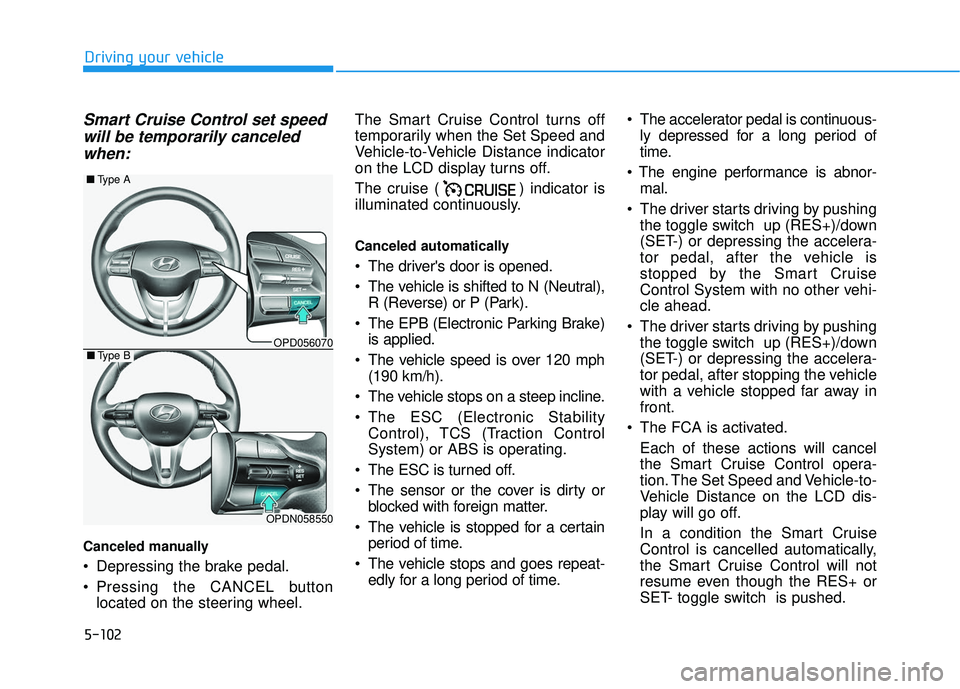
Canceled manually
Depressing the brake pedal.
Pressing the CANCEL button
located on the steering wheel. The Smart Cruise Control turns off
temporarily when the Set Speed and
Vehicle-to-Vehicle Distance indicator
on the LCD display turns off.
The cruise ( ) indicator is
illuminated continuously.
Canceled automatically
The driver's door is opened.
The vehicle is shifted to N (Neutral),
R (Reverse) or P (Park).
The EPB (Electronic Parking Brake) is applied.
The vehicle speed is over 120 mph (190 km/h).
The vehicle stops on a steep incline.
The ESC (Electronic Stability Control), TCS (Traction Control
System) or ABS is operating.
The ESC is turned off.
The sensor or the cover is dirty or blocked with foreign matter.
The vehicle is stopped for a certain period of time.
The vehicle stops and goes repeat- edly for a long period of time. The accelerator pedal is continuous-
ly depressed for a long period of
time.
mal.
The driver starts driving by pushing the toggle switch up (RES+)/down
(SET-) or depressing the accelera-
tor pedal, after the vehicle is
stopped by the Smart Cruise
Control System with no other vehi-
cle ahead.
The driver starts driving by pushing the toggle switch up (RES+)/down
(SET-) or depressing the accelera-
tor pedal, after stopping the vehicle
with a vehicle stopped far away in
front.
The FCA is activated. Each of these actions will cancel
the Smart Cruise Control opera-
tion. The Set Speed and Vehicle-to-
Vehicle Distance on the LCD dis-
play will go off.
In a condition the Smart Cruise
Control is cancelled automatically,
the Smart Cruise Control will not
resume even though the RES+ or
SET- toggle switch is pushed.
OPD056070
■ Type A
OPDN058550
■Type B
Page 353 of 495
6-2
The hazard warning flasher serves
as a warning to other drivers to exer-
cise extreme caution when approach-
ing, overtaking, or passing your vehi-
cle.
It should be used whenever emer-
gency repairs are being made or
when the vehicle is stopped near the
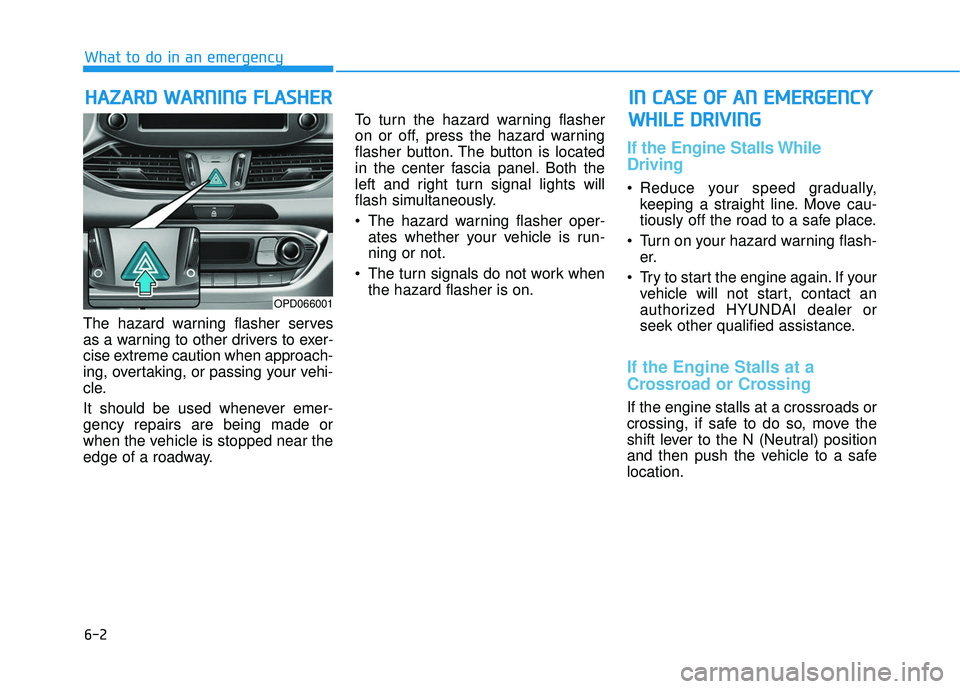
edge of a roadway.To turn the hazard warning flasher
on or off, press the hazard warning
flasher button. The button is located
in the center fascia panel. Both the
left and right turn signal lights will
flash simultaneously.
• The hazard warning flasher oper-
ates whether your vehicle is run-
ning or not.
The turn signals do not work when the hazard flasher is on.
If the Engine Stalls While
Driving
Reduce your speed gradually,keeping a straight line. Move cau-
tiously off the road to a safe place.
Turn on your hazard warning flash- er.
Try to start the engine again. If your vehicle will not start, contact an
authorized HYUNDAI dealer or
seek other qualified assistance.
If the Engine Stalls at a
Crossroad or Crossing
If the engine stalls at a crossroads or
crossing, if safe to do so, move the
shift lever to the N (Neutral) position
and then push the vehicle to a safe
location.
H HA
AZ
ZA
A R
RD
D
W
W A
AR
RN
N I
IN
N G
G
F
F L
LA
A S
SH
H E
ER
R
What to do in an emergency
I
IN
N
C
C A
A S
SE
E
O
O F
F
A
A N
N
E
E M
M E
ER
R G
G E
EN
N C
CY
Y
W
W H
HI
IL
L E
E
D
D R
RI
IV
V I
IN
N G
G
OPD066001
Page 354 of 495
6-3
What to do in an emergency
If you Have a Flat Tire While
Driving
If a tire goes flat while you are driving:
Take your foot off the acceleratorpedal and let the vehicle slow down
while driving straight ahead. Do not
apply the brakes immediately or
attempt to pull off the road as this
may cause loss of vehicle control
resulting in an accident. When the
vehicle has slowed to such a speed
that it is safe to do so, brake care-
fully and pull off the road. Drive off
the road as far as possible and park
on firm, level ground. If you are on
a divided highway, do not park in
the median area between the two
traffic lanes.
When the vehicle is stopped, press the hazard warning flasher button,
move the shift lever into P (Park),
and apply the parking brake, and
place the ignition switch in the
LOCK/OFF position.
Have all passengers get out of the vehicle. Be sure they all get out on
the side of the vehicle that is away
from traffic.
When changing a flat tire, follow the instructions provided later in
this chapter.
If the Engine Doesn't Turn
Over or Turns Over Slowly
Be sure the shift lever is in N
(Neutral) or P (Park). The engine
starts only when the shift lever is in
N (Neutral) or P (Park).
Check the battery connections to be sure they are clean and tight.
Turn on the interior light. If the light dims or goes out when you operate
the starter, the battery is drained.
Do not push or pull the vehicle to
start it. This could cause damage to
your vehicle. See instructions for
"Jump Starting" provided in this
chapter.
If the Engine Turns Over
Normally but Doesn't Start
Check the fuel level and add fuel if
necessary.
If the engine still does not start, have
your vehicle checked by an author-
ized HYUNDAI dealer.
6
I I F
F
T
T H
H E
E
E
E N
N G
GI
IN
N E
E
W
W I
IL
L L
L
N
N O
O T
T
S
S T
T A
A R
RT
T
Push or pull starting the vehicle
may cause the catalytic con-
verter to overload which can
lead to damage to the emission
control system.
CAUTION
Page 483 of 495
I-3
Automatic transmission ..................................................5-19Good driving practices ...............................................5-23
Manual shift mode......................................................5-21
Parking........................................................................\
5-23
Shift lock system ........................................................5-22
Shift-lock release ........................................................5-22
Transmission ranges ...................................................5-20
Automatic ventilation ...................................................3-124
Aux, USB and iPod ..........................................................4-2
Battery ........................................................................\
.....7-35 Battery recharging ......................................................7-36
Battery saver function .....................................................3-90
Before driving ...................................................................5-4
Blade type fuse ...............................................................7-57
Blind-spot Collision Warning (BCW) system ................5-55
Blind spot mirror.............................................................3-31
Blue Link
®center ...........................................................3-20
Bluetooth®Wireless Technology hands-free ....................4-4
Bottle holder .................................................................3-127 Brake system ...................................................................5-35
Anti-lock brake system (ABS) ...................................5-47
Auto hold ....................................................................5-43\
Disc brakes wear indicator .........................................5-36
Electronic parking brake (EPB) .................................5-38
Electronic stability control (ESC) ..............................5-48
Good braking practices ..............................................5-53
Hill-start assist control (HAC) ...................................5-53
Parking brake (hand type) ..........................................5-36
Power brakes ..............................................................5-35
Vehicle stability management (VSM) ........................5-51
Brake/clutch fluid ...........................................................7-27
Bulb replacement Daytime running light (DRL) ....................................7-69
Front side marker .......................................................7-69
Front turn signal lamp ................................................7-69
Headlamp....................................................................7-69\
High mounted stop lamp ............................................7-77
Interior light bulb .......................................................7-78
License plate light bulb ..............................................7-77
Parking lamp ..............................................................7-69
Rear combination light bulb .......................................7-73
Side repeater lamp ......................................................7-73
Bulb wattage .....................................................................8-3\
Button Start/Stop, see Engine Start/Stop button ...............5-9
I
Index
B
Page 485 of 495
............")
I-5
Defroster .......................................................................3\
-123Rear window defroster .............................................3-123
Defrosting (Windshield)................................................3-119
Dimensions .......................................................................8\
-2
Display illumination, see instrument panel illumination..................................................................3-50
Displays, see instrument cluster .....................................3-49
Door locks .......................................................................3\
-11 Auto door lock/unlock features ..................................3-15
Central door lock switch ............................................3-14
Child-protector rear door lock....................................3-16
Drinks holders, see cup holders ....................................3-127
Drive mode integrated control system ............................5-54 SPORT mode ..............................................................5-54
Driver Attention Warning system (DAW) ......................5-88
Driver's air bag................................................................2-47
Driver's knee airbag ........................................................2-47
Driving at night .............................................................5-116
Driving in flooded areas ...............................................5-117
Driving in the rain .........................................................5-116
Dual clutch transmission.................................................5-25 DCT warning messages..............................................5-27
Good driving practices ...............................................5-33
Manual shift mode......................................................5-30
Paddle shifter ..............................................................5-31
Parking........................................................................\
5-32
Shift lock system ........................................................5-32
Shift-lock release ........................................................5-32
Transmission ranges ...................................................5-29 Electric chromic mirror (ECM) with HomeLink
®system,
compass and Blue Link®.............................................3-20
Electric power steering (EPS).........................................3-17
Electronic parking brake (EPB) ......................................5-38
Electronic stability control (ESC)...................................5-48
Emergency towing ..........................................................6-22
Emission control system .................................................7-88 Crankcase emission control system ...........................7-88
Evaporative emission control System ........................7-88
Exhaust emission control system ...............................7-89
Engine compartment..................................................1-7, 7-3
Engine compartment panel fuse replacement .................7-57
Engine coolant ................................................................7-23
Engine coolant temperature gauge .................................3-51
Engine number ................................................................8-12
Engine oil ........................................................................\
7-21
Engine specification..........................................................8-2
Engine start/stop button ....................................................5-9
EPB (Electronic Parking Brake) .....................................5-38
Evaporative emission control System.............................7-88
Exhaust emission control system....................................7-89
Explanation of scheduled maintenance items.................7-18
Exterior care....................................................................7-81\
Exterior overview Front view ....................................................................1-2
Rear view......................................................................1-\
3
I
Index
E
Page 487 of 495

I-7
Horn ........................................................................\
........3-18
How to use this manual ....................................................F-6
If the engine doesn't turn over or turns over slowly.........6-3
If the engine overheats ......................................................6-6
If the engine stalls at a crossroad or crossing...................6-2
If the engine stalls while driving ......................................6-2
If the engine turns over normally but doesn't start ...........6-3
If the engine will not start.................................................6-3
If you have a flat tire while driving ..................................6-3
Ignition switch ..................................................................5-6Engine Start/Stop button ..............................................5-9
Key ignition switch ......................................................5-6
Impact sensing door unlock ............................................3-15
Improtant safety precautions.............................................2-2 Air bag hazards ............................................................2-2
Always wear your seat belt ..........................................2-2
Control your speed .......................................................2-2
Driver distraction..........................................................2-2
Keep your vehicle in safe condition.............................2-2
Restrain all children .....................................................2-2
In case of emergency while driving..................................6-2
Indicator light..................................................................3-56
Inside rearview mirror ....................................................3-19 Instrument cluster ...........................................................3-49
Assist mode ................................................................3-76
Gauges and meters .....................................................3-51
Instrument cluster illumination ..................................3-50
LCD display control ...................................................3-73
LCD display messages ...............................................3-67
LCD display modes ....................................................3-74
Shift indicator pop-up ................................................3-55
Transmission shift indicator .......................................3-54
Trip computer mode ...................................................3-75
User settings mode .....................................................3-77
Warning and indicator lights ......................................3-56
Instrument panel fuse replacement .................................7-56
Instrument panel overview ...............................................1-5
Interior care .....................................................................7-8\
5
Interior features Bottle holder .............................................................3-127
Cargo area cover.......................................................3-134
Cellular phone holder ...............................................3-130
Clock ........................................................................\
3-132
Clothes hanger ..........................................................3-132
Cup holder ................................................................3-127
Floor mat anchor(s) ..................................................3-133
Luggage net (holder) ................................................3-134
Power outlet..............................................................3-129
Sliding armrest .........................................................3-128
Sunvisor ....................................................................3-12\
8
Wireless cellular phone charging system .................3-130
I
Index
I