navigation HYUNDAI ELANTRA GT 2020 Owners Manual
[x] Cancel search | Manufacturer: HYUNDAI, Model Year: 2020, Model line: ELANTRA GT, Model: HYUNDAI ELANTRA GT 2020Pages: 495, PDF Size: 15.22 MB
Page 16 of 495
1-5
Your vehicle at a glance
1
I
IN
N S
ST
T R
R U
U M
M E
EN
N T
T
P
P A
A N
N E
EL
L
O
O V
VE
ER
R V
V I
IE
E W
W
(
( I
I)
)
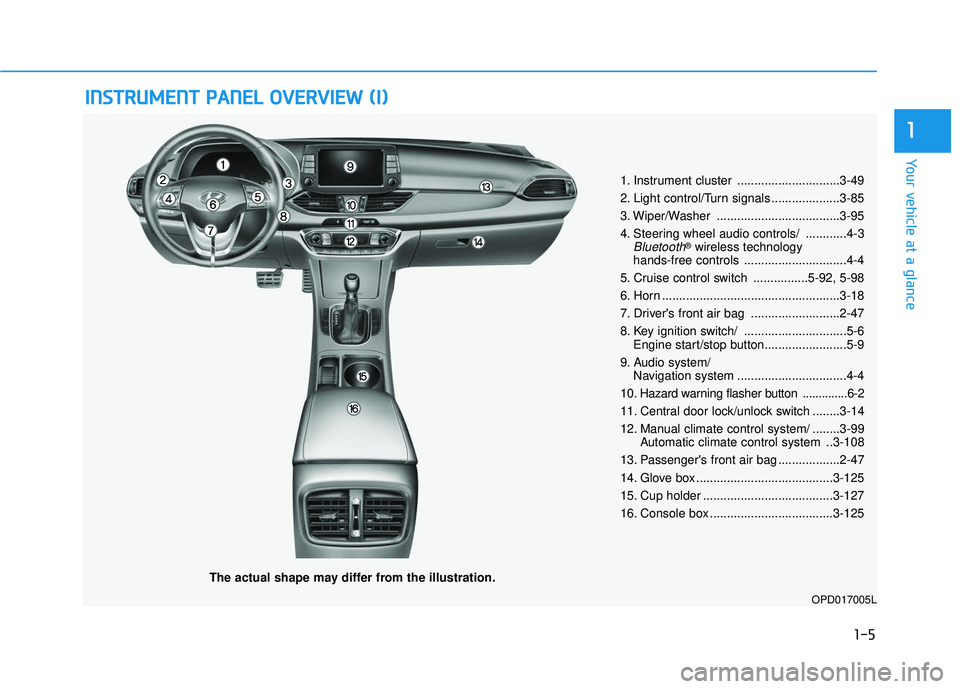
The actual shape may differ from the illustration.
1. Instrument cluster ..............................3-49
2. Light control/Turn signals ....................3-85
3. Wiper/Washer ....................................3-95
4. Steering wheel audio controls/ ............4-3
Bluetooth®wireless technology
hands-free controls ..............................4-4
5. Cruise control switch ................5-92, 5-98
6. Horn ....................................................3-18
7. Driver's front air bag ..........................2-47
8. Key ignition switch/ ..............................5-6 Engine start/stop button........................5-9
9. Audio system/ Navigation system ................................4-4
10
. Hazard warning flasher button ..............6-2
11. Central door lock/unlock switch ........3-14
12. Manual climate control system/ ........3-99 Automatic climate control system ..3-108
13. Passenger's front air bag ..................2-47
14. Glove box ........................................3-125
15. Cup holder ......................................3-127
16. Console box ....................................3-125
OPD017005L
Page 105 of 495
3-20
Convenient features of your vehicle
When cleaning the mirror, use a
paper towel or similar material
dampened with glass cleaner. Do
not spray glass cleaner directly on
the mirror as that may cause the
liquid cleaner to enter the mirror
housing.
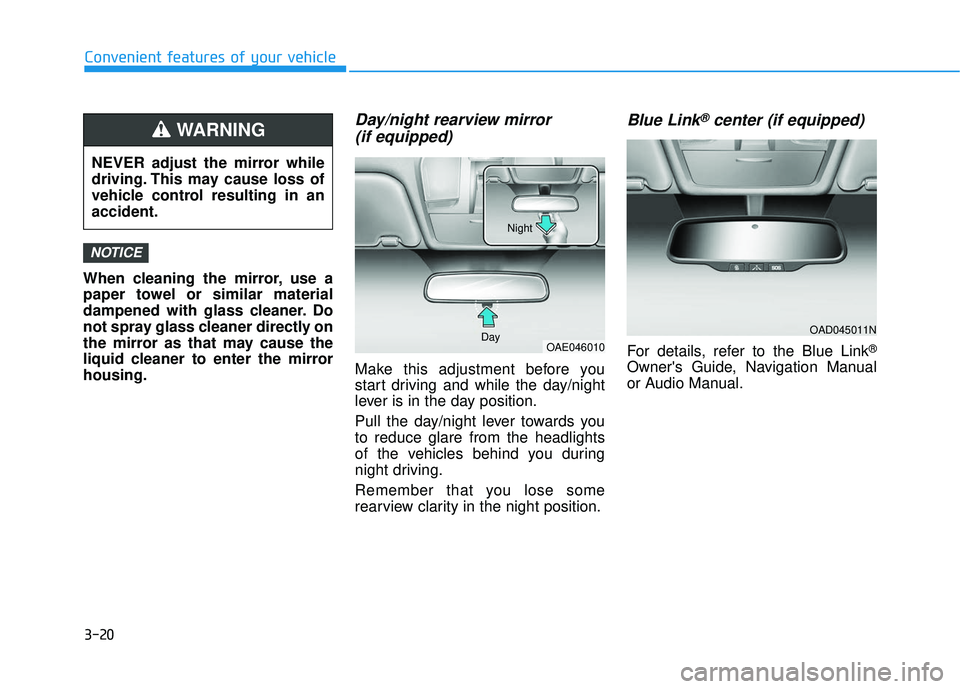
Day/night rearview mirror (if equipped)
Make this adjustment before you
start driving and while the day/night
lever is in the day position.
Pull the day/night lever towards you
to reduce glare from the headlights
of the vehicles behind you during
night driving.
Remember that you lose some
rearview clarity in the night position.
Blue Link®center (if equipped)
For details, refer to the Blue Link®
Owner's Guide, Navigation Manual
or Audio Manual.
NOTICE
OAD045011N
OAE046010
Day Night
NEVER adjust the mirror while
driving. This may cause loss of
vehicle control resulting in an
accident.
WARNING
Page 135 of 495
3-50
Convenient features of your vehicle
Instrument Cluster Control
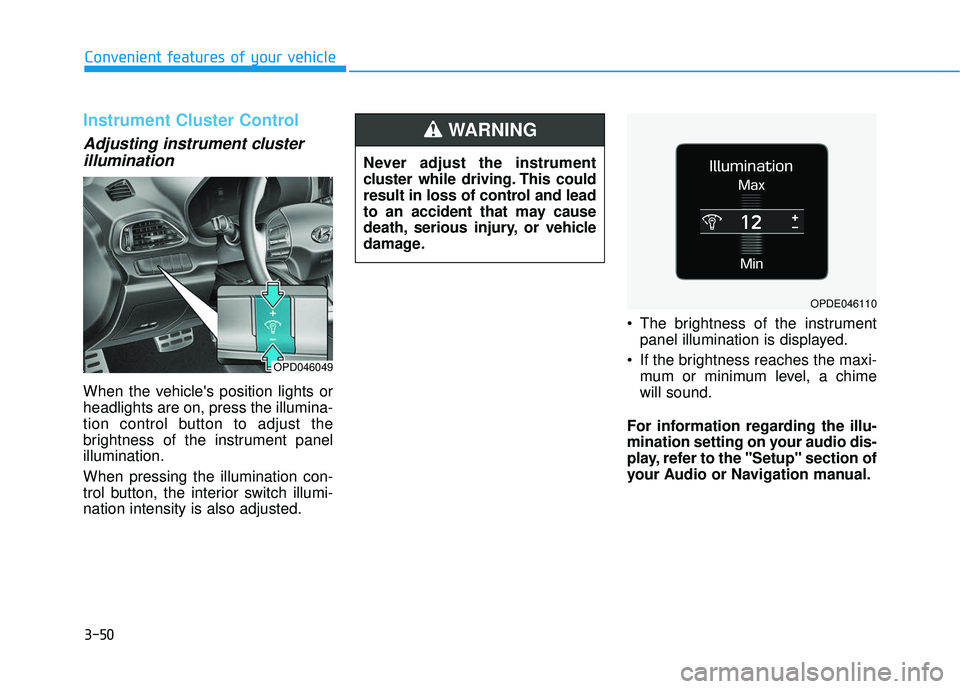
Adjusting instrument clusterillumination
When the vehicle's position lights or
headlights are on, press the illumina-
tion control button to adjust the
brightness of the instrument panel
illumination.
When pressing the illumination con-
trol button, the interior switch illumi-
nation intensity is also adjusted. The brightness of the instrument
panel illumination is displayed.
If the brightness reaches the maxi- mum or minimum level, a chime
will sound.
For information regarding the illu-
mination setting on your audio dis-
play, refer to the "Setup" section of
your Audio or Navigation manual.
Never adjust the instrument
cluster while driving. This could
result in loss of control and lead
to an accident that may cause
death, serious injury, or vehicle
damage.
WARNING
OPD046049
OPDE046110
Page 159 of 495
3-74
Convenient features of your vehicle
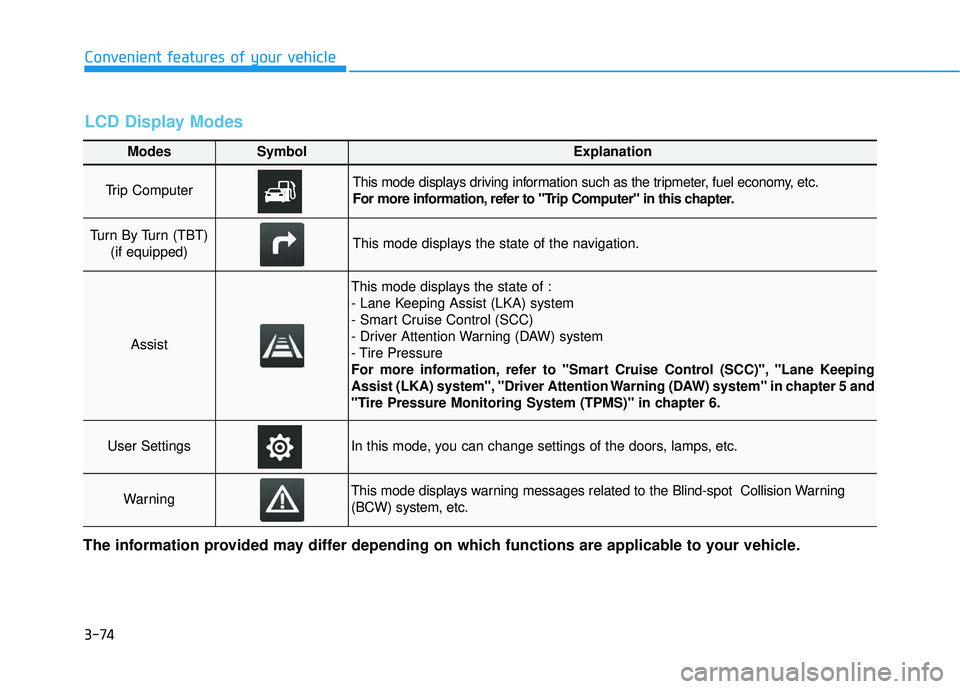
Modes SymbolExplanation
Trip Computer This mode displays driving information such as the tripmeter, fuel economy, etc.
For more information, refer to "Trip Computer" in this chapter.
Turn By Turn (TBT) (if equipped)This mode displays the state of the navigation.
Assist
This mode displays the state of :
- Lane Keeping Assist (LKA) system
- Smart Cruise Control (SCC)
- Driver Attention Warning (DAW) system
- Tire Pressure
For more information, refer to "Smart Cruise Control (SCC)", "Lane Keeping
Assist (LKA) system", "Driver Attention Warning (DAW) system" in chapter 5 and
"Tire Pressure Monitoring System (TPMS)" in chapter 6.
User SettingsIn this mode, you can change settings of the doors, lamps, etc.
WarningThis mode displays warning messages related to the Blind-spot Collision Warning
(BCW) system, etc.
The information provided may differ depending on which functions are applicable to your vehicle.
LCD Display Modes
Page 161 of 495
3-76
Convenient features of your vehicle
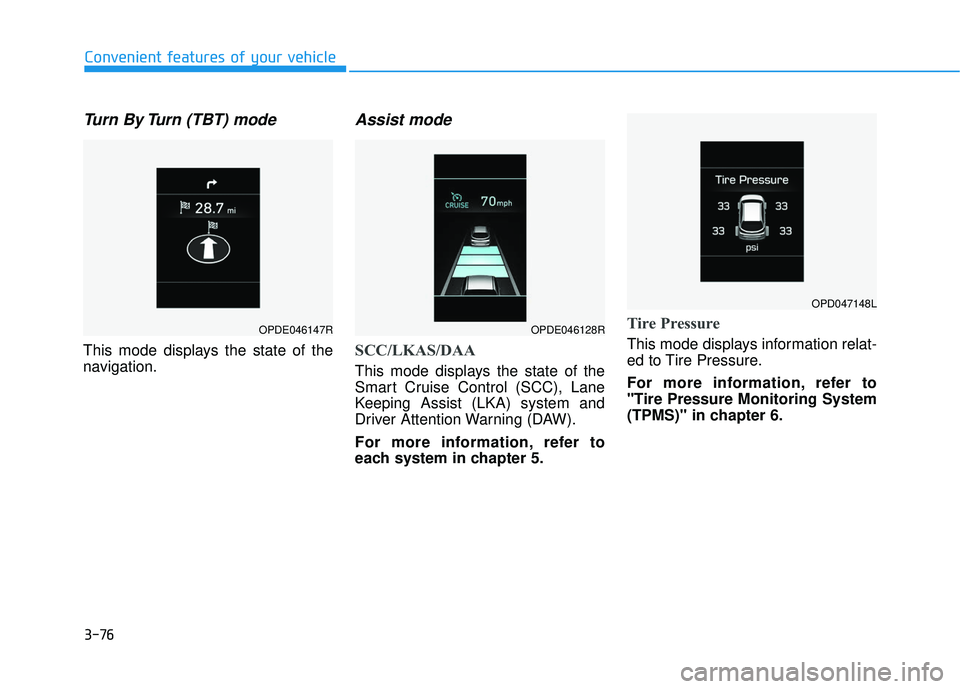
Turn By Turn (TBT) mode
This mode displays the state of the
navigation.
Assist mode
SCC/LKAS/DAA
This mode displays the state of the
Smart Cruise Control (SCC), Lane
Keeping Assist (LKA) system and
Driver Attention Warning (DAW).
For more information, refer to
each system in chapter 5.
Tire Pressure
This mode displays information relat-
ed to Tire Pressure.
For more information, refer to
"Tire Pressure Monitoring System
(TPMS)" in chapter 6.
OPDE046147ROPDE046128R
OPD047148L
Page 217 of 495
3-132
Convenient features of your vehicle
(Continued)
The wireless charging process may temporarily stop, when tem-
perature abnormally increases
inside the wireless cellular
phone charging system. The
wireless charging process
restarts, when temperature falls
to a certain level.
The wireless charging process may temporarily stop when
there is any metallic item, such
as a coin, between the wireless
cellular phone charging system
and a cellular phone.
Clock
Vehicles with Audio system
Select the [SETUP] button on the
audio system ➟ Select [Date/Time].
Set time: Set the time displayed on the audio screen.
Time format: Choose between 12- hour and 24-hour time formats.
Vehicles with Navigation system
Select the Settings menu on the
Navigation system ➟Select
[Date/Time].
GPS time: Displays time according to the received GNSS time.
24-hour: Switches to 12 hour or 24 hour.
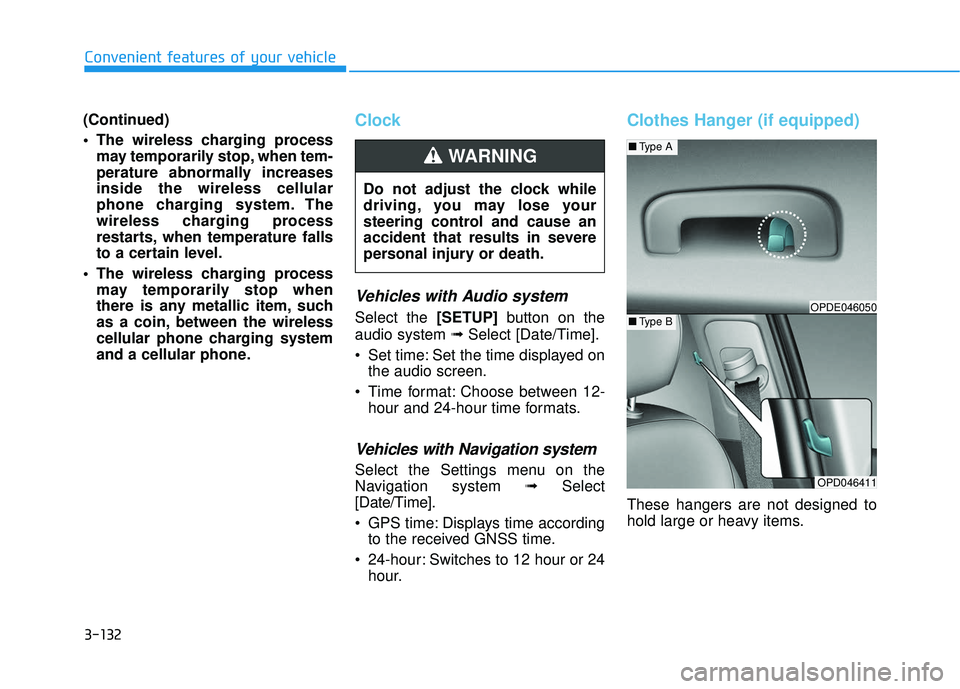
Clothes Hanger (if equipped)
These hangers are not designed to
hold large or heavy items.
Do not adjust the clock while
driving, you may lose your
steering control and cause an
accident that results in severe
personal injury or death.
WARNING
OPD046411
■
Type A
■Type BOPDE046050
Page 220 of 495
Multimedia System
Multimedia System.................................................4-2
AUX, USB and iPod®Port ...............................................4-2
Antenna ........................................................................\
.......4-3
Steering Wheel Audio Controls ......................................4-3
Bluetooth®Wireless Technology Hands-Free ...........4-4
Audio (Display Audio) / Video /
Navigation System (AVN).................................................4-4
4
Page 223 of 495
4-4
Multimedia System
RADIO mode
It will function as the PRESET STA-
TION UP/DOWN button.
MEDIA mode
It will function as the TRACK UP/
DOWN button.
MODE (3)
Press the MODE button to toggle
through Radio, SXM, or AUX modes.
MUTE ( ) (4)
Press the MUTE button to mute thesound.
Press the MUTE button again to activate the sound.
Information
Detailed information for audio control
buttons are described in the separately
supplied manual with the vehicle.
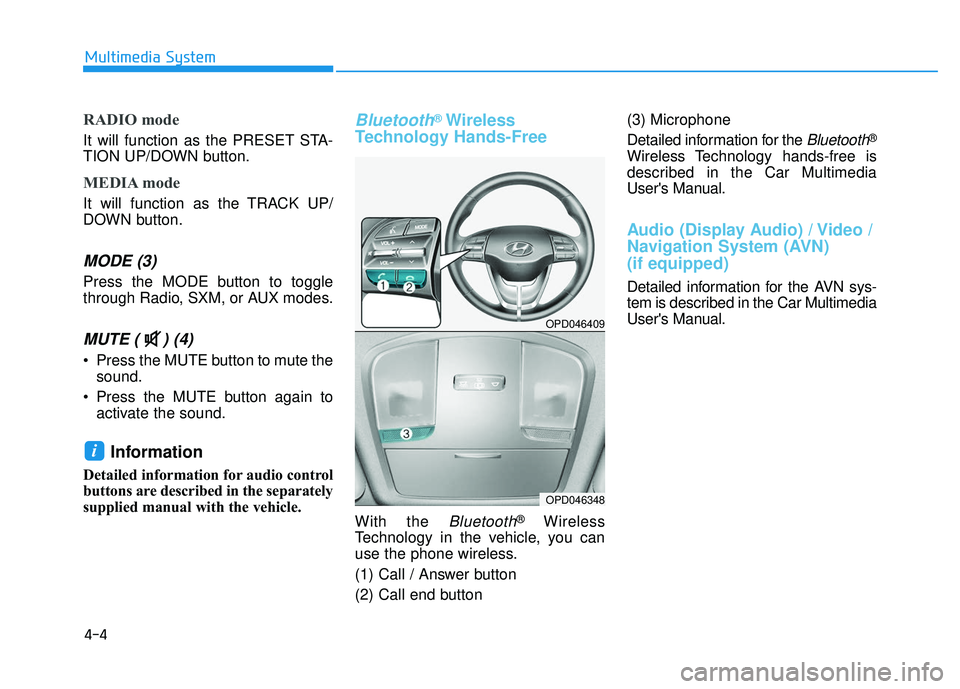
Bluetooth®Wireless
Technology Hands-Free
With the Bluetooth®Wireless
Technology in the vehicle, you can
use the phone wireless.
(1) Call / Answer button
(2) Call end button (3) Microphone
Detailed information for the
Bluetooth®
Wireless Technology hands-free is
described in the Car Multimedia
User's Manual.
Audio (Display Audio) / Video /
Navigation System (AVN)
(if equipped)
Detailed information for the AVN sys-
tem is described in the Car Multimedia
User's Manual.
i
OPD046409
OPD046348
Page 363 of 495
6-12
What to do in an emergency
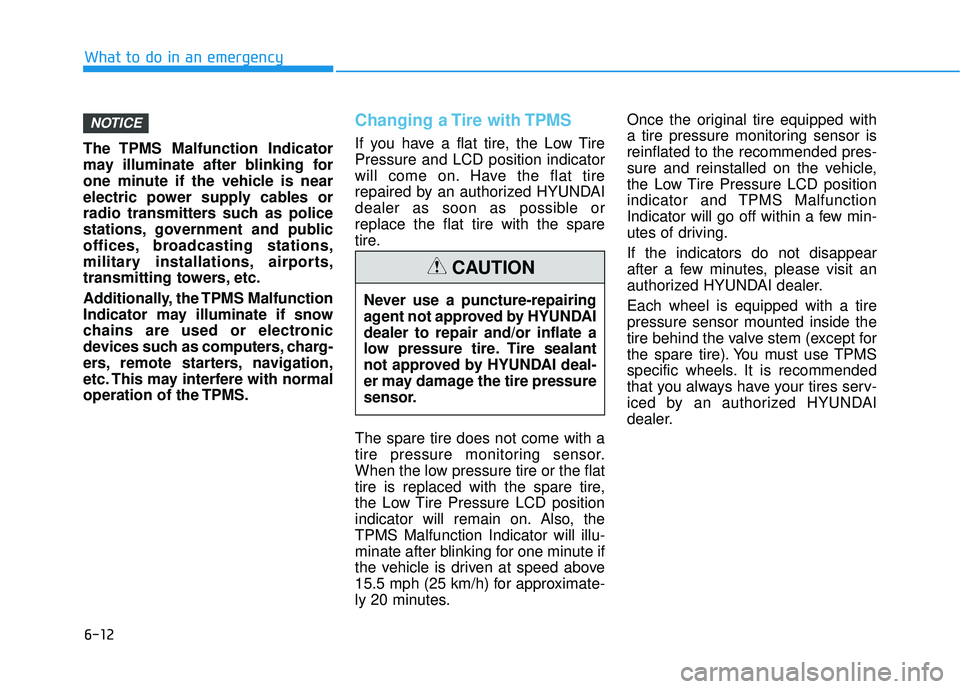
The TPMS Malfunction Indicator
may illuminate after blinking for
one minute if the vehicle is near
electric power supply cables or
radio transmitters such as police
stations, government and public
offices, broadcasting stations,
military installations, airports,
transmitting towers, etc.
Additionally, the TPMS Malfunction
Indicator may illuminate if snow
chains are used or electronic
devices such as computers, charg-
ers, remote starters, navigation,
etc. This may interfere with normal
operation of the TPMS.
Changing a Tire with TPMS
If you have a flat tire, the Low Tire
Pressure and LCD position indicator
will come on. Have the flat tire
repaired by an authorized HYUNDAI
dealer as soon as possible or
replace the flat tire with the spare
tire.
The spare tire does not come with a
tire pressure monitoring sensor.
When the low pressure tire or the flat
tire is replaced with the spare tire,
the Low Tire Pressure LCD position
indicator will remain on. Also, the
TPMS Malfunction Indicator will illu-
minate after blinking for one minute if
the vehicle is driven at speed above
15.5 mph (25 km/h) for approximate-
ly 20 minutes. Once the original tire equipped with
a tire pressure monitoring sensor is
reinflated to the recommended pres-
sure and reinstalled on the vehicle,
the Low Tire Pressure LCD position
indicator and TPMS Malfunction
Indicator will go off within a few min-
utes of driving.
If the indicators do not disappear
after a few minutes, please visit an
authorized HYUNDAI dealer.
Each wheel is equipped with a tire
pressure sensor mounted inside the
tire behind the valve stem (except for
the spare tire). You must use TPMS
specific wheels. It is recommended
that you always have your tires serv-
iced by an authorized HYUNDAI
dealer.
NOTICE
Never use a puncture-repairing
agent not approved by HYUNDAI
dealer to repair and/or inflate a
low pressure tire. Tire sealant
not approved by HYUNDAI deal-
er may damage the tire pressure
sensor.
CAUTION
Page 434 of 495
7-60
Maintenance
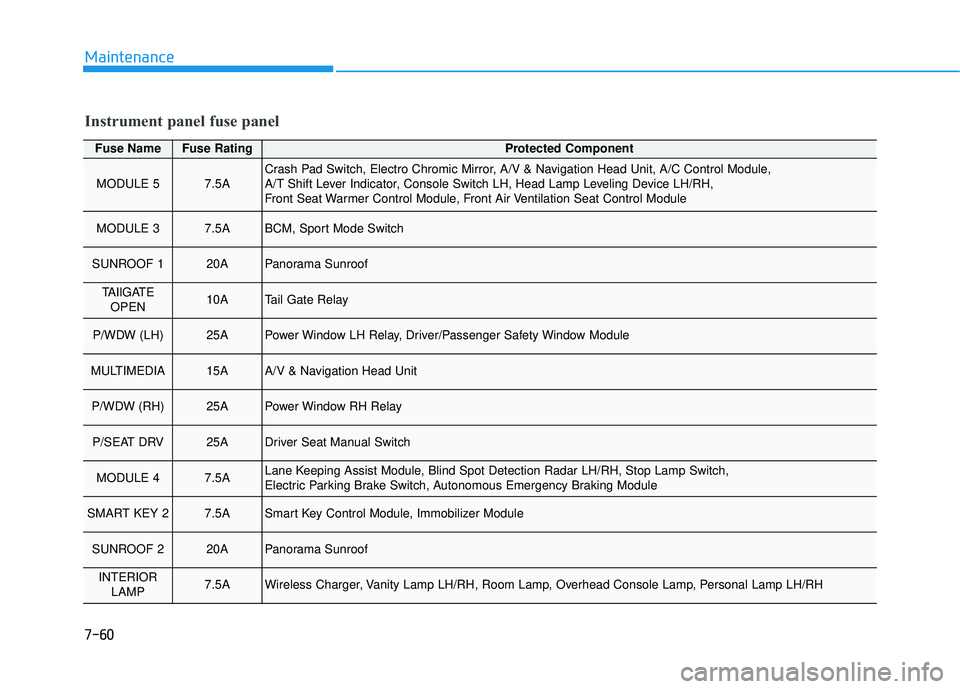
Fuse NameFuse RatingProtected Component
MODULE 57.5ACrash Pad Switch, Electro Chromic Mirror, A/V & Navigation Head Unit, A/C Control Module,
A/T Shift Lever Indicator, Console Switch LH, Head Lamp Leveling Device LH/RH,
Front Seat Warmer Control Module, Front Air Ventilation Seat Control Module
MODULE 37.5ABCM, Sport Mode Switch
SUNROOF 120APanorama Sunroof
TAIlGATEOPEN10ATail Gate Relay
P/WDW (LH)25APower Window LH Relay, Driver/Passenger Safety Window Module
MULTIMEDIA15AA/V & Navigation Head Unit
P/WDW (RH)25APower Window RH Relay
P/SEAT DRV25ADriver Seat Manual Switch
MODULE 47.5ALane Keeping Assist Module, Blind Spot Detection Radar LH/RH, Stop Lamp Switch,
Electric Parking Brake Switch, Autonomous Emergency Braking Module
SMART KEY 27.5ASmart Key Control Module, Immobilizer Module
SUNROOF 220APanorama Sunroof
INTERIOR LAMP7.5AWireless Charger, Vanity Lamp LH/RH, Room Lamp, Overhead Console Lamp, Personal Lamp LH/RH
Instrument panel fuse panel