open hood HYUNDAI ELANTRA HYBRID 2021 Owners Manual
[x] Cancel search | Manufacturer: HYUNDAI, Model Year: 2021, Model line: ELANTRA HYBRID, Model: HYUNDAI ELANTRA HYBRID 2021Pages: 555, PDF Size: 56.08 MB
Page 103 of 555

High Beam Assist indicator light ........................................................................\
..4-18
Forward Collision-Avoidance Assist Warning Light ............................................4-18
Lane Keep Assist Indicator Light ........................................................................\
.. 4-19
Cruise Indicator Light
........................................................................\
...................4-19
SPORT Mode Indicator Light ........................................................................\
........4-19
SMART Mode Indicator Light ........................................................................\
.......4-19
Icy Road Warning Light ........................................................................\
................4-19
LCD Display Messages ........................................................................\
...................4-20
Shift to P or N to start engine (for smart key system) .......................................4-20
Shift to P (for smart key system and intelligent variable transmission) ...........4-20
Low key battery (for smart key system) ..............................................................4-20
Press brake pedal to start engine (for smart key system and intelligent
variable transmission)........................................................................\
.................. 4-20
Press clutch pedal to start engine (for smart key system and manual
transmission)
........................................................................\
................................4-20
Key not in vehicle (for smart key system) ...........................................................4-20
Key not detected (for smart key system) ............................................................4-20
Press START button again (for smart key system)
.............................................4-20
12V battery discharging due to additional electrical devices ...........................4-21
Press START button with key (for smart key system) .........................................4-21
Check BRAKE SWITCH fuse (for smart key system and automatic
transmission/intelligent variable transmission) ..................................................4-21
Door, Hood, Trunk Open Indicator ....................................................................... 4-21
Sunroof Open
........................................................................\
................................4-21
Low Pressure ........................................................................\
................................4-22
Lights Mode ........................................................................\
.................................. 4-22
Wiper
........................................................................\
............................................4-22
Heated Steering Wheel turned off ......................................................................4-22
Low washer fluid ........................................................................\
..........................4-22
Low fuel ........................................................................\
........................................4-23
Engine Overheated ........................................................................\
......................4-23
Check headlight (if equipped) ........................................................................\
....4-23
Check headlight (Low) ........................................................................\
................4-23
Check turn signal ........................................................................\
.........................4-23
Check brake light ........................................................................\
.........................4-23
Check daytime running light ........................................................................\
.......4-24
Check high mounted stop lamp ........................................................................\
.4-24
Check headlight LED ........................................................................\
...................4-24
Check Forward Collision-Avoidance Assist system ...........................................4-24
Check Lane Keeping Assist system ....................................................................4-24
Check Blind-Spot Collision Warning system ......................................................4-24
Check Driver Attention Warning system
............................................................4-25
4
Page 122 of 555
04
4-21
12V battery discharging due to
additional electrical devices
This message is displayed if the 12V
battery voltage is weak due to any
non-factory electrical accessories (ex.
dashboard camera) while parking. Be
careful that the battery is not discharged.
If the message appears after removing
the non-factory electrical accessories,
we recommend that you have the vehicle
inspected by an authorized HYUNDAI
dealer.
Press START button with key
(for smart key system)
This warning message is displayed if you
press the Engine Start/Stop button while
the warning message "Key not detected"
is displayed.
At this time, the immobilizer indicator
light blinks.
Check BRAKE SWITCH fuse (for
smart key system and automatic
transmission/intelligent variable
transmission)
This warning message is displayed if the
brake switch fuse is disconnected.
You need to replace the fuse with a new
one before starting the engine.
If that is not possible, you can start the
engine by pressing the Engine Start/
Stop button for 10 seconds in the ACC
position.
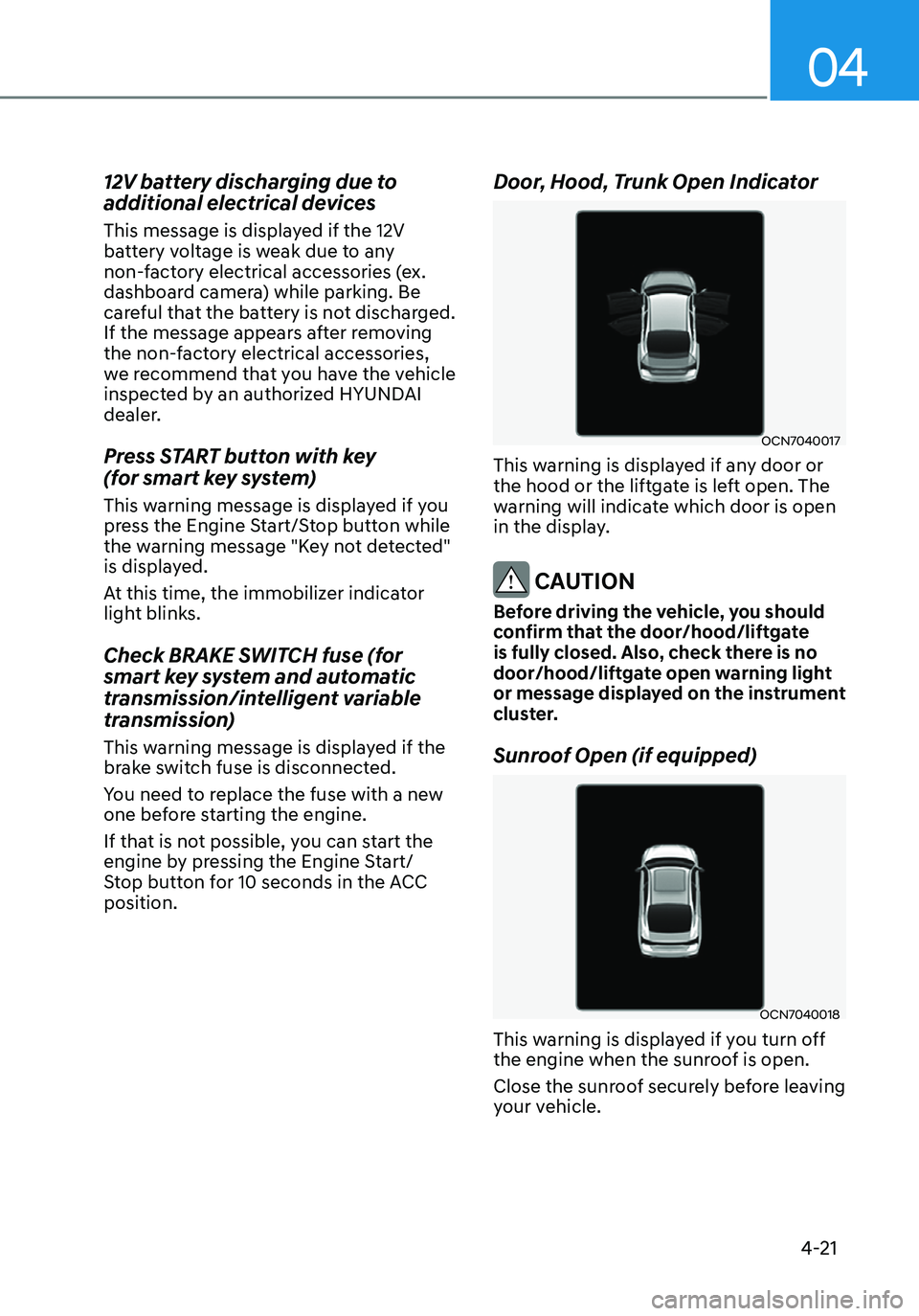
Door, Hood, Trunk Open Indicator
OCN7040017
This warning is displayed if any door or
the hood or the liftgate is left open. The
warning will indicate which door is open
in the display.
CAUTION
Before driving the vehicle, you should
confirm that the door/hood/liftgate
is fully closed. Also, check there is no
door/hood/liftgate open warning light
or message displayed on the instrument
cluster.
Sunroof Open (if equipped)
OCN7040018
This warning is displayed if you turn off
the engine when the sunroof is open.
Close the sunroof securely before leaving
your vehicle.
Page 154 of 555

5.Convenient Features
Convenient Features
Accessing Your Vehicle ........................................................................\
..........5-4Remote Key ........................................................................\
.......................................5-4
Smart Key ........................................................................\
...........................................5 -7
Immobilizer System ........................................................................\
........................5-14
Hyundai Digital Key ........................................................................\
.........................5-15
Door Locks ........................................................................\
.............................5-31Operating Door Locks from Outside the Vehicle ..................................................5-31
Operating Door Locks from Inside the Vehicle ....................................................5-33
Automatic Door Lock and Unlock Features ..........................................................5-35
Child-Protector Rear Door Locks ........................................................................\
..5-35
Rear Occupant Alert (ROA) System .......................................................................5-36
Theft –Alarm System ........................................................................\
...........5-37
Driver position memory system
..................................................................5-38Storing memory positions ........................................................................\
.............5-38
Recalling memory positions ........................................................................\
..........5-38
Driver position memory system reset ...................................................................5-39
Easy access function ........................................................................\
......................5-40
Steering Wheel ........................................................................\
......................5-41Electric Power Steering (EPS) ........................................................................\
.........5-41
Tilt Steering / Telescope Steering ........................................................................\
.5-42
Horn ........................................................................\
................................................. 5-43
Mirrors ........................................................................\
..................................5-44Inside Rearview Mirror ........................................................................\
...................5-44
Side View Mirrors ........................................................................\
...........................5-52
Windows ........................................................................\
...............................5-54Power Windows ........................................................................\
..............................5-55
Sunroof ........................................................................\
.................................5-58Sunroof opening and closing ........................................................................\
........5-59
Tilting the sunroof ........................................................................\
..........................5-60
Sunshade ........................................................................\
........................................5-60
Resetting the sunroof ........................................................................\
.....................5-61
Sunroof open warning ........................................................................\
....................5-61
Hood ........................................................................\
.....................................5-62
Trunk
........................................................................\
.....................................5-64Emergency trunk safety release ........................................................................\
....5-65
Smart Trunk release ........................................................................\
.......................5-66
5
Page 157 of 555
Convenient Features
5-4
Remote Key (if equipped)
OIG046001
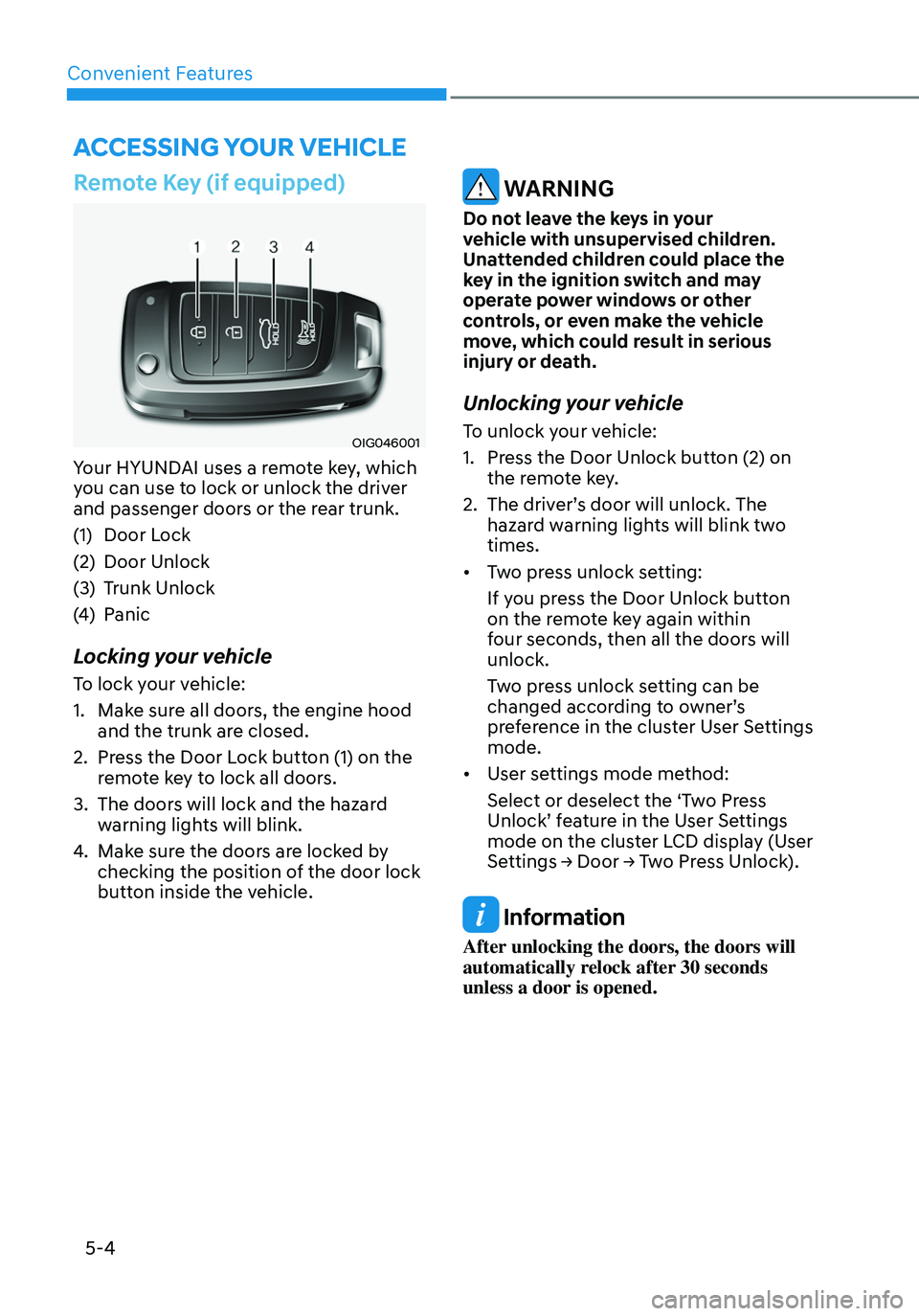
Your HYUNDAI uses a remote key, which
you can use to lock or unlock the driver
and passenger doors or the rear trunk.
(1) Door Lock
(2) Door Unlock
(3) Trunk Unlock
(4) Panic
Locking your vehicle
To lock your vehicle:
1. Make sure all doors, the engine hood
and the trunk are closed.
2. Press the Door Lock button (1) on the
remote key to lock all doors.
3. The doors will lock and the hazard
warning lights will blink.
4. Make sure the doors are locked by
checking the position of the door lock
button inside the vehicle.
WARNING
Do not leave the keys in your
vehicle with unsupervised children.
Unattended children could place the
key in the ignition switch and may
operate power windows or other
controls, or even make the vehicle
move, which could result in serious
injury or death.
Unlocking your vehicle
To unlock your vehicle:
1. Press the Door Unlock button (2) on
the remote key.
2. The driver’s door will unlock. The
hazard warning lights will blink two
times.
• Two press unlock setting:
If you press the Door Unlock button
on the remote key again within
four seconds, then all the doors will
unlock.
Two press unlock setting can be
changed according to owner’s
preference in the cluster User Settings
mode.
• User settings mode method:
Select or deselect the ‘Two Press
Unlock’ feature in the User Settings
mode on the cluster LCD display (User
Settings → Door → Two Press Unlock).
Information
After unlocking the doors, the doors will
automatically relock after 30 seconds
unless a door is opened.
ACCESSING YOUR VEHICLE
Page 160 of 555
05
5 -7
Smart Key (if equipped)
„„Type A
OCN7050004
„„Type B
OCN7050005
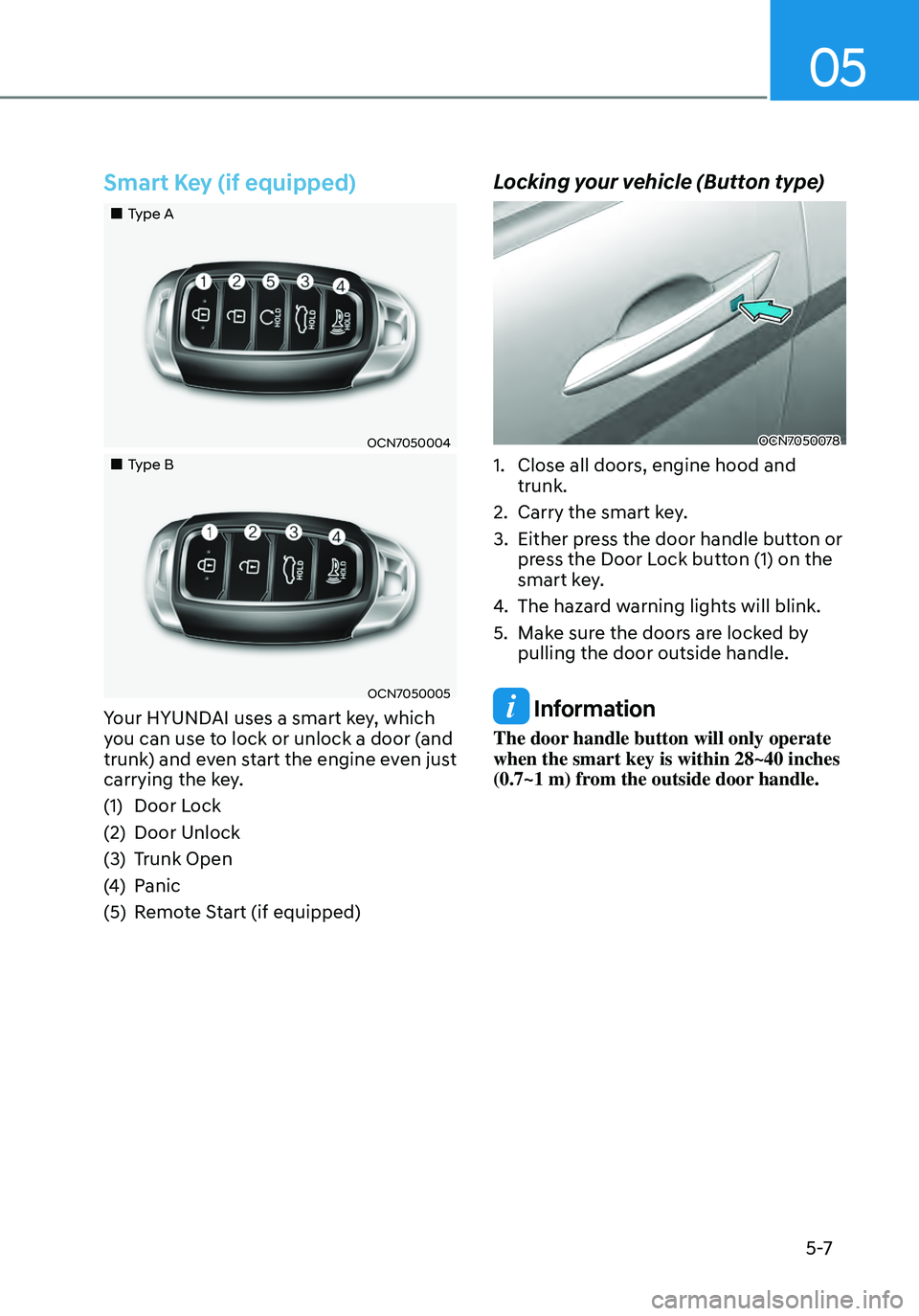
Your HYUNDAI uses a smart key, which
you can use to lock or unlock a door (and
trunk) and even start the engine even just
carrying the key.
(1) Door Lock
(2) Door Unlock
(3) Trunk Open
(4) Panic
(5) Remote Start (if equipped)
Locking your vehicle (Button type)
OCN7050078
1. Close all doors, engine hood and
trunk.
2. Carry the smart key.
3. Either press the door handle button or
press the Door Lock button (1) on the
smart key.
4. The hazard warning lights will blink.
5. Make sure the doors are locked by
pulling the door outside handle.
Information
The door handle button will only operate
when the smart key is within 28~40 inches
(0.7~1 m) from the outside door handle.
Page 161 of 555
Convenient Features
5-8
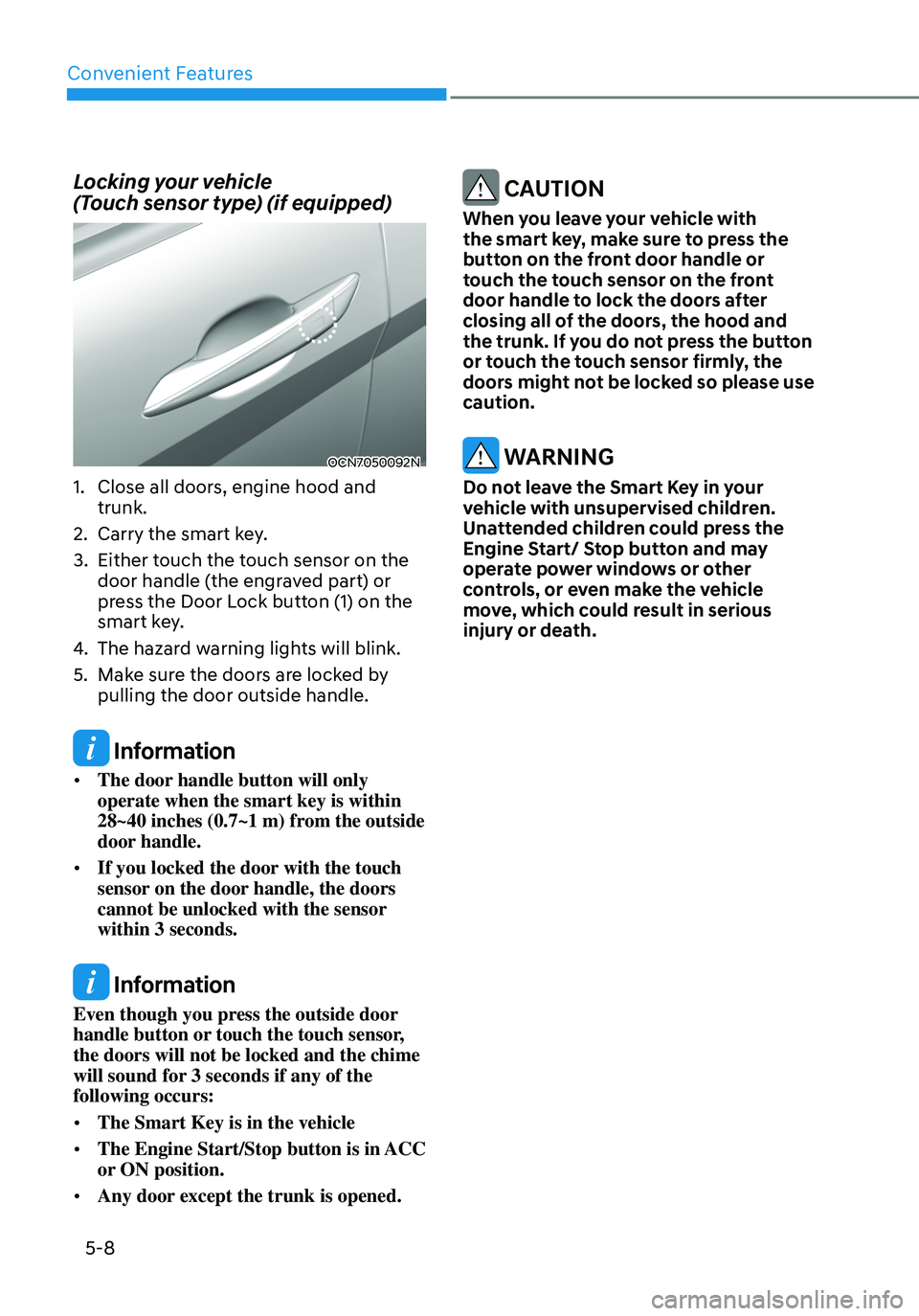
Locking your vehicle
(Touch sensor type) (if equipped)
OCN7050092N
1. Close all doors, engine hood and
trunk.
2. Carry the smart key.
3. Either touch the touch sensor on the
door handle (the engraved part) or
press the Door Lock button (1) on the
smart key.
4. The hazard warning lights will blink.
5. Make sure the doors are locked by
pulling the door outside handle.
Information
• The door handle button will only
operate when the smart key is within
28~40 inches (0.7~1 m) from the outside
door handle.
• If you locked the door with the touch
sensor on the door handle, the doors
cannot be unlocked with the sensor
within 3 seconds.
Information
Even though you press the outside door
handle button or touch the touch sensor,
the doors will not be locked and the chime
will sound for 3 seconds if any of the
following occurs:
• The Smart Key is in the vehicle
• The Engine Start/Stop button is in ACC
or ON position.
• Any door except the trunk is opened.
CAUTION
When you leave your vehicle with
the smart key, make sure to press the
button on the front door handle or
touch the touch sensor on the front
door handle to lock the doors after
closing all of the doors, the hood and
the trunk. If you do not press the button
or touch the touch sensor firmly, the
doors might not be locked so please use
caution.
WARNING
Do not leave the Smart Key in your
vehicle with unsupervised children.
Unattended children could press the
Engine Start/ Stop button and may
operate power windows or other
controls, or even make the vehicle
move, which could result in serious
injury or death.
Page 164 of 555
05
5-11
Remote start (if equipped)
You can start the engine and turn on the
climate system by pressing the remote
start button (5) outside the vehicle.
To start and stop engine remotely :
1. Press the door lock button (1), and
then the hazard warning lights blink
once to alert you.
2. Press the Remote Start button (5)
for more than 2 seconds to start the
engine within 4 seconds after pressing
the door lock button (1).
3. If you want to stop the engine, press
the Remote Start button (5) again.
In case of the manual operation,
the climate control system will be
maintained even when the engine is
turned OFF. However, the automatic
operation is set to 72°F (22°C).
If someone without a designated smart
key attempts to drive your vehicle after
you remotely started it, the engine will
be stopped.
Information
After remotely starting the vehicle, the
engine will turn off after 10 minutes if the
vehicle is not driven.
CAUTION
• The remote start will not work if you
exceed the operating distance limit
(about 10 m).
• Avoid idling the engine for prolonged
periods to follow the emission
regulations in your locality.
• Laws in your locality may restrict the
use of remote start. You should check
locality regulations before using this
remote starting system.
• It is only possible to start the engine
remotely when shifted to P (Park).
• If the hood or the trunk is opened,
you cannot start the engine
remotely.
Information
If the smart key is not moved for some
time, the detection function for smart key
operation will pause. Lift the smart key to
activate the detection again.
Page 171 of 555
Convenient Features
5-18
Set up main vehicle
You can manage multiple digital keys
from the Digital key app. From the list of
digital keys you own, select the vehicle
you want to make your priority vehicle.
For more information, please refer to
the ‘Tutorial’ on your Digital key app.
OCN7050128
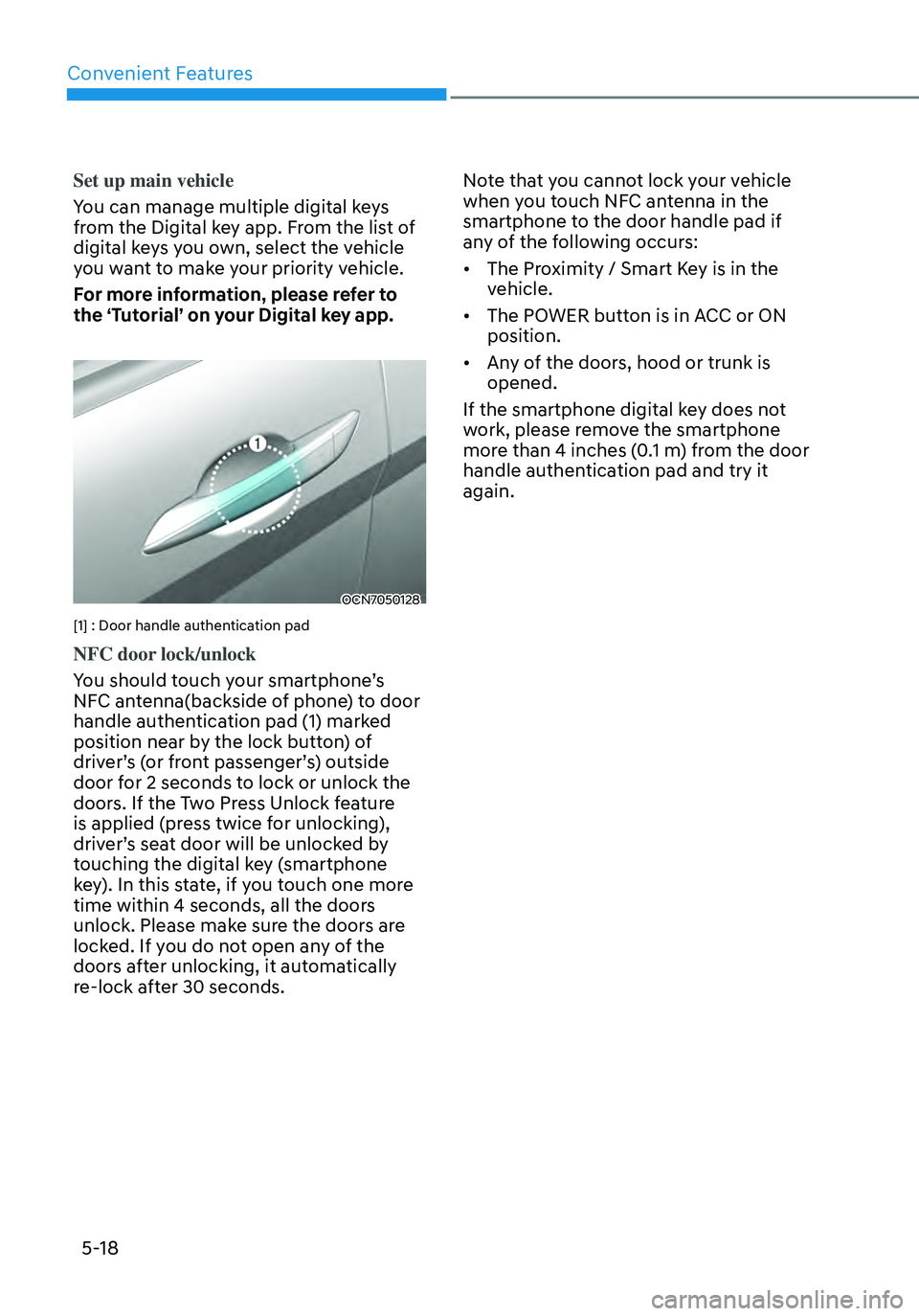
[1] : Door handle authentication pad
NFC door lock/unlock
You should touch your smartphone’s
NFC antenna(backside of phone) to door
handle authentication pad (1) marked
position near by the lock button) of
driver’s (or front passenger’s) outside
door for 2 seconds to lock or unlock the
doors. If the Two Press Unlock feature
is applied (press twice for unlocking),
driver’s seat door will be unlocked by
touching the digital key (smartphone
key). In this state, if you touch one more
time within 4 seconds, all the doors
unlock. Please make sure the doors are
locked. If you do not open any of the
doors after unlocking, it automatically
re-lock after 30 seconds.Note that you cannot lock your vehicle
when you touch NFC antenna in the
smartphone to the door handle pad if
any of the following occurs:
•
The Proximity / Smart Key is in the
vehicle.
• The POWER button is in ACC or ON
position.
• Any of the doors, hood or trunk is
opened.
If the smartphone digital key does not
work, please remove the smartphone
more than 4 inches (0.1 m) from the door
handle authentication pad and try it
again.
Page 178 of 555
05
5-25
• To delete the saved digital key (card
key), the smart key must be inside the
vehicle.
• The deleted digital key (card key) can
be re-registered before registering a
new digital key (card key).
• If you register a new digital key (card
key), the previously registered digital
key (card key) cannot be used again.
OCN7050128
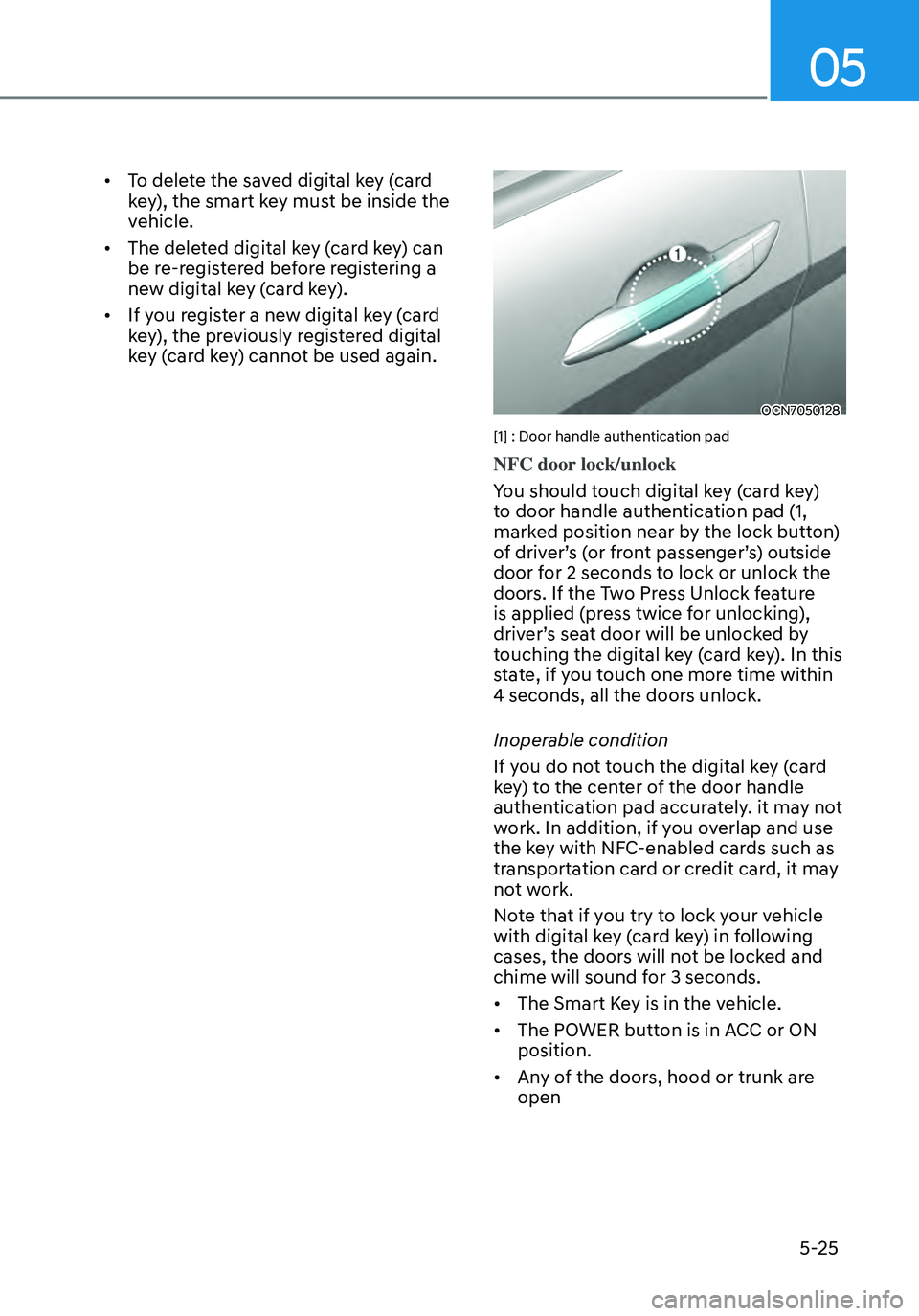
[1] : Door handle authentication pad
NFC door lock/unlock
You should touch digital key (card key)
to door handle authentication pad (1,
marked position near by the lock button)
of driver’s (or front passenger’s) outside
door for 2 seconds to lock or unlock the
doors. If the Two Press Unlock feature
is applied (press twice for unlocking),
driver’s seat door will be unlocked by
touching the digital key (card key). In this
state, if you touch one more time within
4 seconds, all the doors unlock.
Inoperable condition
If you do not touch the digital key (card
key) to the center of the door handle
authentication pad accurately. it may not
work. In addition, if you overlap and use
the key with NFC-enabled cards such as
transportation card or credit card, it may
not work.
Note that if you try to lock your vehicle
with digital key (card key) in following
cases, the doors will not be locked and
chime will sound for 3 seconds.
• The Smart Key is in the vehicle.
• The POWER button is in ACC or ON
position.
• Any of the doors, hood or trunk are
open
Page 190 of 555
05
5-37
THEFT-ALARM SYSTEM
This system helps to protect your vehicle
and valuables. The horn will sound and
the hazard warning lights will blink
continuously if any of the following
occur:
-A door is opened without using the
remote key or smart key.
-The trunk is opened without using the
remote key or smart key.
-The engine hood is opened.
The alarm continues for 30 seconds, then
the system resets. To turn off the alarm,
unlock the doors with the remote key or
smart key.
The Theft Alarm System automatically
sets 30 seconds after you lock the doors
and the trunk. For the system to activate,
you must lock the doors and the trunk
from outside the vehicle with the remote
key or smart key or by pressing the
button on the outside of the door handle
with the smart key in your possession.
The hazard warning lights will blink and
the chime will sound once to indicate the
system is armed.
Once the security system is set, opening
any door, the trunk, or the hood without
using the remote key or smart key will
cause the alarm to activate.
The Theft Alarm System will not set if the
hood, the trunk, or any door is not fully
closed. If the system will not set, check
the hood, the trunk, or the doors are fully
closed.
Do not attempt to alter this system or
add other devices to it.
Information
• Do not lock the doors until all
passengers have left the vehicle. If the
remaining passenger leaves the vehicle
when the system is armed, the alarm
will be activated.
• If the vehicle is not disarmed with the
remote key or smart key, open the
doors by using the mechanical key and
place the ignition switch in the ON
position (for remote key) or start the
engine (for smart key) and wait for 30
seconds.
• When the system is disarmed but a
door or trunk is not opened within 30
seconds, the system will be rearmed.