mirror HYUNDAI ELANTRA HYBRID 2022 Owners Manual
[x] Cancel search | Manufacturer: HYUNDAI, Model Year: 2022, Model line: ELANTRA HYBRID, Model: HYUNDAI ELANTRA HYBRID 2022Pages: 529, PDF Size: 38.79 MB
Page 29 of 529
2-2
Vehicle Information and Reporting Safety Defects
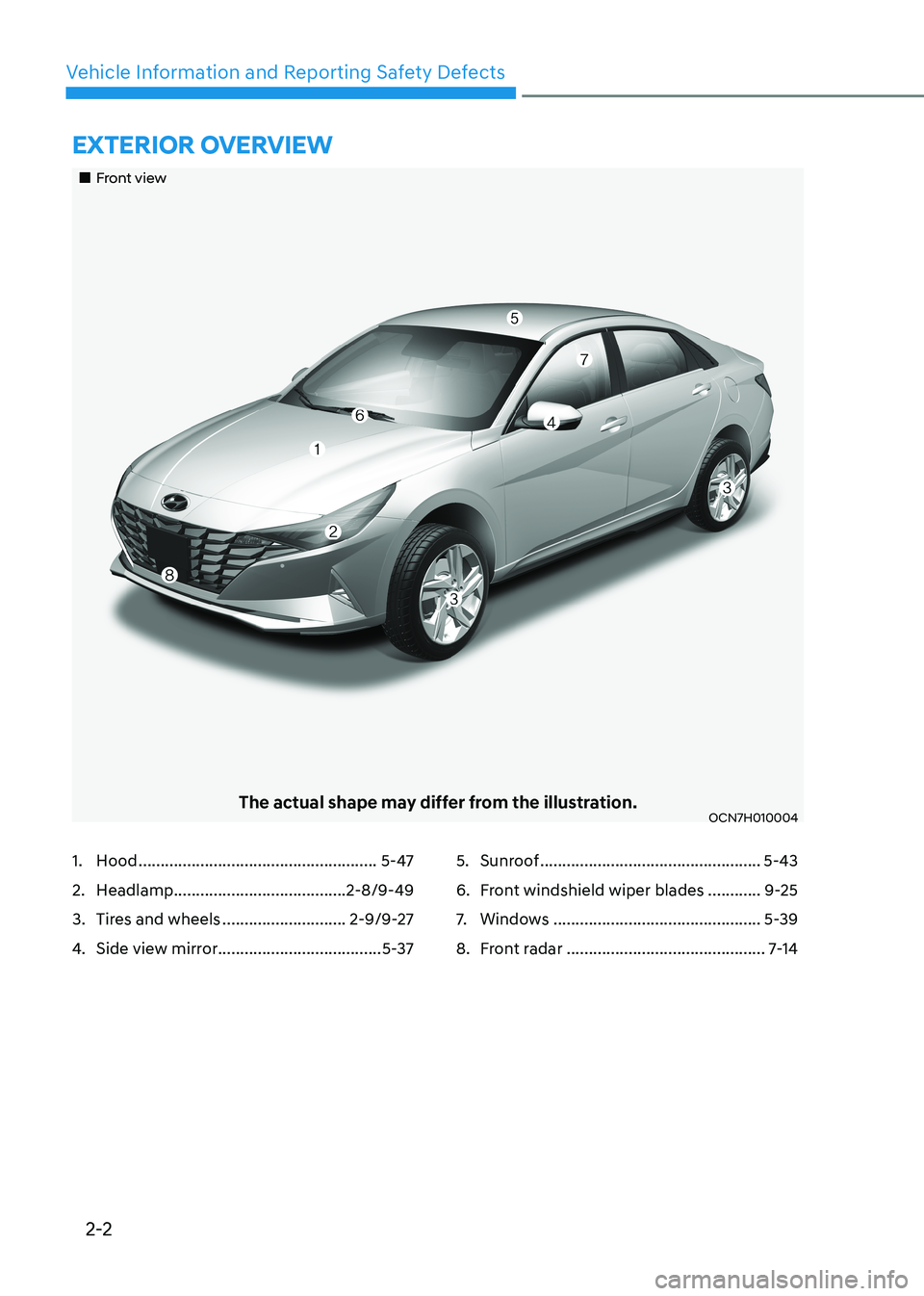
ExtErior ovErviEw
„„Front view
The actual shape may differ from the illustration.OCN7H010004
1. Hood ...................................................... 5-47
2. Headlamp ....................................... 2-8/9-49
3. Tires and wheels ............................2-9/9-27
4. Side view mirror ..................................... 5-375. Sunroof
.................................................. 5-43
6. Front windshield wiper blades ............9-25
7. Windows ............................................... 5-39
8. Front radar ............................................. 7-14
Page 31 of 529
2-4
Vehicle Information and Reporting Safety Defects
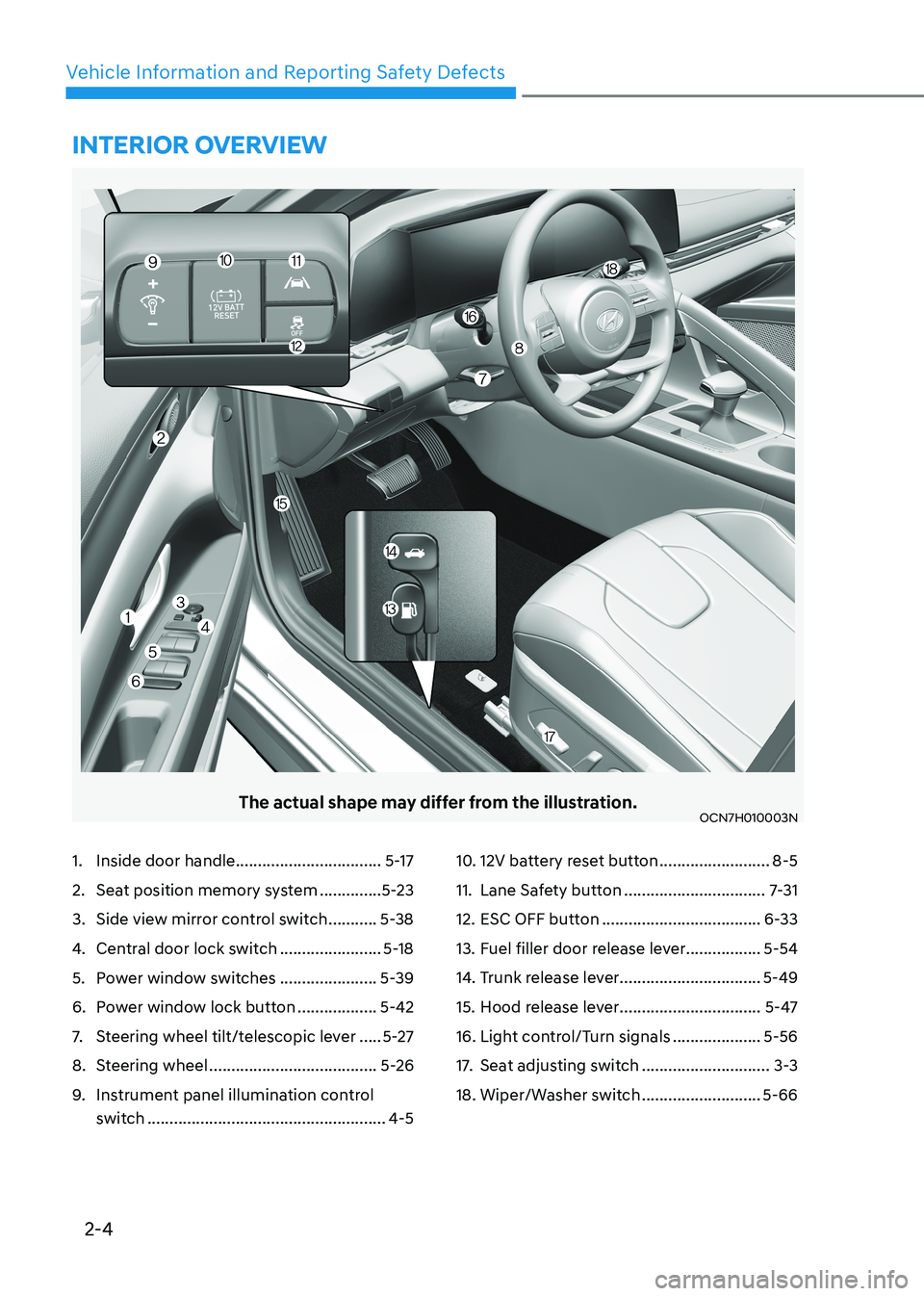
The actual shape may differ from the illustration.OCN7H010003N
1. Inside door handle .................................5-17
2. Seat position memory system ..............5-23
3. Side view mirror control switch ...........5-38
4. Central door lock switch .......................5-18
5. Power window switches ......................5-39
6. Power window lock button ..................5-42
7. Steering wheel tilt/telescopic lever .....5-27
8. Steering wheel ...................................... 5-26
9. Instrument panel illumination control
switch ...................................................... 4-510. 12V battery reset button
.........................8-5
11. Lane Safety button ................................7-31
12. ESC OFF button .................................... 6-33
13. Fuel filler door release lever .................5-54
14. Trunk release lever ................................5-49
15. Hood release lever ................................5-47
16. Light control/Turn signals ....................5-56
17. Seat adjusting switch .............................3-3
18. Wiper/Washer switch ...........................5-66
intErior ovErviEw
Page 35 of 529
Vehicle Information and Reporting Safety Defects
2-8
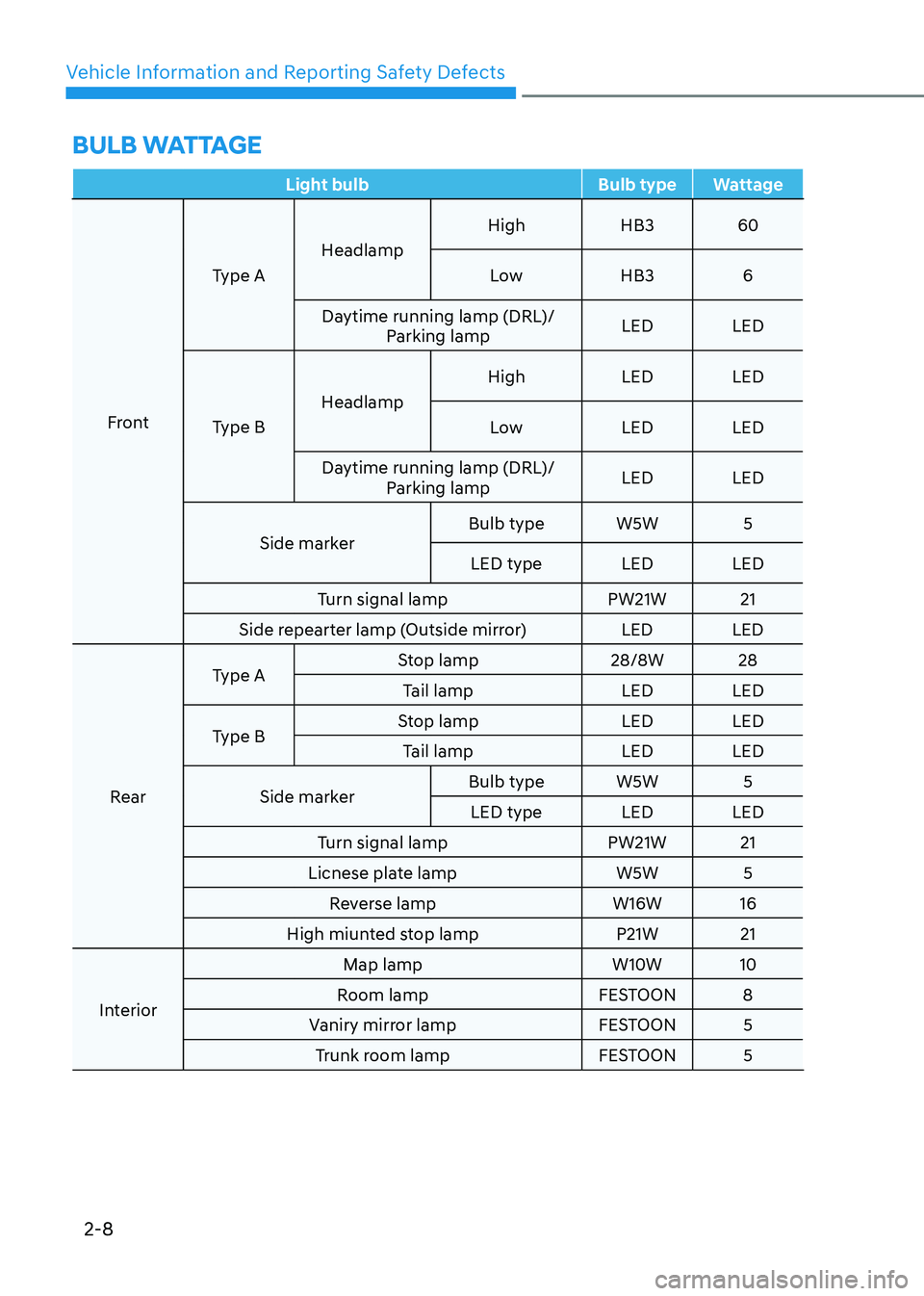
BulB wattagE
Light bulb Bulb type Wattage
FrontType A
Headlamp High HB3 60
Low HB3 6
Daytime running lamp (DRL)/ Parking lamp LED LED
Type B Headlamp High LED LED
Low LED LED
Daytime running lamp (DRL)/ Parking lamp LED LED
Side marker Bulb type W5W 5
LED type LED LED
Turn signal lamp PW21W 21
Side repearter lamp (Outside mirror) LED LED
Rear Type A
Stop lamp 28/8W 28
Tail lamp LED LED
Type B Stop lamp LED LED
Tail lamp LED LED
Side marker Bulb type W5W 5
LED type LED LED
Turn signal lamp PW21W 21
Licnese plate lamp W5W 5 Reverse lamp W16W 16
High miunted stop lamp P21W 21
Interior Map lamp W10W 10
Room lamp FESTOON 8
Vaniry mirror lamp FESTOON 5 Trunk room lamp FESTOON 5
Page 132 of 529
Instrument Cluster
4-34
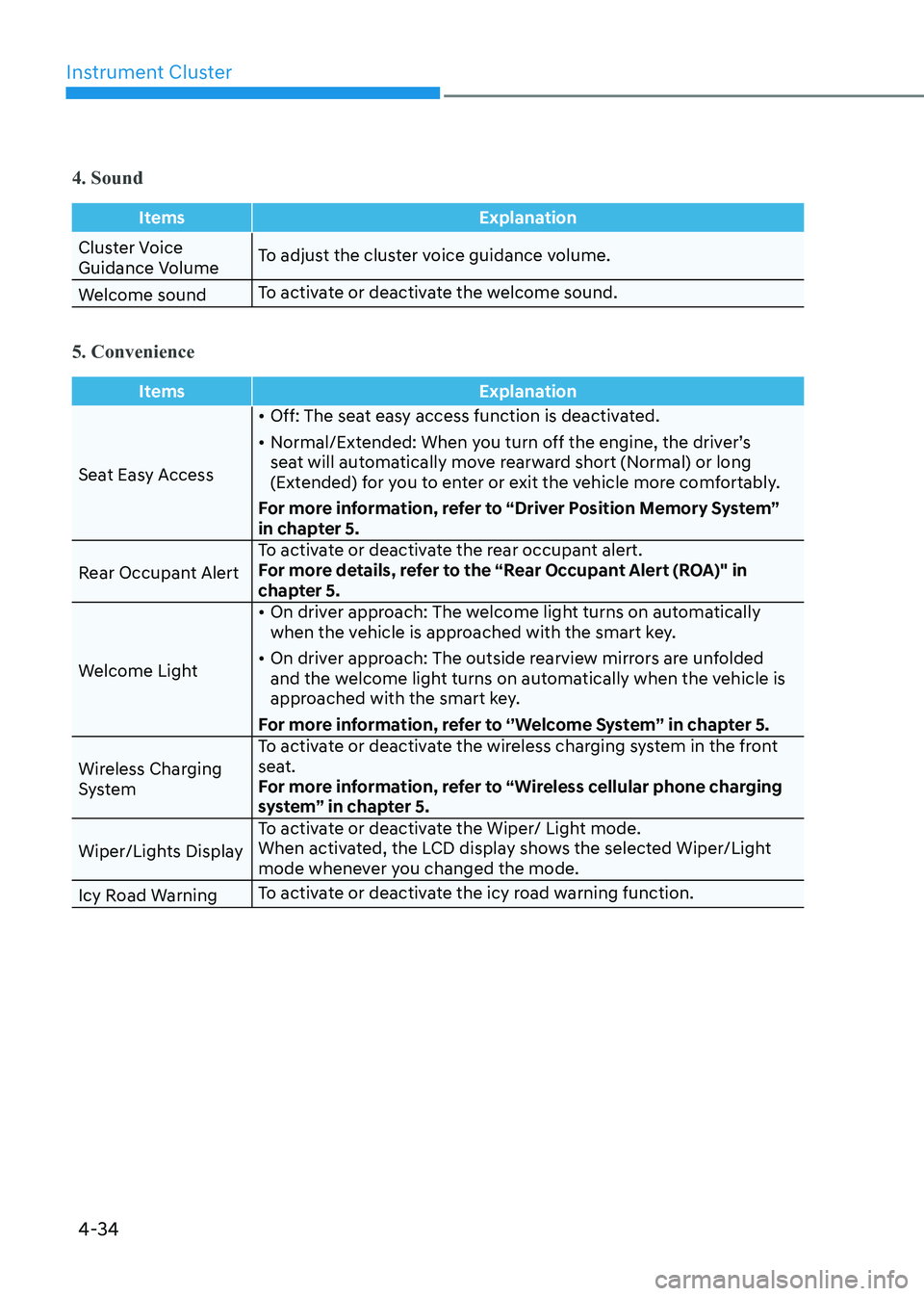
4. Sound
ItemsExplanation
Cluster Voice
Guidance VolumeTo adjust the cluster voice guidance volume.
Welcome sound To activate or deactivate the welcome sound.
5. Convenience
Items
Explanation
Seat Easy Access•
Off: The seat easy access function is deactivated.
• Normal/Extended: When you turn off the engine, the driver’s
seat will automatically move rearward short (Normal) or long
(Extended) for you to enter or exit the vehicle more comfortably.
For more information, refer to “Driver Position Memory System”
in chapter 5.
Rear Occupant Alert To activate or deactivate the rear occupant alert.
For more details, refer to the “Rear Occupant Alert (ROA)" in
chapter 5.
Welcome Light •
On driver approach: The welcome light turns on automatically
when the vehicle is approached with the smart key.
• On driver approach: The outside rearview mirrors are unfolded
and the welcome light turns on automatically when the vehicle is
approached with the smart key.
For more information, refer to ‘’Welcome System’’ in chapter 5.
Wireless Charging
System To activate or deactivate the wireless charging system in the front
seat.
For more information, refer to “Wireless cellular phone charging
system” in chapter 5.
Wiper/Lights Display To activate or deactivate the Wiper/ Light mode.
When activated, the LCD display shows the selected Wiper/Light
mode whenever you changed the mode.
Icy Road Warning To activate or deactivate the icy road warning function.
Page 145 of 529
04
4-47
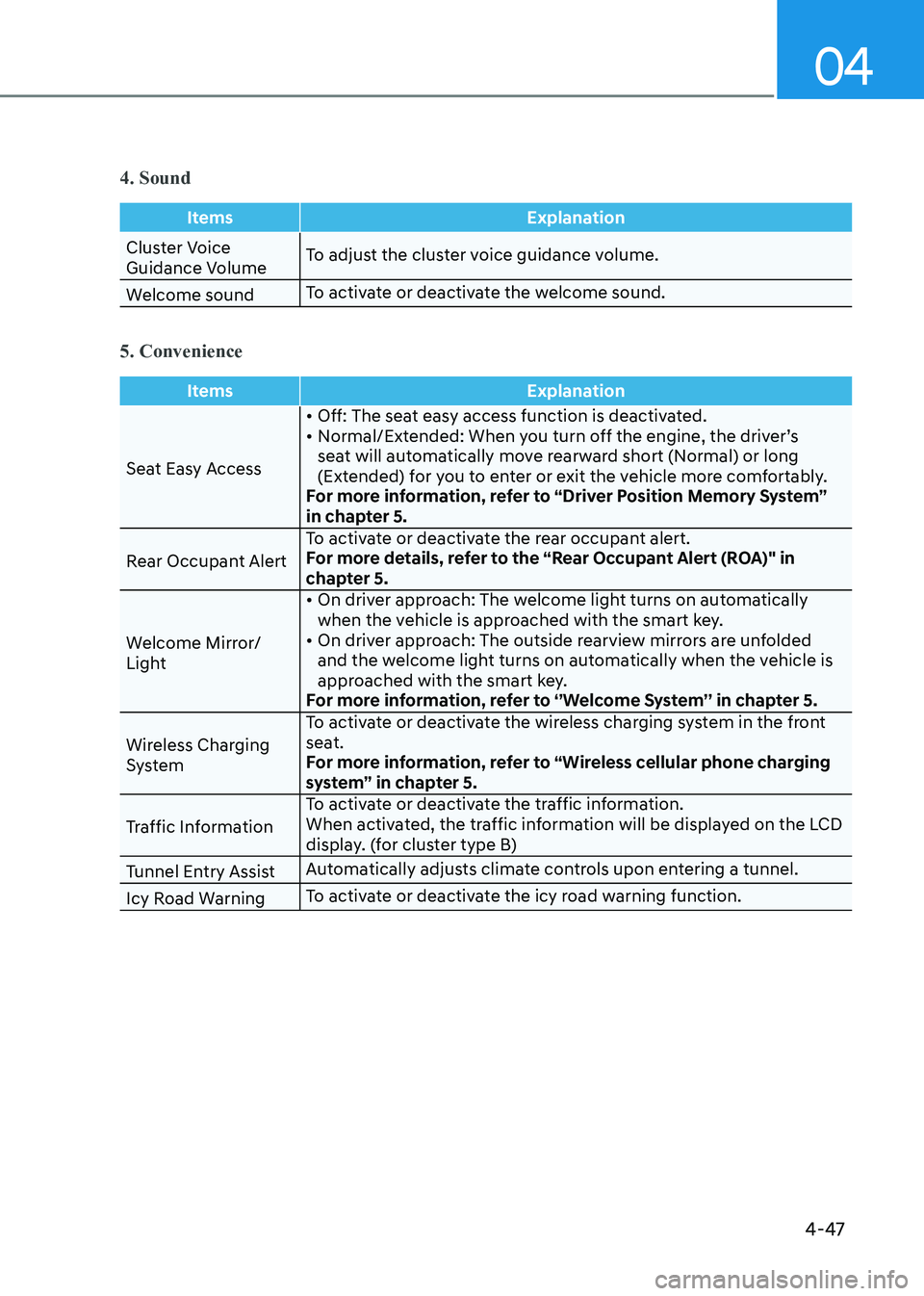
4. Sound
ItemsExplanation
Cluster Voice
Guidance VolumeTo adjust the cluster voice guidance volume.
Welcome sound To activate or deactivate the welcome sound.
5. Convenience
Items
Explanation
Seat Easy Access• Off: The seat easy access function is deactivated.
• Normal/Extended: When you turn off the engine, the driver’s
seat will automatically move rearward short (Normal) or long
(Extended) for you to enter or exit the vehicle more comfortably.
For more information, refer to “Driver Position Memory System”
in chapter 5.
Rear Occupant Alert To activate or deactivate the rear occupant alert.
For more details, refer to the “Rear Occupant Alert (ROA)" in
chapter 5.
Welcome Mirror/
Light • On driver approach: The welcome light turns on automatically
when the vehicle is approached with the smart key.
• On driver approach: The outside rearview mirrors are unfolded and the welcome light turns on automatically when the vehicle is
approached with the smart key.
For more information, refer to ‘’Welcome System’’ in chapter 5.
Wireless Charging
System To activate or deactivate the wireless charging system in the front
seat.
For more information, refer to “Wireless cellular phone charging
system” in chapter 5.
Traffic Information To activate or deactivate the traffic information.
When activated, the traffic information will be displayed on the LCD
display. (for cluster type B)
Tunnel Entry Assist Automatically adjusts climate controls upon entering a tunnel.
Icy Road Warning To activate or deactivate the icy road warning function.
Page 148 of 529
5. Convenient Features
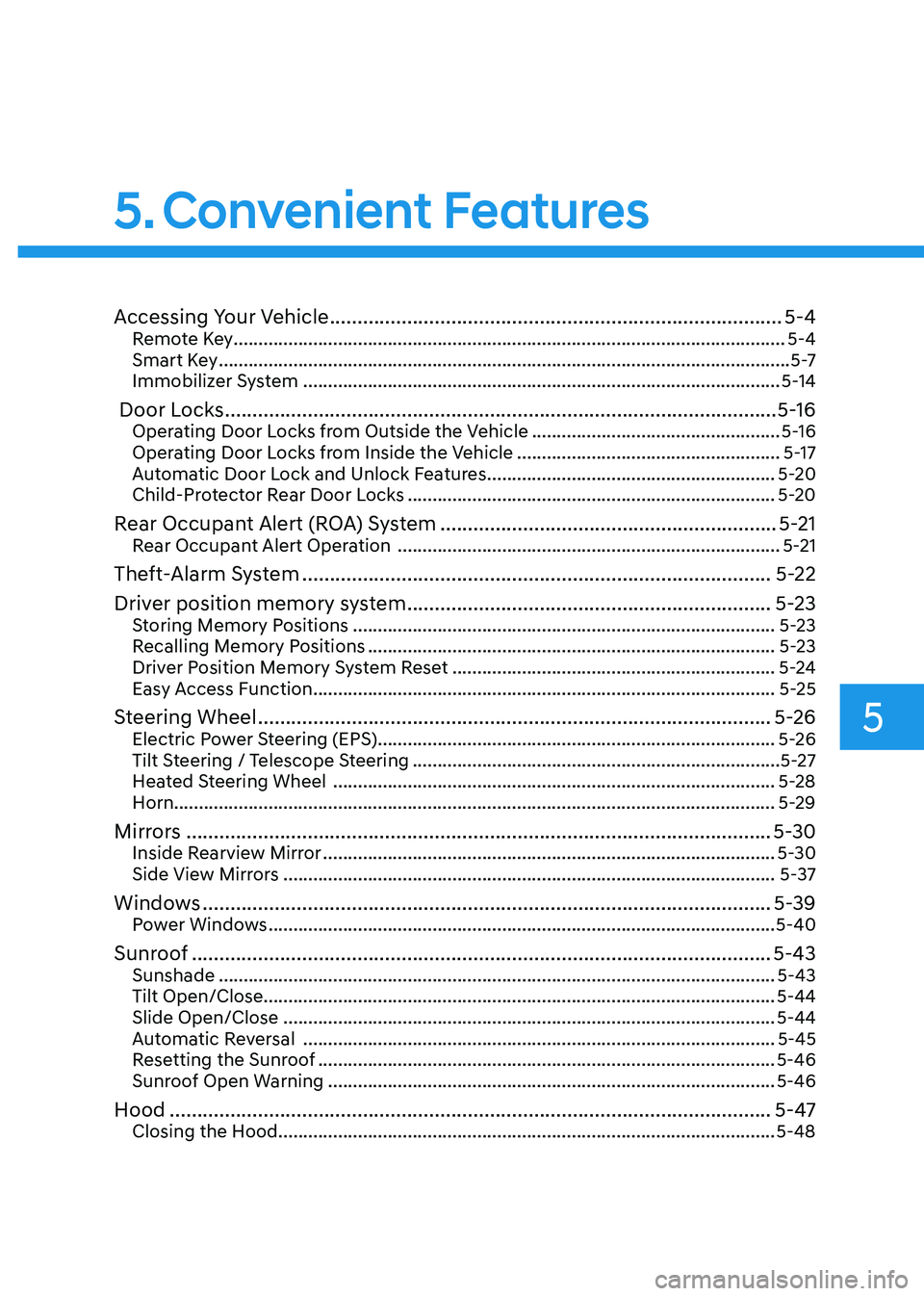
Accessing Your Vehicle .................................................................................. 5-4
Remote Key ............................................................................................................... 5-4
Smart Key ................................................................................................................... 5 -7
Immobilizer System ................................................................................................ 5-14
Door Locks .................................................................................................... 5-16
Operating Door Locks from Outside the Vehicle ..................................................5-16
Operating Door Locks from Inside the Vehicle .....................................................5-17
Automatic Door Lock and Unlock Features ..........................................................5-20
Child-Protector Rear Door Locks .......................................................................... 5-20
Rear Occupant Alert (ROA) System ............................................................. 5-21
Rear Occupant Alert Operation ............................................................................. 5-21
Theft-Alarm System ..................................................................................... 5-22
Driver position memory system .................................................................. 5-23
Storing Memory Positions ..................................................................................... 5-23
Recalling Memory Positions .................................................................................. 5-23
Driver Position Memory System Reset ................................................................. 5-24
Easy Access Function ............................................................................................. 5-25
Steering Wheel ............................................................................................. 5-26
Electric Power Steering (EPS) ................................................................................ 5-26
Tilt Steering / Telescope Steering .......................................................................... 5-27
Heated Steering Wheel ......................................................................................... 5-28
Horn......................................................................................................................... 5-29
Mirrors .......................................................................................................... 5-30
Inside Rearview Mirror ........................................................................................... 5-30
Side View Mirrors ................................................................................................... 5-37
Windows ....................................................................................................... 5-39
Power Windows ...................................................................................................... 5-40
Sunroof ......................................................................................................... 5-43
Sunshade ................................................................................................................ 5-43
Tilt Open/Close....................................................................................................... 5-44 Slide Open/Close ................................................................................................... 5-44
Automatic Reversal ............................................................................................... 5-45
Resetting the Sunroof ............................................................................................ 5-46
Sunroof Open Warning .......................................................................................... 5-46
Hood ............................................................................................................. 5-47
Closing the Hood .................................................................................................... 5-48
5
Page 149 of 529
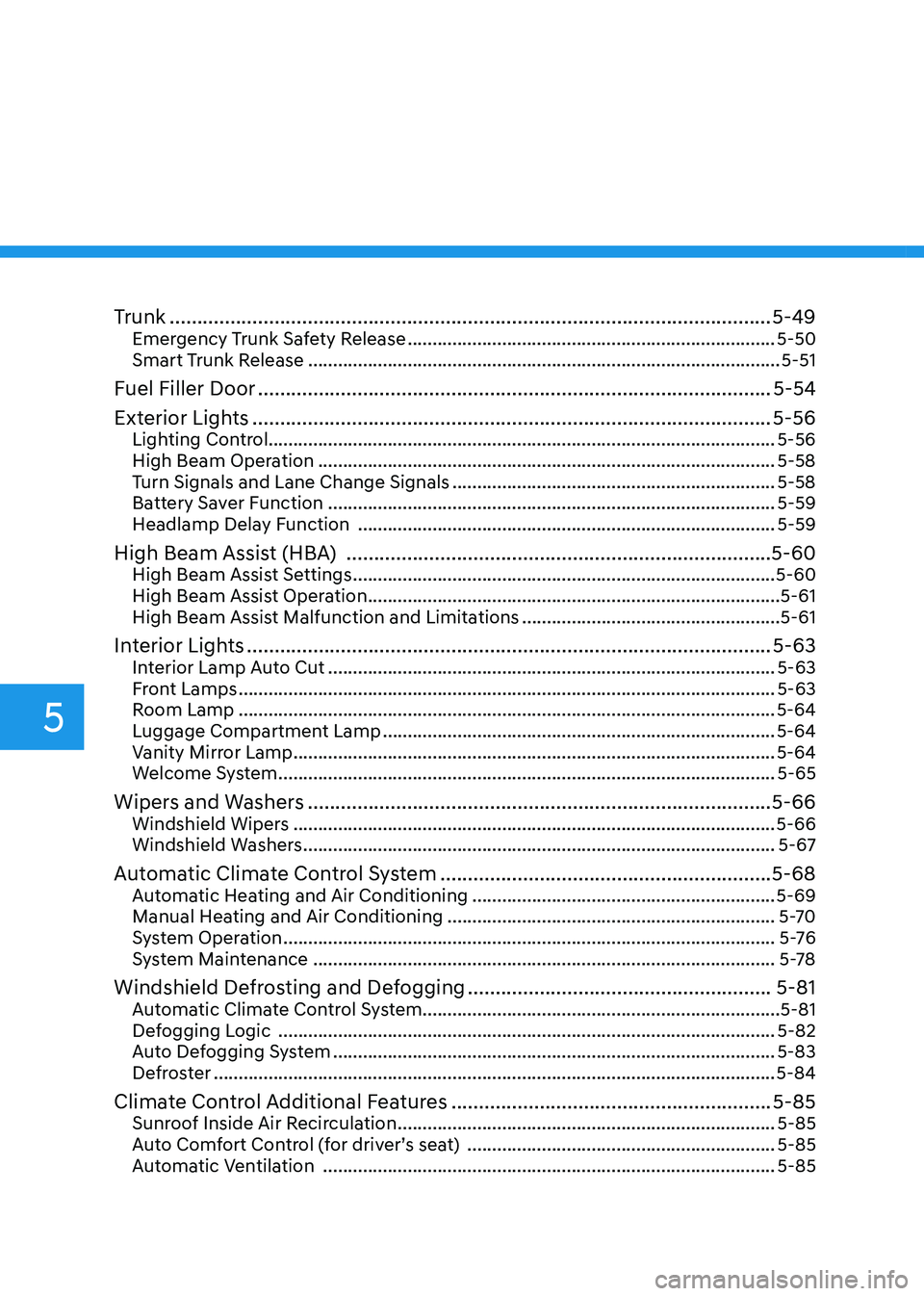
Trunk ............................................................................................................. 5-49
Emergency Trunk Safety Release .......................................................................... 5-50
Smart Trunk Release ............................................................................................... 5-51
Fuel Filler Door ............................................................................................. 5-54
Exterior Lights .............................................................................................. 5-56
Lighting Control...................................................................................................... 5-56
High Beam Operation ............................................................................................ 5-58
Turn Signals and Lane Change Signals ................................................................. 5-58
Battery Saver Function .......................................................................................... 5-59
Headlamp Delay Function .................................................................................... 5-59
High Beam Assist (HBA) ............................................................................. 5-60
High Beam Assist Settings ..................................................................................... 5-60
High Beam Assist Operation ................................................................................... 5-61
High Beam Assist Malfunction and Limitations ....................................................5-61
Interior Lights ............................................................................................... 5-63
Interior Lamp Auto Cut .......................................................................................... 5-63
Front Lamps ............................................................................................................ 5-63
Room Lamp ............................................................................................................ 5-64
Luggage Compartment Lamp ............................................................................... 5-64
Vanity Mirror Lamp ................................................................................................. 5-64
Welcome System .................................................................................................... 5-65
Wipers and Washers .................................................................................... 5-66
Windshield Wipers ................................................................................................. 5-66
Windshield Washers ............................................................................................... 5-67
Automatic Climate Control System ............................................................ 5-68
Automatic Heating and Air Conditioning .............................................................5-69
Manual Heating and Air Conditioning .................................................................. 5-70
System Operation ................................................................................................... 5 -76
System Maintenance ............................................................................................. 5-78
Windshield Defrosting and Defogging .......................................................5-81
Automatic Climate Control System........................................................................5-81
Defogging Logic .................................................................................................... 5-82
Auto Defogging System ......................................................................................... 5-83
Defroster ................................................................................................................. 5-84
Climate Control Additional Features ..........................................................5-85
Sunroof Inside Air Recirculation ............................................................................ 5-85
Auto Comfort Control (for driver’s seat) ..............................................................5-85
Automatic Ventilation ........................................................................................... 5-85
5
Page 177 of 529
Convenient Features
5-30
Inside Rearview Mirror
Before driving your vehicle, check to
see that your inside rearview mirror is
properly positioned. Adjust the rearview
mirror so that the view through the rear
window is properly centered.
WARNING
Make sure your line of sight is not
obstructed. Do not place objects in the
rear seat, cargo area, or behind the rear
head restraints which could interfere
with your vision through the rear
window.
WARNING
To prevent serious injury during an
accident or deployment of the air bag,
do not modify the rearview mirror and
do not install a wide mirror.
WARNING
NEVER adjust the mirror while driving.
This may cause loss of vehicle control
resulting in an accident.
NOTICE
When cleaning the mirror, use a paper
towel or similar material dampened
with glass cleaner. Do not spray glass
cleaner directly on the mirror as this
may cause the liquid cleaner to enter
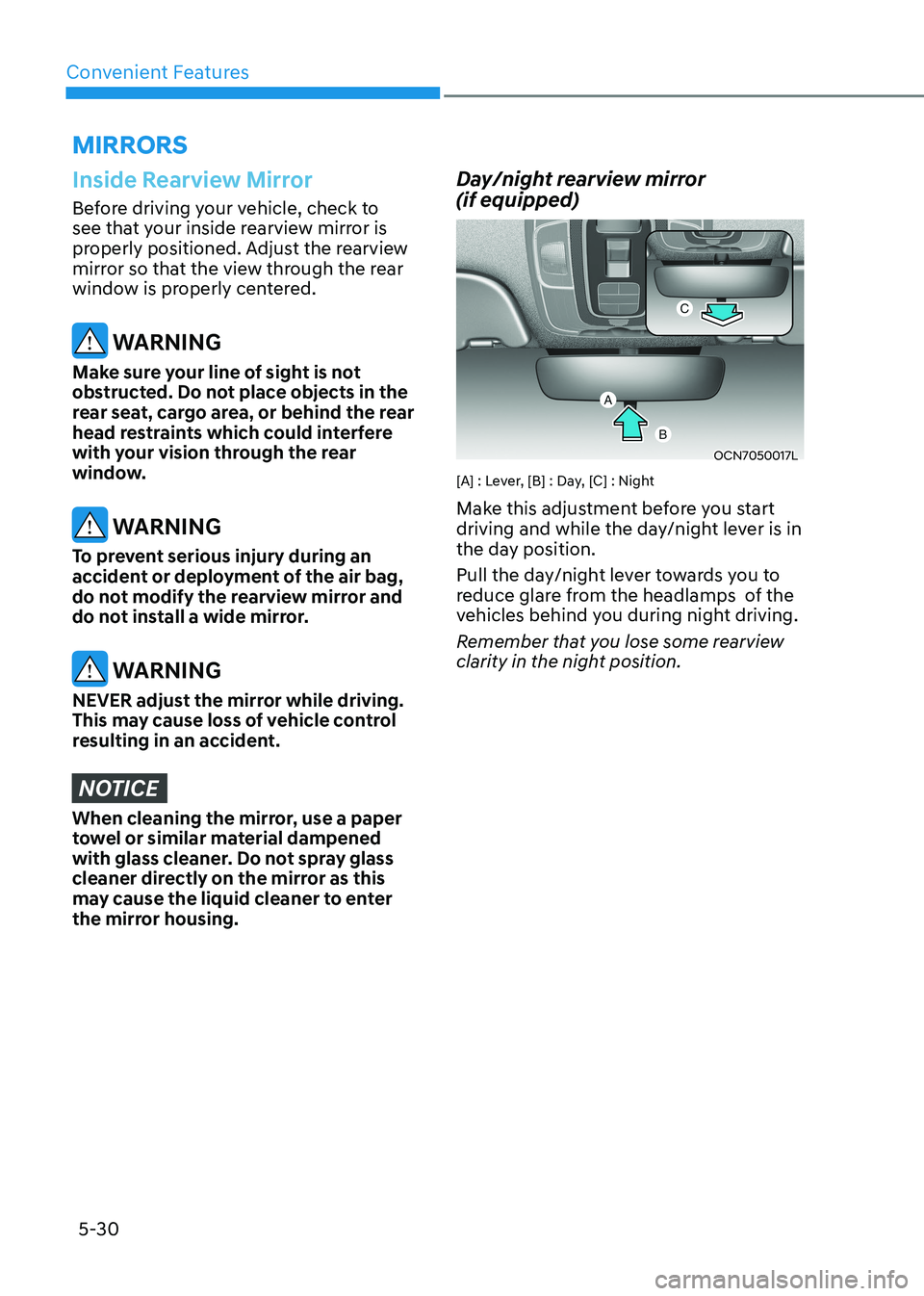
the mirror housing. Day/night rearview mirror (if equipped)
OCN7050017L
[A] : Lever, [B] : Day, [C] : Night
Make this adjustment before you start
driving and while the day/night lever is in
the day position.
Pull the day/night lever towards you to
reduce glare from the headlamps of the
vehicles behind you during night driving.
Remember that you lose some rearview
clarity in the night position.
miRRORS
Page 178 of 529

05
5-31
Electrochromic mirror (ECM) with
HomeLink® system (if equipped)
OCN7050084N
Your vehicle may be equipped with
a Gentex Automatic-Dimming Mirror
with an Integrated HomeLink® Wireless
Control System.
During nighttime driving, this feature
will automatically detect and reduce
rearview mirror glare. The HomeLink®
Universal Transceiver allows you to
activate your garage door(s), electric
gate, home lighting, etc.
(1) HomeLink Channel 1
(2) HomeLink Channel 2
(3) HomeLink Channel 3
(4) Garage Door Opener Status Indicator : Closing or Closed
(5) HomeLink Operation Indicator
(6) Garage Door Opener Status Indicator : Opening or Opened
(7) HomeLink User Interface Indicator
Automatic-Dimming Night Vision Safety™ (NVS ®
) Mirror (if equipped)
The NVS® Mirror automatically reduces
glare by monitoring light levels in the
front and the rear of the vehicle. Any
object that obstructs either light sensor
will degrade the automatic dimming
control feature.
For more information regarding NVS®
mirrors and other applications, please
refer to the Gentex website:
www.gentex.com
Your mirror will automatically dim
upon detecting glare from the vehicles
traveling behind you.
The mirror defaults to the ON position
each time the vehicle is started. Integrated HomeLink ®
Wireless Control
System
The HomeLink® Wireless Control System
can replace up to three hand-held
radio-frequency (RF) transmitters with
a single built-in device. This innovative
feature will learn the radio frequency
codes of most current transmitters to
operate devices such as gate operators,
garage door openers, entry door locks,
security systems, even home lighting.
Both standard and rolling code-equipped
transmitters can be programmed by
following the outlined procedures.
Additional HomeLink® information can
be found at: www.homelink.com, www.
youtube.com/HomeLinkGentex or by
calling 1-800-355-3515.
Retain the original transmitter of the
RF device you are programming for use
in other vehicles as well as for future
HomeLink® programming. It is also
suggested that upon the sale of the
vehicle, the programmed HomeLink®
buttons be erased for security purposes.
Page 179 of 529
Convenient Features
5-32
WARNING
Before programming HomeLink® to a
garage door opener or gate operator,
make sure people and objects are out
of the way of the device to prevent
potential harm or damage. Do not
use the HomeLink® with any garage
door opener that lacks the safety
stop and reverse features required by
federal safety standards (this includes
any garage door opener model
manufactured before April 1, 1982).
A garage door that cannot detect an
object - signaling the door to stop
and reverse does not meet current
federal safety standards.Using a garage
door opener without these features
increases the risk of serious injury or
death.
Programming HomeLink ®
Please note the following:
• When programming a garage door opener, it is advised to park the
vehicle outside of the garage.
• It is recommended that a new battery be placed in the hand-held transmitter
of the device being programmed to
HomeLink® for quicker training and
accurate transmission of the radio-
frequency signal.
• Some vehicles may require the Engine Start/Stop button to be in the
ACC (or “Accessories”) position for
programming and/or operation of
HomeLink®.
• In the event that there are still programming difficulties or questions
after following the programming steps
listed below, contact HomeLink® at:
www.homelink.com, www.youtube.
com/HomeLinkGentex or by calling
1-800-355-3515.Programming
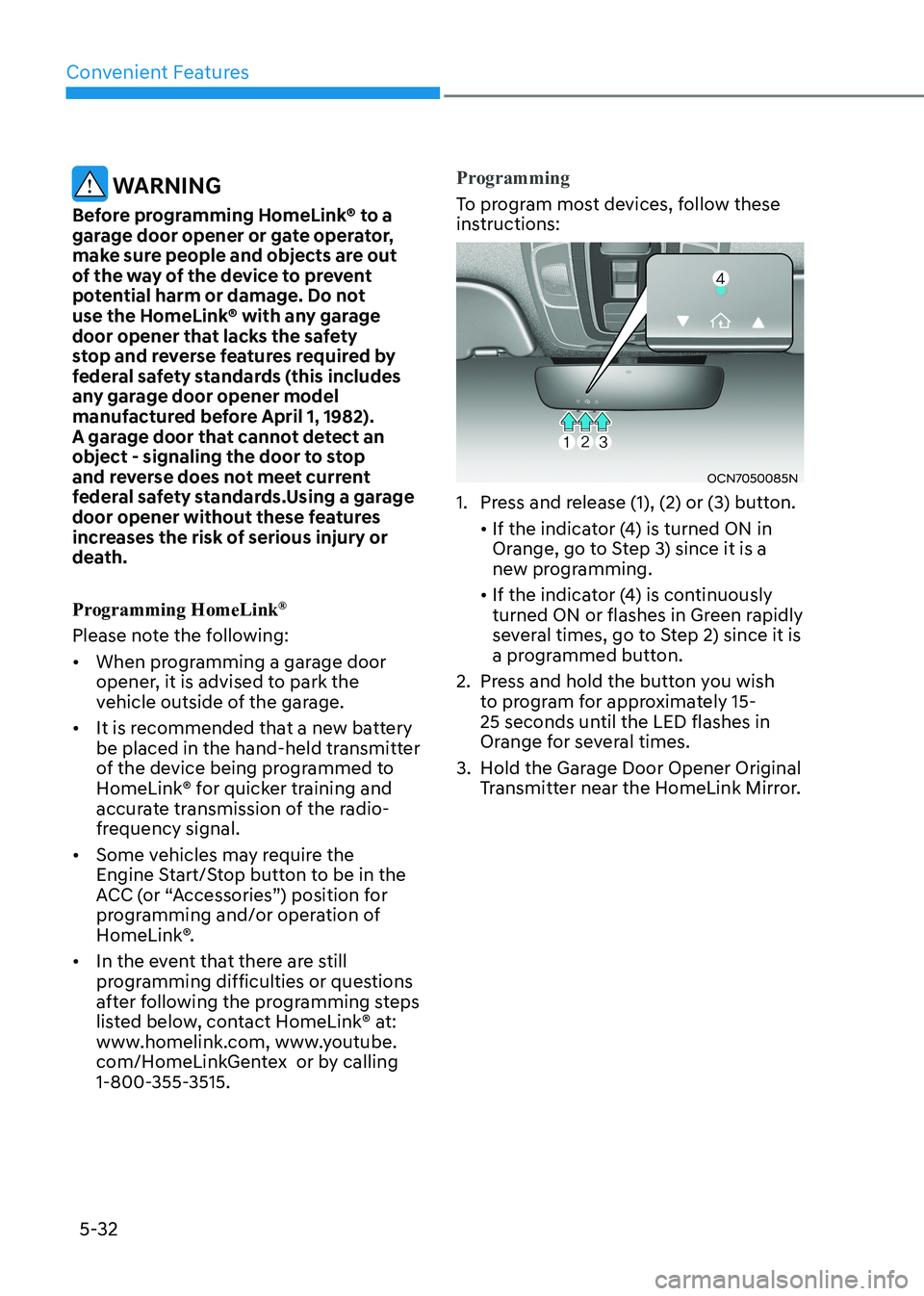
To program most devices, follow these
instructions:
OCN7050085N
1. Press and release (1), (2) or (3) button.
• If the indicator (4) is turned ON in Orange, go to Step 3) since it is a
new programming.
• If the indicator (4) is continuously turned ON or flashes in Green rapidly
several times, go to Step 2) since it is
a programmed button.
2. Press and hold the button you wish to program for approximately 15-
25 seconds until the LED flashes in
Orange for several times.
3. Hold the Garage Door Opener Original Transmitter near the HomeLink Mirror.