transmission HYUNDAI ELANTRA HYBRID 2022 Owners Manual
[x] Cancel search | Manufacturer: HYUNDAI, Model Year: 2022, Model line: ELANTRA HYBRID, Model: HYUNDAI ELANTRA HYBRID 2022Pages: 529, PDF Size: 38.79 MB
Page 5 of 529
Foreword
1-2
IntroductIon
Congratulations, and thank you for choosing HYUNDAI. We are pleased to welcome
you to the growing number of discerning people who drive HYUNDAIs. We are very
proud of the advanced engineering and high-quality construction of each HYUNDAI
we build.
Your Owner’s Manual will introduce you to the features and operation of your new
HYUNDAI. To become familiar with your new HYUNDAI, so that you can fully enjoy it,
read this Owner’s Manual carefully before driving your new vehicle.
This manual contains important safety information and instructions intended to
familiarize you with your vehicle’s controls and safety features so you can safely
operate your vehicle.
This manual also contains information on maintenance designed to enhance safe
operation of the vehicle. It is recommended that all service and maintenance on your
car be performed by an authorized HYUNDAI dealer. HYUNDAI dealers are prepared
to provide high-quality service, maintenance and any other assistance that may be
required.
This Owner’s Manual should be considered a permanent part of your vehicle, and
should be kept in the vehicle so you can refer to it at any time. The manual should stay
with the vehicle if you sell it to provide the next owner with important operating, safety
and maintenance information.
HYundAI Auto cAnAdA
CAUTION
Severe engine and transmission damage may result from the use of poor quality
fuels and lubricants that do not meet HYUNDAI specifications. You must always use
high quality fuels and lubricants that meet the specifications listed on Page 2-11 in
the Vehicle Specifications section of the Owner’s Manual.
Copyright 2020 HYUNDAI Auto Canada Corp. All rights reserved. No part of this
publication may be reproduced, stored in any retrieval system or transmitted in any
form or by any means without prior written permission of HYUNDAI Auto Canada Corp.
All trademarks and tradenames owned in Canada by HYUNDAI Auto Canada Corp.
Page 38 of 529
02
2-11
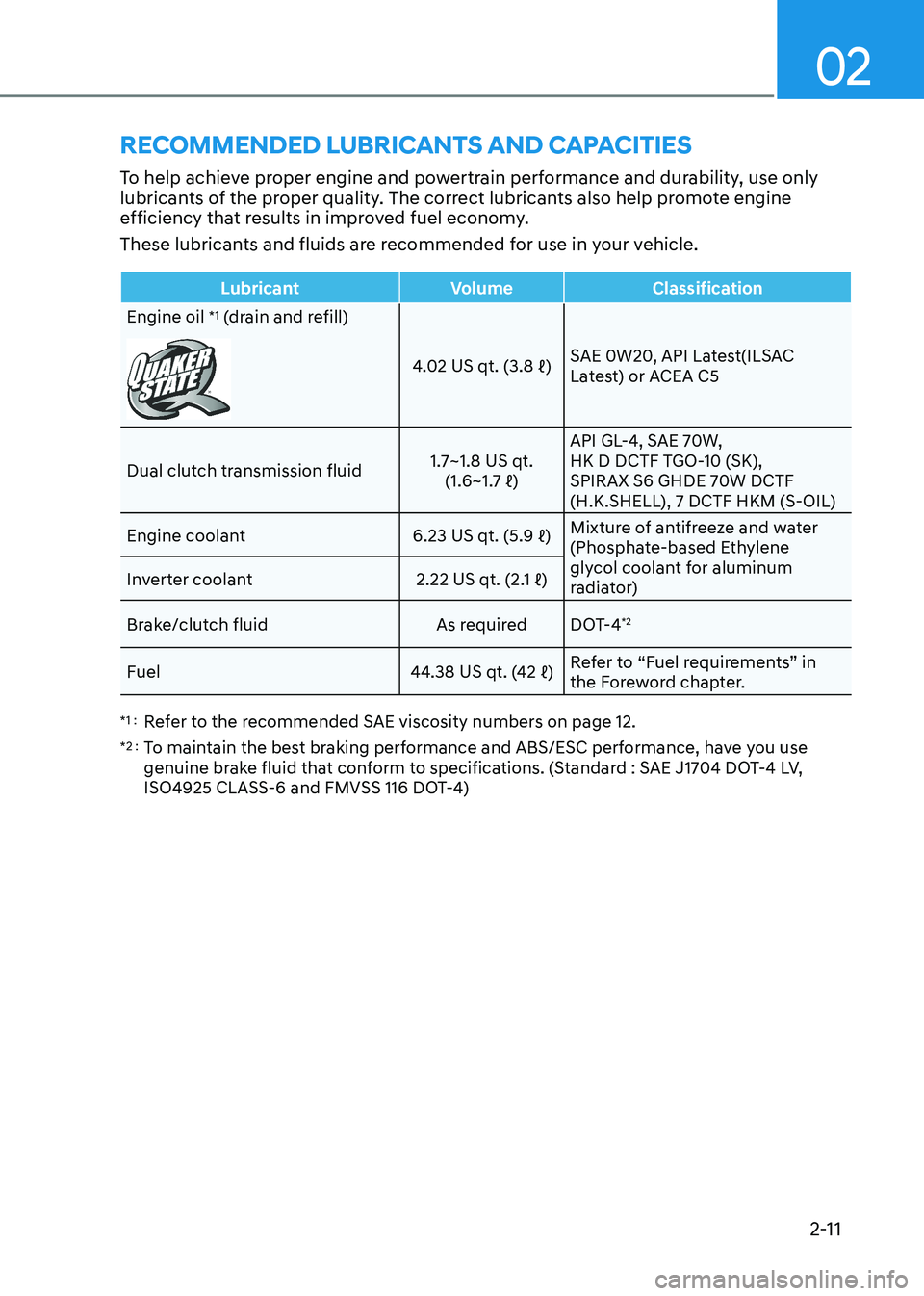
rECommEnDED luBriCants anD CaPaCitiEs
To help achieve proper engine and powertrain performance and durability, use only
lubricants of the proper quality. The correct lubricants also help promote engine
efficiency that results in improved fuel economy.
These lubricants and fluids are recommended for use in your vehicle.
Lubricant Volume Classification
Engine oil *1
(drain and refill)
4.02 US qt. (3.8 ℓ) SAE 0W20, API Latest(ILSAC
Latest) or ACEA C5
Dual clutch transmission fluid 1.7~1.8 US qt.
(1.6~1.7 ℓ) API GL-4, SAE 70W,
HK D DCTF TGO-10 (SK),
SPIRAX S6 GHDE 70W DCTF
(H.K.SHELL), 7 DCTF HKM (S-OIL)
Engine coolant 6.23 US qt. (5.9 ℓ)Mixture of antifreeze and water
(Phosphate-based Ethylene
glycol coolant for aluminum
radiator)
Inverter coolant
2.22 US qt. (2.1 ℓ)
Brake/clutch fluid As required DOT-4 *2
Fuel 44.38 US qt. (42 ℓ)Refer to “Fuel requirements” in
the Foreword chapter.
*1 : Refer to the recommended SAE viscosity numbers on page 12.
*2 : To maintain the best braking performance and ABS/ESC performance, have you use
genuine brake fluid that conform to specifications. (Standard : SAE J1704 DOT-4 LV,
ISO4925 CLASS-6 and FMVSS 116 DOT-4)
Page 99 of 529
4
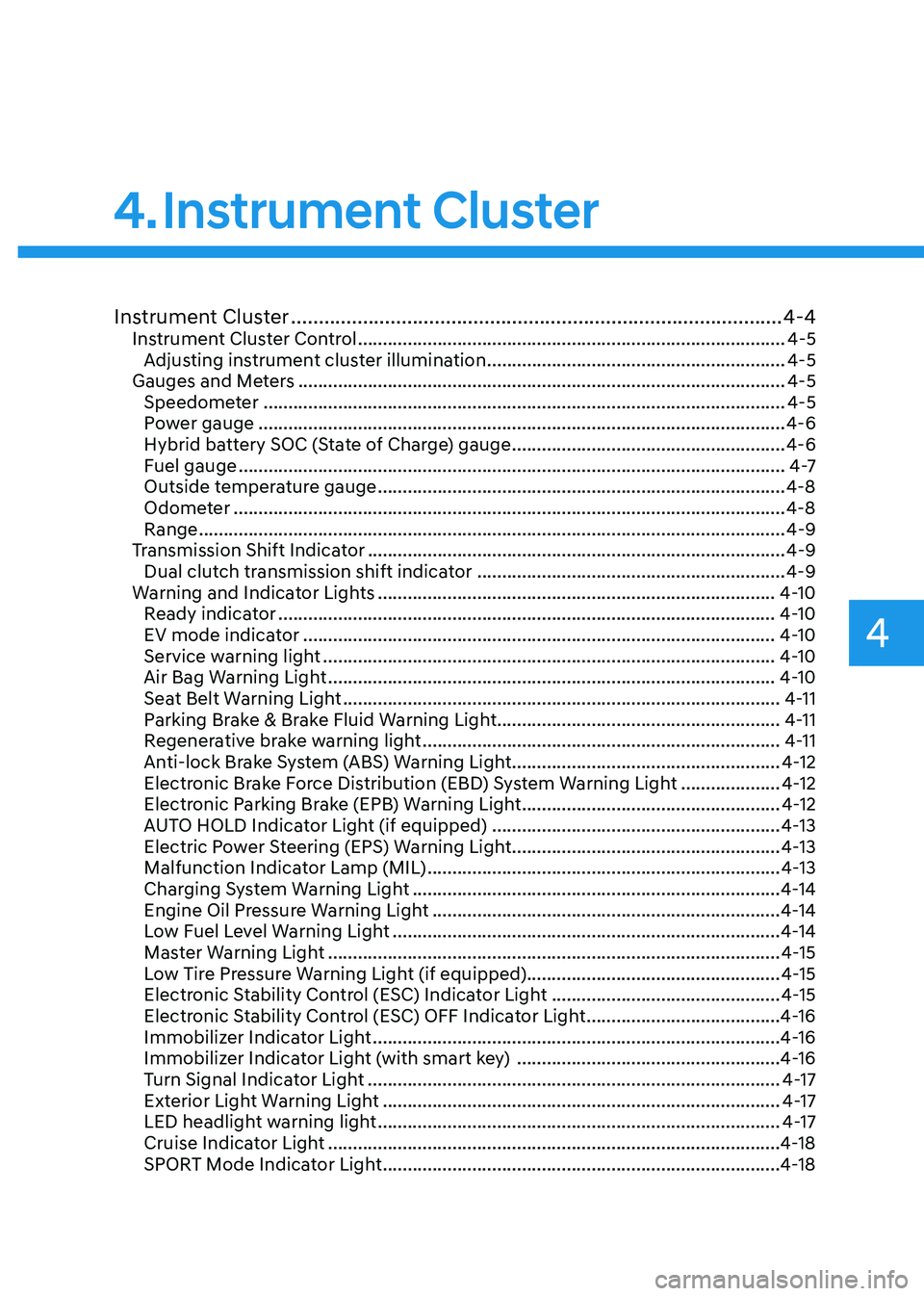
Instrument Cluster ......................................................................................... 4-4
Instrument Cluster Control ...................................................................................... 4-5
Adjusting instrument cluster illumination ............................................................4-5
Gauges and Meters .................................................................................................. 4-5
Speedometer ......................................................................................................... 4-5
Power gauge .......................................................................................................... 4-6
Hybrid battery SOC (State of Charge) gauge .......................................................4-6
Fuel gauge .............................................................................................................. 4 -7
Outside temperature gauge .................................................................................. 4-8
Odometer ............................................................................................................... 4-8
Range ...................................................................................................................... 4-9
Transmission Shift Indicator .................................................................................... 4-9
Dual clutch transmission shift indicator ..............................................................4-9
Warning and Indicator Lights ................................................................................ 4-10
Ready indicator .................................................................................................... 4-10
EV mode indicator ............................................................................................... 4-10
Service warning light ........................................................................................... 4-10
Air Bag Warning Light .......................................................................................... 4-10
Seat Belt Warning Light ........................................................................................ 4-11
Parking Brake & Brake Fluid Warning Light .........................................................4-11
Regenerative brake warning light ........................................................................ 4-11
Anti-lock Brake System (ABS) Warning Light ......................................................4-12
Electronic Brake Force Distribution (EBD) System Warning Light ....................4-12
Electronic Parking Brake (EPB) Warning Light ....................................................4-12
AUTO HOLD Indicator Light (if equipped) ..........................................................4-13
Electric Power Steering (EPS) Warning Light ......................................................4-13
Malfunction Indicator Lamp (MIL) ....................................................................... 4-13
Charging System Warning Light .......................................................................... 4-14
Engine Oil Pressure Warning Light ...................................................................... 4-14
Low Fuel Level Warning Light .............................................................................. 4-14
Master Warning Light ........................................................................................... 4-15
Low Tire Pressure Warning Light (if equipped)................................................... 4-15
Electronic Stability Control (ESC) Indicator Light ..............................................4-15
Electronic Stability Control (ESC) OFF Indicator Light .......................................4-16
Immobilizer Indicator Light .................................................................................. 4-16
Immobilizer Indicator Light (with smart key) .....................................................4-16
Turn Signal Indicator Light ................................................................................... 4-17
Exterior Light Warning Light ................................................................................ 4-17
LED headlight warning light ................................................................................. 4-17
Cruise Indicator Light ........................................................................................... 4-18
SPORT Mode Indicator Light ................................................................................ 4-18
4. Instrument Cluster
Page 100 of 529
4
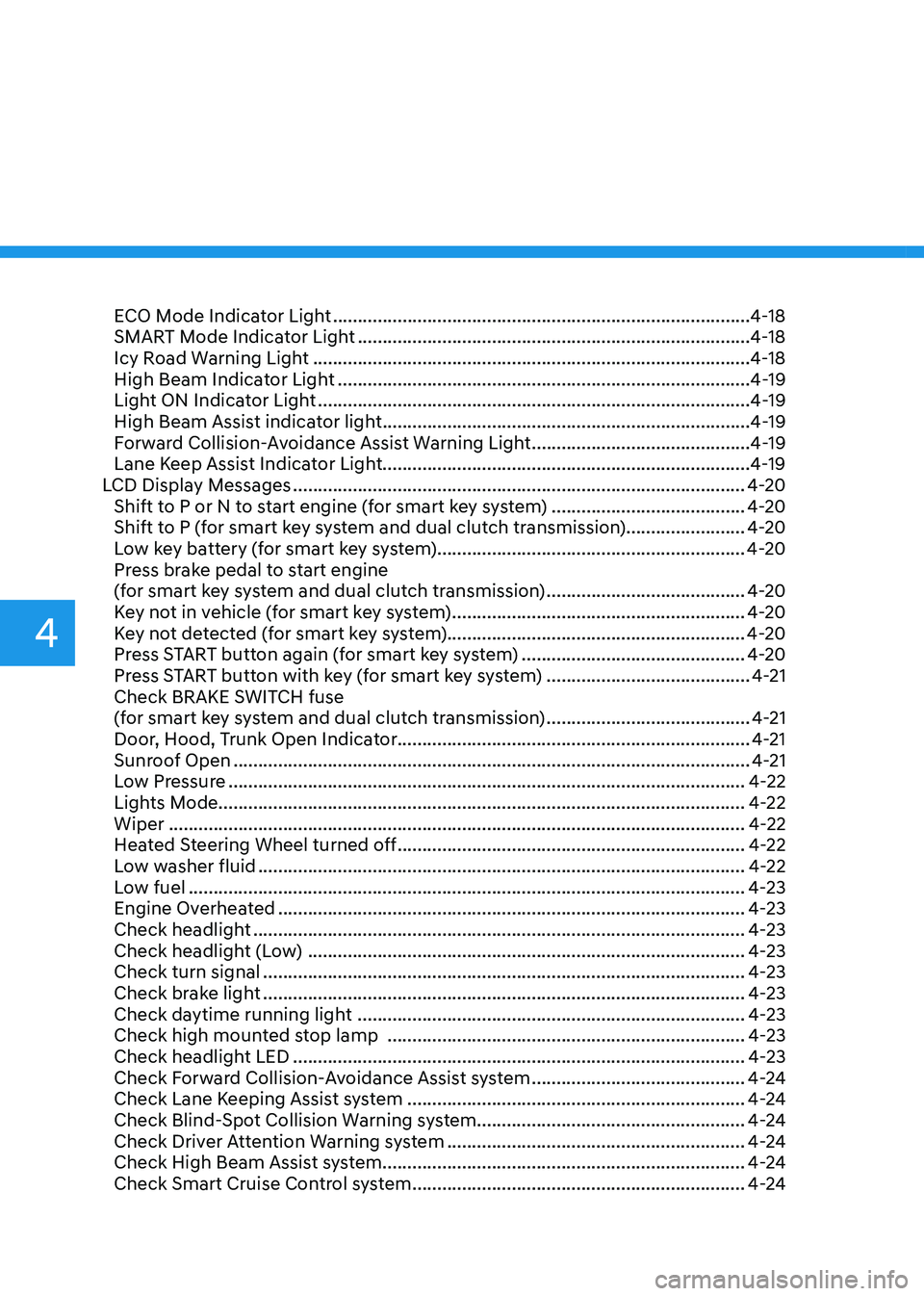
ECO Mode Indicator Light .................................................................................... 4-18
SMART Mode Indicator Light ............................................................................... 4-18
Icy Road Warning Light ........................................................................................ 4-18
High Beam Indicator Light ................................................................................... 4-19
Light ON Indicator Light ....................................................................................... 4-19
High Beam Assist indicator light .......................................................................... 4-19
Forward Collision-Avoidance Assist Warning Light ............................................4-19
Lane Keep Assist Indicator Light..........................................................................4-19
LCD Display Messages ........................................................................................... 4-20
Shift to P or N to start engine (for smart key system) .......................................4-20
Shift to P (for smart key system and dual clutch transmission)........................ 4-20
Low key battery (for smart key system).............................................................. 4-20
Press brake pedal to start engine
(for smart key system and dual clutch transmission) ........................................4-20
Key not in vehicle (for smart key system) ...........................................................4-20
Key not detected (for smart key system)............................................................ 4-20
Press START button again (for smart key system) .............................................4-20
Press START button with key (for smart key system) .........................................4-21
Check BRAKE SWITCH fuse
(for smart key system and dual clutch transmission) .........................................4-21
Door, Hood, Trunk Open Indicator....................................................................... 4-21
Sunroof Open ........................................................................................................ 4-21
Low Pressure ........................................................................................................ 4-22
Lights Mode.......................................................................................................... 4-22Wiper .................................................................................................................... 4-22
Heated Steering Wheel turned off ...................................................................... 4-22
Low washer fluid .................................................................................................. 4-22
Low fuel ................................................................................................................ 4-23
Engine Overheated .............................................................................................. 4-23
Check headlight ................................................................................................... 4-23
Check headlight (Low) ........................................................................................ 4-23
Check turn signal ................................................................................................. 4-23
Check brake light ................................................................................................. 4-23
Check daytime running light .............................................................................. 4-23
Check high mounted stop lamp ........................................................................ 4-23
Check headlight LED ........................................................................................... 4-23
Check Forward Collision-Avoidance Assist system ...........................................4-24
Check Lane Keeping Assist system .................................................................... 4-24
Check Blind-Spot Collision Warning system...................................................... 4-24
Check Driver Attention Warning system ............................................................4-24
Check High Beam Assist system ......................................................................... 4-24
Check Smart Cruise Control system ................................................................... 4-24
Page 107 of 529
04
4-9
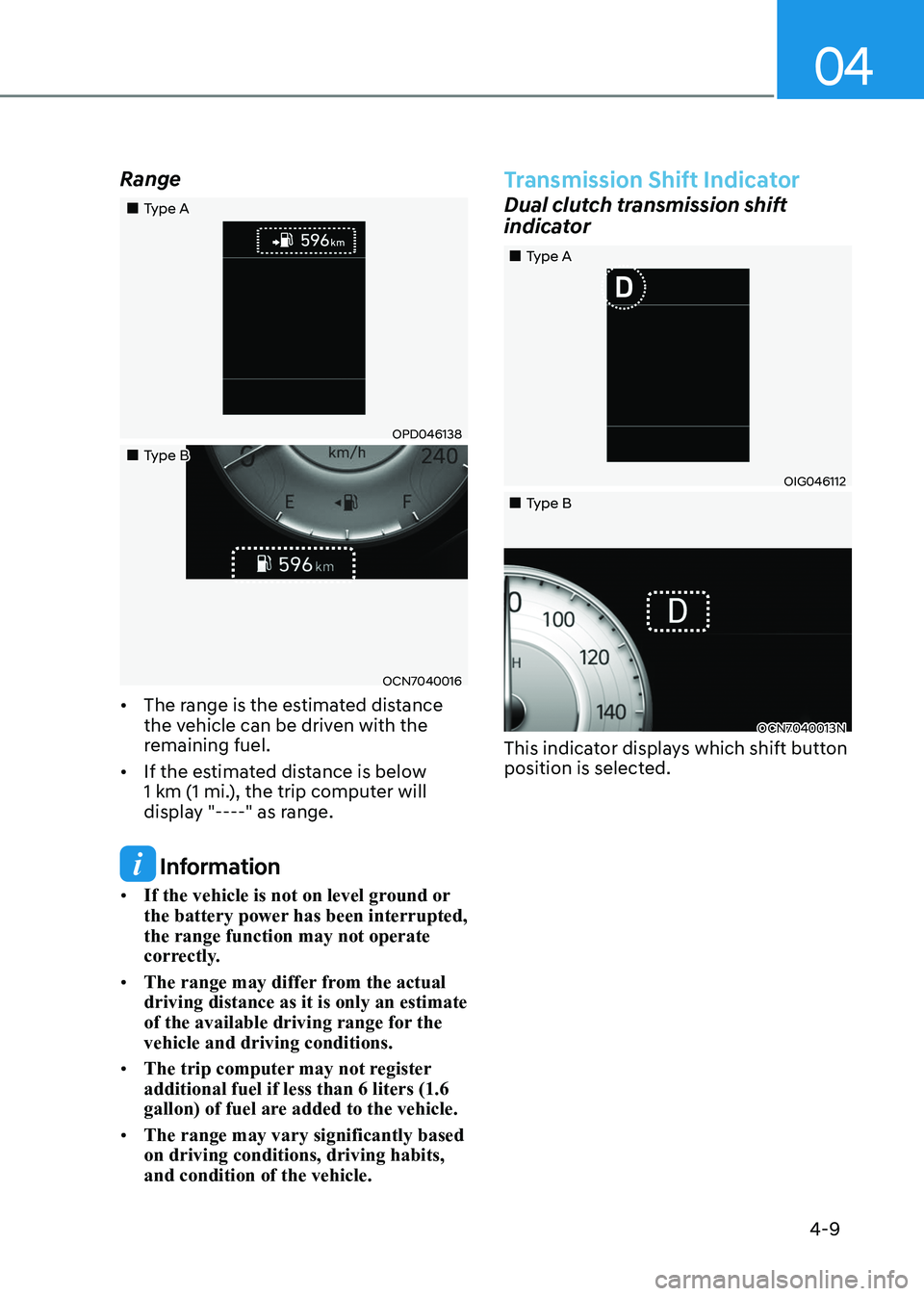
Range
„„Type A
OPD046138
„„Type B
OCN7040016
• The range is the estimated distance
the vehicle can be driven with the
remaining fuel.
• If the estimated distance is below
1 km (1 mi.), the trip computer will
display "----" as range.
Information
• If the vehicle is not on level ground or
the battery power has been interrupted, the range function may not operate
correctly.
• The range may differ from the actual driving distance as it is only an estimate
of the available driving range for the vehicle and driving conditions.
• The trip computer may not register additional fuel if less than 6 liters (1.6
gallon) of fuel are added to the vehicle.
• The range may vary significantly based on driving conditions, driving habits, and condition of the vehicle.
Transmission Shift Indicator
Dual clutch transmission shift
indicator
OIG046112
OCN7040013N
„
„Type A
„
„Type B
This indicator displays which shift button
position is selected.
Page 118 of 529
Instrument Cluster
4-20
LCD Display Messages
Shift to P or N to start engine
(for smart key system)
This warning message is displayed if
you try to start the engine with the shift
button not in the P (Park) or N (Neutral) position.
Information
You can start the engine with the shift
button in the N (Neutral) position. But, for
your safety, have you start the engine with
the shift button in the P (Park) position.
Shift to P (for smart key system and
dual clutch transmission)
This message is displayed if you try to
turn off the engine without the shift
button in P (Park) position.
If this occurs, the Engine Start/Stop
button turns to the ACC position (If you
press the Engine Start/Stop button once
more, it will turn to the ON position).
Low key battery
(for smart key system)
This warning message is displayed if the
battery of the smart key is discharged
while changing the Engine Start/Stop
button to the OFF position.
Press brake pedal to start engine
(for smart key system and dual
clutch transmission)
This warning message is displayed if the
Engine Start/Stop button changes to
the ACC position twice by pressing the
button repeatedly without depressing
the brake pedal.
You can start the vehicle by depressing
the brake pedal and then pressing the
Engine Start/Stop button. Key not in vehicle
(for smart key system)
This warning message is displayed if the
smart key is not in the vehicle when you
press the Engine Start/Stop button.
When attempting to start the vehicle,
always have the smart key with you.
Key not detected
(for smart key system)
This warning message is displayed if the
smart key is not detected when you press
the Engine Start/Stop button.
Press START button again
(for smart key system)
This message is displayed if you were
unable to start the vehicle when the
Engine Start/Stop button was pressed.
If this occurs, attempt to start the engine
by pressing the Engine Start/Stop button again.
If the warning message appears each
time you press the Engine Start/Stop
button, have your vehicle inspected by
an authorized HYUNDAI dealer.
Page 119 of 529
04
4-21
12V battery discharging due to
additional electrical devices
This message is displayed if the 12V
battery voltage is weak due to any
non-factory electrical accessories (ex.
dashboard camera) while parking. Be
careful that the battery is not discharged.
If the message appears after removing
the non-factory electrical accessories,
we recommend that you have the vehicle
inspected by an authorized HYUNDAI
dealer.
Press START button with key
(for smart key system)
This warning message is displayed if you
press the Engine Start/Stop button while
the warning message "Key not detected"
is displayed.
At this time, the immobilizer indicator
light blinks.
Check BRAKE SWITCH fuse (for
smart key system and dual clutch
transmission)
This warning message is displayed if the
brake switch fuse is disconnected.
You need to replace the fuse with a new
one before starting the engine.
If that is not possible, you can start the
engine by pressing the Engine Start/
Stop button for 10 seconds in the ACC position.
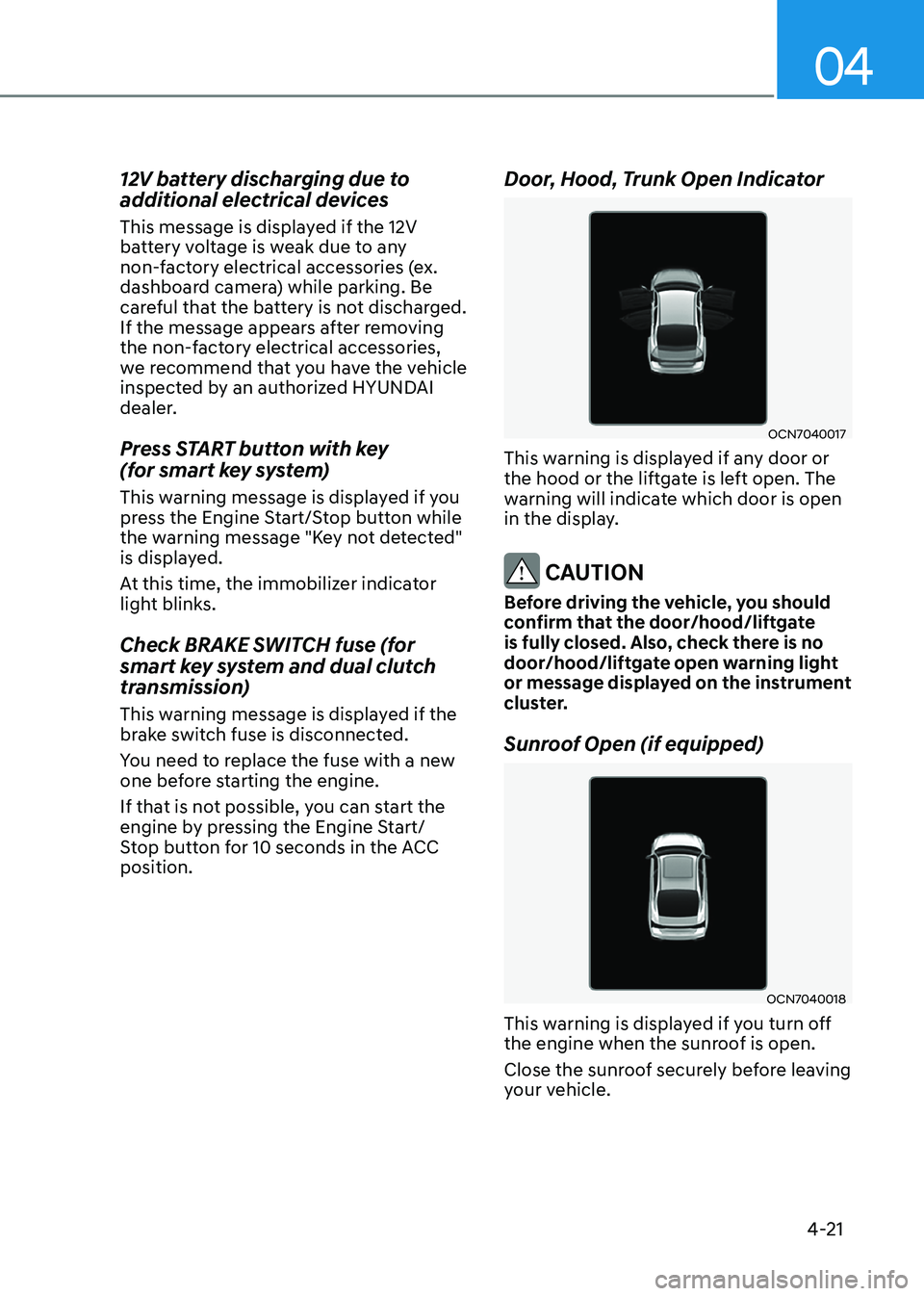
Door, Hood, Trunk Open Indicator
OCN7040017
This warning is displayed if any door or
the hood or the liftgate is left open. The
warning will indicate which door is open
in the display.
CAUTION
Before driving the vehicle, you should
confirm that the door/hood/liftgate
is fully closed. Also, check there is no
door/hood/liftgate open warning light
or message displayed on the instrument
cluster.
Sunroof Open (if equipped)
OCN7040018
This warning is displayed if you turn off
the engine when the sunroof is open.
Close the sunroof securely before leaving
your vehicle.
Page 128 of 529
Instrument Cluster
4-30
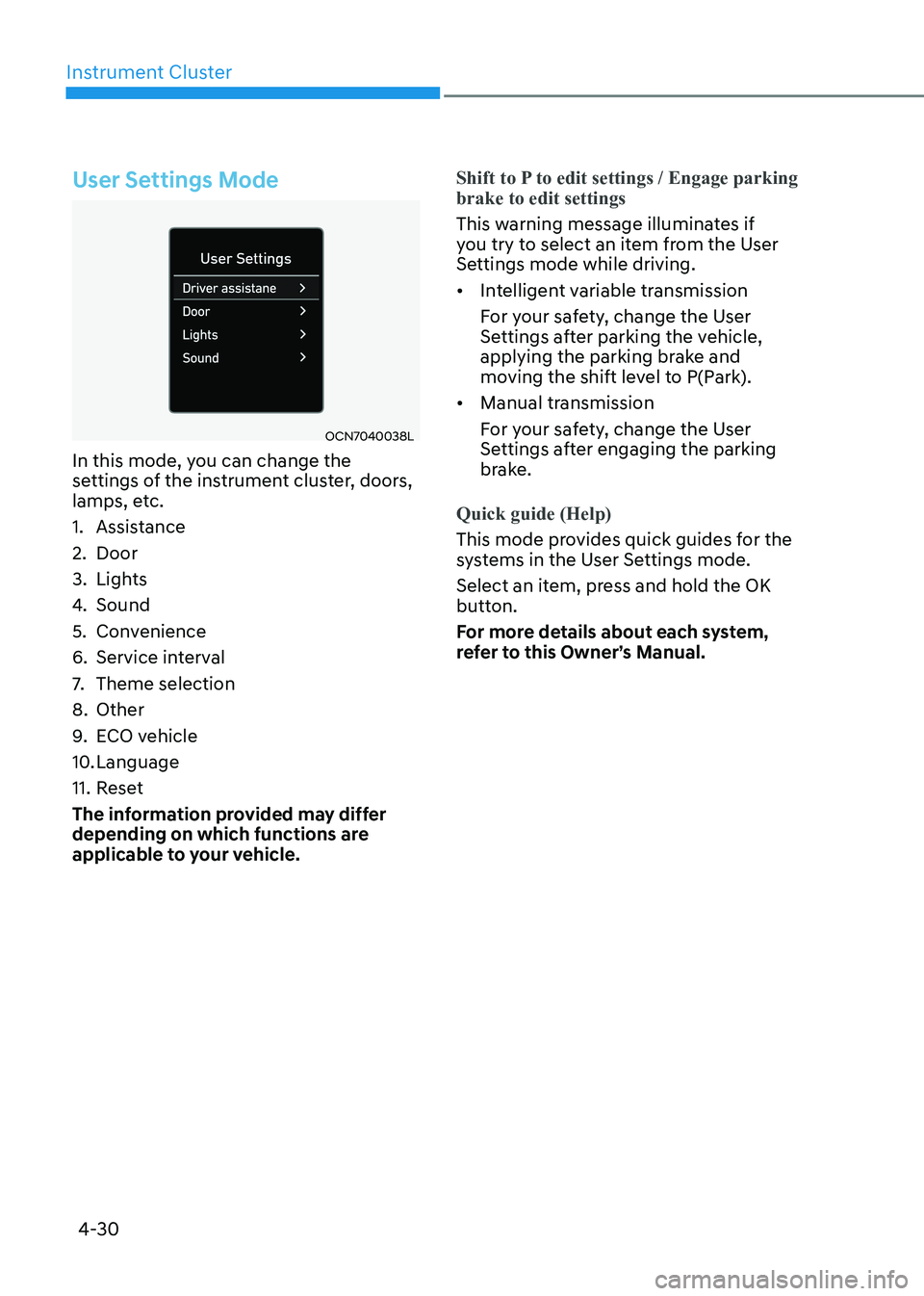
User Settings Mode
OCN7040038L
In this mode, you can change the
settings of the instrument cluster, doors,
lamps, etc.
1. Assistance
2. Door
3. Lights
4. Sound
5. Convenience
6. Service interval
7. Theme selection
8. Other
9. ECO vehicle
10. Language
11. Reset
The information provided may differ
depending on which functions are
applicable to your vehicle.
Shift to P to edit settings / Engage parking brake to edit settings
This warning message illuminates if
you try to select an item from the User
Settings mode while driving. • Intelligent variable transmission
For your safety, change the User
Settings after parking the vehicle,
applying the parking brake and
moving the shift level to P(Park).
• Manual transmission
For your safety, change the User
Settings after engaging the parking
brake.
Quick guide (Help)
This mode provides quick guides for the
systems in the User Settings mode.
Select an item, press and hold the OK
button.
For more details about each system,
refer to this Owner’s Manual.
Page 131 of 529
04
4-33
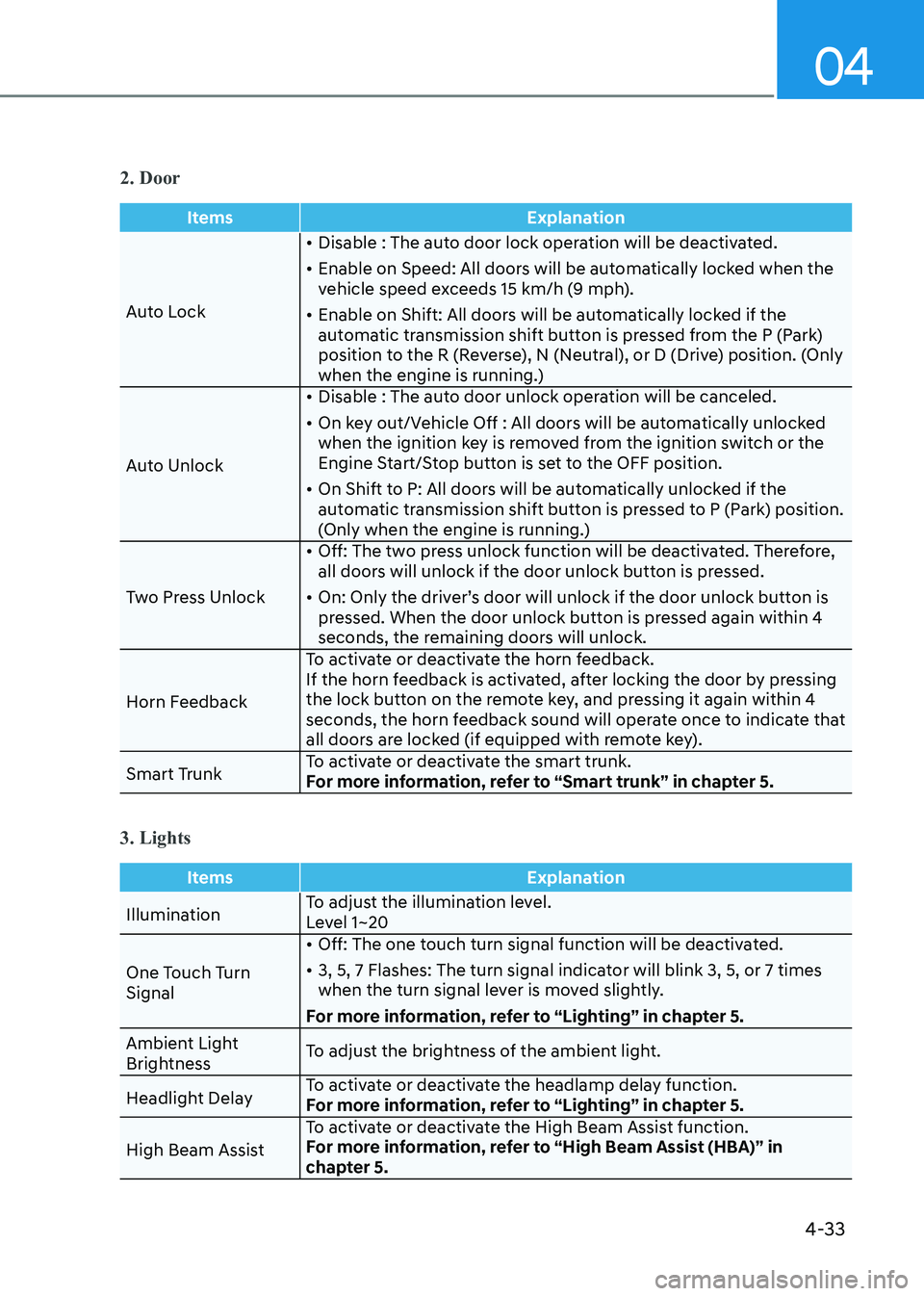
2. Door
ItemsExplanation
Auto Lock•
Disable : The auto door lock operation will be deactivated.
• Enable on Speed: All doors will be automatically locked when the
vehicle speed exceeds 15 km/h (9 mph).
• Enable on Shift: All doors will be automatically locked if the
automatic transmission shift button is pressed from the P (Park)
position to the R (Reverse), N (Neutral), or D (Drive) position. (Only
when the engine is running.)
Auto Unlock •
Disable : The auto door unlock operation will be canceled.
• On key out/Vehicle Off : All doors will be automatically unlocked
when the ignition key is removed from the ignition switch or the
Engine Start/Stop button is set to the OFF position.
• On Shift to P: All doors will be automatically unlocked if the
automatic transmission shift button is pressed to P (Park) position.
(Only when the engine is running.)
Two Press Unlock •
Off: The two press unlock function will be deactivated. Therefore,
all doors will unlock if the door unlock button is pressed.
• On: Only the driver’s door will unlock if the door unlock button is
pressed. When the door unlock button is pressed again within 4
seconds, the remaining doors will unlock.
Horn Feedback To activate or deactivate the horn feedback.
If the horn feedback is activated, after locking the door by pressing
the lock button on the remote key, and pressing it again within 4
seconds, the horn feedback sound will operate once to indicate that
all doors are locked (if equipped with remote key).
Smart Trunk To activate or deactivate the smart trunk.
For more information, refer to “Smart trunk” in chapter 5.
3. Lights
Items
Explanation
IlluminationTo adjust the illumination level.
Level 1~20
One Touch Turn Signal •
Off: The one touch turn signal function will be deactivated.
• 3, 5, 7 Flashes: The turn signal indicator will blink 3, 5, or 7 times
when the turn signal lever is moved slightly.
For more information, refer to “Lighting” in chapter 5.
Ambient Light
Brightness To adjust the brightness of the ambient light.
Headlight Delay To activate or deactivate the headlamp delay function.
For more information, refer to “Lighting” in chapter 5.
High Beam Assist To activate or deactivate the High Beam Assist function.
For more information, refer to “High Beam Assist (HBA)” in
chapter 5.
Page 142 of 529
Instrument Cluster
4-44
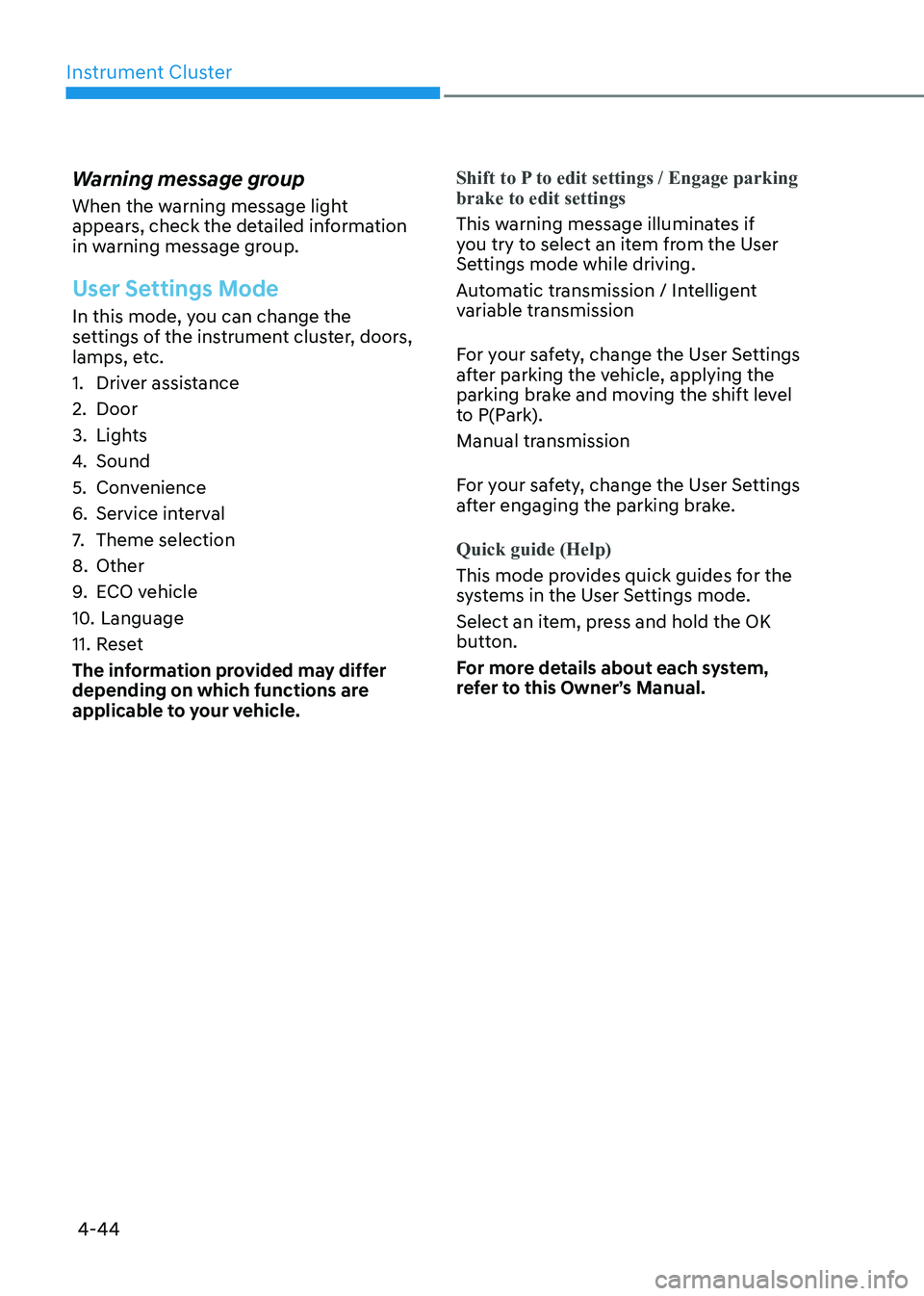
Warning message group
When the warning message light
appears, check the detailed information
in warning message group.
User Settings Mode
In this mode, you can change the
settings of the instrument cluster, doors,
lamps, etc.
1. Driver assistance
2. Door
3. Lights
4.
Sound
5. Convenience
6. Service interval
7. Theme selection
8. Other
9. ECO vehicle
10. Language
11. Reset
The information provided may differ
depending on which functions are
applicable to your vehicle.
Shift to P to edit settings / Engage parking brake to edit settings
This warning message illuminates if
you try to select an item from the User
Settings mode while driving.
Automatic transmission / Intelligent
variable transmission
For your safety, change the User Settings
after parking the vehicle, applying the
parking brake and moving the shift level
to P(Park).
Manual transmission
For your safety, change the User Settings
after engaging the parking brake.
Quick guide (Help)
This mode provides quick guides for the
systems in the User Settings mode.
Select an item, press and hold the OK
button.
For more details about each system,
refer to this Owner’s Manual.