heating HYUNDAI ELANTRA LIMITED 2017 Owners Manual
[x] Cancel search | Manufacturer: HYUNDAI, Model Year: 2017, Model line: ELANTRA LIMITED, Model: HYUNDAI ELANTRA LIMITED 2017Pages: 586, PDF Size: 15.29 MB
Page 14 of 586

F14F14
Trip Computer .......................................................3-98
Conventional Cluster.......................................................3\
-98
Supervision Cluster .......................................................3-102
Light .....................................................................3-1\
07
Exterior Lights ...............................................................3-107
Interior Lights ................................................................3-115
Welcome System ...........................................................3-117
Wipers and Washers..........................................3-119
Windshield Wipers ........................................................3-119
Windshield Washers .....................................................3-120
Driver Assist System .........................................3-121
Rear View Camera ........................................................3-121
Defroster .............................................................3-122
Rear Window Defroster ..............................................3-122
Manual Climate Control System.......................3-123
Heating and Air Conditioning .....................................3-124
System Operation .........................................................3-129
System Maintenance....................................................3-131
Automatic Climate Control System ..................3-133
Automatic Heating and Air Conditioning.................3-134
Manual Heating and Air Conditioning......................3-135
System Operation .........................................................3-141
System Maintenance....................................................3-143
Windshield Defrosting and Defogging ............3-145
Auto Defogging System ..............................................3-148
Climate Control Additional Features...................3-149
Automatic Ventilation ...................................................3-149
Sunroof Inside Air Recirculation ...............................3-149
Storage Compartment .......................................3-150
Center Console Storage ..............................................3-150
Sliding Armrest ..............................................................3-150
Glove Box ........................................................................\
3-151
Sunglass Holder.............................................................3-151
Multi box ........................................................................\
.3-152
Interior Features ................................................3-153
Cup Holder ......................................................................3-\
153
Sunvisor ........................................................................\
...3-154
Power Outlet ..................................................................3-154
USB Charger ...................................................................3-156\
Clock ........................................................................\
.........3-156
Clothes Hanger ..............................................................3-157
Floor Mat Anchor(s).....................................................3-157
Luggage Net Holder .....................................................3-158
Page 45 of 586
2-20
Safety system of your vehicle
To prevent damage to the seat
warmers and seats:
Never use a solvent such as paint thinner, benzene, alcohol
or gasoline to clean the seats.
Do not place heavy or sharp objects on seats equipped with
seat warmers.
Do not change the seat cover. It may damage the seat warmer. While the engine is running, push
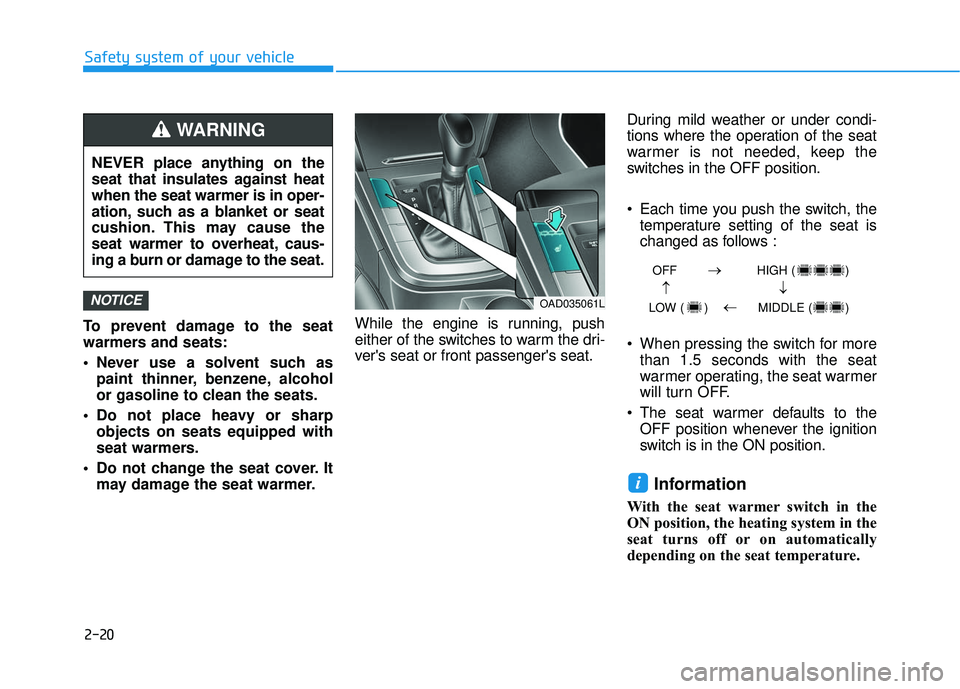
either of the switches to warm the dri-
ver's seat or front passenger's seat. During mild weather or under condi-
tions where the operation of the seat
warmer is not needed, keep the
switches in the OFF position.
Each time you push the switch, the
temperature setting of the seat is
changed as follows :
When pressing the switch for more than 1.5 seconds with the seat
warmer operating, the seat warmer
will turn OFF.
The seat warmer defaults to the OFF position whenever the ignition
switch is in the ON position.
Information
With the seat warmer switch in the
ON position, the heating system in the
seat turns off or on automatically
depending on the seat temperature.
i
NOTICE
NEVER place anything on the
seat that insulates against heat
when the seat warmer is in oper-
ation, such as a blanket or seat
cushion. This may cause the
seat warmer to overheat, caus-
ing a burn or damage to the seat.
WARNING
OAD035061L
OFF HIGH ( )
LOW ( ) MIDDLE ( )
→→
→
→
Page 46 of 586
2-21
Safety system of your vehicle
2
Rear seat warmers (if equipped)
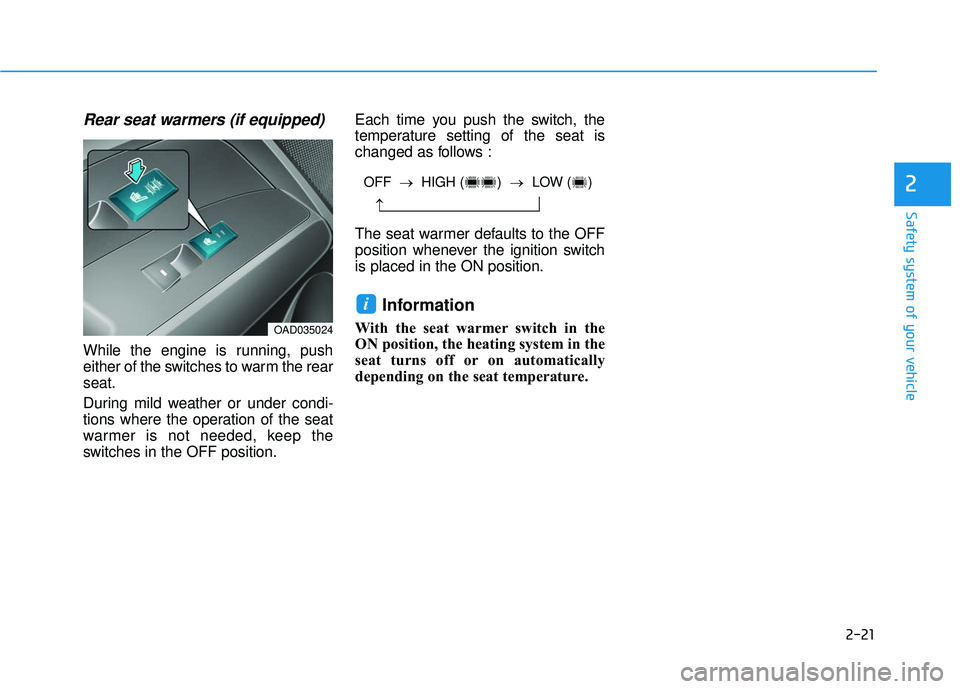
While the engine is running, push
either of the switches to warm the rear
seat.
During mild weather or under condi-
tions where the operation of the seat
warmer is not needed, keep the
switches in the OFF position.Each time you push the switch, the
temperature setting of the seat is
changed as follows :
The seat warmer defaults to the OFF
position whenever the ignition switch
is placed in the ON position.
Information
With the seat warmer switch in the
ON position, the heating system in the
seat turns off or on automatically
depending on the seat temperature.
i
OAD035024
OFF →
HIGH ( ) → LOW ( )
→
Page 96 of 586

Trip Computer .......................................................3-98
Conventional Cluster.......................................................3\
-98
Supervision Cluster .......................................................3-102
Light .....................................................................3-1\
07
Exterior Lights ...............................................................3-107
Interior Lights ................................................................3-115
Welcome System ...........................................................3-117
Wipers and Washers..........................................3-119
Windshield Wipers ........................................................3-119
Windshield Washers .....................................................3-120
Driver Assist System .........................................3-121
Rear View Camera ........................................................3-121
Defroster .............................................................3-122
Rear Window Defroster ..............................................3-122
Manual Climate Control System.......................3-123
Heating and Air Conditioning .....................................3-124
System Operation .........................................................3-129
System Maintenance....................................................3-131
Automatic Climate Control System ..................3-133
Automatic Heating and Air Conditioning.................3-134
Manual Heating and Air Conditioning......................3-135
System Operation .........................................................3-141
System Maintenance....................................................3-143
Windshield Defrosting and Defogging ............3-145
Auto Defogging System ..............................................3-148
Climate Control Additional Features...................3-149
Automatic Ventilation ...................................................3-149
Sunroof Inside Air Recirculation ...............................3-149
Storage Compartment .......................................3-150
Center Console Storage ..............................................3-150
Sliding Armrest ..............................................................3-150
Glove Box ........................................................................\
3-151
Sunglass Holder.............................................................3-151
Multi box ........................................................................\
.3-152
3
Page 158 of 586
3-64
Convenient features of your vehicleNever remove the radiator cap or
reservoir cap when the engine is
hot. The engine coolant is under
pressure and could severely
burn. Wait until the engine is cool
before adding coolant to the
reservoir.
WARNING
Tachometer
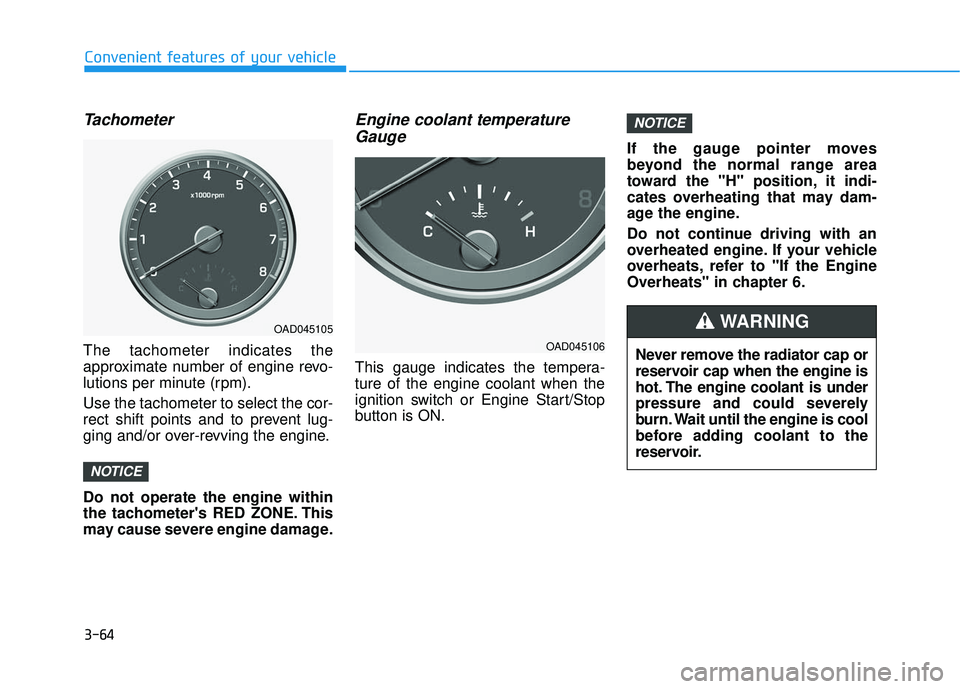
The tachometer indicates the
approximate number of engine revo-
lutions per minute (rpm).
Use the tachometer to select the cor-
rect shift points and to prevent lug-
ging and/or over-revving the engine.
Do not operate the engine within
the tachometer's RED ZONE. This
may cause severe engine damage.
Engine coolant temperatureGauge
This gauge indicates the tempera-
ture of the engine coolant when the
ignition switch or Engine Start/Stop
button is ON. If the gauge pointer moves
beyond the normal range area
toward the "H" position, it indi-
cates overheating that may dam-
age the engine.
Do not continue driving with an
overheated engine. If your vehicle
overheats, refer to "If the Engine
Overheats" in chapter 6.
NOTICE
NOTICE
OAD045106
OAD045105
Page 179 of 586
3-85
Convenient features of your vehicle
3
Low Fuel
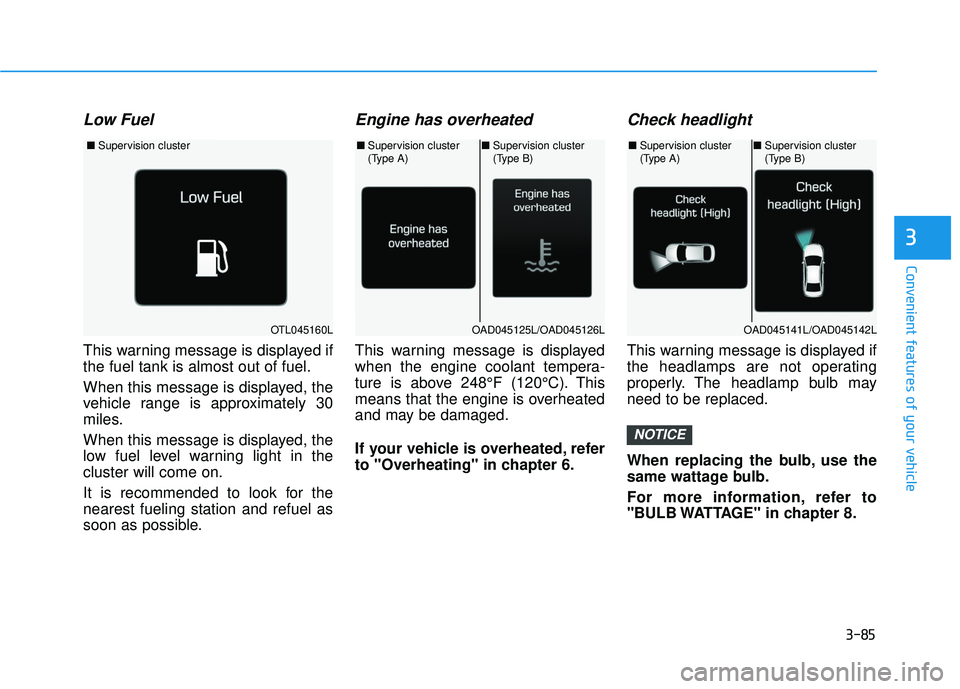
This warning message is displayed if
the fuel tank is almost out of fuel.
When this message is displayed, the
vehicle range is approximately 30
miles.
When this message is displayed, the
low fuel level warning light in the
cluster will come on.
It is recommended to look for the
nearest fueling station and refuel as
soon as possible.
Engine has overheated
This warning message is displayed
when the engine coolant tempera-
ture is above 248°F (120°C). This
means that the engine is overheated
and may be damaged.
If your vehicle is overheated, refer
to "Overheating" in chapter 6.
Check headlight
This warning message is displayed if
the headlamps are not operating
properly. The headlamp bulb may
need to be replaced.
When replacing the bulb, use the
same wattage bulb.
For more information, refer to
"BULB WATTAGE" in chapter 8.
NOTICE
OTL045160L
■Supervision cluster
OAD045125L/OAD045126L
■Supervision cluster
(Type A)■Supervision cluster
(Type B)
OAD045141L/OAD045142L
■Supervision cluster
(Type A)■Supervision cluster
(Type B)
Page 218 of 586
3-124
Convenient features of your vehicle
Heating and Air Conditioning
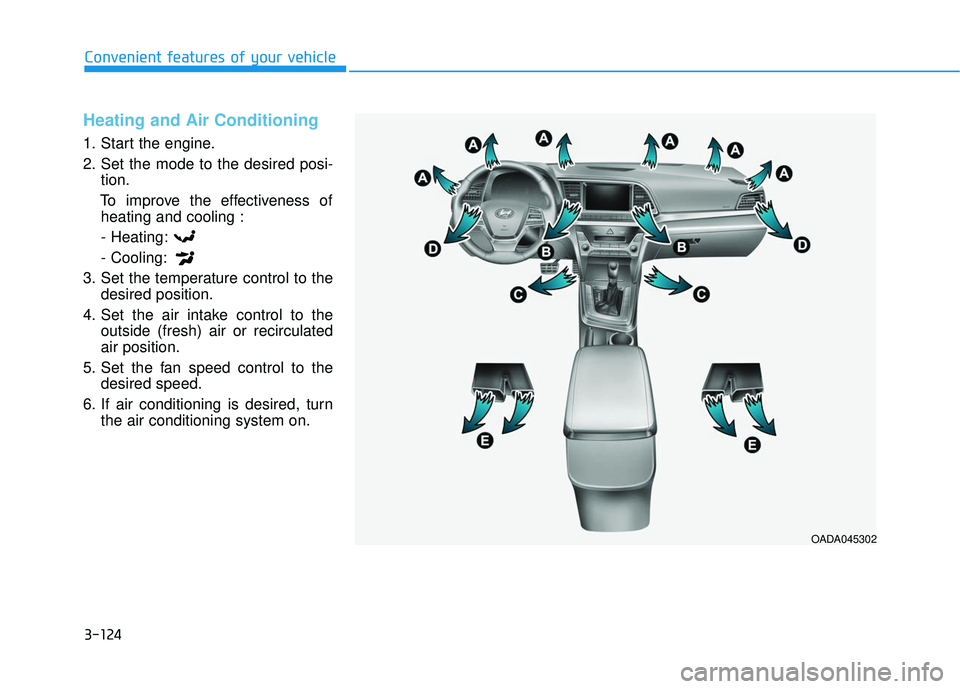
1. Start the engine.
2. Set the mode to the desired posi-tion.
To improve the effectiveness of heating and cooling :
- Heating:
- Cooling:
3. Set the temperature control to the desired position.
4. Set the air intake control to the outside (fresh) air or recirculated
air position.
5. Set the fan speed control to the desired speed.
6. If air conditioning is desired, turn the air conditioning system on.
OADA045302
Page 222 of 586
3-128
Convenient features of your vehicle
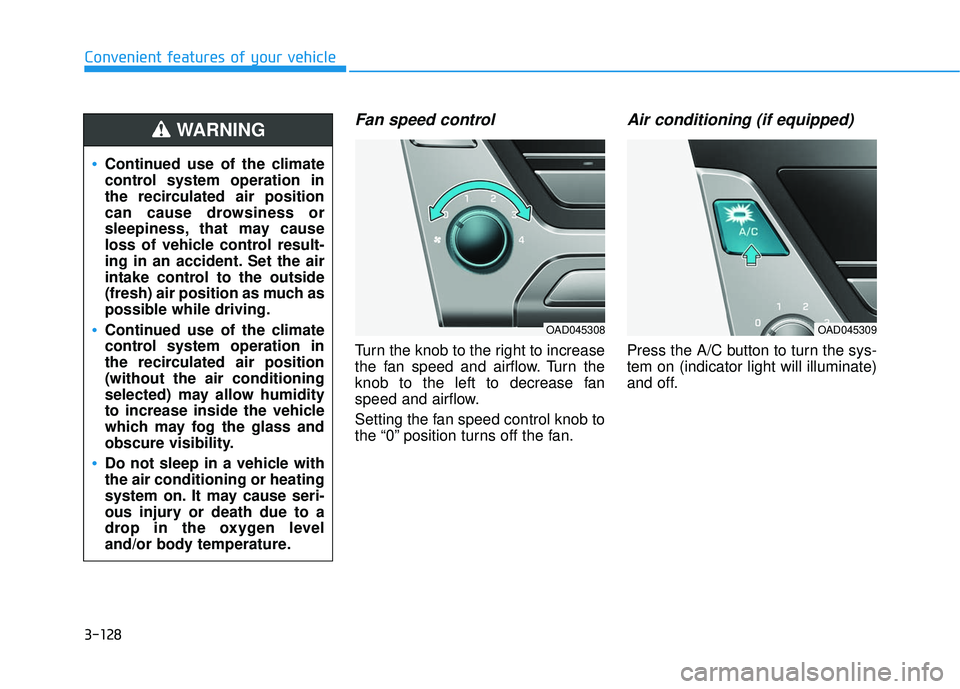
Fan speed control
Turn the knob to the right to increase
the fan speed and airflow. Turn the
knob to the left to decrease fan
speed and airflow.
Setting the fan speed control knob to
the “0” position turns off the fan.
Air conditioning (if equipped)
Press the A/C button to turn the sys-
tem on (indicator light will illuminate)
and off.
Continued use of the climate
control system operation in
the recirculated air position
can cause drowsiness or
sleepiness, that may cause
loss of vehicle control result-
ing in an accident. Set the air
intake control to the outside
(fresh) air position as much as
possible while driving.
Continued use of the climate
control system operation in
the recirculated air position
(without the air conditioning
selected) may allow humidity
to increase inside the vehicle
which may fog the glass and
obscure visibility.
Do not sleep in a vehicle with
the air conditioning or heating
system on. It may cause seri-
ous injury or death due to a
drop in the oxygen level
and/or body temperature.
WARNING
OAD045308OAD045309
Page 223 of 586
3-129
Convenient features of your vehicle
3
System Operation
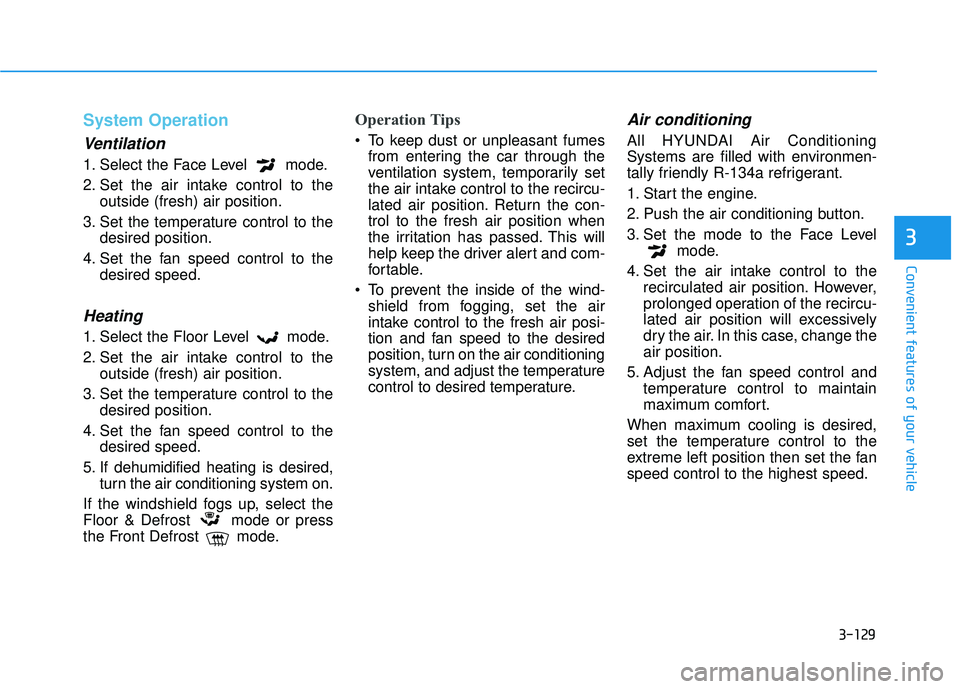
Ventilation
1. Select the Face Level mode.
2. Set the air intake control to theoutside (fresh) air position.
3. Set the temperature control to the desired position.
4. Set the fan speed control to the desired speed.
Heating
1. Select the Floor Level mode.
2. Set the air intake control to theoutside (fresh) air position.
3. Set the temperature control to the desired position.
4. Set the fan speed control to the desired speed.
5. If dehumidified heating is desired, turn the air conditioning system on.
If the windshield fogs up, select the
Floor & Defrost mode or press
the Front Defrost mode.
Operation Tips
To keep dust or unpleasant fumes from entering the car through the
ventilation system, temporarily set
the air intake control to the recircu-
lated air position. Return the con-
trol to the fresh air position when
the irritation has passed. This will
help keep the driver alert and com-
fortable.
To prevent the inside of the wind- shield from fogging, set the air
intake control to the fresh air posi-
tion and fan speed to the desired
position, turn on the air conditioning
system, and adjust the temperature
control to desired temperature.
Air conditioning
All HYUNDAI Air Conditioning
Systems are filled with environmen-
tally friendly R-134a refrigerant.
1. Start the engine.
2. Push the air conditioning button.
3. Set the mode to the Face Level mode.
4. Set the air intake control to the recirculated air position. However,
prolonged operation of the recircu-
lated air position will excessively
dry the air. In this case, change the
air position.
5. Adjust the fan speed control and temperature control to maintain
maximum comfort.
When maximum cooling is desired,
set the temperature control to the
extreme left position then set the fan
speed control to the highest speed.
Page 224 of 586
3-130
Convenient features of your vehicle
When using the air conditioning
system, monitor the engine tem-
perature gauge closely while driv-
ing up hills or in heavy traffic
when outside temperatures are
high. Air conditioning system
operation can cause engine over-
heating. Continue to use the blow-
er fan, but turn the air condition-
ing system off if the engine tem-
perature gauge indicates engine
overheating.
Air conditioning system operation
tips
If the vehicle has been parked in direct sunlight during hot weather,
open the windows for a short time
to let the hot air inside the vehicle
escape.
After sufficient cooling has been achieved, switch back from the
recirculated air to the fresh outside
air position.
To help reduce moisture inside of the windows on rainy or humid
days, decrease the humidity inside
the vehicle by operating the air
conditioning system with the win-
dows and sunroof closed.
Use the air conditioning system every month only for a few minutes
to ensure maximum system per-
formance. If you operate air conditioner
excessively, the difference between
the temperature of the outside air
and that of the windshield could
cause the outer surface of the
windshield to fog up, causing loss
of visibility. In this case, set the
mode selection knob or button to
the position and fan speed
control to the lower speed.
NOTICE