steering HYUNDAI ELANTRA SEL 2021 Workshop Manual
[x] Cancel search | Manufacturer: HYUNDAI, Model Year: 2021, Model line: ELANTRA SEL, Model: HYUNDAI ELANTRA SEL 2021Pages: 570, PDF Size: 52.21 MB
Page 420 of 570
07
7-107
OCN7070035L
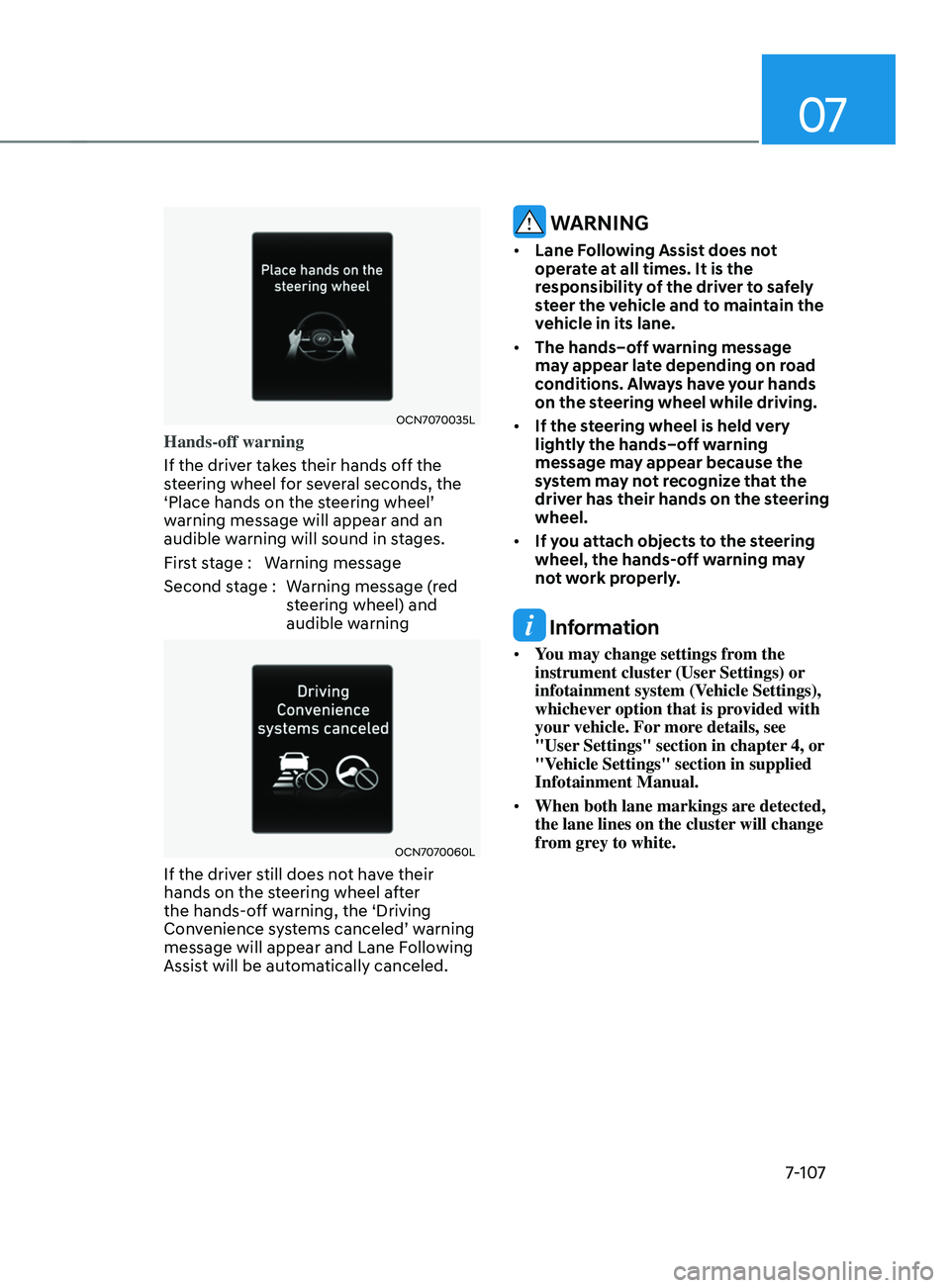
Hands-off warning
If the driver takes their hands off the
steering wheel for several seconds, the
‘Place
hands on the s
teering
wheel’ warning message will appear and an
audible w
arning will sound in stages.
First stage : Warning message
Second stage : Warning message (red steering wheel) and
audible warning
OCN7070060L
If the driver still does not have their
hands on the steering wheel after
the hands-off warning, the ‘Driving
Convenience
s
ystems
canceled’ w
arning
message will appear and Lane Follo
wing
Assist will be automatically canceled.
WARNING
• Lane Following Assist does not
operate at all times. It is the
responsibility of the driver to safely
steer the vehicle and to maintain the
vehicle in its lane.
• The hands–off warning message
may appear late depending on road
conditions. Always have your hands
on the steering wheel while driving.
• If the steering wheel is held very
lightly the hands–off warning
message may appear because the
system may not recognize that the
driver has their hands on the steering
wheel.
• If you attach objects to the steering
wheel, the hands-off warning may
not work properly.
Information
• You may change settings from the
instrument cluster (User Settings) or
infotainment system (Vehicle Settings),
whichever option that is provided with
your vehicle. For more details, see
"User Settings" section in chapter 4, or
"Vehicle Settings" section in supplied
Infotainment Manual.
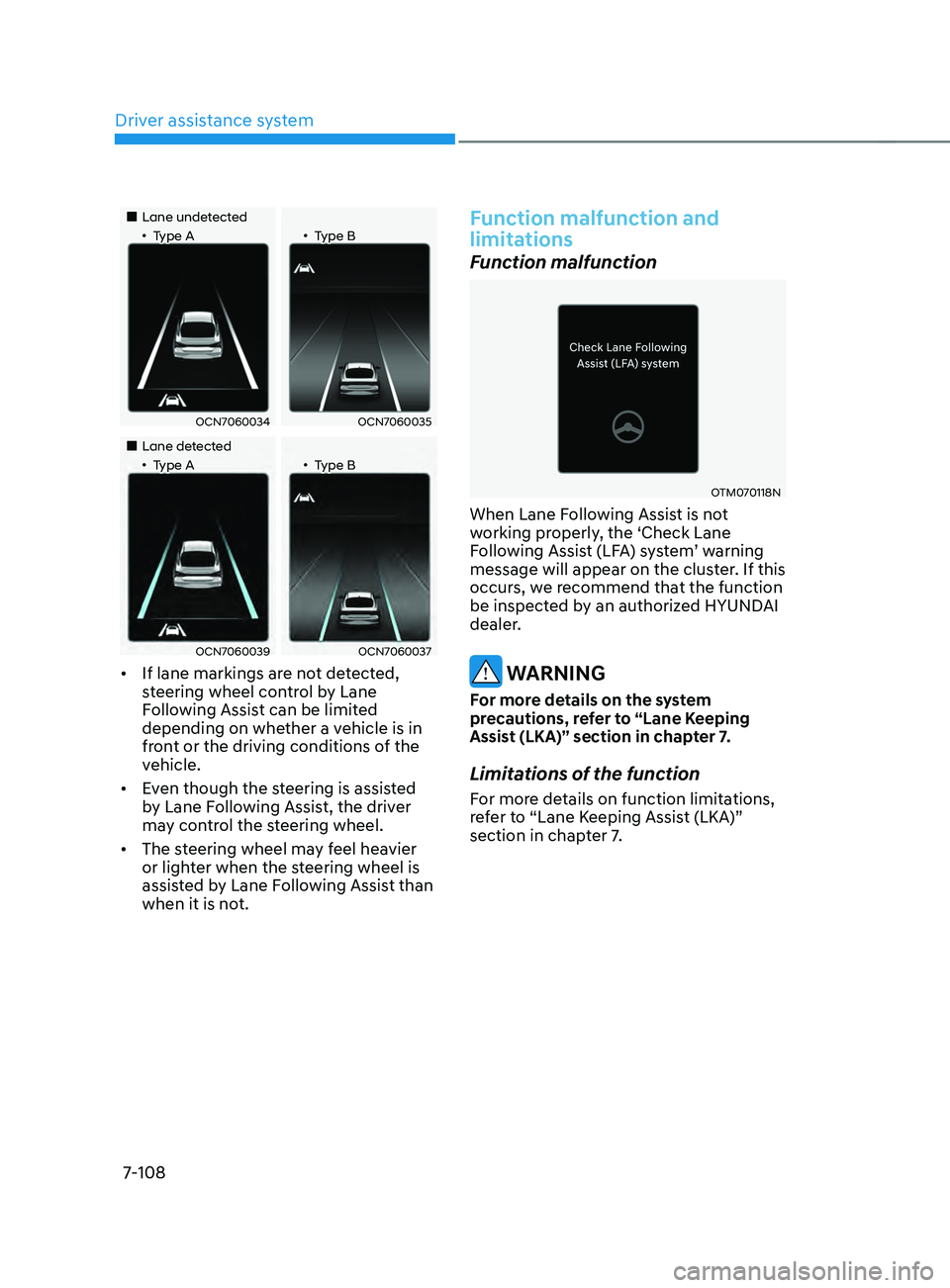
• When both lane markings are detected,
the lane lines on the cluster will change
from grey to white.
Page 421 of 570
Driver assistance system
7-108
„„Lane undetected„•Type A„•Type B
OCN7060034OCN7060035
„„Lane detected„•Type A„•Type B
OCN7060039OCN7060037
• If lane markings are not detected,
steering wheel control by Lane
Following Assist can be limited
depending on whether a vehicle is in
front or the driving conditions of the
vehicle.
• Even though the steering is assisted
by Lane Following Assist, the driver
may control the steering wheel.
• The steering wheel may feel heavier
or lighter when the steering wheel is
assisted by Lane Following Assist than
when it is not.
Function malfunction and
limitations
Function malfunction
OTM070118N
When Lane Following Assist is not
working properly, the ‘Check Lane
Following
Assis
t
(LF
A)
s
ystem’
w
arning
message will appear on the clust
er. If this
occurs, we recommend that the function
be inspected by an authorized HYUNDAI
dealer.
WARNING
For more details on the system
precautions, refer to “Lane Keeping
Assist (LKA)” section in chapter 7.
Limitations of the function
For more details on function limitations,
refer to “Lane Keeping Assist (LKA)”
section in chapter 7.
Page 425 of 570
Driver assistance system
7-112
• Restarting after stopping
OCN7070054L
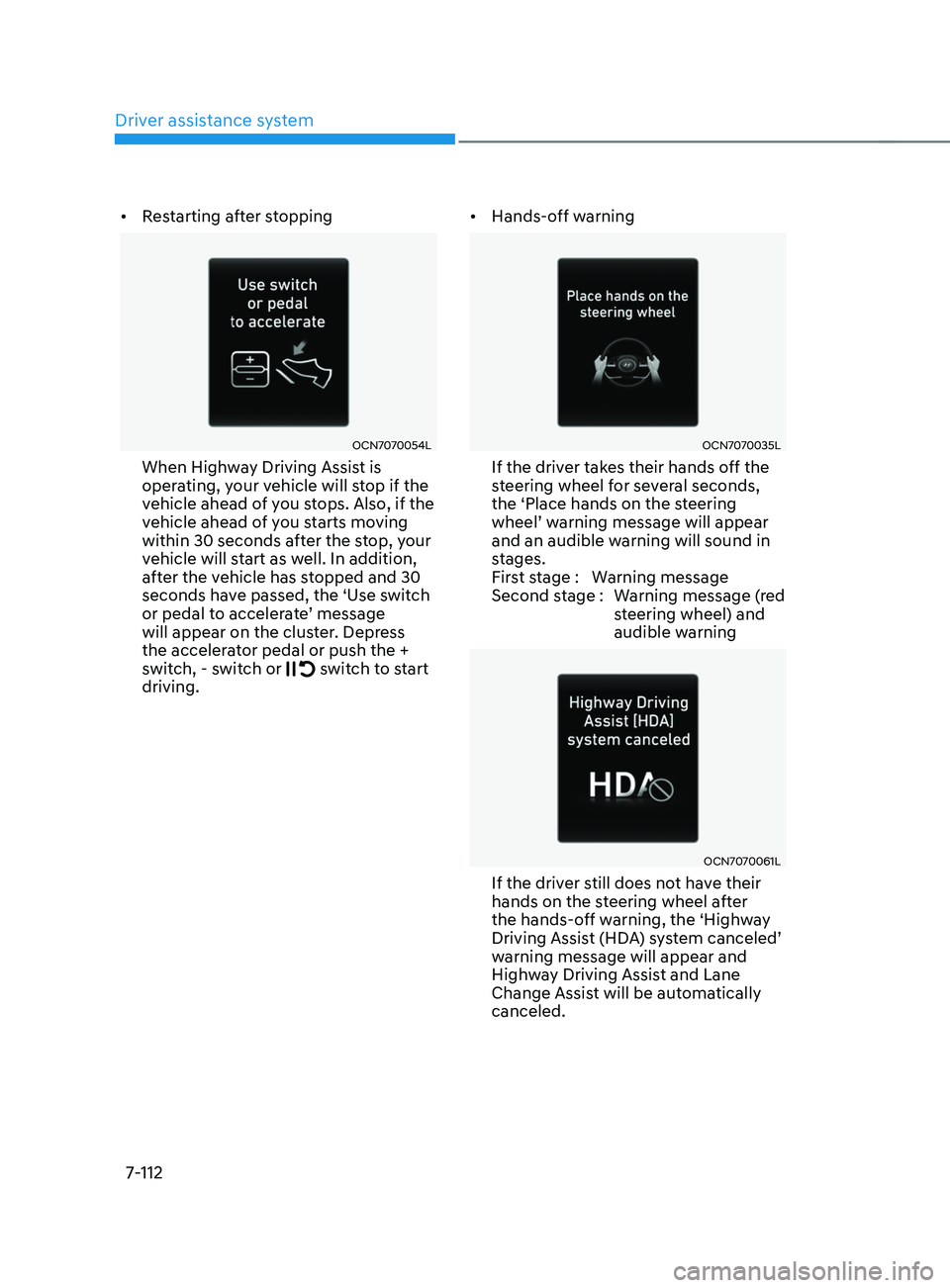
When Highway Driving Assist is
operating, your vehicle will stop if the
vehicle ahead of you stops. Also, if the
vehicle ahead of you starts moving
within 30 seconds after the stop, your
vehicle will start as well. In addition,
after the vehicle has stopped and 30
seconds have passed, the ‘Use switch
or
pedal t
o
acceler
ate’
message will appear on the clust
er. Depress
the accelerator pedal or push the +
switch, - switch or
switch to start
driving. •
Hands-off warning
OCN7070035L
If the driver takes their hands off the
steering wheel for several seconds,
the ‘Place hands on the steering
wheel’
w
arning
message will appear and an audible warning will sound in
s
tages.
First stage : Warning message
Second stage : Warning message (red steering wheel) and
audible warning
OCN7070061L
If the driver still does not have their
hands on the steering wheel after
the hands-off warning, the ‘Highway
Driving
Assis
t
(HD
A)
s
ystem
canceled’ warning message will appear and
High
way Driving Assist and Lane
Change Assist will be automatically
canceled.
Page 426 of 570
07
7-113
Function standby
When Smart Cruise Control is
temporarily canceled while Highway
Driving Assist is operating, Highway
Driving Assist will be in the standby state.
At this time, Lane Following Assist will
operate normally.
Function malfunction and
limitations
System malfunction
OTM070120N
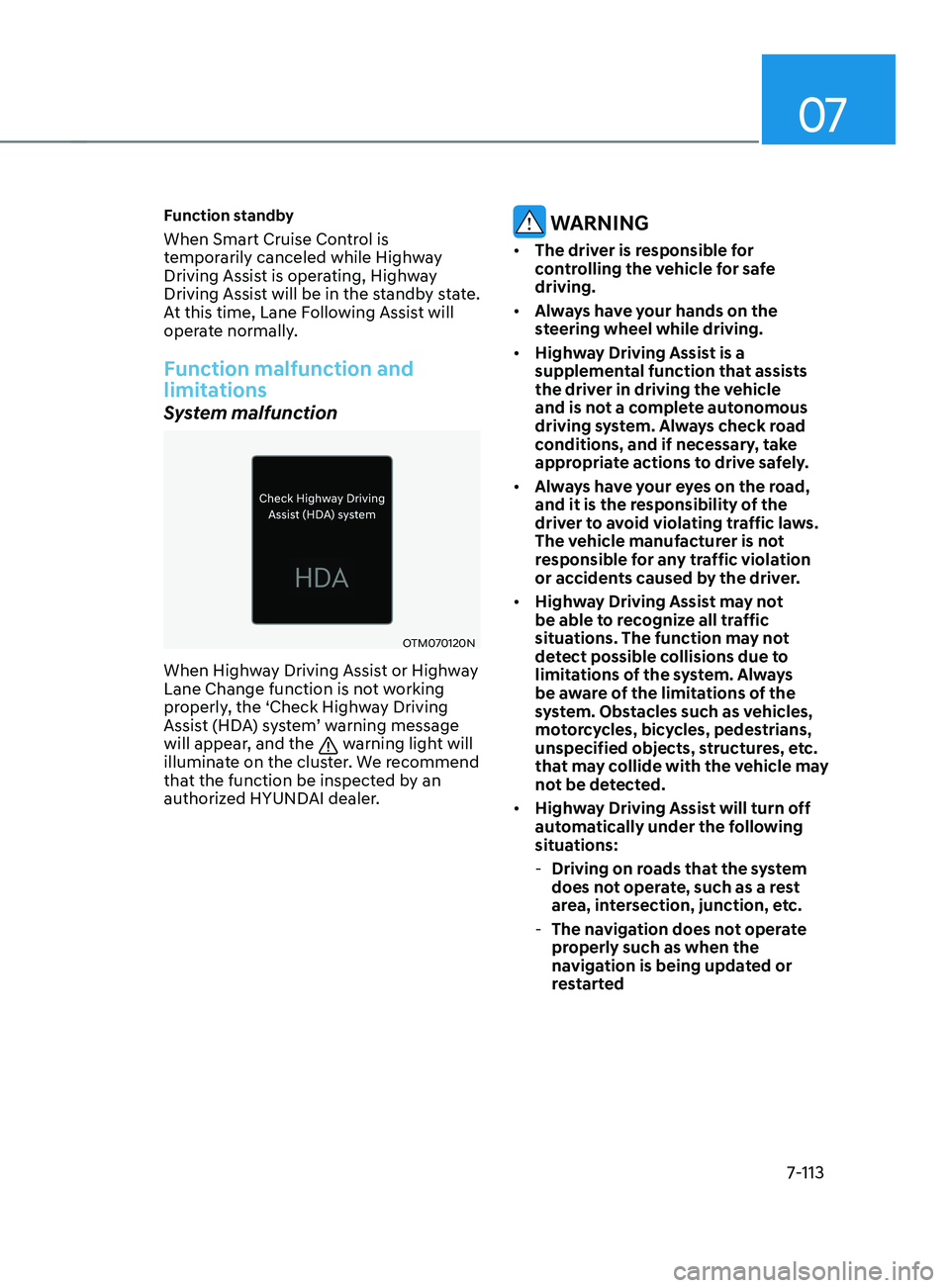
When Highway Driving Assist or Highway
Lane Change function is not working
properly, the ‘Check Highway Driving
Assist (HDA) system’ warning message
will appear, and the
warning light will
illuminate on the cluster. We recommend
that the function be inspected by an
authorized HYUNDAI dealer.
WARNING
• The driver is responsible for
controlling the vehicle for safe
driving.
• Always have your hands on the
steering wheel while driving.
• Highway Driving Assist is a
supplemental function that assists
the driver in driving the vehicle
and is not a complete autonomous
driving system. Always check road
conditions, and if necessary, take
appropriate actions to drive safely.
• Always have your eyes on the road,
and it is the responsibility of the
driver to avoid violating traffic laws.
The vehicle manufacturer is not
responsible for any traffic violation
or accidents caused by the driver.
• Highway Driving Assist may not
be able to recognize all traffic
situations. The function may not
detect possible collisions due to
limitations of the system. Always
be aware of the limitations of the
system. Obstacles such as vehicles,
motorcycles, bicycles, pedestrians,
unspecified objects, structures, etc.
that may collide with the vehicle may
not be detected.
• Highway Driving Assist will turn off
automatically under the following
situations:
- Driving on roads that the system
does not operate, such as a rest
area, intersection, junction, etc.
- The navigation does not operate
properly such as when the
navigation is being updated or
restarted
Page 427 of 570
Driver assistance system
7-114
• Highway Driving Assist may
inadvertently operate or turn off
depending on road conditions
(navigation information) and
surroundings.
• Lane Following Assist function may
be temporarily disabled when the
front view camera cannot detect
lanes properly or the hands-off
warning is on.
• You may not hear the warning sound
of Highway Driving Assist if the
surrounding is noisy.
• If the vehicle is driven at high speed
above a certain speed at a curve,
your vehicle may drive to one side or
may depart from the driving lane.
• When you are towing a trailer or
another vehicle, we recommend that
Highway Driving Assist is turned off
due to safety reasons.
• The hands–off warning message
may appear early or late depending
on how the steering wheel is held or
road conditions. Always have your
hands on the steering wheel while
driving.
• For your safety, please read the
owner's manual before using the
Highway Driving Assist.
• Highway Driving Assist will not
operate when the engine is started,
or when the detecting sensors or
navigation is being initialized.Limitations of the function
Highway Driving Assist may not operate
normally, or may not operate under the
following circumstances:
• The map information and the
actual road is different because the
navigation is not updated
• The map information and the actual
road is different because of real-time
GPS data or map information error
• The infotainment system is overloaded
by simultaneously performing
functions such as route search, video
playback, voice recognition, etc.
• GPS signals are blocked in areas such
as a tunnel
• The driver goes off course or the
route to the destination is changed or
canceled by resetting the navigation
• The vehicle enters a service station or
rest area
• Android Auto or Car Play is operating
• The navigation cannot detect the
current vehicle position (ex: elevated
roads including overpass adjacent to
general roads or nearby roads exist in
a parallel way)
• White single dotted lane line or road
edge cannot be detected
• The road is temporarily controlled due
to construction, etc.
• There is no structure, such as a
medium strip, guardrails, etc., on the
road
• There is a changeable lane in the
direction of lane change
For more details on the limitations of
the front view camera, front radar, front
corner radar and rear corner radar, refer
to “Forward Collision-Avoidance Assist
(FCA)” section in chapter 7.
Page 457 of 570
Driver assistance system
7-144
OTM070140N
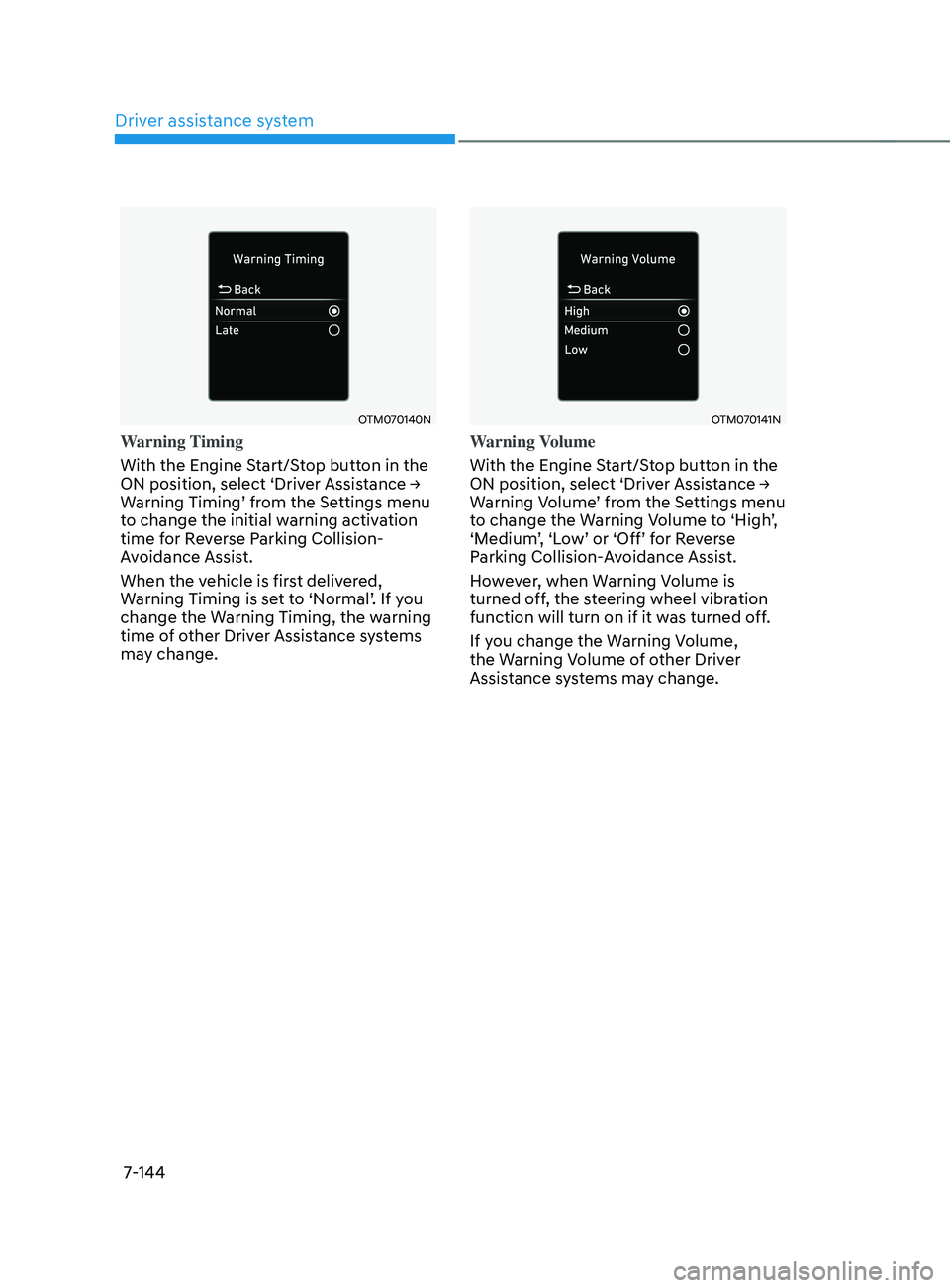
Warning Timing
With the Engine Start/Stop button in the
ON
position, select ‘Driv
er
Assis
tance
→ Warning Timing’ fr
om
the Se
ttings
menu to change the initial w
arning activation
time for Reverse Parking Collision-
Avoidance Assist.
When the vehicle is first delivered,
Warning
Timing is se
t
t
o
‘N
ormal’.
If y
ou
change the Warning Timing, the w
arning
time of other Driver Assistance systems
may change.
OTM070141N
Warning Volume
With the Engine Start/Stop button in the
ON
position, select ‘Driv
er
Assis
tance
→ Warning V
olume’
fr
om
the Se
ttings
menu to change the W
arning
V
olume
t
o
‘High
’,
‘Medium
’,
‘L
ow’
or ‘Off’ f
or
R
everse
Parking Collision-
Avoidance Assist.
However, when Warning Volume is
turned off, the steering wheel vibration
function will turn on if it was turned off.
If you change the Warning Volume,
the Warning Volume of other Driver
Assistance systems may change.
Page 458 of 570
07
7-145
Function operation
Operating conditions
If ‘Active Assist’ or ‘Warning Only’ is set from the Settings menu, Reverse Parking
Collision-Avoidance Assist will be in
the ready status when the following
conditions are satisfied:
- The tailgat
e is closed
- The gear is shifted t
o R (Reverse)
- Vehicle speed is belo
w 6
mph (10
km/h
)
- Sy
stem components such as the rear
view camera and the rear ultrasonic
sensors are in normal conditions
Warning Only
• If the function detects a risk of
collision with a pedestrian or an
object, the system will warn the driver
with an audible warning, steering
wheel vibration and warning message
on the cluster. When Rear View
Monitor is operating, a warning will
appear on the infotainment system
screen.
• ‘If
‘W
arning
Only’ is select
ed,
br
aking
will not be assis
ted.
• The warning will turn off when the
gear is shifted to P (Park), N (Neutral)
or D (Drive). Active Assist
•
If the function detects a risk of
collision with a pedestrian or an
object, the system will warn the driver
with an audible warning, steering
wheel vibration and warning message
on the cluster. When Rear View
Monitor is operating, a warning will
appear on the infotainment system
screen.
• If the function detects imminent
collision with a pedestrian or an
object behind the vehicle, the system
will assist you with braking. The driver
needs to pay attention as the brake
assist will end within 2 seconds. The
driver must immediately depress
the brake pedal and check vehicle
surroundings.
• Brake control will end when:
- The gear is shifted t
o P (Park) or D
(Drive).
- The driver depr
esses the brake
pedal with sufficient power
- Braking assis
t has last for
approximately 2 seconds
• The warning will turn off when:
- The driver shifts the gear t
o P (Park),
N (Neutral), or D (Drive)
• The brake control may not operate
properly depending on the status of
ESC (Electronic Stability Control).
There will only be a warning when:
- The ESC (Electronic S
tability
Control) warning light is on
- ESC (Electronic S
tability Control) is
engaged in a different function
Page 485 of 570
Emergency Situations
8-22
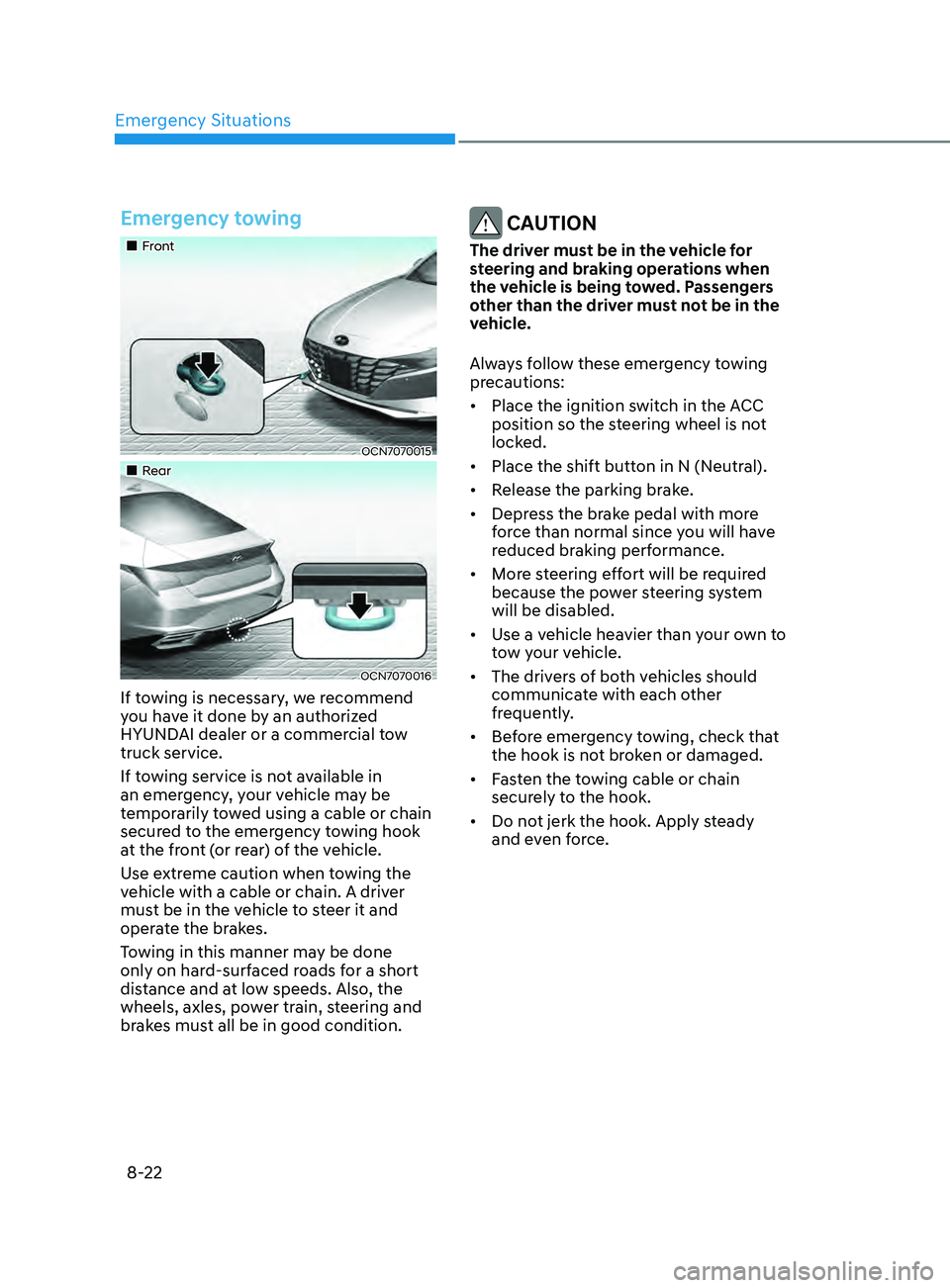
Emergency towing
„„Front
OCN7070015
„„Rear
OCN7070016
If towing is necessary, we recommend
you have it done by an authorized
HYUNDAI dealer or a commercial tow
truck service.
If towing service is not available in
an emergency, your vehicle may be
temporarily towed using a cable or chain
secured to the emergency towing hook
at the front (or rear) of the vehicle.
Use extreme caution when towing the
vehicle with a cable or chain. A driver
must be in the vehicle to steer it and
operate the brakes.
Towing in this manner may be done
only on hard-surfaced roads for a short
distance and at low speeds. Also, the
wheels, axles, power train, steering and
brakes must all be in good condition.
CAUTION
The driver must be in the vehicle for
steering and braking operations when
the vehicle is being towed. Passengers
other than the driver must not be in the
vehicle.
Always follow these emergency towing
precautions:
• Place the ignition switch in the ACC
position so the steering wheel is not
locked.
• Place the shift button in N (Neutral).
• Release the parking brake.
• Depress the brake pedal with more
force than normal since you will have
reduced braking performance.
• More steering effort will be required
because the power steering system
will be disabled.
• Use a vehicle heavier than your own to
tow your vehicle.
• The drivers of both vehicles should
communicate with each other
frequently.
• Before emergency towing, check that
the hook is not broken or damaged.
• Fasten the towing cable or chain
securely to the hook.
• Do not jerk the hook. Apply steady
and even force.
Page 492 of 570

Maintenance
9-6
While operating your vehicle:
• Note any changes in the sound of the
exhaust or any smell of exhaust fumes
in the vehicle.
• Check for vibrations in the steering
wheel. Notice if there is any increased
steering effort or looseness in the
steering wheel, or change in its
straight-ahead position.
• Notice if your vehicle constantly turns
slightly or “pulls” to one side when
traveling on smooth, level road.
• When stopping, listen and check for
unusual sounds, pulling to one side,
increased brake pedal travel or “hard-
to-push” brake pedal.
• If any slipping or changes in the
operation of your transmission occurs,
check the transmission fluid level.
• Check the intelligent variable
transmission P (Park) function.
• Check the parking brake.
• Check for fluid leaks under your
vehicle (water dripping from the air
conditioning system during or after
use is normal).
At least monthly:
• Check coolant level in the engine
coolant reservoir.
• Check the operation of all exterior
lights, including the brake lights, turn
signals and hazard warning flashers.
• Check the inflation pressures of all
tires including the spare for tires that
are worn, show uneven wear, or are
damaged.
• Check for loose wheel lug nuts.
At least twice a year:
(i.e., every Spring and Autumn)
• Check radiator, heater and air
conditioning hoses for leaks or
damage.
• Check windshield washer spray and
wiper operation. Clean wiper blades
with a clean cloth dampened with
washer a fluid.
• Check headlamp alignment.
• Check muffler, exhaust pipes, shields
and clamps.
• Check the seat belts for wear and
function.
At least once a year:
• Clean body and door drain holes.
• Lubricate door hinges and hood
hinges.
• Lubricate door and hood locks and
latches.
• Lubricate door rubber weather strips.
• Lubricate door checker.
• Check the air conditioning system.
• Inspect and lubricate intelligent
variable transmission linkage and
controls.
• Clean the battery and terminals.
• Check the brake fluid level.
Page 495 of 570
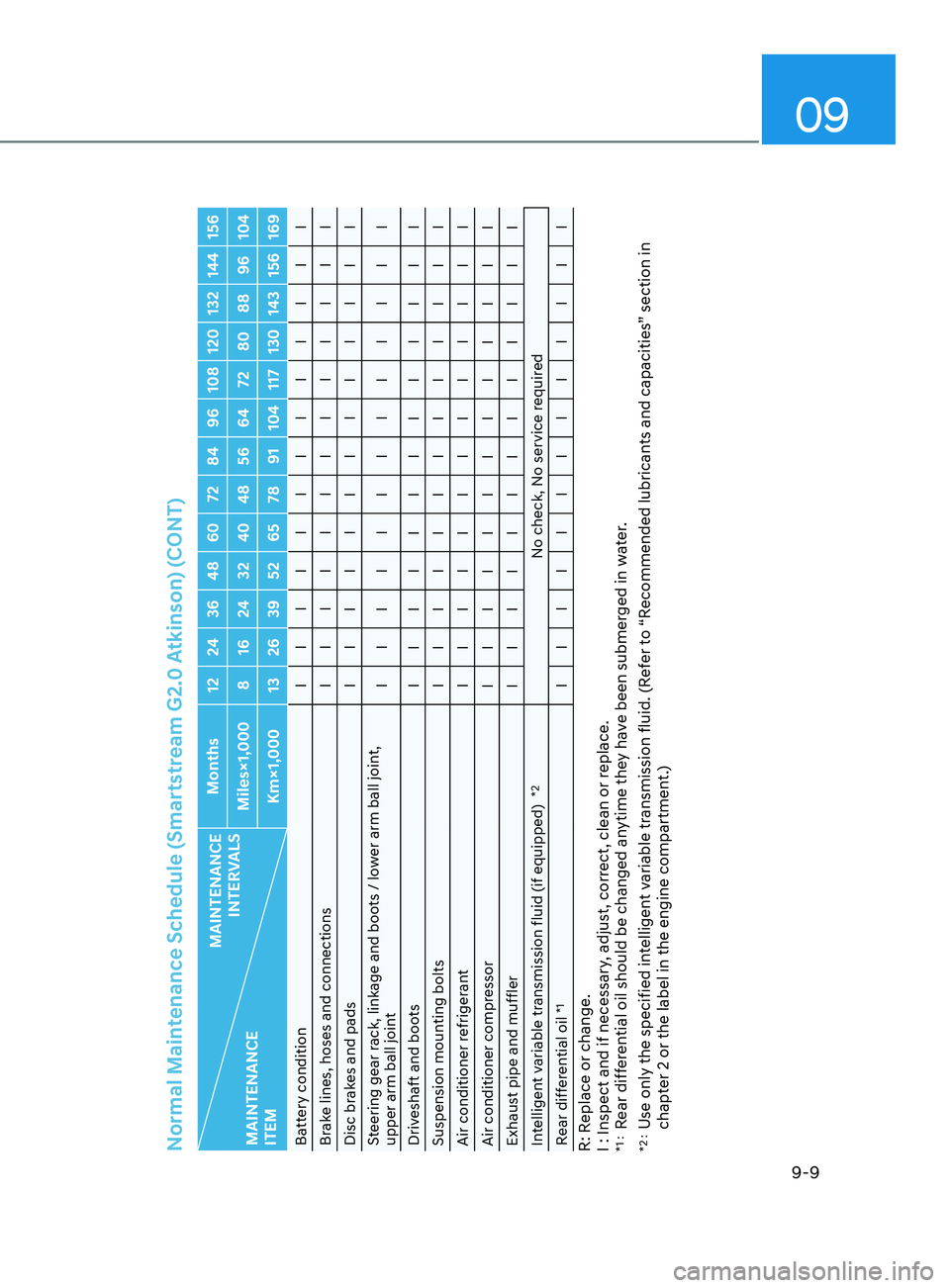
09
9-9
Normal Maintenance Schedule (Smartstream G2.0 Atkinson) (CONT)
MAINTENANCE INTERVALS
MAINTENANCE
ITEM Months 12 24 36 48 60 72 84 96 108 120 132 144 156
Miles×1,000 8 16 24 32 40 48 56 64 72 80 88 96 104 Km×1,000 13 26 39 52 65 78 91 104 117 130 143 156 169
Battery condition I I I I I I I I I I I I I
Brake lines, hoses and connections I I I I I I I I I I I I I
Disc brakes and pads I I I I I I I I I I I I I
Steering gear rack, linkage and boots / lower arm ball joint,
upper arm ball joint I I I I I I I I I I I I I
Driveshaft and boots I I I I I I I I I I I I I
Suspension mounting bolts I I I I I I I I I I I I I
Air conditioner refrigerant I I I I I I I I I I I I I
Air conditioner compressor I I I I I I I I I I I I I
Exhaust pipe and muffler I I I I I I I I I I I I I
Intelligent variable transmission fluid (if equipped)
*2
No check, No service required
Rear differential oil
*1
I I I I I I I I I I I I I
R: Replace or change.
I : Inspect and if necessary, adjust, correct, clean or replace.*1 : Rear differential oil should be changed anytime they have been submerged in water.
*2 : Use only the specified intelligent variable transmission fluid. (Refer to “Recommended lubricants and capacities” section in
chapter 2 or the label in the engine compartment.)