trip computer HYUNDAI ELANTRA SPORT 2019 User Guide
[x] Cancel search | Manufacturer: HYUNDAI, Model Year: 2019, Model line: ELANTRA SPORT, Model: HYUNDAI ELANTRA SPORT 2019Pages: 534, PDF Size: 51.51 MB
Page 269 of 534
5-28
Driving your vehicle
Always come to a complete stopbefore shifting into D (Drive) or
R (Reverse).
Do not put the shift lever in N (Neutral) while driving.
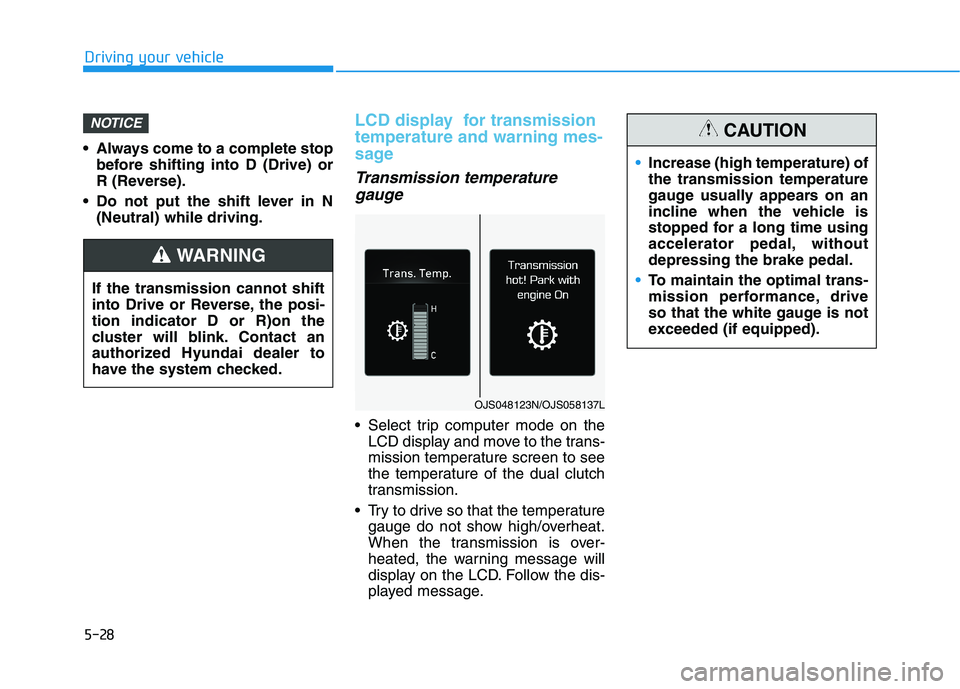
LCD display for transmission temperature and warning mes-
sage
Transmission temperature
gauge
Select trip computer mode on the LCD display and move to the trans-
mission temperature screen to see
the temperature of the dual clutch
transmission.
Try to drive so that the temperature gauge do not show high/overheat.
When the transmission is over-
heated, the warning message will
display on the LCD. Follow the dis-
played message.
NOTICE
If the transmission cannot shift
into Drive or Reverse, the posi-tion indicator D or R)on the
cluster will blink. Contact an
authorized Hyundai dealer to
have the system checked.
WARNING
OJS048123N/OJS058137L
Increase (high temperature) of the transmission temperature
gauge usually appears on an
incline when the vehicle is
stopped for a long time using
accelerator pedal, withoutdepressing the brake pedal.
To maintain the optimal trans-
mission performance, drive
so that the white gauge is not
exceeded (if equipped).
CAUTION
Page 462 of 534
7-37
7
Maintenance
By jump starting
After a jump start from a good bat-
tery, drive the vehicle for 20-30 min-
utes before it is shutoff. The vehicle
may not restart if you shut it off
before the battery had a chance to
adequately recharge. See "Jump
Starting" in chapter 6 for more infor-
mation on jump starting procedures.Information An inappropriately disposedbattery can be harmful to
the environment and human
health.
Dispose the battery accord- ing to your local law(s) or
regulation.
Reset Features
The following items may need to be
reset after the battery has been dis-
charged or the battery has been dis-connected.
Power Windows
Trip Computer
Climate Control System
Clock
Audio System
Sunroof
i
Watch the battery during
charging, and stop or reduce
the charging rate if the battery
cells begin boiling violently.
The negative battery cable
must be removed first and
installed last when the battery
is disconnected. Disconnect
the battery charger in the fol-
lowing order:
(1) Turn off the battery charg- er main switch.
(2) Unhook the negative
clamp from the negative
battery terminal.
(3) Unhook the positive clamp from the positive batteryterminal.
Always use a genuine
HYUNDAI approved battery
when you replace the battery.
Page 533 of 534
I-10
Theft-Alarm System .......................................................3-19
Tire Specification and Pressure Label ............................8-11
Tires and Wheels .....................................................7-38, 8-5
All Season Tires .........................................................7-51
Check Tire Inflation Pressure .....................................7-40
Low Aspect Ratio Tires ..............................................7-52
Radial-Ply Tires ..........................................................7-51
Recommended Cold Tire Inflation Pressures.............7-39
Snow Tires ..................................................................7-51
Summer Tires .............................................................7-51
Tire Care .....................................................................7-38
Tire Maintenance ........................................................7-44
Tire Replacement........................................................7-42
Tire Rotation...............................................................7-41
Tire Sidewall Labeling ...............................................7-44
Tire Terminology and Definitions ..............................7-48
Tire Traction ...............................................................7-43
Wheel Alignment and Tire Balance ...........................7-42
Wheel Replacement....................................................7-43
Towing ............................................................................6-30
Dinghy towing ............................................................6-31
Emergency towing......................................................6-32
Removable Towing Hook...........................................6-32
Towing service ...........................................................6-30 Trailer Towing...............................................................5-148
Trip Computer .................................................................3-93
Conventional Cluster ..................................................3-93
Supervision Cluster ....................................................3-97
Trunk ...............................................................................3-46
Turn Signal Lamp Replacement .....................................7-65
USB Charger .................................................................3-151
User Settings Mode.........................................................3-86
Vehicle Certification Label .............................................8-10
Vehicle Identification Number (VIN) .............................8-10
Vehicle Load Limit .......................................................5-142 Tire Loading Information Label...............................5-143
Vehicle Stability Management (VSM)............................5-49
Volume and Weight ...........................................................8-6
Index
T
U
V