automatic Hyundai Elantra Touring 2011 Owner's Guide
[x] Cancel search | Manufacturer: HYUNDAI, Model Year: 2011, Model line: Elantra Touring, Model: Hyundai Elantra Touring 2011Pages: 402, PDF Size: 37.54 MB
Page 158 of 402
Features of your vehicle
82 4
D250000AUN
For maximum defrosting, set the temper-
ature control to the extreme right/hot posi-
tion and the fan speed control to the high-
est speed.
If warm air to the floor is desired while
defrosting or defogging, set the mode to
the floor-defrost position.
Before driving, clear all snow and ice from
the windshield, rear window, outside rear
view mirrors, and all side windows.
Clear all snow and ice from the hood and
air inlet in the cowl grill to improve heater
and defroster efficiency and to reduce the
probability of fogging up the inside of the
windshield.
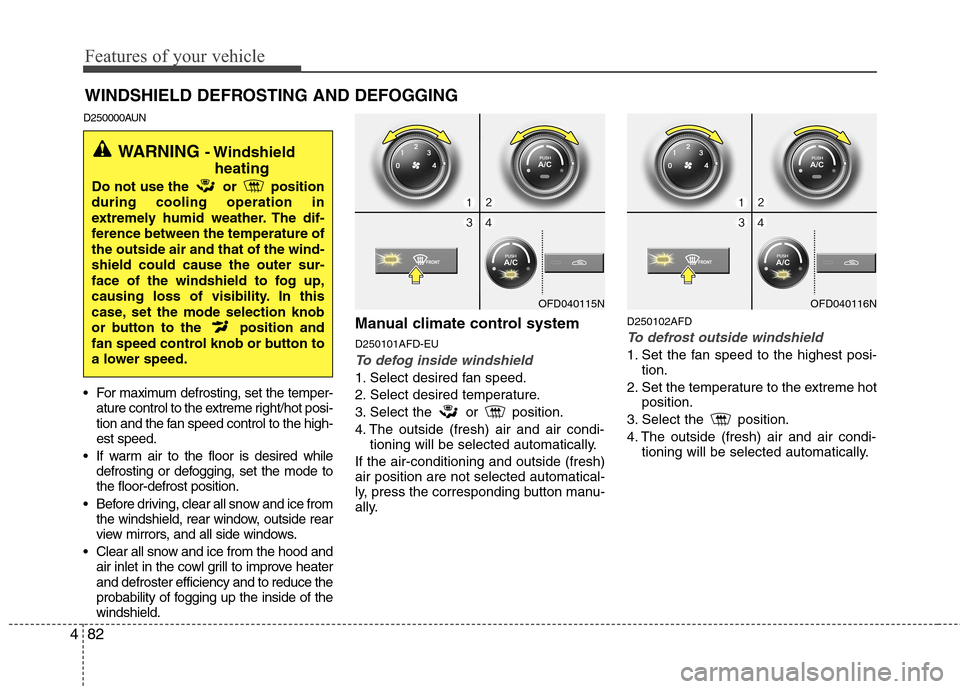
Manual climate control system
D250101AFD-EU
To defog inside windshield
1. Select desired fan speed.
2. Select desired temperature.
3. Select the or position.
4. The outside (fresh) air and air condi-
tioning will be selected automatically.
If the air-conditioning and outside (fresh)
air position are not selected automatical-
ly, press the corresponding button manu-
ally.
D250102AFD
To defrost outside windshield
1. Set the fan speed to the highest posi-
tion.
2. Set the temperature to the extreme hot
position.
3. Select the position.
4. The outside (fresh) air and air condi-
tioning will be selected automatically.
WINDSHIELD DEFROSTING AND DEFOGGING
OFD040115N
WARNING - Windshield
heating
Do not use the or position
during cooling operation in
extremely humid weather. The dif-
ference between the temperature of
the outside air and that of the wind-
shield could cause the outer sur-
face of the windshield to fog up,
causing loss of visibility. In this
case, set the mode selection knob
or button to the position and
fan speed control knob or button to
a lower speed.
OFD040116N
Page 159 of 402
483
Features of your vehicle
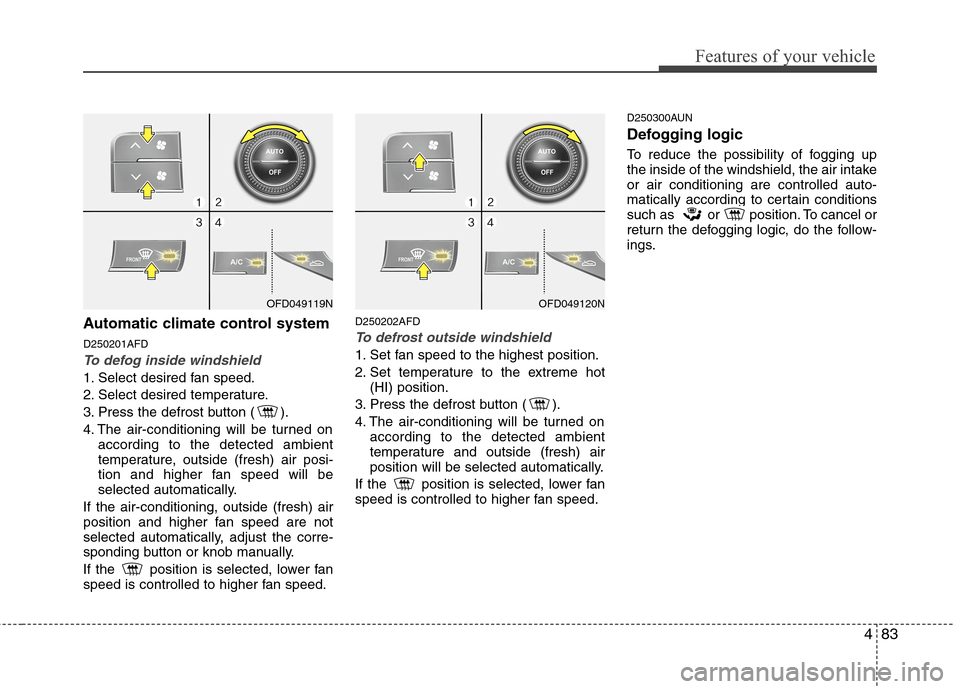
Automatic climate control system
D250201AFD
To defog inside windshield
1. Select desired fan speed.
2. Select desired temperature.
3. Press the defrost button ( ).
4. The air-conditioning will be turned on
according to the detected ambient
temperature, outside (fresh) air posi-
tion and higher fan speed will be
selected automatically.
If the air-conditioning, outside (fresh) air
position and higher fan speed are not
selected automatically, adjust the corre-
sponding button or knob manually.
If the position is selected, lower fan
speed is controlled to higher fan speed.
D250202AFD
To defrost outside windshield
1. Set fan speed to the highest position.
2. Set temperature to the extreme hot
(HI) position.
3. Press the defrost button ( ).
4. The air-conditioning will be turned on
according to the detected ambient
temperature and outside (fresh) air
position will be selected automatically.
If the position is selected, lower fan
speed is controlled to higher fan speed.
D250300AUN
Defogging logic
To reduce the possibility of fogging up
the inside of the windshield, the air intake
or air conditioning are controlled auto-
matically according to certain conditions
such as or position. To cancel or
return the defogging logic, do the follow-
ings.
OFD049119NOFD049120N
Page 160 of 402
Features of your vehicle
84 4
D250301AFD
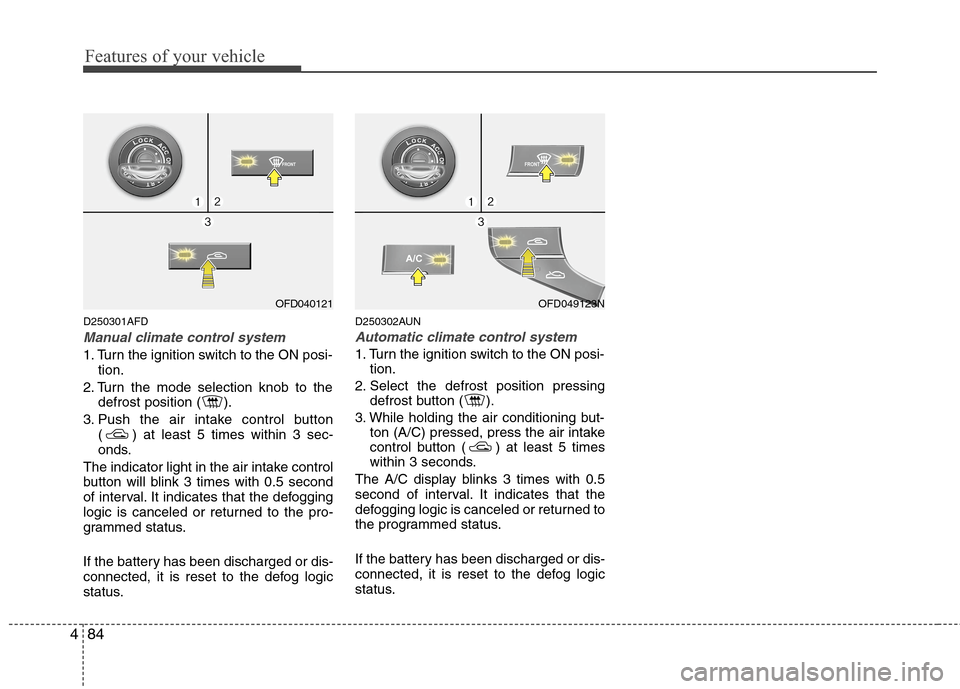
Manual climate control system
1. Turn the ignition switch to the ON posi-
tion.
2. Turn the mode selection knob to the
defrost position ( ).
3. Push the air intake control button
( ) at least 5 times within 3 sec-
onds.
The indicator light in the air intake control
button will blink 3 times with 0.5 second
of interval. It indicates that the defogging
logic is canceled or returned to the pro-
grammed status.
If the battery has been discharged or dis-
connected, it is reset to the defog logic
status.
D250302AUN
Automatic climate control system
1. Turn the ignition switch to the ON posi-
tion.
2. Select the defrost position pressing
defrost button ( ).
3. While holding the air conditioning but-
ton (A/C) pressed, press the air intake
control button ( ) at least 5 times
within 3 seconds.
The A/C display blinks 3 times with 0.5
second of interval. It indicates that the
defogging logic is canceled or returned to
the programmed status.
If the battery has been discharged or dis-
connected, it is reset to the defog logic
status.
OFD040121OFD049123N
Page 161 of 402
485
Features of your vehicle
D270000AUN
These compartments can be used to
store small items required by the driver
or passengers.
D270100AFD
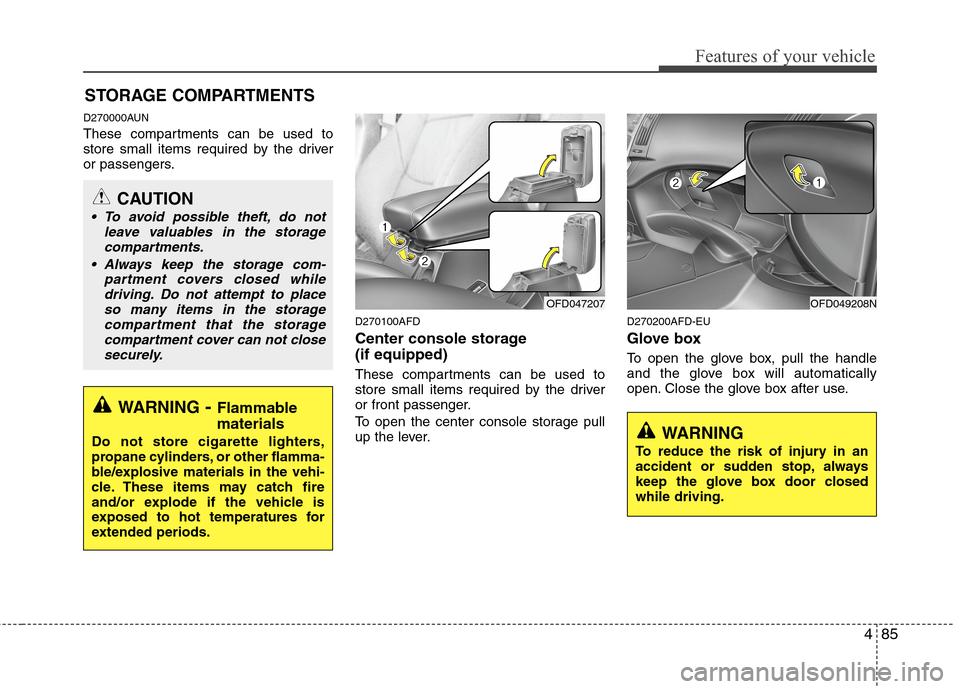
Center console storage
(if equipped)
These compartments can be used to
store small items required by the driver
or front passenger.
To open the center console storage pull
up the lever.
D270200AFD-EU
Glove box
To open the glove box, pull the handle
and the glove box will automatically
open. Close the glove box after use.
STORAGE COMPARTMENTS
WARNING- Flammable
materials
Do not store cigarette lighters,
propane cylinders, or other flamma-
ble/explosive materials in the vehi-
cle. These items may catch fire
and/or explode if the vehicle is
exposed to hot temperatures for
extended periods.
CAUTION
To avoid possible theft, do not
leave valuables in the storage
compartments.
Always keep the storage com-
partment covers closed while
driving. Do not attempt to place
so many items in the storage
compartment that the storage
compartment cover can not close
securely.
OFD047207OFD049208N
WARNING
To reduce the risk of injury in an
accident or sudden stop, always
keep the glove box door closed
while driving.
Page 180 of 402
Features of your vehicle
104 4
A-100FD
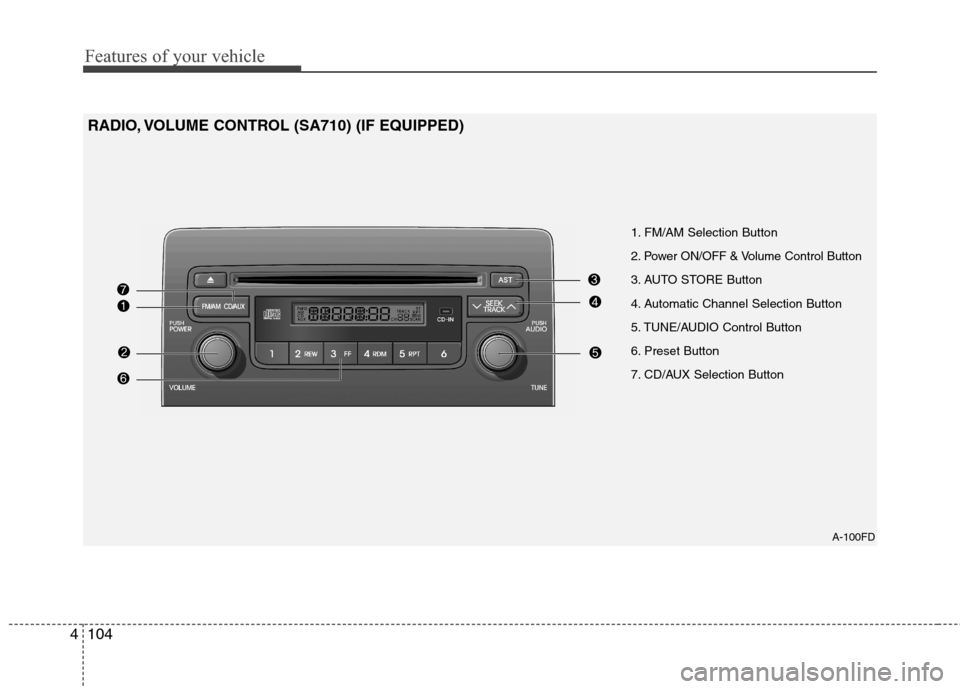
1. FM/AM Selection Button
2. Power ON/OFF & Volume Control Button
3. AUTO STORE Button
4. Automatic Channel Selection Button
5. TUNE/AUDIO Control Button
6. Preset Button
7. CD/AUX Selection Button
RADIO, VOLUME CONTROL (SA710) (IF EQUIPPED)
Page 181 of 402
4105
Features of your vehicle
1. FM/AM Selection Button
Turns to FM/AM mode and toggles FM1
and FM2➟AM➟FM1··· when the button is
pressed each time.
2. Power ON/OFF & Volume
Control Button
Turns the ON/OFF set when the IGNI-
TION SWITCH is on ACC or ON.
If the button is turned to the right, it
increases the volume and left, decreases
the volume.
3. AUTO STORE Button
When the button is pressed, it automati-
cally selects and saves channels with
high reception rate to PRESET but-
tons(1~6) and plays the channel saved in
PRESET1.
If no channel is saved after AST, it will
play the previous channel.
4. Automatic Channel Selection
Button
When the [SEEK ] button is
pressed, it reduces the band frequency
by 5kHz to automatically select chan-
nel. Stops at the previous frequency if
no channel is found.
When the [SEEK ] button is
pressed, it increases the band fre-
quency by 5kHz to automatically select
channel. Stops at the previous fre-
quency if no channel is found.
5. TUNE/AUDIO Control Button
Turn this button clockwise by one notch
to increase frequency by 0.05MHz from
current frequency.
Turn this button counterclockwise by one
notch to decrease frequency by 0.05MHz
from current frequency.
Turns to AUDIO CONTROL mode, and
toggles in the order of BASS
➟MIDDLE➟TREBLE➟FADER➟BALANCE➟AV C
ON➟P.BASS➟BASS··· when the button
is pressed each time.
6. Preset Button
Push [1]~[6]button less than 0.8 second
to play the channel saved in each button.
Push preset button for 0.8 second or
longer to save current channel to the
respective button with a beep.
7. CD/AUX Selection Button
If there is a CD in the CDP DECK it turns
to CD mode, and if a device is connected
to AUX then it toggles CD
➟AUX➟CD···
when the button is pressed each time.(It
will not turn to AUX if the auxiliary device
is not connected.)
Page 182 of 402
Features of your vehicle
106 4
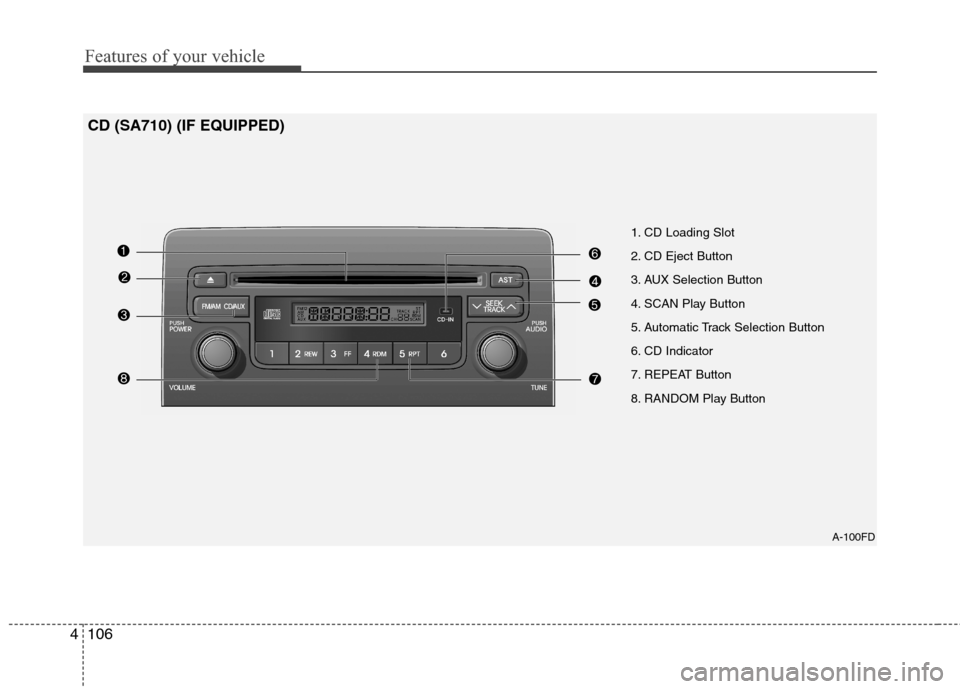
A-100FD
1. CD Loading Slot
2. CD Eject Button
3. AUX Selection Button
4. SCAN Play Button
5. Automatic Track Selection Button
6. CD Indicator
7. REPEAT Button
8. RANDOM Play Button
CD (SA710) (IF EQUIPPED)
Page 183 of 402
4107
Features of your vehicle
1. CD Loading Slot
Please face printed side upward and
gently push in.
When the ignition switch is on ACC or
ON and power is OFF, power is automat-
ically turned on if the CD is loaded.
This CDP supports both 8cm and 12cm
CDs. But if VCD, Data CD, MP3 CD are
loaded, "Disc-Err" message will appear
and CD will be ejected.
2. CD Eject Button
Push button to eject the CD during
CD playback.
This button is enabled when ignition
switch is off.
3. AUX Selection Button
If the auxiliary device is connected, it
turns to AUX MODE to play the sound
from the auxiliary player.
If no Disc and auxiliary device is con-
nected, it displays "NO Media" for 5 sec-
onds and returns to the previous mode.
4. SCAN Play Button
Play first 10 seconds of each song in the
DISC.
To cancel the mode, press the key once
again.
5. Automatic Track Selection
Button
Push [SEEK ] button for less than
0.8 second to play from the beginning
of current song.
Push [SEEK ] button for less than
0.8 second and press again within 1
second to play the previous song.
Push [SEEK ] button for 0.8 second
or longer to initiate reverse direction
high speed sound search of current
song.
Push [SEEK ] button for less than
0.8 second to play the next song.
Push [SEEK ] button for less than
0.8 second or longer to initiate high
speed sound search of current song.
6. CD Indicator
When car ignition switch is ACC or ON
and if the CD is loaded, this indicator is
lighted.
If the CD is ejected the light is turned off.
7. REPEAT Button
Repeats current song when the button is
pressed for less than 0.8 second.
Repeats the entire DISC when the button
is pressed for 0.8 second or longer.
8. RANDOM Play Button
Turns ON/OFF the randomization of the
play list of files in the currently played
DISC.
To cancel the mode, press the key once
again.
Page 184 of 402
Features of your vehicle
108 4
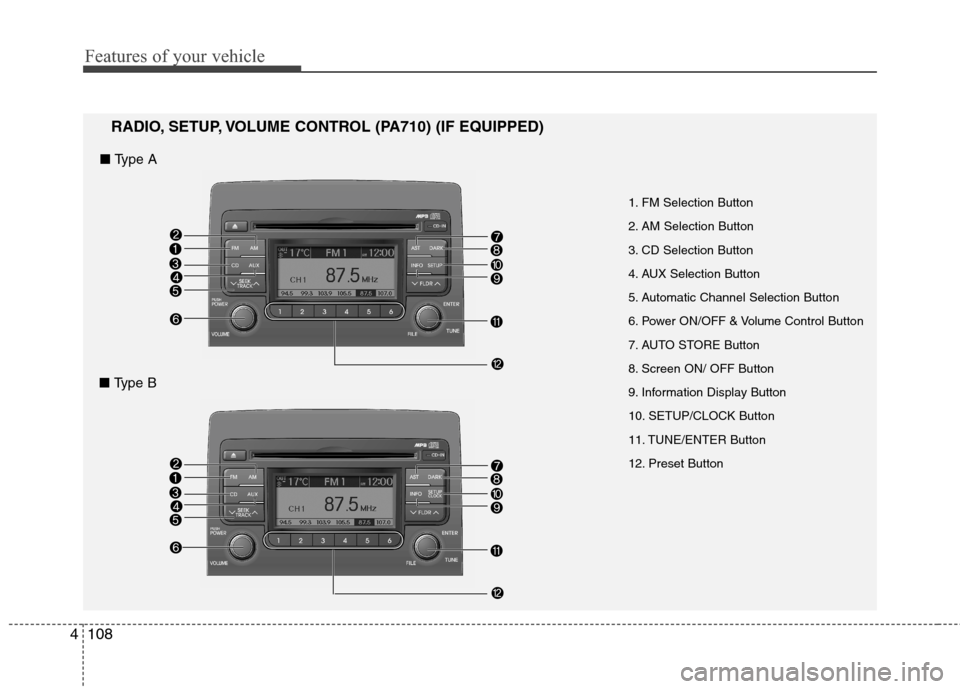
1. FM Selection Button
2. AM Selection Button
3. CD Selection Button
4. AUX Selection Button
5. Automatic Channel Selection Button
6. Power ON/OFF & VolumeControl Button
7. AUTO STORE Button
8. Screen ON/ OFF Button
9. Information Display Button
10. SETUP/CLOCK Button
11. TUNE/ENTER Button
12. Preset Button
RADIO, SETUP, VOLUME CONTROL (PA710) (IF EQUIPPED)
■ Type A
■ Type B
Page 185 of 402
4109
Features of your vehicle
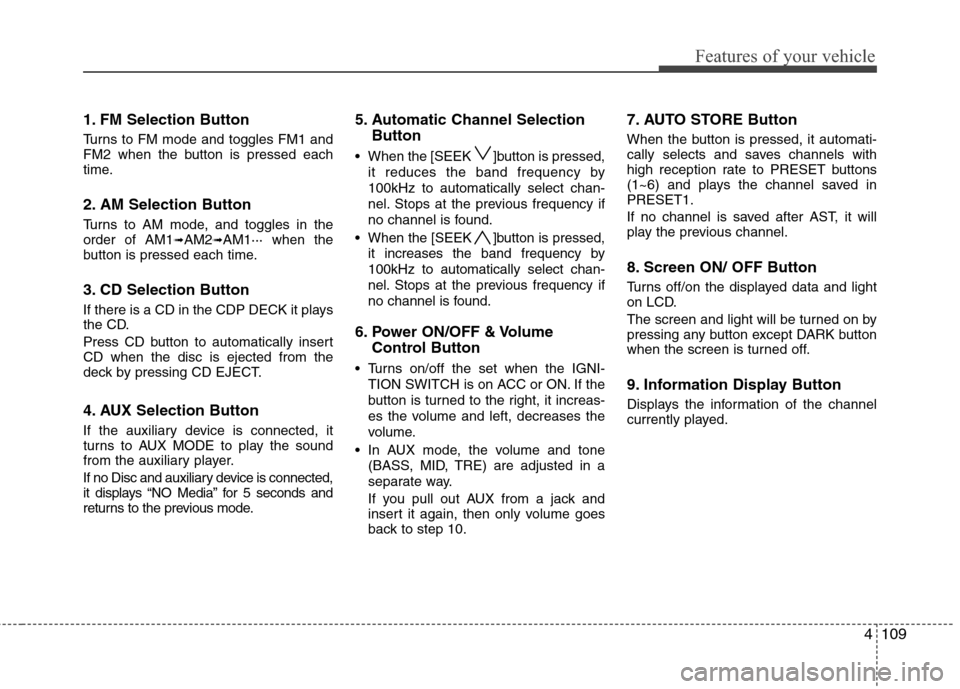
1. FM Selection Button
Turns to FM mode and toggles FM1 and
FM2 when the button is pressed each
time.
2. AM Selection Button
Turns to AM mode, and toggles in the
order of AM1➟AM2➟AM1··· when the
button is pressed each time.
3. CD Selection Button
If there is a CD in the CDP DECK it plays
the CD.
Press CD button to automatically insert
CD when the disc is ejected from the
deck by pressing CD EJECT.
4. AUX Selection Button
If the auxiliary device is connected, it
turns to AUX MODE to play the sound
from the auxiliary player.
If no Disc and auxiliary device is connected,
it displays “NO Media” for 5 seconds and
returns to the previous mode.
5. Automatic Channel Selection
Button
When the [SEEK ]button is pressed,
it reduces the band frequency by
100kHz to automatically select chan-
nel. Stops at the previous frequency if
no channel is found.
When the [SEEK ]button is pressed,
it increases the band frequency by
100kHz to automatically select chan-
nel. Stops at the previous frequency if
no channel is found.
6. Power ON/OFF & Volume
Control Button
Turns on/off the set when the IGNI-
TION SWITCH is on ACC or ON. If the
button is turned to the right, it increas-
es the volume and left, decreases the
volume.
In AUX mode, the volume and tone
(BASS, MID, TRE) are adjusted in a
separate way.
If you pull out AUX from a jack and
insert it again, then only volume goes
back to step 10.
7. AUTO STORE Button
When the button is pressed, it automati-
cally selects and saves channels with
high reception rate to PRESET buttons
(1~6) and plays the channel saved in
PRESET1.
If no channel is saved after AST, it will
play the previous channel.
8. Screen ON/ OFF Button
Turns off/on the displayed data and light
on LCD.
The screen and light will be turned on by
pressing any button except DARK button
when the screen is turned off.
9. Information Display Button
Displays the information of the channel
currently played.