reset Hyundai Elantra Touring 2012 User Guide
[x] Cancel search | Manufacturer: HYUNDAI, Model Year: 2012, Model line: Elantra Touring, Model: Hyundai Elantra Touring 2012Pages: 402, PDF Size: 5.49 MB
Page 181 of 402
4105
Features of your vehicle
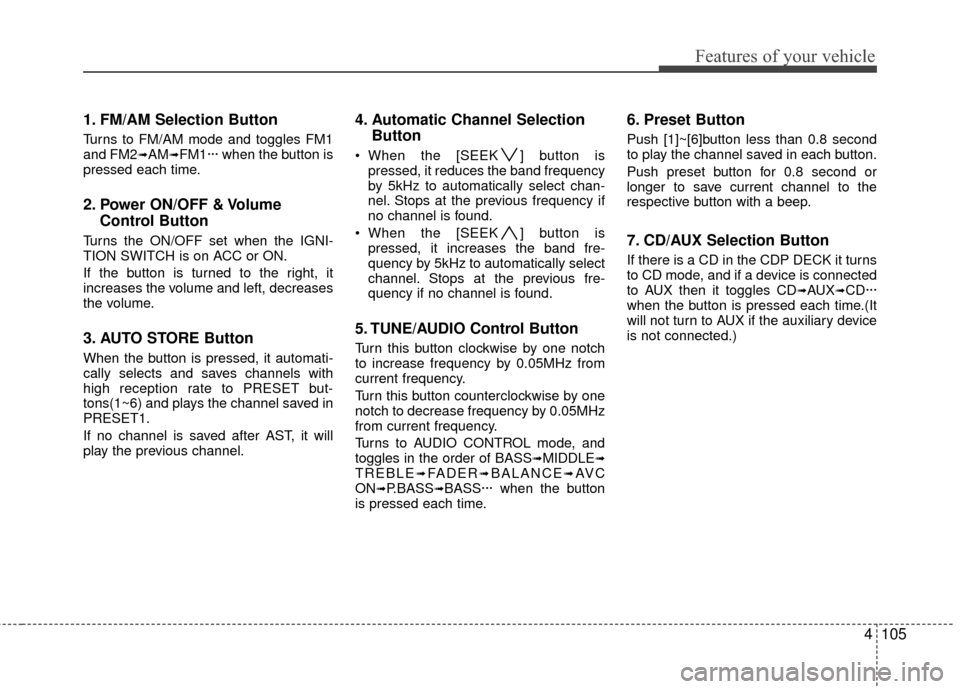
1. FM/AM Selection Button
Turns to FM/AM mode and toggles FM1
and FM2➟AM➟FM1··· when the button is
pressed each time.
2. Power ON/OFF & Volume Control Button
Turns the ON/OFF set when the IGNI-
TION SWITCH is on ACC or ON.
If the button is turned to the right, it
increases the volume and left, decreases
the volume.
3. AUTO STORE Button
When the button is pressed, it automati-
cally selects and saves channels with
high reception rate to PRESET but-
tons(1~6) and plays the channel saved in
PRESET1.
If no channel is saved after AST, it will
play the previous channel.
4. Automatic Channel SelectionButton
When the [SEEK ] button is
pressed, it reduces the band frequency
by 5kHz to automatically select chan-
nel. Stops at the previous frequency if
no channel is found.
When the [SEEK ] button is pressed, it increases the band fre-
quency by 5kHz to automatically select
channel. Stops at the previous fre-
quency if no channel is found.
5. TUNE/AUDIO Control Button
Turn this button clockwise by one notch
to increase frequency by 0.05MHz from
current frequency.
Turn this button counterclockwise by one
notch to decrease frequency by 0.05MHz
from current frequency.
Turns to AUDIO CONTROL mode, and
toggles in the order of BASS
➟MIDDLE➟TREBLE➟FADER➟BALANCE➟AV C
ON➟P.BASS➟BASS··· when the button
is pressed each time.
6. Preset Button
Push [1]~[6]button less than 0.8 second
to play the channel saved in each button.
Push preset button for 0.8 second or
longer to save current channel to the
respective button with a beep.
7. CD/AUX Selection Button
If there is a CD in the CDP DECK it turns
to CD mode, and if a device is connected
to AUX then it toggles CD
➟AUX➟CD···
when the button is pressed each time.(It
will not turn to AUX if the auxiliary device
is not connected.)
Page 184 of 402
Features of your vehicle
108
4
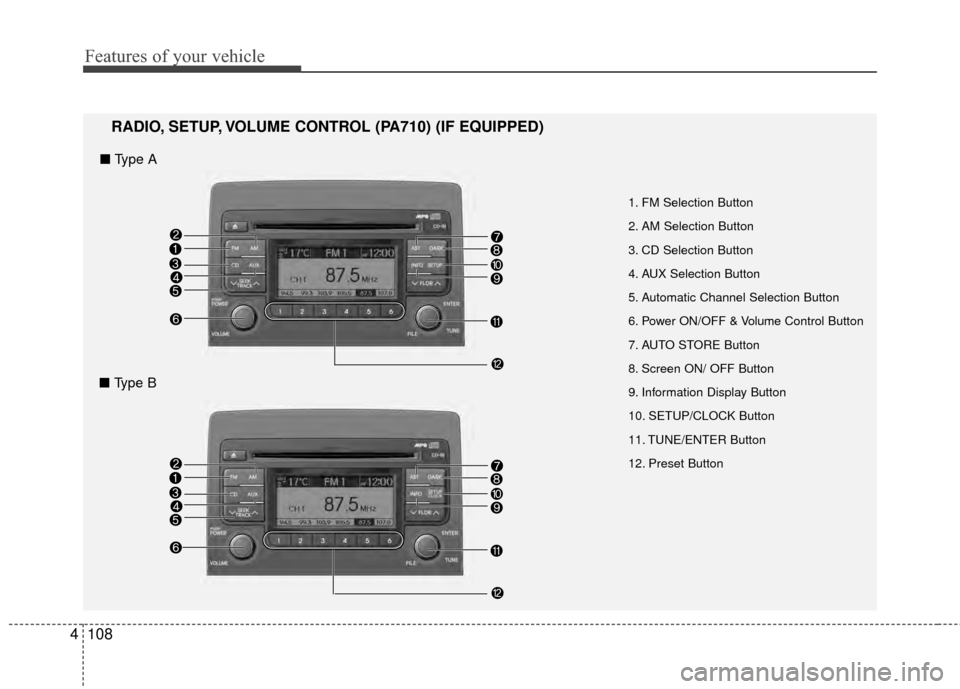
1. FM Selection Button
2. AM Selection Button
3. CD Selection Button
4. AUX Selection Button
5. Automatic Channel Selection Button
6. Power ON/OFF & V olumeControl Button
7. AUTO STORE Button
8. Screen ON/ OFF Button
9. Information Display Button
10. SETUP/CLOCK Button
11. TUNE/ENTER Button
12. Preset Button
RADIO, SETUP, VOLUME CONTROL (PA710) (IF EQUIPPED)
■ Type A
■ Type B
Page 185 of 402
4109
Features of your vehicle
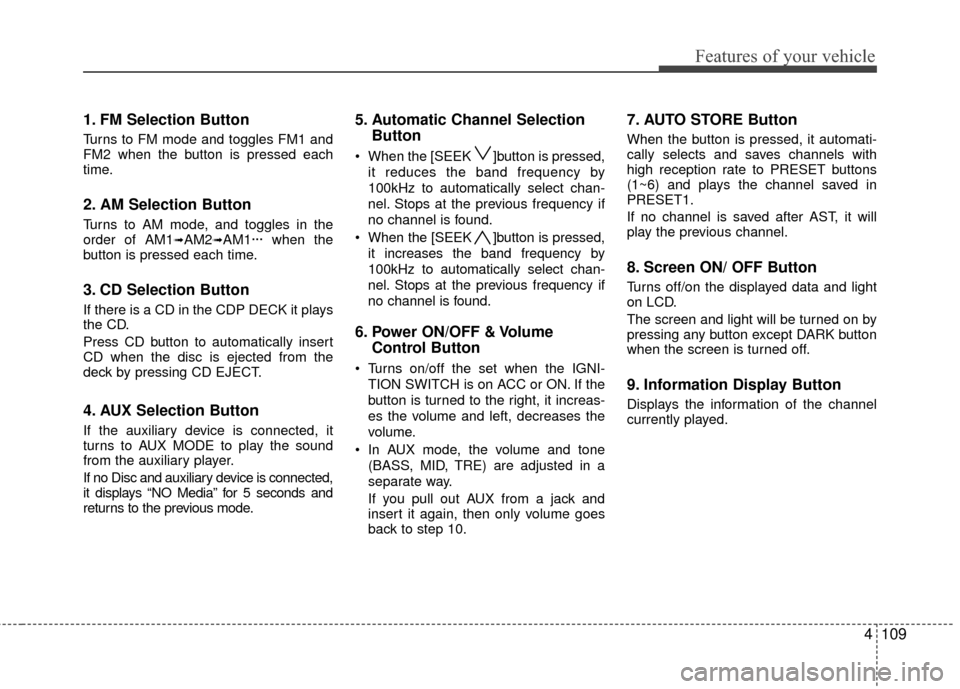
1. FM Selection Button
Turns to FM mode and toggles FM1 and
FM2 when the button is pressed each
time.
2. AM Selection Button
Turns to AM mode, and toggles in the
order of AM1➟AM2➟AM1··· when the
button is pressed each time.
3. CD Selection Button
If there is a CD in the CDP DECK it plays
the CD.
Press CD button to automatically insert
CD when the disc is ejected from the
deck by pressing CD EJECT.
4. AUX Selection Button
If the auxiliary device is connected, it
turns to AUX MODE to play the sound
from the auxiliary player.
If no Disc and auxiliary device is connected,
it displays “NO Media” for 5 seconds and
returns to the previous mode.
5. Automatic Channel Selection Button
When the [SEEK ]button is pressed,
it reduces the band frequency by
100kHz to automatically select chan-
nel. Stops at the previous frequency if
no channel is found.
When the [SEEK ]button is pressed, it increases the band frequency by
100kHz to automatically select chan-
nel. Stops at the previous frequency if
no channel is found.
6. Power ON/OFF & Volume Control Button
Turns on/off the set when the IGNI-
TION SWITCH is on ACC or ON. If the
button is turned to the right, it increas-
es the volume and left, decreases the
volume.
In AUX mode, the volume and tone (BASS, MID, TRE) are adjusted in a
separate way.
If you pull out AUX from a jack and
insert it again, then only volume goes
back to step 10.
7. AUTO STORE Button
When the button is pressed, it automati-
cally selects and saves channels with
high reception rate to PRESET buttons
(1~6) and plays the channel saved in
PRESET1.
If no channel is saved after AST, it will
play the previous channel.
8. Screen ON/ OFF Button
Turns off/on the displayed data and light
on LCD.
The screen and light will be turned on by
pressing any button except DARK button
when the screen is turned off.
9. Information Display Button
Displays the information of the channel
currently played.
Page 186 of 402
Features of your vehicle
110
4
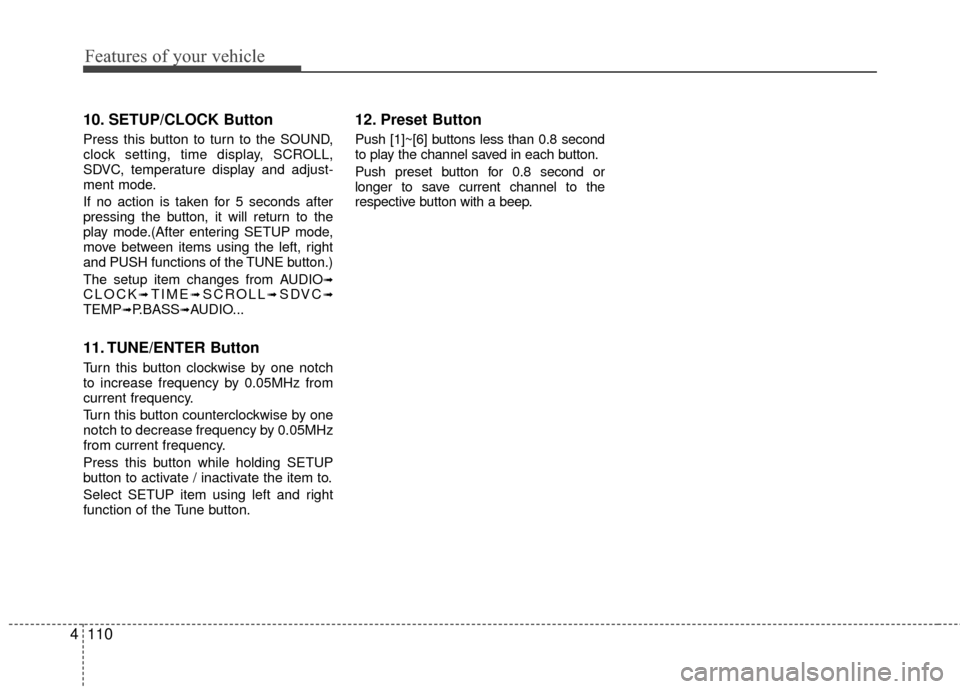
10. SETUP/CLOCK Button
Press this button to turn to the SOUND,
clock setting, time display, SCROLL,
SDVC, temperature display and adjust-
ment mode.
If no action is taken for 5 seconds after
pressing the button, it will return to the
play mode.(After entering SETUP mode,
move between items using the left, right
and PUSH functions of the TUNE button.)
The setup item changes from AUDIO
➟CLOCK➟TIME➟SCROLL➟SDVC➟TEMP➟P.BASS➟AUDIO...
11. TUNE/ENTER Button
Turn this button clockwise by one notch
to increase frequency by 0.05MHz from
current frequency.
Turn this button counterclockwise by one
notch to decrease frequency by 0.05MHz
from current frequency.
Press this button while holding SETUP
button to activate / inactivate the item to.
Select SETUP item using left and right
function of the Tune button.
12. Preset Button
Push [1]~[6] buttons less than 0.8 second
to play the channel saved in each button.
Push preset button for 0.8 second or
longer to save current channel to the
respective button with a beep.
Page 196 of 402
Features of your vehicle
120
4
✽
✽
NOTICE FOR USING THE
iPod®DEVICE
• Some iPod models might not sup-
port the communication protocol
and the files will not be played.
Supported iPod models:
- iPod Mini
- iPod 4th(Photo) ~ 6th(Classic)
generation
- iPod Nano 1st~4th generation
- iPod Touch 1st~2nd generation
• The order of search or playback of songs in the iPod can be different
from the order searched in the
audio system.
• If the iPod disabled due to its own malfunction, reset the iPod. (Reset:
Refer to iPod manual)
• An iPod may not operate normally on low battery.
• Some iPod devices, such as the iPhone, can be connected through
the Bluetooth
®wireless technology
interface. The device must have
audio Bluetooth
®wireless technolo-
gy capability (such as for stereo
headphone Bluetooth
®wireless
technology). The device can play,
but it will not be controlled by the
audio system.
CAUTION IN USING THE
iPod
®DEVICE
The Hyundai iPod Power Cable is needed in order to operate iPodwith the audio buttons on theaudio system. The USB cable pro-vided by Apple may cause mal-function and should not be usedfor Hyundai vehicles.
\b \b The Hyundai iPod Power Cable
may be purchased throughyour Hyundai Dealership.
When connecting iPod with the iPod Power Cable, insert the con-nector to the multimedia socketcompletely. If not inserted com-pletely, communications betweeniPod and audio may be interrupted.
When adjusting the sound effects of the iPod and the audio system,the sound effects of both deviceswill overlap and might reduce ordistort the quality of the sound.
(Continued)
(Continued) Deactivate (turn off) the equalizer function of an iPod when adjust-ing the audio system’s volume,and turn off the equalizer of the audio system when using theequalizer of an iPod.
When the iPod cable is connect- ed, the system can be switched toAUX mode even without iPoddevice and may cause noise.
Disconnect the iPod cable whenyou are not using the iPod device.
When not using iPod with car audio, detach the iPod cable fromiPod. Otherwise, iPod may remain in accessory mode, and may notwork properly.
Page 197 of 402
4121
Features of your vehicle
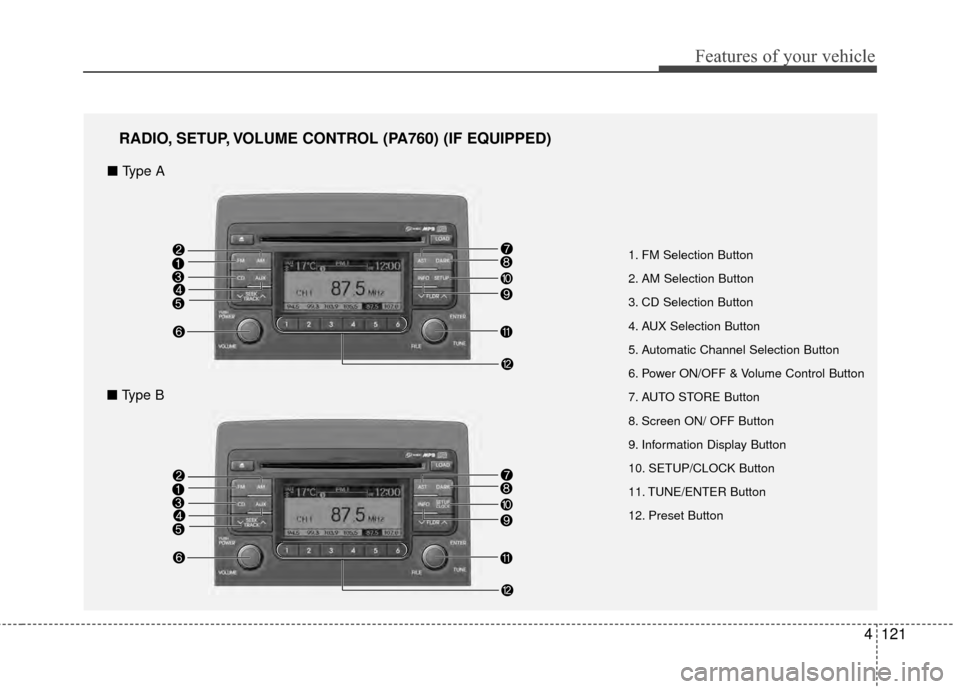
1. FM Selection Button
2. AM Selection Button
3. CD Selection Button
4. AUX Selection Button
5. Automatic Channel Selection Button
6. Power ON/OFF & Volume Control Button
7. AUTO STORE Button
8. Screen ON/ OFF Button
9. Information Display Button
10. SETUP/CLOCK Button
11. TUNE/ENTER Button
12. Preset Button
RADIO, SETUP, VOLUME CONTROL (PA760) (IF EQUIPPED)
■ Type A
■ Type B
Page 198 of 402
Features of your vehicle
122
4
1. FM Selection Button
Turns to FM mode and toggles FM1 and
FM2 when the button is pressed each
time.
2. AM Selection Button
Turns to AM mode, and toggles in the
order of AM1➟AM2➟AM1··· when the
button is pressed each time.
3. CD Selection Button
If there is a CD in the CDP DECK it plays
the CD.
Press CD button to automatically insert
CD when the disc is ejected from the
deck by pressing CD EJECT.
4. AUX Selection Button
If the auxiliary device is connected, it
turns to AUX MODE to play the sound
from the auxiliary player.
If no Disc and auxiliary device is connected,
it displays “NO Media” for 5 seconds and
returns to the previous mode.
5. Automatic Channel Selection Button
When the [SEEK ]button is pressed,
it reduces the band frequency by
100kHz to automatically select chan-
nel. Stops at the previous frequency if
no channel is found.
When the [SEEK ]button is pressed, it increases the band frequency by
100kHz to automatically select chan-
nel. Stops at the previous frequency if
no channel is found.
6. Power ON/OFF & Volume Control Button
Turns on/off the set when the IGNI-
TION SWITCH is on ACC or ON. If the
button is turned to the right, it increas-
es the volume and left, decreases the
volume.
In AUX mode, the volume and tone (BASS, MID, TRE) are adjusted in a
separate way.
If you pull out AUX from a jack and
insert it again, then only volume goes
back to step 10.
7. AUTO STORE Button
When the button is pressed, it automati-
cally selects and saves channels with
high reception rate to PRESET buttons
(1~6) and plays the channel saved in
PRESET1.
If no channel is saved after AST, it will
play the previous channel.
8. Screen ON/ OFF Button
Turns off/on the displayed data and light
on LCD.
The screen and light will be turned on by
pressing any button except DARK button
when the screen is turned off.
9. Information Display Button
Displays the information of the channel
currently played.
Page 199 of 402
4123
Features of your vehicle
10. SETUP/CLOCK Button
Press this button to turn to the SOUND,
clock setting, time display, SCROLL,
SDVC, temperature display and adjust-
ment mode.
If no action is taken for 5 seconds after
pressing the button, it will return to the
play mode.(After entering SETUP mode,
move between items using the left, right
and PUSH functions of the TUNE button.)
The setup item changes from AUDIO
➟CLOCK➟TIME➟SCROLL➟SDVC➟TEMP➟AUDIO...
11. TUNE/ENTER Button
Turn this button clockwise by one notch
to increase frequency by 0.05MHz from
current frequency.
Turn this button counterclockwise by one
notch to decrease frequency by 0.05MHz
from current frequency.
Press this button while holding SETUP
button to activate / inactivate the item to.
Select SETUP item using left and right
function of the Tune button.
12. Preset Button
Push [1]~[6] buttons less than 0.8 second
to play the channel saved in each button.
Push preset button for 0.8 second or
longer to save current channel to the
respective button with a beep.
Page 209 of 402
4133
Features of your vehicle
✽
✽NOTICE FOR USING THE
iPod®DEVICE
• Some iPod models might not sup-
port the communication protocol
and the files will not be played.
Supported iPod models:
- iPod Mini
- iPod 4th(Photo) ~ 6th(Classic)
generation
- iPod Nano 1st~4th generation
- iPod Touch 1st~2nd generation
• The order of search or playback of songs in the iPod can be different
from the order searched in the
audio system.
• If the iPod disabled due to its own malfunction, reset the iPod. (Reset:
Refer to iPod manual)
• An iPod may not operate normally on low battery.
• Some iPod devices, such as the iPhone, can be connected through the
Bluetooth
®wireless technology inter-
face. The device must have audio
Bluetooth
®wireless technology capa-
bility (such as for stereo headphone
Bluetooth
®wireless technology). The
device can play, but it will not be con-
trolled by the audio system.
CAUTION IN USING THE
iPod
®DEVICE
The Hyundai iPod Power Cable is needed in order to operate iPodwith the audio buttons on theaudio system. The USB cable pro-vided by Apple may cause mal-function and should not be usedfor Hyundai vehicles.
\b The Hyundai iPod Power Cablemay be purchased through yourHyundai Dealership.
When connecting iPod with the iPod Power Cable, insert the con-nector to the multimedia socketcompletely. If not inserted com-pletely, communications betweeniPod and audio may be interrupted.
When adjusting the sound effects of the iPod and the audio system,the sound effects of both deviceswill overlap and might reduce ordistort the quality of the sound.
(Continued)
(Continued) Deactivate (turn off) the equalizer
function of an iPod when adjust-ing the audio system’s volume,and turn off the equalizer of theaudio system when using theequalizer of an iPod.
When the iPod cable is connect- ed, the system can be switched toAUX mode even without iPoddevice and may cause noise.
Disconnect the iPod cable whenyou are not using the iPod device.
When not using iPod with car audio, detach the iPod cable fromiPod. Otherwise, iPod may remain in accessory mode, and may notwork properly.
Page 210 of 402
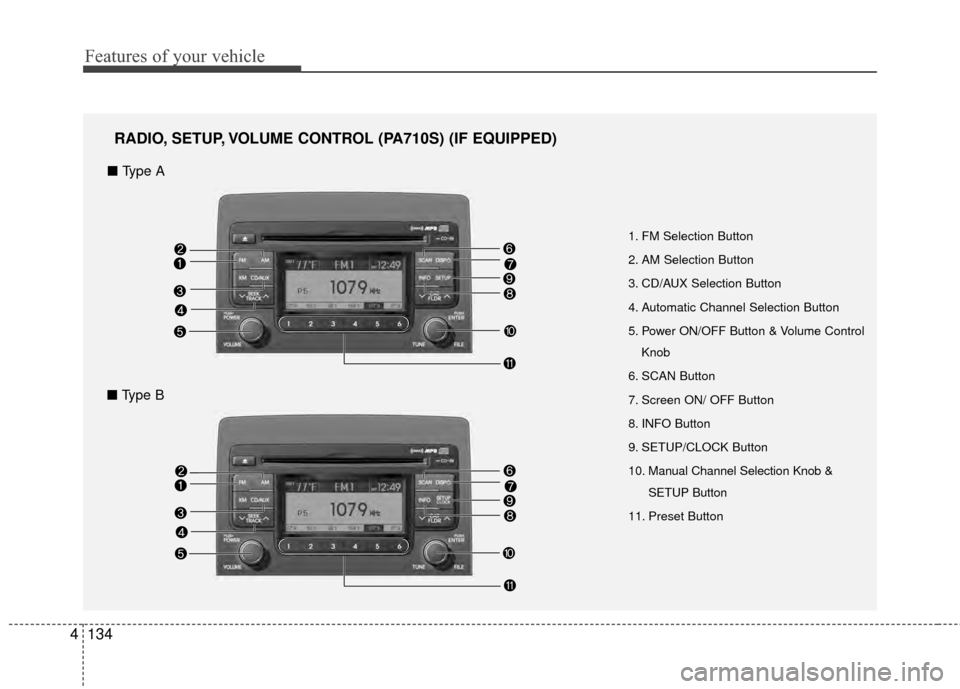
Features of your vehicle
134
4
1. FM Selection Button
2. AM Selection Button
3. CD/AUX Selection Button
4. Automatic Channel Selection Button
5. Power ON/OFF Button & Volume Control
Knob
6. SCAN Button
7. Screen ON/ OFF Button
8. INFO Button
9. SETUP/CLOCK Button
10. Manual Channel Selection Knob & SETUP Button
11. Preset Button
RADIO, SETUP, VOLUME CONTROL (PA710S) (IF EQUIPPED)
■ Type A
■ Type B