ignition HYUNDAI ENTOURAGE 2007 User Guide
[x] Cancel search | Manufacturer: HYUNDAI, Model Year: 2007, Model line: ENTOURAGE, Model: HYUNDAI ENTOURAGE 2007Pages: 398, PDF Size: 8.03 MB
Page 40 of 398
Features of your vehicle24 3Power sliding door non-opening condi-
tions
When the ignition switch is in the ON
position, the power sliding door will only
automatically close under the following
conditions:
1. Vehicle is moving above 3 mph (5 km/h).
2. The gearshift lever is not in P (Park) for
automatic transaxle.
Under theses conditions, if the main or
sub control buttons are pushed when the
power sliding door is closed, the chime
will sound.
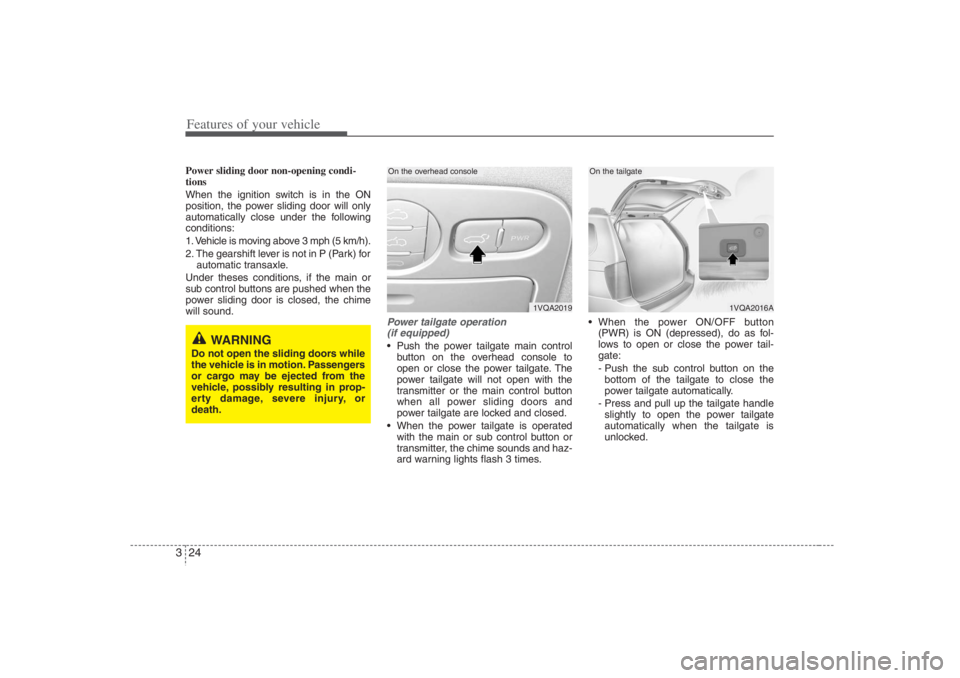
Power tailgate operation
(if equipped) Push the power tailgate main control
button on the overhead console to
open or close the power tailgate. The
power tailgate will not open with the
transmitter or the main control button
when all power sliding doors and
power tailgate are locked and closed.
When the power tailgate is operated
with the main or sub control button or
transmitter, the chime sounds and haz-
ard warning lights flash 3 times. When the power ON/OFF button
(PWR) is ON (depressed), do as fol-
lows to open or close the power tail-
gate:
- Push the sub control button on the
bottom of the tailgate to close the
power tailgate automatically.
- Press and pull up the tailgate handle
slightly to open the power tailgate
automatically when the tailgate is
unlocked.
1VQA2019
On the overhead console
1VQA2016A
On the tailgate
WARNING
Do not open the sliding doors while
the vehicle is in motion. Passengers
or cargo may be ejected from the
vehicle, possibly resulting in prop-
erty damage, severe injury, or
death.
Page 41 of 398
325
Features of your vehicle
When the power ON/OFF button
(PWR) is OFF (not depressed), the
power tailgate cannot be controlled
with the sub control buttons or tailgate
handle, and if the sub control button is
pushed, the chime sounds once.
The tailgate may be opened manually
by pulling the exterior handle and lifting
the tailgate upward. The tailgate may
be manually closed by pushing the tail-
gate downward.
If the power tailgate is not closed and
latched completely after power closing
operation, the chime sounds 3 times.
If the power tailgate is operated while
the tailgate is in partially opened posi-
tion (less than 20 degrees), the tailgate
is automatically opened fully.
If the power tailgate is operated while
the tailgate is in half-opened position
(more than 20 degrees), the tailgate is
automatically closed completely. If the power tailgate is operated again
while the tailgate is closing, the tailgate
is automatically opened fully.
If the power tailgate is operated again
while the tailgate is opening, the tail-
gate is automatically closed complete-
ly. However, if the power tailgate button
is pressed again when the tailgate is
open less than 20 degrees, the tailgate
will continue to open.
Power tailgate non-opening condi-
tionsWhen the ignition switch is in the ON
position, the power tailgate will only auto-
matically close under the following condi-
tions:
1. Vehicle is moving above 3 mph (5 km/h).
2. The gearshift lever is not in P (Park) for
automatic transaxle.
Under theses conditions, if the main or
sub control buttons are pushed when the
power tailgate is closed, the chime will
sound.
WARNING
Even though the power ON/OFF
button (PWR) is in the OFF (not
depressed) position, the tailgate
will still be propelled upward by
mechanical force if the tailgate is
manually opened more than 20
degrees beyond the fully closed
position. In addition, if the tailgate
is manually closed to the secondary
latch position, the tailgate will be
electrically moved to the fully
latched position. Make sure that
face, arms, hands, and other
obstructions are safely out of the
way before operating the tailgate.
WARNING
Make sure there are no people or
objects around the tailgate before
operating the power tailgate. Wait
until the tailgate is open fully and
stopped before loading or unload-
ing cargo or passengers from the
vehicle.
WARNING
Make sure the tailgate is closed
firmly before driving. If the tailgate
is open, you will draw dangerous
exhaust fumes into your vehicle
which can cause serious injury or
death to vehicle occupants.
Page 43 of 398
327
Features of your vehicle
The ignition switch must be in the ON
position for power windows to operate.
Each door has a power window switch
that controls that door’s window. The driv-
er has a power window lock switch which
can block the operation of passenger
windows.
The power windows can be operated for
approximately 30 seconds after the igni-
tion key is removed or turned to the ACC
or LOCK position. However, if the front
doors are opened, the power windows
cannot be operated within the 30 sec-
onds after the ignition key removal.
While driving, if you notice wind buffeting
or pulsation (wind shock) with either side
window open, you should open the oppo-
site window slightly to reduce the condi-
tion.
Window opening and closingThe driver’s door has a master power
window switch that controls all the win-
dows in the vehicle.
To open or close a window, press down
(8) or pull up (8) the front portion of the
corresponding switch.
To open or close a rear quarter win-
dow, push (8) the corresponding
switch.
(Continued)
Never try to operate the main
switch on the driver's door and
the individual door window
switch in opposing directions at
the same time. If this is done, the
window will stop and cannot be
opened or closed.
WARNING -
Windows
Passengers can be injured if their
head, hands or other body parts
are trapped by a closing window.
Always check for obstructions
before raising any window.
NEVER leave the ignition key in
the vehicle.
NEVER leave any child unattend-
ed in the vehicle. Even very
young children may inadvertently
cause the vehicle to move, entan-
gle themselves in the windows, or
otherwise injure themselves or
others.
(Continued)
(Continued)
Do not attempt to operate the
main switch on the driver's door
and a switch on another door in
opposing directions at the same
time. If this is done, the window
will stop and cannot be opened or
closed.
Do not allow children to play with
the power windows. Keep the dri-
ver’s door power window lock
switch in the LOCK position
(depressed). Serious injury can
result from unintentional window
operation by the child.
Do not extend head, hands or
arms outside through the window
opening while driving.
CAUTION
To prevent the power window
system from the possibility of
damage, do not open or close two
windows at the same time. This
will also ensure the longevity of
the fuse.
(Continued)
Page 44 of 398
Features of your vehicle28 3Automatic power window down
(driver’s window)
Depressing the power window switch
momentarily to the second detent posi-
tion (9) completely lowers the driver’s
window even when the switch is
released. To stop the window at the
desired position while the window is in
operation, pull up the switch momentarily
to the opposite direction of the window
movement.
If the power window is not operating cor-
rectly, the automatic power window sys-
tem can be reset as follows:
1. Turn the ignition key to ON position.
2. Close driver’s window and continue
pulling up on driver’s power window
switch for at least 1 second after the
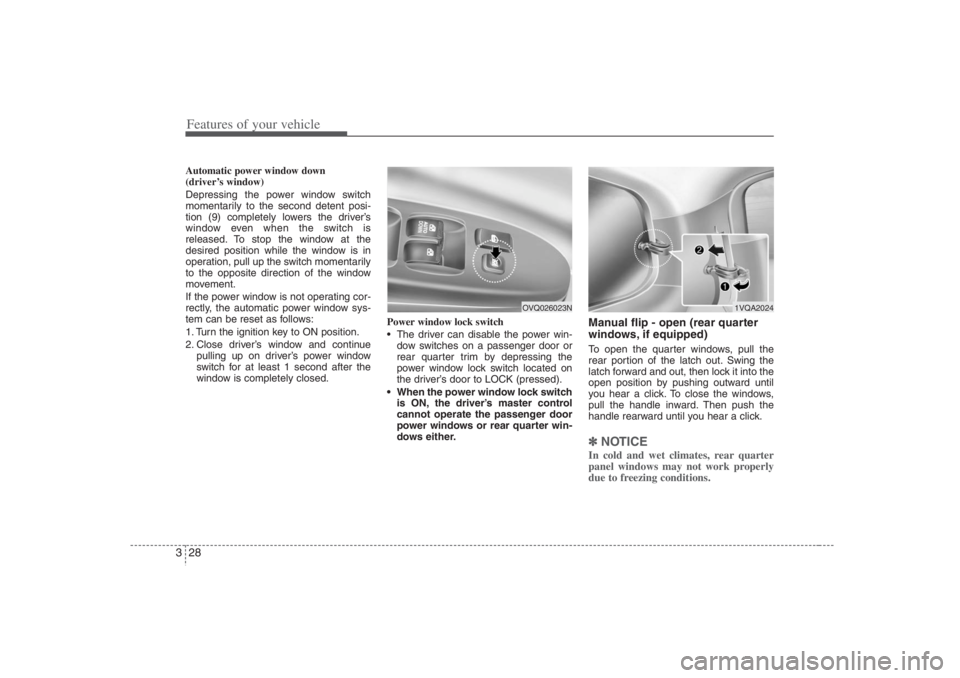
window is completely closed.Power window lock switch
The driver can disable the power win-
dow switches on a passenger door or
rear quarter trim by depressing the
power window lock switch located on
the driver’s door to LOCK (pressed).
When the power window lock switch
is ON, the driver’s master control
cannot operate the passenger door
power windows or rear quarter win-
dows either.
Manual flip - open (rear quarter
windows, if equipped)To open the quarter windows, pull the
rear portion of the latch out. Swing the
latch forward and out, then lock it into the
open position by pushing outward until
you hear a click. To close the windows,
pull the handle inward. Then push the
handle rearward until you hear a click.✽ ✽
NOTICEIn cold and wet climates, rear quarter
panel windows may not work properly
due to freezing conditions.
1VQA2024
OVQ026023N
Page 49 of 398
333
Features of your vehicle
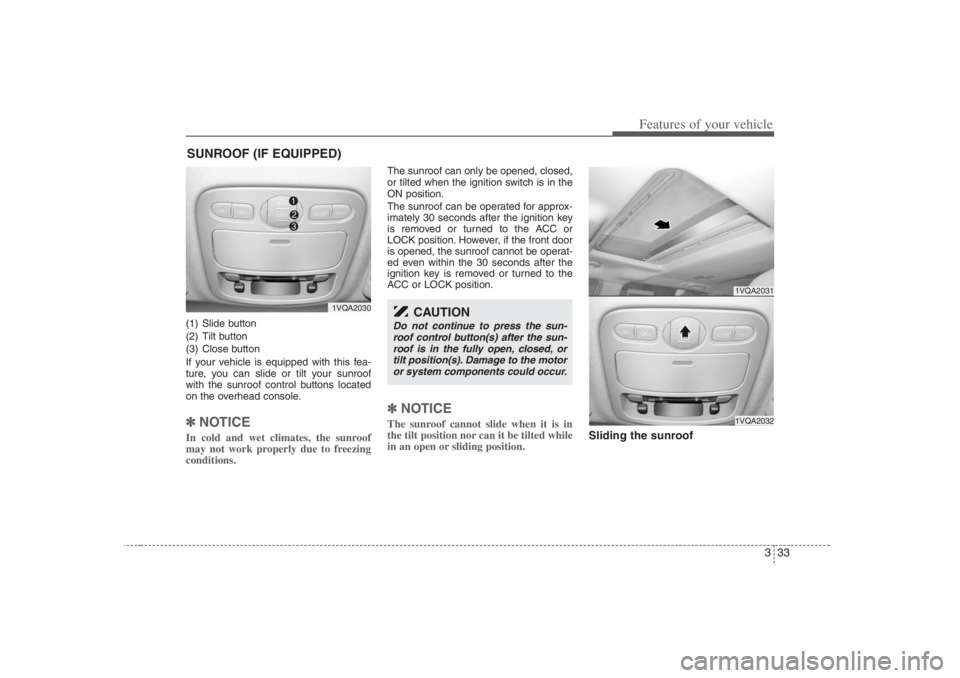
(1) Slide button
(2) Tilt button
(3) Close button
If your vehicle is equipped with this fea-
ture, you can slide or tilt your sunroof
with the sunroof control buttons located
on the overhead console.✽ ✽
NOTICEIn cold and wet climates, the sunroof
may not work properly due to freezing
conditions.
The sunroof can only be opened, closed,
or tilted when the ignition switch is in the
ON position.
The sunroof can be operated for approx-
imately 30 seconds after the ignition key
is removed or turned to the ACC or
LOCK position. However, if the front door
is opened, the sunroof cannot be operat-
ed even within the 30 seconds after the
ignition key is removed or turned to the
ACC or LOCK position.✽ ✽
NOTICEThe sunroof cannot slide when it is in
the tilt position nor can it be tilted while
in an open or sliding position.
Sliding the sunroof
SUNROOF (IF EQUIPPED)
1VQA2030
1VQA20311VQA2032
CAUTION
Do not continue to press the sun-
roof control button(s) after the sun-
roof is in the fully open, closed, or
tilt position(s). Damage to the motor
or system components could occur.
Page 52 of 398
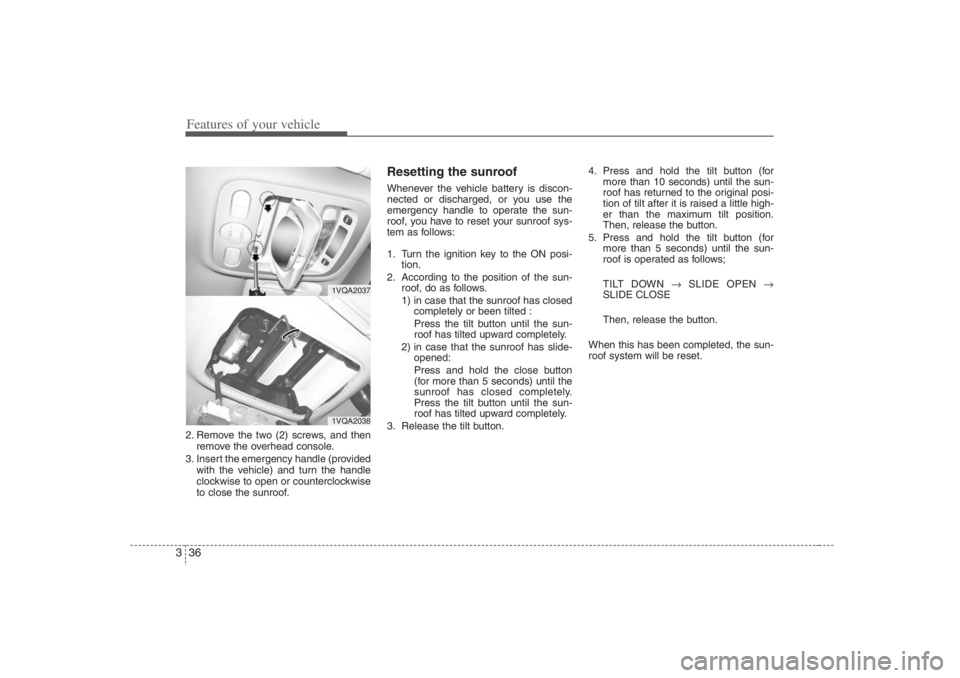
Features of your vehicle36 32. Remove the two (2) screws, and then
remove the overhead console.
3. Insert the emergency handle (provided
with the vehicle) and turn the handle
clockwise to open or counterclockwise
to close the sunroof.
Resetting the sunroofWhenever the vehicle battery is discon-
nected or discharged, or you use the
emergency handle to operate the sun-
roof, you have to reset your sunroof sys-
tem as follows:
1. Turn the ignition key to the ON posi-
tion.
2. According to the position of the sun-
roof, do as follows.
1) in case that the sunroof has closed
completely or been tilted :
Press the tilt button until the sun-
roof has tilted upward completely.
2) in case that the sunroof has slide-
opened:
Press and hold the close button
(for more than 5 seconds) until the
sunroof has closed completely.
Press the tilt button until the sun-
roof has tilted upward completely.
3. Release the tilt button.4. Press and hold the tilt button (for
more than 10 seconds) until the sun-
roof has returned to the original posi-
tion of tilt after it is raised a little high-
er than the maximum tilt position.
Then, release the button.
5. Press and hold the tilt button (for
more than 5 seconds) until the sun-
roof is operated as follows;
TILT DOWN →SLIDE OPEN →
SLIDE CLOSE
Then, release the button.
When this has been completed, the sun-
roof system will be reset.
1VQA20371VQA2038
Page 56 of 398
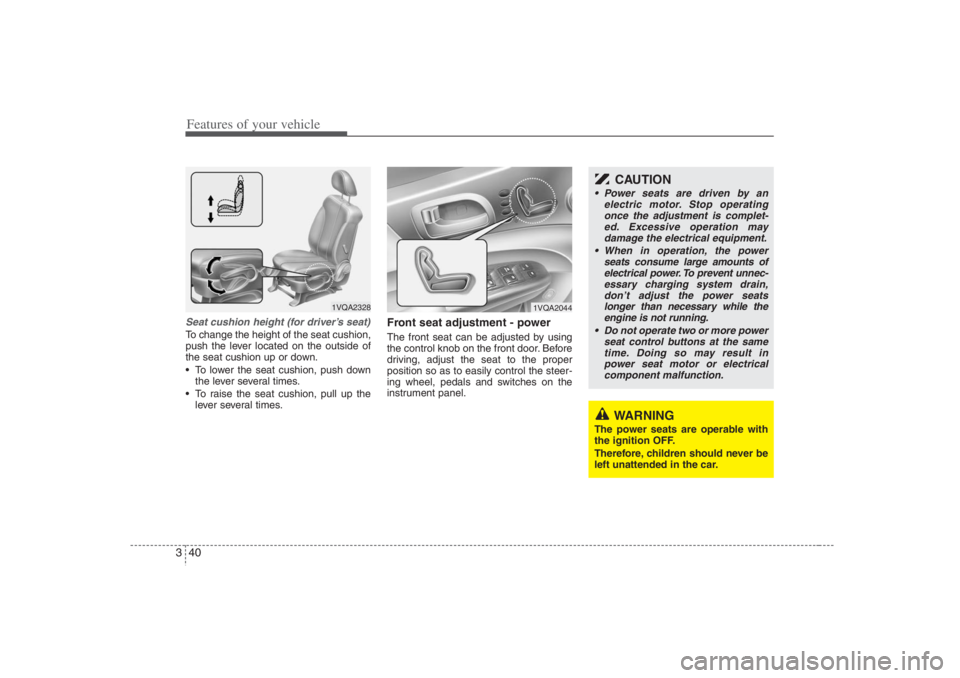
Features of your vehicle40 3Seat cushion height (for driver’s seat)To change the height of the seat cushion,
push the lever located on the outside of
the seat cushion up or down.
To lower the seat cushion, push down
the lever several times.
To raise the seat cushion, pull up the
lever several times.
Front seat adjustment - powerThe front seat can be adjusted by using
the control knob on the front door. Before
driving, adjust the seat to the proper
position so as to easily control the steer-
ing wheel, pedals and switches on the
instrument panel.
1VQA2328
WARNING
The power seats are operable with
the ignition OFF.
Therefore, children should never be
left unattended in the car.
CAUTION
Power seats are driven by an
electric motor. Stop operating
once the adjustment is complet-
ed. Excessive operation may
damage the electrical equipment.
When in operation, the power
seats consume large amounts of
electrical power. To prevent unnec-
essary charging system drain,
don’t adjust the power seats
longer than necessary while the
engine is not running.
Do not operate two or more power
seat control buttons at the same
time. Doing so may result in
power seat motor or electrical
component malfunction.
1VQA2044
Page 61 of 398
345
Features of your vehicle
Seat warmer (if equipped)The front seats can be electrically heated
individually when the ignition switch is
ON. When the switch is ON, a number
ranging from 1 to 5 is displayed on the
switch (5 = warmest setting).
To turn off the seat warmer, set the
switch to 0.
The seat warmer turns off automatically
when the seat temperature reaches the
selected range and will turn on again if
the temperature drops below the select-
ed range.
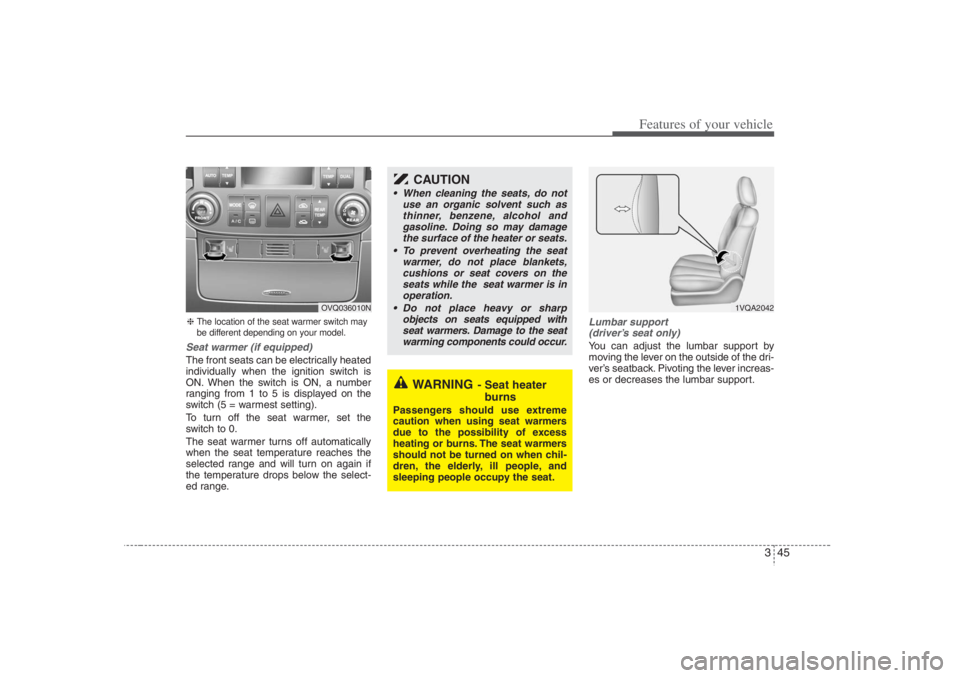
Lumbar support
(driver’s seat only)You can adjust the lumbar support by
moving the lever on the outside of the dri-
ver’s seatback. Pivoting the lever increas-
es or decreases the lumbar support.
❈The location of the seat warmer switch may
be different depending on your model.
OVQ036010N
WARNING
- Seat heater
burns
Passengers should use extreme
caution when using seat warmers
due to the possibility of excess
heating or burns. The seat warmers
should not be turned on when chil-
dren, the elderly, ill people, and
sleeping people occupy the seat.
CAUTION
When cleaning the seats, do not
use an organic solvent such as
thinner, benzene, alcohol and
gasoline. Doing so may damage
the surface of the heater or seats.
To prevent overheating the seat
warmer, do not place blankets,
cushions or seat covers on the
seats while the seat warmer is in
operation.
Do not place heavy or sharp
objects on seats equipped with
seat warmers. Damage to the seat
warming components could occur.
1VQA2042
Page 72 of 398
Features of your vehicle56 3
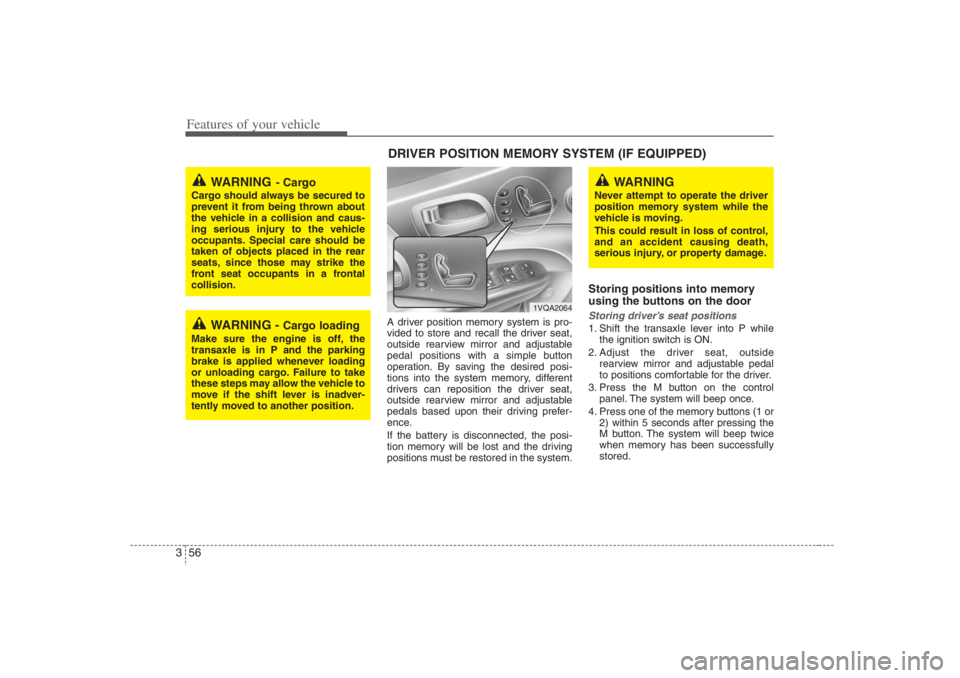
A driver position memory system is pro-
vided to store and recall the driver seat,
outside rearview mirror and adjustable
pedal positions with a simple button
operation. By saving the desired posi-
tions into the system memory, different
drivers can reposition the driver seat,
outside rearview mirror and adjustable
pedals based upon their driving prefer-
ence.
If the battery is disconnected, the posi-
tion memory will be lost and the driving
positions must be restored in the system.
Storing positions into memory
using the buttons on the doorStoring driver’s seat positions1. Shift the transaxle lever into P while
the ignition switch is ON.
2. Adjust the driver seat, outside
rearview mirror and adjustable pedal
to positions comfortable for the driver.
3. Press the M button on the control
panel. The system will beep once.
4. Press one of the memory buttons (1 or
2) within 5 seconds after pressing the
M button. The system will beep twice
when memory has been successfully
stored.
WARNING
- Cargo
Cargo should always be secured to
prevent it from being thrown about
the vehicle in a collision and caus-
ing serious injury to the vehicle
occupants. Special care should be
taken of objects placed in the rear
seats, since those may strike the
front seat occupants in a frontal
collision.
WARNING -
Cargo loading
Make sure the engine is off, the
transaxle is in P and the parking
brake is applied whenever loading
or unloading cargo. Failure to take
these steps may allow the vehicle to
move if the shift lever is inadver-
tently moved to another position.
DRIVER POSITION MEMORY SYSTEM (IF EQUIPPED)
WARNING
Never attempt to operate the driver
position memory system while the
vehicle is moving.
This could result in loss of control,
and an accident causing death,
serious injury, or property damage.
1VQA2064
Page 73 of 398
357
Features of your vehicle
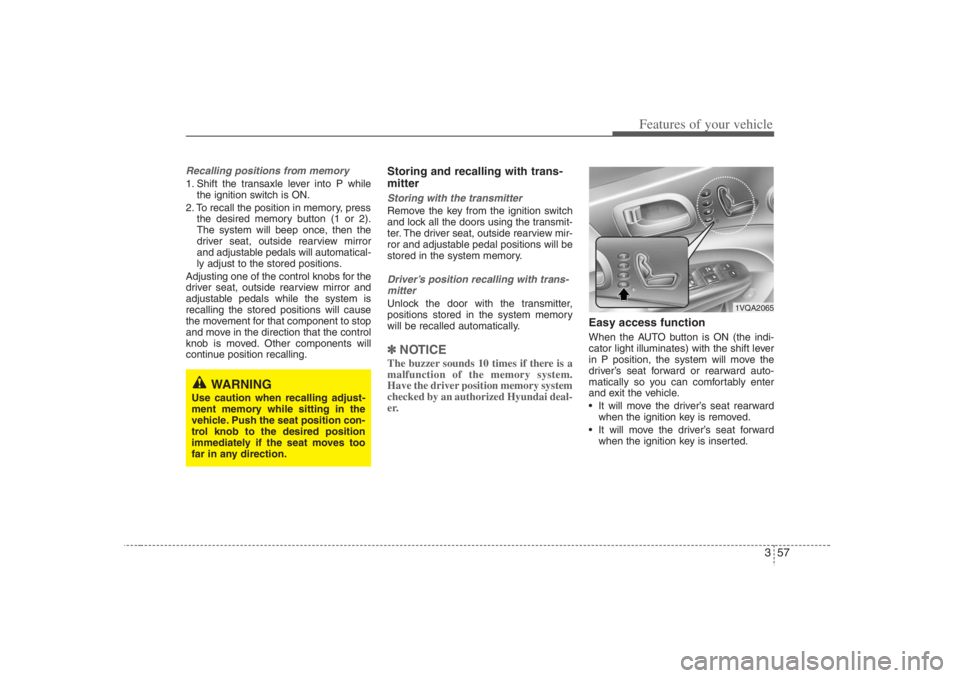
Recalling positions from memory1. Shift the transaxle lever into P while
the ignition switch is ON.
2. To recall the position in memory, press
the desired memory button (1 or 2).
The system will beep once, then the
driver seat, outside rearview mirror
and adjustable pedals will automatical-
ly adjust to the stored positions.
Adjusting one of the control knobs for the
driver seat, outside rearview mirror and
adjustable pedals while the system is
recalling the stored positions will cause
the movement for that component to stop
and move in the direction that the control
knob is moved. Other components will
continue position recalling.
Storing and recalling with trans-
mitterStoring with the transmitterRemove the key from the ignition switch
and lock all the doors using the transmit-
ter. The driver seat, outside rearview mir-
ror and adjustable pedal positions will be
stored in the system memory.Driver’s position recalling with trans-
mitterUnlock the door with the transmitter,
positions stored in the system memory
will be recalled automatically.✽ ✽
NOTICEThe buzzer sounds 10 times if there is a
malfunction of the memory system.
Have the driver position memory system
checked by an authorized Hyundai deal-
er.
Easy access functionWhen the AUTO button is ON (the indi-
cator light illuminates) with the shift lever
in P position, the system will move the
driver’s seat forward or rearward auto-
matically so you can comfortably enter
and exit the vehicle.
It will move the driver’s seat rearward
when the ignition key is removed.
It will move the driver’s seat forward
when the ignition key is inserted.
WARNING
Use caution when recalling adjust-
ment memory while sitting in the
vehicle. Push the seat position con-
trol knob to the desired position
immediately if the seat moves too
far in any direction.
1VQA2065