light HYUNDAI ENTOURAGE 2007 User Guide
[x] Cancel search | Manufacturer: HYUNDAI, Model Year: 2007, Model line: ENTOURAGE, Model: HYUNDAI ENTOURAGE 2007Pages: 398, PDF Size: 8.03 MB
Page 40 of 398
Features of your vehicle24 3Power sliding door non-opening condi-
tions
When the ignition switch is in the ON
position, the power sliding door will only
automatically close under the following
conditions:
1. Vehicle is moving above 3 mph (5 km/h).
2. The gearshift lever is not in P (Park) for
automatic transaxle.
Under theses conditions, if the main or
sub control buttons are pushed when the
power sliding door is closed, the chime
will sound.
Power tailgate operation
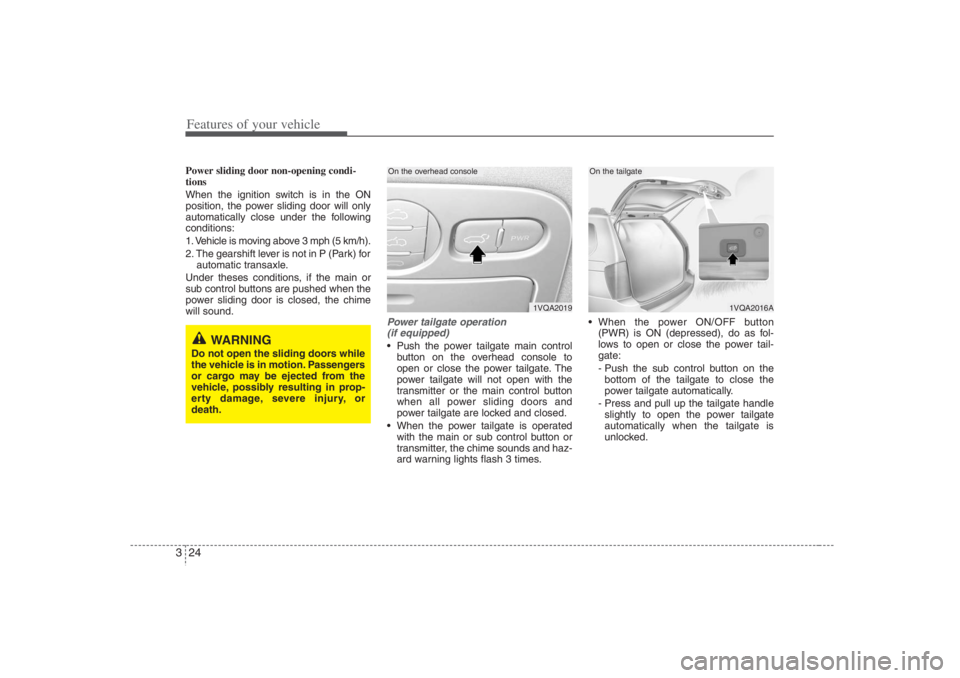
(if equipped) Push the power tailgate main control
button on the overhead console to
open or close the power tailgate. The
power tailgate will not open with the
transmitter or the main control button
when all power sliding doors and
power tailgate are locked and closed.
When the power tailgate is operated
with the main or sub control button or
transmitter, the chime sounds and haz-
ard warning lights flash 3 times. When the power ON/OFF button
(PWR) is ON (depressed), do as fol-
lows to open or close the power tail-
gate:
- Push the sub control button on the
bottom of the tailgate to close the
power tailgate automatically.
- Press and pull up the tailgate handle
slightly to open the power tailgate
automatically when the tailgate is
unlocked.
1VQA2019
On the overhead console
1VQA2016A
On the tailgate
WARNING
Do not open the sliding doors while
the vehicle is in motion. Passengers
or cargo may be ejected from the
vehicle, possibly resulting in prop-
erty damage, severe injury, or
death.
Page 43 of 398
327
Features of your vehicle
The ignition switch must be in the ON
position for power windows to operate.
Each door has a power window switch
that controls that door’s window. The driv-
er has a power window lock switch which
can block the operation of passenger
windows.
The power windows can be operated for
approximately 30 seconds after the igni-
tion key is removed or turned to the ACC
or LOCK position. However, if the front
doors are opened, the power windows
cannot be operated within the 30 sec-
onds after the ignition key removal.
While driving, if you notice wind buffeting
or pulsation (wind shock) with either side
window open, you should open the oppo-
site window slightly to reduce the condi-
tion.
Window opening and closingThe driver’s door has a master power
window switch that controls all the win-
dows in the vehicle.
To open or close a window, press down
(8) or pull up (8) the front portion of the
corresponding switch.
To open or close a rear quarter win-
dow, push (8) the corresponding
switch.
(Continued)
Never try to operate the main
switch on the driver's door and
the individual door window
switch in opposing directions at
the same time. If this is done, the
window will stop and cannot be
opened or closed.
WARNING -
Windows
Passengers can be injured if their
head, hands or other body parts
are trapped by a closing window.
Always check for obstructions
before raising any window.
NEVER leave the ignition key in
the vehicle.
NEVER leave any child unattend-
ed in the vehicle. Even very
young children may inadvertently
cause the vehicle to move, entan-
gle themselves in the windows, or
otherwise injure themselves or
others.
(Continued)
(Continued)
Do not attempt to operate the
main switch on the driver's door
and a switch on another door in
opposing directions at the same
time. If this is done, the window
will stop and cannot be opened or
closed.
Do not allow children to play with
the power windows. Keep the dri-
ver’s door power window lock
switch in the LOCK position
(depressed). Serious injury can
result from unintentional window
operation by the child.
Do not extend head, hands or
arms outside through the window
opening while driving.
CAUTION
To prevent the power window
system from the possibility of
damage, do not open or close two
windows at the same time. This
will also ensure the longevity of
the fuse.
(Continued)
Page 45 of 398
329
Features of your vehicle
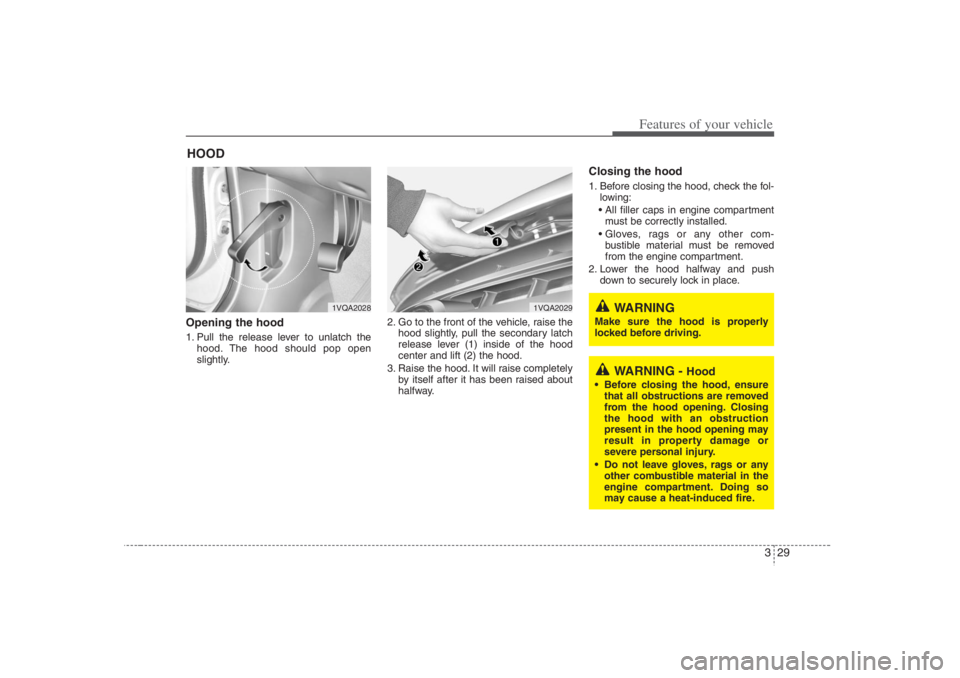
Opening the hood 1. Pull the release lever to unlatch the
hood. The hood should pop open
slightly.2. Go to the front of the vehicle, raise the
hood slightly, pull the secondary latch
release lever (1) inside of the hood
center and lift (2) the hood.
3. Raise the hood. It will raise completely
by itself after it has been raised about
halfway.
Closing the hood1. Before closing the hood, check the fol-
lowing:
All filler caps in engine compartment
must be correctly installed.
Gloves, rags or any other com-
bustible material must be removed
from the engine compartment.
2. Lower the hood halfway and push
down to securely lock in place.
HOOD
WARNING -
Hood
Before closing the hood, ensure
that all obstructions are removed
from the hood opening. Closing
the hood with an obstruction
present in the hood opening may
result in property damage or
severe personal injury.
Do not leave gloves, rags or any
other combustible material in the
engine compartment. Doing so
may cause a heat-induced fire.
1VQA2028
1VQA2029
WARNING
Make sure the hood is properly
locked before driving.
Page 46 of 398
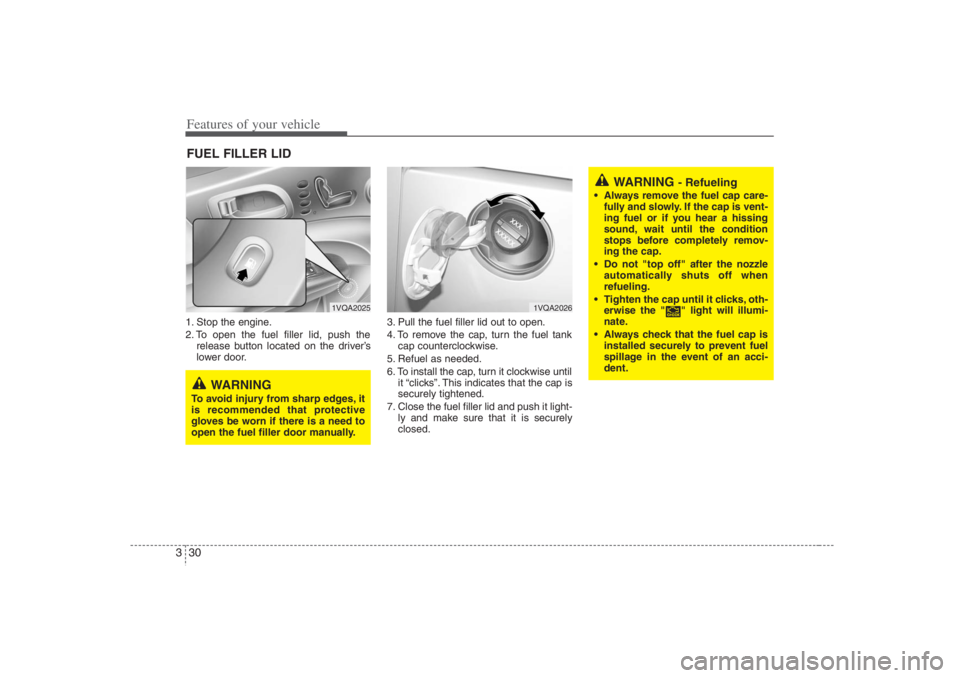
Features of your vehicle30 31. Stop the engine.
2. To open the fuel filler lid, push the
release button located on the driver’s
lower door.3. Pull the fuel filler lid out to open.
4. To remove the cap, turn the fuel tank
cap counterclockwise.
5. Refuel as needed.
6. To install the cap, turn it clockwise until
it “clicks”. This indicates that the cap is
securely tightened.
7. Close the fuel filler lid and push it light-
ly and make sure that it is securely
closed.FUEL FILLER LID
1VQA2025
1VQA2026
WARNING
To avoid injury from sharp edges, it
is recommended that protective
gloves be worn if there is a need to
open the fuel filler door manually.
WARNING
- Refueling
Always remove the fuel cap care-
fully and slowly. If the cap is vent-
ing fuel or if you hear a hissing
sound, wait until the condition
stops before completely remov-
ing the cap.
Do not "top off" after the nozzle
automatically shuts off when
refueling.
Tighten the cap until it clicks, oth-
erwise the " " light will illumi-
nate.
Always check that the fuel cap is
installed securely to prevent fuel
spillage in the event of an acci-
dent.
Page 47 of 398
331
Features of your vehicle
WARNING -
Refueling dan-
gers
Automotive fuels are flammable
materials. When refueling, please
note the following guidelines care-
fully. Failure to follow these guide-
lines may result in severe personal
injury, severe burns or death by fire
or explosion.
Before refueling note the location
of the Emergency Gasoline Shut-
Off, if available, at the gas station
facility.
Before touching the fuel nozzle,
you should eliminate potentially
dangerous static electricity dis-
charge by touching another metal
part of the vehicle, a safe distance
away from the fuel filler neck, noz-
zle, or other gas source.
(Continued)
(Continued)
Do not get back into a vehicle
once you have begun refueling
since you can generate static
electricity by touching, rubbing or
sliding against any item or fabric
(polyester, satin, nylon, etc.)
capable of producing static elec-
tricity. Static electricity discharge
can ignite fuel vapors resulting in
rapid burning. If you must re-
enter the vehicle, you should
once again eliminate potentially
dangerous static electricity dis-
charge by touching a metal part
of the vehicle, away from the fuel
filler neck, nozzle or other gaso-
line source.
When using an approved portable
fuel container be sure to place the
container on the ground prior to
refueling. Static electricity dis-
charge from the container can
ignite fuel vapors causing a fire.
Once refueling has begun, con-
tact with the vehicle should be
maintained until the filling is com-
plete.
(Continued)
(Continued)
Use only approved portable plas-
tic fuel containers designed to
carry and store gasoline.
Do not use cellular phones while
refueling. Electric current and/or
electronic interference from cellu-
lar phones can potentially ignite
fuel vapors causing a fire.
When refueling, always shut the
engine off. Sparks produced by
electrical components related to
the engine can ignite fuel vapors
causing a fire. Once refueling is
complete, check to make sure the
filler cap and filler door are
securely closed, before starting
the engine.
DO NOT use matches or a lighter
and DO NOT SMOKE or leave a lit
cigarette in your vehicle while at a
gas station especially during
refueling. Automotive fuel is high-
ly flammable and can, when ignit-
ed, result in fire.
(Continued)
Page 48 of 398
Features of your vehicle32 3
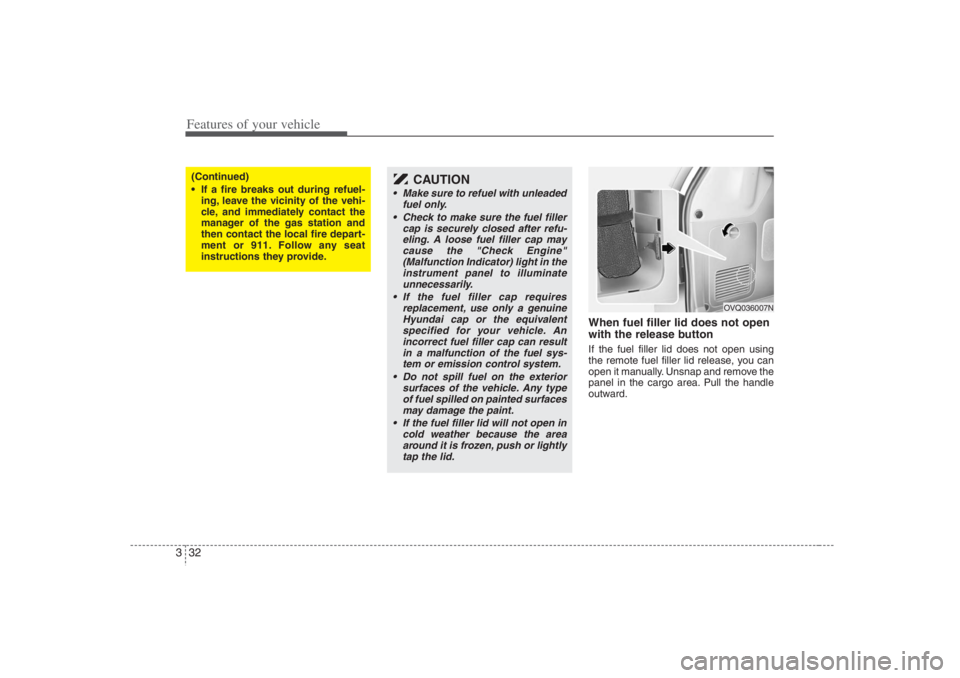
When fuel filler lid does not open
with the release buttonIf the fuel filler lid does not open using
the remote fuel filler lid release, you can
open it manually. Unsnap and remove the
panel in the cargo area. Pull the handle
outward.
(Continued)
If a fire breaks out during refuel-
ing, leave the vicinity of the vehi-
cle, and immediately contact the
manager of the gas station and
then contact the local fire depart-
ment or 911. Follow any seat
instructions they provide.
CAUTION
Make sure to refuel with unleaded
fuel only.
Check to make sure the fuel filler
cap is securely closed after refu-
eling. A loose fuel filler cap may
cause the "Check Engine"
(Malfunction Indicator) light in the
instrument panel to illuminate
unnecessarily.
If the fuel filler cap requires
replacement, use only a genuine
Hyundai cap or the equivalent
specified for your vehicle. An
incorrect fuel filler cap can result
in a malfunction of the fuel sys-
tem or emission control system.
Do not spill fuel on the exterior
surfaces of the vehicle. Any type
of fuel spilled on painted surfaces
may damage the paint.
If the fuel filler lid will not open in
cold weather because the area
around it is frozen, push or lightly
tap the lid.
OVQ036007N
Page 55 of 398
339
Features of your vehicle
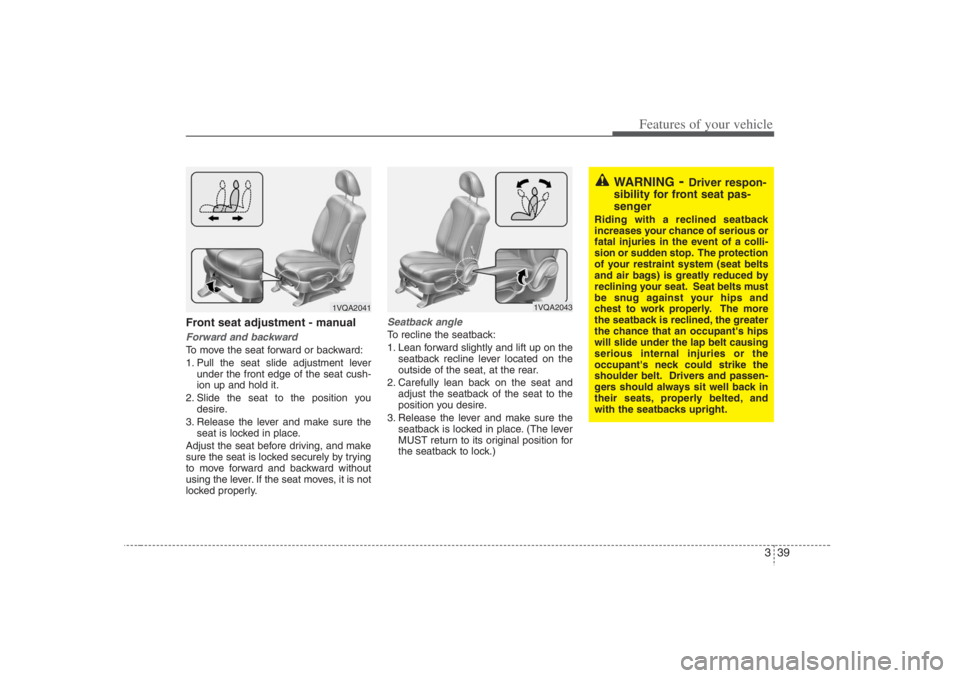
Front seat adjustment - manualForward and backwardTo move the seat forward or backward:
1. Pull the seat slide adjustment lever
under the front edge of the seat cush-
ion up and hold it.
2. Slide the seat to the position you
desire.
3. Release the lever and make sure the
seat is locked in place.
Adjust the seat before driving, and make
sure the seat is locked securely by trying
to move forward and backward without
using the lever. If the seat moves, it is not
locked properly.
Seatback angleTo recline the seatback:
1. Lean forward slightly and lift up on the
seatback recline lever located on the
outside of the seat, at the rear.
2. Carefully lean back on the seat and
adjust the seatback of the seat to the
position you desire.
3. Release the lever and make sure the
seatback is locked in place. (The lever
MUST return to its original position for
the seatback to lock.)
1VQA2041
1VQA2043
WARNING
- Driver respon-
sibility for front seat pas-
senger
Riding with a reclined seatback
increases your chance of serious or
fatal injuries in the event of a colli-
sion or sudden stop. The protection
of your restraint system (seat belts
and air bags) is greatly reduced by
reclining your seat. Seat belts must
be snug against your hips and
chest to work properly. The more
the seatback is reclined, the greater
the chance that an occupant's hips
will slide under the lap belt causing
serious internal injuries or the
occupant's neck could strike the
shoulder belt. Drivers and passen-
gers should always sit well back in
their seats, properly belted, and
with the seatbacks upright.
Page 62 of 398
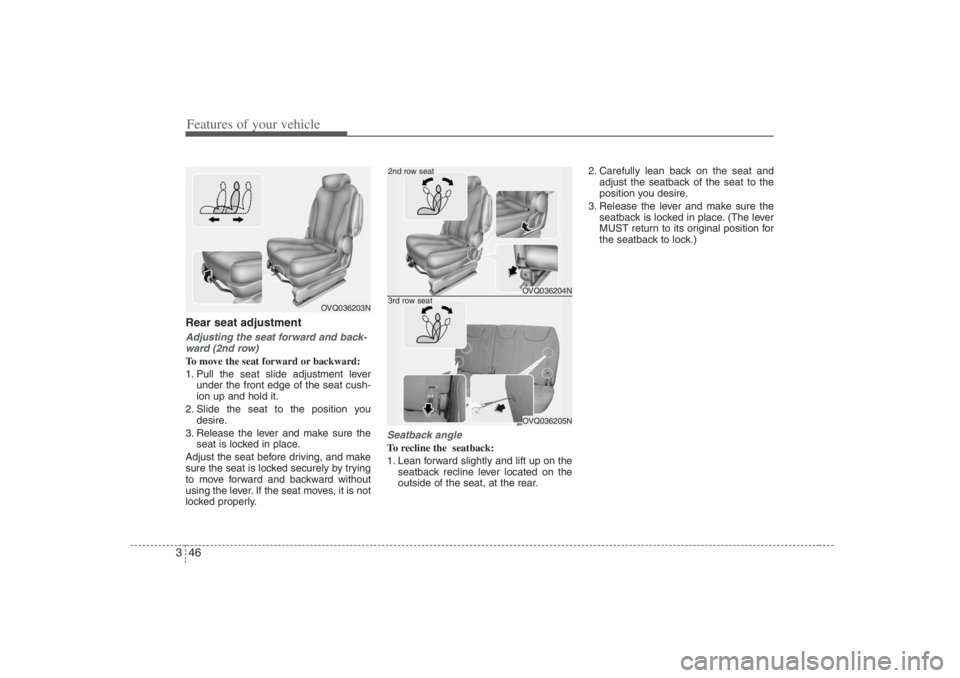
Features of your vehicle46 3Rear seat adjustmentAdjusting the seat forward and back-
ward (2nd row)To move the seat forward or backward:
1. Pull the seat slide adjustment lever
under the front edge of the seat cush-
ion up and hold it.
2. Slide the seat to the position you
desire.
3. Release the lever and make sure the
seat is locked in place.
Adjust the seat before driving, and make
sure the seat is locked securely by trying
to move forward and backward without
using the lever. If the seat moves, it is not
locked properly.
Seatback angleTo recline the seatback:
1. Lean forward slightly and lift up on the
seatback recline lever located on the
outside of the seat, at the rear.2. Carefully lean back on the seat and
adjust the seatback of the seat to the
position you desire.
3. Release the lever and make sure the
seatback is locked in place. (The lever
MUST return to its original position for
the seatback to lock.)
OVQ036203N
OVQ036204NOVQ036205N
2nd row seat3rd row seat
Page 68 of 398
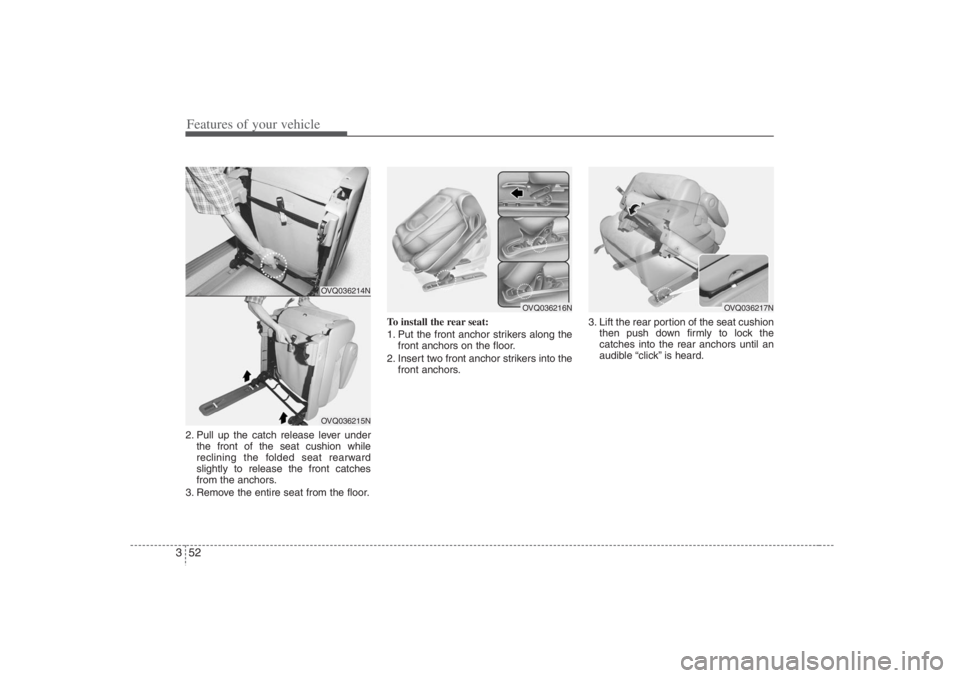
Features of your vehicle52 32. Pull up the catch release lever under
the front of the seat cushion while
reclining the folded seat rearward
slightly to release the front catches
from the anchors.
3. Remove the entire seat from the floor.To install the rear seat:
1. Put the front anchor strikers along the
front anchors on the floor.
2. Insert two front anchor strikers into the
front anchors.3. Lift the rear portion of the seat cushion
then push down firmly to lock the
catches into the rear anchors until an
audible “click” is heard.
OVQ036214NOVQ036215N
OVQ036216N
OVQ036217N
Page 73 of 398
357
Features of your vehicle
Recalling positions from memory1. Shift the transaxle lever into P while
the ignition switch is ON.
2. To recall the position in memory, press
the desired memory button (1 or 2).
The system will beep once, then the
driver seat, outside rearview mirror
and adjustable pedals will automatical-
ly adjust to the stored positions.
Adjusting one of the control knobs for the
driver seat, outside rearview mirror and
adjustable pedals while the system is
recalling the stored positions will cause
the movement for that component to stop
and move in the direction that the control
knob is moved. Other components will
continue position recalling.
Storing and recalling with trans-
mitterStoring with the transmitterRemove the key from the ignition switch
and lock all the doors using the transmit-
ter. The driver seat, outside rearview mir-
ror and adjustable pedal positions will be
stored in the system memory.Driver’s position recalling with trans-
mitterUnlock the door with the transmitter,
positions stored in the system memory
will be recalled automatically.✽ ✽
NOTICEThe buzzer sounds 10 times if there is a
malfunction of the memory system.
Have the driver position memory system
checked by an authorized Hyundai deal-
er.
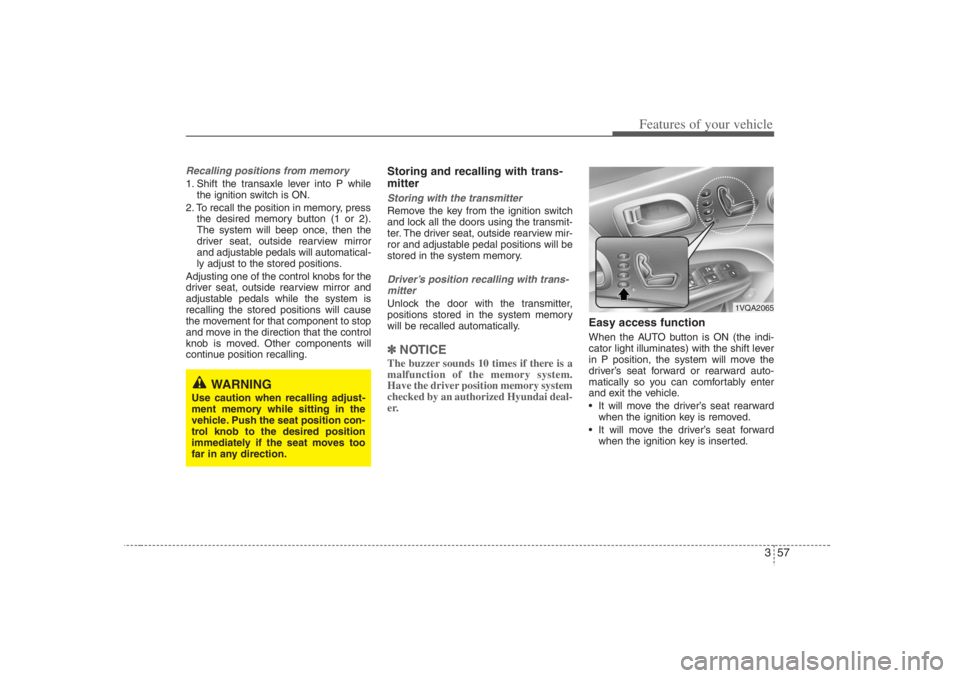
Easy access functionWhen the AUTO button is ON (the indi-
cator light illuminates) with the shift lever
in P position, the system will move the
driver’s seat forward or rearward auto-
matically so you can comfortably enter
and exit the vehicle.
It will move the driver’s seat rearward
when the ignition key is removed.
It will move the driver’s seat forward
when the ignition key is inserted.
WARNING
Use caution when recalling adjust-
ment memory while sitting in the
vehicle. Push the seat position con-
trol knob to the desired position
immediately if the seat moves too
far in any direction.
1VQA2065