Vic HYUNDAI ENTOURAGE 2007 Owner's Manual
[x] Cancel search | Manufacturer: HYUNDAI, Model Year: 2007, Model line: ENTOURAGE, Model: HYUNDAI ENTOURAGE 2007Pages: 398, PDF Size: 8.03 MB
Page 195 of 398
3 179
Features of your vehicle
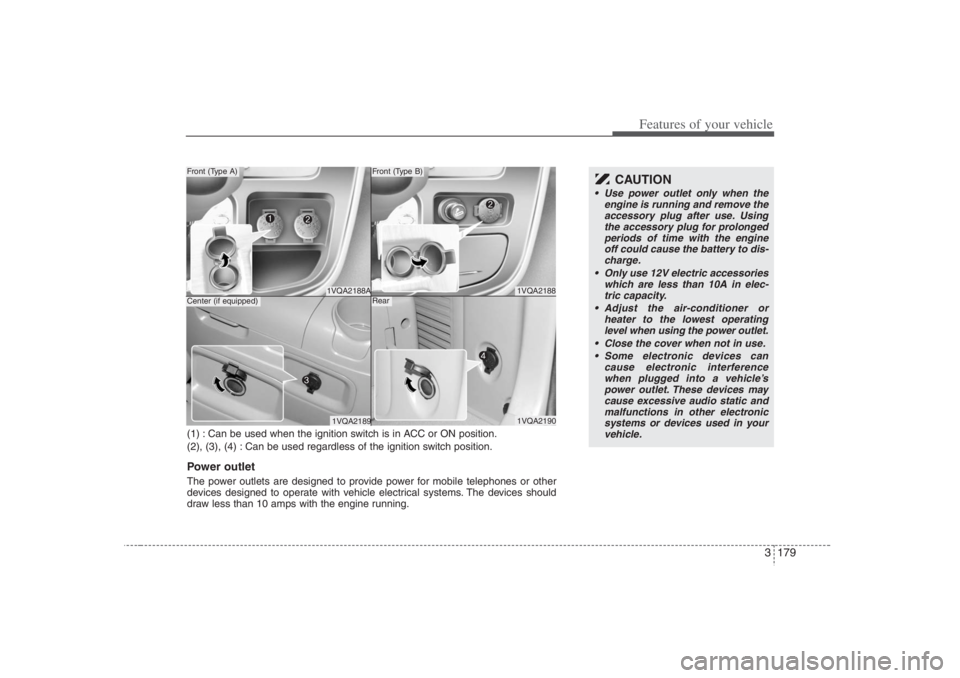
1VQA21881VQA2190
Front (Type B)Rear
1VQA2188A1VQA2189
Front (Type A)Center (if equipped)
CAUTION
Use power outlet only when the
engine is running and remove the
accessory plug after use. Using
the accessory plug for prolonged
periods of time with the engine
off could cause the battery to dis-
charge.
Only use 12V electric accessories
which are less than 10A in elec-
tric capacity.
Adjust the air-conditioner or
heater to the lowest operating
level when using the power outlet.
Close the cover when not in use.
Some electronic devices can
cause electronic interference
when plugged into a vehicle’s
power outlet. These devices may
cause excessive audio static and
malfunctions in other electronic
systems or devices used in your
vehicle.
(1) : Can be used when the ignition switch is in ACC or ON position.
(2), (3), (4) : Can be used regardless of the ignition switch position.Power outletThe power outlets are designed to provide power for mobile telephones or other
devices designed to operate with vehicle electrical systems. The devices should
draw less than 10 amps with the engine running.
Page 200 of 398
Features of your vehicle184 3Care of cassette tapes
(if equipped) Because the thickness of a cassette
tape with the total playback time of
over 60 minutes (C-60) are too thin, we
suggest that you do not use any of
them to avoid having tapes being tan-
gled.
To achieve better sound quality, period-
ically clean the tape head using a cot-
ton stick with colorless alcohol (once
per month).
If a tape is too loose, fasten it to reel by
winding with objects like a pencil.
Because dust or foreign objects on a
cassette tape may damage the play-
back head, always store tapes in their
cases when not in use.
Make sure cassette tapes are kept
away from magnetic devices (TV,
stereo system, etc) in order to achieve
better sound quality.
Be certain that no objects or substances
other than cassette tapes are inserted
into the cassette tape player. Because tape media can be distorted
when exposed to direct sunlight, Do
not leave cassette tapes on the seats,
dashboard or near the back wind-
shield.
Care of disc (if equipped) If the temperature inside the car is too
high, open the car windows for ventilation
before using your car audio.
It is illegal to copy and use
MP3/WMA/AAC/WAVE files without
permission(If equipped with M465, use
only MP3/WMA, If equipped with M445,
use only CD-DA). Use CDs that are cre-
ated only by lawful means.
Do not apply volatile agents such as
benzene and thinner, normal cleaners
and magnetic sprays made for ana-
logue disc onto CDs.
To prevent the disc surface from get-
ting damaged. Hold and carry CDs by
the edges or the edges of the center
hole only.
Clean the disc surface with a piece of soft
cloth before playback (wipe it from the
center to the outside edge).
Do not damage the disc surface or
attach pieces of sticky tape or paper
onto it.
Make sure nothing other than CDs are
inserted into the CD player (Do not
insert more than one CD at a time).
Keep CDs in their cases after use to
protect them from scratches or dirt. Depending on the type of CD-R/CD-
RW CDs, certain CDs may not operate
normally according to manufacturing
companies or making and recording
methods. In such circumstances, if you
still continue to use those CDs, they
may cause a malfunction of your audio
system.
✽ ✽
NOTICE
- Playing an
Incompatible Copy-Protected
Audio CD
Some copy-protected CDs, which do not
comply with international audio CD
standards, may not play on your car
audio. Please note that if you try to play
copy protected CDs and the CD player
of your car audio is not performing to
your expectation, this may be caused by
those CDs and not a defect in the device
itself.
Page 231 of 398
3215
Features of your vehicle
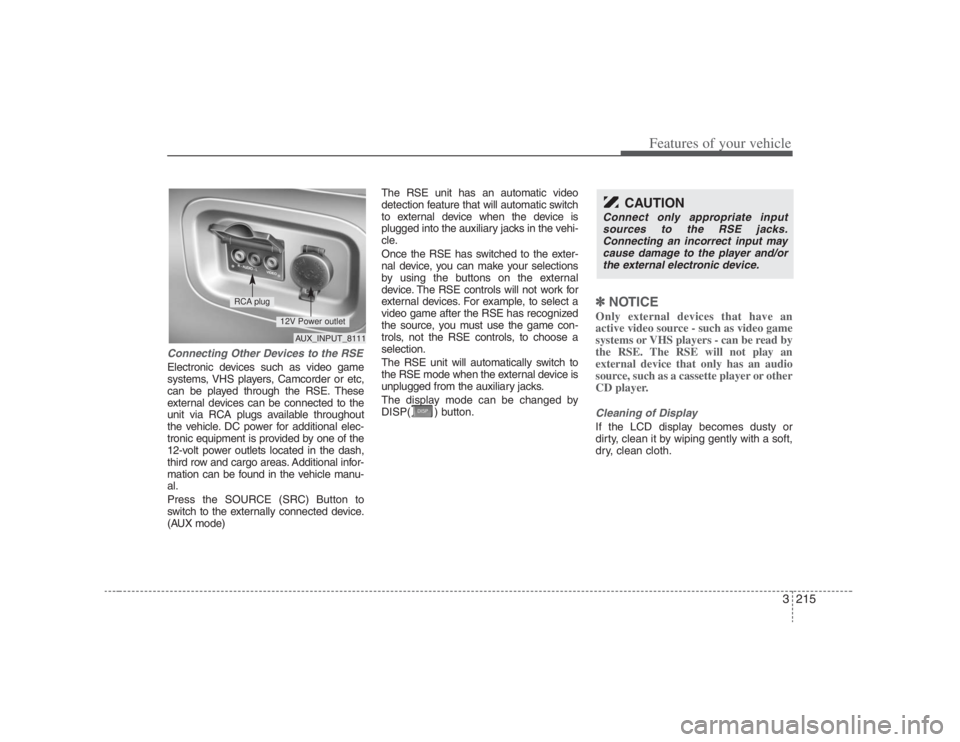
Connecting Other Devices to the RSEElectronic devices such as video game
systems, VHS players, Camcorder or etc,
can be played through the RSE. These
external devices can be connected to the
unit via RCA plugs available throughout
the vehicle. DC power for additional elec-
tronic equipment is provided by one of the
12-volt power outlets located in the dash,
third row and cargo areas. Additional infor-
mation can be found in the vehicle manu-
al.
Press the SOURCE (SRC) Button to
switch to the externally connected device.
(AUX mode)The RSE unit has an automatic video
detection feature that will automatic switch
to external device when the device is
plugged into the auxiliary jacks in the vehi-
cle.
Once the RSE has switched to the exter-
nal device, you can make your selections
by using the buttons on the external
device. The RSE controls will not work for
external devices. For example, to select a
video game after the RSE has recognized
the source, you must use the game con-
trols, not the RSE controls, to choose a
selection.
The RSE unit will automatically switch to
the RSE mode when the external device is
unplugged from the auxiliary jacks.
The display mode can be changed by
DISP( ) button.
✽ ✽
NOTICEOnly external devices that have an
active video source - such as video game
systems or VHS players - can be read by
the RSE. The RSE will not play an
external device that only has an audio
source, such as a cassette player or other
CD player.Cleaning of DisplayIf the LCD display becomes dusty or
dirty, clean it by wiping gently with a soft,
dry, clean cloth.
CAUTION
Connect only appropriate input
sources to the RSE jacks.
Connecting an incorrect input may
cause damage to the player and/or
the external electronic device.
AUX_INPUT_8111
RCA plug
12V Power outlet
Page 236 of 398
Features of your vehicle220 3When viewing a menu, pressing the
MENU button again will automatically
return to the movie at the point it was
being viewed. You can also select “play” or
any other option by using the NEXT,
PREV, FWD and REV buttons.
Press the NEXT button to move the cursor
up and the PREV button to move the cur-
sor down the menu.
Press the FWD button to move the cursor
to the right, and the REV button to move
the cursor to the left.✽ ✽
NOTICEYou must repeatedly push any button to
move through several items. Pressing
and holding any button will not advance
the cursor beyond the position just
moved. Press ENTER to select the desired menu
choice.11. SourcePress the SOURCE button to switch from
the RSE’s internal DVD player to an
external device such as a VCR or video
game. The sound and images from the
external source will be presented
through the RSE.Pressing the SRC button will switch
between the following RSE states:
Playback state - will play DVDs, VCDs, and
CDs
Auxiliary (AUX) state - will play video
games and other external devices
When an external source is selected, the
RSE’s internal DVD player turns off.
Press the SRC button to switch back
from the external source to the internal
DVD player.
If a disc is present in the DVD player, the
disc will begin to play. If another source
has been detected, such as a VCR or
video game, the RSE will enter the AUX
mode automatically and shall remain so
until a disc is inserted or until the PLAY/
SRC button is pressed on the RSE's front
panel or on the remote control. If the
vehicle ignition is on but the player isn't
being used, the display will power off.
The DVD mechanism will be in sleep
mode, but the main RSE's controller will
stay up to accept commands from the
front panel controls or the remote control.
✽ ✽
NOTICEThe external device must be correctly
connected to the RSE in order to play
properly.
Using the CD PlayerThe RSE will play audio CDs in both the
standard (12 cm) and mini-disc (8 cm)
format.✽ ✽
NOTICEWhile the player will accept DVD
ROMs and CD ROMs discs, the RSE
cannot play discs in these formats and
will eject them.With power applied to your unit, insert
the disc part way into the load slot. The
player will automatically grip the CD disc,
pull it the rest of the way in and begin
playing.CD ControlsThe following functions are available
when playing audio CDs.
Page 243 of 398
3227
Features of your vehicle
✽ ✽
NOTICEYou must repeatedly push any button to
move through several items. Pressing
and holding any button will not advance
the cursor beyond the position just
moved. Press ENTER to select the desired menu
choice.11. SourcePress the SOURCE button to switch from
the RSE’s internal DVD player to an
external device such as a VCR or video
game. The sound and images from the
external source will be presented
through the RSE.
Pressing the SRC button will switch
between the following RSE states:
Playback state - will play DVDs, VCDs, and
CDs
Auxiliary (AUX) state - will play video
games and other external devices When an external source is selected, the
RSE’s internal DVD player turns off.
Press the SRC button to switch back
from the external source to the internal
DVD player.
If a disc is present in the DVD player, the
disc will begin to play. If another source
has been detected, such as a VCR or
video game, the RSE will enter the AUX
mode automatically and shall remain so
until a disc is inserted or until the PLAY/
SRC button is pressed on the RSE’s front
panel or on the remote control. If the
vehicle ignition is on but the player isn't
being used, the display will power off.
The DVD mechanism will be in sleep
mode, but the main RSE's controller will
stay up to accept commands from the
front panel controls or the remote control.
✽ ✽
NOTICEThe external device must be correctly
connected to the RSE in order to play
properly.
12. AngleSome DVDs offer different scene angles.
If available on the DVD, the ANGLE but-
ton will show you the other available
scene angles. If angle scenes are not
available, then “Invalid icon[:
]” will be
displayed. Pressing the ANGLE button
during CD play will do nothing.13. SubscriptThe SUBSC button allows you to display
or remove language subtitles. If no lan-
guage subtitles are available, the display
will show an invalid icon[:
]. Pressing the
SUBSC button during CD play will do
nothing.14. LanguagePressing the LANG button will allow you
to select your preferred language, if avail-
able. Select the language and then press
enter. If no other languages are available,
the display will show an invalid icon[:
].
Pressing the LANG button during CD
play will do nothing.
Page 246 of 398
Features of your vehicle230 3Troubleshooting
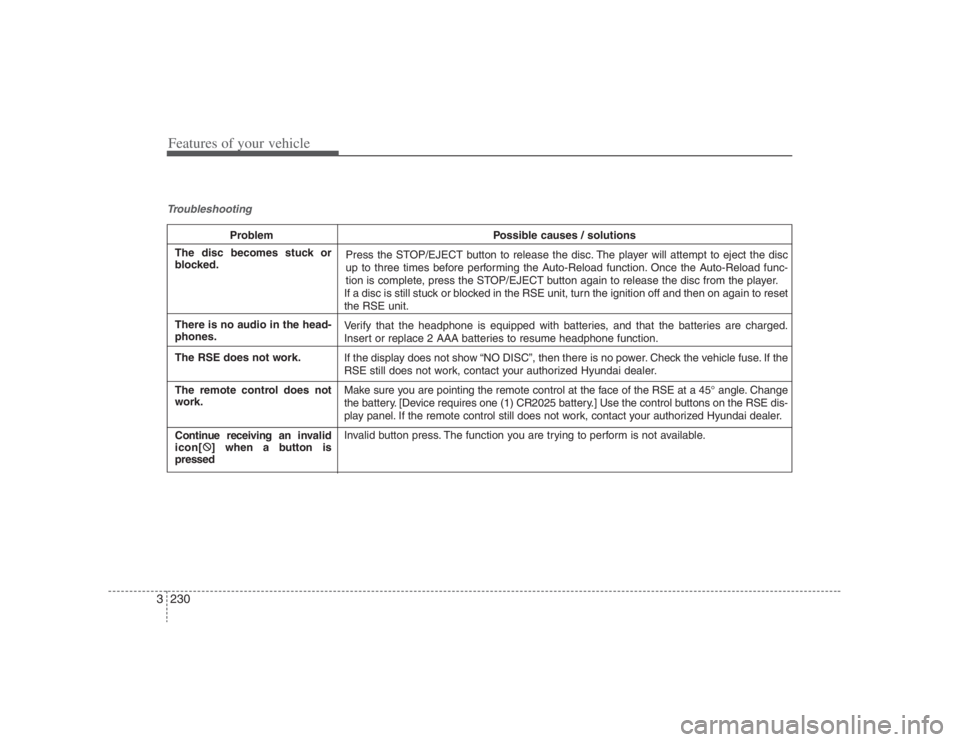
Problem Possible causes / solutions
Press the STOP/EJECT button to release the disc. The player will attempt to eject the disc
up to three times before performing the Auto-Reload function. Once the Auto-Reload func-
tion is complete, press the STOP/EJECT button again to release the disc from the player.
If a disc is still stuck or blocked in the RSE unit, turn the ignition off and then on again to reset
the RSE unit.
Verify that the headphone is equipped with batteries, and that the batteries are charged.
Insert or replace 2 AAA batteries to resume headphone function.
If the display does not show “NO DISC”, then there is no power. Check the vehicle fuse. If the
RSE still does not work, contact your authorized Hyundai dealer.
Make sure you are pointing the remote control at the face of the RSE at a 45° angle. Change
the battery. [Device requires one (1) CR2025 battery.] Use the control buttons on the RSE dis-
play panel. If the remote control still does not work, contact your authorized Hyundai dealer.
Invalid button press. The function you are trying to perform is not available.
The disc becomes stuck or
blocked.
There is no audio in the head-
phones.
The RSE does not work.
The remote control does not
work.
Continue receiving an invalid
icon[:
] when a button is
pressed
Page 255 of 398
49
Driving your vehicle
Transaxle rangesP (park)Always come to a complete stop before
shifting into P (Park). This position locks
the transaxle and prevents the front
wheels from rotating.
R (reverse)Use this position to drive the vehicle
backward.N (neutral)The wheels and transaxle are not locked.
The vehicle will roll freely even on the
slightest incline unless the parking brake
or service brakes are applied.D (drive)This is the normal forward driving posi-
tion. The transaxle will automatically shift
through a 5-gear sequence, providing the
best fuel economy and power.
For extra power when passing another
vehicle or climbing grades, depress the
accelerator fully, at which time the
transaxle will automatically downshift to
the next lower gear.
(Continued)
Before leaving the driver’s seat,
always make sure the shift lever
is in the P (PARK) position. Set
the parking brake fully, shut the
engine off and take the key with
you. Unexpected and sudden
vehicle movement can occur if
you do not follow these precau-
tions in the order specified.
Never leave a child unattended in
a vehicle.
WARNING
Shifting into P (Park) while the
vehicle is in motion will cause the
drive wheels to lock which will
cause you to lose control of the
vehicle.
Do not use the P (Park) position
in place of the parking brake.
Always make sure the shift lever
is latched in the P (Park) position
so that it cannot be moved unless
the lock release button is pushed
in, AND set the parking brake
fully.
(Continued)
CAUTION
The transaxle may be damaged if
you shift into P (Park) while the
vehicle is in motion.
CAUTION
Always come to a complete stop
before shifting into or out of R
(Reverse); you may damage the
transaxle if you shift into R while
the vehicle is in motion, except as
explained in “Rocking the Vehicle”,
in this manual.
Page 257 of 398
411
Driving your vehicle
Moving up a steep grade from a
standing startTo move up a steep grade from a stand-
ing start, depress the brake pedal, shift
the shift lever to D (Drive). Select the
appropriate gear depending on load
weight and steepness of the grade, and
release the parking brake. Depress the
accelerator gradually while releasing the
service brakes.
When accelerating from a stop on a
steep hill, the vehicle may have a ten-
dency to roll backwards. Shifting the
shift lever into 2 (Second Gear) while
in Sports mode will help prevent the
vehicle from rolling backwards.
Good driving practices Never move the gear selector lever
from "P" or "N" to any other position
with the accelerator pedal depressed.
Never move the gear selector lever into
"P" when the vehicle is in motion.
Be sure the car is completely stopped
before you attempt to shift into "R".
Never take the car out of gear and
coast down a hill. This may be
extremely hazardous. Always leave the
car in gear when moving.
Do not "ride" the brakes. This can
cause them to overheat and malfunc-
tion. Instead, when you are driving
down a long hill, slow down and shift to
a lower gear. When you do this, engine
braking will help slow the car.
Slow down before shifting to a lower
gear. Otherwise, the lower gear may
not be engaged.
Always use the parking brake. Do not
depend on placing the transaxle in "P"
to keep the car from moving.
Exercise extreme caution when driving
on a slippery surface. Be especially
careful when braking, accelerating or
shifting gears. On a slippery surface,
an abrupt change in vehicle speed can
cause the drive wheels to lose traction
and the vehicle to go out of control. Optimum vehicle performance and
economy is obtained by smoothly
depressing and releasing the accelera-
tor pedal.
WARNING
Always buckle-up! In a collision,
an unbelted occupant is signifi-
cantly more likely to be seriously
injured or killed than a properly
belted occupant.
Avoid high speeds when corner-
ing or turning.
Do not make quick steering wheel
movements, such as sharp lane
changes or fast, sharp turns.
The risk of rollover is greatly
increased if you lose control of
your vehicle at highway speeds.
Loss of control often occurs if
two or more wheels drop off the
roadway and the driver over-
steers to reenter the roadway.
In the event your vehicle leaves
the roadway, do not steer sharply.
Instead, slow down before pulling
back into the travel lanes.
Never exceed posted speed lim-
its.
Page 263 of 398
417
Driving your vehicle
Power brakes Your vehicle has power-assisted brakes
that adjust automatically through normal
usage.
In the event that the power-assisted
brakes lose power because of a stalled
engine or some other reason, you can
still stop your vehicle by applying greater
force to the brake pedal than you nor-
mally would. The stopping distance, how-
ever, will be longer.
When the engine is not running, the
reserve brake power is partially depleted
each time the brake pedal is applied. Do
not pump the brake pedal when the
power assist has been interrupted.
Pump the brake pedal only when neces-
sary to maintain steering control on slip-
pery surfaces.
In the event of brake failure If service brakes fail to operate while the
vehicle is in motion, you can make an
emergency stop with the parking brake.
The stopping distance, however, will be
much greater than normal.
BRAKE SYSTEM
(Continued)
When descending a long or steep
hill, shift to a lower gear and
avoid continuous application of
the brakes. Continuous brake
application will cause the brakes
to overheat and could result in a
temporary loss of braking per-
formance.
Wet brakes may result in the vehi-
cle not slowing down at the usual
rate and pulling to one side when
the brakes are applied. Applying
the brakes lightly will indicate
whether they have been affected
in this way. Always test your
brakes in this fashion after driv-
ing through deep water. To dry the
brakes, apply them lightly while
maintaining a safe forward speed
until brake performance returns
to normal.
WARNING
- Parking brake
Applying the parking brake while
the vehicle is moving at normal
speeds can cause a sudden loss of
control of the vehicle. If you must
use the parking brake to stop the
vehicle, use great caution in apply-
ing the brake.
WARNING -
Brakes
Do not drive with your foot rest-
ing on the brake pedal. This will
create abnormal high brake tem-
peratures, excessive brake lining
and pad wear, and increased
stopping distances.
(Continued)
Page 264 of 398
Driving your vehicle18 4Disc brakes wear indicator Your vehicle has disc brakes.
When your brake pads are worn and new
pads are required, you will hear a high-
pitched warning sound from your front
brakes or rear brakes (if equipped). You
may hear this sound come and go or it
may occur whenever you depress the
brake pedal.
Please remember that some driving con-
ditions or climates may cause a brake
squeal when you first apply (or lightly
apply) the brakes. This is normal and
does not indicate a problem with your
brakes.
Parking on curbed streets When parking your vehicle on an uphill
grade, park as close to the curb as
possible and turn the front wheels
away from the curb so that the front
wheels will contact the curb if the vehi-
cle moves backward.
When parking your vehicle on a down-
hill grade, park as close to the curb as
possible and turn the front wheels
toward the curb so that the front
wheels will contact the curb if the vehi-
cle moves forward.
WARNING
- Brake wear
This brake wear warning sound
means your vehicle needs service.
If you ignore this audible warning,
you will eventually lose braking per-
formance, which could lead to a
serious accident.
CAUTION
Always replace brake pads as com-
plete front or rear axle sets.
CAUTION
To avoid costly brake repairs, do
not continue to drive with worn
brake pads.