blade HYUNDAI ENTOURAGE 2007 Owners Manual
[x] Cancel search | Manufacturer: HYUNDAI, Model Year: 2007, Model line: ENTOURAGE, Model: HYUNDAI ENTOURAGE 2007Pages: 398, PDF Size: 8.03 MB
Page 149 of 398
3 133
Features of your vehicle
LO : Normal wiper speed
HI : Fast wiper speed
MIST: For a single wiping cycle, push the
lever upward and release it with
the lever in the OFF position. The
wipers will operate continuously if
the lever is pushed upward and
held.✽ ✽
NOTICEIf there is heavy accumulation of snow
or ice on the windshield, defrost the
windshield for about 10 minutes, or
until the snow and/or ice is removed
before using the windshield wipers to
ensure proper operation.
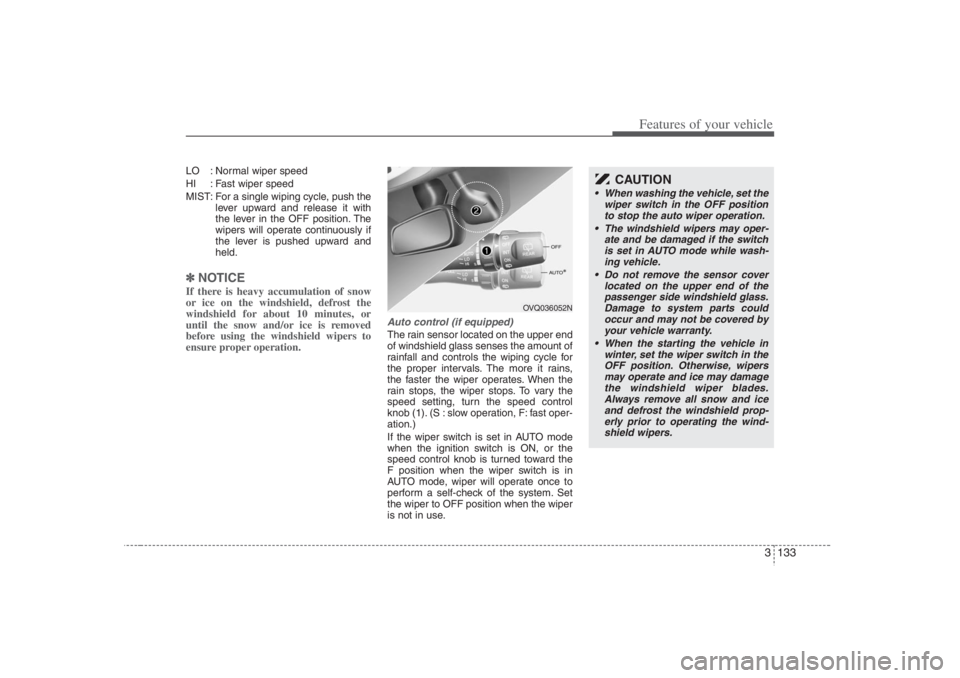
Auto control (if equipped)The rain sensor located on the upper end
of windshield glass senses the amount of
rainfall and controls the wiping cycle for
the proper intervals. The more it rains,
the faster the wiper operates. When the
rain stops, the wiper stops. To vary the
speed setting, turn the speed control
knob (1). (S : slow operation, F: fast oper-
ation.)
If the wiper switch is set in AUTO mode
when the ignition switch is ON, or the
speed control knob is turned toward the
F position when the wiper switch is in
AUTO mode, wiper will operate once to
perform a self-check of the system. Set
the wiper to OFF position when the wiper
is not in use.
OVQ036052N
CAUTION
When washing the vehicle, set the
wiper switch in the OFF position
to stop the auto wiper operation.
The windshield wipers may oper-
ate and be damaged if the switch
is set in AUTO mode while wash-
ing vehicle.
Do not remove the sensor cover
located on the upper end of the
passenger side windshield glass.
Damage to system parts could
occur and may not be covered by
your vehicle warranty.
When the starting the vehicle in
winter, set the wiper switch in the
OFF position. Otherwise, wipers
may operate and ice may damage
the windshield wiper blades.
Always remove all snow and ice
and defrost the windshield prop-
erly prior to operating the wind-
shield wipers.
Page 150 of 398
Features of your vehicle134 3
Variable intermittent wipersSet the lever to the INT/AUTO position
and choose the desired wiper interval by
turning the ring.One - touch wiper For a single wiping cycle, push the lever
upward and release it with the lever in the
OFF position.
The wipers will operate continuously if
the lever is pushed upward and held.
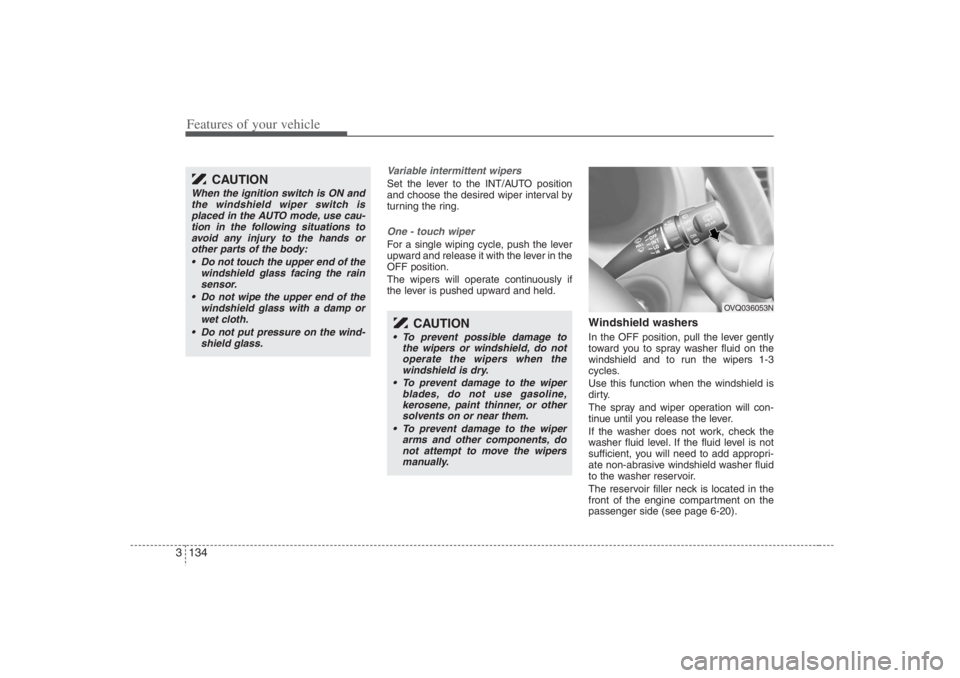
Windshield washers In the OFF position, pull the lever gently
toward you to spray washer fluid on the
windshield and to run the wipers 1-3
cycles.
Use this function when the windshield is
dirty.
The spray and wiper operation will con-
tinue until you release the lever.
If the washer does not work, check the
washer fluid level. If the fluid level is not
sufficient, you will need to add appropri-
ate non-abrasive windshield washer fluid
to the washer reservoir.
The reservoir filler neck is located in the
front of the engine compartment on the
passenger side (see page 6-20).
CAUTION
When the ignition switch is ON and
the windshield wiper switch is
placed in the AUTO mode, use cau-
tion in the following situations to
avoid any injury to the hands or
other parts of the body:
Do not touch the upper end of the
windshield glass facing the rain
sensor.
Do not wipe the upper end of the
windshield glass with a damp or
wet cloth.
Do not put pressure on the wind-
shield glass.
CAUTION
To prevent possible damage to
the wipers or windshield, do not
operate the wipers when the
windshield is dry.
To prevent damage to the wiper
blades, do not use gasoline,
kerosene, paint thinner, or other
solvents on or near them.
To prevent damage to the wiper
arms and other components, do
not attempt to move the wipers
manually.
OVQ036053N
Page 162 of 398
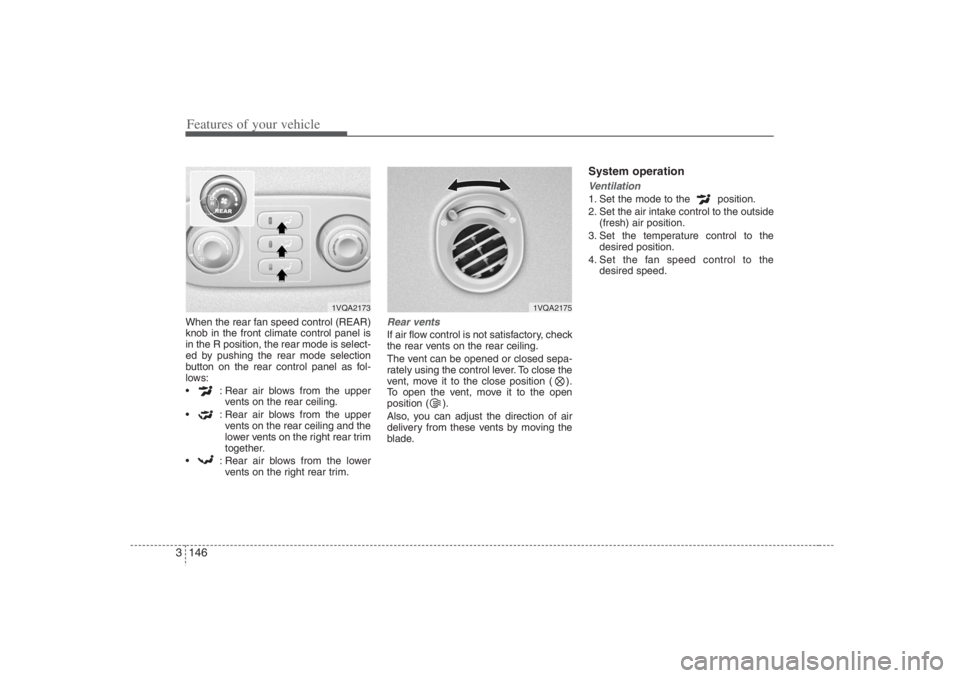
Features of your vehicle146 3When the rear fan speed control (REAR)
knob in the front climate control panel is
in the R position, the rear mode is select-
ed by pushing the rear mode selection
button on the rear control panel as fol-
lows:
: Rear air blows from the upper
vents on the rear ceiling.
: Rear air blows from the upper
vents on the rear ceiling and the
lower vents on the right rear trim
together.
: Rear air blows from the lower
vents on the right rear trim.
Rear ventsIf air flow control is not satisfactory, check
the rear vents on the rear ceiling.
The vent can be opened or closed sepa-
rately using the control lever. To close the
vent, move it to the close position ( ).
To open the vent, move it to the open
position ( ).
Also, you can adjust the direction of air
delivery from these vents by moving the
blade.
System operationVentilation1. Set the mode to the position.
2. Set the air intake control to the outside
(fresh) air position.
3. Set the temperature control to the
desired position.
4. Set the fan speed control to the
desired speed.
1VQA2173
1VQA2175
Page 175 of 398
3 159
Features of your vehicle
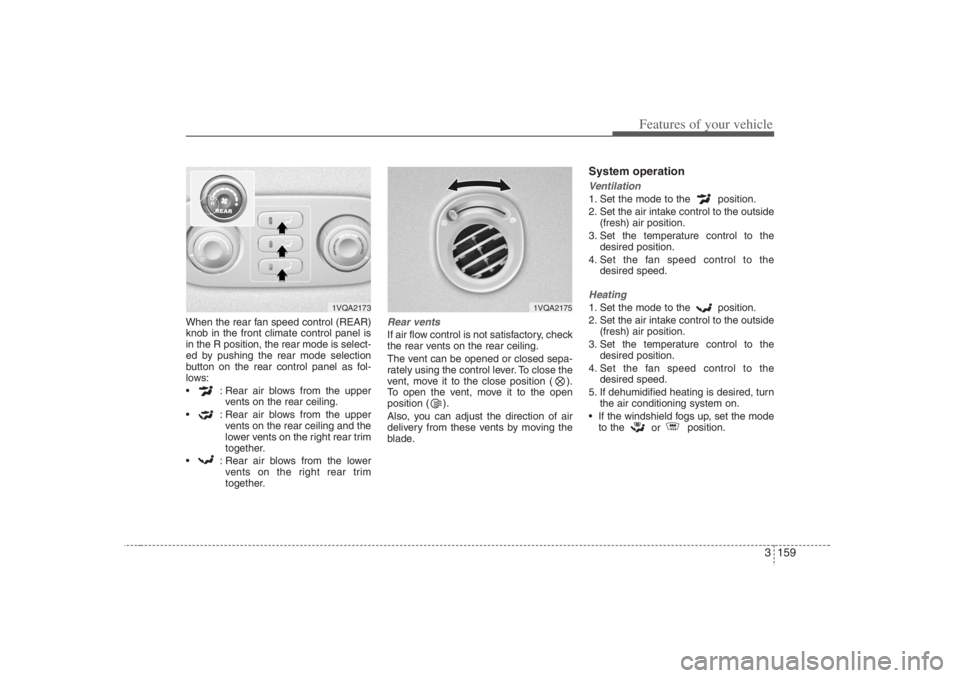
When the rear fan speed control (REAR)
knob in the front climate control panel is
in the R position, the rear mode is select-
ed by pushing the rear mode selection
button on the rear control panel as fol-
lows:
: Rear air blows from the upper
vents on the rear ceiling.
: Rear air blows from the upper
vents on the rear ceiling and the
lower vents on the right rear trim
together.
: Rear air blows from the lower
vents on the right rear trim
together.
Rear ventsIf air flow control is not satisfactory, check
the rear vents on the rear ceiling.
The vent can be opened or closed sepa-
rately using the control lever. To close the
vent, move it to the close position ( ).
To open the vent, move it to the open
position ( ).
Also, you can adjust the direction of air
delivery from these vents by moving the
blade.
System operationVentilation1. Set the mode to the position.
2. Set the air intake control to the outside
(fresh) air position.
3. Set the temperature control to the
desired position.
4. Set the fan speed control to the
desired speed.Heating1. Set the mode to the position.
2. Set the air intake control to the outside
(fresh) air position.
3. Set the temperature control to the
desired position.
4. Set the fan speed control to the
desired speed.
5. If dehumidified heating is desired, turn
the air conditioning system on.
If the windshield fogs up, set the mode
to the
or position.
1VQA2173
1VQA2175
Page 277 of 398
431
Driving your vehicle
Driving at night Because night driving presents more
hazards than driving in the daylight, here
are some important tips to remember:
Slow down and keep more distance
between you and other vehicles, as it
may be more difficult to see at night,
especially in areas where there may
not be any street lights.
Adjust your mirrors to reduce the glare
from other driver's headlights.
Keep your headlights clean and prop-
erly aimed on vehicles not equipped
with the automatic headlight aiming
feature. Dirty or improperly aimed
headlights will make it much more diffi-
cult to see at night.
Avoid staring directly at the headlights
of oncoming vehicles. You could be
temporarily blinded, and it will take
several seconds for your eyes to read-
just to the darkness.
Driving in the rain Rain and wet roads can make driving
dangerous, especially if you’re not pre-
pared for the slick pavement. Here are a
few things to consider when driving in the
rain:
A heavy rainfall will make it harder to
see and will increase the distance
needed to stop your vehicle, so slow
down.
Keep your windshield wiping equip-
ment in good shape. Replace your
windshield wiper blades when they
show signs of streaking or missing
areas on the windshield.
If your tires are not in good condition,
making a quick stop on wet pavement
can cause a skid and possibly lead to
an accident. Be sure your tires are in
good shape.
Turn on your headlights to make it eas-
ier for others to see you.
Driving too fast through large puddles
can affect your brakes. If you must go
through puddles, try to drive through
them slowly.
If you believe you may have gotten
your brakes wet, apply them lightly
while driving until normal braking oper-
ation returns.
Driving in flooded areas Avoid driving through flooded areas
unless you are sure the water is no high-
er than the bottom of the wheel hub.
Drive through any water slowly. Allow
adequate stopping distance because
brake performance may be affected.
After driving through water, dry the
brakes by gently applying them several
times while the vehicle is moving slowly.
Page 315 of 398
6
Maintenance services / 6-2
Scheduled maintenance service / 6-2
Explanation of scheduled maintenance items / 6-7
Owner maintenance / 6-9
Engine compartment / 6-11
Engine oil / 6-12
Engine coolant / 6-13
Air cleaner / 6-15
Automatic transaxle / 6-17
Brakes / 6-19
Lubricants and fluids / 6-20
Power steering / 6-21
Climate control air filter / 6-22
Wiper blades / 6-24
Fuses / 6-26
Battery / 6-35
Tires and wheels / 6-37
Light bulbs replacement / 6-51
Lubricant / 6-59
Corrosion protection / 6-61
Appearance care / 6-63
Emission control system / 6-66
Maintenance
Page 323 of 398
69
Maintenance
OWNER MAINTENANCE Owner maintenance schedule The following lists are vehicle checks and
inspections that should be performed by
the owner or an Authorized Hyundai
Dealer at the frequencies indicated to
help ensure safe, dependable operation
of your vehicle.
Any adverse conditions should be
brought to the attention of your dealer as
soon as possible.
These Owner Maintenance Checks are
generally not covered by warranties and
you may be charged for labor, parts and
lubricants used.When you stop for fuel: Check the engine oil level.
Check coolant level in coolant reser-
voir.
Check the windshield washer fluid
level.
Look for low or under-inflated tires.
While operating your vehicle: Note any changes in the sound of the
exhaust or any smell of exhaust fumes
in the vehicle.
Check for vibrations in the steering
wheel. Notice any increased steering
effort or looseness in the steering
wheel, or change in its straight-ahead
position.
Notice if your vehicle constantly turns
slightly or “pulls” to one side when trav-
eling on smooth, level roads.
When stopping, listen and check for
unusual sounds, pulling to one side,
increased brake pedal travel or “hard-
to-push” brake pedal.
If any slipping or changes in the oper-
ation of your transaxle occurs, check
the transaxle fluid level.
Check automatic transaxle P (Park)
function.
Check parking brake.
Check for fluid leaks under your vehicle
(water dripping from the air condition-
ing system during or after use is nor-
mal).
At least monthly: Check coolant level in the coolant
recovery reservoir.
Check the operation of all exterior
lights, including the stoplights, turn sig-
nals and hazard warning flashers.
Check the inflation pressures of all
tires including the spare.At least twice a year
(i.e., every Spring and Fall): Check radiator, heater and air condi-
tioning hoses for leaks or damage.
Check windshield washer spray and
wiper operation. Clean wiper blades
with clean cloth dampened with wash-
er fluid.
Check headlight alignment.
Check muffler, exhaust pipes, shields
and clamps.
Check the lap/shoulder belts for wear
and function.
Check for worn tires and loose wheel
lug nuts.
WARNING
Be careful when checking your
engine coolant level when the
engine is hot. Scalding hot coolant
and steam may blow out under
pressure. This could cause burns or
other serious injury.
Page 338 of 398
Maintenance24 6WIPER BLADES Maintenance Commercial hot waxes applied by
automatic car washes have been
known to make the windshield diffi-
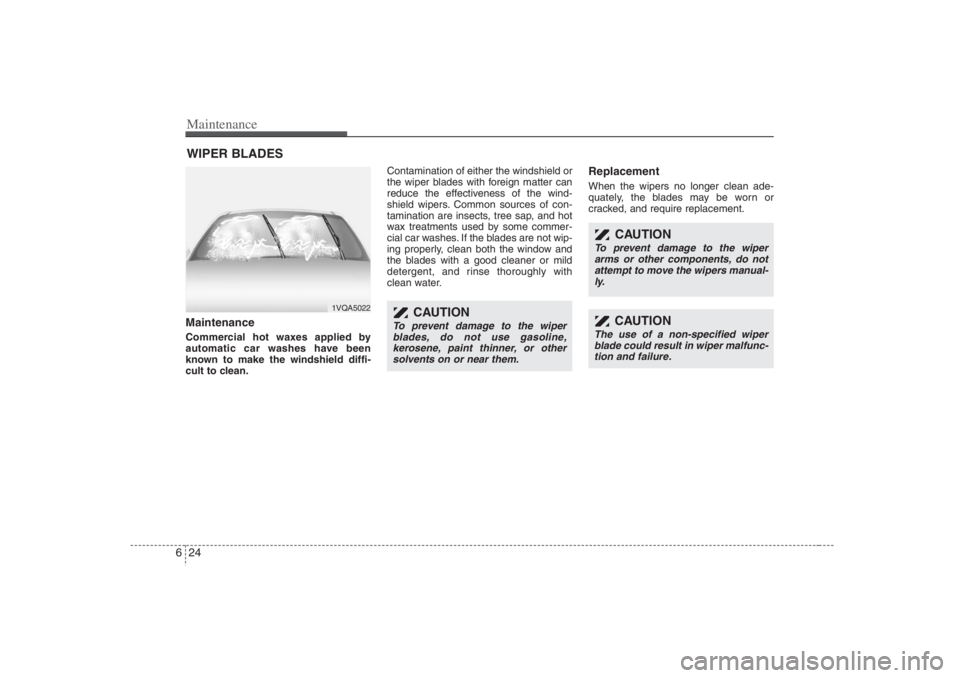
cult to clean.Contamination of either the windshield or
the wiper blades with foreign matter can
reduce the effectiveness of the wind-
shield wipers. Common sources of con-
tamination are insects, tree sap, and hot
wax treatments used by some commer-
cial car washes. If the blades are not wip-
ing properly, clean both the window and
the blades with a good cleaner or mild
detergent, and rinse thoroughly with
clean water.
Replacement When the wipers no longer clean ade-
quately, the blades may be worn or
cracked, and require replacement.
1VQA5022
CAUTION
To prevent damage to the wiper
blades, do not use gasoline,
kerosene, paint thinner, or other
solvents on or near them.
CAUTION
To prevent damage to the wiper
arms or other components, do not
attempt to move the wipers manual-
ly.
CAUTION
The use of a non-specified wiper
blade could result in wiper malfunc-
tion and failure.
Page 339 of 398
625
Maintenance
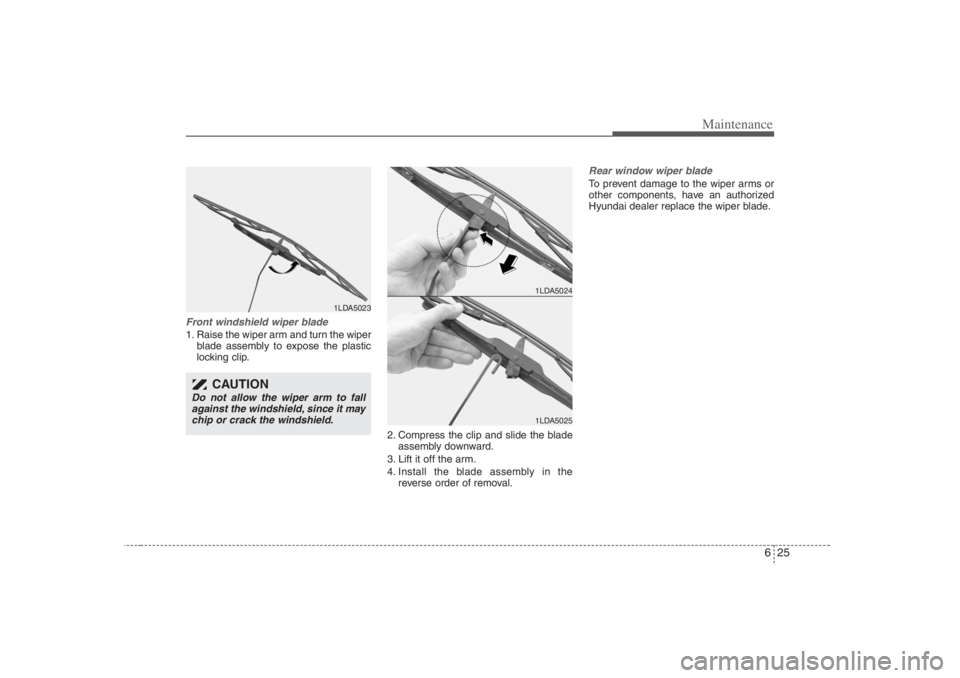
Front windshield wiper blade1. Raise the wiper arm and turn the wiper
blade assembly to expose the plastic
locking clip.
2. Compress the clip and slide the blade
assembly downward.
3. Lift it off the arm.
4. Install the blade assembly in the
reverse order of removal.
Rear window wiper bladeTo prevent damage to the wiper arms or
other components, have an authorized
Hyundai dealer replace the wiper blade.
1LDA5023
1LDA50241LDA5025
CAUTION
Do not allow the wiper arm to fall
against the windshield, since it may
chip or crack the windshield.
Page 340 of 398
Maintenance26 6FUSESA vehicle’s electrical system is protected
from electrical overload damage by
fuses.This vehicle has three fuse panels, one
located in the driver’s side panel bolster,
another in the cargo area, the other in
the engine compartment near the bat-
tery.
If any of your vehicle’s lights, acces-
sories, or controls do not work, check the
appropriate circuit fuse. If a fuse has
blown, the element inside the fuse will be
melted.
If the electrical system does not work,
first check the driver’s side fuse panel.
Always replace a blown fuse with one of
the same rating.
If the replacement fuse blows, this indi-
cates an electrical problem. Avoid using
the system involved and immediately
consult an Authorized Hyundai Dealer.
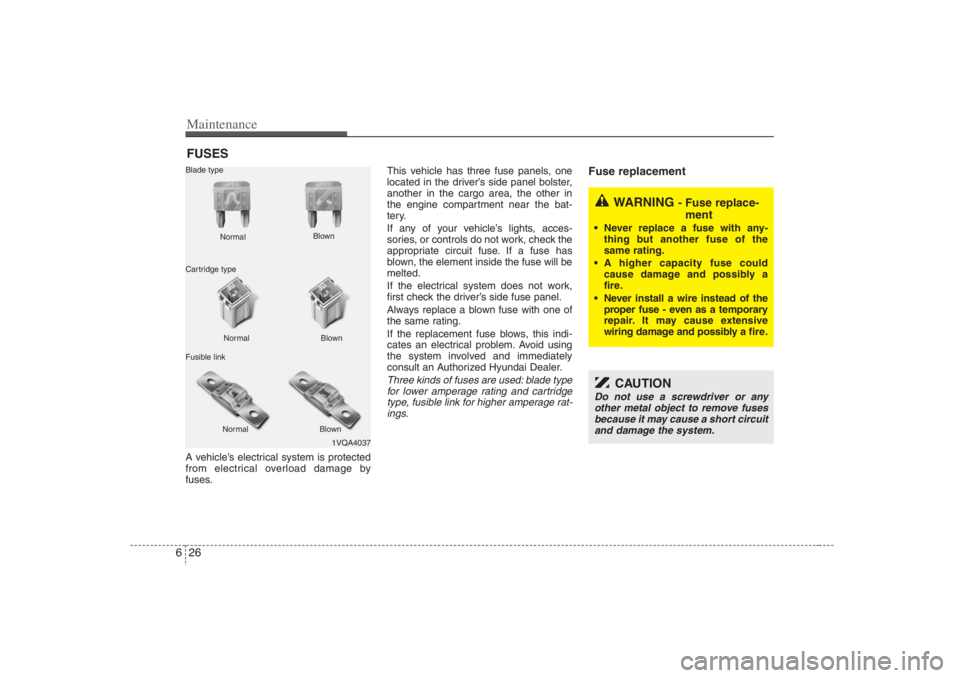
Three kinds of fuses are used: blade type
for lower amperage rating and cartridge
type, fusible link for higher amperage rat-
ings.
Fuse replacement
1VQA4037 Normal Normal Blade type
Cartridge type
Fusible linkBlown
Blown
Normal Blown
WARNING
- Fuse replace-
ment
Never replace a fuse with any-
thing but another fuse of the
same rating.
A higher capacity fuse could
cause damage and possibly a
fire.
Never install a wire instead of the
proper fuse - even as a temporary
repair. It may cause extensive
wiring damage and possibly a fire.
CAUTION
Do not use a screwdriver or any
other metal object to remove fuses
because it may cause a short circuit
and damage the system.