clock HYUNDAI ENTOURAGE 2007 Owners Manual
[x] Cancel search | Manufacturer: HYUNDAI, Model Year: 2007, Model line: ENTOURAGE, Model: HYUNDAI ENTOURAGE 2007Pages: 398, PDF Size: 8.03 MB
Page 16 of 398
23
Your vehicle at a glance
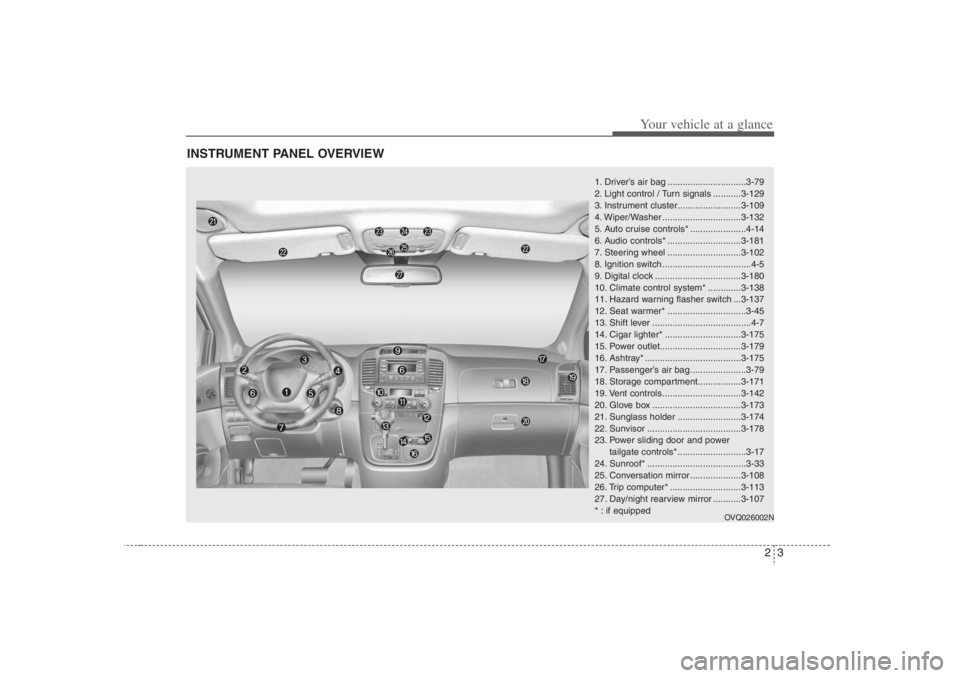
INSTRUMENT PANEL OVERVIEW
1. Driver’s air bag ...............................3-79
2. Light control / Turn signals ...........3-129
3. Instrument cluster.........................3-109
4. Wiper/Washer ...............................3-132
5. Auto cruise controls* ......................4-14
6. Audio controls* .............................3-181
7. Steering wheel .............................3-102
8. Ignition switch ...................................4-5
9. Digital clock ..................................3-180
10. Climate control system* .............3-138
11. Hazard warning flasher switch ...3-137
12. Seat warmer* ...............................3-45
13. Shift lever .......................................4-7
14. Cigar lighter* ..............................3-175
15. Power outlet................................3-179
16. Ashtray* ......................................3-175
17. Passenger’s air bag ......................3-79
18. Storage compartment.................3-171
19. Vent controls ...............................3-142
20. Glove box ...................................3-173
21. Sunglass holder .........................3-174
22. Sunvisor .....................................3-178
23. Power sliding door and power
tailgate controls* ...........................3-17
24. Sunroof* .......................................3-33
25. Conversation mirror ....................3-108
26. Trip computer* ............................3-113
27. Day/night rearview mirror ...........3-107
* : if equipped
OVQ026002N
Page 35 of 398
319
Features of your vehicle
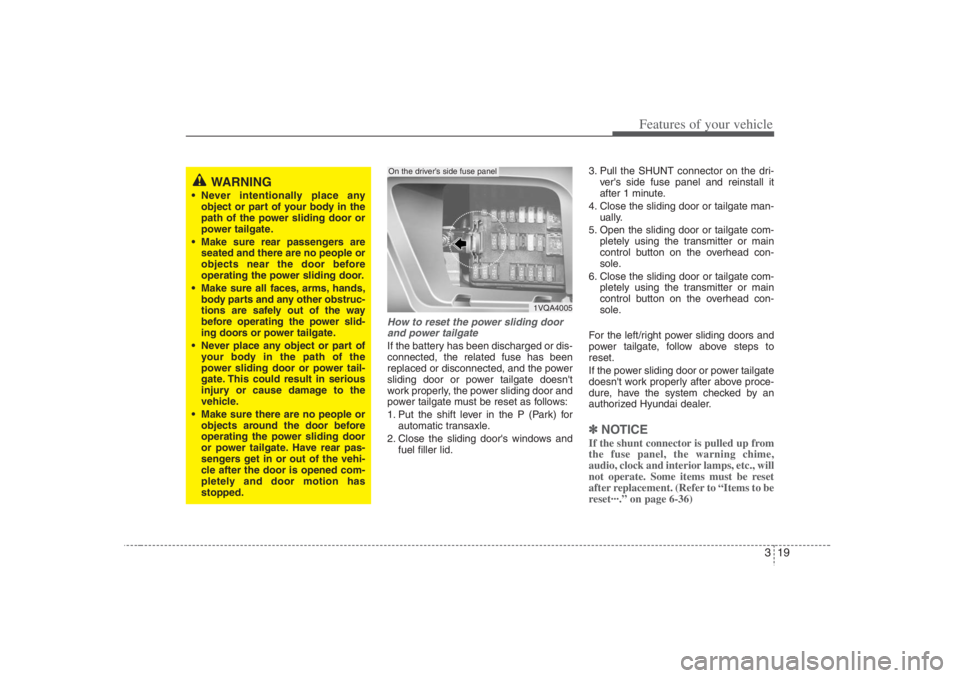
How to reset the power sliding door
and power tailgateIf the battery has been discharged or dis-
connected, the related fuse has been
replaced or disconnected, and the power
sliding door or power tailgate doesn't
work properly, the power sliding door and
power tailgate must be reset as follows:
1. Put the shift lever in the P (Park) for
automatic transaxle.
2. Close the sliding door's windows and
fuel filler lid.3. Pull the SHUNT connector on the dri-
ver's side fuse panel and reinstall it
after 1 minute.
4. Close the sliding door or tailgate man-
ually.
5. Open the sliding door or tailgate com-
pletely using the transmitter or main
control button on the overhead con-
sole.
6. Close the sliding door or tailgate com-
pletely using the transmitter or main
control button on the overhead con-
sole.
For the left/right power sliding doors and
power tailgate, follow above steps to
reset.
If the power sliding door or power tailgate
doesn't work properly after above proce-
dure, have the system checked by an
authorized Hyundai dealer.
✽ ✽
NOTICEIf the shunt connector is pulled up from
the fuse panel, the warning chime,
audio, clock and interior lamps, etc., will
not operate. Some items must be reset
after replacement. (Refer to “Items to be
reset···.” on page 6-36)
WARNING
Never intentionally place any
object or part of your body in the
path of the power sliding door or
power tailgate.
Make sure rear passengers are
seated and there are no people or
objects near the door before
operating the power sliding door.
Make sure all faces, arms, hands,
body parts and any other obstruc-
tions are safely out of the way
before operating the power slid-
ing doors or power tailgate.
Never place any object or part of
your body in the path of the
power sliding door or power tail-
gate. This could result in serious
injury or cause damage to the
vehicle.
Make sure there are no people or
objects around the door before
operating the power sliding door
or power tailgate. Have rear pas-
sengers get in or out of the vehi-
cle after the door is opened com-
pletely and door motion has
stopped.
1VQA4005
On the driver’s side fuse panel
Page 46 of 398
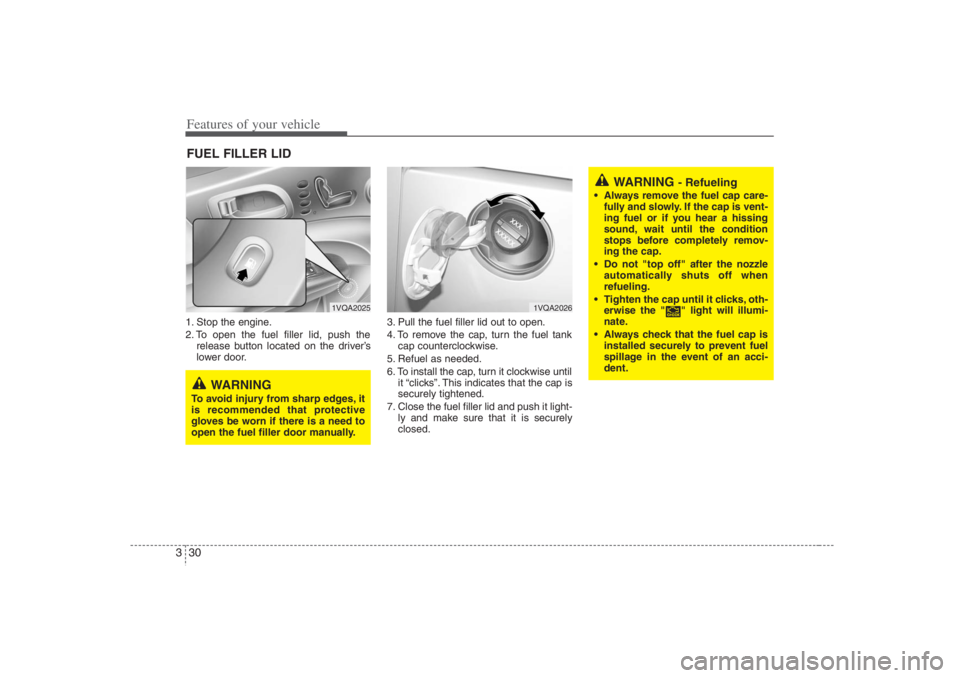
Features of your vehicle30 31. Stop the engine.
2. To open the fuel filler lid, push the
release button located on the driver’s
lower door.3. Pull the fuel filler lid out to open.
4. To remove the cap, turn the fuel tank
cap counterclockwise.
5. Refuel as needed.
6. To install the cap, turn it clockwise until
it “clicks”. This indicates that the cap is
securely tightened.
7. Close the fuel filler lid and push it light-
ly and make sure that it is securely
closed.FUEL FILLER LID
1VQA2025
1VQA2026
WARNING
To avoid injury from sharp edges, it
is recommended that protective
gloves be worn if there is a need to
open the fuel filler door manually.
WARNING
- Refueling
Always remove the fuel cap care-
fully and slowly. If the cap is vent-
ing fuel or if you hear a hissing
sound, wait until the condition
stops before completely remov-
ing the cap.
Do not "top off" after the nozzle
automatically shuts off when
refueling.
Tighten the cap until it clicks, oth-
erwise the " " light will illumi-
nate.
Always check that the fuel cap is
installed securely to prevent fuel
spillage in the event of an acci-
dent.
Page 52 of 398
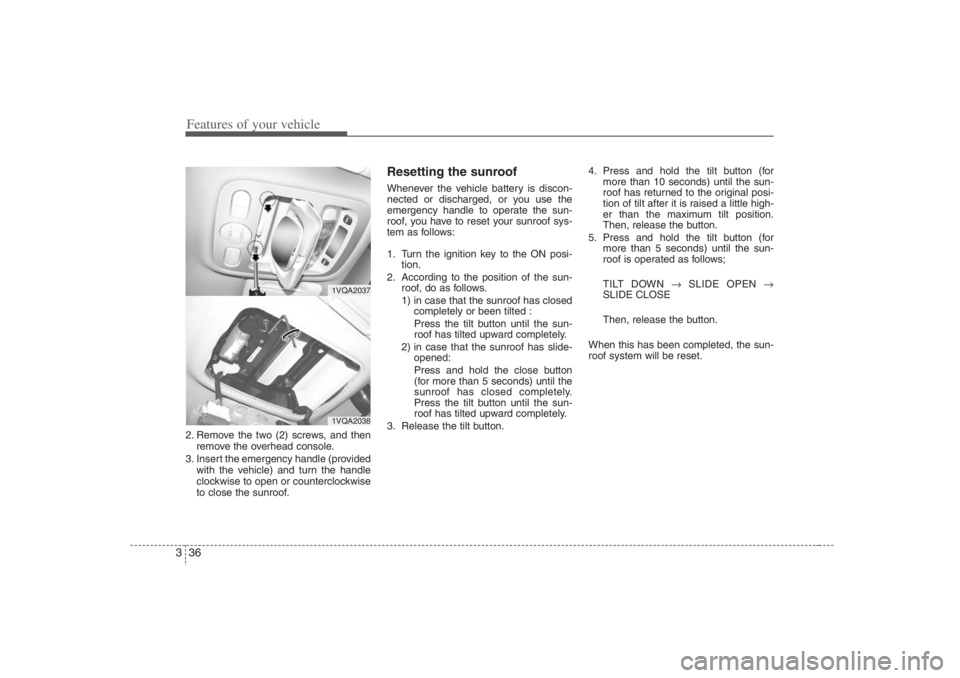
Features of your vehicle36 32. Remove the two (2) screws, and then
remove the overhead console.
3. Insert the emergency handle (provided
with the vehicle) and turn the handle
clockwise to open or counterclockwise
to close the sunroof.
Resetting the sunroofWhenever the vehicle battery is discon-
nected or discharged, or you use the
emergency handle to operate the sun-
roof, you have to reset your sunroof sys-
tem as follows:
1. Turn the ignition key to the ON posi-
tion.
2. According to the position of the sun-
roof, do as follows.
1) in case that the sunroof has closed
completely or been tilted :
Press the tilt button until the sun-
roof has tilted upward completely.
2) in case that the sunroof has slide-
opened:
Press and hold the close button
(for more than 5 seconds) until the
sunroof has closed completely.
Press the tilt button until the sun-
roof has tilted upward completely.
3. Release the tilt button.4. Press and hold the tilt button (for
more than 10 seconds) until the sun-
roof has returned to the original posi-
tion of tilt after it is raised a little high-
er than the maximum tilt position.
Then, release the button.
5. Press and hold the tilt button (for
more than 5 seconds) until the sun-
roof is operated as follows;
TILT DOWN →SLIDE OPEN →
SLIDE CLOSE
Then, release the button.
When this has been completed, the sun-
roof system will be reset.
1VQA20371VQA2038
Page 130 of 398
Features of your vehicle114 3✽
✽
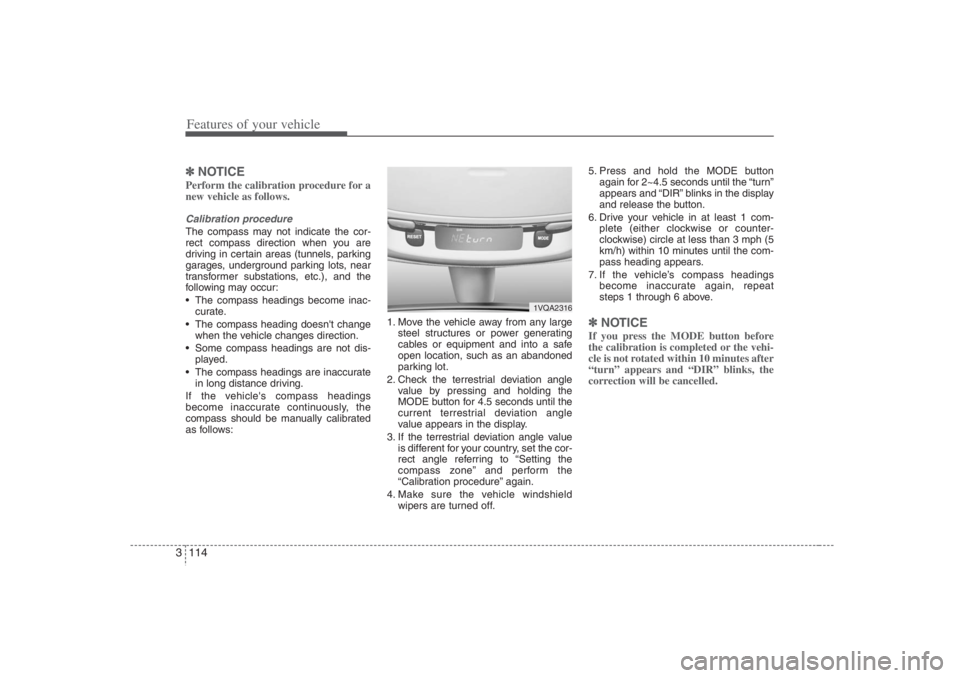
NOTICEPerform the calibration procedure for a
new vehicle as follows.Calibration procedureThe compass may not indicate the cor-
rect compass direction when you are
driving in certain areas (tunnels, parking
garages, underground parking lots, near
transformer substations, etc.), and the
following may occur:
The compass headings become inac-
curate.
The compass heading doesn't change
when the vehicle changes direction.
Some compass headings are not dis-
played.
The compass headings are inaccurate
in long distance driving.
If the vehicle's compass headings
become inaccurate continuously, the
compass should be manually calibrated
as follows:1. Move the vehicle away from any large
steel structures or power generating
cables or equipment and into a safe
open location, such as an abandoned
parking lot.
2. Check the terrestrial deviation angle
value by pressing and holding the
MODE button for 4.5 seconds until the
current terrestrial deviation angle
value appears in the display.
3. If the terrestrial deviation angle value
is different for your country, set the cor-
rect angle referring to “Setting the
compass zone” and perform the
“Calibration procedure” again.
4. Make sure the vehicle windshield
wipers are turned off.5. Press and hold the MODE button
again for 2~4.5 seconds until the “turn”
appears and “DIR” blinks in the display
and release the button.
6. Drive your vehicle in at least 1 com-
plete (either clockwise or counter-
clockwise) circle at less than 3 mph (5
km/h) within 10 minutes until the com-
pass heading appears.
7. If the vehicle’s compass headings
become inaccurate again, repeat
steps 1 through 6 above.
✽ ✽
NOTICEIf you press the MODE button before
the calibration is completed or the vehi-
cle is not rotated within 10 minutes after
“turn” appears and “DIR” blinks, the
correction will be cancelled.
1VQA2316
Page 196 of 398
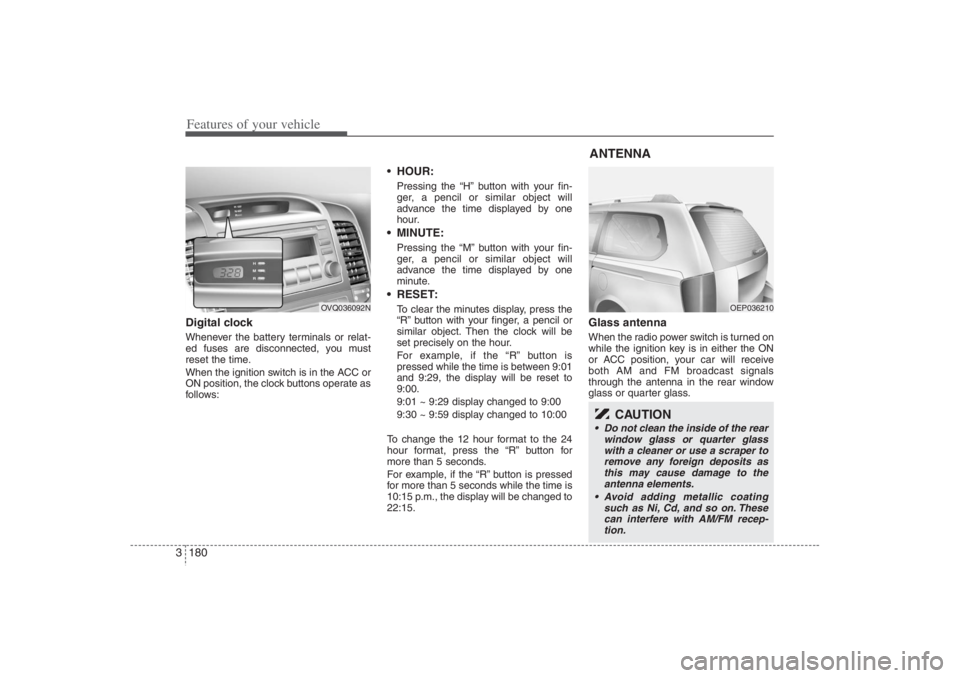
Features of your vehicle180 3Digital clockWhenever the battery terminals or relat-
ed fuses are disconnected, you must
reset the time.
When the ignition switch is in the ACC or
ON position, the clock buttons operate as
follows:
HOUR:Pressing the “H” button with your fin-
ger, a pencil or similar object will
advance the time displayed by one
hour. MINUTE:Pressing the “M” button with your fin-
ger, a pencil or similar object will
advance the time displayed by one
minute. RESET:To clear the minutes display, press the
“R” button with your finger, a pencil or
similar object. Then the clock will be
set precisely on the hour.
For example, if the “R” button is
pressed while the time is between 9:01
and 9:29, the display will be reset to
9:00.
9:01 ~ 9:29 display changed to 9:00
9:30 ~ 9:59 display changed to 10:00
To change the 12 hour format to the 24
hour format, press the “R” button for
more than 5 seconds.
For example, if the “R” button is pressed
for more than 5 seconds while the time is
10:15 p.m., the display will be changed to
22:15.
Glass antennaWhen the radio power switch is turned on
while the ignition key is in either the ON
or ACC position, your car will receive
both AM and FM broadcast signals
through the antenna in the rear window
glass or quarter glass.
OVQ036092N
ANTENNA
OEP036210
CAUTION
Do not clean the inside of the rear
window glass or quarter glass
with a cleaner or use a scraper to
remove any foreign deposits as
this may cause damage to the
antenna elements.
Avoid adding metallic coating
such as Ni, Cd, and so on. These
can interfere with AM/FM recep-
tion.
Page 202 of 398
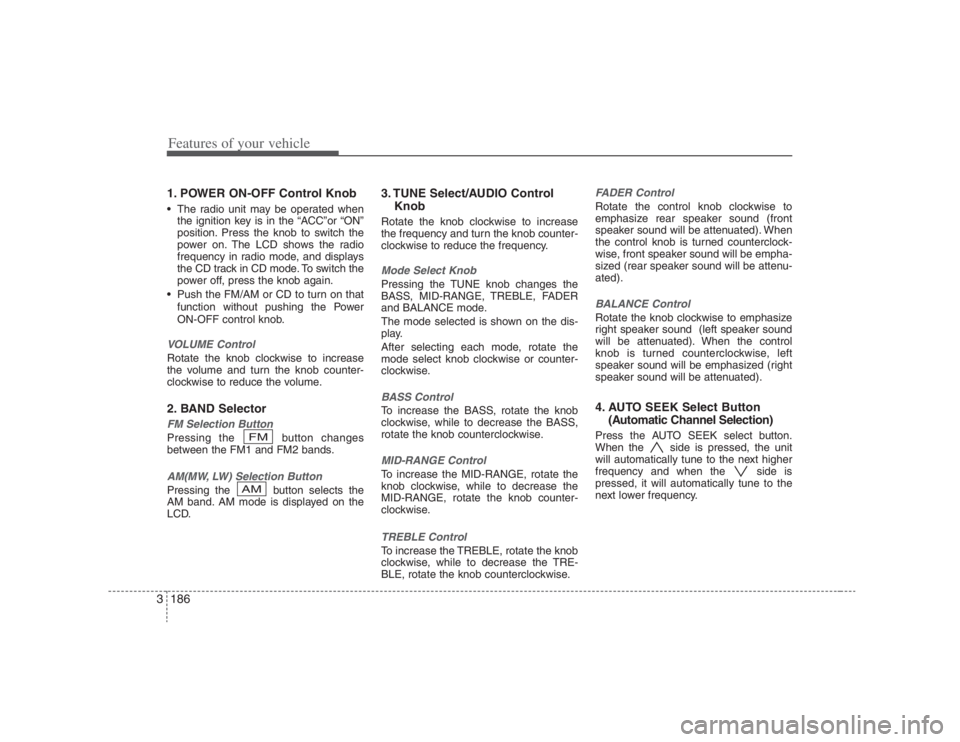
Features of your vehicle186 31. POWER ON-OFF Control Knob The radio unit may be operated when
the ignition key is in the “ACC”or “ON”
position. Press the knob to switch the
power on. The LCD shows the radio
frequency in radio mode, and displays
the CD track in CD mode. To switch the
power off, press the knob again.
Push the FM/AM or CD to turn on that
function without pushing the Power
ON-OFF control knob.VOLUME ControlRotate the knob clockwise to increase
the volume and turn the knob counter-
clockwise to reduce the volume.2. BAND SelectorFM Selection Button Pressing the button changes
between the FM1 and FM2 bands.AM(MW, LW) Selection Button Pressing the button selects the
AM band. AM mode is displayed on the
LCD.
3. TUNE Select/AUDIO Control
KnobRotate the knob clockwise to increase
the frequency and turn the knob counter-
clockwise to reduce the frequency.Mode Select KnobPressing the TUNE knob changes the
BASS, MID-RANGE, TREBLE, FADER
and BALANCE mode.
The mode selected is shown on the dis-
play.
After selecting each mode, rotate the
mode select knob clockwise or counter-
clockwise.BASS ControlTo increase the BASS, rotate the knob
clockwise, while to decrease the BASS,
rotate the knob counterclockwise.MID-RANGE ControlTo increase the MID-RANGE, rotate the
knob clockwise, while to decrease the
MID-RANGE, rotate the knob counter-
clockwise.TREBLE ControlTo increase the TREBLE, rotate the knob
clockwise, while to decrease the TRE-
BLE, rotate the knob counterclockwise.
FADER ControlRotate the control knob clockwise to
emphasize rear speaker sound (front
speaker sound will be attenuated). When
the control knob is turned counterclock-
wise, front speaker sound will be empha-
sized (rear speaker sound will be attenu-
ated).BALANCE ControlRotate the knob clockwise to emphasize
right speaker sound (left speaker sound
will be attenuated). When the control
knob is turned counterclockwise, left
speaker sound will be emphasized (right
speaker sound will be attenuated).4. AUTO SEEK Select Button
(Automatic Channel Selection)Press the AUTO SEEK select button.
When the side is pressed, the unit
will automatically tune to the next higher
frequency and when the side is
pressed, it will automatically tune to the
next lower frequency.
AMFM
Page 208 of 398
Features of your vehicle192 3
CLASSIC➟POPS➟ROCK➟JAZZ➟OFF
1. POWER ON-OFF Control Knob The radio unit may be operated when
the ignition key is in the "ACC" or "ON"
position. Press the button to switch the
power on. The LCD shows the radio
frequency in the radio mode, the tape
direction indicator in the tape mode or
CD/MP3 track in the CD/MP3 mode. To
switch the power off, press the button
again.
Push the FM/AM, TAPE or CD/MP3 to
turn on that function without pushing
the Power ON-OFF control knob.VOLUME Control Rotate the knob clockwise to increase
the volume and turn the knob counter-
clockwise to reduce the volume.2. AUDIO Select ButtonPressing the AUDIO button changes the
BASS, MID-RANGE, TREBLE, FADER
and BALANCE mode.
The mode selected is shown on the dis-
play.
After selecting each mode, rotate the
Audio control knob clockwise or counter-
clockwise.
BASS ControlTo increase the BASS, rotate the knob
clockwise, while to decrease the BASS,
rotate the knob counterclockwise.MID-RANGE ControlTo increase the MID-RANGE, rotate the
knob clockwise, while to decrease the
MID-RANGE, rotate the knob counter-
clockwise.TREBLE ControlTo increase the TREBLE, rotate the knob
clockwise, while to decrease the TRE-
BLE, rotate the knob counterclockwise.FADER ControlTurn the control knob clockwise to
emphasize rear speaker sound (front
speaker sound will be attenuated). When
the control knob is turned counterclock-
wise, front speaker sound will be empha-
sized (rear speaker sound will be attenu-
ated).BALANCE ControlRotate the knob clockwise to emphasize
right speaker sound (left speaker sound
will be attenuated). When the control
knob is turned counter clockwise, left
speaker sound will be emphasized (right
speaker sound will be attenuated).
3. BAND Select ButtonPressing the FM/AM button changes the
AM, FM1 and FM2 bands. The mode
selected is shown on the display.4. SCAN ButtonWhen you press the button, frequency is
changed and the next channel is
received automatically.
To stay on a station, press the SCAN but-
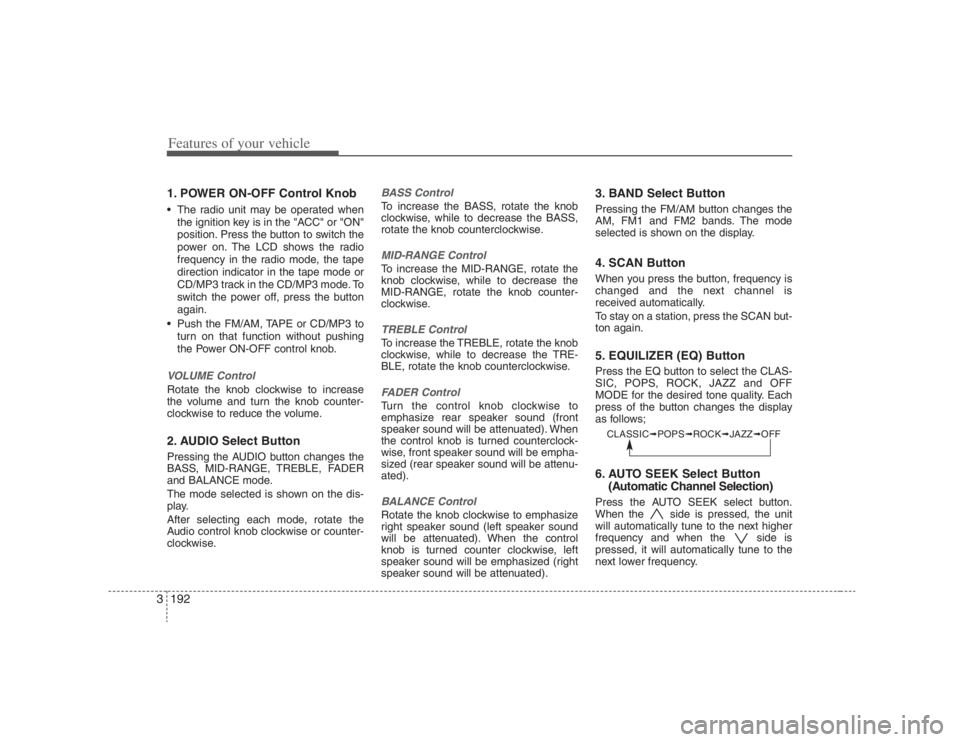
ton again.5. EQUILIZER (EQ) ButtonPress the EQ button to select the CLAS-
SIC, POPS, ROCK, JAZZ and OFF
MODE for the desired tone quality. Each
press of the button changes the display
as follows;6. AUTO SEEK Select Button
(Automatic Channel Selection)Press the AUTO SEEK select button.
When the side is pressed, the unit
will automatically tune to the next higher
frequency and when the side is
pressed, it will automatically tune to the
next lower frequency.
Page 209 of 398
3193
Features of your vehicle
7. TUNE Select/Audio Control KnobRotate the knob clockwise to increase
the frequency and turn the knob counter-
clockwise to reduce the frequency.8. PRESET STATION Select
ButtonsSix stations for AM, FM1 and FM2
respectively can be preset in the elec-
tronic memory circuit.HOW TO PRESET STATIONSSix AM and twelve FM stations may be
programmed into the memory of the
radio. Then, by simply pressing the
AM/FM band select button and/or one of
the six station select buttons, you may
recall any of these stations instantly. To
program the stations, follow these steps:
Press AM/FM selector to set the band
for AM, FM1 and FM2.
Select the desired station to be stored
by seek or manual tuning.
Determine the preset station select
button you wish to use to access that
station. Press and hold the station select button
for more than 0.8 seconds. A select but-
ton indicator will show in the display indi-
cating which select button you have
depressed. The frequency display will
flash after it has been stored in to the
memory. You should then release the but-
ton, and proceed to program the next
desired station. A total of 18 stations can
be programmed by selecting one AM and
two FM stations per button.
When completed, any preset station
may be recalled by selecting AM, FM1
or FM2 band and the appropriate sta-
tion button.
CAUTION
Do not place beverages close to
the audio system. The playback
mechanism may be damaged if
you spill them.
Do not strike or allow anything to
impact the audio system, damage
to the system mechanisms could
occur.
Page 215 of 398
3199
Features of your vehicle
6. BOOKMARK (MARK) ButtonWhen the CD player unit is operating, the
desired track on the disc can be book-
marked by using the MARK button.(MP3
CD only)
Press the MARK button for more than
1 second to bookmark the desired
track.
“M” will be displayed on the LCD and
“MEMORY(1~50)” will display for
approximately five seconds with beep
sound.
To play a bookmarked track, press the
MARK button within 1 second and
select the bookmarked track to play.
To erase a bookmarked track, press
the MARK button for more than 1 sec-
ond. The unit will beep once when the
bookmark is erased.✽ ✽
NOTICETracks stored on Mark Memory will be
automatically erased after you eject CDs
that contain those tracks. 7. SCROLL ButtonPress the button, and you can check the
file names with more than 16 characters
on MP3 CD(max 34 characters.).The button doesn’t work on file names
less than 16 characters.
8. EQUILIZER (EQ) ButtonPress the EQ button to select the CLAS-
SIC, POPS, ROCK, JAZZ and OFF
MODE for the desired tone quality. Each
press of the button changes the display
as follows;9. CD EJECT ButtonWhen the button is pressed with a CD
loaded, the CD will eject.
Forcing to eject : To force to eject a CD,
press this button for more than 3 sec-
onds.
(Do this only when a CD is jammed and
you can not eject it in the normal way -
e.g.) in case that you have inserted 2
CDs by mistake)10. CD SCAN Button To playback the first 10 seconds of
each track, press the SCAN button
more than 1 second.
To playback the first 10 seconds of
each track in the selected folder, press
the SCAN button within 1 second.
(MP3 CD only) Press the SCAN button again within 10
sec. when you have reached the
desired track.
11. FILE SEARCH Knob
(TUNE Select Knob) You can skip the track (file) by turning
the FILE SEARCH knob clockwise or
counterclockwise.
After selecting the desired track (file),
press the FILE SEARCH knob to play-
back the track (file).
If you do not press the FILE SEARCH
knob within five seconds, the search
will stop.12. DIRECTORY SEARCH (DIR)
Button You can move through the folder by
pushing the DIR button to up ( ) and
down( ).
After moving the desired folder, press
the FILE SEARCH knob to play back in
the selected folder. If you do not press
the FILE SEARCH knob within 5 sec-
onds, the folder searching function will
be released. It can not be operated in a
single folder.
CLASSIC➟POPS➟ROCK➟JAZZ➟OFF