dash HYUNDAI ENTOURAGE 2008 Owners Manual
[x] Cancel search | Manufacturer: HYUNDAI, Model Year: 2008, Model line: ENTOURAGE, Model: HYUNDAI ENTOURAGE 2008Pages: 393, PDF Size: 8.78 MB
Page 104 of 393
Features of your vehicle88 3
1KMN3663
1KMN36641KMN3665
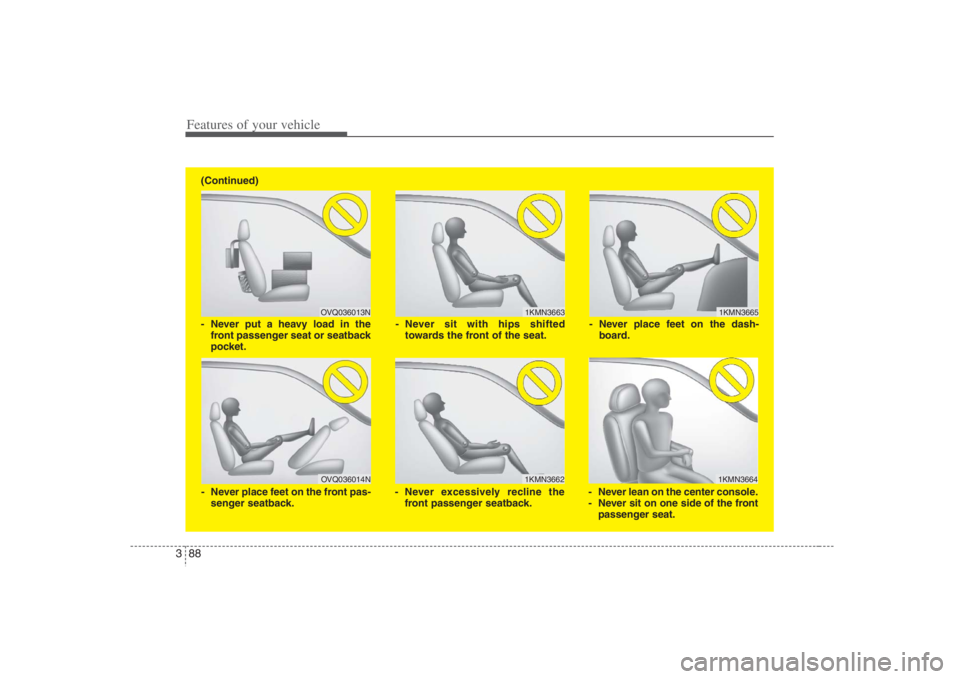
- Never sit with hips shifted
towards the front of the seat.
- Never lean on the center console.
- Never sit on one side of the front
passenger seat. - Never place feet on the dash-
board.
OVQ036013N
1KMN3662
- Never put a heavy load in the
front passenger seat or seatback
pocket.
- Never excessively recline the
front passenger seatback.
OVQ036014N
- Never place feet on the front pas-
senger seatback. (Continued)
Page 225 of 393
3209
Features of your vehicle
Connecting Other Devices to the RSEElectronic devices such as video game
systems, VHS players, Camcorder or etc,
can be played through the RSE. These
external devices can be connected to the
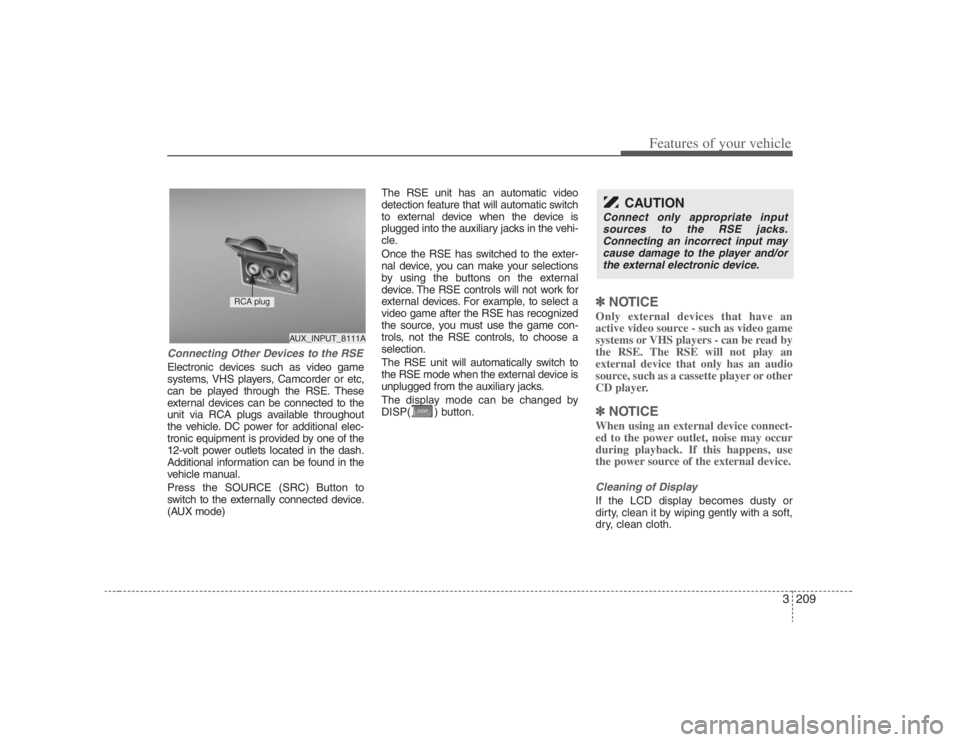
unit via RCA plugs available throughout
the vehicle. DC power for additional elec-
tronic equipment is provided by one of the
12-volt power outlets located in the dash.
Additional information can be found in the
vehicle manual.
Press the SOURCE (SRC) Button to
switch to the externally connected device.
(AUX mode)The RSE unit has an automatic video
detection feature that will automatic switch
to external device when the device is
plugged into the auxiliary jacks in the vehi-
cle.
Once the RSE has switched to the exter-
nal device, you can make your selections
by using the buttons on the external
device. The RSE controls will not work for
external devices. For example, to select a
video game after the RSE has recognized
the source, you must use the game con-
trols, not the RSE controls, to choose a
selection.
The RSE unit will automatically switch to
the RSE mode when the external device is
unplugged from the auxiliary jacks.
The display mode can be changed by
DISP( ) button.
✽ ✽
NOTICEOnly external devices that have an
active video source - such as video game
systems or VHS players - can be read by
the RSE. The RSE will not play an
external device that only has an audio
source, such as a cassette player or other
CD player.✽ ✽
NOTICEWhen using an external device connect-
ed to the power outlet, noise may occur
during playback. If this happens, use
the power source of the external device.Cleaning of DisplayIf the LCD display becomes dusty or
dirty, clean it by wiping gently with a soft,
dry, clean cloth.
CAUTION
Connect only appropriate input
sources to the RSE jacks.
Connecting an incorrect input may
cause damage to the player and/or
the external electronic device.
AUX_INPUT_8111A
RCA plug
Page 374 of 393
665
Maintenance
Aluminum wheel maintenance The aluminum wheels are coated with a
clear protective finish.
Do not use any abrasive cleaner, pol-
ishing compound, solvent, or wire
brushes on aluminum wheels. They
may scratch or damage the finish.
Use only a mild soap or neutral deter-
gent, and rinse thoroughly with water.
Also, be sure to clean the wheels after
driving on salted roads. This helps pre-
vent corrosion.
Avoid washing the wheels with high-
speed car wash brushes.
Do not use any acid detergent. It may
damage and corrode the aluminum
wheels coated with a clear protective
finish.
Interior care Interior general precautions Prevent caustic solutions such as per-
fume and cosmetic oil from contacting
the dashboard because they may cause
damage or discoloration. If they do con-
tact the dashboard, wipe them off imme-
diately. See the instructions that follow for
the proper way to clean vinyl.
Cleaning the upholstery and interior
trim Vinyl
Remove dust and loose dirt from vinyl
with a whisk broom or vacuum cleaner.
Clean vinyl surfaces with a vinyl cleaner.
Fabric
Remove dust and loose dirt from fabric
with a whisk broom or vacuum cleaner.
Clean with a mild soap solution recom-
mended for upholstery or carpets.
Remove fresh spots immediately with a
fabric spot cleaner. If fresh spots do not
receive immediate attention, the fabric
can be stained and its color can be
affected. Also, its fire-resistant properties
can be reduced if the material is not
properly maintained.
CAUTION
Never allow water or other liquids
to come in contact with electrical/
electronic components inside the
vehicle as this may damage them.
CAUTION
Using anything but recommended
cleaners and procedures may affect
the fabric’s appearance and fire-
resistant properties.