reset Hyundai Equus 2010 User Guide
[x] Cancel search | Manufacturer: HYUNDAI, Model Year: 2010, Model line: Equus, Model: Hyundai Equus 2010Pages: 374, PDF Size: 41.29 MB
Page 195 of 374
4117
Features of your vehicle
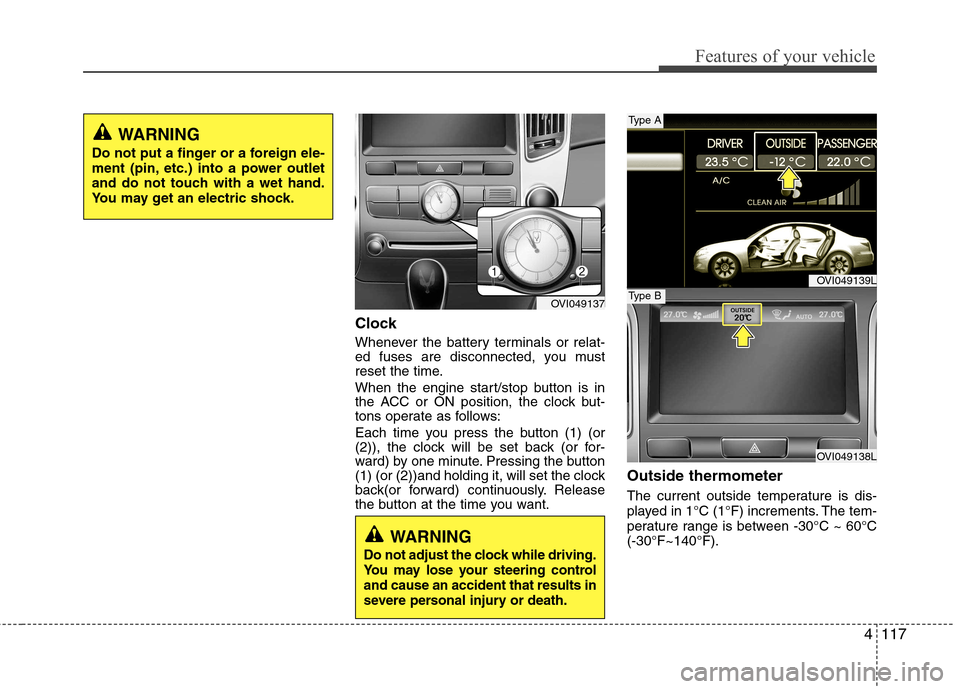
Clock
Whenever the battery terminals or relat-
ed fuses are disconnected, you must
reset the time.
When the engine start/stop button is in
the ACC or ON position, the clock but-
tons operate as follows:
Each time you press the button (1) (or
(2)), the clock will be set back (or for-
ward) by one minute. Pressing the button
(1) (or (2))and holding it, will set the clock
back(or forward) continuously. Release
the button at the time you want.Outside thermometer
The current outside temperature is dis-
played in 1°C (1°F) increments. The tem-
perature range is between -30°C ~ 60°C(-30°F~140°F).
WARNING
Do not adjust the clock while driving.
You may lose your steering controland cause an accident that results in
severe personal injury or death.
WARNING
Do not put a finger or a foreign ele-
ment (pin, etc.) into a power outlet
and do not touch with a wet hand.
You may get an electric shock.
OVI049137
OVI049139L
OVI049138L
Type A
Type B
Page 196 of 374
Features of your vehicle
118
4
Temperature conversion
If the battery has been discharged or dis-
connected, the temperature mode dis-
play will reset to Centigrade.
This is a normal condition. You can switch
the temperature mode between
Centigrade to Fahrenheit as follows;
While pressing the MODE button,
depress the DUAL button for 3 seconds
or more. The display will change from
Centigrade to Fahrenheit, or from
Fahrenheit to Centigrade.
The outside temperature on the display
may not change immediately like a gen-
eral thermometer to prevent the driver
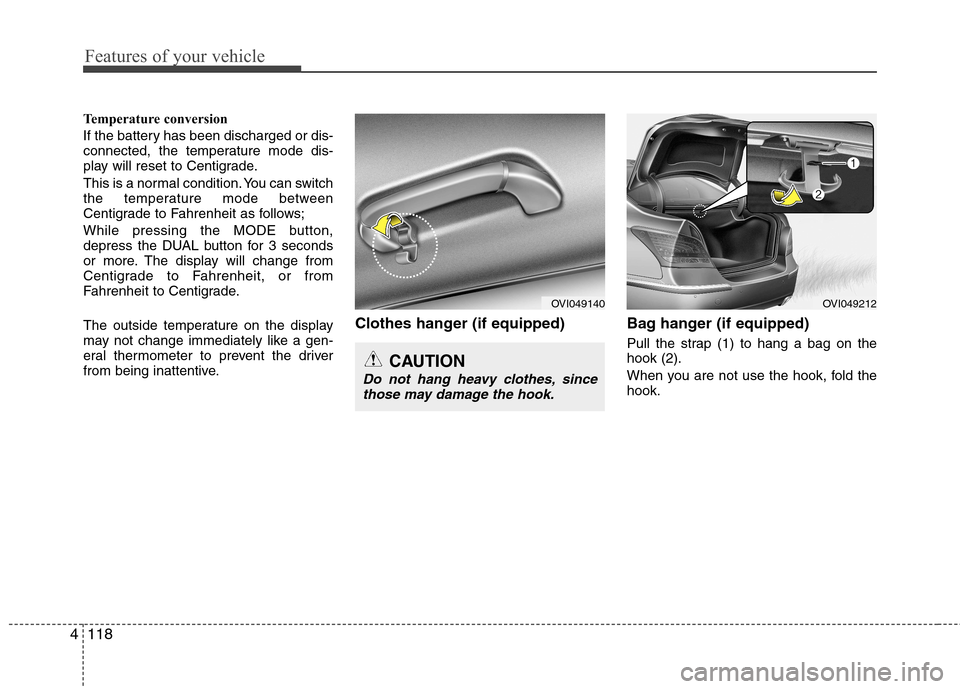
from being inattentive. Clothes hanger (if equipped) Bag hanger (if equipped)
Pull the strap (1) to hang a bag on thehook (2).
When you are not use the hook, fold the hook.
CAUTION
Do not hang heavy clothes, sincethose may damage the hook.
OVI049140OVI049212
Page 203 of 374
4125
Features of your vehicle
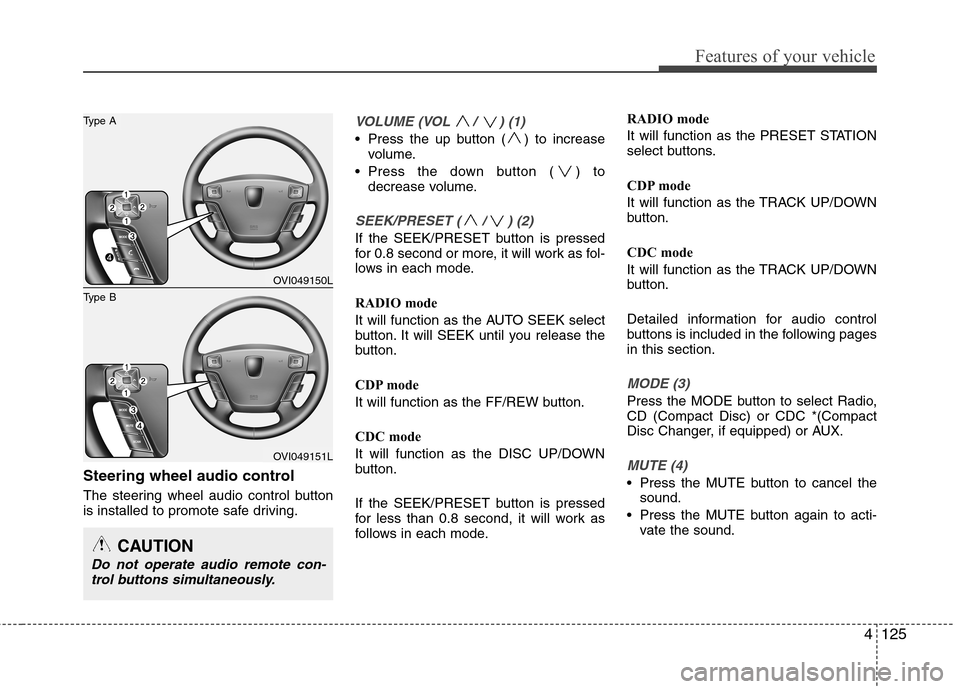
Steering wheel audio control
The steering wheel audio control button
is installed to promote safe driving.
VOLUME (VOL / ) (1)
Press the up button ( ) to increasevolume.
Press the down button ( ) to decrease volume.
SEEK/PRESET ( / ) (2)
If the SEEK/PRESET button is pressed
for 0.8 second or more, it will work as fol-
lows in each mode.
RADIO mode
It will function as the AUTO SEEK select
button. It will SEEK until you release the
button.
CDP mode
It will function as the FF/REW button.
CDC mode
It will function as the DISC UP/DOWN
button.
If the SEEK/PRESET button is pressed
for less than 0.8 second, it will work as
follows in each mode. RADIO mode
It will function as the PRESET STATION
select buttons.
CDP mode
It will function as the TRACK UP/DOWN
button.
CDC mode
It will function as the TRACK UP/DOWN
button.
Detailed information for audio control
buttons is included in the following pagesin this section.
MODE (3)
Press the MODE button to select Radio, CD (Compact Disc) or CDC *(Compact
Disc Changer, if equipped) or AUX.
MUTE (4)
Press the MUTE button to cancel the
sound.
Press the MUTE button again to acti- vate the sound.
CAUTION
Do not operate audio remote con-
trol buttons simultaneously.
OVI049150L
OVI049151L
Type B
Type A
Page 239 of 374
535
Driving your vehicle
Operating the EPB switch. Do notoperate the parking brake while driving
except in an emergency situation.
Each of these actions will cancel cruise
control operation (the SET indicator light
in the instrument cluster will go off), but itwill not turn the system off. If you wish toresume cruise control operation, push
the RES+ switch located on your steering wheel. You will return to your previouslypreset speed.
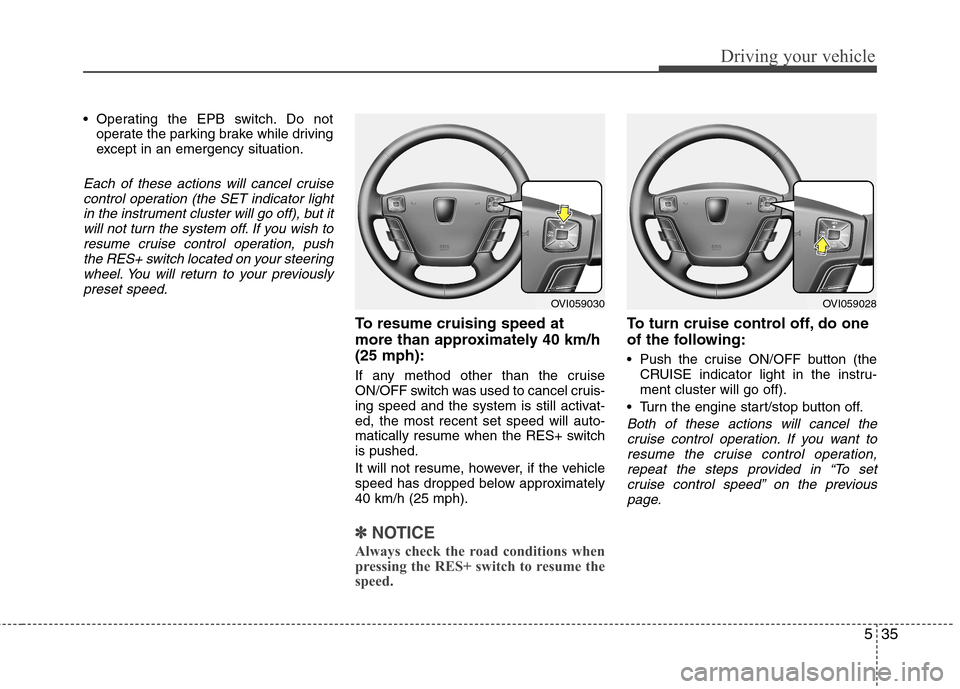
To resume cruising speed at
more than approximately 40 km/h(25 mph):
If any method other than the cruise
ON/OFF switch was used to cancel cruis-
ing speed and the system is still activat-ed, the most recent set speed will auto-
matically resume when the RES+ switchis pushed.
It will not resume, however, if the vehicle
speed has dropped below approximately40 km/h (25 mph).
✽✽ NOTICE
Always check the road conditions when
pressing the RES+ switch to resume the
speed.
To turn cruise control off, do one
of the following:
Push the cruise ON/OFF button (the CRUISE indicator light in the instru- ment cluster will go off).
Turn the engine start/stop button off.
Both of these actions will cancel the cruise control operation. If you want to resume the cruise control operation,repeat the steps provided in “To set
cruise control speed” on the previouspage.
OVI059030OVI059028
Page 243 of 374

539
Driving your vehicle
Decreasing the vehicle speed to lessthan approximately 10km/h (6.2mph)
as the vehicle in front of you.
Accelerating the vehicle speed to more than approximately 180km/h(113mph).
The ESP is turned off.
The sensor or the cover is stained with foreign matter.
Each of these actions will cancel smart
cruise control operation (the SET indica-
tor light, set speed and vehicle to vehicledistance on the LCD screen will go out),but it will not turn the system off. If youwish to resume smart cruise control
operation, push the RES+ switch locatedon your steering wheel. You will return toyour previously preset speed.
To resume cruising speed at
more than approximately 10 km/h(6.2 mph):
If any method other than the cruise
ON/OFF switch was used to cancel cruis-
ing speed and the system is still activat-ed, the most recent set speed will auto-
matically resume when the RES+ switchis pushed.
It will not resume, however, if the vehicle
speed has dropped below approximately10 km/h (6.2 mph) when the sensor
detects the vehicle ahead or if the vehicle
speed has dropped below approximately30 km/h (18.6 mph) when there is no
vehicle in front of your vehicle.
✽✽ NOTICE
Always check the road conditions when
pressing the RES+ switch to resume the
speed.
To turn cruise control off, do one
of the following:
Push the cruise ON/OFF button (the CRUISE indicator light in the instru- ment cluster will go out).
Turn the engine off.
Both of these actions cancel smart cruise control operation. If you want to resume smart cruise control operation, repeat
the steps provided in “To set cruise con- trol speed” on the previous page.OVI059030
CAUTION
If the sensor cover is dirty orobstructed, the smart cruise control
operation will cancel automatically.
Page 323 of 374
Maintenance
32
7
Reset items
Items should be reset after the battery
has been discharged or the battery hasbeen disconnected.
Power trunk (See section 4)
Sunroof (See section 4)
Trip computer (See section 4)
Climate control system
(See section 4)
Clock (See section 4)
Audio (See section 4)
WARNING
Before performing maintenance or recharging the battery, turn off all accessories and stop the
engine.
The negative battery cable must be removed first and installed
last when the battery is discon-nected.
Operation related to the battery should be done in an authorized
HYUNDAI dealer.
CAUTION
Keep the battery away from water
or any liquid.
The battery is in the trunk, so you should be careful when you load
a container filled with liquid intothe trunk.
For your safety, use the authentic- ity by approved authorizedHYUNDAI dealer, when you
replace the battery.
Page 327 of 374
Maintenance
36
7
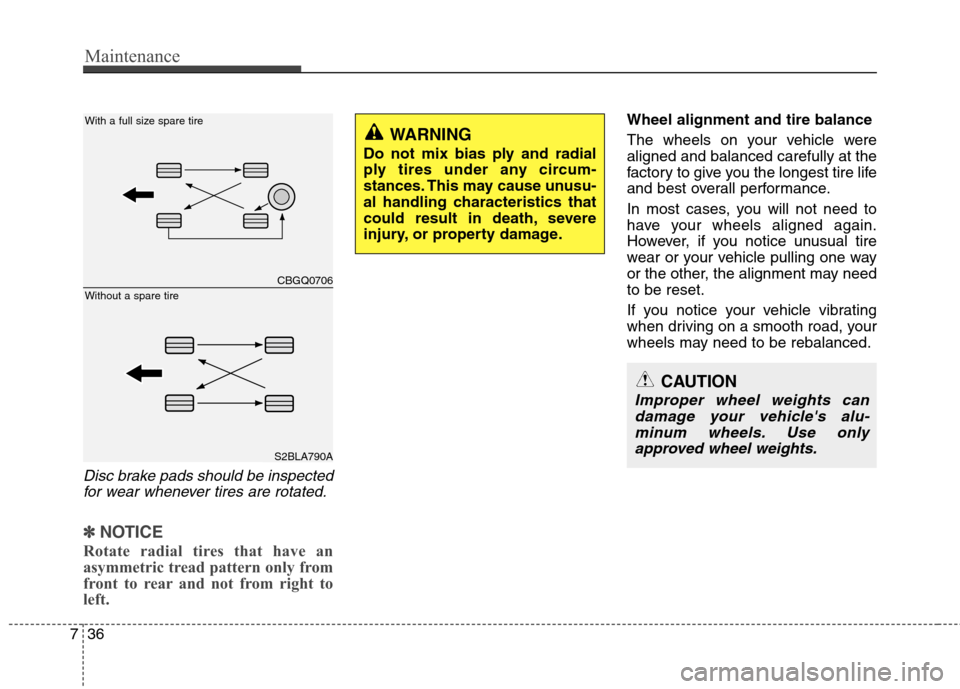
Disc brake pads should be inspected
for wear whenever tires are rotated.
✽✽ NOTICE
Rotate radial tires that have an
asymmetric tread pattern only from
front to rear and not from right to
left.
Wheel alignment and tire balance
The wheels on your vehicle were aligned and balanced carefully at the
factory to give you the longest tire life
and best overall performance.
In most cases, you will not need to
have your wheels aligned again.
However, if you notice unusual tire
wear or your vehicle pulling one way
or the other, the alignment may needto be reset.
If you notice your vehicle vibrating
when driving on a smooth road, your
wheels may need to be rebalanced.
WARNING
Do not mix bias ply and radial
ply tires under any circum-
stances. This may cause unusu-
al handling characteristics that
could result in death, severe
injury, or property damage.
CAUTION
Improper wheel weights can damage your vehicle's alu-minum wheels. Use only approved wheel weights.
CBGQ0706
S2BLA790A
Without a spare tire
With a full size spare tire
Page 336 of 374
745
Maintenance
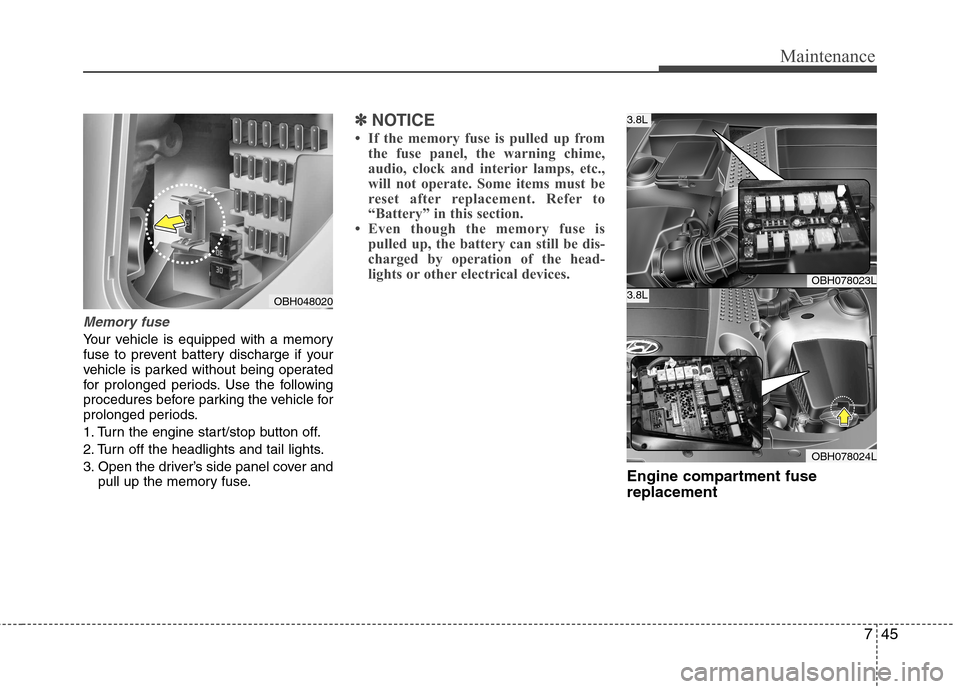
Memory fuse
Your vehicle is equipped with a memory
fuse to prevent battery discharge if your
vehicle is parked without being operated
for prolonged periods. Use the following
procedures before parking the vehicle for
prolonged periods.
1. Turn the engine start/stop button off.
2. Turn off the headlights and tail lights.
3. Open the driver’s side panel cover andpull up the memory fuse.
✽✽ NOTICE
If the memory fuse is pulled up from the fuse panel, the warning chime,
audio, clock and interior lamps, etc.,
will not operate. Some items must be
reset after replacement. Refer to
“Battery” in this section.
Even though the memory fuse is
pulled up, the battery can still be dis-
charged by operation of the head-
lights or other electrical devices.
Engine compartment fuse replacement
OBH048020
OBH078023L
OBH078024L
3.8L
3.8L