Red warning light Hyundai Equus 2011 User Guide
[x] Cancel search | Manufacturer: HYUNDAI, Model Year: 2011, Model line: Equus, Model: Hyundai Equus 2011Pages: 385, PDF Size: 10.67 MB
Page 141 of 385
459
Features of your vehicle
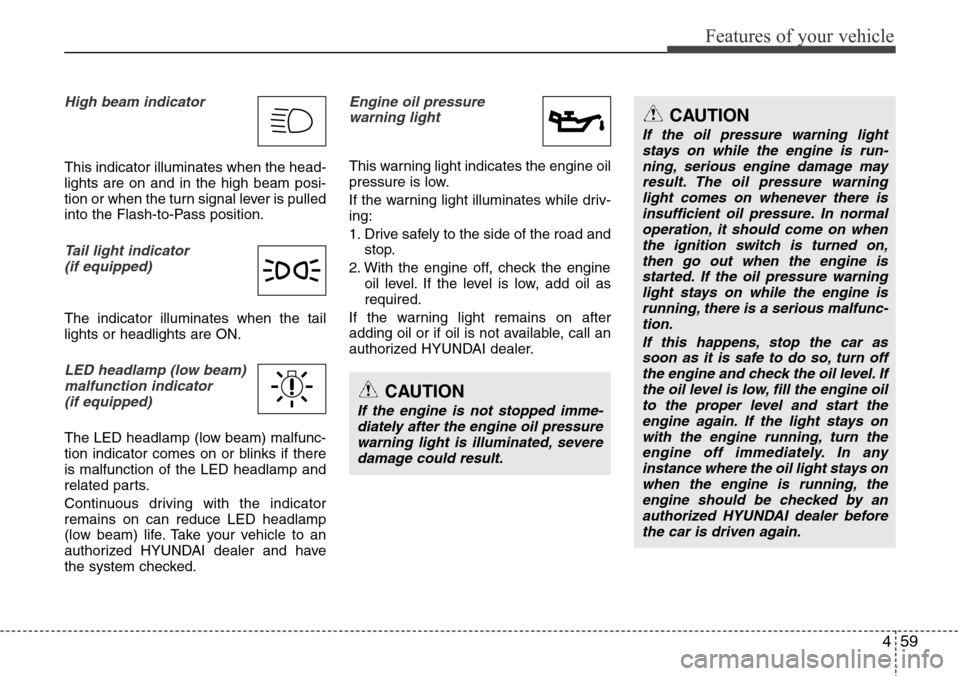
High beam indicator
This indicator illuminates when the head-
lights are on and in the high beam posi-
tion or when the turn signal lever is pulled
into the Flash-to-Pass position.
Tail light indicator
(if equipped)
The indicator illuminates when the tail
lights or headlights are ON.
LED headlamp (low beam)
malfunction indicator
(if equipped)
The LED headlamp (low beam) malfunc-
tion indicator comes on or blinks if there
is malfunction of the LED headlamp and
related parts.
Continuous driving with the indicator
remains on can reduce LED headlamp
(low beam) life. Take your vehicle to an
authorized HYUNDAI dealer and have
the system checked.
Engine oil pressure
warning light
This warning light indicates the engine oil
pressure is low.
If the warning light illuminates while driv-
ing:
1. Drive safely to the side of the road and
stop.
2. With the engine off, check the engine
oil level. If the level is low, add oil as
required.
If the warning light remains on after
adding oil or if oil is not available, call an
authorized HYUNDAI dealer.
CAUTION
If the engine is not stopped imme-
diately after the engine oil pressure
warning light is illuminated, severe
damage could result.
CAUTION
If the oil pressure warning light
stays on while the engine is run-
ning, serious engine damage may
result. The oil pressure warning
light comes on whenever there is
insufficient oil pressure. In normal
operation, it should come on when
the ignition switch is turned on,
then go out when the engine is
started. If the oil pressure warning
light stays on while the engine is
running, there is a serious malfunc-
tion.
If this happens, stop the car as
soon as it is safe to do so, turn off
the engine and check the oil level. If
the oil level is low, fill the engine oil
to the proper level and start the
engine again. If the light stays on
with the engine running, turn the
engine off immediately. In any
instance where the oil light stays on
when the engine is running, the
engine should be checked by an
authorized HYUNDAI dealer before
the car is driven again.
Page 142 of 385
Features of your vehicle
60 4
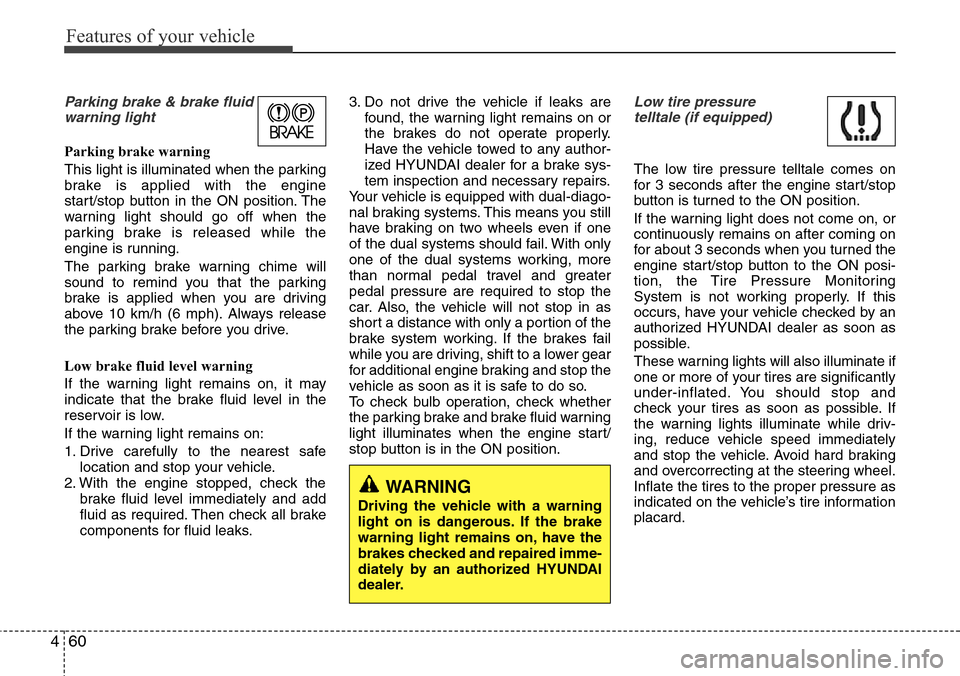
Parking brake & brake fluid
warning light
Parking brake warning
This light is illuminated when the parking
brake is applied with the engine
start/stop button in the ON position. The
warning light should go off when the
parking brake is released while the
engine is running.
The parking brake warning chime will
sound to remind you that the parking
brake is applied when you are driving
above 10 km/h (6 mph). Always release
the parking brake before you drive.
Low brake fluid level warning
If the warning light remains on, it may
indicate that the brake fluid level in the
reservoir is low.
If the warning light remains on:
1. Drive carefully to the nearest safe
location and stop your vehicle.
2. With the engine stopped, check the
brake fluid level immediately and add
fluid as required. Then check all brake
components for fluid leaks.3. Do not drive the vehicle if leaks are
found, the warning light remains on or
the brakes do not operate properly.
Have the vehicle towed to any author-
ized HYUNDAI dealer for a brake sys-
tem inspection and necessary repairs.
Your vehicle is equipped with dual-diago-
nal braking systems. This means you still
have braking on two wheels even if one
of the dual systems should fail. With only
one of the dual systems working, more
than normal pedal travel and greater
pedal pressure are required to stop the
car. Also, the vehicle will not stop in as
short a distance with only a portion of the
brake system working. If the brakes fail
while you are driving, shift to a lower gear
for additional engine braking and stop the
vehicle as soon as it is safe to do so.
To check bulb operation, check whether
the parking brake and brake fluid warning
light illuminates when the engine start/
stop button is in the ON position.
Low tire pressure
telltale (if equipped)
The low tire pressure telltale comes on
for 3 seconds after the engine start/stop
button is turned to the ON position.
If the warning light does not come on, or
continuously remains on after coming on
for about 3 seconds when you turned the
engine start/stop button to the ON posi-
tion, the Tire Pressure Monitoring
System is not working properly. If this
occurs, have your vehicle checked by an
authorized HYUNDAI dealer as soon as
possible.
These warning lights will also illuminate if
one or more of your tires are significantly
under-inflated. You should stop and
check your tires as soon as possible. If
the warning lights illuminate while driv-
ing, reduce vehicle speed immediately
and stop the vehicle. Avoid hard braking
and overcorrecting at the steering wheel.
Inflate the tires to the proper pressure as
indicated on the vehicle’s tire information
placard.
WARNING
Driving the vehicle with a warning
light on is dangerous. If the brake
warning light remains on, have the
brakes checked and repaired imme-
diately by an authorized HYUNDAI
dealer.
Page 162 of 385
Features of your vehicle
80 4
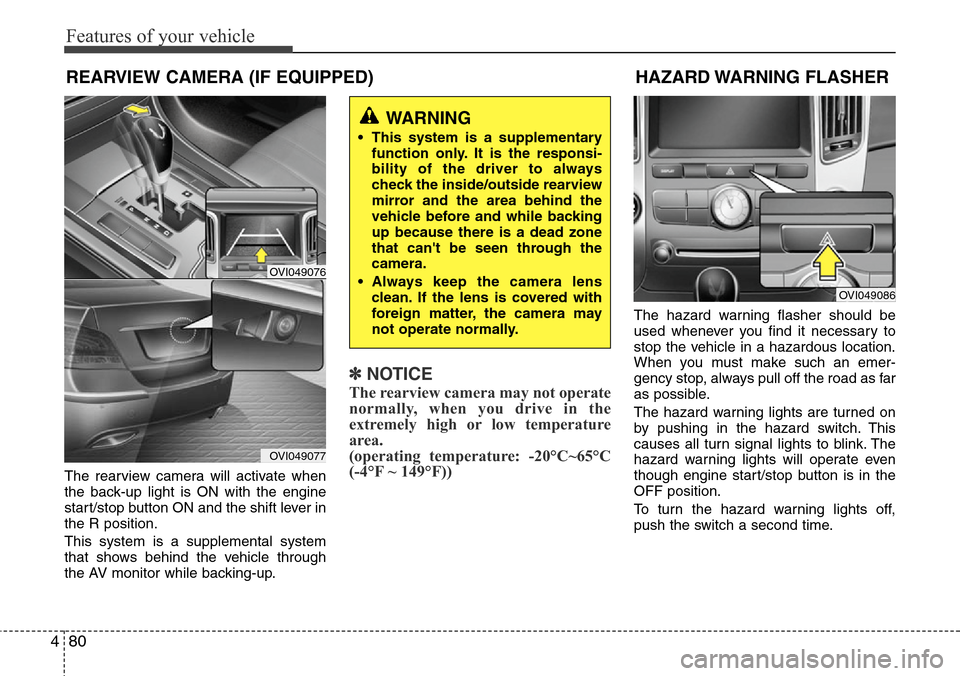
The rearview camera will activate when
the back-up light is ON with the engine
start/stop button ON and the shift lever in
the R position.
This system is a supplemental system
that shows behind the vehicle through
the AV monitor while backing-up.
✽NOTICE
The rearview camera may not operate
normally, when you drive in the
extremely high or low temperature
area.
(operating temperature: -20°C~65°C
(-4°F ~ 149°F))
The hazard warning flasher should be
used whenever you find it necessary to
stop the vehicle in a hazardous location.
When you must make such an emer-
gency stop, always pull off the road as far
as possible.
The hazard warning lights are turned on
by pushing in the hazard switch. This
causes all turn signal lights to blink. The
hazard warning lights will operate even
though engine start/stop button is in the
OFF position.
To turn the hazard warning lights off,
push the switch a second time.
WARNING
• This system is a supplementary
function only. It is the responsi-
bility of the driver to always
check the inside/outside rearview
mirror and the area behind the
vehicle before and while backing
up because there is a dead zone
that can't be seen through the
camera.
• Always keep the camera lens
clean. If the lens is covered with
foreign matter, the camera may
not operate normally.
OVI049086
REARVIEW CAMERA (IF EQUIPPED)
OVI049076
OVI049077
HAZARD WARNING FLASHER
Page 174 of 385
Features of your vehicle
92 4
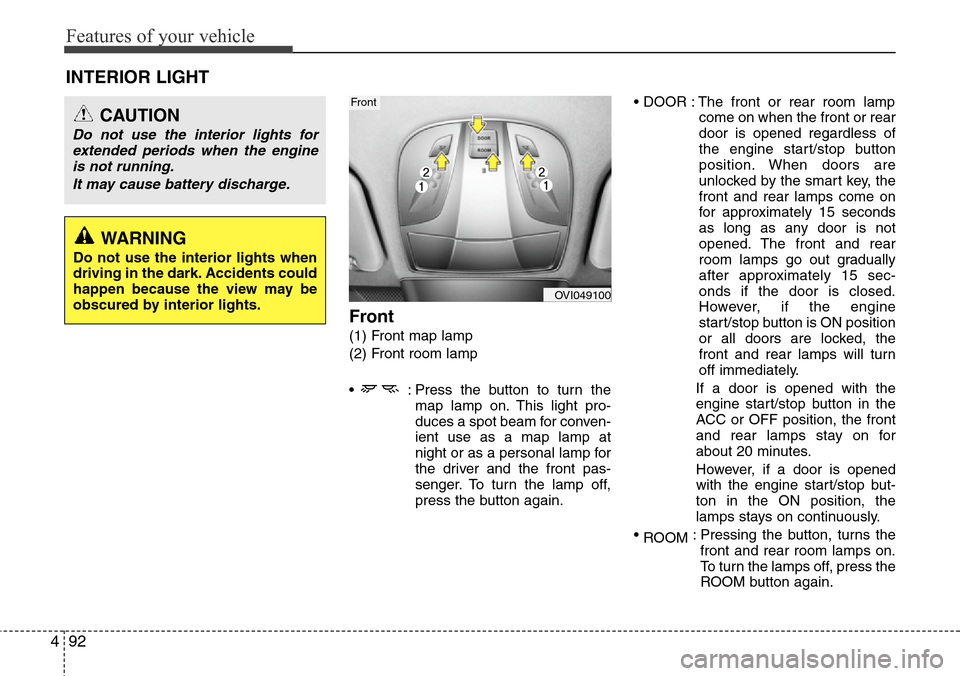
Front
(1) Front map lamp
(2) Front room lamp
• : Press the button to turn the
map lamp on. This light pro-
duces a spot beam for conven-
ient use as a map lamp at
night or as a personal lamp for
the driver and the front pas-
senger. To turn the lamp off,
press the button again.• DOOR : The front or rear room lamp
come on when the front or rear
door is opened regardless of
the engine start/stop button
position. When doors are
unlocked by the smart key, the
front and rear lamps come on
for approximately 15 seconds
as long as any door is not
opened. The front and rear
room lamps go out gradually
after approximately 15 sec-
onds if the door is closed.
However, if the engine
start/stop button is ON position
or all doors are locked, the
front and rear lamps will turn
off immediately.
If a door is opened with the
engine start/stop button in the
ACC or OFF position, the front
and rear lamps stay on for
about 20 minutes.
However, if a door is opened
with the engine start/stop but-
ton in the ON position, the
lamps stays on continuously.
•
ROOM: Pressing the button, turns the
front and rear room lamps on.
To turn the lamps off, press the
ROOM button again.
INTERIOR LIGHT
CAUTION
Do not use the interior lights for
extended periods when the engine
is not running.
It may cause battery discharge.
OVI049100
Front
WARNING
Do not use the interior lights when
driving in the dark. Accidents could
happen because the view may be
obscured by interior lights.
Page 195 of 385
4113
Features of your vehicle
These compartments can be used to
store small items required by the driver
or passengers.
Center console storage
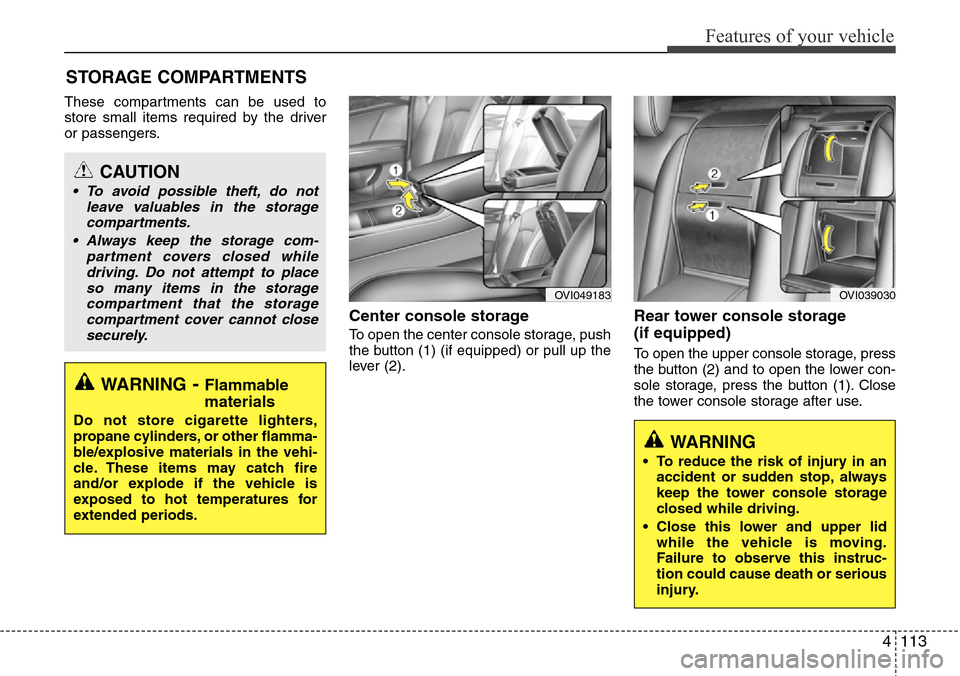
To open the center console storage, push
the button (1) (if equipped) or pull up the
lever (2).
Rear tower console storage
(if equipped)
To open the upper console storage, press
the button (2) and to open the lower con-
sole storage, press the button (1). Close
the tower console storage after use.
STORAGE COMPARTMENTS
WARNING- Flammable
materials
Do not store cigarette lighters,
propane cylinders, or other flamma-
ble/explosive materials in the vehi-
cle. These items may catch fire
and/or explode if the vehicle is
exposed to hot temperatures for
extended periods.
WARNING
• To reduce the risk of injury in an
accident or sudden stop, always
keep the tower console storage
closed while driving.
• Close this lower and upper lid
while the vehicle is moving.
Failure to observe this instruc-
tion could cause death or serious
injury.
CAUTION
• To avoid possible theft, do not
leave valuables in the storage
compartments.
• Always keep the storage com-
partment covers closed while
driving. Do not attempt to place
so many items in the storage
compartment that the storage
compartment cover cannot close
securely.
OVI049183OVI039030
Page 200 of 385
Features of your vehicle
118 4
Rear (if equipped)
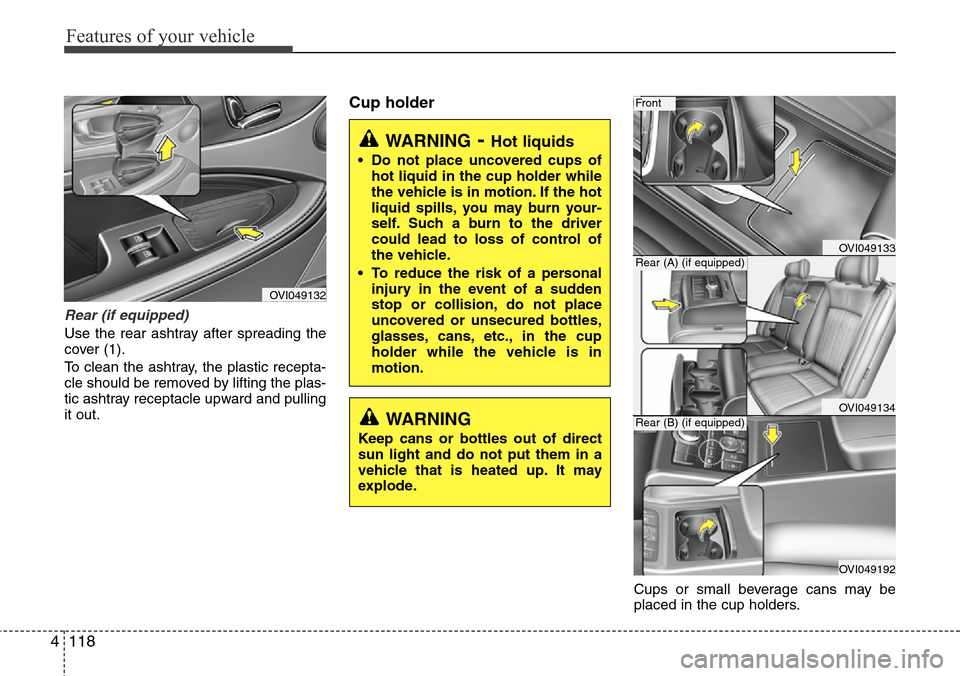
Use the rear ashtray after spreading the
cover (1).
To clean the ashtray, the plastic recepta-
cle should be removed by lifting the plas-
tic ashtray receptacle upward and pulling
it out.
Cup holder
Cups or small beverage cans may be
placed in the cup holders.
OVI049132
WARNING- Hot liquids
• Do not place uncovered cups of
hot liquid in the cup holder while
the vehicle is in motion. If the hot
liquid spills, you may burn your-
self. Such a burn to the driver
could lead to loss of control of
the vehicle.
• To reduce the risk of a personal
injury in the event of a sudden
stop or collision, do not place
uncovered or unsecured bottles,
glasses, cans, etc., in the cup
holder while the vehicle is in
motion.
OVI049133
OVI049134
OVI049192
Front
Rear (A) (if equipped)
Rear (B) (if equipped)WARNING
Keep cans or bottles out of direct
sun light and do not put them in a
vehicle that is heated up. It may
explode.
Page 217 of 385
Driving your vehicle
4 5
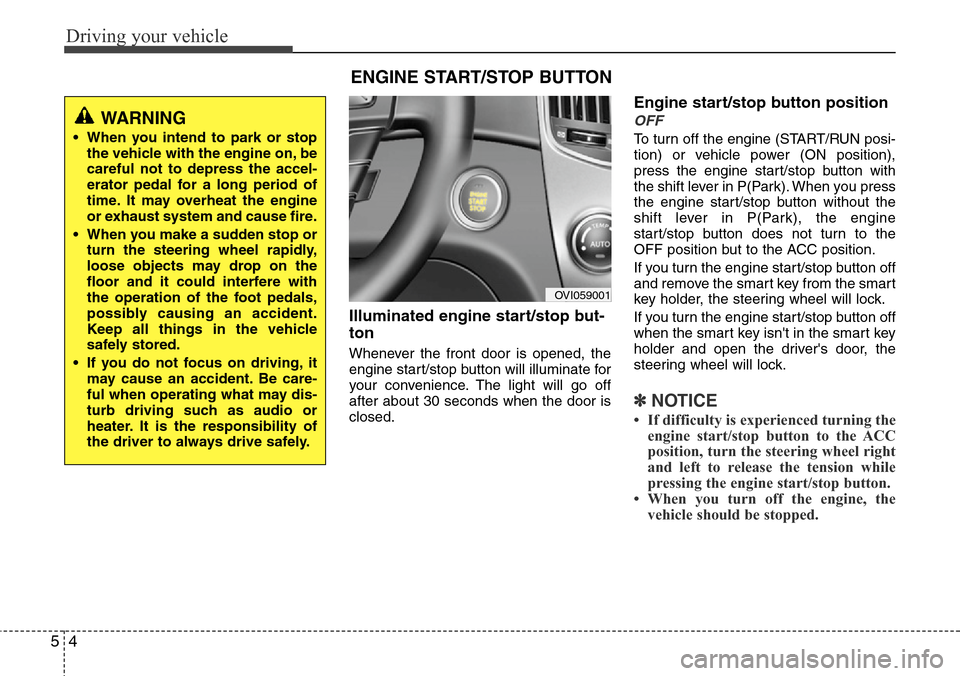
Illuminated engine start/stop but-
ton
Whenever the front door is opened, the
engine start/stop button will illuminate for
your convenience. The light will go off
after about 30 seconds when the door is
closed.
Engine start/stop button position
OFF
To turn off the engine (START/RUN posi-
tion) or vehicle power (ON position),
press the engine start/stop button with
the shift lever in P(Park). When you press
the engine start/stop button without the
shift lever in P(Park), the engine
start/stop button does not turn to the
OFF position but to the ACC position.
If you turn the engine start/stop button off
and remove the smart key from the smart
key holder, the steering wheel will lock.
If you turn the engine start/stop button off
when the smart key isn't in the smart key
holder and open the driver's door, the
steering wheel will lock.
✽NOTICE
• If difficulty is experienced turning the
engine start/stop button to the ACC
position, turn the steering wheel right
and left to release the tension while
pressing the engine start/stop button.
• When you turn off the engine, the
vehicle should be stopped.
ENGINE START/STOP BUTTON
OVI059001
WARNING
• When you intend to park or stop
the vehicle with the engine on, be
careful not to depress the accel-
erator pedal for a long period of
time. It may overheat the engine
or exhaust system and cause fire.
• When you make a sudden stop or
turn the steering wheel rapidly,
loose objects may drop on the
floor and it could interfere with
the operation of the foot pedals,
possibly causing an accident.
Keep all things in the vehicle
safely stored.
• If you do not focus on driving, it
may cause an accident. Be care-
ful when operating what may dis-
turb driving such as audio or
heater. It is the responsibility of
the driver to always drive safely.
Page 228 of 385
515
Driving your vehicle
Disc brakes wear indicator
Your vehicle has disc brakes.
When your brake pads are worn and new
pads are required, you will hear a high-
pitched warning sound from your front
brakes or rear brakes. You may hear this
sound come and go or it may occur
whenever you depress the brake pedal.
Please remember that some driving con-
ditions or climates may cause a brake
squeal when you first apply (or lightly
apply) the brakes. This is normal and
does not indicate a problem with your
brakes.
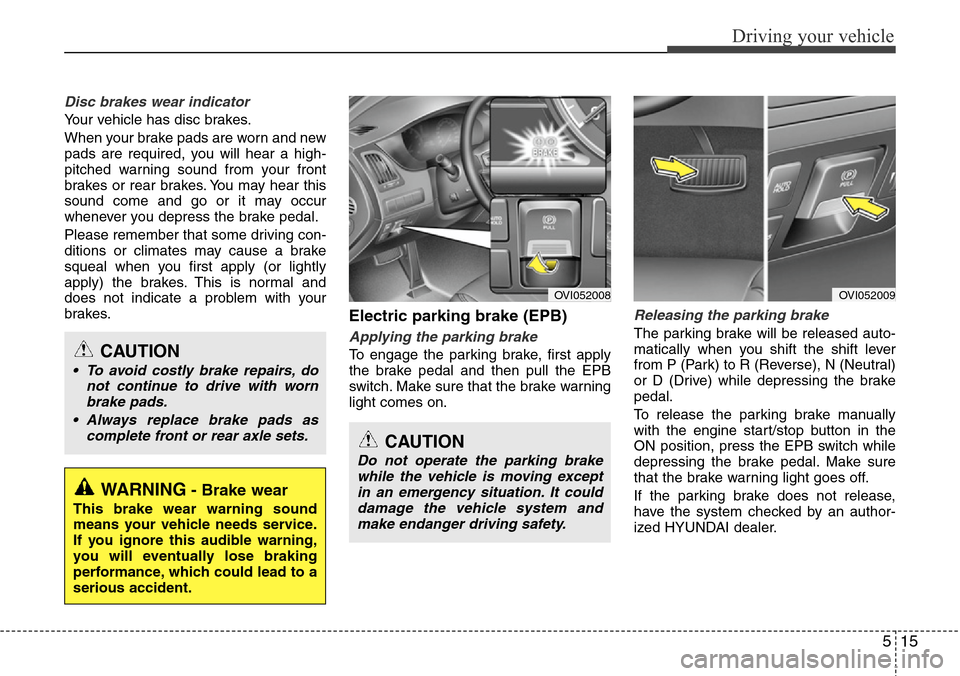
Electric parking brake (EPB)
Applying the parking brake
To engage the parking brake, first apply
the brake pedal and then pull the EPB
switch. Make sure that the brake warning
light comes on.
Releasing the parking brake
The parking brake will be released auto-
matically when you shift the shift lever
from P (Park) to R (Reverse), N (Neutral)
or D (Drive) while depressing the brake
pedal.
To release the parking brake manually
with the engine start/stop button in the
ON position, press the EPB switch while
depressing the brake pedal. Make sure
that the brake warning light goes off.
If the parking brake does not release,
have the system checked by an author-
ized HYUNDAI dealer.
WARNING- Brake wear
This brake wear warning sound
means your vehicle needs service.
If you ignore this audible warning,
you will eventually lose braking
performance, which could lead to a
serious accident.
CAUTION
• To avoid costly brake repairs, do
not continue to drive with worn
brake pads.
• Always replace brake pads as
complete front or rear axle sets.
CAUTION
Do not operate the parking brake
while the vehicle is moving except
in an emergency situation. It could
damage the vehicle system and
make endanger driving safety.
OVI052008OVI052009
Page 245 of 385
Driving your vehicle
32 5
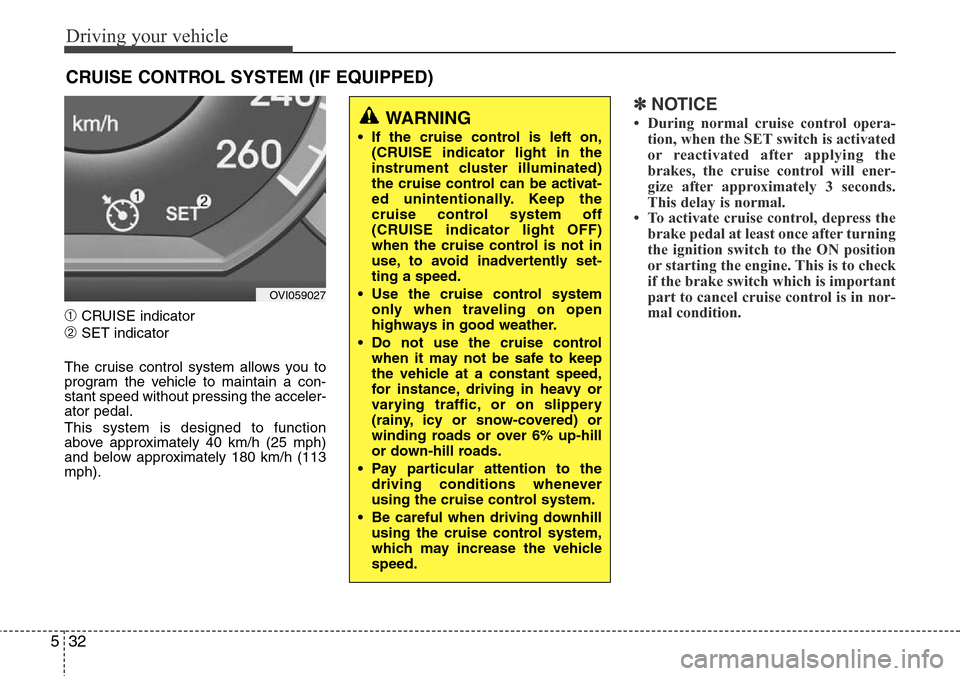
➀CRUISE indicator
➁SET indicator
The cruise control system allows you to
program the vehicle to maintain a con-
stant speed without pressing the acceler-
ator pedal.
This system is designed to function
above approximately 40 km/h (25 mph)
and below approximately 180 km/h (113
mph).
✽NOTICE
• During normal cruise control opera-
tion, when the SET switch is activated
or reactivated after applying the
brakes, the cruise control will ener-
gize after approximately 3 seconds.
This delay is normal.
• To activate cruise control, depress the
brake pedal at least once after turning
the ignition switch to the ON position
or starting the engine. This is to check
if the brake switch which is important
part to cancel cruise control is in nor-
mal condition.
CRUISE CONTROL SYSTEM (IF EQUIPPED)
WARNING
• If the cruise control is left on,
(CRUISE indicator light in the
instrument cluster illuminated)
the cruise control can be activat-
ed unintentionally. Keep the
cruise control system off
(CRUISE indicator light OFF)
when the cruise control is not in
use, to avoid inadvertently set-
ting a speed.
• Use the cruise control system
only when traveling on open
highways in good weather.
• Do not use the cruise control
when it may not be safe to keep
the vehicle at a constant speed,
for instance, driving in heavy or
varying traffic, or on slippery
(rainy, icy or snow-covered) or
winding roads or over 6% up-hill
or down-hill roads.
• Pay particular attention to the
driving conditions whenever
using the cruise control system.
• Be careful when driving downhill
using the cruise control system,
which may increase the vehicle
speed.
OVI059027
Page 249 of 385
Driving your vehicle
36 5
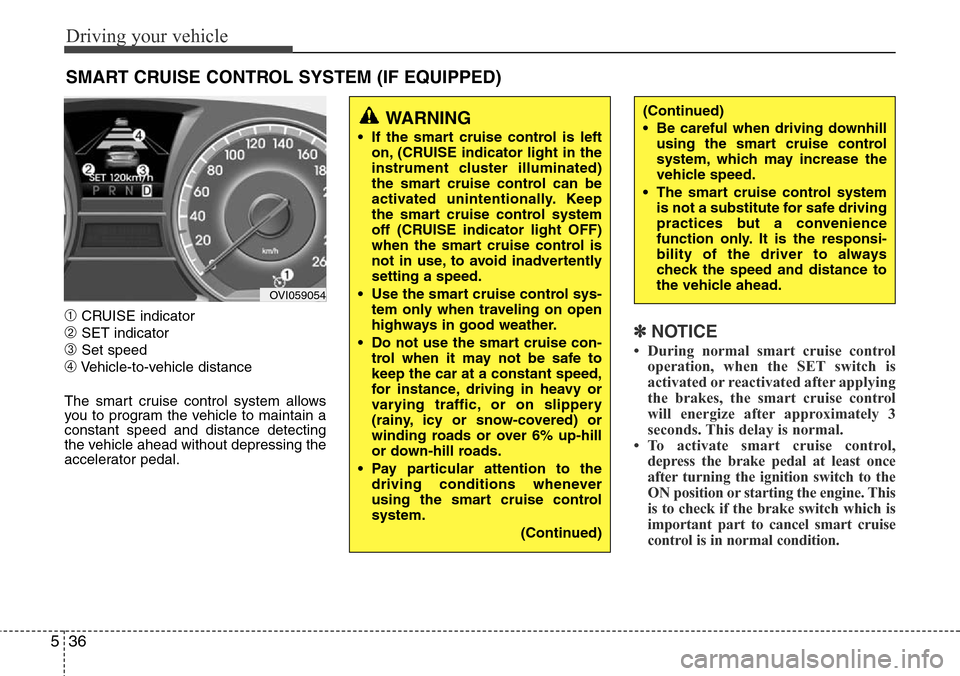
➀CRUISE indicator
➁SET indicator
➂Set speed
➃Vehicle-to-vehicle distance
The smart cruise control system allows
you to program the vehicle to maintain a
constant speed and distance detecting
the vehicle ahead without depressing the
accelerator pedal.
✽NOTICE
• During normal smart cruise control
operation, when the SET switch is
activated or reactivated after applying
the brakes, the smart cruise control
will energize after approximately 3
seconds. This delay is normal.
• To activate smart cruise control,
depress the brake pedal at least once
after turning the ignition switch to the
ON position or starting the engine. This
is to check if the brake switch which is
important part to cancel smart cruise
control is in normal condition.
SMART CRUISE CONTROL SYSTEM (IF EQUIPPED)
WARNING
• If the smart cruise control is left
on, (CRUISE indicator light in the
instrument cluster illuminated)
the smart cruise control can be
activated unintentionally. Keep
the smart cruise control system
off (CRUISE indicator light OFF)
when the smart cruise control is
not in use, to avoid inadvertently
setting a speed.
• Use the smart cruise control sys-
tem only when traveling on open
highways in good weather.
• Do not use the smart cruise con-
trol when it may not be safe to
keep the car at a constant speed,
for instance, driving in heavy or
varying traffic, or on slippery
(rainy, icy or snow-covered) or
winding roads or over 6% up-hill
or down-hill roads.
• Pay particular attention to the
driving conditions whenever
using the smart cruise control
system.
(Continued)
(Continued)
• Be careful when driving downhill
using the smart cruise control
system, which may increase the
vehicle speed.
• The smart cruise control system
is not a substitute for safe driving
practices but a convenience
function only. It is the responsi-
bility of the driver to always
check the speed and distance to
the vehicle ahead.
OVI059054