key Hyundai Equus 2011 User Guide
[x] Cancel search | Manufacturer: HYUNDAI, Model Year: 2011, Model line: Equus, Model: Hyundai Equus 2011Pages: 385, PDF Size: 10.67 MB
Page 94 of 385
Features of your vehicle
12 4
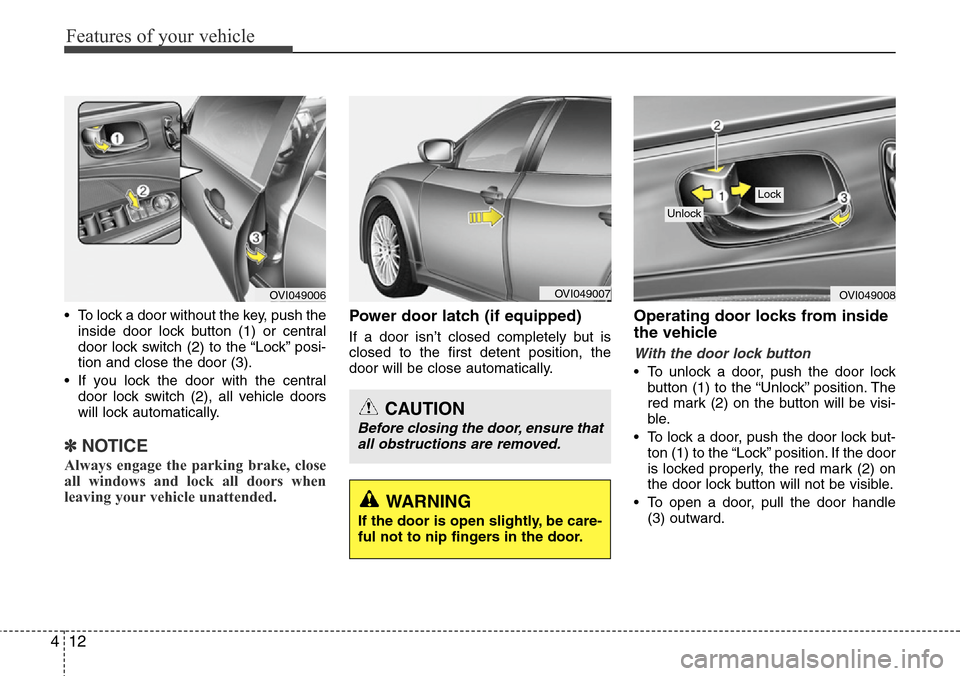
• To lock a door without the key, push the
inside door lock button (1) or central
door lock switch (2
) to the “Lock” posi-
tion and close the door (3).
• If you lock the door with the central
door lock switch (2), all vehicle doors
will lock automatically.
✽NOTICE
Always engage the parking brake, close
all windows and lock all doors when
leaving your vehicle unattended.
Power door latch (if equipped)
If a door isn’t closed completely but is
closed to the first detent position, the
door will be close automatically.
Operating door locks from inside
the vehicle
With the door lock button
• To unlock a door, push the door lock
button (1) to the “Unlock” position. The
red mark (2) on the button will be visi-
ble.
• To lock a door, push the door lock but-
ton (1) to the “Lock” position. If the door
is locked properly, the red mark (2) on
the door lock button will not be visible.
• To open a door, pull the door handle
(3) outward.
OVI049008
Lock
Unlock
OVI049007
WARNING
If the door is open slightly, be care-
ful not to nip fingers in the door.
CAUTION
Before closing the door, ensure that
all obstructions are removed.
OVI049006
Page 95 of 385
413
Features of your vehicle
• If the inner door handle of the driver’s
(or front passenger’s) door is pulled
when the door lock button is in lock
position, the button is unlocked and
door opens. (if equipped)
• Front doors cannot be locked if the
smart key is in the vehicle and any
door is opened.
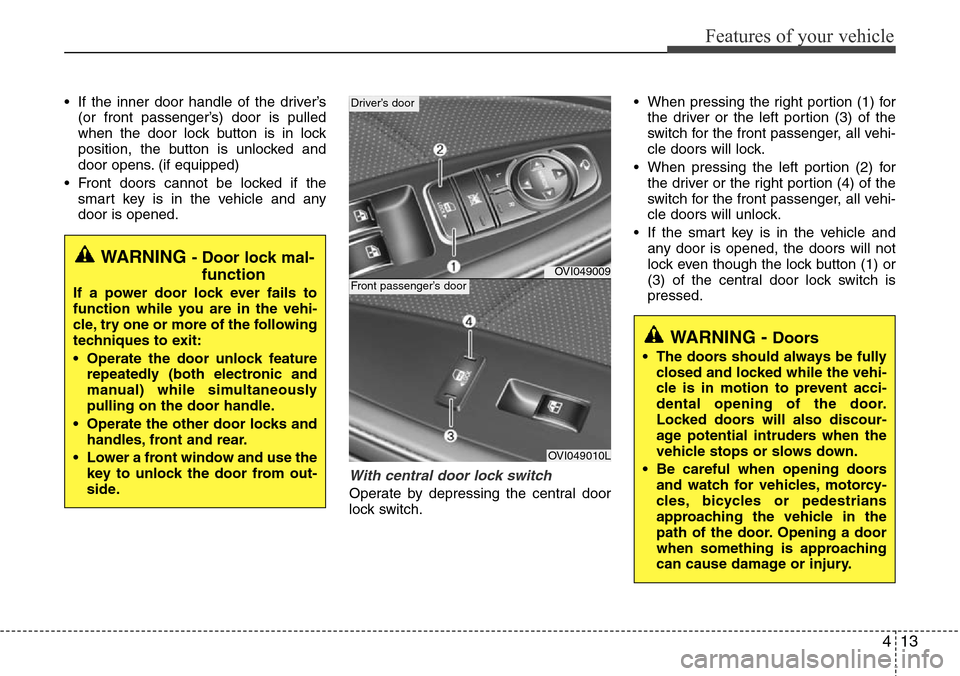
With central door lock switch
Operate by depressing the central door
lock switch.• When pressing the right portion (1) for
the driver or the left portion (3) of the
switch for the front passenger, all vehi-
cle doors will lock.
• When pressing the left portion (2) for
the driver or the right portion (4) of the
switch for the front passenger, all vehi-
cle doors will unlock.
• If the smart key is in the vehicle and
any door is opened, the doors will not
lock even though the lock button (1) or
(3) of the central door lock switch is
pressed.
WARNING - Door lock mal-
function
If a power door lock ever fails to
function while you are in the vehi-
cle, try one or more of the following
techniques to exit:
• Operate the door unlock feature
repeatedly (both electronic and
manual) while simultaneously
pulling on the door handle.
• Operate the other door locks and
handles, front and rear.
• Lower a front window and use the
key to unlock the door from out-
side.
OVI049009
Driver’s door
OVI049010L
Front passenger’s door
WARNING - Doors
• The doors should always be fully
closed and locked while the vehi-
cle is in motion to prevent acci-
dental opening of the door.
Locked doors will also discour-
age potential intruders when the
vehicle stops or slows down.
• Be careful when opening doors
and watch for vehicles, motorcy-
cles, bicycles or pedestrians
approaching the vehicle in the
path of the door. Opening a door
when something is approaching
can cause damage or injury.
Page 96 of 385
Features of your vehicle
14 4
Impact sensing door unlock sys-
tem
All doors will be automatically unlocked
after an impact causes the air bags to
deploy.
Speed sensing door lock system
(if equipped)
All doors will be automatically locked
after the vehicle speed exceeds 15 km/h
(9 mph). And all doors will be automati-
cally unlocked when you turn the engine
off.
✽NOTICE
You can select some auto door lock/
unlock features in the INFO menu of
DIS (Driver Information System, if
equipped) as follows;
• Speed sensing auto door lock
• Auto door unlock by unlocking the
driver's door lock button
• Auto door unlock when the smart key
is removed from the smart key holder.
• Auto door lock/unlock by shifting the
shift lever out of P (Park) or into P
(Park)
If you want this feature, refer to the DIS
manual (if equipped) supplied separate-
ly.WARNING- Unlocked
vehicles
Leaving your vehicle unlocked can
invite theft or possible harm to you
or others from someone hiding in
your vehicle while you are gone.
Always remove the ignition key,
engage the parking brake, close all
windows and lock all doors when
leaving your vehicle unattended.
WARNING- Unattended
children
An enclosed vehicle can become
extremely hot, causing death or
severe injury to unattended chil-
dren or animals who cannot escape
the vehicle. Furthermore, children
might operate features of the vehi-
cle that could injure them, or they
could encounter other harm, possi-
bly from someone gaining entry to
the vehicle. Never leave children or
animals unattended in your vehicle.
Page 98 of 385
Features of your vehicle
16 4
Without the power trunk
Opening the trunk
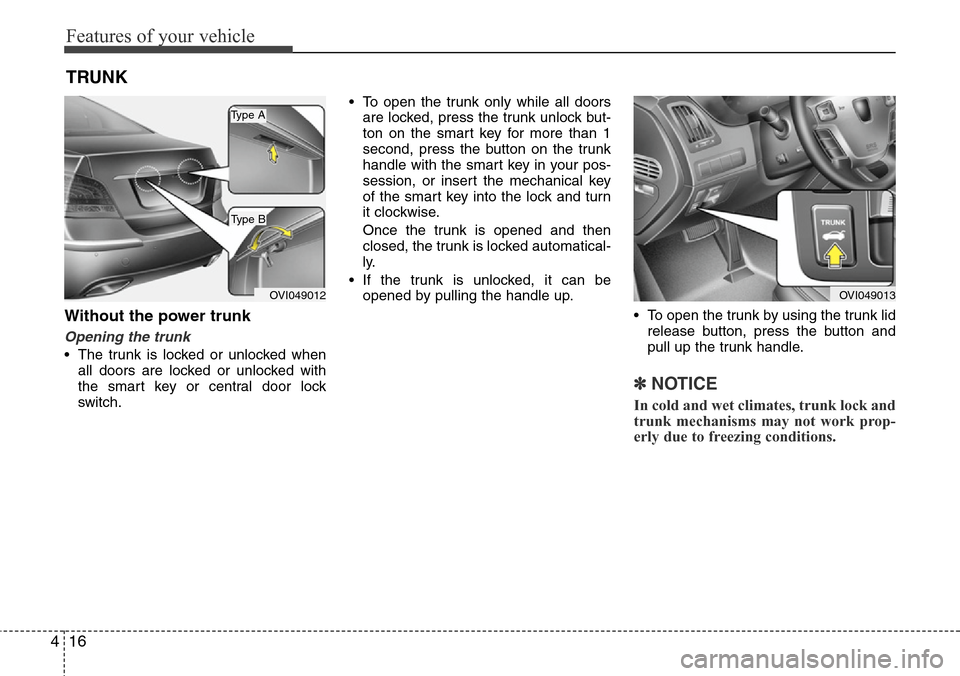
• The trunk is locked or unlocked when
all doors are locked or unlocked with
the smart key or central door lock
switch.• To open the trunk only while all doors
are locked, press the trunk unlock but-
ton on the smart key for more than 1
second, press the button on the trunk
handle with the smart key in your pos-
session, or insert the mechanical key
of the smart key into the lock and turn
it clockwise.
Once the trunk is opened and then
closed, the trunk is locked automatical-
ly.
• If the trunk is unlocked, it can be
opened by pulling the handle up.
• To open the trunk by using the trunk lid
release button, press the button and
pull up the trunk handle.
✽NOTICE
In cold and wet climates, trunk lock and
trunk mechanisms may not work prop-
erly due to freezing conditions.
TRUNK
OVI049013OVI049012
Type B
Type A
Page 99 of 385
417
Features of your vehicle
Closing the trunk
To close the trunk, lower the trunk lid,
then press down it until it locks. To be
sure the trunk lid is securely fastened,
always check by trying to pull it up again.
Power trunk (if equipped)
The power trunk can be opened or
closed automatically with the smart key,
the power trunk main control button, the
open button, or the close button on the
trunk.
If you depress the power trunk main con-
trol button, open button, or close button
while operating the power trunk, you
could stop operating the power trunk.
If that happens, to operate the power
trunk again, push any button.
CAUTION
Make certain that you close the
trunk before driving your vehicle.
Possible damage may occur to the
trunk lift cylinders and attached
hardware if the trunk is not closed
prior to driving.
WARNING
The trunk swings upward. Make
sure no objects or people are near
the rear of the vehicle when open-
ing the trunk.
WARNING
The trunk lid should be always kept
completely closed while the vehicle
is in motion. If it is left open or ajar,
poisonous exhaust gases may
enter the vehicle and serious ill-
ness or death may result.
CAUTION
For your safety, do not leave the
power trunk open for a long time, it
could also to prevent unnecessary
charging system drain.
WARNING
Never leave children or animals
unattended in your vehicle.
Children or animals might operate
the power trunk that could result in
injury to themselves or others, or
damage to the vehicle.
Page 101 of 385
419
Features of your vehicle
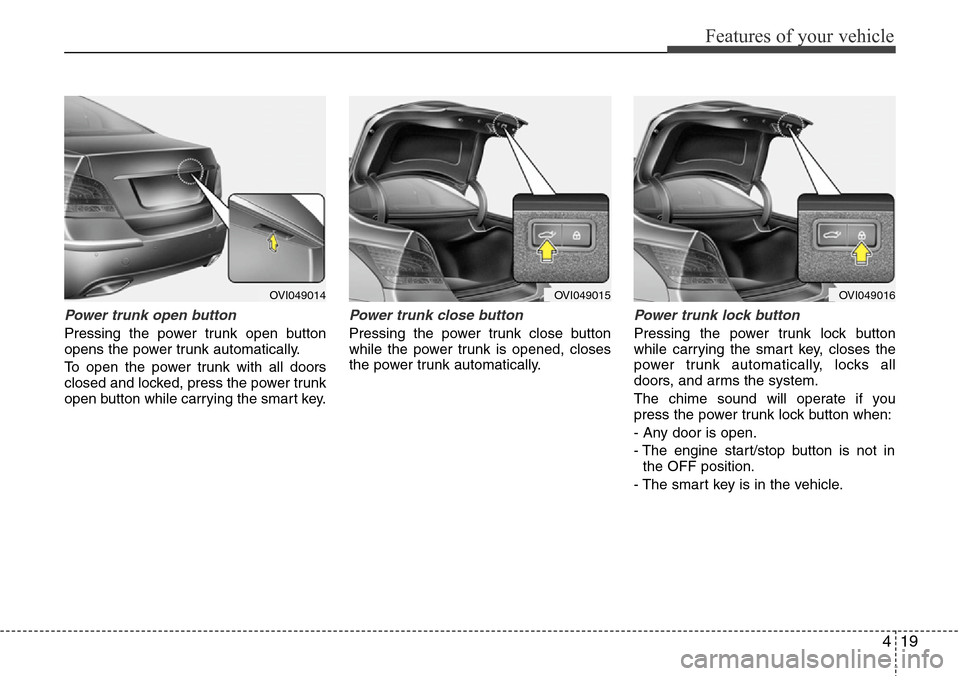
Power trunk open button
Pressing the power trunk open button
opens the power trunk automatically.
To open the power trunk with all doors
closed and locked, press the power trunk
open button while carrying the smart key.
Power trunk close button
Pressing the power trunk close button
while the power trunk is opened, closes
the power trunk automatically.
Power trunk lock button
Pressing the power trunk lock button
while carrying the smart key, closes the
power trunk automatically, locks all
doors, and arms the system.
The chime sound will operate if you
press the power trunk lock button when:
- Any door is open.
- The engine start/stop button is not in
the OFF position.
- The smart key is in the vehicle.
OVI049014OVI049015OVI049016
Page 103 of 385
421
Features of your vehicle
If the automatic stop and reversal feature
operates continuously more than twice
during one opening or closing operation,
the power trunk may stop at that position.
At this time, close the trunk manually and
operate the trunk automatically again.How to reset the power trunk
If the battery has been discharged or dis-
connected, or if the related fuse has
been replaced or disconnected, for the
power trunk to operate normally, reset
the power trunk as follow:
1. Put the shift lever in P (Park).
2. Close the trunk manually.
If the power trunk doesn't work properly
after above procedure, have the system
checked by an authorized HYUNDAI
dealer.
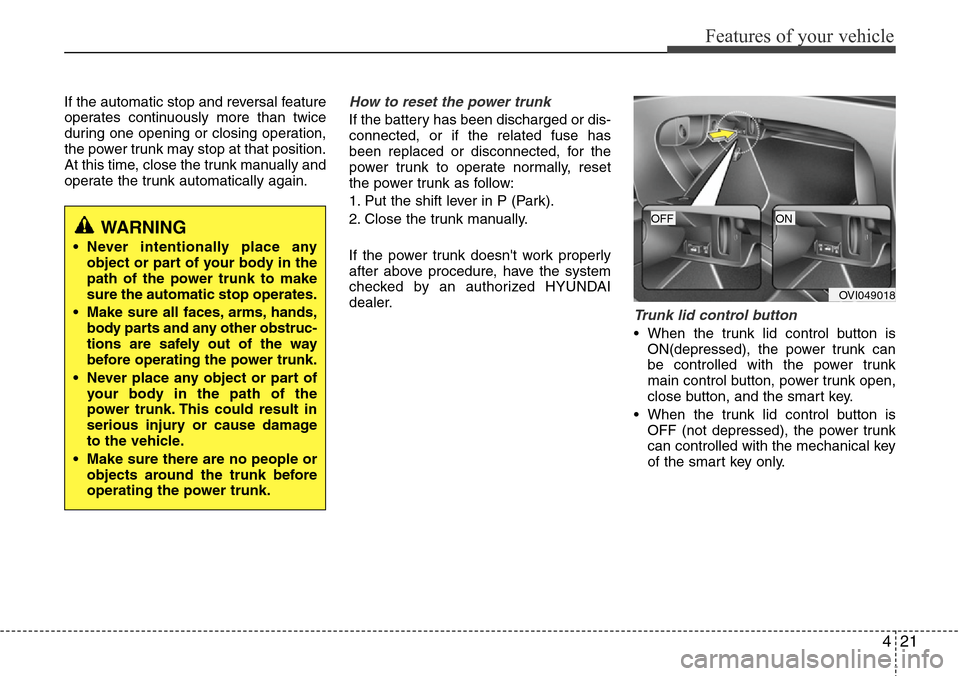
Trunk lid control button
• When the trunk lid control button is
ON(depressed), the power trunk can
be controlled with the power trunk
main control button, power trunk open,
close button, and the smart key.
• When the trunk lid control button is
OFF (not depressed), the power trunk
can controlled with the mechanical key
of the smart key only.
WARNING
• Never intentionally place any
object or part of your body in the
path of the power trunk to make
sure the automatic stop operates.
• Make sure all faces, arms, hands,
body parts and any other obstruc-
tions are safely out of the way
before operating the power trunk.
• Never place any object or part of
your body in the path of the
power trunk. This could result in
serious injury or cause damage
to the vehicle.
• Make sure there are no people or
objects around the trunk before
operating the power trunk.
OVI049018
OFFON
Page 110 of 385
Features of your vehicle
28 4
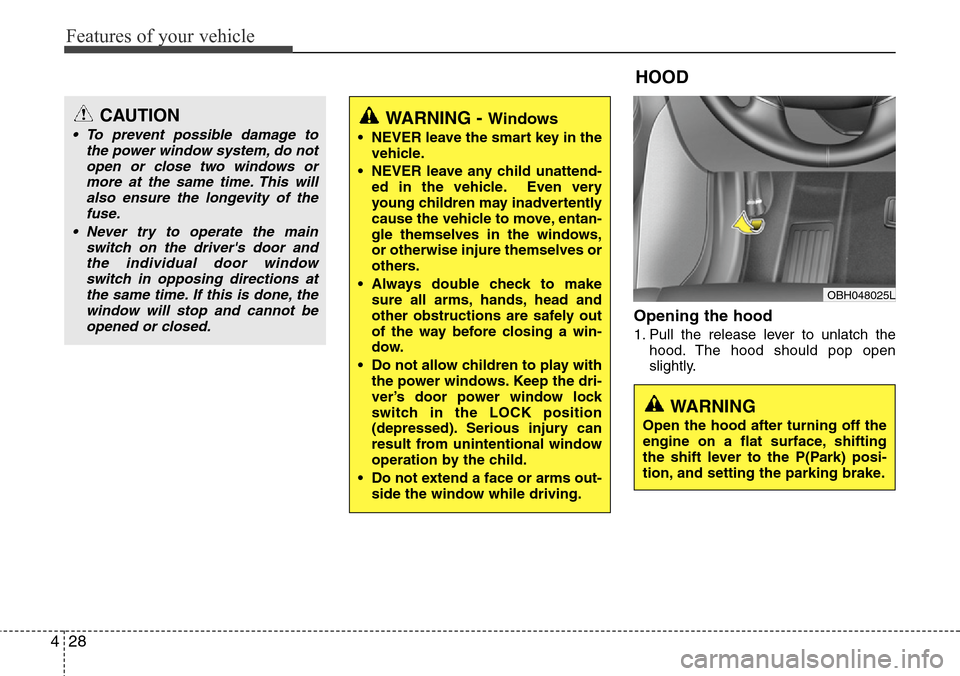
Opening the hood
1. Pull the release lever to unlatch the
hood. The hood should pop open
slightly.
WARNING - Windows
• NEVER leave the smart key in the
vehicle.
• NEVER leave any child unattend-
ed in the vehicle. Even very
young children may inadvertently
cause the vehicle to move, entan-
gle themselves in the windows,
or otherwise injure themselves or
others.
• Always double check to make
sure all arms, hands, head and
other obstructions are safely out
of the way before closing a win-
dow.
• Do not allow children to play with
the power windows. Keep the dri-
ver’s door power window lock
switch in the LOCK position
(depressed). Serious injury can
result from unintentional window
operation by the child.
• Do not extend a face or arms out-
side the window while driving.
HOOD
OBH048025L
CAUTION
• To prevent possible damage to
the power window system, do not
open or close two windows or
more at the same time. This will
also ensure the longevity of the
fuse.
• Never try to operate the main
switch on the driver's door and
the individual door window
switch in opposing directions at
the same time. If this is done, the
window will stop and cannot be
opened or closed.
WARNING
Open the hood after turning off the
engine on a flat surface, shifting
the shift lever to the P(Park) posi-
tion, and setting the parking brake.
Page 120 of 385
Features of your vehicle
38 4
Easy access function
(if equipped)
The steering wheel will move away from
the driver and the seat will move rear-
ward, when the engine start/stop button
is turned to the OFF position or when you
pull out the smart key from the smart key
holder with the shift lever in the P posi-
tion.
The steering wheel will move toward the
driver and the seat will move forward,
when the engine start/stop button is
turned to the ACC position or when you
insert the smart key into the smart key
holder with the shift lever in the P posi-
tion.
✽NOTICE
You can activate or deactivate the easy
access function in the INFO menu of
DIS (Driver Information System, if
equipped) as follows (if equipped);
• Seat easy access
• Steering easy access
If you want detailed informations, refer
to the DIS manual (if equipped) sup-
plied separately.
Reverse parking aid function
(if equipped)
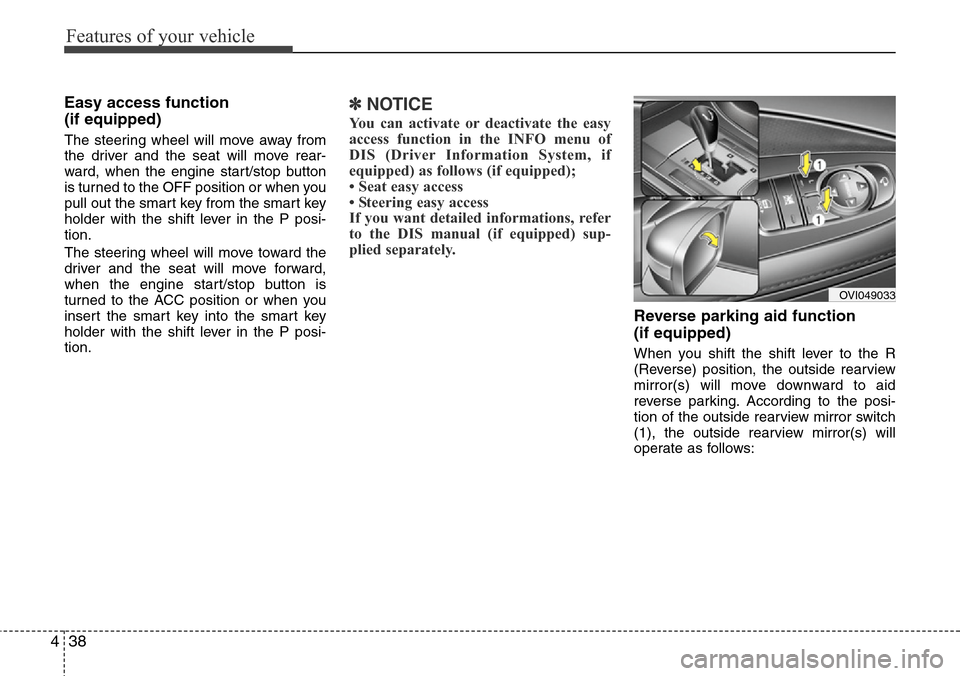
When you shift the shift lever to the R
(Reverse) position, the outside rearview
mirror(s) will move downward to aid
reverse parking. According to the posi-
tion of the outside rearview mirror switch
(1), the outside rearview mirror(s) will
operate as follows:
OVI049033
Page 128 of 385
Features of your vehicle
46 4
Electric chromic mirror (ECM)
(if equipped)
The electric chromic mirror automatically
controls the glare from the headlights of
the car behind you in nighttime or low
light driving conditions. The sensor
mounted in the mirror senses the light
level around the vehicle, and automati-
cally controls the headlight glare from
vehicles behind you.
When the engine is running, the glare is
automatically controlled by the sensor
mounted in the rearview mirror.
Whenever the shift lever is shifted into R
(Reverse), the mirror will automatically
go to the brightest setting in order to
improve the drivers view behind the vehi-
cle. If the ECM of inside rear view mirror
operates, it will be working
Folding the outside rearview mirror
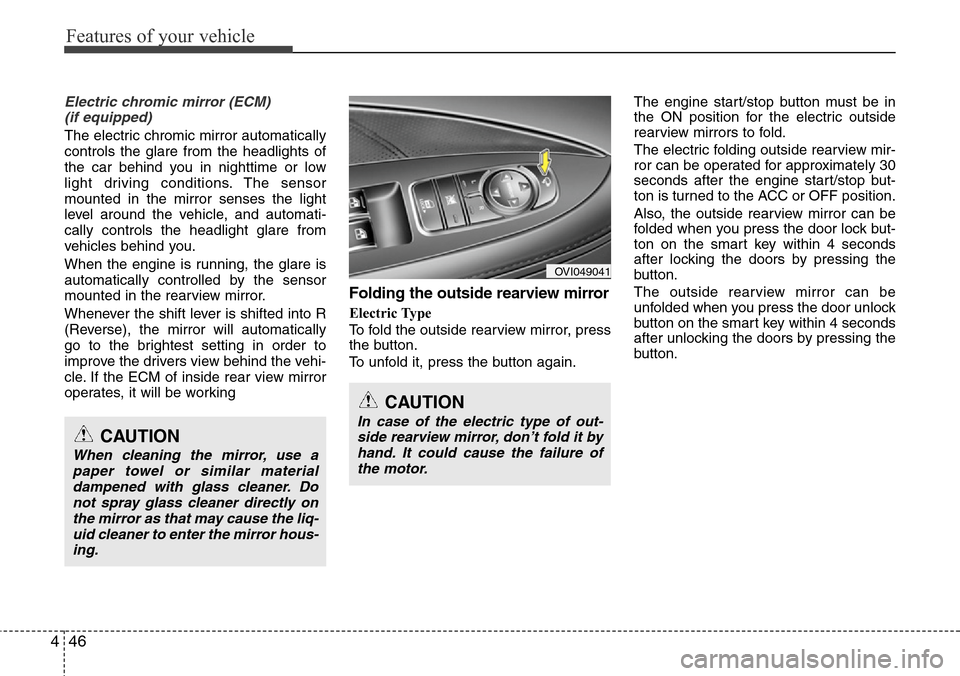
Electric Type
To fold the outside rearview mirror, press
the button.
To unfold it, press the button again.The engine start/stop button must be in
the ON position for the electric outside
rearview mirrors to fold.
The electric folding outside rearview mir-
ror can be operated for approximately 30
seconds after the engine start/stop but-
ton is turned to the ACC or OFF position.
Also, the outside rearview mirror can be
folded when you press the door lock but-
ton on the smart key within 4 seconds
after locking the doors by pressing the
button.
The outside rearview mirror can be
unfolded when you press the door unlock
button on the smart key within 4 seconds
after unlocking the doors by pressing the
button.
OVI049041
CAUTION
In case of the electric type of out-
side rearview mirror, don’t fold it by
hand. It could cause the failure of
the motor.CAUTION
When cleaning the mirror, use a
paper towel or similar material
dampened with glass cleaner. Do
not spray glass cleaner directly on
the mirror as that may cause the liq-
uid cleaner to enter the mirror hous-
ing.