steering Hyundai Equus 2011 Owner's Guide
[x] Cancel search | Manufacturer: HYUNDAI, Model Year: 2011, Model line: Equus, Model: Hyundai Equus 2011Pages: 385, PDF Size: 10.67 MB
Page 130 of 385
Features of your vehicle
48 4
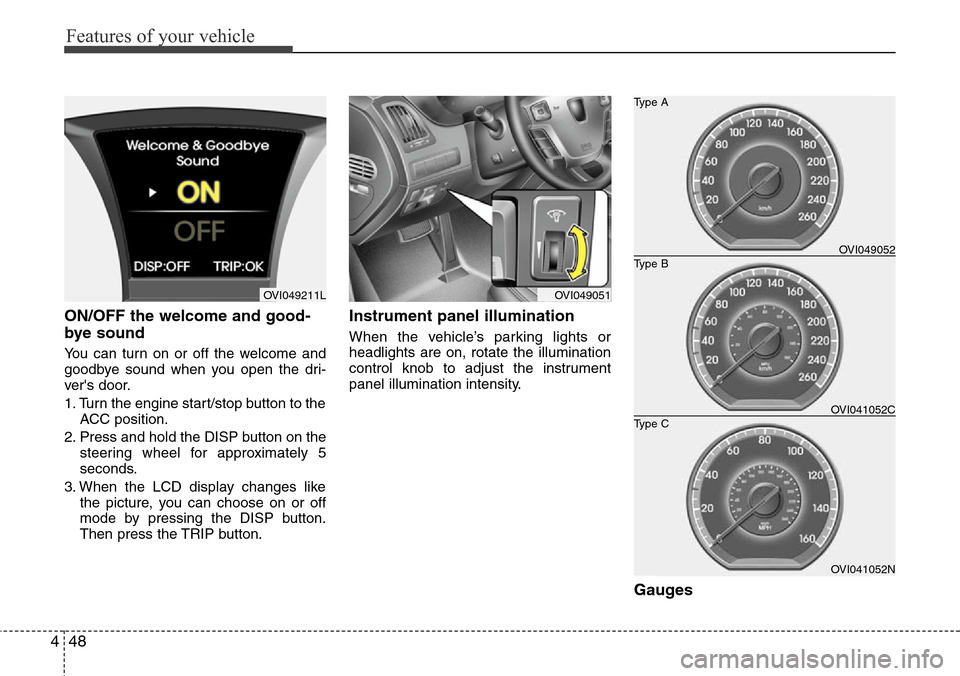
ON/OFF the welcome and good-
bye sound
You can turn on or off the welcome and
goodbye sound when you open the dri-
ver's door.
1. Turn the engine start/stop button to the
ACC position.
2. Press and hold the DISP button on the
steering wheel for approximately 5
seconds.
3. When the LCD display changes like
the picture, you can choose on or off
mode by pressing the DISP button.
Then press the TRIP button.
Instrument panel illumination
When the vehicle’s parking lights or
headlights are on, rotate the illumination
control knob to adjust the instrument
panel illumination intensity.
Gauges
OVI049051OVI049211L
OVI041052N
Type B Type A
Type COVI049052
OVI041052C
Page 142 of 385
Features of your vehicle
60 4
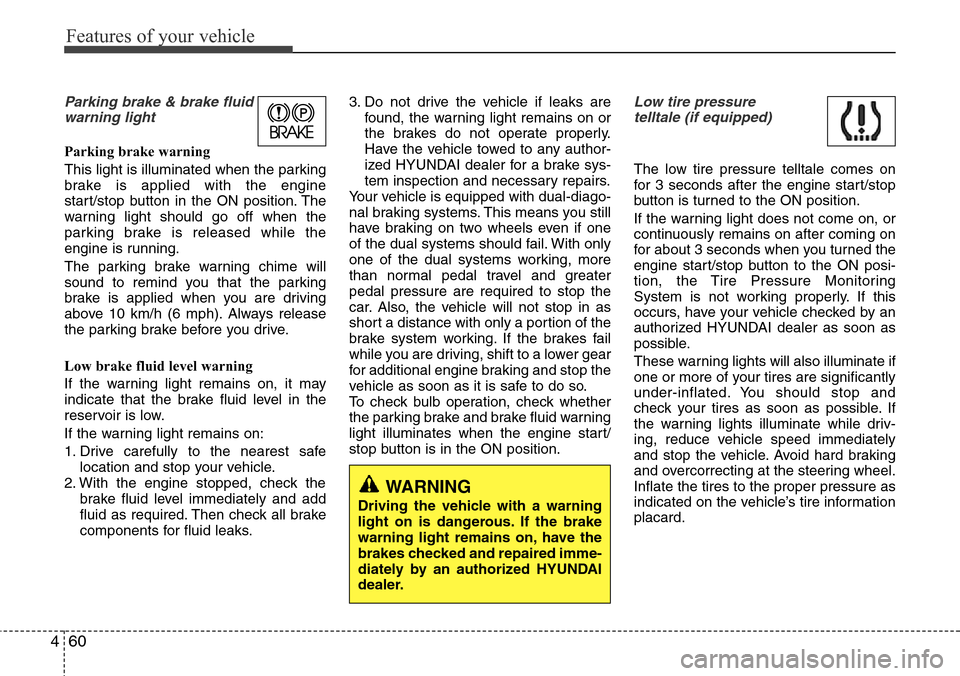
Parking brake & brake fluid
warning light
Parking brake warning
This light is illuminated when the parking
brake is applied with the engine
start/stop button in the ON position. The
warning light should go off when the
parking brake is released while the
engine is running.
The parking brake warning chime will
sound to remind you that the parking
brake is applied when you are driving
above 10 km/h (6 mph). Always release
the parking brake before you drive.
Low brake fluid level warning
If the warning light remains on, it may
indicate that the brake fluid level in the
reservoir is low.
If the warning light remains on:
1. Drive carefully to the nearest safe
location and stop your vehicle.
2. With the engine stopped, check the
brake fluid level immediately and add
fluid as required. Then check all brake
components for fluid leaks.3. Do not drive the vehicle if leaks are
found, the warning light remains on or
the brakes do not operate properly.
Have the vehicle towed to any author-
ized HYUNDAI dealer for a brake sys-
tem inspection and necessary repairs.
Your vehicle is equipped with dual-diago-
nal braking systems. This means you still
have braking on two wheels even if one
of the dual systems should fail. With only
one of the dual systems working, more
than normal pedal travel and greater
pedal pressure are required to stop the
car. Also, the vehicle will not stop in as
short a distance with only a portion of the
brake system working. If the brakes fail
while you are driving, shift to a lower gear
for additional engine braking and stop the
vehicle as soon as it is safe to do so.
To check bulb operation, check whether
the parking brake and brake fluid warning
light illuminates when the engine start/
stop button is in the ON position.
Low tire pressure
telltale (if equipped)
The low tire pressure telltale comes on
for 3 seconds after the engine start/stop
button is turned to the ON position.
If the warning light does not come on, or
continuously remains on after coming on
for about 3 seconds when you turned the
engine start/stop button to the ON posi-
tion, the Tire Pressure Monitoring
System is not working properly. If this
occurs, have your vehicle checked by an
authorized HYUNDAI dealer as soon as
possible.
These warning lights will also illuminate if
one or more of your tires are significantly
under-inflated. You should stop and
check your tires as soon as possible. If
the warning lights illuminate while driv-
ing, reduce vehicle speed immediately
and stop the vehicle. Avoid hard braking
and overcorrecting at the steering wheel.
Inflate the tires to the proper pressure as
indicated on the vehicle’s tire information
placard.
WARNING
Driving the vehicle with a warning
light on is dangerous. If the brake
warning light remains on, have the
brakes checked and repaired imme-
diately by an authorized HYUNDAI
dealer.
Page 147 of 385

465
Features of your vehicle
ESP OFF indicator
The ESP OFF indicator will illuminate
when the engine start/stop button is
turned ON, but should go off after
approximately 3 seconds. To switch to
ESP OFF mode, press the ESP OFF but-
ton. The ESP OFF indicator will illumi-
nate indicating the ESP is deactivated.
VSM OFF indicator
(if equipped)
To switch to VSM OFF mode, press the
VSM OFF button. The VSM OFF indica-
tor will illuminate indicating the VSM is
deactivated.
If this indicator stays on when VSM OFF
is not selected, the VSM may have mal-
functioned. Take your vehicle to an
authorized HYUNDAI dealer and have
the system checked.
Cruise indicator (if equipped)
CRUISE indicator
The indicator illuminates when the cruise
control system is enabled.
The cruise indicator in the instrument
cluster is illuminated when the CRUISE
button on the steering wheel is pressed.
The indicator light turns off when the
CRUISE button is pressed again. For
more information about the use of cruise
control, refer to “Cruise control system or
Smart cruise control system” in section 5.
Cruise SET indicator
The indicator illuminates when the cruise
function switch (SET- or RES+) is ON.
The cruise SET indicator light in the
instrument cluster or on the LCD screen
is illuminated when the cruise control
switch (SET- or RES+) is pushed. The
cruise SET indicator does not illuminate
when the cruise control switch (CAN-
CEL) is pushed or the system is disen-
gaged.
SET
VSM
OFF
Page 153 of 385
471
Features of your vehicle
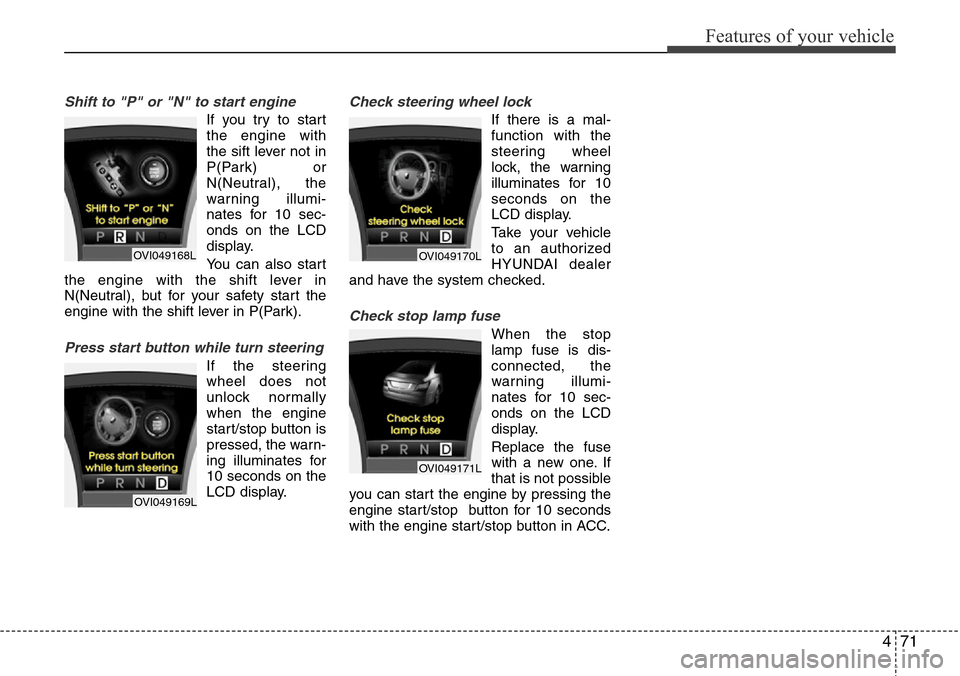
Shift to "P" or "N" to start engine
If you try to start
the engine with
the sift lever not in
P(Park) or
N(Neutral), the
warning illumi-
nates for 10 sec-
onds on the LCD
display.
You can also start
the engine with the shift lever in
N(Neutral), but for your safety start the
engine with the shift lever in P(Park).
Press start button while turn steering
If the steering
wheel does not
unlock normally
when the engine
start/stop button is
pressed, the warn-
ing illuminates for
10 seconds on the
LCD display.
Check steering wheel lock
If there is a mal-
function with the
steering wheel
lock, the warning
illuminates for 10
seconds on the
LCD display.
Take your vehicle
to an authorized
HYUNDAI dealer
and have the system checked.
Check stop lamp fuse
When the stop
lamp fuse is dis-
connected, the
warning illumi-
nates for 10 sec-
onds on the LCD
display.
Replace the fuse
with a new one. If
that is not possible
you can start the engine by pressing the
engine start/stop button for 10 seconds
with the engine start/stop button in ACC.
OVI049168L
OVI049169L
OVI049170L
OVI049171L
Page 158 of 385
Features of your vehicle
76 4
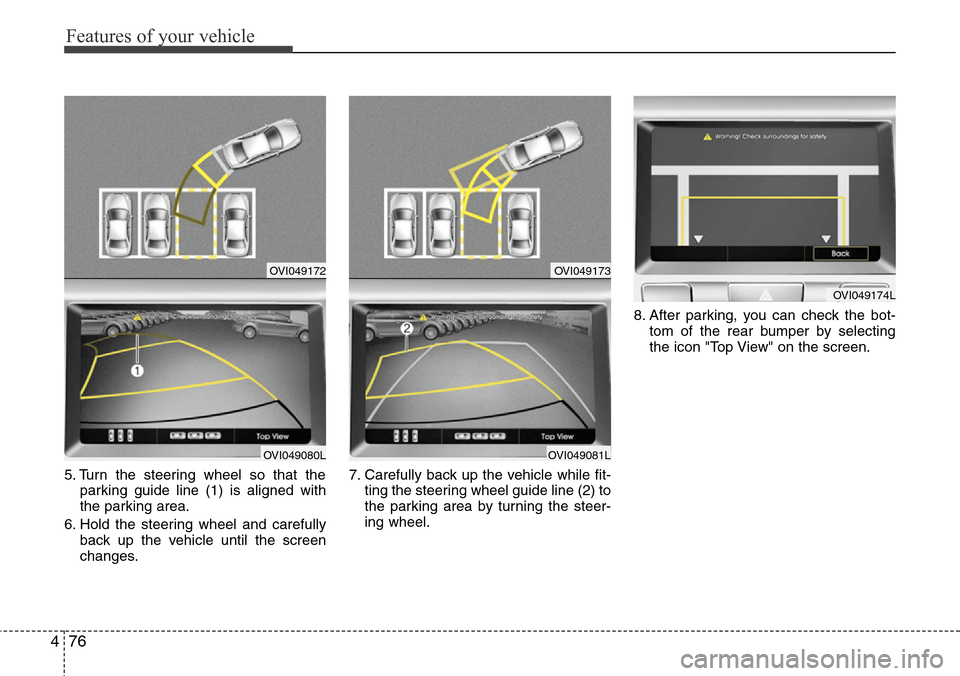
5. Turn the steering wheel so that the
parking guide line (1) is aligned with
the parking area.
6. Hold the steering wheel and carefully
back up the vehicle until the screen
changes.7. Carefully back up the vehicle while fit-
ting the steering wheel guide line (2) to
the parking area by turning the steer-
ing wheel.8. After parking, you can check the bot-
tom of the rear bumper by selecting
the icon "Top View" on the screen.
OVI049172
OVI049080L
OVI049173
OVI049081L
OVI049174L
Page 159 of 385
477
Features of your vehicle
Parallel parking
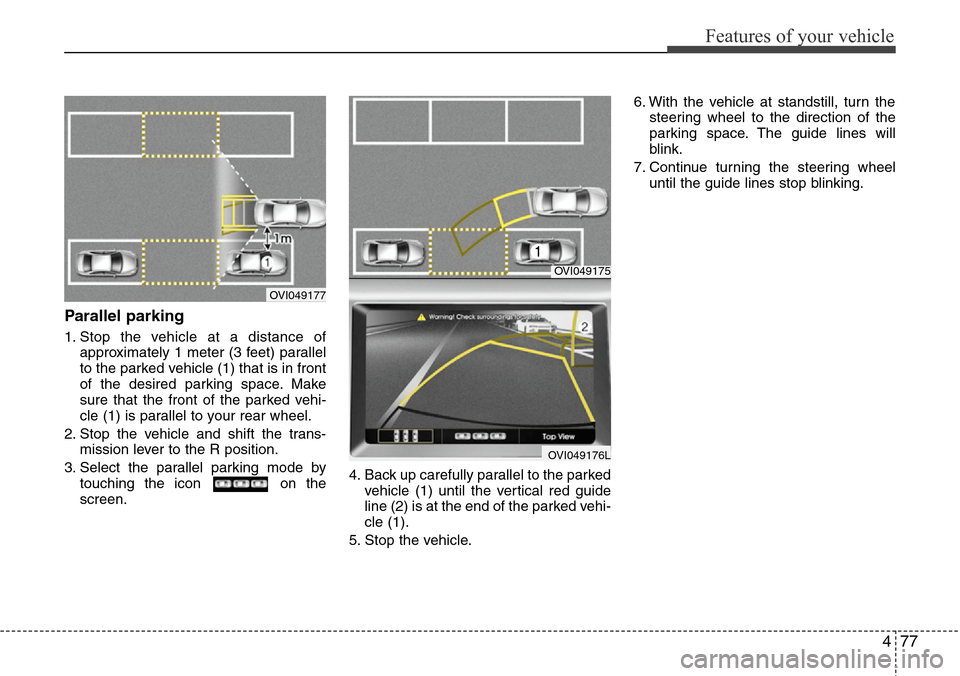
1. Stop the vehicle at a distance of
approximately 1 meter (3 feet) parallel
to the parked vehicle (1) that is in front
of the desired parking space. Make
sure that the front of the parked vehi-
cle (1) is parallel to your rear wheel.
2. Stop the vehicle and shift the trans-
mission lever to the R position.
3. Select the parallel parking mode by
touching the icon on the
screen.4. Back up carefully parallel to the parked
vehicle (1) until the vertical red guide
line (2) is at the end of the parked vehi-
cle (1).
5. Stop the vehicle.6. With the vehicle at standstill, turn the
steering wheel to the direction of the
parking space. The guide lines will
blink.
7. Continue turning the steering wheel
until the guide lines stop blinking.
OVI049175
OVI049176L
OVI049177
Page 160 of 385
Features of your vehicle
78 4
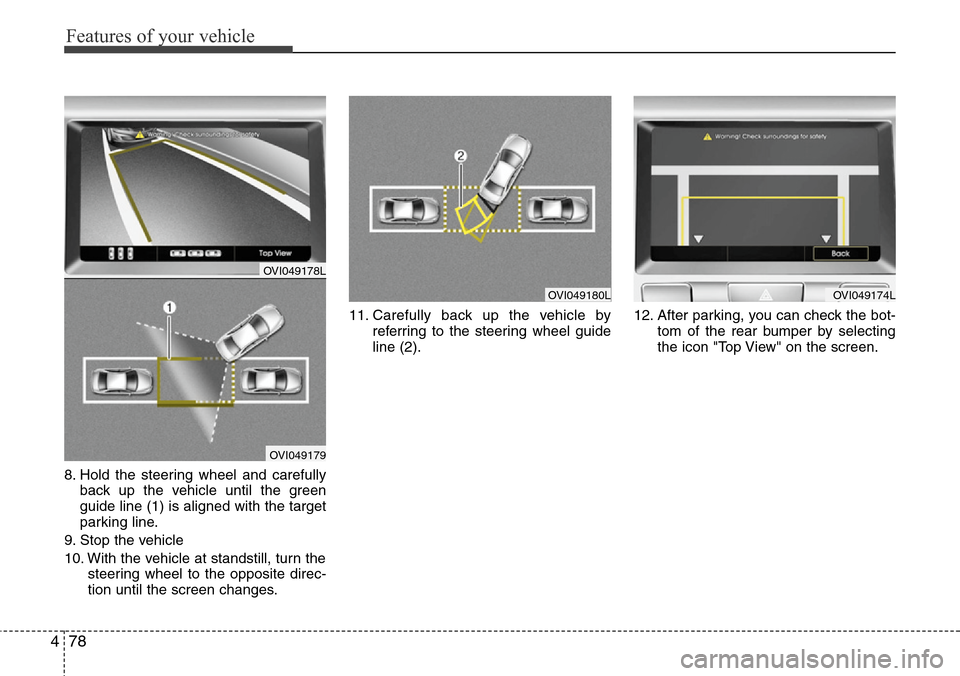
8. Hold the steering wheel and carefully
back up the vehicle until the green
guide line (1) is aligned with the target
parking line.
9. Stop the vehicle
10. With the vehicle at standstill, turn the
steering wheel to the opposite direc-
tion until the screen changes.11. Carefully back up the vehicle by
referring to the steering wheel guide
line (2).12. After parking, you can check the bot-
tom of the rear bumper by selecting
the icon "Top View" on the screen.
OVI049180LOVI049174L
OVI049178L
OVI049179
Page 163 of 385
481
Features of your vehicle
Battery saver function
• The purpose of this feature is to pre-
vent the battery from being dis-
charged. The system automatically
turns off the parking lights when the
driver turns off the engine and opens
the driver-side door.
• With this feature, the parking lights will
be turned off automatically if the driver
parks on the side of road at night.
If necessary, to keep the lights on
when the engine start/stop button is
turned to the OFF position, perform the
following:
1) Open the driver-side door.
2) Turn the parking lights OFF and ON
again using the light switch on the
steering column.
Headlight welcome function
(if equipped)
When the headlight is ON or AUTO posi-
tion and all doors (and trunk) are closed
and locked, if you press the door unlock
button on the smart key, the headlights
will come on for about 15 seconds. At this
time, if you press the door lock or unlock
button, the headlights will turn off imme-
diately.
Headlight escort function
(if equipped)
If you turn the engine start/stop button to
the ACC or OFF position with the head-
lights ON, the headlights (and/or tail
lights) remain on for about 20 minutes.
However, if the driver’s door is opened
and closed, the headlights are turned off
after 30 seconds.
The headlights can be turned off by
pressing the door lock button on the
smart key twice or turning the light switch
to the OFF or Auto position.
If the headlight switch is in the AUTO
position, the function can only operate at
night.
Rescue mode function
(if equipped)
If your vehicle has any problem on the
vehicle network system, the headlights
(low beam) turn on automatically with the
engine start/stop button in the ON posi-
tion even though the headlight switch is
not turned on. At this time, the emer-
gency lighting is not turned off when the
headlight switch is turned off.
LIGHTING
CAUTION
If the driver gets out of the vehicle
through other doors (except dri-
ver's door), the battery saver func-
tion does not operate and the head-
light escort function does not turn
off automatically. Therefore, it caus-
es the battery to be discharged. In
this case, make sure to turn off the
lamp before getting out of the vehi-
cle.
CAUTION
If the rescue mode occurs, have
your vehicle checked by an author-
ized HYUNDAI dealer as soon as
possible.
Page 169 of 385
487
Features of your vehicle
AFLS (Adaptive Front Lighting
System) (if equipped)
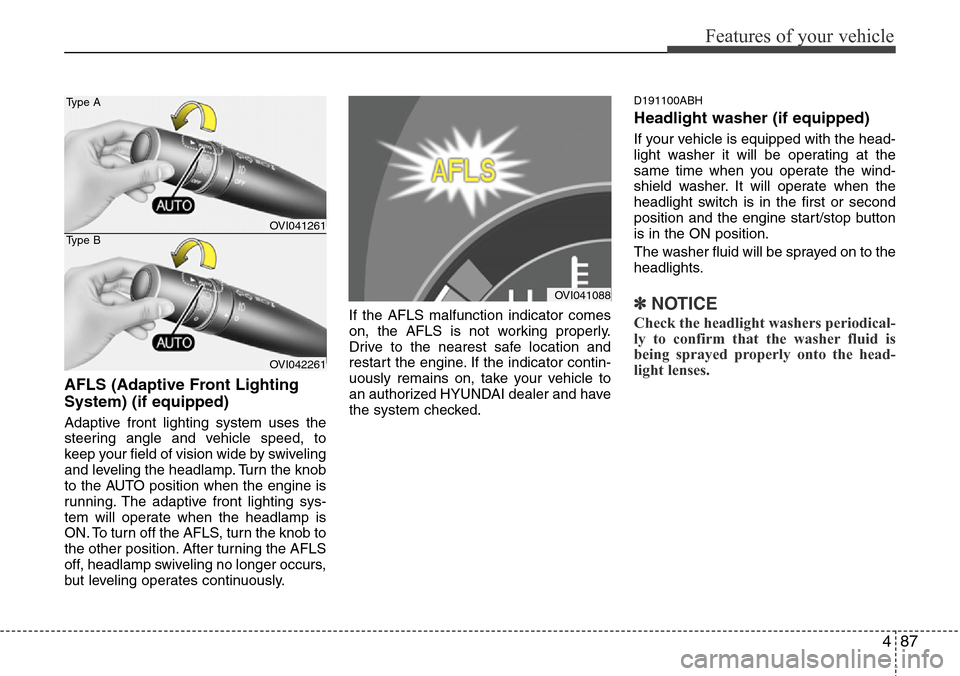
Adaptive front lighting system uses the
steering angle and vehicle speed, to
keep your field of vision wide by swiveling
and leveling the headlamp. Turn the knob
to the AUTO position when the engine is
running. The adaptive front lighting sys-
tem will operate when the headlamp is
ON. To turn off the AFLS, turn the knob to
the other position. After turning the AFLS
off, headlamp swiveling no longer occurs,
but leveling operates continuously.If the AFLS malfunction indicator comes
on, the AFLS is not working properly.
Drive to the nearest safe location and
restart the engine. If the indicator contin-
uously remains on, take your vehicle to
an authorized HYUNDAI dealer and have
the system checked.
D191100ABH
Headlight washer (if equipped)
If your vehicle is equipped with the head-
light washer it will be operating at the
same time when you operate the wind-
shield washer. It will operate when the
headlight switch is in the first or second
position and the engine start/stop button
is in the ON position.
The washer fluid will be sprayed on to the
headlights.
✽NOTICE
Check the headlight washers periodical-
ly to confirm that the washer fluid is
being sprayed properly onto the head-
light lenses.
OVI041088
OVI041261
OVI042261 Type A
Type B
Page 203 of 385
4121
Features of your vehicle
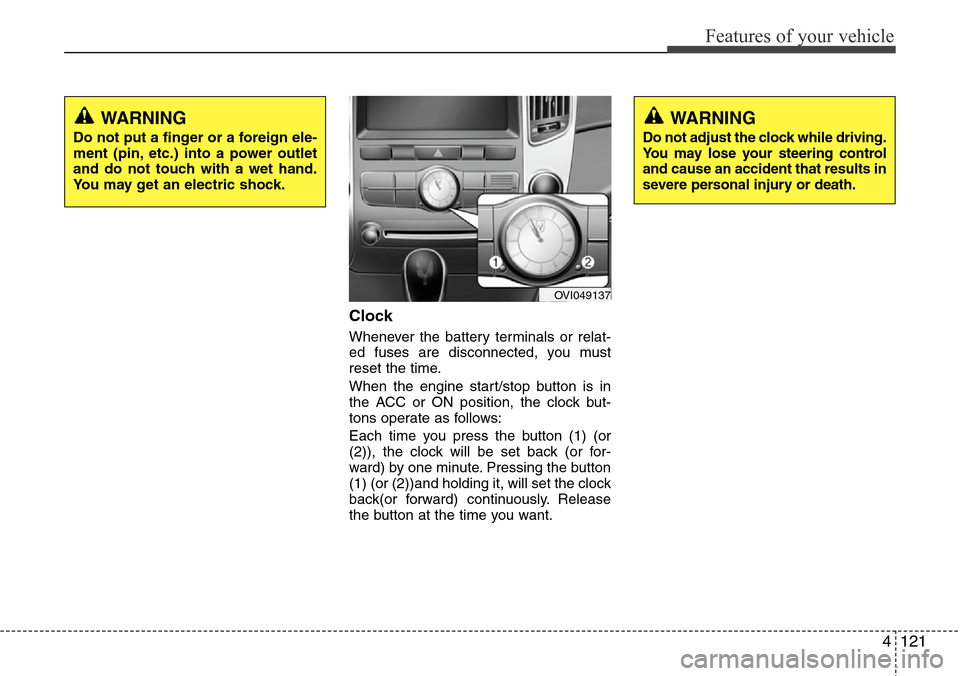
Clock
Whenever the battery terminals or relat-
ed fuses are disconnected, you must
reset the time.
When the engine start/stop button is in
the ACC or ON position, the clock but-
tons operate as follows:
Each time you press the button (1) (or
(2)), the clock will be set back (or for-
ward) by one minute. Pressing the button
(1) (or (2))and holding it, will set the clock
back(or forward) continuously. Release
the button at the time you want.
WARNING
Do not adjust the clock while driving.
You may lose your steering control
and cause an accident that results in
severe personal injury or death.
WARNING
Do not put a finger or a foreign ele-
ment (pin, etc.) into a power outlet
and do not touch with a wet hand.
You may get an electric shock.
OVI049137