wheel Hyundai Equus 2011 Owner's Guide
[x] Cancel search | Manufacturer: HYUNDAI, Model Year: 2011, Model line: Equus, Model: Hyundai Equus 2011Pages: 385, PDF Size: 10.67 MB
Page 153 of 385
471
Features of your vehicle
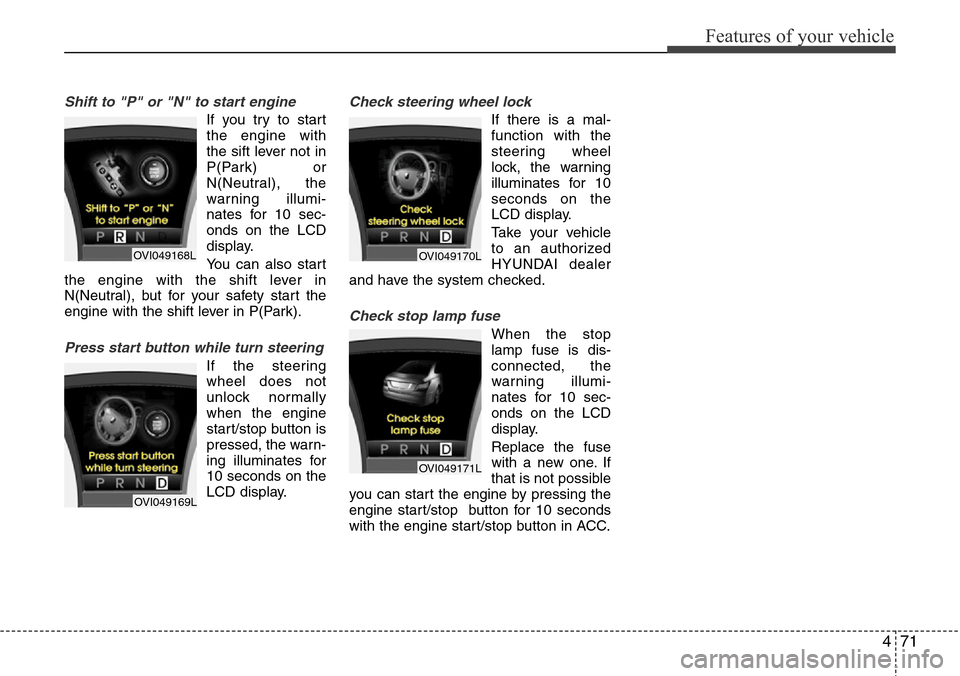
Shift to "P" or "N" to start engine
If you try to start
the engine with
the sift lever not in
P(Park) or
N(Neutral), the
warning illumi-
nates for 10 sec-
onds on the LCD
display.
You can also start
the engine with the shift lever in
N(Neutral), but for your safety start the
engine with the shift lever in P(Park).
Press start button while turn steering
If the steering
wheel does not
unlock normally
when the engine
start/stop button is
pressed, the warn-
ing illuminates for
10 seconds on the
LCD display.
Check steering wheel lock
If there is a mal-
function with the
steering wheel
lock, the warning
illuminates for 10
seconds on the
LCD display.
Take your vehicle
to an authorized
HYUNDAI dealer
and have the system checked.
Check stop lamp fuse
When the stop
lamp fuse is dis-
connected, the
warning illumi-
nates for 10 sec-
onds on the LCD
display.
Replace the fuse
with a new one. If
that is not possible
you can start the engine by pressing the
engine start/stop button for 10 seconds
with the engine start/stop button in ACC.
OVI049168L
OVI049169L
OVI049170L
OVI049171L
Page 158 of 385
Features of your vehicle
76 4
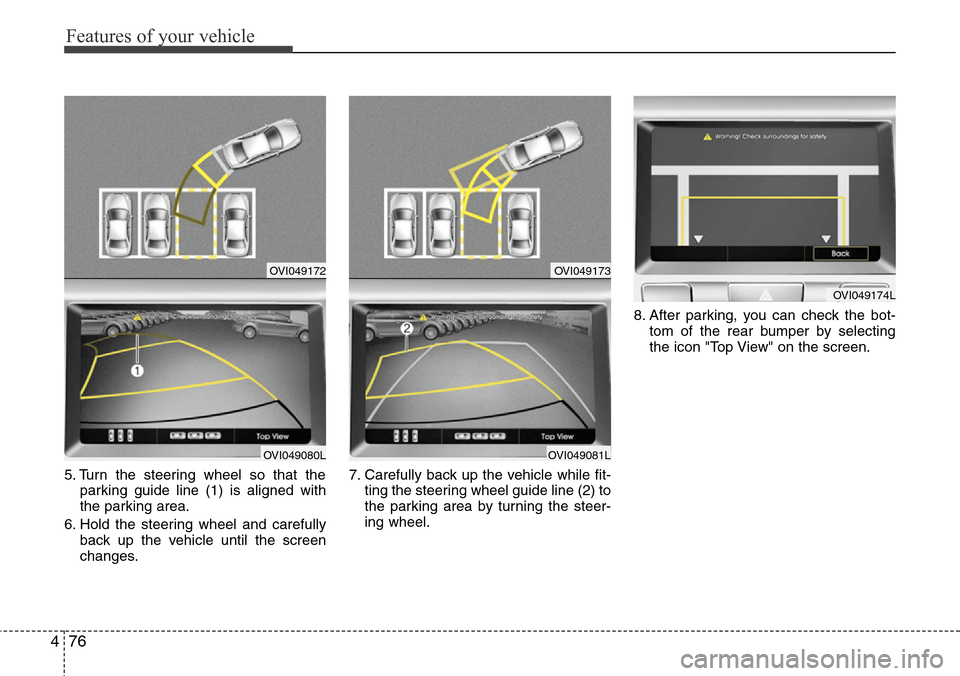
5. Turn the steering wheel so that the
parking guide line (1) is aligned with
the parking area.
6. Hold the steering wheel and carefully
back up the vehicle until the screen
changes.7. Carefully back up the vehicle while fit-
ting the steering wheel guide line (2) to
the parking area by turning the steer-
ing wheel.8. After parking, you can check the bot-
tom of the rear bumper by selecting
the icon "Top View" on the screen.
OVI049172
OVI049080L
OVI049173
OVI049081L
OVI049174L
Page 159 of 385
477
Features of your vehicle
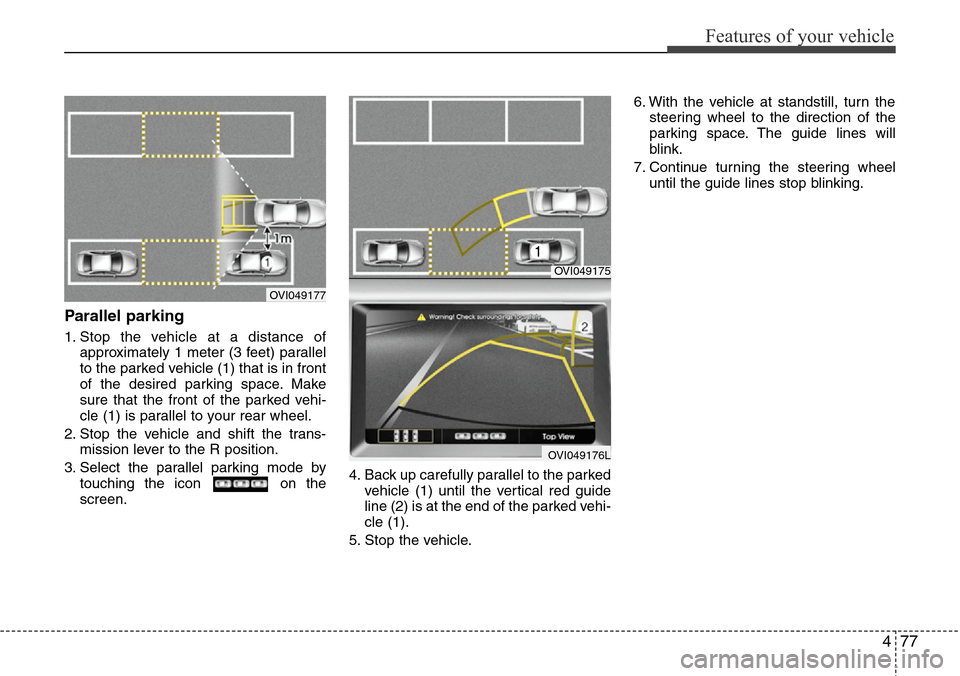
Parallel parking
1. Stop the vehicle at a distance of
approximately 1 meter (3 feet) parallel
to the parked vehicle (1) that is in front
of the desired parking space. Make
sure that the front of the parked vehi-
cle (1) is parallel to your rear wheel.
2. Stop the vehicle and shift the trans-
mission lever to the R position.
3. Select the parallel parking mode by
touching the icon on the
screen.4. Back up carefully parallel to the parked
vehicle (1) until the vertical red guide
line (2) is at the end of the parked vehi-
cle (1).
5. Stop the vehicle.6. With the vehicle at standstill, turn the
steering wheel to the direction of the
parking space. The guide lines will
blink.
7. Continue turning the steering wheel
until the guide lines stop blinking.
OVI049175
OVI049176L
OVI049177
Page 160 of 385
Features of your vehicle
78 4
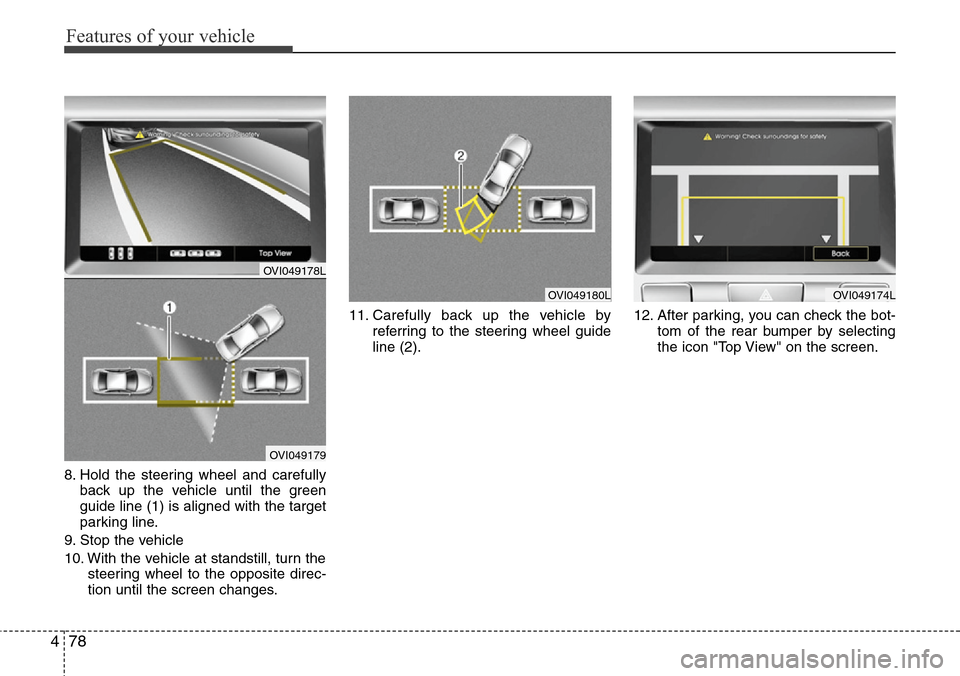
8. Hold the steering wheel and carefully
back up the vehicle until the green
guide line (1) is aligned with the target
parking line.
9. Stop the vehicle
10. With the vehicle at standstill, turn the
steering wheel to the opposite direc-
tion until the screen changes.11. Carefully back up the vehicle by
referring to the steering wheel guide
line (2).12. After parking, you can check the bot-
tom of the rear bumper by selecting
the icon "Top View" on the screen.
OVI049180LOVI049174L
OVI049178L
OVI049179
Page 182 of 385
Features of your vehicle
100 4
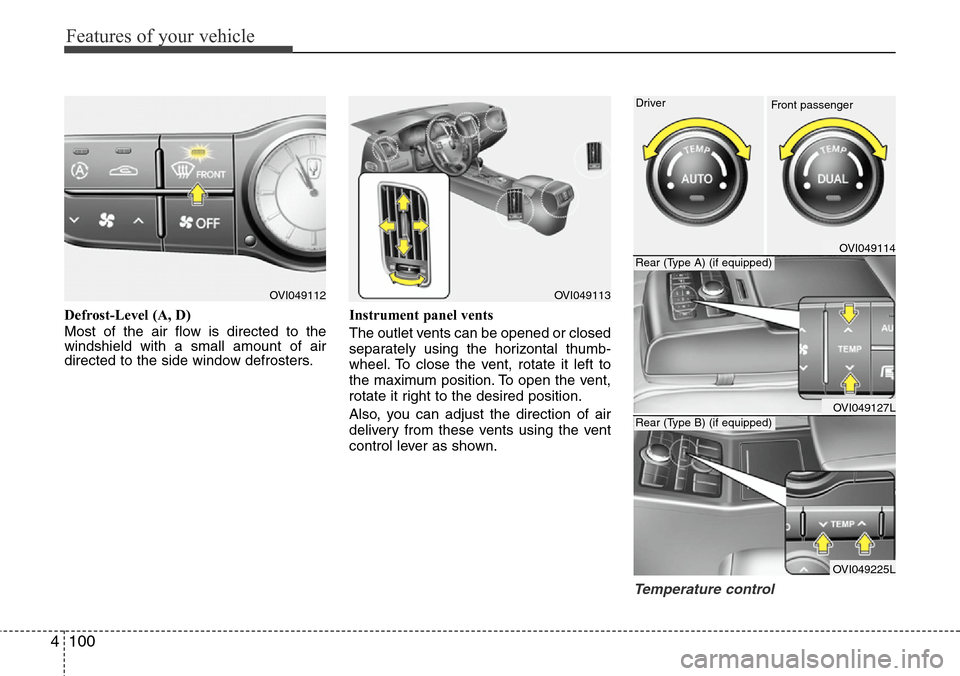
Defrost-Level (A, D)
Most of the air flow is directed to the
windshield with a small amount of air
directed to the side window defrosters.Instrument panel vents
The outlet vents can be opened or closed
separately using the horizontal thumb-
wheel. To close the vent, rotate it left to
the maximum position. To open the vent,
rotate it right to the desired position.
Also, you can adjust the direction of air
delivery from these vents using the vent
control lever as shown.
Temperature control
OVI049112OVI049113
OVI049114
OVI049127L
OVI049225L Driver
Rear (Type A) (if equipped)
Rear (Type B) (if equipped)
Front passenger
Page 212 of 385
Features of your vehicle
130 4
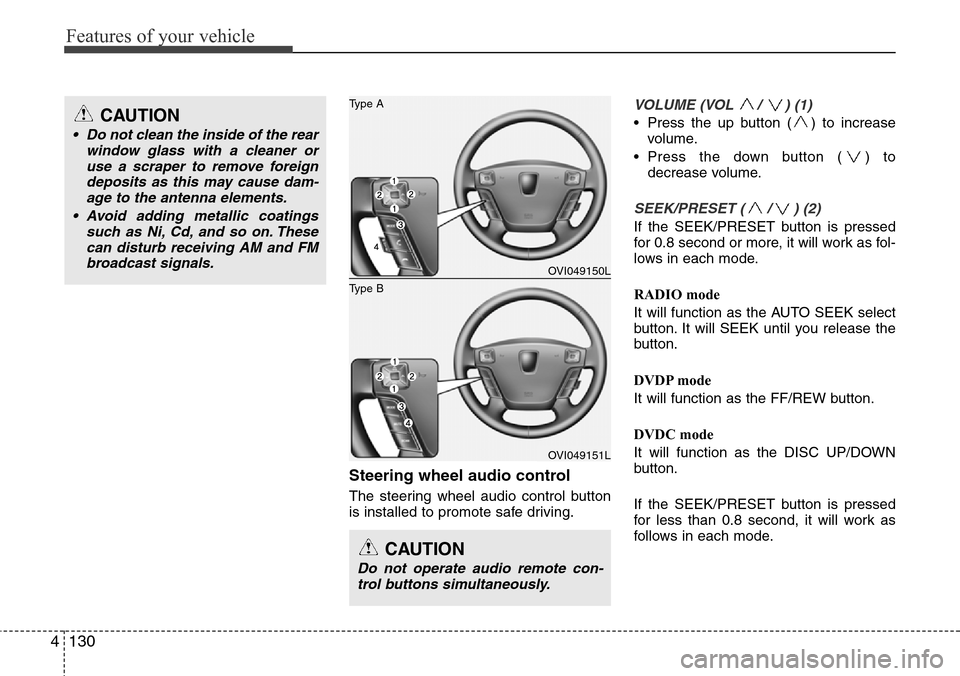
Steering wheel audio control
The steering wheel audio control button
is installed to promote safe driving.
VOLUME (VOL / ) (1)
• Press the up button ( ) to increase
volume.
• Press the down button ( ) to
decrease volume.
SEEK/PRESET ( / ) (2)
If the SEEK/PRESET button is pressed
for 0.8 second or more, it will work as fol-
lows in each mode.
RADIO mode
It will function as the AUTO SEEK select
button. It will SEEK until you release the
button.
DVDP mode
It will function as the FF/REW button.
DVDC mode
It will function as the DISC UP/DOWN
button.
If the SEEK/PRESET button is pressed
for less than 0.8 second, it will work as
follows in each mode.
CAUTION
Do not operate audio remote con-
trol buttons simultaneously.
OVI049150L
OVI049151L
Type B
Type ACAUTION
• Do not clean the inside of the rear
window glass with a cleaner or
use a scraper to remove foreign
deposits as this may cause dam-
age to the antenna elements.
• Avoid adding metallic coatings
such as Ni, Cd, and so on. These
can disturb receiving AM and FM
broadcast signals.
Page 217 of 385
Driving your vehicle
4 5
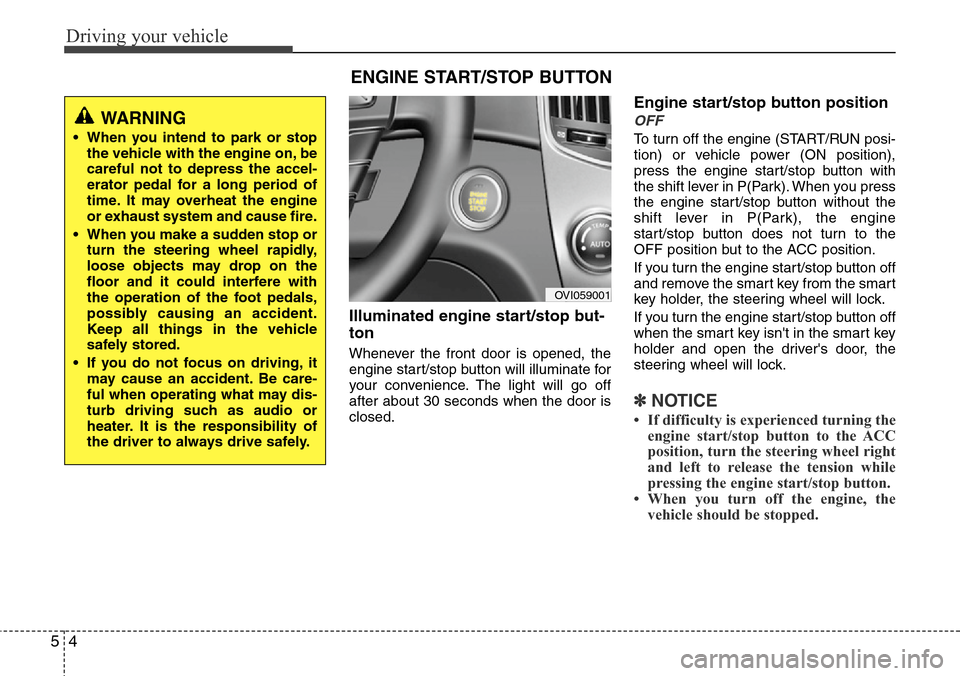
Illuminated engine start/stop but-
ton
Whenever the front door is opened, the
engine start/stop button will illuminate for
your convenience. The light will go off
after about 30 seconds when the door is
closed.
Engine start/stop button position
OFF
To turn off the engine (START/RUN posi-
tion) or vehicle power (ON position),
press the engine start/stop button with
the shift lever in P(Park). When you press
the engine start/stop button without the
shift lever in P(Park), the engine
start/stop button does not turn to the
OFF position but to the ACC position.
If you turn the engine start/stop button off
and remove the smart key from the smart
key holder, the steering wheel will lock.
If you turn the engine start/stop button off
when the smart key isn't in the smart key
holder and open the driver's door, the
steering wheel will lock.
✽NOTICE
• If difficulty is experienced turning the
engine start/stop button to the ACC
position, turn the steering wheel right
and left to release the tension while
pressing the engine start/stop button.
• When you turn off the engine, the
vehicle should be stopped.
ENGINE START/STOP BUTTON
OVI059001
WARNING
• When you intend to park or stop
the vehicle with the engine on, be
careful not to depress the accel-
erator pedal for a long period of
time. It may overheat the engine
or exhaust system and cause fire.
• When you make a sudden stop or
turn the steering wheel rapidly,
loose objects may drop on the
floor and it could interfere with
the operation of the foot pedals,
possibly causing an accident.
Keep all things in the vehicle
safely stored.
• If you do not focus on driving, it
may cause an accident. Be care-
ful when operating what may dis-
turb driving such as audio or
heater. It is the responsibility of
the driver to always drive safely.
Page 218 of 385
55
Driving your vehicle
ACC(Accessory)
Press the engine start/stop button when
it is in the OFF position without depress-
ing the brake pedal.
The steering wheel is unlocked and elec-
trical accessories are operational.
If the engine start/stop button is in the
ACC position for more than 1 hour, the
button is off automatically to prevent the
battery discharge.
ON
Press the engine start/stop button while it
is in the ACC position without depressing
the brake pedal.
The warning lights can be checked before
the engine is started.
Do not leave the engine start/stop button
in the ON position for a long time. The
battery may discharge, because the
engine is not running.
START
To start the engine, depress the brake
pedal and press the engine start/stop
button with the shift lever in the P(Park)
or the N(Neutral) position. For your safe-
ty, start the engine with the shift lever in
the P (Park) position.
✽NOTICE
• If you press the engine start/stop but-
ton without depressing the brake
pedal, the engine will not start and the
engine start/stop button changes as
follow :
OFF
→ACC →ON →OFF
Page 222 of 385
59
Driving your vehicle
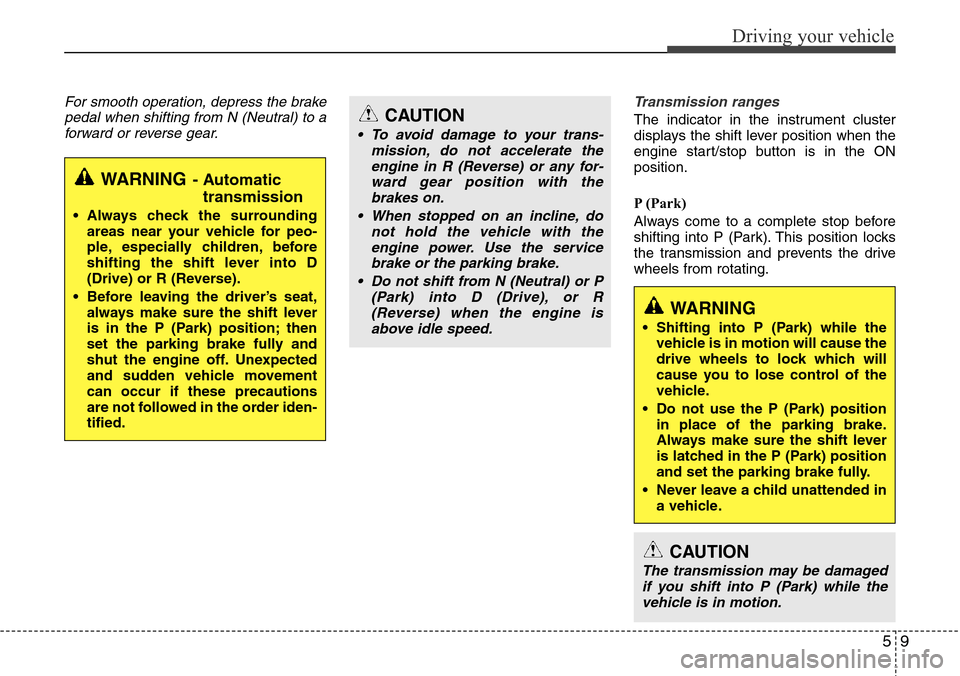
For smooth operation, depress the brake
pedal when shifting from N (Neutral) to a
forward or reverse gear.Transmission ranges
The indicator in the instrument cluster
displays the shift lever position when the
engine start/stop button is in the ON
position.
P (Park)
Always come to a complete stop before
shifting into P (Park). This position locks
the transmission and prevents the drive
wheels from rotating.
WARNING- Automatic
transmission
• Always check the surrounding
areas near your vehicle for peo-
ple, especially children, before
shifting the shift lever into D
(Drive) or R (Reverse).
• Before leaving the driver’s seat,
always make sure the shift lever
is in the P (Park) position; then
set the parking brake fully and
shut the engine off. Unexpected
and sudden vehicle movement
can occur if these precautions
are not followed in the order iden-
tified.
CAUTION
• To avoid damage to your trans-
mission, do not accelerate the
engine in R (Reverse) or any for-
ward gear position with the
brakes on.
• When stopped on an incline, do
not hold the vehicle with the
engine power. Use the service
brake or the parking brake.
• Do not shift from N (Neutral) or P
(Park) into D (Drive), or R
(Reverse) when the engine is
above idle speed.
WARNING
• Shifting into P (Park) while the
vehicle is in motion will cause the
drive wheels to lock which will
cause you to lose control of the
vehicle.
• Do not use the P (Park) position
in place of the parking brake.
Always make sure the shift lever
is latched in the P (Park) position
and set the parking brake fully.
• Never leave a child unattended in
a vehicle.
CAUTION
The transmission may be damaged
if you shift into P (Park) while the
vehicle is in motion.
Page 223 of 385
Driving your vehicle
10 5
R (Reverse)
Use this position to drive the vehicle
backward.N (Neutral)
The wheels and transmission are not
engaged. The vehicle will roll freely even
on the slightest incline unless the parking
brake or service brakes are applied.
D (Drive)
This is the normal forward driving posi-
tion. The transmission will automatically
shift through a 8-gear sequence, provid-
ing the best fuel economy and power.
For extra power when passing another
vehicle or climbing grades, depress the
accelerator fully, at which time the trans-
mission will automatically downshift to
the next lower gear.
✽NOTICE
Always come to a complete stop before
shifting into D (Drive).
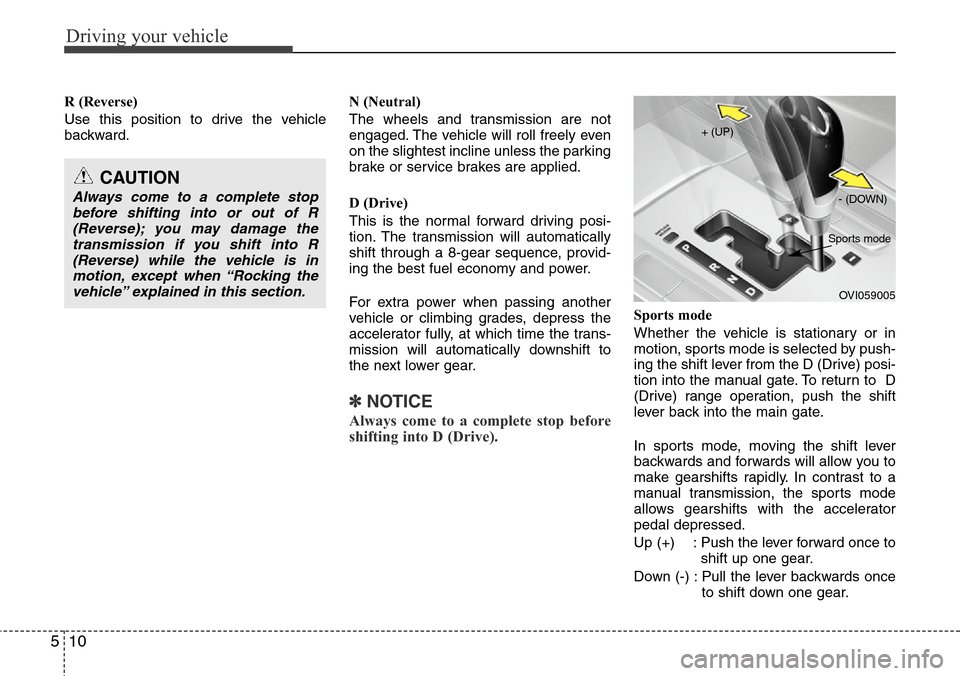
Sports mode
Whether the vehicle is stationary or in
motion, sports mode is selected by push-
ing the shift lever from the D (Drive) posi-
tion into the manual gate. To return to D
(Drive) range operation, push the shift
lever back into the main gate.
In sports mode, moving the shift lever
backwards and forwards will allow you to
make gearshifts rapidly. In contrast to a
manual transmission, the sports mode
allows gearshifts with the accelerator
pedal depressed.
Up (+) : Push the lever forward once to
shift up one gear.
Down (-) : Pull the lever backwards once
to shift down one gear.
CAUTION
Always come to a complete stop
before shifting into or out of R
(Reverse); you may damage the
transmission if you shift into R
(Reverse) while the vehicle is in
motion, except when “Rocking the
vehicle” explained in this section.
OVI059005 + (UP)
- (DOWN)
Sports mode