cruise control Hyundai Equus 2012 User Guide
[x] Cancel search | Manufacturer: HYUNDAI, Model Year: 2012, Model line: Equus, Model: Hyundai Equus 2012Pages: 385, PDF Size: 10.67 MB
Page 252 of 385
539
Driving your vehicle
• Decreasing the vehicle speed to less
than approximately 10km/h (6.2mph)
as the vehicle in front of you.
• Accelerating the vehicle speed to more
than approximately 180km/h
(113mph).
• The ESP is turned off.
• The sensor or the cover is stained with
foreign matter.
Each of these actions will cancel smart
cruise control operation (the SET indica-
tor light, set speed and vehicle to vehicle
distance on the LCD screen will go out),
but it will not turn the system off. If you
wish to resume smart cruise control
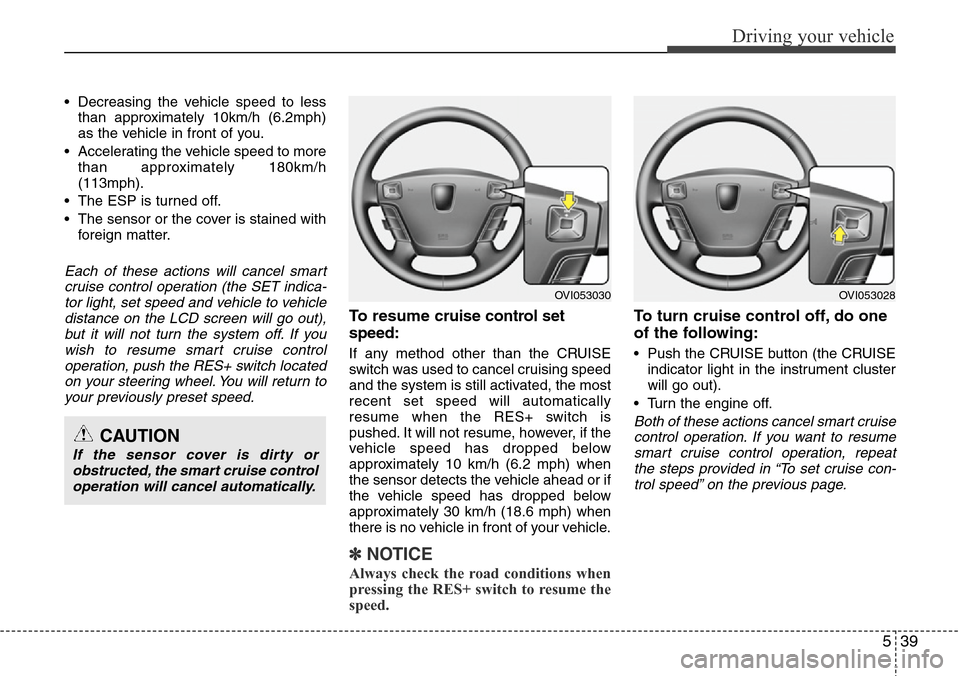
operation, push the RES+ switch located
on your steering wheel. You will return to
your previously preset speed.
To resume cruise control set
speed:
If any method other than the CRUISE
switch was used to cancel cruising speed
and the system is still activated, the most
recent set speed will automatically
resume when the RES+ switch is
pushed. It will not resume, however, if the
vehicle speed has dropped below
approximately 10 km/h (6.2 mph) when
the sensor detects the vehicle ahead or if
the vehicle speed has dropped below
approximately 30 km/h (18.6 mph) when
there is no vehicle in front of your vehicle.
✽NOTICE
Always check the road conditions when
pressing the RES+ switch to resume the
speed.
To turn cruise control off, do one
of the following:
• Push the CRUISE button (the CRUISE
indicator light in the instrument cluster
will go out).
• Turn the engine off.
Both of these actions cancel smart cruise
control operation. If you want to resume
smart cruise control operation, repeat
the steps provided in “To set cruise con-
trol speed” on the previous page.CAUTION
If the sensor cover is dirty or
obstructed, the smart cruise control
operation will cancel automatically.
OVI053030OVI053028
Page 253 of 385
Driving your vehicle
40 5
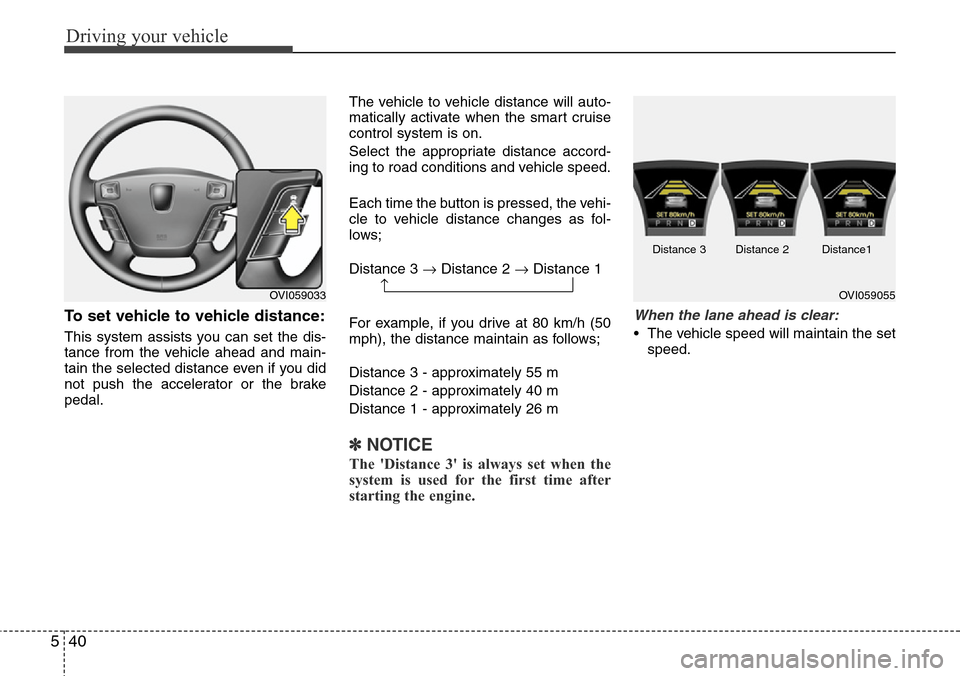
To set vehicle to vehicle distance:
This system assists you can set the dis-
tance from the vehicle ahead and main-
tain the selected distance even if you did
not push the accelerator or the brake
pedal.The vehicle to vehicle distance will auto-
matically activate when the smart cruise
control system is on.
Select the appropriate distance accord-
ing to road conditions and vehicle speed.
Each time the button is pressed, the vehi-
cle to vehicle distance changes as fol-
lows;
Distance 3 →Distance 2 →Distance 1
For example, if you drive at 80 km/h (50
mph), the distance maintain as follows;
Distance 3 - approximately 55 m
Distance 2 - approximately 40 m
Distance 1 - approximately 26 m
✽NOTICE
The 'Distance 3' is always set when the
system is used for the first time after
starting the engine.
When the lane ahead is clear:
• The vehicle speed will maintain the set
speed.
OVI059033→OVI059055 Distance 3 Distance 2 Distance1
Page 254 of 385
541
Driving your vehicle
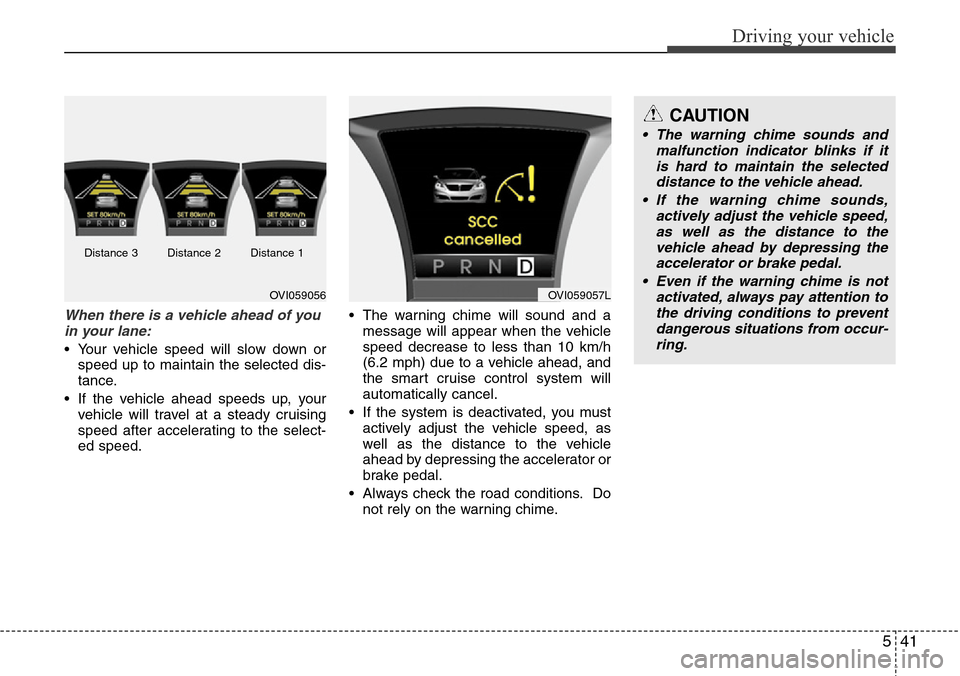
When there is a vehicle ahead of you
in your lane:
• Your vehicle speed will slow down or
speed up to maintain the selected dis-
tance.
• If the vehicle ahead speeds up, your
vehicle will travel at a steady cruising
speed after accelerating to the select-
ed speed.• The warning chime will sound and a
message will appear when the vehicle
speed decrease to less than 10 km/h
(6.2 mph) due to a vehicle ahead, and
the smart cruise control system will
automatically cancel.
• If the system is deactivated, you must
actively adjust the vehicle speed, as
well as the distance to the vehicle
ahead by depressing the accelerator or
brake pedal.
• Always check the road conditions. Do
not rely on the warning chime.
OVI059056OVI059057L
CAUTION
• The warning chime sounds and
malfunction indicator blinks if it
is hard to maintain the selected
distance to the vehicle ahead.
• If the warning chime sounds,
actively adjust the vehicle speed,
as well as the distance to the
vehicle ahead by depressing the
accelerator or brake pedal.
• Even if the warning chime is not
activated, always pay attention to
the driving conditions to prevent
dangerous situations from occur-
ring.
Distance 3 Distance 2 Distance 1
Page 255 of 385
Driving your vehicle
42 5
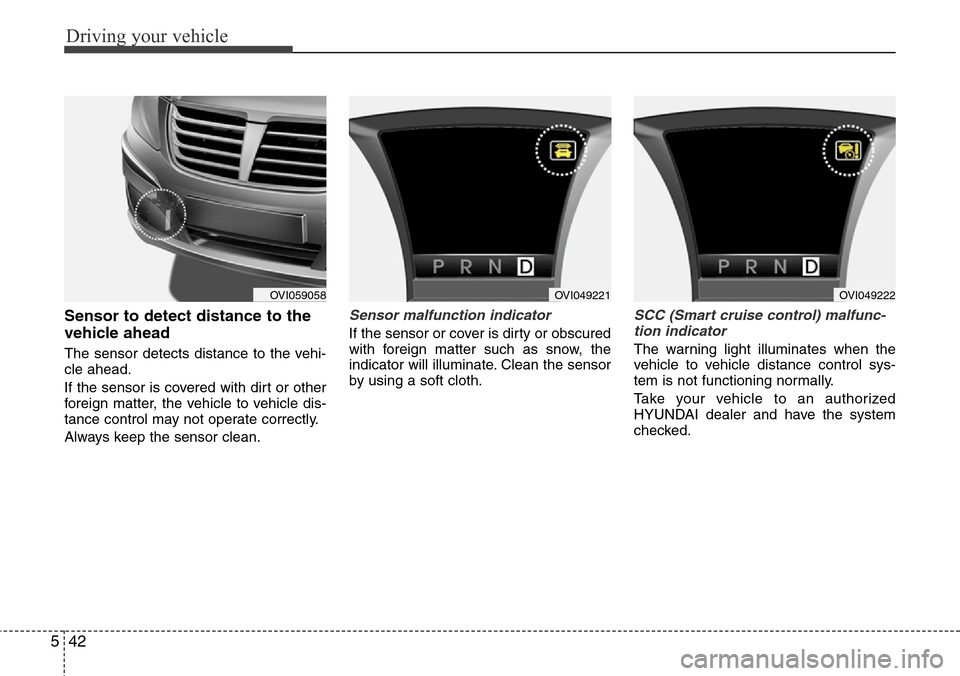
Sensor to detect distance to the
vehicle ahead
The sensor detects distance to the vehi-
cle ahead.
If the sensor is covered with dirt or other
foreign matter, the vehicle to vehicle dis-
tance control may not operate correctly.
Always keep the sensor clean.
Sensor malfunction indicator
If the sensor or cover is dirty or obscured
with foreign matter such as snow, the
indicator will illuminate. Clean the sensor
by using a soft cloth.
SCC (Smart cruise control) malfunc-
tion indicator
The warning light illuminates when the
vehicle to vehicle distance control sys-
tem is not functioning normally.
Take your vehicle to an authorized
HYUNDAI dealer and have the system
checked.
OVI059058OVI049221OVI049222
Page 256 of 385
543
Driving your vehicle
Limitations of the system
The smart cruise control system may
have limits to its ability to detect distance
to the vehicle ahead due to road and traf-
fic conditions.
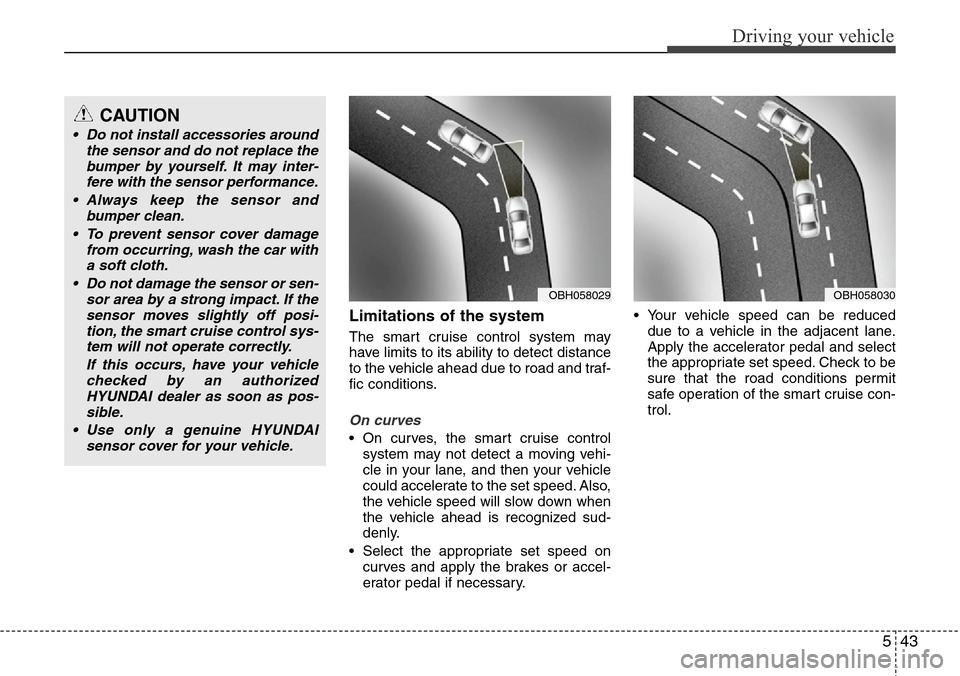
On curves
• On curves, the smart cruise control
system may not detect a moving vehi-
cle in your lane, and then your vehicle
could accelerate to the set speed. Also,
the vehicle speed will slow down when
the vehicle ahead is recognized sud-
denly.
• Select the appropriate set speed on
curves and apply the brakes or accel-
erator pedal if necessary.• Your vehicle speed can be reduced
due to a vehicle in the adjacent lane.
Apply the accelerator pedal and select
the appropriate set speed. Check to be
sure that the road conditions permit
safe operation of the smart cruise con-
trol.
OBH058030OBH058029
CAUTION
• Do not install accessories around
the sensor and do not replace the
bumper by yourself. It may inter-
fere with the sensor performance.
• Always keep the sensor and
bumper clean.
• To prevent sensor cover damage
from occurring, wash the car with
a soft cloth.
• Do not damage the sensor or sen-
sor area by a strong impact. If the
sensor moves slightly off posi-
tion, the smart cruise control sys-
tem will not operate correctly.
If this occurs, have your vehicle
checked by an authorized
HYUNDAI dealer as soon as pos-
sible.
• Use only a genuine HYUNDAI
sensor cover for your vehicle.
Page 257 of 385
Driving your vehicle
44 5
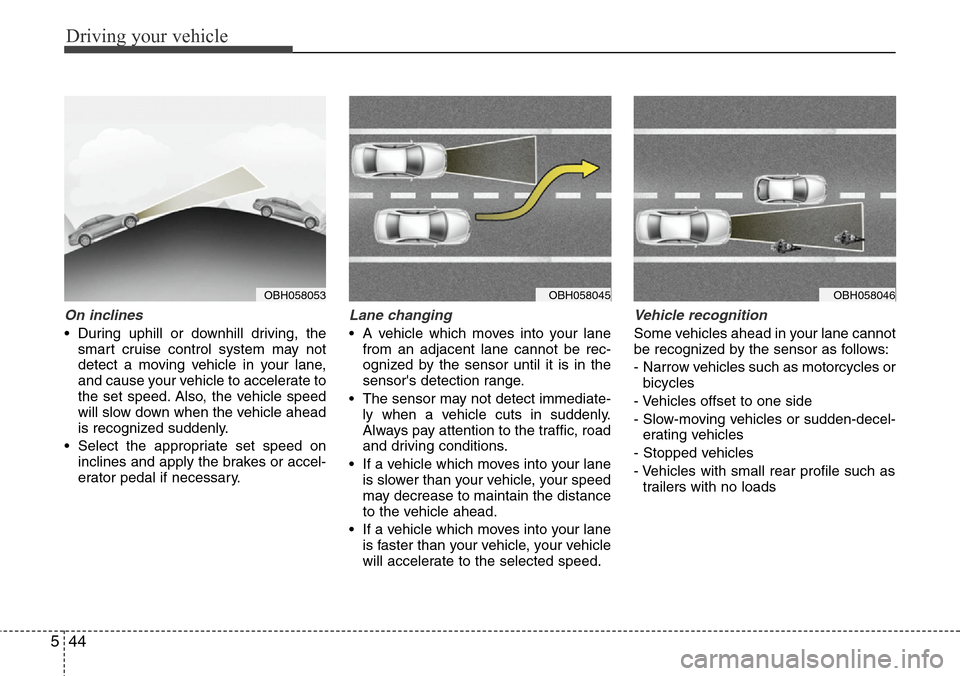
On inclines
• During uphill or downhill driving, the
smart cruise control system may not
detect a moving vehicle in your lane,
and cause your vehicle to accelerate to
the set speed. Also, the vehicle speed
will slow down when the vehicle ahead
is recognized suddenly.
• Select the appropriate set speed on
inclines and apply the brakes or accel-
erator pedal if necessary.
Lane changing
• A vehicle which moves into your lane
from an adjacent lane cannot be rec-
ognized by the sensor until it is in the
sensor's detection range.
• The sensor may not detect immediate-
ly when a vehicle cuts in suddenly.
Always pay attention to the traffic, road
and driving conditions.
• If a vehicle which moves into your lane
is slower than your vehicle, your speed
may decrease to maintain the distance
to the vehicle ahead.
• If a vehicle which moves into your lane
is faster than your vehicle, your vehicle
will accelerate to the selected speed.
Vehicle recognition
Some vehicles ahead in your lane cannot
be recognized by the sensor as follows:
- Narrow vehicles such as motorcycles or
bicycles
- Vehicles offset to one side
- Slow-moving vehicles or sudden-decel-
erating vehicles
- Stopped vehicles
- Vehicles with small rear profile such as
trailers with no loads
OBH058046OBH058045OBH058053
Page 258 of 385
545
Driving your vehicle
A vehicle ahead cannot be recognized
correctly by the sensor if any of following
occurs:
- When the vehicle is pointing upwards
due to overloading in the trunk
- While the steering wheel is operating
- When driving to one side of the lane
- When driving on narrow lanes or on
curves
Apply the brakes or accelerator pedal if
necessary.(Continued)
• The smart cruise control system
is not a substitute for safe driving
practices but a convenience
function only. It is the responsi-
bility of the driver to always
check the speed and the distance
to the vehicle ahead.
• Always be aware of the selected
speed and vehicle to vehicle dis-
tance.
• Always maintain sufficient brak-
ing distance and decelerate your
vehicle by applying the brakes if
necessary.
• As the smart cruise control sys-
tem may not recognize complex
driving situations, always pay
attention to driving conditions
and control your vehicle speed.
• For safe operation, carefully read
and follow the instructions in this
manual before use.WARNING
• The vehicle cannot be stopped by
using the smart cruise control
system.
If an emergency stop is neces-
sary, you must apply the brakes.
• Keep a safe distance according
to road conditions and vehicle
speed. If the vehicle to vehicle
distance is too close during a
high-speed driving, it may cause
a serious collision.
• The smart cruise control system
can not recognize a stopped
vehicle, pedestrians or an
oncoming vehicle. Always look
ahead cautiously to prevent
unexpected and sudden situa-
tions from occurring.
• In front of you, vehicles moving
with a frequent lane change may
cause a delay in the system's
reaction or may cause the system
to react to a vehicle actually in an
adjacent lane. Always look ahead
cautiously to prevent unexpected
and sudden situations from
occurring.
(Continued)
CAUTION
The smart cruise control system
may not operate temporarily due to
electrical interference.
Page 353 of 385
751
Maintenance
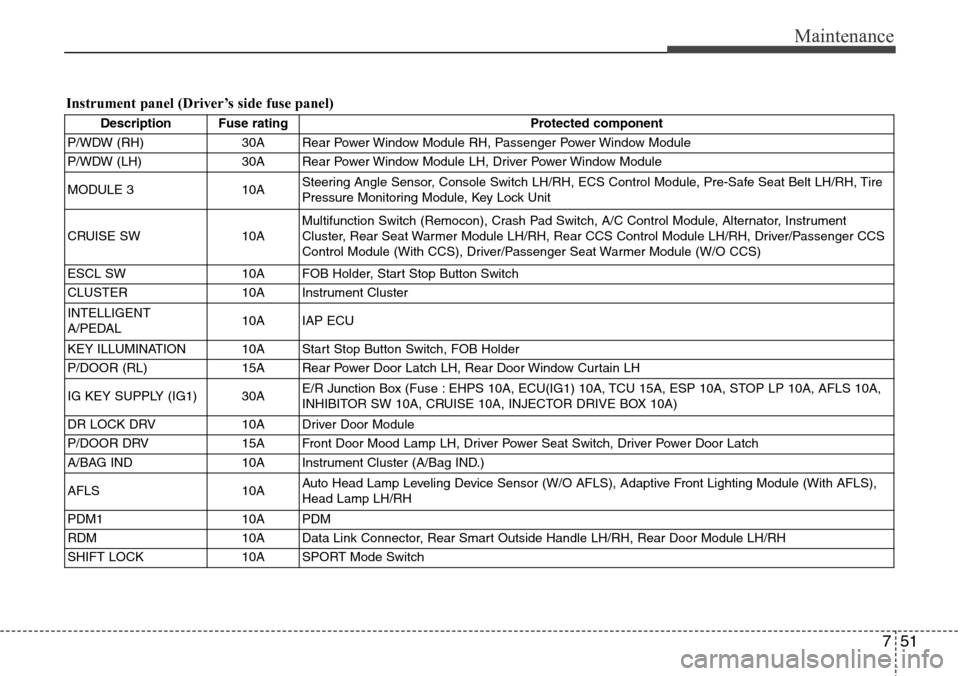
Instrument panel (Driver’s side fuse panel)
Description Fuse rating Protected component
P/WDW (RH) 30A Rear Power Window Module RH, Passenger Power Window Module
P/WDW (LH) 30A Rear Power Window Module LH, Driver Power Window Module
MODULE 3 10ASteering Angle Sensor, Console Switch LH/RH, ECS Control Module, Pre-Safe Seat Belt LH/RH, Tire
Pressure Monitoring Module, Key Lock Unit
CRUISE SW 10AMultifunction Switch (Remocon), Crash Pad Switch, A/C Control Module, Alternator, Instrument
Cluster, Rear Seat Warmer Module LH/RH, Rear CCS Control Module LH/RH, Driver/Passenger CCS
Control Module (With CCS), Driver/Passenger Seat Warmer Module (W/O CCS)
ESCL SW 10A FOB Holder, Start Stop Button Switch
CLUSTER 10A Instrument Cluster
INTELLIGENT
A/PEDAL10A IAP ECU
KEY ILLUMINATION 10A Start Stop Button Switch, FOB Holder
P/DOOR (RL) 15A Rear Power Door Latch LH, Rear Door Window Curtain LH
IG KEY SUPPLY (IG1) 30AE/R Junction Box (Fuse : EHPS 10A, ECU(IG1) 10A, TCU 15A, ESP 10A, STOP LP 10A, AFLS 10A,
INHIBITOR SW 10A, CRUISE 10A, INJECTOR DRIVE BOX 10A)
DR LOCK DRV 10A Driver Door Module
P/DOOR DRV 15A Front Door Mood Lamp LH, Driver Power Seat Switch, Driver Power Door Latch
A/BAG IND 10A Instrument Cluster (A/Bag IND.)
AFLS 10AAuto Head Lamp Leveling Device Sensor (W/O AFLS), Adaptive Front Lighting Module (With AFLS),
Head Lamp LH/RH
PDM1 10A PDM
RDM 10A Data Link Connector, Rear Smart Outside Handle LH/RH, Rear Door Module LH/RH
SHIFT LOCK 10A SPORT Mode Switch
Page 358 of 385
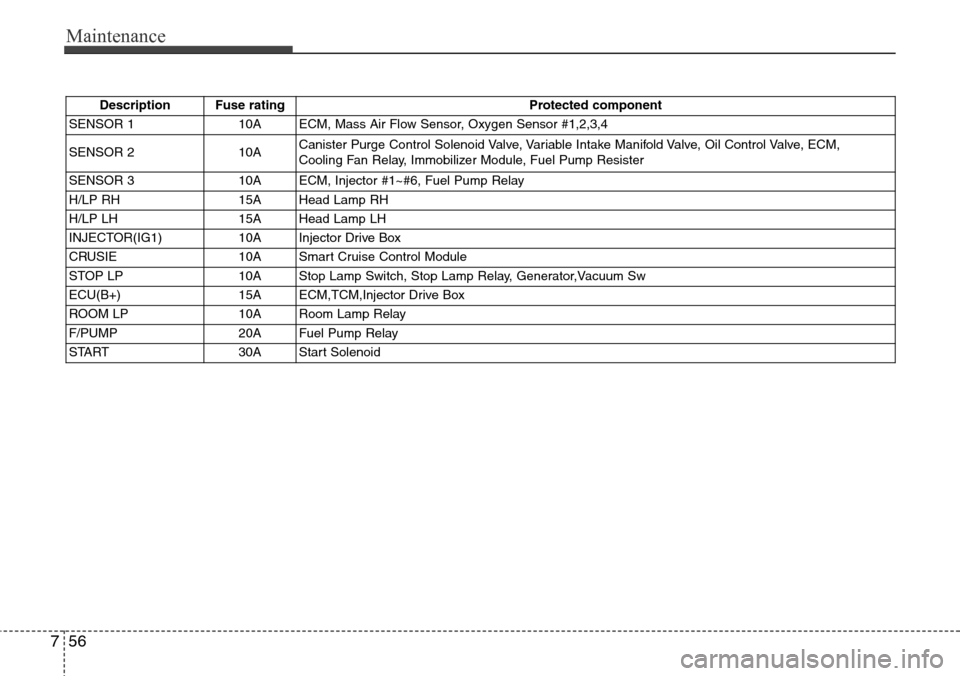
Maintenance
56 7
Description Fuse rating Protected component
SENSOR 110AECM, Mass Air Flow Sensor, Oxygen Sensor #1,2,3,4
SENSOR 2 10ACanister Purge Control Solenoid Valve, Variable Intake Manifold Valve, Oil Control Valve, ECM,
Cooling Fan Relay, Immobilizer Module, Fuel Pump Resister
SENSOR 3 10A ECM, Injector #1~#6, Fuel Pump Relay
H/LP RH 15A Head Lamp RH
H/LP LH 15A Head Lamp LH
INJECTOR(IG1) 10A Injector Drive Box
CRUSIE 10A Smart Cruise Control Module
STOP LP 10A Stop Lamp Switch, Stop Lamp Relay, Generator,Vacuum Sw
ECU(B+) 15A ECM,TCM,Injector Drive Box
ROOM LP 10A Room Lamp Relay
F/PUMP 20A Fuel Pump Relay
START 30A Start Solenoid