instrument panel Hyundai Equus 2012 User Guide
[x] Cancel search | Manufacturer: HYUNDAI, Model Year: 2012, Model line: Equus, Model: Hyundai Equus 2012Pages: 385, PDF Size: 10.67 MB
Page 130 of 385
Features of your vehicle
48 4
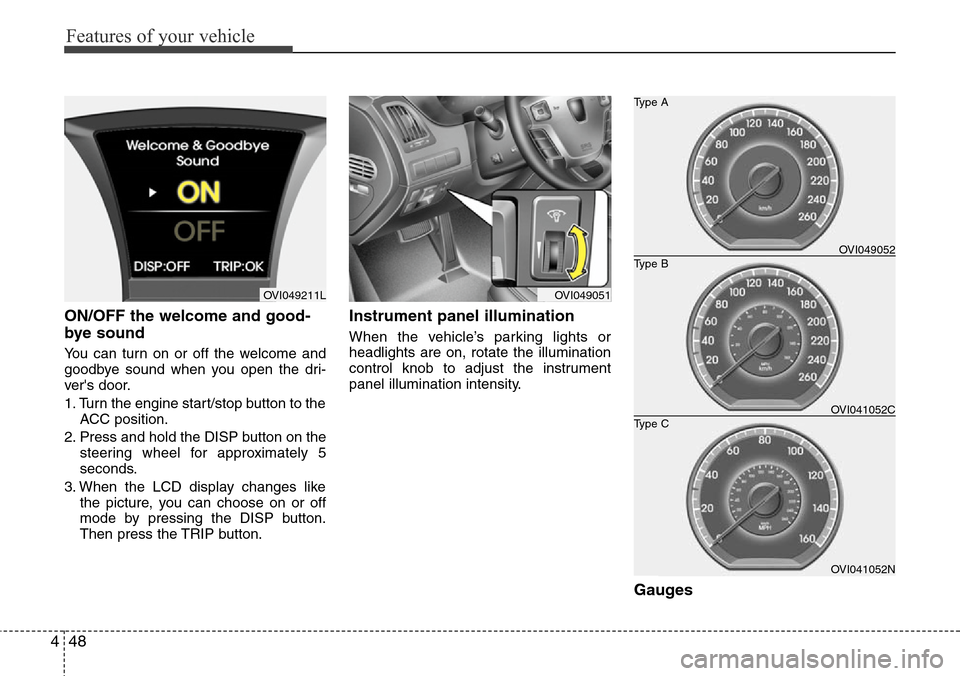
ON/OFF the welcome and good-
bye sound
You can turn on or off the welcome and
goodbye sound when you open the dri-
ver's door.
1. Turn the engine start/stop button to the
ACC position.
2. Press and hold the DISP button on the
steering wheel for approximately 5
seconds.
3. When the LCD display changes like
the picture, you can choose on or off
mode by pressing the DISP button.
Then press the TRIP button.
Instrument panel illumination
When the vehicle’s parking lights or
headlights are on, rotate the illumination
control knob to adjust the instrument
panel illumination intensity.
Gauges
OVI049051OVI049211L
OVI041052N
Type B Type A
Type COVI049052
OVI041052C
Page 164 of 385
Features of your vehicle
82 4
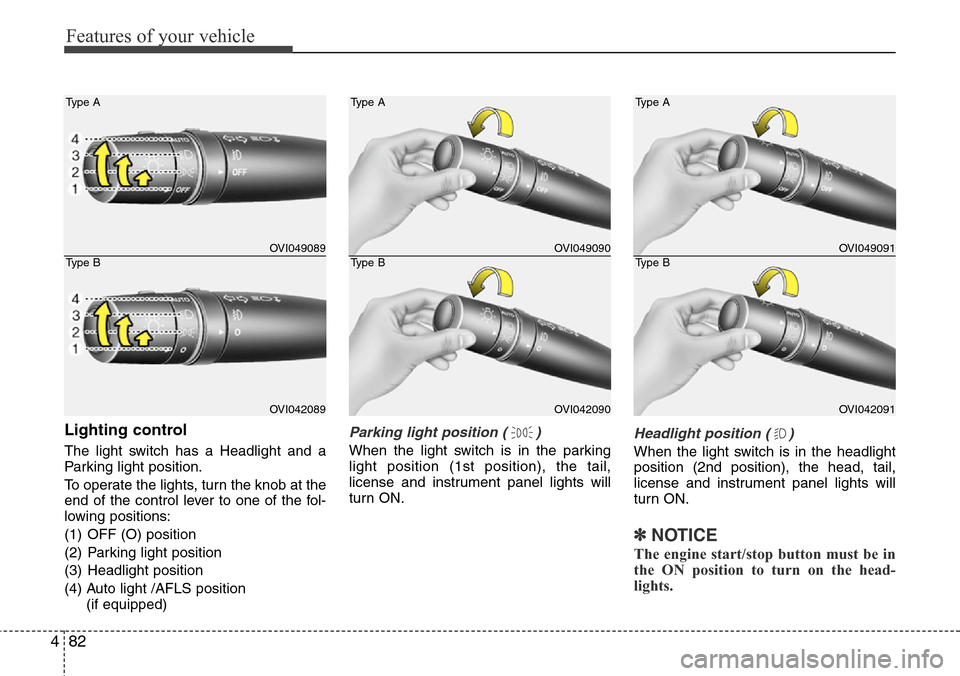
Lighting control
The light switch has a Headlight and a
Parking light position.
To operate the lights, turn the knob at the
end of the control lever to one of the fol-
lowing positions:
(1) OFF (O) position
(2) Parking light position
(3) Headlight position
(4) Auto light /AFLS position
(if equipped)
Parking light position ( )
When the light switch is in the parking
light position (1st position), the tail,
license and instrument panel lights will
turn ON.
Headlight position ( )
When the light switch is in the headlight
position (2nd position), the head, tail,
license and instrument panel lights will
turn ON.
✽NOTICE
The engine start/stop button must be in
the ON position to turn on the head-
lights.
OVI049089
OVI042089 Type A
Type B
OVI049090
OVI042090 Type A
Type B
OVI049091
OVI042091 Type A
Type B
Page 166 of 385
Features of your vehicle
84 4
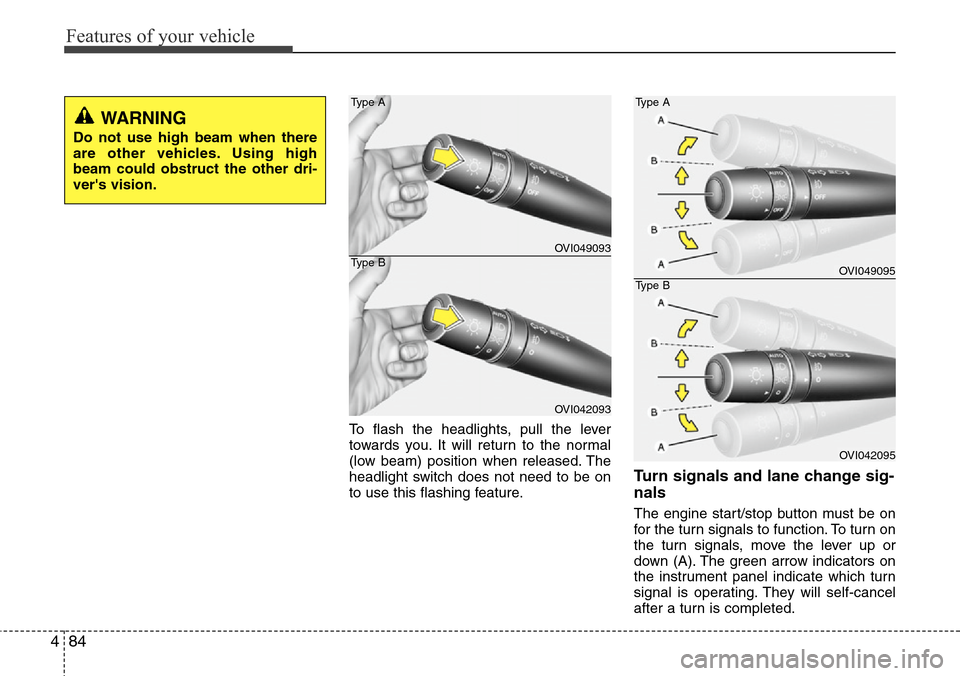
To flash the headlights, pull the lever
towards you. It will return to the normal
(low beam) position when released. The
headlight switch does not need to be on
to use this flashing feature.
Turn signals and lane change sig-
nals
The engine start/stop button must be on
for the turn signals to function. To turn on
the turn signals, move the lever up or
down (A). The green arrow indicators on
the instrument panel indicate which turn
signal is operating. They will self-cancel
after a turn is completed.
WARNING
Do not use high beam when there
are other vehicles. Using high
beam could obstruct the other dri-
ver's vision.
OVI049093
OVI042093 Type A
Type B
OVI049095
OVI042095 Type A
Type B
Page 177 of 385
495
Features of your vehicle
✽NOTICE
If you want to defrost and defog the
front windshield, refer to “Windshield
defrosting and defogging” in this sec-
tion.
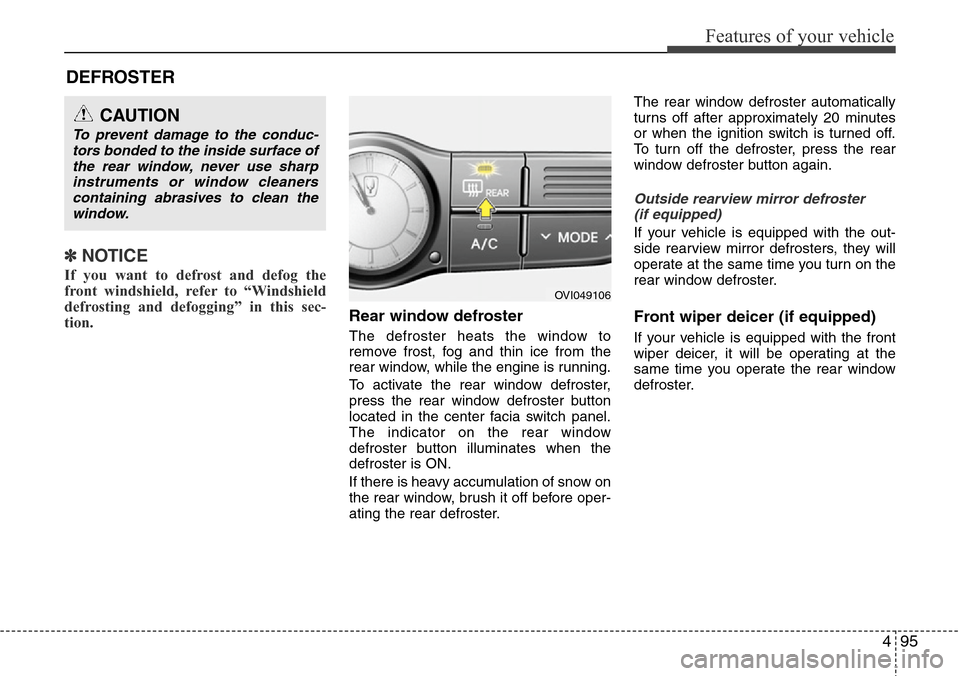
Rear window defroster
The defroster heats the window to
remove frost, fog and thin ice from the
rear window, while the engine is running.
To activate the rear window defroster,
press the rear window defroster button
located in the center facia switch panel.
The indicator on the rear window
defroster button illuminates when the
defroster is ON.
If there is heavy accumulation of snow on
the rear window, brush it off before oper-
ating the rear defroster.The rear window defroster automatically
turns off after approximately 20 minutes
or when the ignition switch is turned off.
To turn off the defroster, press the rear
window defroster button again.
Outside rearview mirror defroster
(if equipped)
If your vehicle is equipped with the out-
side rearview mirror defrosters, they will
operate at the same time you turn on the
rear window defroster.
Front wiper deicer (if equipped)
If your vehicle is equipped with the front
wiper deicer, it will be operating at the
same time you operate the rear window
defroster.
CAUTION
To prevent damage to the conduc-
tors bonded to the inside surface of
the rear window, never use sharp
instruments or window cleaners
containing abrasives to clean the
window.
DEFROSTER
OVI049106
Page 179 of 385
497
Features of your vehicle
Automatic heating and air condi-
tioning
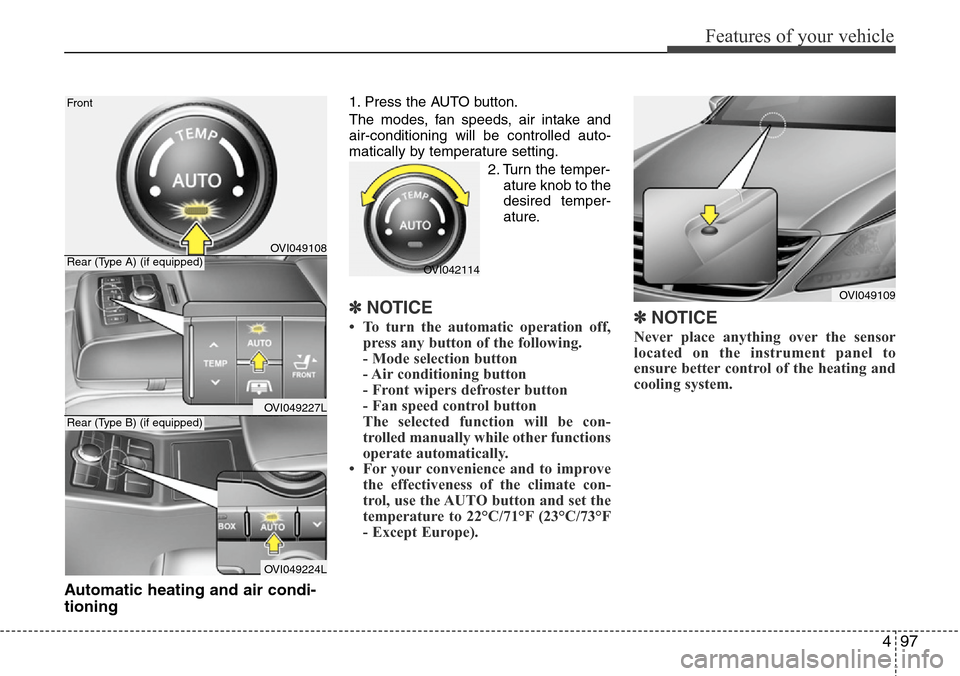
1. Press the AUTO button.
The modes, fan speeds, air intake and
air-conditioning will be controlled auto-
matically by temperature setting.
2. Turn the temper-
ature knob to the
desired temper-
ature.
✽NOTICE
• To turn the automatic operation off,
press any button of the following.
- Mode selection button
- Air conditioning button
- Front wipers defroster button
- Fan speed control button
The selected function will be con-
trolled manually while other functions
operate automatically.
• For your convenience and to improve
the effectiveness of the climate con-
trol, use the AUTO button and set the
temperature to 22°C/71°F (23°C/73°F
- Except Europe).✽NOTICE
Never place anything over the sensor
located on the instrument panel to
ensure better control of the heating and
cooling system.
OVI049109
OVI049108
OVI049227L
OVI049224L Front
Rear (Type A) (if equipped)
Rear (Type B) (if equipped)
OVI042114
Page 181 of 385
499
Features of your vehicle
❈ Rear outlet vents (F)
• The air flow of the Rear outlet vents is
controlled by the front climate control
system and delivered through the
inside air duct of the front doors. If the
door is open or not closed completely,
the air flow of the Rear outlet vent is
not delivered properly. Make sure the
front doors are closed completely.
• The air flow of the Rear outlet vents
may be weaker than the instrument
panel vents for the long air duct in the
front doors.
• Close the air vents in cold weather. The
air flow of the Rear outlet vents may
cool a little during heating operation.
(Use the Rear outlet vents during cool-
ing operation.)
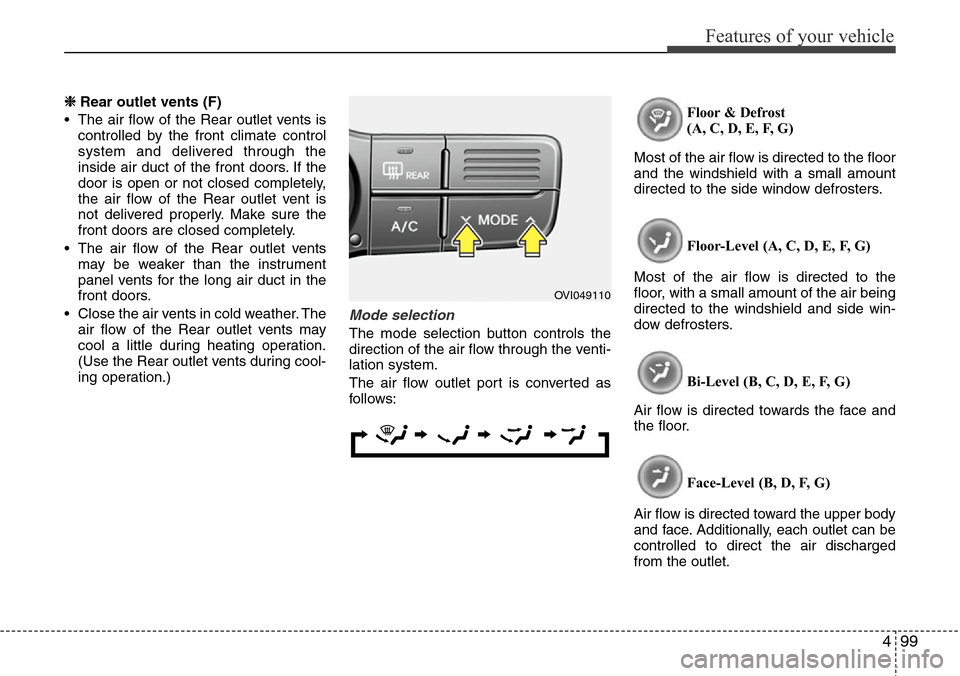
Mode selection
The mode selection button controls the
direction of the air flow through the venti-
lation system.
The air flow outlet port is converted as
follows:Floor & Defrost
(A, C, D, E, F, G)
Most of the air flow is directed to the floor
and the windshield with a small amount
directed to the side window defrosters.
Floor-Level (A, C, D, E, F, G)
Most of the air flow is directed to the
floor, with a small amount of the air being
directed to the windshield and side win-
dow defrosters.
Bi-Level (B, C, D, E, F, G)
Air flow is directed towards the face and
the floor.
Face-Level (B, D, F, G)
Air flow is directed toward the upper body
and face. Additionally, each outlet can be
controlled to direct the air discharged
from the outlet.
OVI049110
Page 182 of 385
Features of your vehicle
100 4
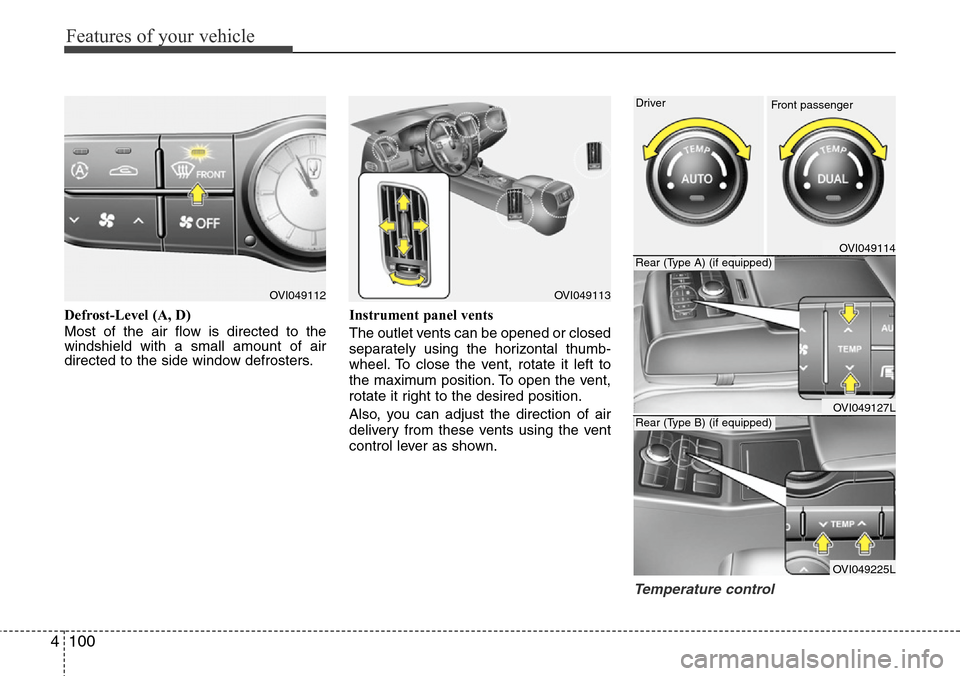
Defrost-Level (A, D)
Most of the air flow is directed to the
windshield with a small amount of air
directed to the side window defrosters.Instrument panel vents
The outlet vents can be opened or closed
separately using the horizontal thumb-
wheel. To close the vent, rotate it left to
the maximum position. To open the vent,
rotate it right to the desired position.
Also, you can adjust the direction of air
delivery from these vents using the vent
control lever as shown.
Temperature control
OVI049112OVI049113
OVI049114
OVI049127L
OVI049225L Driver
Rear (Type A) (if equipped)
Rear (Type B) (if equipped)
Front passenger
Page 349 of 385
747
Maintenance
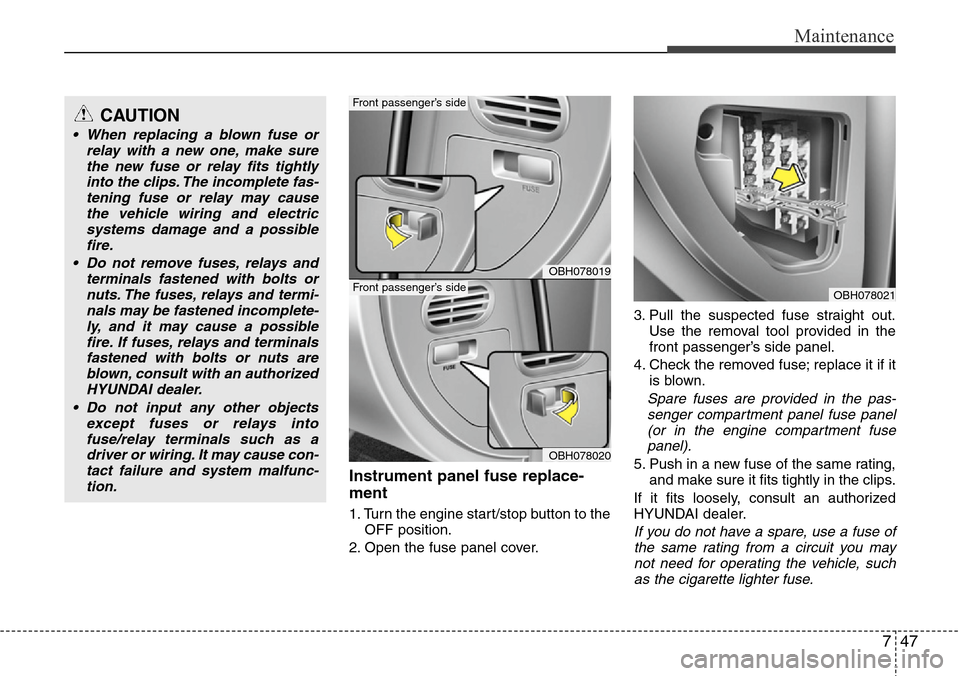
Instrument panel fuse replace-
ment
1. Turn the engine start/stop button to the
OFF position.
2. Open the fuse panel cover.3. Pull the suspected fuse straight out.
Use the removal tool provided in the
front passenger’s side panel.
4. Check the removed fuse; replace it if it
is blown.
Spare fuses are provided in the pas-
senger compartment panel fuse panel
(or in the engine compartment fuse
panel).
5. Push in a new fuse of the same rating,
and make sure it fits tightly in the clips.
If it fits loosely, consult an authorized
HYUNDAI dealer.
If you do not have a spare, use a fuse of
the same rating from a circuit you may
not need for operating the vehicle, such
as the cigarette lighter fuse.
OBH078021
OBH078019
OBH078020
Driver’s side
Front passenger’s side
Front passenger’s sideCAUTION
• When replacing a blown fuse or
relay with a new one, make sure
the new fuse or relay fits tightly
into the clips. The incomplete fas-
tening fuse or relay may cause
the vehicle wiring and electric
systems damage and a possible
fire.
• Do not remove fuses, relays and
terminals fastened with bolts or
nuts. The fuses, relays and termi-
nals may be fastened incomplete-
ly, and it may cause a possible
fire. If fuses, relays and terminals
fastened with bolts or nuts are
blown, consult with an authorized
HYUNDAI dealer.
• Do not input any other objects
except fuses or relays into
fuse/relay terminals such as a
driver or wiring. It may cause con-
tact failure and system malfunc-
tion.
Page 352 of 385
Maintenance
50 7
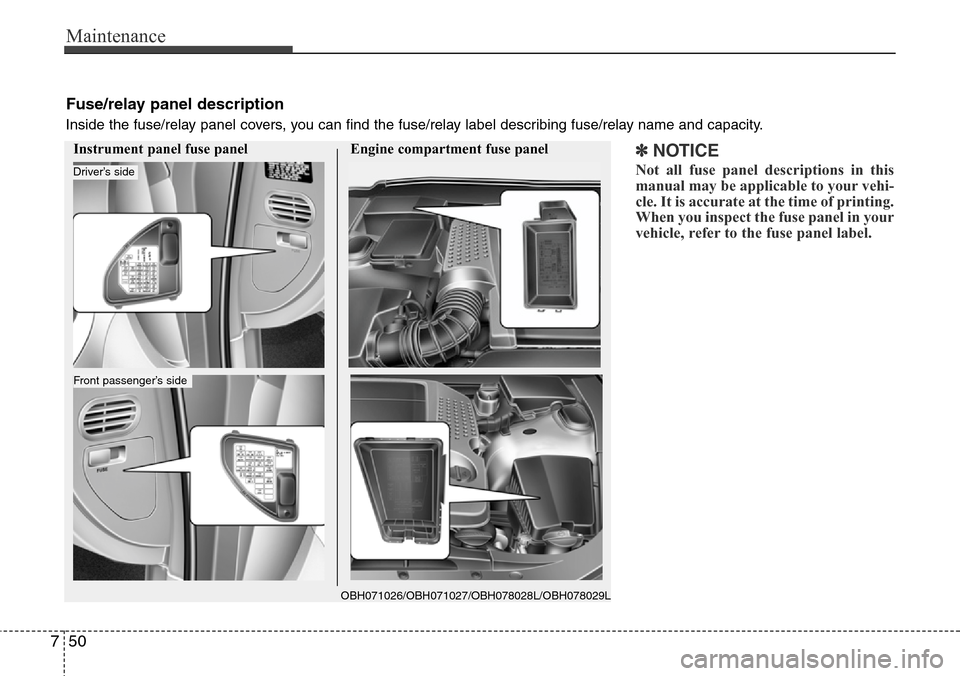
Fuse/relay panel description
Inside the fuse/relay panel covers, you can find the fuse/relay label describing fuse/relay name and capacity.
Instrument panel fuse panel Engine compartment fuse panel
OBH071026/OBH071027/OBH078028L/OBH078029L
Driver’s side
Front passenger’s side
✽NOTICE
Not all fuse panel descriptions in this
manual may be applicable to your vehi-
cle. It is accurate at the time of printing.
When you inspect the fuse panel in your
vehicle, refer to the fuse panel label.
Page 353 of 385
751
Maintenance
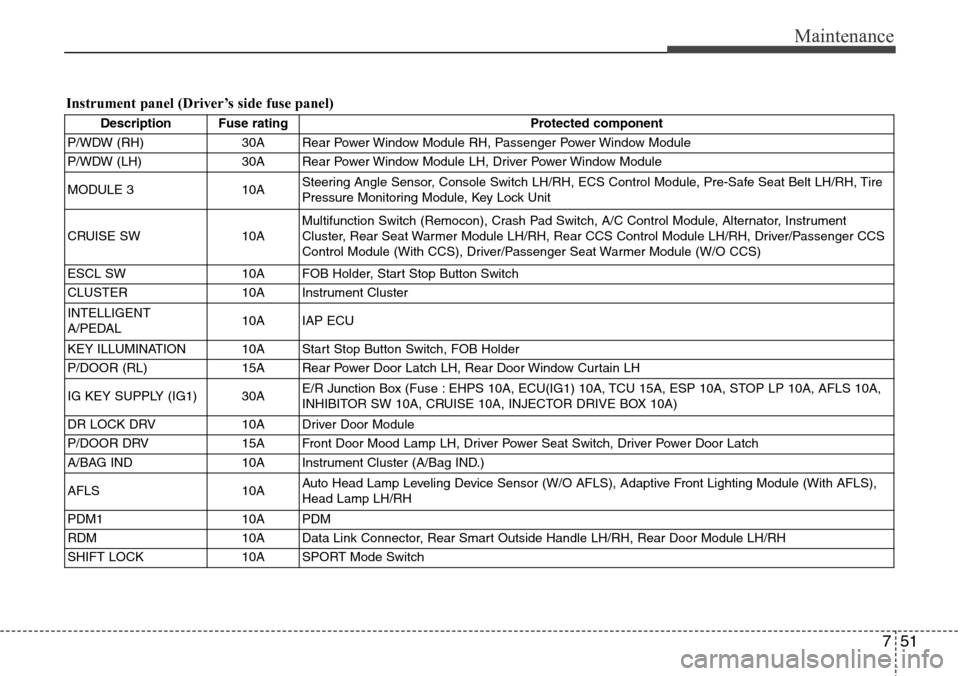
Instrument panel (Driver’s side fuse panel)
Description Fuse rating Protected component
P/WDW (RH) 30A Rear Power Window Module RH, Passenger Power Window Module
P/WDW (LH) 30A Rear Power Window Module LH, Driver Power Window Module
MODULE 3 10ASteering Angle Sensor, Console Switch LH/RH, ECS Control Module, Pre-Safe Seat Belt LH/RH, Tire
Pressure Monitoring Module, Key Lock Unit
CRUISE SW 10AMultifunction Switch (Remocon), Crash Pad Switch, A/C Control Module, Alternator, Instrument
Cluster, Rear Seat Warmer Module LH/RH, Rear CCS Control Module LH/RH, Driver/Passenger CCS
Control Module (With CCS), Driver/Passenger Seat Warmer Module (W/O CCS)
ESCL SW 10A FOB Holder, Start Stop Button Switch
CLUSTER 10A Instrument Cluster
INTELLIGENT
A/PEDAL10A IAP ECU
KEY ILLUMINATION 10A Start Stop Button Switch, FOB Holder
P/DOOR (RL) 15A Rear Power Door Latch LH, Rear Door Window Curtain LH
IG KEY SUPPLY (IG1) 30AE/R Junction Box (Fuse : EHPS 10A, ECU(IG1) 10A, TCU 15A, ESP 10A, STOP LP 10A, AFLS 10A,
INHIBITOR SW 10A, CRUISE 10A, INJECTOR DRIVE BOX 10A)
DR LOCK DRV 10A Driver Door Module
P/DOOR DRV 15A Front Door Mood Lamp LH, Driver Power Seat Switch, Driver Power Door Latch
A/BAG IND 10A Instrument Cluster (A/Bag IND.)
AFLS 10AAuto Head Lamp Leveling Device Sensor (W/O AFLS), Adaptive Front Lighting Module (With AFLS),
Head Lamp LH/RH
PDM1 10A PDM
RDM 10A Data Link Connector, Rear Smart Outside Handle LH/RH, Rear Door Module LH/RH
SHIFT LOCK 10A SPORT Mode Switch