engine Hyundai Equus 2012 Owner's Guide
[x] Cancel search | Manufacturer: HYUNDAI, Model Year: 2012, Model line: Equus, Model: Hyundai Equus 2012Pages: 385, PDF Size: 10.67 MB
Page 91 of 385
49
Features of your vehicle
THEFT-ALARM SYSTEM
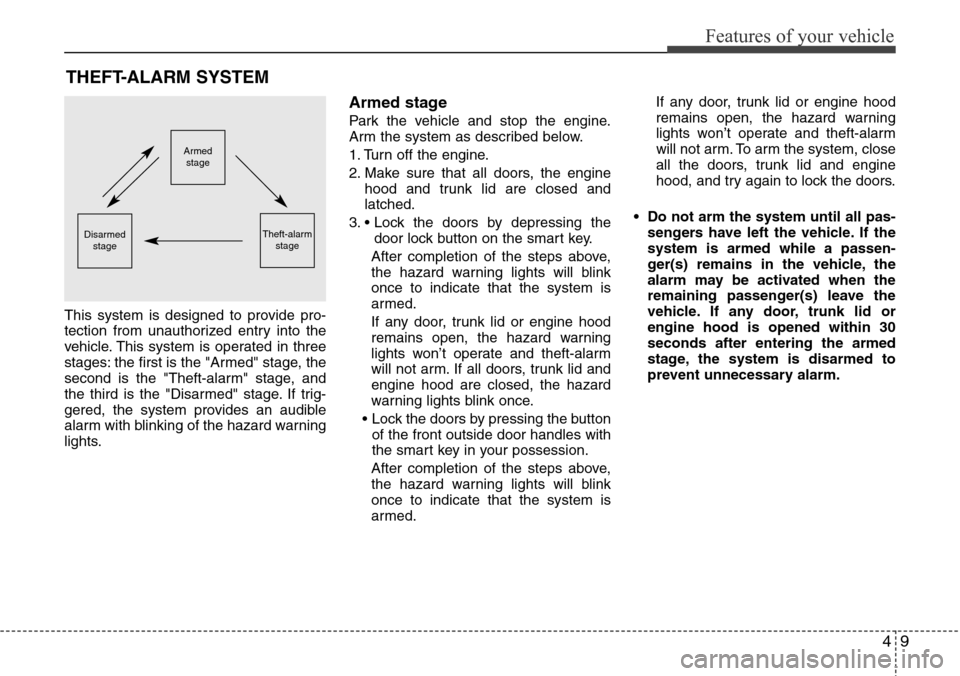
This system is designed to provide pro-
tection from unauthorized entry into the
vehicle. This system is operated in three
stages: the first is the "Armed" stage, the
second is the "Theft-alarm" stage, and
the third is the "Disarmed" stage. If trig-
gered, the system provides an audible
alarm with blinking of the hazard warning
lights.
Armed stage
Park the vehicle and stop the engine.
Arm the system as described below.
1. Turn off the engine.
2. Make sure that all doors, the engine
hood and trunk lid are closed and
latched.
3. • Lock the doors by depressing the
door lock button on the smart key.
After completion of the steps above,
the hazard warning lights will blink
once to indicate that the system is
armed.
If any door, trunk lid or engine hood
remains open, the hazard warning
lights won’t operate and theft-alarm
will not arm. If all doors, trunk lid and
engine hood are closed, the hazard
warning lights blink once.
• Lock the doors by pressing the button
of the front outside door handles with
the smart key in your possession.
After completion of the steps above,
the hazard warning lights will blink
once to indicate that the system is
armed.If any door, trunk lid or engine hood
remains open, the hazard warning
lights won’t operate and theft-alarm
will not arm. To arm the system, close
all the doors, trunk lid and engine
hood, and try again to lock the doors.
• Do not arm the system until all pas-
sengers have left the vehicle. If the
system is armed while a passen-
ger(s) remains in the vehicle, the
alarm may be activated when the
remaining passenger(s) leave the
vehicle. If any door, trunk lid or
engine hood is opened within 30
seconds after entering the armed
stage, the system is disarmed to
prevent unnecessary alarm.
Armed
stage
Theft-alarm
stageDisarmed
stage
Page 92 of 385
Features of your vehicle
10 4
Theft-alarm stage
The alarm will be activated if any of the
following occurs while the system is
armed.
• A door is opened without using the
smart key.
• The trunk is opened without using the
smart key.
✽NOTICE
If the trunk is opened by using the smart
key, the alarm will not be activated, but
doors, hood, and engine start/stop but-
ton keep arming condition.
Once the trunk is opened and then
closed, the trunk will be locked and
armed automatically.
• The engine hood is opened.
The horn will sound and the hazard
warning lights will blink continuously for
approximately 30 seconds. To turn off the
system, unlock the doors with the smart
key.
Disarmed stage
The system will be disarmed when:
- The door unlock button is pressed.
- Putting your hand in the outside door
handle for about 0.5 second while car-
rying the smart key.
After the doors are unlocked, the hazard
warning lights will blink twice to indicate
that the system is disarmed.
After unlocking the door, if any door (or
trunk) is not opened within 30 seconds,
the system will be rearmed.
✽NOTICE
• Avoid trying to start the engine while
the alarm is activated. The vehicle
starter motor is disabled during the
theft-alarm stage.
If the system is not disarmed, unlock
the doors by inserting the mechanical
key into the key hole and turn the key
toward the rear of the vehicle, then
turn the engine start/stop button to
the ON position and wait for 30 sec-
onds. Then the system will be dis-
armed. (except China)
• If you lose your keys, consult your
authorized HYUNDAI dealer.
CAUTION
Do not change, alter or adjust the
theft-alarm system because it could
cause the theft-alarm system to
malfunction and should only be
serviced by an authorized HYUNDAI
dealer.
Malfunctions caused by improper
alterations, adjustments or modifi-
cations to the theft-alarm system
are not covered by your vehicle
manufacturer warranty.
Page 96 of 385
Features of your vehicle
14 4
Impact sensing door unlock sys-
tem
All doors will be automatically unlocked
after an impact causes the air bags to
deploy.
Speed sensing door lock system
(if equipped)
All doors will be automatically locked
after the vehicle speed exceeds 15 km/h
(9 mph). And all doors will be automati-
cally unlocked when you turn the engine
off.
✽NOTICE
You can select some auto door lock/
unlock features in the INFO menu of
DIS (Driver Information System, if
equipped) as follows;
• Speed sensing auto door lock
• Auto door unlock by unlocking the
driver's door lock button
• Auto door unlock when the smart key
is removed from the smart key holder.
• Auto door lock/unlock by shifting the
shift lever out of P (Park) or into P
(Park)
If you want this feature, refer to the DIS
manual (if equipped) supplied separate-
ly.WARNING- Unlocked
vehicles
Leaving your vehicle unlocked can
invite theft or possible harm to you
or others from someone hiding in
your vehicle while you are gone.
Always remove the ignition key,
engage the parking brake, close all
windows and lock all doors when
leaving your vehicle unattended.
WARNING- Unattended
children
An enclosed vehicle can become
extremely hot, causing death or
severe injury to unattended chil-
dren or animals who cannot escape
the vehicle. Furthermore, children
might operate features of the vehi-
cle that could injure them, or they
could encounter other harm, possi-
bly from someone gaining entry to
the vehicle. Never leave children or
animals unattended in your vehicle.
Page 101 of 385
419
Features of your vehicle
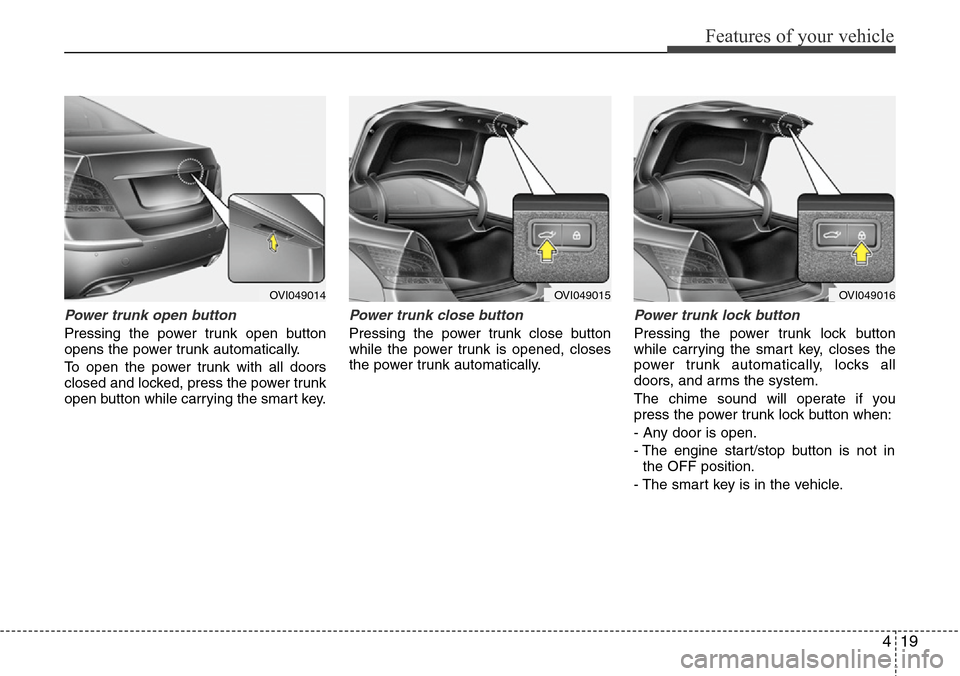
Power trunk open button
Pressing the power trunk open button
opens the power trunk automatically.
To open the power trunk with all doors
closed and locked, press the power trunk
open button while carrying the smart key.
Power trunk close button
Pressing the power trunk close button
while the power trunk is opened, closes
the power trunk automatically.
Power trunk lock button
Pressing the power trunk lock button
while carrying the smart key, closes the
power trunk automatically, locks all
doors, and arms the system.
The chime sound will operate if you
press the power trunk lock button when:
- Any door is open.
- The engine start/stop button is not in
the OFF position.
- The smart key is in the vehicle.
OVI049014OVI049015OVI049016
Page 102 of 385
Features of your vehicle
20 4
Power trunk non-opening conditions
The power trunk will not open or close
automatically, when the vehicle is moving
more than 3 km/h (1.8 mph).
✽NOTICE
If there are obstacles such as snow on
the power trunk, it may not open auto-
matically. After remove the obstacle, try
to open it again.
✽NOTICE
• The power trunk can be operated
when the engine is not running.
However the power trunk operation
consumes large amounts of vehicle
electric power. To prevent the battery
from being discharged, do not operate
it excessively e.g.: more than approxi-
mately 10 times repeatedly.
• To prevent the battery from being dis-
charged, do not leave the power trunk
in the open position for a long lime.
• Do not apply excessive force while
operating the power trunk. This could
cause damage to the power trunk.
• Do not modify or repair any part of
the power trunk by yourself. This
must be done by an authorized
HYUNDAI dealer.
• When jacking up the vehicle to
change a tire or repair the vehicle, do
not operate the power trunk. This
could cause the power trunk to oper-
ate improperly.
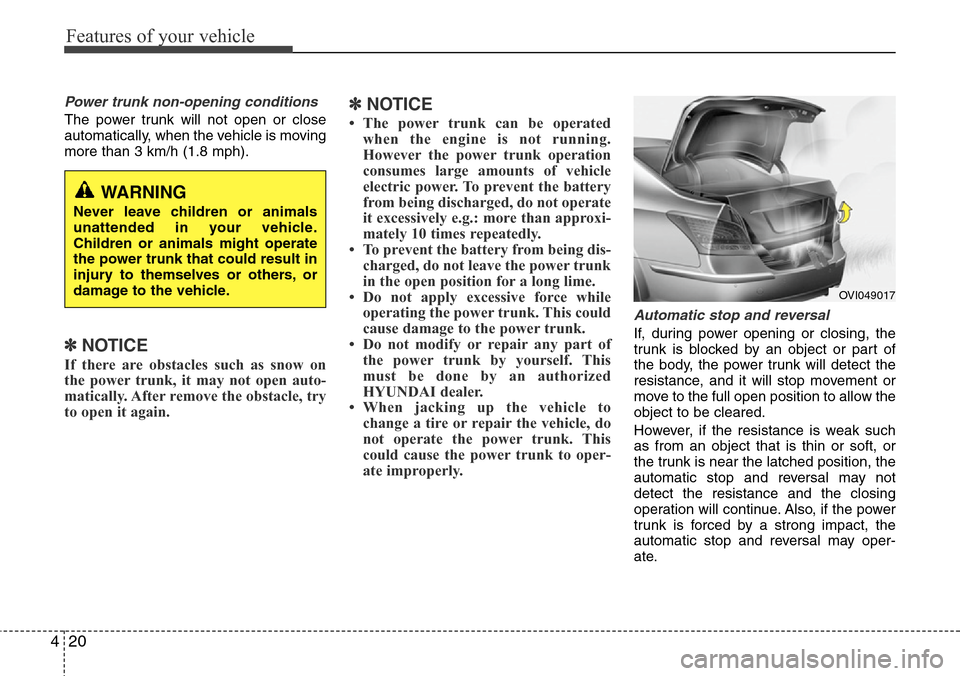
Automatic stop and reversal
If, during power opening or closing, the
trunk is blocked by an object or part of
the body, the power trunk will detect the
resistance, and it will stop movement or
move to the full open position to allow the
object to be cleared.
However, if the resistance is weak such
as from an object that is thin or soft, or
the trunk is near the latched position, the
automatic stop and reversal may not
detect the resistance and the closing
operation will continue. Also, if the power
trunk is forced by a strong impact, the
automatic stop and reversal may oper-
ate.
WARNING
Never leave children or animals
unattended in your vehicle.
Children or animals might operate
the power trunk that could result in
injury to themselves or others, or
damage to the vehicle.
OVI049017
Page 107 of 385
425
Features of your vehicle
Power windows
The engine start/stop button must be in
the ON position for power windows to
operate.
Each door has a power window switch
that controls the door's window. The driv-
er has a power window lock switch which
can block the operation of passenger
windows. The power windows can be
operated for approximately 30 seconds
after the engine start/stop button turned
to the ACC or OFF position. However, if
the front doors are opened, the power
windows cannot be operated even within
the 30 second period.
✽NOTICE
While driving with the rear windows
down or with the sunroof (if equipped)
in an open (or partially open position),
your vehicle may demonstrate a wind
buffeting or pulsation noise. This
noise is a normal occurrence and can be
reduced or eliminated by taking the fol-
lowing actions. If the noise occurs with
one or both of the rear windows down,
partially lower both front windows
approximately one inch. If you expe-
rience the noise with the sunroof open,
slightly reduce the size of the sunroof
opening.
Window opening and closing
The driver’s door has a master power
window switch that controls all the win-
dows in the vehicle.
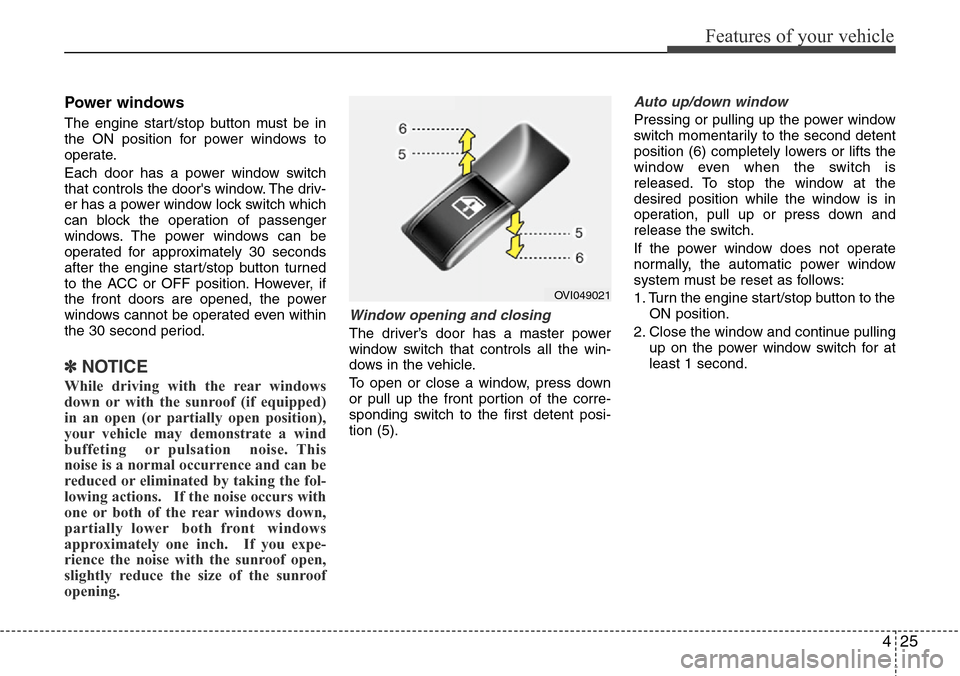
To open or close a window, press down
or pull up the front portion of the corre-
sponding switch to the first detent posi-
tion (5).
Auto up/down window
Pressing or pulling up the power window
switch momentarily to the second detent
position (6) completely lowers or lifts the
window even when the switch is
released. To stop the window at the
desired position while the window is in
operation, pull up or press down and
release the switch.
If the power window does not operate
normally, the automatic power window
system must be reset as follows:
1. Turn the engine start/stop button to the
ON position.
2. Close the window and continue pulling
up on the power window switch for at
least 1 second.
OVI049021
Page 109 of 385
427
Features of your vehicle
2. To set up the curtain, pull up the switch
once more.
3. If you want to open the curtained win-
dow, fold the curtain first by pushing
down the switch. Then you can open
the window by pushing the switch once
again.Resetting the rear door window curtain
If the curtain is not operated correctly, the
curtain must be reset as follows:
1. Turn the engine start/stop button to the
ON position.
2. Close the curtain by pressing the
power window switch to the first detent
position and continue pulling up the
switch for at least 10 seconds.
If the curtain doesn't work properly after
above procedure, have the system
checked by an authorized HYUNDAI
dealer.
✽NOTICE
The rear door window curtain may not
operate normally, when the temperature
in the vehicle is lower than -15°C.
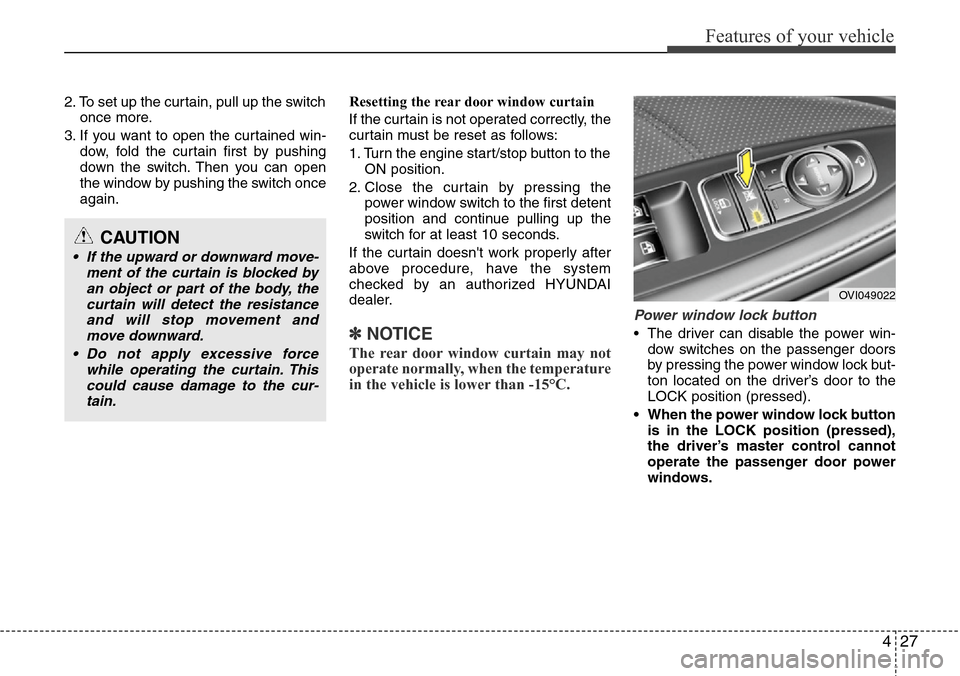
Power window lock button
• The driver can disable the power win-
dow switches on the passenger doors
by pressing the power window lock but-
ton located on the driver’s door to the
LOCK position (pressed).
• When the power window lock button
is in the LOCK position (pressed),
the driver’s master control cannot
operate the passenger door power
windows.
OVI049022
CAUTION
• If the upward or downward move-
ment of the curtain is blocked by
an object or part of the body, the
curtain will detect the resistance
and will stop movement and
move downward.
• Do not apply excessive force
while operating the curtain. This
could cause damage to the cur-
tain.
Page 110 of 385
Features of your vehicle
28 4
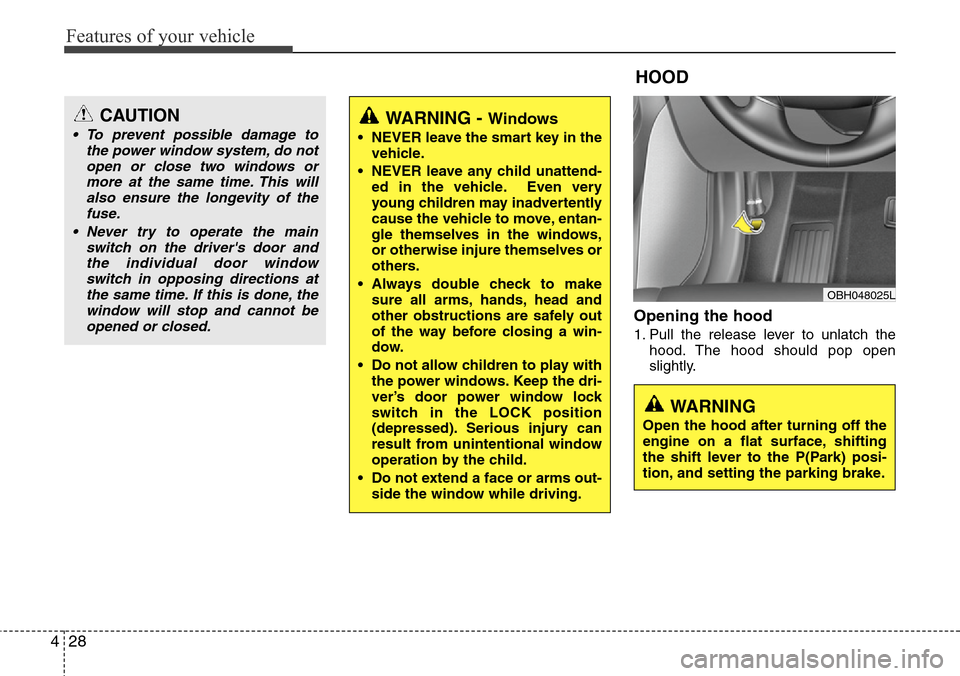
Opening the hood
1. Pull the release lever to unlatch the
hood. The hood should pop open
slightly.
WARNING - Windows
• NEVER leave the smart key in the
vehicle.
• NEVER leave any child unattend-
ed in the vehicle. Even very
young children may inadvertently
cause the vehicle to move, entan-
gle themselves in the windows,
or otherwise injure themselves or
others.
• Always double check to make
sure all arms, hands, head and
other obstructions are safely out
of the way before closing a win-
dow.
• Do not allow children to play with
the power windows. Keep the dri-
ver’s door power window lock
switch in the LOCK position
(depressed). Serious injury can
result from unintentional window
operation by the child.
• Do not extend a face or arms out-
side the window while driving.
HOOD
OBH048025L
CAUTION
• To prevent possible damage to
the power window system, do not
open or close two windows or
more at the same time. This will
also ensure the longevity of the
fuse.
• Never try to operate the main
switch on the driver's door and
the individual door window
switch in opposing directions at
the same time. If this is done, the
window will stop and cannot be
opened or closed.
WARNING
Open the hood after turning off the
engine on a flat surface, shifting
the shift lever to the P(Park) posi-
tion, and setting the parking brake.
Page 111 of 385
429
Features of your vehicle
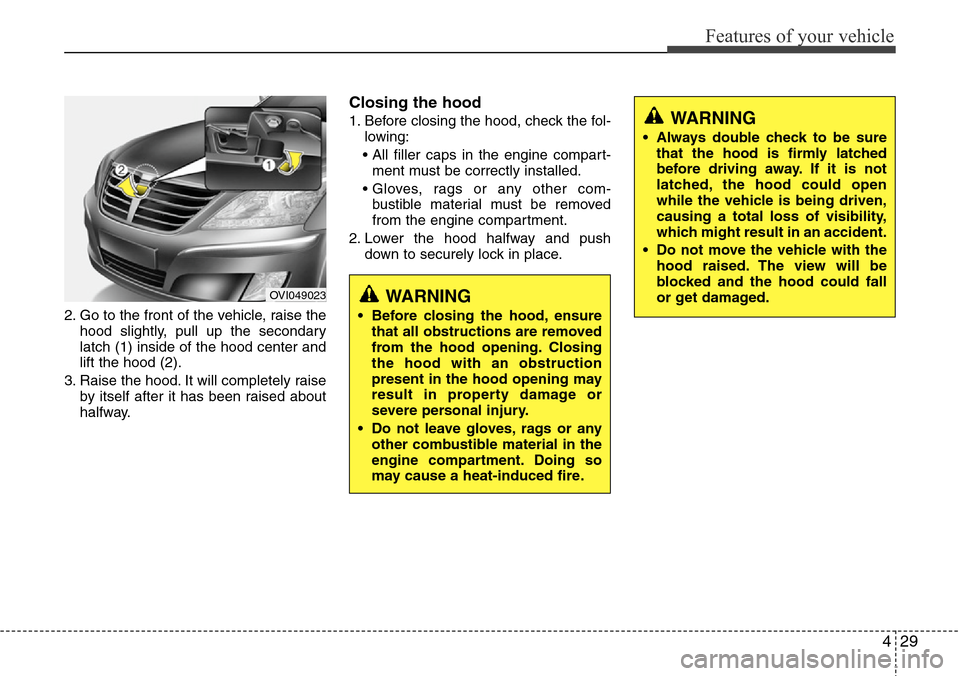
2. Go to the front of the vehicle, raise the
hood slightly, pull up the secondary
latch (1) inside of the hood center and
lift the hood (2).
3. Raise the hood. It will completely raise
by itself after it has been raised about
halfway.
Closing the hood
1. Before closing the hood, check the fol-
lowing:
• All filler caps in the engine compart-
ment must be correctly installed.
• Gloves, rags or any other com-
bustible material must be removed
from the engine compartment.
2. Lower the hood halfway and push
down to securely lock in place.
WARNING
• Before closing the hood, ensure
that all obstructions are removed
from the hood opening. Closing
the hood with an obstruction
present in the hood opening may
result in property damage or
severe personal injury.
• Do not leave gloves, rags or any
other combustible material in the
engine compartment. Doing so
may cause a heat-induced fire.
WARNING
• Always double check to be sure
that the hood is firmly latched
before driving away. If it is not
latched, the hood could open
while the vehicle is being driven,
causing a total loss of visibility,
which might result in an accident.
• Do not move the vehicle with the
hood raised. The view will be
blocked and the hood could fall
or get damaged.
OVI049023
Page 112 of 385
Features of your vehicle
30 4
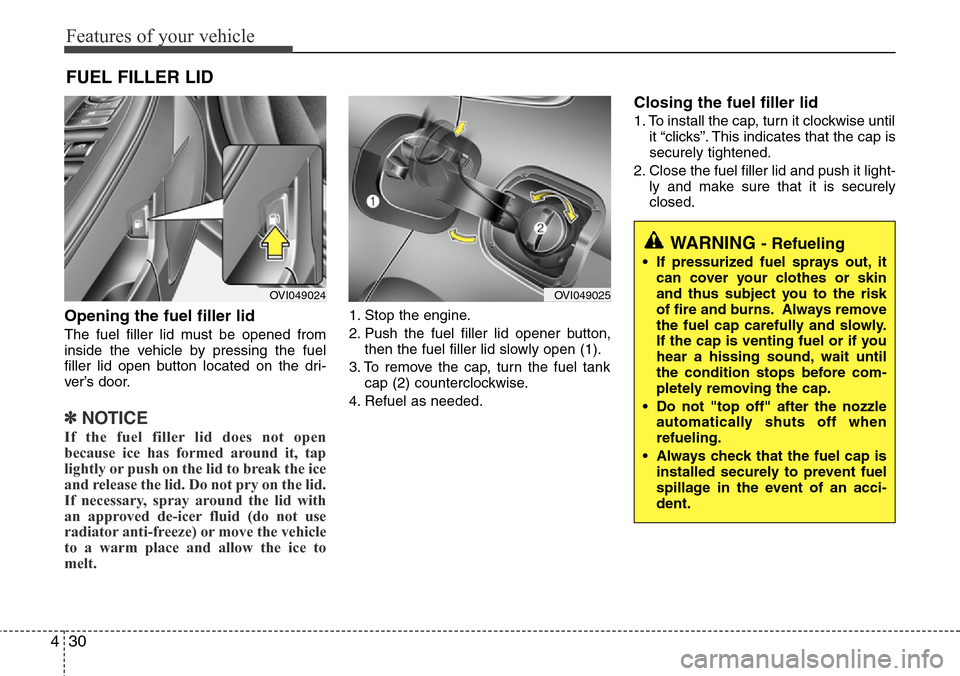
Opening the fuel filler lid
The fuel filler lid must be opened from
inside the vehicle by pressing the fuel
filler lid open button located on the dri-
ver’s door.
✽NOTICE
If the fuel filler lid does not open
because ice has formed around it, tap
lightly or push on the lid to break the ice
and release the lid. Do not pry on the lid.
If necessary, spray around the lid with
an approved de-icer fluid (do not use
radiator anti-freeze) or move the vehicle
to a warm place and allow the ice to
melt.
1. Stop the engine.
2. Push the fuel filler lid opener button,
then the fuel filler lid slowly open (1).
3. To remove the cap, turn the fuel tank
cap (2) counterclockwise.
4. Refuel as needed.
Closing the fuel filler lid
1. To install the cap, turn it clockwise until
it “clicks”. This indicates that the cap is
securely tightened.
2. Close the fuel filler lid and push it light-
ly and make sure that it is securely
closed.
FUEL FILLER LID
OVI049024OVI049025
WARNING - Refueling
• If pressurized fuel sprays out, it
can cover your clothes or skin
and thus subject you to the risk
of fire and burns. Always remove
the fuel cap carefully and slowly.
If the cap is venting fuel or if you
hear a hissing sound, wait until
the condition stops before com-
pletely removing the cap.
• Do not "top off" after the nozzle
automatically shuts off when
refueling.
• Always check that the fuel cap is
installed securely to prevent fuel
spillage in the event of an acci-
dent.