change wheel Hyundai Equus 2012 Owner's Manual
[x] Cancel search | Manufacturer: HYUNDAI, Model Year: 2012, Model line: Equus, Model: Hyundai Equus 2012Pages: 385, PDF Size: 10.67 MB
Page 121 of 385
439
Features of your vehicle
Left or Right: When the L or R switch is
selected, both outside
rearview mirrors will
move downward.
Neutral: When neither switch is select-
ed, the outside rearview mir-
rors will not operate.
✽NOTICE
The outside rearview mirrors will auto-
matically revert to their original posi-
tions under the following conditions:
1. Engine start/stop button is turned to
the ACC or OFF position.
2. Shift lever is moved to any position
except R.
3. Remote control outside rearview mir-
ror switch is not selected.
Power steering
Power steering uses energy from the
engine to assist you in steering the vehi-
cle. If the engine is off or if the power
steering system becomes inoperative,
the vehicle may still be steered, but it will
require increased steering effort.
Should you notice any change in the
effort required to steer during normal
vehicle operation, have the power steer-
ing checked by an authorized HYUNDAI
dealer.
Electronic Hydraulic Power Steering
(EHPS)
EHPS uses an electromotor to assist you
in steering the vehicle. It senses the vehi-
cle speed and road condition.
If the engine is off or if the power steer-
ing system becomes inoperative, the
vehicle may still be steered, but it will
require increased steering effort.
Should you notice any change in the
effort required to steer during normal
vehicle operation, have the power steer-
ing checked by an authorized HYUNDAI
dealer.
STEERING WHEEL
CAUTION
Never hold the steering wheel
against a stop (extreme right or left
turn) for more than 5 seconds with
the engine running. Holding the
steering wheel for more than 5 sec-
onds in either position may cause
damage to the power steering
pump.
Page 130 of 385
Features of your vehicle
48 4
ON/OFF the welcome and good-
bye sound
You can turn on or off the welcome and
goodbye sound when you open the dri-
ver's door.
1. Turn the engine start/stop button to the
ACC position.
2. Press and hold the DISP button on the
steering wheel for approximately 5
seconds.
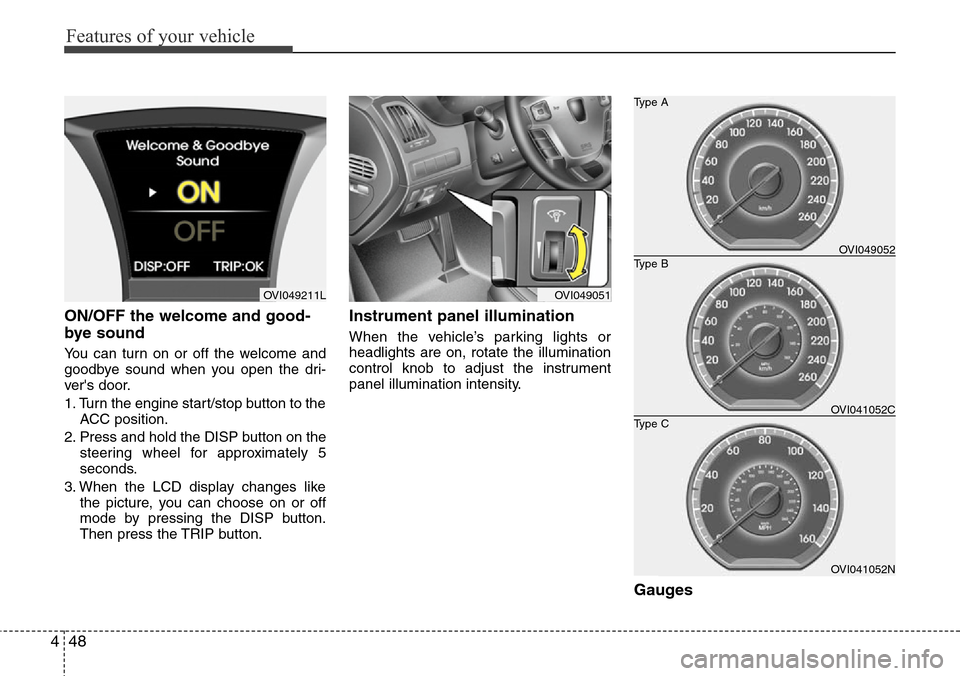
3. When the LCD display changes like
the picture, you can choose on or off
mode by pressing the DISP button.
Then press the TRIP button.
Instrument panel illumination
When the vehicle’s parking lights or
headlights are on, rotate the illumination
control knob to adjust the instrument
panel illumination intensity.
Gauges
OVI049051OVI049211L
OVI041052N
Type B Type A
Type COVI049052
OVI041052C
Page 158 of 385
Features of your vehicle
76 4
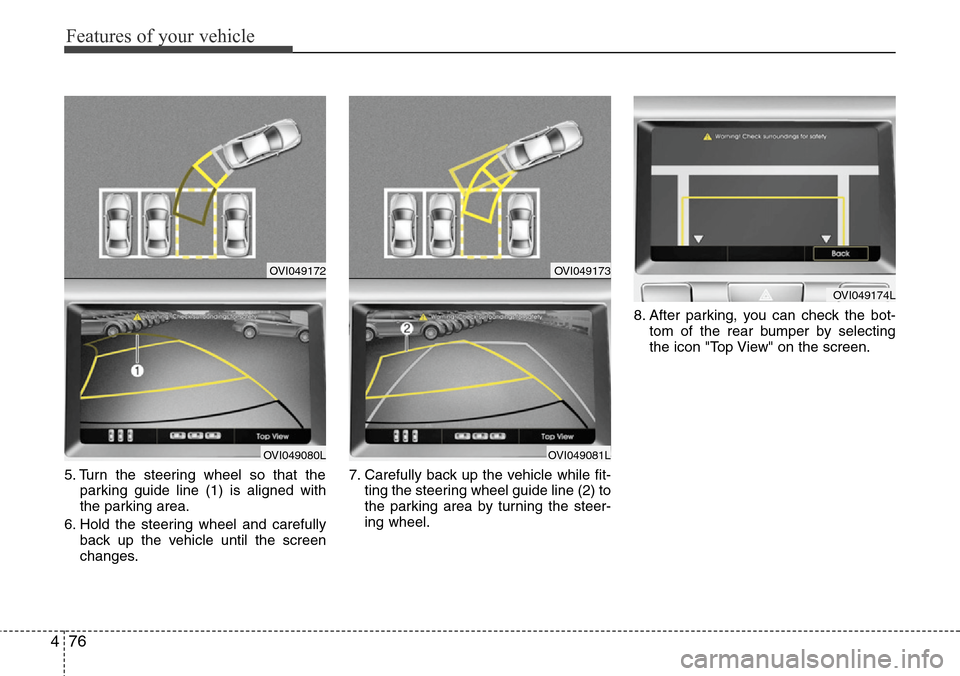
5. Turn the steering wheel so that the
parking guide line (1) is aligned with
the parking area.
6. Hold the steering wheel and carefully
back up the vehicle until the screen
changes.7. Carefully back up the vehicle while fit-
ting the steering wheel guide line (2) to
the parking area by turning the steer-
ing wheel.8. After parking, you can check the bot-
tom of the rear bumper by selecting
the icon "Top View" on the screen.
OVI049172
OVI049080L
OVI049173
OVI049081L
OVI049174L
Page 160 of 385
Features of your vehicle
78 4
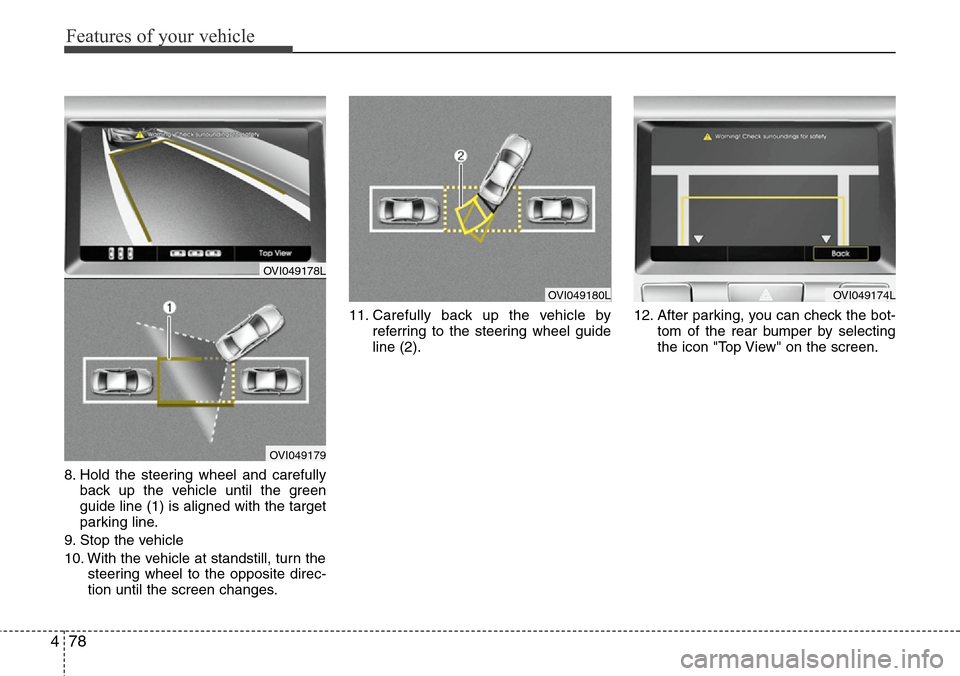
8. Hold the steering wheel and carefully
back up the vehicle until the green
guide line (1) is aligned with the target
parking line.
9. Stop the vehicle
10. With the vehicle at standstill, turn the
steering wheel to the opposite direc-
tion until the screen changes.11. Carefully back up the vehicle by
referring to the steering wheel guide
line (2).12. After parking, you can check the bot-
tom of the rear bumper by selecting
the icon "Top View" on the screen.
OVI049180LOVI049174L
OVI049178L
OVI049179
Page 218 of 385
55
Driving your vehicle
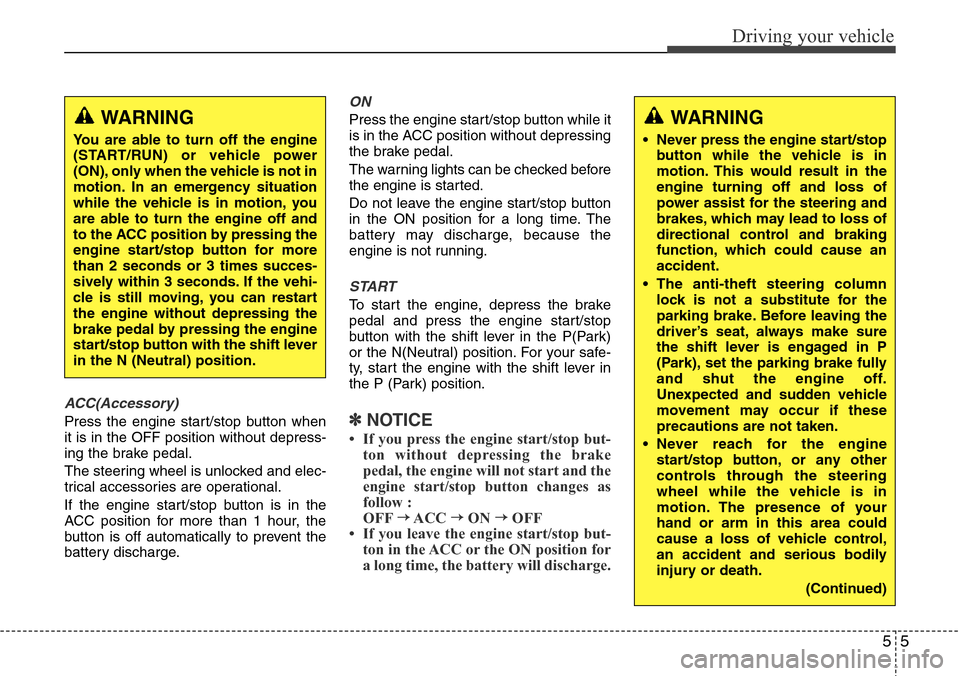
ACC(Accessory)
Press the engine start/stop button when
it is in the OFF position without depress-
ing the brake pedal.
The steering wheel is unlocked and elec-
trical accessories are operational.
If the engine start/stop button is in the
ACC position for more than 1 hour, the
button is off automatically to prevent the
battery discharge.
ON
Press the engine start/stop button while it
is in the ACC position without depressing
the brake pedal.
The warning lights can be checked before
the engine is started.
Do not leave the engine start/stop button
in the ON position for a long time. The
battery may discharge, because the
engine is not running.
START
To start the engine, depress the brake
pedal and press the engine start/stop
button with the shift lever in the P(Park)
or the N(Neutral) position. For your safe-
ty, start the engine with the shift lever in
the P (Park) position.
✽NOTICE
• If you press the engine start/stop but-
ton without depressing the brake
pedal, the engine will not start and the
engine start/stop button changes as
follow :
OFF
→ACC →ON →OFF
Page 225 of 385
Driving your vehicle
12 5
Good driving practices
• Never move the shift lever from P
(Park) or N (Neutral) to any other posi-
tion with the accelerator pedal
depressed.
• Never move the shift lever into P (Park)
when the vehicle is in motion.
• Be sure the vehicle is completely
stopped before you attempt to shift into
R (Reverse) or D (Drive).
• Never take the vehicle out of gear and
coast down a hill. This may be
extremely hazardous. Always leave the
vehicle in gear when moving.
• Do not "ride" the brakes. This can
cause them to overheat and malfunc-
tion. Instead, when you are driving
down a long hill, slow down and shift to
a lower gear. When you do this, engine
braking will help slow the vehicle.
• Slow down before shifting to a lower
gear. Otherwise, the lower gear may
not be engaged.• Always use the parking brake. Do not
depend on placing the transmission in
P (Park) to keep the vehicle from mov-
ing.
• Exercise extreme caution when driving
on a slippery surface. Be especially
careful when braking, accelerating or
shifting gears. On a slippery surface,
an abrupt change in vehicle speed can
cause the drive wheels to lose traction
and the vehicle to go out of control.
• Optimum vehicle performance and
economy is obtained by smoothly
depressing and releasing the accelera-
tor pedal.WARNING
• Always buckle-up! In a collision,
an unbelted occupant is signifi-
cantly more likely to be seriously
injured or killed than a properly
belted occupant.
• Avoid high speeds when corner-
ing or turning.
• Do not make quick steering
wheel movements, such as sharp
lane changes or fast, sharp turns.
• The risk of rollover is greatly
increased if you lose control of
your vehicle at highway speeds.
• Lossing control often occurs if
two or more wheels drop off the
roadway and the driver over-
steers to reenter the roadway.
• In the event your vehicle leaves
the roadway, do not steer sharply.
Instead, slow down before pulling
back into the travel lanes.
• Never exceed posted speed lim-
its.
Page 247 of 385
Driving your vehicle
34 5
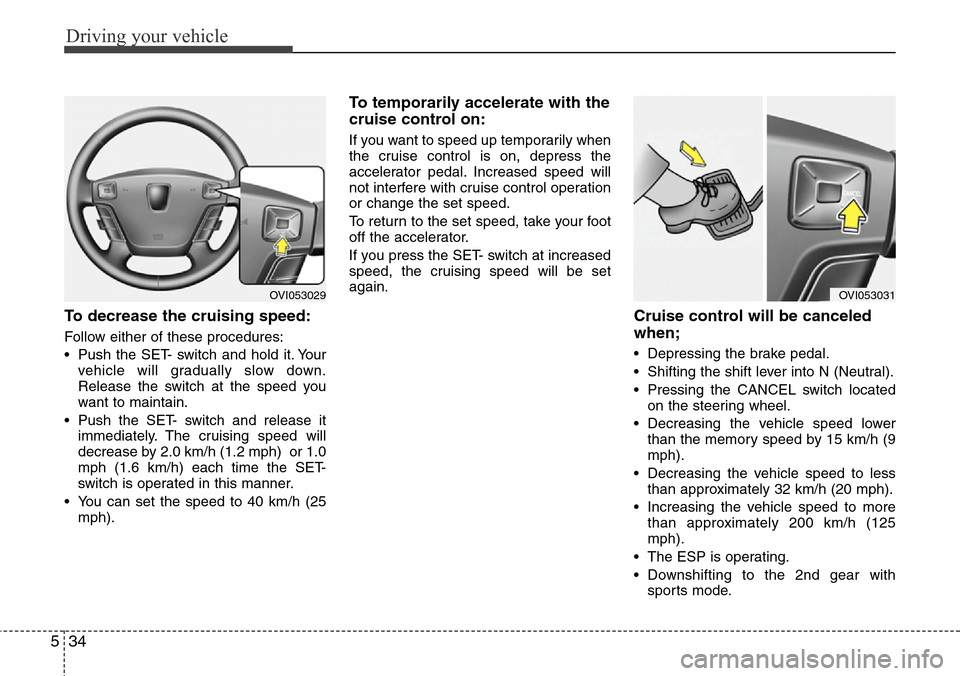
To decrease the cruising speed:
Follow either of these procedures:
• Push the SET- switch and hold it. Your
vehicle will gradually slow down.
Release the switch at the speed you
want to maintain.
• Push the SET- switch and release it
immediately. The cruising speed will
decrease by 2.0 km/h (1.2 mph) or 1.0
mph (1.6 km/h) each time the SET-
switch is operated in this manner.
• You can set the speed to 40 km/h (25
mph).
To temporarily accelerate with the
cruise control on:
If you want to speed up temporarily when
the cruise control is on, depress the
accelerator pedal. Increased speed will
not interfere with cruise control operation
or change the set speed.
To return to the set speed, take your foot
off the accelerator.
If you press the SET- switch at increased
speed, the cruising speed will be set
again.
Cruise control will be canceled
when;
• Depressing the brake pedal.
• Shifting the shift lever into N (Neutral).
• Pressing the CANCEL switch located
on the steering wheel.
• Decreasing the vehicle speed lower
than the memory speed by 15 km/h (9
mph).
• Decreasing the vehicle speed to less
than approximately 32 km/h (20 mph).
• Increasing the vehicle speed to more
than approximately 200 km/h (125
mph).
• The ESP is operating.
• Downshifting to the 2nd gear with
sports mode.
OVI053031OVI053029
Page 251 of 385
Driving your vehicle
38 5
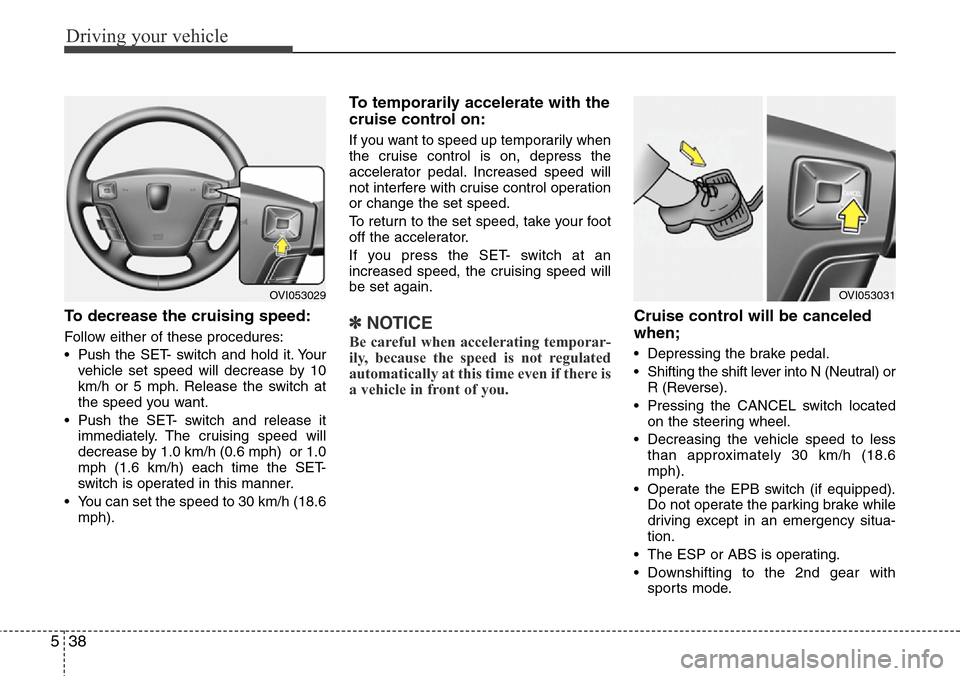
To decrease the cruising speed:
Follow either of these procedures:
• Pushthe SET- switch and hold it. Your
vehicle set speed will decrease by 10
km/h or 5 mph. Release the switch at
the speed you want.
• Push the SET- switch and release it
immediately. The cruising speed will
decrease by 1.0 km/h (0.6 mph) or 1.0
mph (1.6 km/h) each time the SET-
switch is operated in this manner.
• You can set the speed to 30 km/h (18.6
mph).
To temporarily accelerate with the
cruise control on:
If you want to speed up temporarily when
the cruise control is on, depress the
accelerator pedal. Increased speed will
not interfere with cruise control operation
or change the set speed.
To return to the set speed, take your foot
off the accelerator.
If you press the SET- switch at an
increased speed, the cruising speed will
be set again.
✽NOTICE
Be careful when accelerating temporar-
ily, because the speed is not regulated
automatically at this time even if there is
a vehicle in front of you.
Cruise control will be canceled
when;
• Depressing the brake pedal.
• Shifting the shift lever into N (Neutral) or
R (Reverse).
• Pressing the CANCEL switch located
on the steering wheel.
• Decreasing the vehicle speed to less
than approximately 30 km/h (18.6
mph).
• Operate the EPB switch (if equipped).
Do not operate the parking brake while
driving except in an emergency situa-
tion.
• The ESP or ABS is operating.
• Downshifting to the 2nd gear with
sports mode.
OVI053029OVI053031
Page 258 of 385
545
Driving your vehicle
A vehicle ahead cannot be recognized
correctly by the sensor if any of following
occurs:
- When the vehicle is pointing upwards
due to overloading in the trunk
- While the steering wheel is operating
- When driving to one side of the lane
- When driving on narrow lanes or on
curves
Apply the brakes or accelerator pedal if
necessary.(Continued)
• The smart cruise control system
is not a substitute for safe driving
practices but a convenience
function only. It is the responsi-
bility of the driver to always
check the speed and the distance
to the vehicle ahead.
• Always be aware of the selected
speed and vehicle to vehicle dis-
tance.
• Always maintain sufficient brak-
ing distance and decelerate your
vehicle by applying the brakes if
necessary.
• As the smart cruise control sys-
tem may not recognize complex
driving situations, always pay
attention to driving conditions
and control your vehicle speed.
• For safe operation, carefully read
and follow the instructions in this
manual before use.WARNING
• The vehicle cannot be stopped by
using the smart cruise control
system.
If an emergency stop is neces-
sary, you must apply the brakes.
• Keep a safe distance according
to road conditions and vehicle
speed. If the vehicle to vehicle
distance is too close during a
high-speed driving, it may cause
a serious collision.
• The smart cruise control system
can not recognize a stopped
vehicle, pedestrians or an
oncoming vehicle. Always look
ahead cautiously to prevent
unexpected and sudden situa-
tions from occurring.
• In front of you, vehicles moving
with a frequent lane change may
cause a delay in the system's
reaction or may cause the system
to react to a vehicle actually in an
adjacent lane. Always look ahead
cautiously to prevent unexpected
and sudden situations from
occurring.
(Continued)
CAUTION
The smart cruise control system
may not operate temporarily due to
electrical interference.
Page 259 of 385
Driving your vehicle
46 5
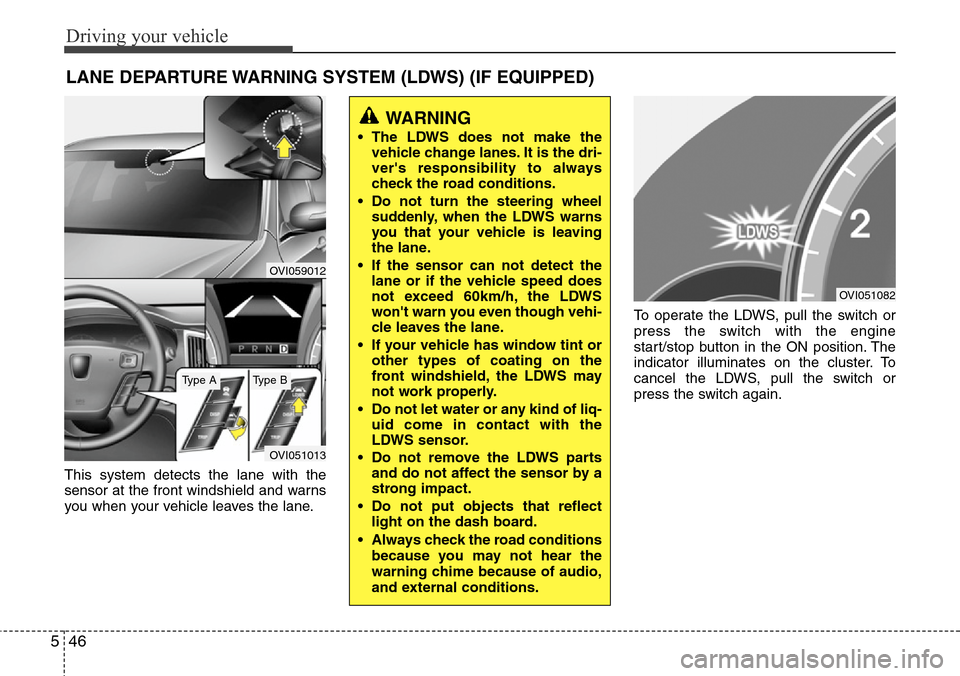
This system detects the lane with the
sensor at the front windshield and warns
you when your vehicle leaves the lane.To operate the LDWS, pull the switch or
press the switch with the engine
start/stop button in the ON position. The
indicator illuminates on the cluster. To
cancel the LDWS, pull the switch or
press the switch again.
LANE DEPARTURE WARNING SYSTEM (LDWS) (IF EQUIPPED)
OVI059012
OVI051013
WARNING
• The LDWS does not make the
vehicle change lanes. It is the dri-
ver's responsibility to always
check the road conditions.
• Do not turn the steering wheel
suddenly, when the LDWS warns
you that your vehicle is leaving
the lane.
• If the sensor can not detect the
lane or if the vehicle speed does
not exceed 60km/h, the LDWS
won't warn you even though vehi-
cle leaves the lane.
• If your vehicle has window tint or
other types of coating on the
front windshield, the LDWS may
not work properly.
• Do not let water or any kind of liq-
uid come in contact with the
LDWS sensor.
• Do not remove the LDWS parts
and do not affect the sensor by a
strong impact.
• Do not put objects that reflect
light on the dash board.
• Always check the road conditions
because you may not hear the
warning chime because of audio,
and external conditions.
OVI051082
Type AType B