parking brake Hyundai Equus 2012 Owner's Manual
[x] Cancel search | Manufacturer: HYUNDAI, Model Year: 2012, Model line: Equus, Model: Hyundai Equus 2012Pages: 385, PDF Size: 10.67 MB
Page 12 of 385
15
Introduction
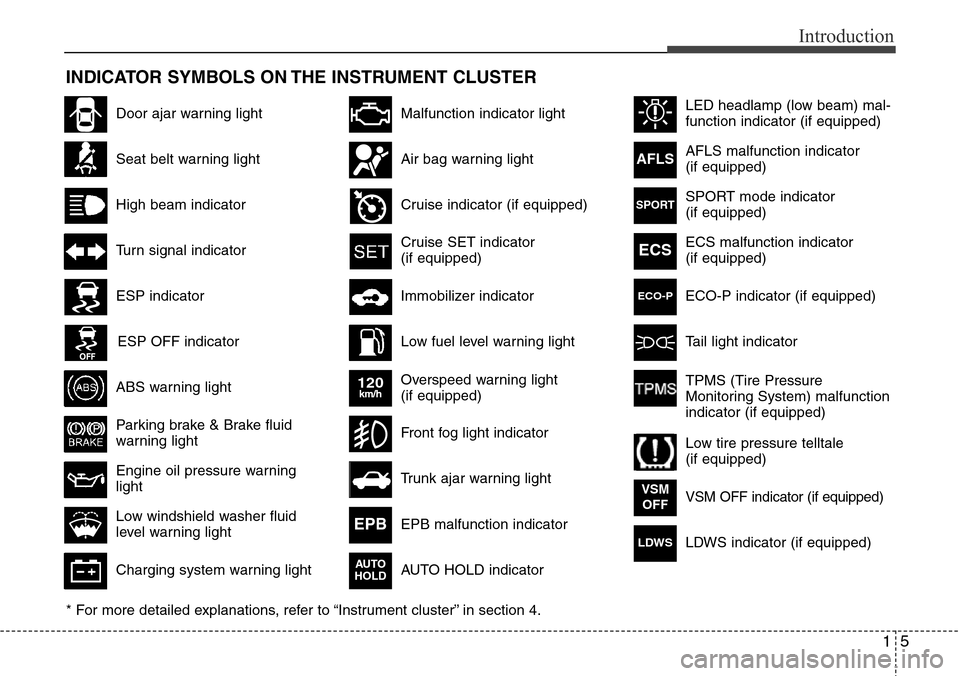
INDICATOR SYMBOLS ON THE INSTRUMENT CLUSTER
Seat belt warning light
High beam indicator
Turn signal indicator
ABS warning light
Parking brake & Brake fluid
warning light
Engine oil pressure warning
light
ESP indicator
ESP OFF indicator
Malfunction indicator light
Air bag warning light
Cruise indicator (if equipped)
Cruise SET indicator
(if equipped)
Immobilizer indicator
Low fuel level warning light
* For more detailed explanations, refer to “Instrument cluster” in section 4.
Charging system warning light
Low windshield washer fluid
level warning light
Door ajar warning light
Overspeed warning light
(if equipped)
120km/h
AFLS malfunction indicator
(if equipped)
ECS malfunction indicator
(if equipped)
Tail light indicator
Trunk ajar warning light
Front fog light indicator
AFLS
ECS
EPB malfunction indicator
AUTO HOLD indicator EPB
VSM OFF indicator (if equipped)VSM
OFF
AUTO
HOLD
TPMS (Tire Pressure
Monitoring System) malfunction
indicator (if equipped)
Low tire pressure telltale
(if equipped) ECO-P indicator (if equipped)
ECO-P
SPORT mode indicator
(if equipped)SPORT
LDWS indicator (if equipped)LDWS
LED headlamp (low beam) mal-
function indicator (if equipped)
Page 15 of 385
Your vehicle at a glance
2 2
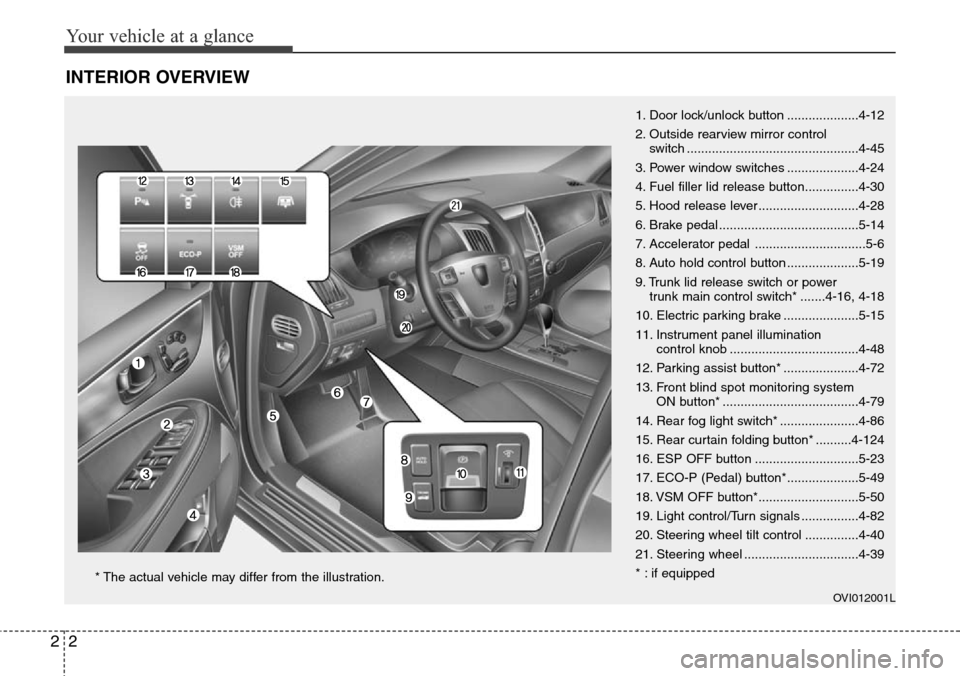
INTERIOR OVERVIEW
1. Door lock/unlock button ....................4-12
2. Outside rearview mirror control
switch ................................................4-45
3. Power window switches ....................4-24
4. Fuel filler lid release button...............4-30
5. Hood release lever ............................4-28
6. Brake pedal .......................................5-14
7. Accelerator pedal ...............................5-6
8. Auto hold control button ....................5-19
9. Trunk lid release switch or power
trunk main control switch* .......4-16, 4-18
10. Electric parking brake .....................5-15
11. Instrument panel illumination
control knob ....................................4-48
12. Parking assist button* .....................4-72
13. Front blind spot monitoring system
ON button* ......................................4-79
14. Rear fog light switch* ......................4-86
15. Rear curtain folding button* ..........4-124
16. ESP OFF button .............................5-23
17. ECO-P (Pedal) button*....................5-49
18. VSM OFF button*............................5-50
19. Light control/Turn signals ................4-82
20. Steering wheel tilt control ...............4-40
21. Steering wheel ................................4-39
* : if equipped
OVI012001L
* The actual vehicle may differ from the illustration.
Page 94 of 385
Features of your vehicle
12 4
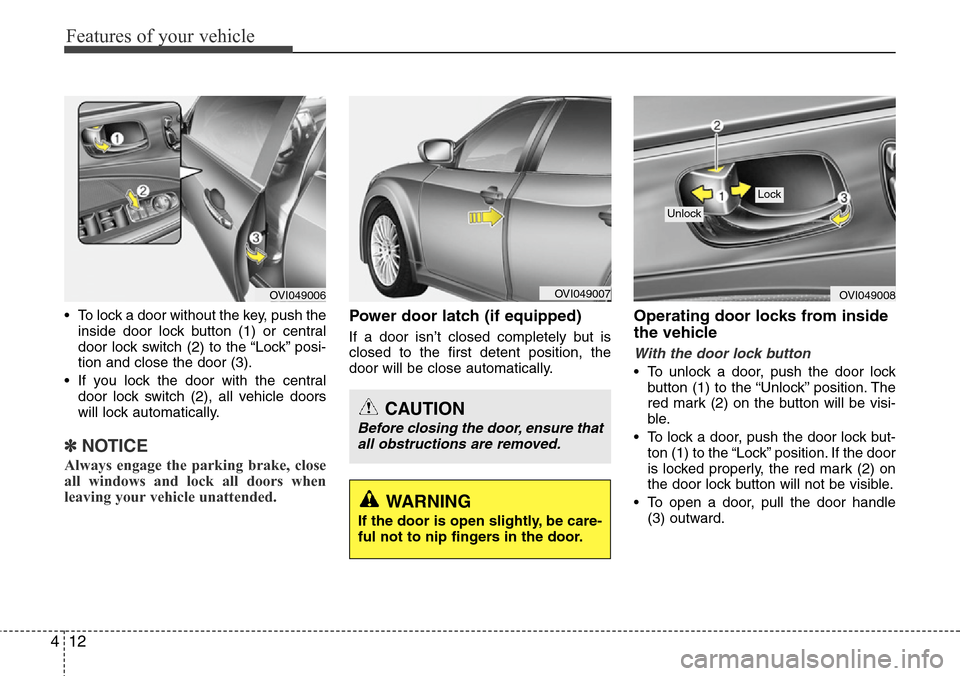
• To lock a door without the key, push the
inside door lock button (1) or central
door lock switch (2
) to the “Lock” posi-
tion and close the door (3).
• If you lock the door with the central
door lock switch (2), all vehicle doors
will lock automatically.
✽NOTICE
Always engage the parking brake, close
all windows and lock all doors when
leaving your vehicle unattended.
Power door latch (if equipped)
If a door isn’t closed completely but is
closed to the first detent position, the
door will be close automatically.
Operating door locks from inside
the vehicle
With the door lock button
• To unlock a door, push the door lock
button (1) to the “Unlock” position. The
red mark (2) on the button will be visi-
ble.
• To lock a door, push the door lock but-
ton (1) to the “Lock” position. If the door
is locked properly, the red mark (2) on
the door lock button will not be visible.
• To open a door, pull the door handle
(3) outward.
OVI049008
Lock
Unlock
OVI049007
WARNING
If the door is open slightly, be care-
ful not to nip fingers in the door.
CAUTION
Before closing the door, ensure that
all obstructions are removed.
OVI049006
Page 96 of 385
Features of your vehicle
14 4
Impact sensing door unlock sys-
tem
All doors will be automatically unlocked
after an impact causes the air bags to
deploy.
Speed sensing door lock system
(if equipped)
All doors will be automatically locked
after the vehicle speed exceeds 15 km/h
(9 mph). And all doors will be automati-
cally unlocked when you turn the engine
off.
✽NOTICE
You can select some auto door lock/
unlock features in the INFO menu of
DIS (Driver Information System, if
equipped) as follows;
• Speed sensing auto door lock
• Auto door unlock by unlocking the
driver's door lock button
• Auto door unlock when the smart key
is removed from the smart key holder.
• Auto door lock/unlock by shifting the
shift lever out of P (Park) or into P
(Park)
If you want this feature, refer to the DIS
manual (if equipped) supplied separate-
ly.WARNING- Unlocked
vehicles
Leaving your vehicle unlocked can
invite theft or possible harm to you
or others from someone hiding in
your vehicle while you are gone.
Always remove the ignition key,
engage the parking brake, close all
windows and lock all doors when
leaving your vehicle unattended.
WARNING- Unattended
children
An enclosed vehicle can become
extremely hot, causing death or
severe injury to unattended chil-
dren or animals who cannot escape
the vehicle. Furthermore, children
might operate features of the vehi-
cle that could injure them, or they
could encounter other harm, possi-
bly from someone gaining entry to
the vehicle. Never leave children or
animals unattended in your vehicle.
Page 110 of 385
Features of your vehicle
28 4
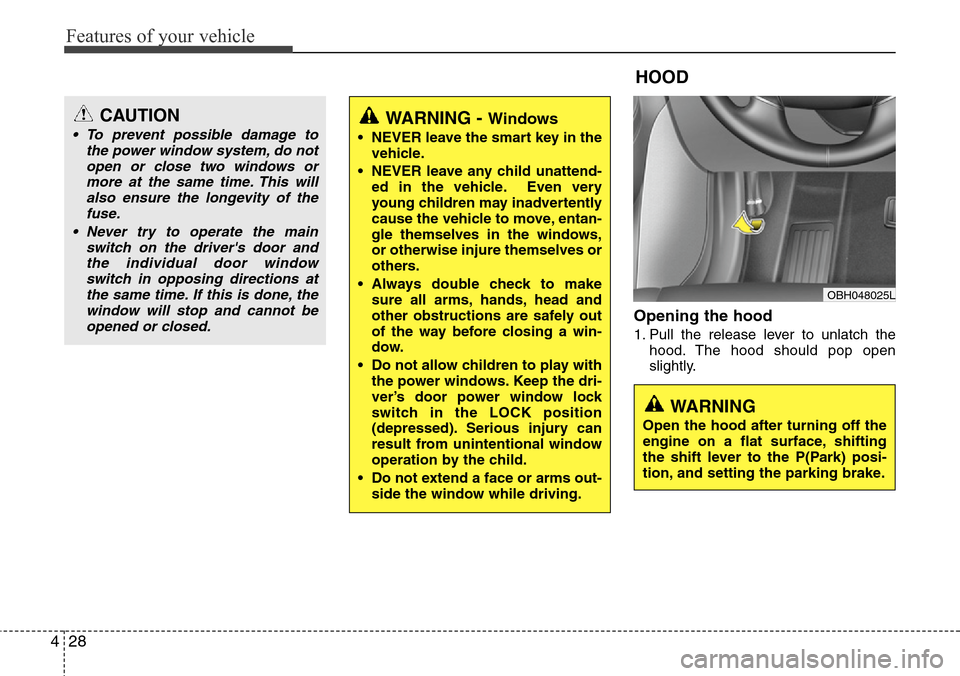
Opening the hood
1. Pull the release lever to unlatch the
hood. The hood should pop open
slightly.
WARNING - Windows
• NEVER leave the smart key in the
vehicle.
• NEVER leave any child unattend-
ed in the vehicle. Even very
young children may inadvertently
cause the vehicle to move, entan-
gle themselves in the windows,
or otherwise injure themselves or
others.
• Always double check to make
sure all arms, hands, head and
other obstructions are safely out
of the way before closing a win-
dow.
• Do not allow children to play with
the power windows. Keep the dri-
ver’s door power window lock
switch in the LOCK position
(depressed). Serious injury can
result from unintentional window
operation by the child.
• Do not extend a face or arms out-
side the window while driving.
HOOD
OBH048025L
CAUTION
• To prevent possible damage to
the power window system, do not
open or close two windows or
more at the same time. This will
also ensure the longevity of the
fuse.
• Never try to operate the main
switch on the driver's door and
the individual door window
switch in opposing directions at
the same time. If this is done, the
window will stop and cannot be
opened or closed.
WARNING
Open the hood after turning off the
engine on a flat surface, shifting
the shift lever to the P(Park) posi-
tion, and setting the parking brake.
Page 138 of 385
Features of your vehicle
56 4
Warnings and indicators
All warning lights are checked by turning
the engine start/stop button ON. Any light
that does not illuminate should be
checked by an authorized HYUNDAI
dealer.
After starting the engine, check to make
sure that all warning lights are off. If any
are still on, this indicates a situation that
needs attention. When releasing the
parking brake, the brake system warning
light should go off. The fuel warning light
will stay on if the fuel level is low.
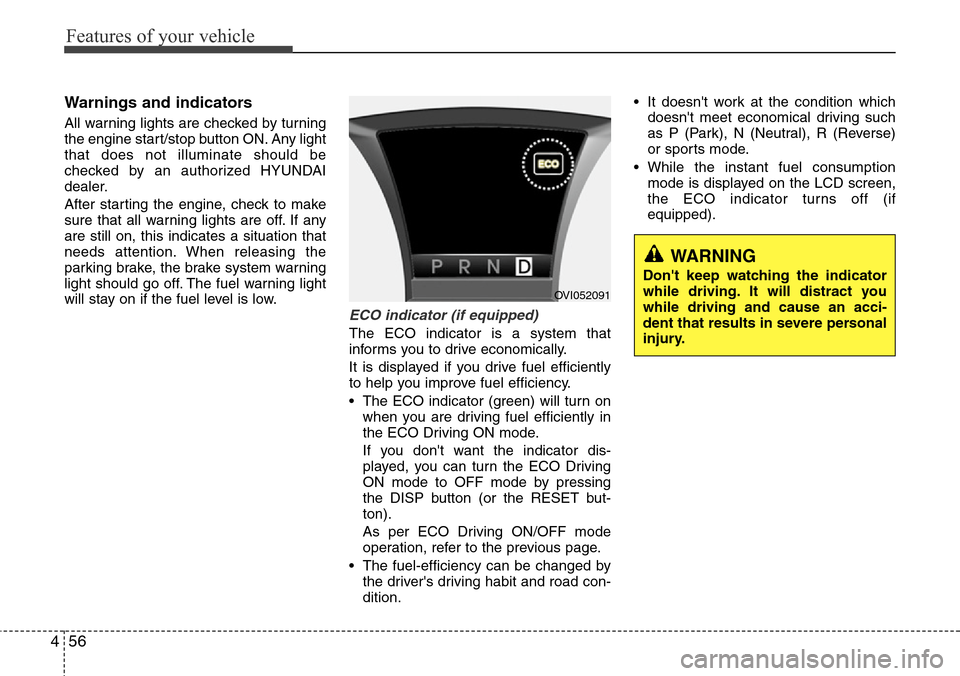
ECO indicator (if equipped)
The ECO indicator is a system that
informs you to drive economically.
It is displayed if you drive fuel efficiently
to help you improve fuel efficiency.
• The ECO indicator (green) will turn on
when you are driving fuel efficiently in
the ECO Driving ON mode.
If you don't want the indicator dis-
played, you can turn the ECO Driving
ON mode to OFF mode by pressing
the DISP button (or the RESET but-
ton).
As per ECO Driving ON/OFF mode
operation, refer to the previous page.
• The fuel-efficiency can be changed by
the driver's driving habit and road con-
dition.• It doesn't work at the condition which
doesn't meet economical driving such
as P (Park), N (Neutral), R (Reverse)
or sports mode.
• While the instant fuel consumption
mode is displayed on the LCD screen,
the ECO indicator turns off (if
equipped).
WARNING
Don't keep watching the indicator
while driving. It will distract you
while driving and cause an acci-
dent that results in severe personal
injury.
OVI052091
Page 142 of 385
Features of your vehicle
60 4
Parking brake & brake fluid
warning light
Parking brake warning
This light is illuminated when the parking
brake is applied with the engine
start/stop button in the ON position. The
warning light should go off when the
parking brake is released while the
engine is running.
The parking brake warning chime will
sound to remind you that the parking
brake is applied when you are driving
above 10 km/h (6 mph). Always release
the parking brake before you drive.
Low brake fluid level warning
If the warning light remains on, it may
indicate that the brake fluid level in the
reservoir is low.
If the warning light remains on:
1. Drive carefully to the nearest safe
location and stop your vehicle.
2. With the engine stopped, check the
brake fluid level immediately and add
fluid as required. Then check all brake
components for fluid leaks.3. Do not drive the vehicle if leaks are
found, the warning light remains on or
the brakes do not operate properly.
Have the vehicle towed to any author-
ized HYUNDAI dealer for a brake sys-
tem inspection and necessary repairs.
Your vehicle is equipped with dual-diago-
nal braking systems. This means you still
have braking on two wheels even if one
of the dual systems should fail. With only
one of the dual systems working, more
than normal pedal travel and greater
pedal pressure are required to stop the
car. Also, the vehicle will not stop in as
short a distance with only a portion of the
brake system working. If the brakes fail
while you are driving, shift to a lower gear
for additional engine braking and stop the
vehicle as soon as it is safe to do so.
To check bulb operation, check whether
the parking brake and brake fluid warning
light illuminates when the engine start/
stop button is in the ON position.
Low tire pressure
telltale (if equipped)
The low tire pressure telltale comes on
for 3 seconds after the engine start/stop
button is turned to the ON position.
If the warning light does not come on, or
continuously remains on after coming on
for about 3 seconds when you turned the
engine start/stop button to the ON posi-
tion, the Tire Pressure Monitoring
System is not working properly. If this
occurs, have your vehicle checked by an
authorized HYUNDAI dealer as soon as
possible.
These warning lights will also illuminate if
one or more of your tires are significantly
under-inflated. You should stop and
check your tires as soon as possible. If
the warning lights illuminate while driv-
ing, reduce vehicle speed immediately
and stop the vehicle. Avoid hard braking
and overcorrecting at the steering wheel.
Inflate the tires to the proper pressure as
indicated on the vehicle’s tire information
placard.
WARNING
Driving the vehicle with a warning
light on is dangerous. If the brake
warning light remains on, have the
brakes checked and repaired imme-
diately by an authorized HYUNDAI
dealer.
Page 150 of 385
Features of your vehicle
68 4
Overspeed warning
(if equipped)
Overspeed warning light
If you drive with the speed of 120 km/h or
more, the overspeed warning light will
blink. This is to prevent you from over-
speeding.
Overspeed warning chime
If you drive with the speed of 120 km/h or
more, the overspeed warning chime will
sound for about 5 seconds. This is to pre-
vent you from overspeeding.
EPB (Electric Parking
Brake) malfunction indica-
tor
The EPB malfunction indicator will illumi-
nate when the engine start/stop button is
turned to ON, but should go off after
approximately 3 seconds. If the warning
light does not come on, or continuously
remains on after coming on for about 3
seconds when you turned the engine
start/stop button to the ON position, the
Electric Parking Brake is not working
properly.
If it comes on while driving, the EPB is
not working properly.
Take your vehicle to an authorized
HYUNDAI dealer and have the system
checked.
The EPB malfunction indicator may illu-
minate when the ESP indicator comes on
to indicate that the ESP is not working
properly, but if this occurs, it does not
indicate malfunction of the EPB.
AUTO HOLD indicator
If you press the AUTO HOLD switch, the
AUTO HOLD indicator on the cluster
comes on white. And when you stop the
vehicle completely by pressing the brake
pedal, the indicator changes from white
to green.
For more information, refer to “AUTO
HOLD” in section 5.
120km/hEPBAUTO
HOLD
Page 155 of 385
473
Features of your vehicle
• If you move the shift lever to the R
position with the engine start/stop but-
ton in the ON position and the parking
assist system in OFF, the parking
assist system will operate automatical-
ly. But it will turn off automatically,
when the vehicle speed exceeds than
20km/h.
✽NOTICE
It may not operate if it’s distance from
the object is already less than approxi-
mately 25 cm when the system is ON.
Types of warning sound
• When an object is 100 cm to 61 cm
from the rear bumper : Buzzer beeps
intermittently
• When an object is 60 cm to 31 cm from
the front or rear bumper : Buzzer
sounds two beeps intermittently
• When an object is within 30 cm of the
front or rear bumper : Buzzer sounds
continuously.
Non-operational conditions of
parking assist system
Parking assist system may not oper-
ate normally when:
1. Moisture is frozen to the sensor. (It will
operate normally when moisture
melts.)
2. Sensor is covered with foreign matter,
such as snow or water, or the sensor
cover is blocked. (It will operate nor-
mally when the material is removed or
the sensor is no longer blocked.)
3. Sensor is stained with foreign matter
such as snow or water. (Sensing range
will return to normal when removed.)
There is a possibility of parking
assist system malfunction when:
1. Driving on uneven road surfaces such
as unpaved roads, gravel, bumps, or
gradient.
2. Objects generating excessive noise
such as vehicle horns, loud motorcycle
engines, or truck air brakes can inter-
fere with the sensor.
3. Heavy rain or water spray.
4. Wireless transmitters or mobile
phones present near the sensor.
5. Sensor is covered with snow.
Detecting range may decrease when:
1. Outside air temperature is extremely
hot or cold.
2. Undetectable objects smaller than 1 m
and narrower than 14 cm in diameter.
The following objects may not be rec-
ognized by the sensor:
1. Sharp or slim objects such as ropes,
chains or small poles.
2. Objects, which tend to absorb sensor
frequency such as clothes, spongy
material or snow.
Page 216 of 385
53
Driving your vehicle
Before entering vehicle
• Be sure that all windows, outside mir-
ror(s), and outside lights are clean.
• Check the condition of the tires.
• Check under the vehicle for any sign of
leaks.
• Be sure there are no obstacles behind
you if you intend to back up.
Necessary inspections
Fluid levels, such as engine oil, engine
coolant, brake fluid, and washer fluid
should be checked on a regular basis,
with the exact interval depending on the
fluid. Further details are provided in sec-
tion 7, “Maintenance”.
Before starting
• Close and lock all doors.
• Position the seat so that all controls are
easily reached.
• Adjust the inside and outside rearview
mirrors.
• Be sure that all lights work.
• Check all gauges.
• Check the operation of warning lights
when the engine start/stop button is
turned to the ON position.
• Release the parking brake and make
sure the brake warning light goes out.
For safe operation, be sure you are famil-
iar with your vehicle and its equipment.
BEFORE DRIVING
WARNING
All passengers must be properly
belted whenever the vehicle is mov-
ing. Refer to “Seat belts” in section
3 for more information on their
proper use.
WARNING
Always check the surrounding
areas near your vehicle for people,
especially children, before putting a
vehicle into D (Drive) or R
(Reverse).
WARNING- Driving under
the influence of alcohol or
drugs
Drinking and driving is dangerous.
Drunk driving is the number one
contributor to the highway death
toll each year. Even a small amount
of alcohol will affect your reflexes,
perceptions and judgment. Driving
while under the influence of drugs
is as dangerous or more dangerous
than driving drunk.
You are much more likely to have a
serious accident if you drink or
take drugs and drive.
If you are drinking or taking drugs,
don’t drive. Do not ride with a driv-
er who has been drinking or taking
drugs. Choose a designated driver
or call a cab.
WARNING
Driving while distracted can result in
a loss of vehicle control, that may
lead to an accident, severe personal
injury, and death. The driver’s primary
responsibility is in the safe and legal
operation of a vehicle, and use of any
handheld devices, other equipment,
or vehicle systems which take the
driver’s eyes, attention and focus
away from the safe operation of a
vehicle or which are not permissible
by law should never be used during
operation of the vehicle.