key Hyundai Equus 2013 User Guide
[x] Cancel search | Manufacturer: HYUNDAI, Model Year: 2013, Model line: Equus, Model: Hyundai Equus 2013Pages: 479, PDF Size: 10.15 MB
Page 102 of 479
413
Features of your vehicle
THEFT-ALARM SYSTEM (IF EQUIPPED)
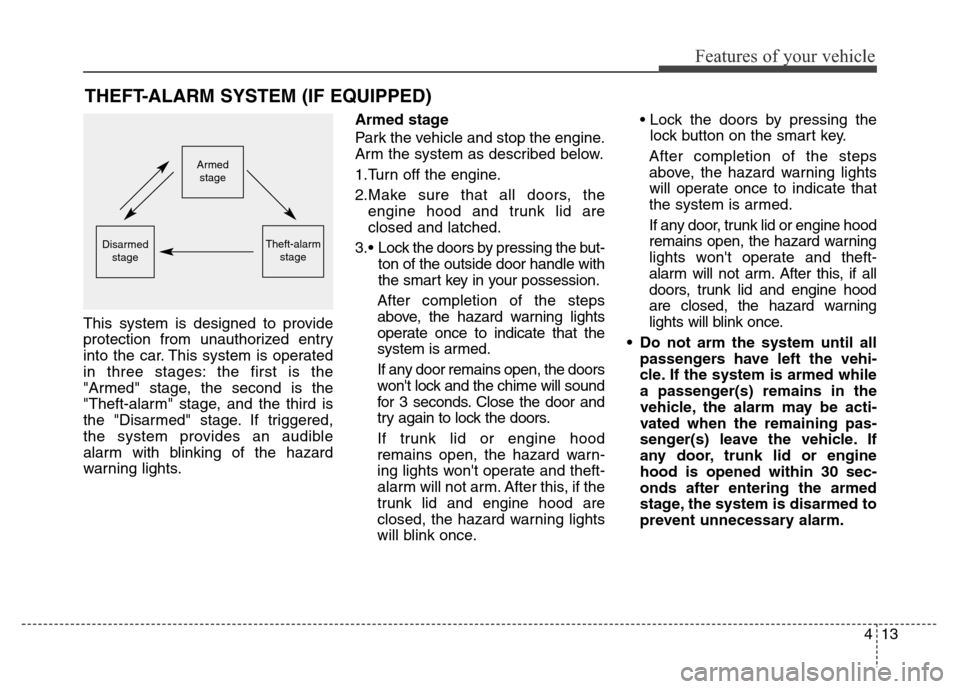
This system is designed to provide
protection from unauthorized entry
into the car. This system is operated
in three stages: the first is the
"Armed" stage, the second is the
"Theft-alarm" stage, and the third is
the "Disarmed" stage. If triggered,
the system provides an audible
alarm with blinking of the hazard
warning lights.Armed stage
Park the vehicle and stop the engine.
Arm the system as described below.
1.Turn off the engine.
2.Make sure that all doors, the
engine hood and trunk lid are
closed and latched.
3.• Lock the doors by pressing the but-
ton of the outside door handle with
the smart key in your possession.
After completion of the steps
above, the hazard warning lights
operate once to indicate that the
system is armed.
If any door remains open, the doors
won't lock and the chime will sound
for 3 seconds. Close the door and
try again to lock the doors.
If trunk lid or engine hood
remains open, the hazard warn-
ing lights won't operate and theft-
alarm will not arm. After this, if the
trunk lid and engine hood are
closed, the hazard warning lights
will blink once.• Lock the doors by pressing the
lock button on the smart key.
After completion of the steps
above, the hazard warning lights
will operate once to indicate that
the system is armed.
If any door, trunk lid or engine hood
remains open, the hazard warning
lights won't operate and theft-
alarm will not arm. After this, if all
doors, trunk lid and engine hood
are closed, the hazard warning
lights will blink once.
• Do not arm the system until all
passengers have left the vehi-
cle. If the system is armed while
a passenger(s) remains in the
vehicle, the alarm may be acti-
vated when the remaining pas-
senger(s) leave the vehicle. If
any door, trunk lid or engine
hood is opened within 30 sec-
onds after entering the armed
stage, the system is disarmed to
prevent unnecessary alarm.
Armed
stage
Theft-alarm
stageDisarmed
stage
Page 103 of 479
Features of your vehicle
14 4
Theft-alarm stage
The alarm will be activated if any of
the following occurs while the system
is armed.
• A door is opened without using the
smart key.
• The trunk is opened without using
the smart key.
• The engine hood is opened.
The horn will sound and the hazard
warning lights will blink continuously
for approximately 27 seconds. To turn
off the system, unlock the doors with
the smart key.
Opening the trunk with the
alarm armed (if equipped)
When the alarm is armed, the alarm
will not sound if the trunk lid is
opened with the smart key.
Once the trunk is opened and then
closed, the trunk will lock automatical-
ly and the system will be armed again.
Also, if any of the doors or hood is
opened while the trunk lid is opened
and the alarm armed, the alarm will
sound.
Disarmed stage
The system will be disarmed when
the doors are unlocked with the
smart key. The hazard warning lights
will blink twice to indicate that the
system is disarmed.
After unlocking the doors, if any door
(or trunk) is not opened within 30
seconds, the system will be rearmed.
✽NOTICE
• Avoid trying to start the engine
while the alarm is activated. The
vehicle starter motor is disabled
during the theft-alarm stage.
If the system is not disarmed with
the smart key, open the doors by
using the mechanical key and turn
the engine start/stop button to the
ON position. (except China)
• If you lose your keys, we recom-
mend that you consult an author-
ized HYUNDAI dealer.
Page 105 of 479
Features of your vehicle
16 4
Operating door locks from
outside the vehicle
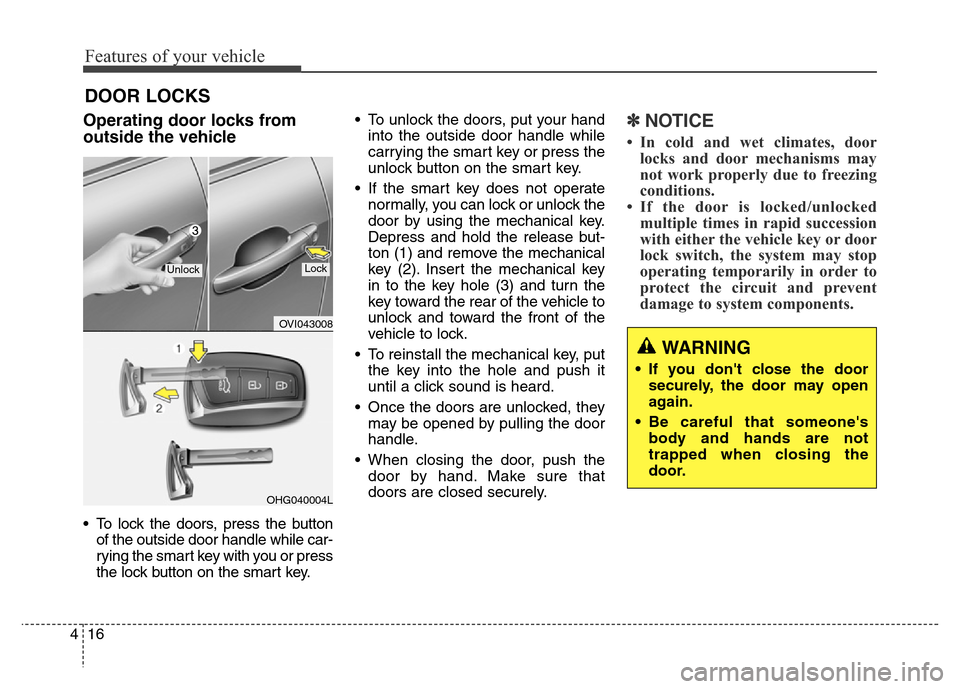
• To lock the doors, press the button
of the outside door handle while car-
rying the smart key with you or press
the lock button on the smart key.• To unlock the doors, put your hand
into the outside door handle while
carrying the smart key or press the
unlock button on the smart key.
• If the smart key does not operate
normally, you can lock or unlock the
door by using the mechanical key.
Depress and hold the release but-
ton (1) and remove the mechanical
key (2). Insert the mechanical key
in to the key hole (3) and turn the
key toward the rear of the vehicle to
unlock and toward the front of the
vehicle to lock.
• To reinstall the mechanical key, put
the key into the hole and push it
until a click sound is heard.
• Once the doors are unlocked, they
may be opened by pulling the door
handle.
• When closing the door, push the
door by hand. Make sure that
doors are closed securely.
✽NOTICE
• In cold and wet climates, door
locks and door mechanisms may
not work properly due to freezing
conditions.
• If the door is locked/unlocked
multiple times in rapid succession
with either the vehicle key or door
lock switch, the system may stop
operating temporarily in order to
protect the circuit and prevent
damage to system components.
DOOR LOCKS
OVI043008
OHG040004L
UnlockLock
WARNING
• If you don't close the door
securely, the door may open
again.
• Be careful that someone's
body and hands are not
trapped when closing the
door.
Page 106 of 479
417
Features of your vehicle
Power door latch (if equipped)
If a door isn’t closed completely but
is closed to the first detent position,
the door will be close automatically.
Operating door locks from
inside the vehicle
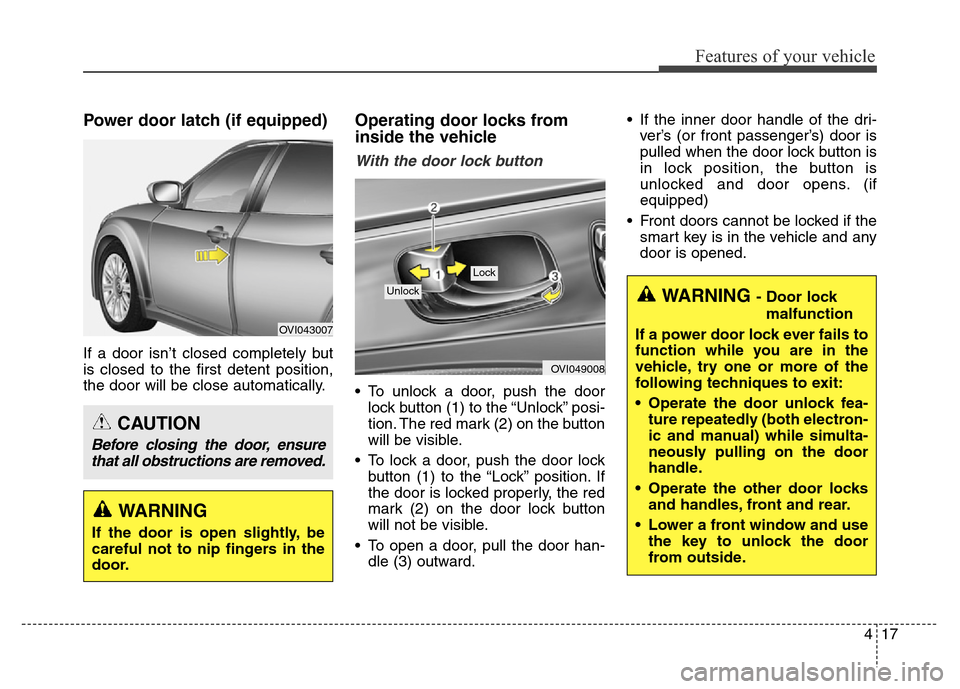
With the door lock button
• To unlock a door, push the door
lock button (1) to the “Unlock” posi-
tion. The red mark (2) on the button
will be visible.
• To lock a door, push the door lock
button (1) to the “Lock” position. If
the door is locked properly, the red
mark (2) on the door lock button
will not be visible.
• To open a door, pull the door han-
dle (3) outward.• If the inner door handle of the dri-
ver’s (or front passenger’s) door is
pulled when the door lock button is
in lock position, the button is
unlocked and door opens. (if
equipped)
• Front doors cannot be locked if the
smart key is in the vehicle and any
door is opened.
OVI049008
Lock
Unlock
OVI043007
WARNING
If the door is open slightly, be
careful not to nip fingers in the
door.
CAUTION
Before closing the door, ensure
that all obstructions are removed.
WARNING - Door lock
malfunction
If a power door lock ever fails to
function while you are in the
vehicle, try one or more of the
following techniques to exit:
• Operate the door unlock fea-
ture repeatedly (both electron-
ic and manual) while simulta-
neously pulling on the door
handle.
• Operate the other door locks
and handles, front and rear.
• Lower a front window and use
the key to unlock the door
from outside.
Page 107 of 479
Features of your vehicle
18 4
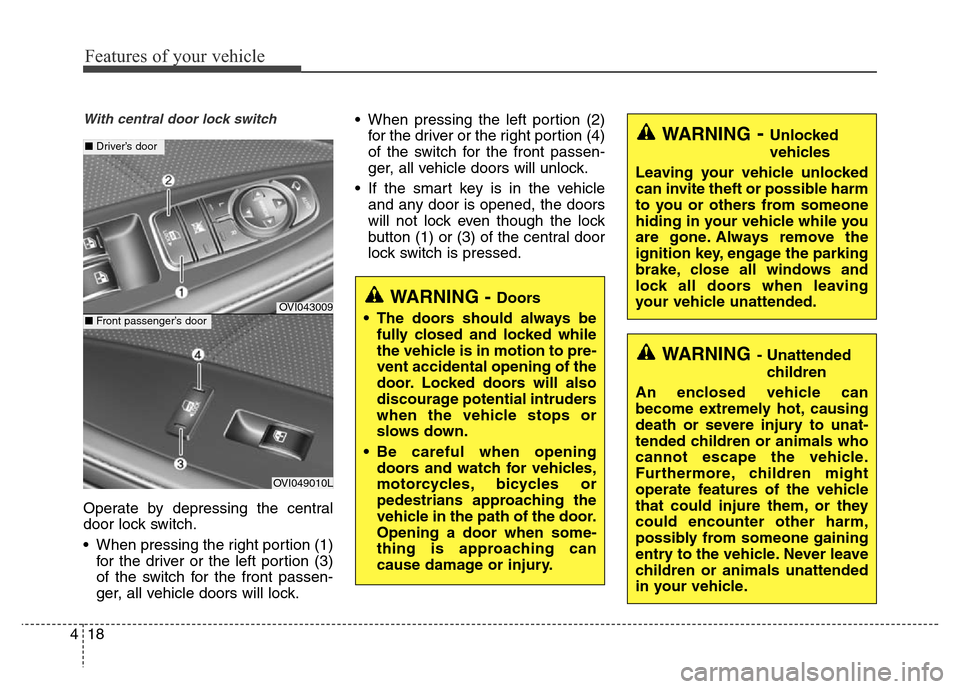
With central door lock switch
Operate by depressing the central
door lock switch.
• When pressing the right portion (1)
for the driver or the left portion (3)
of the switch for the front passen-
ger, all vehicle doors will lock.• When pressing the left portion (2)
for the driver or the right portion (4)
of the switch for the front passen-
ger, all vehicle doors will unlock.
• If the smart key is in the vehicle
and any door is opened, the doors
will not lock even though the lock
button (1) or (3) of the central door
lock switch is pressed.
OVI043009
■ Driver’s door
OVI049010L
■ Front passenger’s door
WARNING - Doors
• The doors should always be
fully closed and locked while
the vehicle is in motion to pre-
vent accidental opening of the
door. Locked doors will also
discourage potential intruders
when the vehicle stops or
slows down.
• Be careful when opening
doors and watch for vehicles,
motorcycles, bicycles or
pedestrians approaching the
vehicle in the path of the door.
Opening a door when some-
thing is approaching can
cause damage or injury.
WARNING- Unlocked
vehicles
Leaving your vehicle unlocked
can invite theft or possible harm
to you or others from someone
hiding in your vehicle while you
are gone. Always remove the
ignition key, engage the parking
brake, close all windows and
lock all doors when leaving
your vehicle unattended.
WARNING- Unattended
children
An enclosed vehicle can
become extremely hot, causing
death or severe injury to unat-
tended children or animals who
cannot escape the vehicle.
Furthermore, children might
operate features of the vehicle
that could injure them, or they
could encounter other harm,
possibly from someone gaining
entry to the vehicle. Never leave
children or animals unattended
in your vehicle.
Page 109 of 479
Features of your vehicle
20 4
Non-powered trunk
Opening the trunk
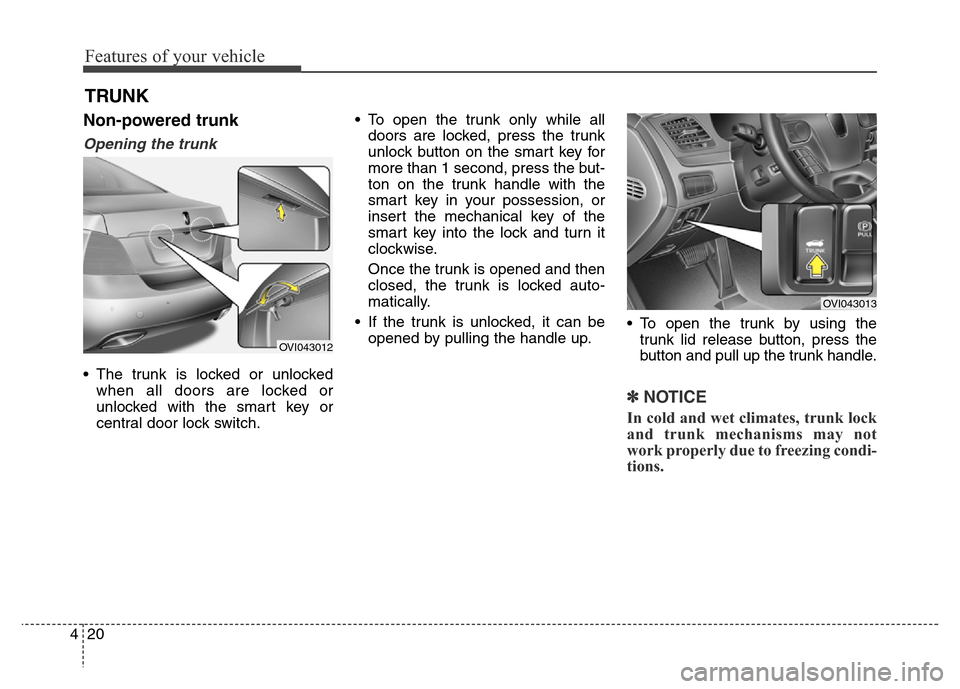
• The trunk is locked or unlocked
when all doors are locked or
unlocked with the smart key or
central door lock switch.• To open the trunk only while all
doors are locked, press the trunk
unlock button on the smart key for
more than 1 second, press the but-
ton on the trunk handle with the
smart key in your possession, or
insert the mechanical key of the
smart key into the lock and turn it
clockwise.
Once the trunk is opened and then
closed, the trunk is locked auto-
matically.
• If the trunk is unlocked, it can be
opened by pulling the handle up.• To open the trunk by using the
trunk lid release button, press the
button and pull up the trunk handle.
✽NOTICE
In cold and wet climates, trunk lock
and trunk mechanisms may not
work properly due to freezing condi-
tions.
TRUNK
OVI043013
OVI043012
Page 110 of 479
421
Features of your vehicle
Closing the trunk
To close the trunk, lower the trunk lid,
then press down it until it locks. To be
sure the trunk lid is securely fas-
tened, always check by trying to pull
it up again.
Power trunk (if equipped)
The power trunk can be opened or
closed automatically with the smart
key, the power trunk main control
button, the open button, or the close
button on the trunk lid.
If you depress the power trunk main
control button, open button, or close
button while operating the power
trunk, you could stop operating the
power trunk.
If that happens, to operate the power
trunk again, push any button.
CAUTION
Make certain that you close the
trunk before driving your vehi-
cle. Possible damage may occur
to the trunk lift cylinders and
attached hardware if the trunk is
not closed prior to driving.
WARNING
The trunk swings upward. Make
sure no objects or people are
near the rear of the vehicle
when opening the trunk.
WARNING
The trunk lid should be always
kept completely closed while
the vehicle is in motion. If it is
left open or ajar, poisonous
exhaust gases may enter the
vehicle and serious illness or
death may result.
CAUTION
For your safety, do not leave the
power trunk open for a long
time, it could also to prevent
unnecessary charging system
drain.
Page 112 of 479
423
Features of your vehicle
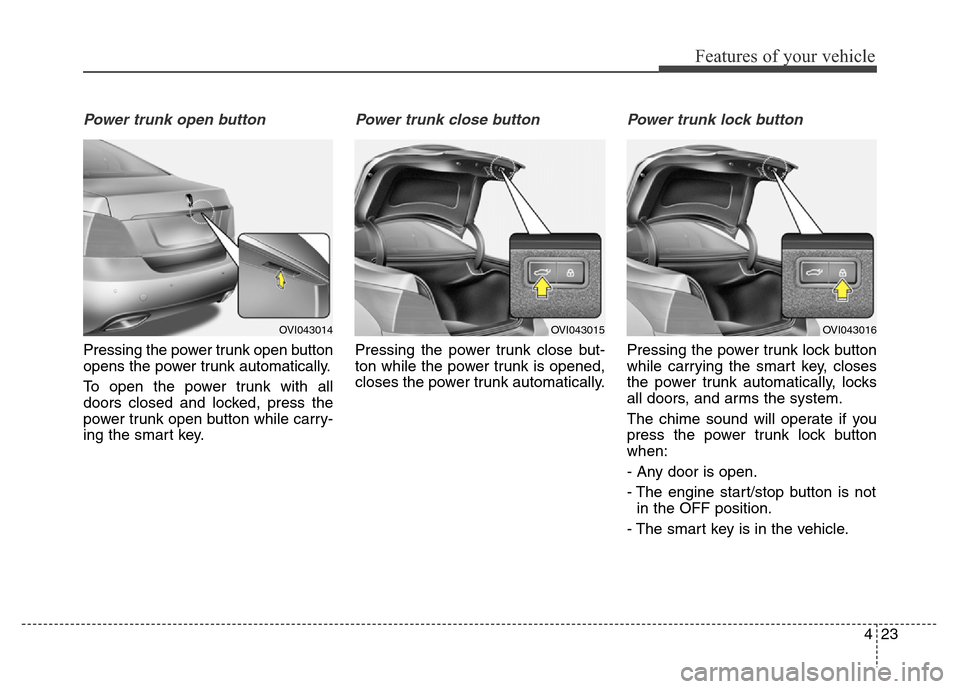
Power trunk open button
Pressing the power trunk open button
opens the power trunk automatically.
To open the power trunk with all
doors closed and locked, press the
power trunk open button while carry-
ing the smart key.
Power trunk close button
Pressing the power trunk close but-
ton while the power trunk is opened,
closes the power trunk automatically.
Power trunk lock button
Pressing the power trunk lock button
while carrying the smart key, closes
the power trunk automatically, locks
all doors, and arms the system.
The chime sound will operate if you
press the power trunk lock button
when:
- Any door is open.
- The engine start/stop button is not
in the OFF position.
- The smart key is in the vehicle.
OVI043014OVI043015OVI043016
Page 114 of 479
425
Features of your vehicle
If the automatic stop and reversal
feature operates continuously more
than twice during one opening or
closing operation, the power trunk
may stop at that position. At this time,
close the trunk manually and operate
the trunk automatically again.How to reset the power trunk
If the battery has been discharged or
disconnected, or if the related fuse
has been replaced or disconnected,
for the power trunk to operate nor-
mally, reset the power trunk as fol-
low:
1. Put the shift lever in P (Park).
2. Close the trunk manually.
If the power trunk doesn't work prop-
erly after above procedure, we rec-
ommend that the system be checked
by an authorized HYUNDAI dealer.
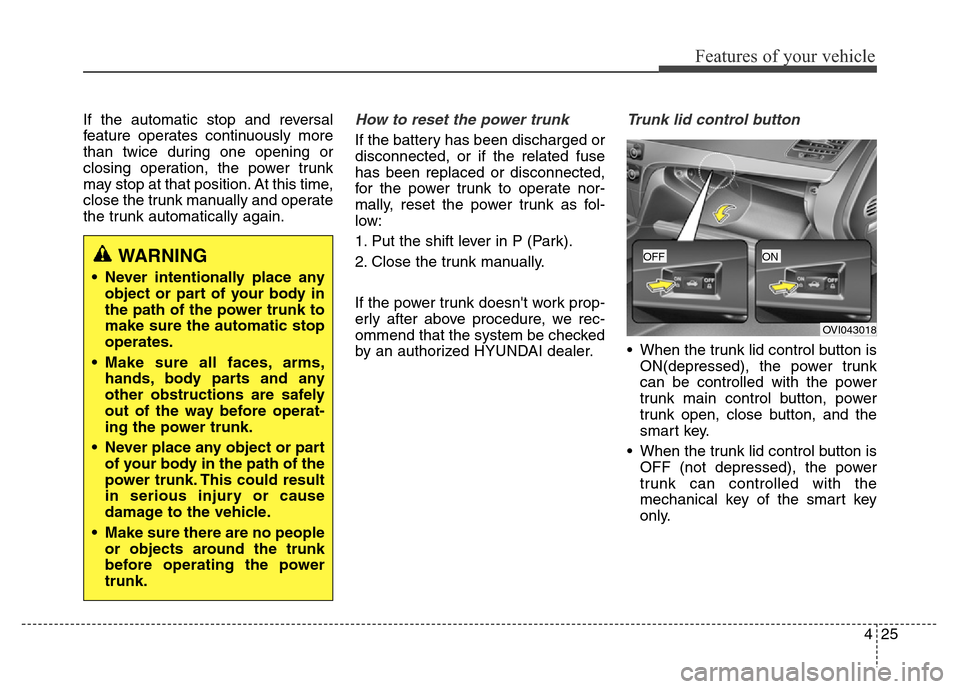
Trunk lid control button
• When the trunk lid control button is
ON(depressed), the power trunk
can be controlled with the power
trunk main control button, power
trunk open, close button, and the
smart key.
• When the trunk lid control button is
OFF (not depressed), the power
trunk can controlled with the
mechanical key of the smart key
only.
WARNING
• Never intentionally place any
object or part of your body in
the path of the power trunk to
make sure the automatic stop
operates.
• Make sure all faces, arms,
hands, body parts and any
other obstructions are safely
out of the way before operat-
ing the power trunk.
• Never place any object or part
of your body in the path of the
power trunk. This could result
in serious injury or cause
damage to the vehicle.
• Make sure there are no people
or objects around the trunk
before operating the power
trunk.
OVI043018
OFFON
Page 121 of 479
Features of your vehicle
32 4
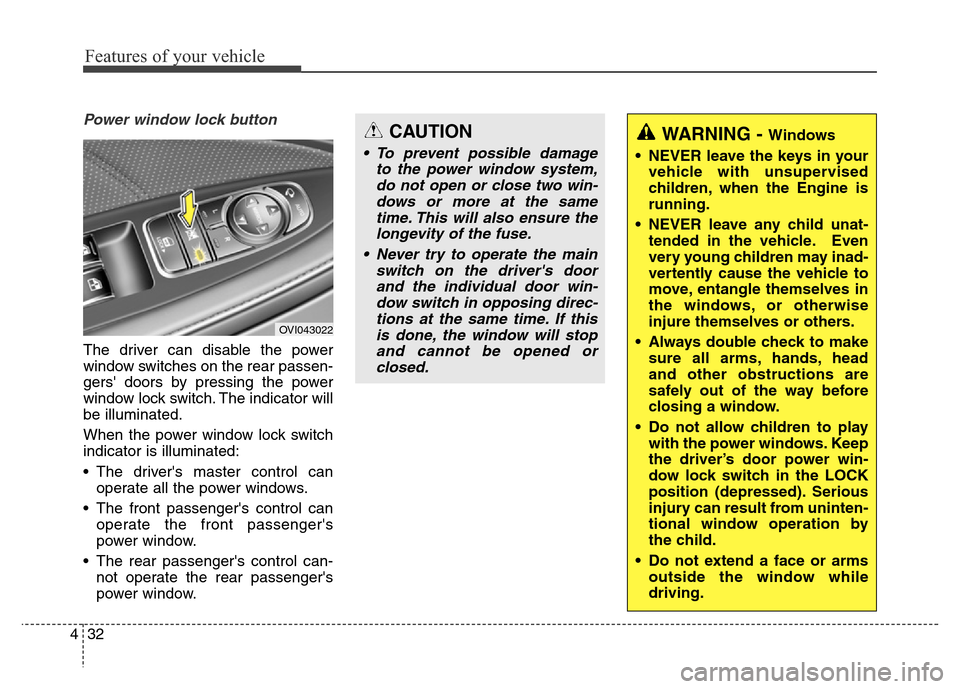
Power window lock button
The driver can disable the power
window switches on the rear passen-
gers' doors by pressing the power
window lock switch. The indicator will
be illuminated.
When the power window lock switch
indicator is illuminated:
• The driver's master control can
operate all the power windows.
• The front passenger's control can
operate the front passenger's
power window.
• The rear passenger's control can-
not operate the rear passenger's
power window.
OVI043022
WARNING - Windows
• NEVER leave the keys in your
vehicle with unsupervised
children, when the Engine is
running.
• NEVER leave any child unat-
tended in the vehicle. Even
very young children may inad-
vertently cause the vehicle to
move, entangle themselves in
the windows, or otherwise
injure themselves or others.
• Always double check to make
sure all arms, hands, head
and other obstructions are
safely out of the way before
closing a window.
• Do not allow children to play
with the power windows. Keep
the driver’s door power win-
dow lock switch in the LOCK
position (depressed). Serious
injury can result from uninten-
tional window operation by
the child.
• Do not extend a face or arms
outside the window while
driving.CAUTION
• To prevent possible damage
to the power window system,
do not open or close two win-
dows or more at the same
time. This will also ensure the
longevity of the fuse.
• Never try to operate the main
switch on the driver's door
and the individual door win-
dow switch in opposing direc-
tions at the same time. If this
is done, the window will stop
and cannot be opened or
closed.