auto start Hyundai Equus 2013 Owner's Guide
[x] Cancel search | Manufacturer: HYUNDAI, Model Year: 2013, Model line: Equus, Model: Hyundai Equus 2013Pages: 479, PDF Size: 10.15 MB
Page 206 of 479
4117
Features of your vehicle
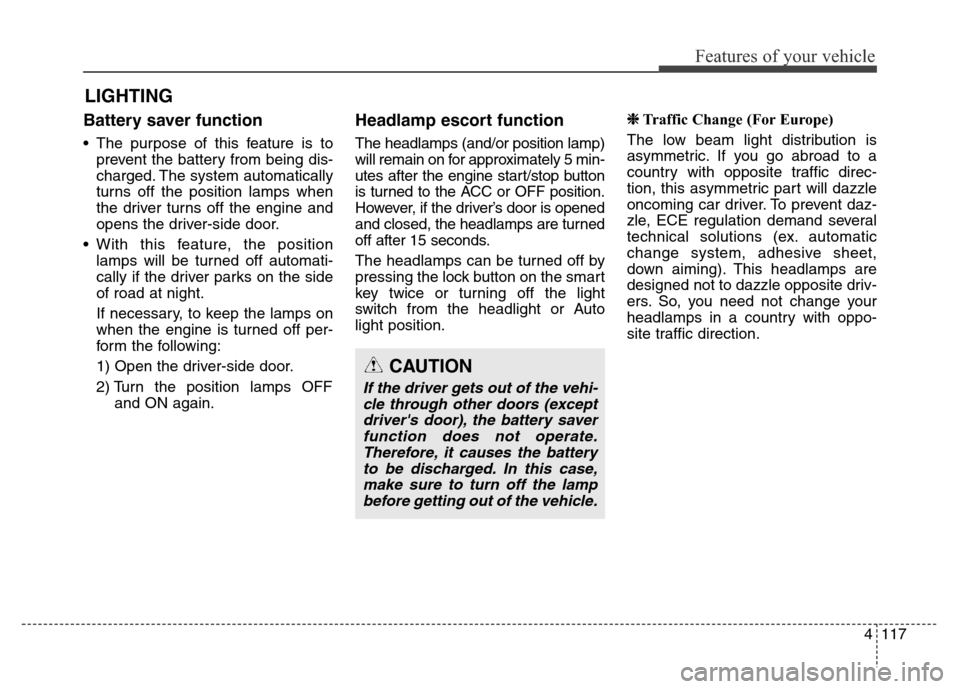
Battery saver function
• The purpose of this feature is to
prevent the battery from being dis-
charged. The system automatically
turns off the position lamps when
the driver turns off the engine and
opens the driver-side door.
• With this feature, the position
lamps will be turned off automati-
cally if the driver parks on the side
of road at night.
If necessary, to keep the lamps on
when the engine is turned off per-
form the following:
1) Open the driver-side door.
2) Turn the position lamps OFF
and ON again.
Headlamp escort function
The headlamps (and/or position lamp)
will remain on for approximately 5 min-
utes after the engine start/stop button
is turned to the ACC or OFF position.
However, if the driver’s door is opened
and closed, the headlamps are turned
off after 15 seconds.
The headlamps can be turned off by
pressing the lock button on the smart
key twice or turning off the light
switch from the headlight or Auto
light position.
❈Traffic Change (For Europe)
The low beam light distribution is
asymmetric. If you go abroad to a
country with opposite traffic direc-
tion, this asymmetric part will dazzle
oncoming car driver. To prevent daz-
zle, ECE regulation demand several
technical solutions (ex. automatic
change system, adhesive sheet,
down aiming). This headlamps are
designed not to dazzle opposite driv-
ers. So, you need not change your
headlamps in a country with oppo-
site traffic direction.
LIGHTING
CAUTION
If the driver gets out of the vehi-
cle through other doors (except
driver's door), the battery saver
function does not operate.
Therefore, it causes the battery
to be discharged. In this case,
make sure to turn off the lamp
before getting out of the vehicle.
Page 208 of 479
4119
Features of your vehicle
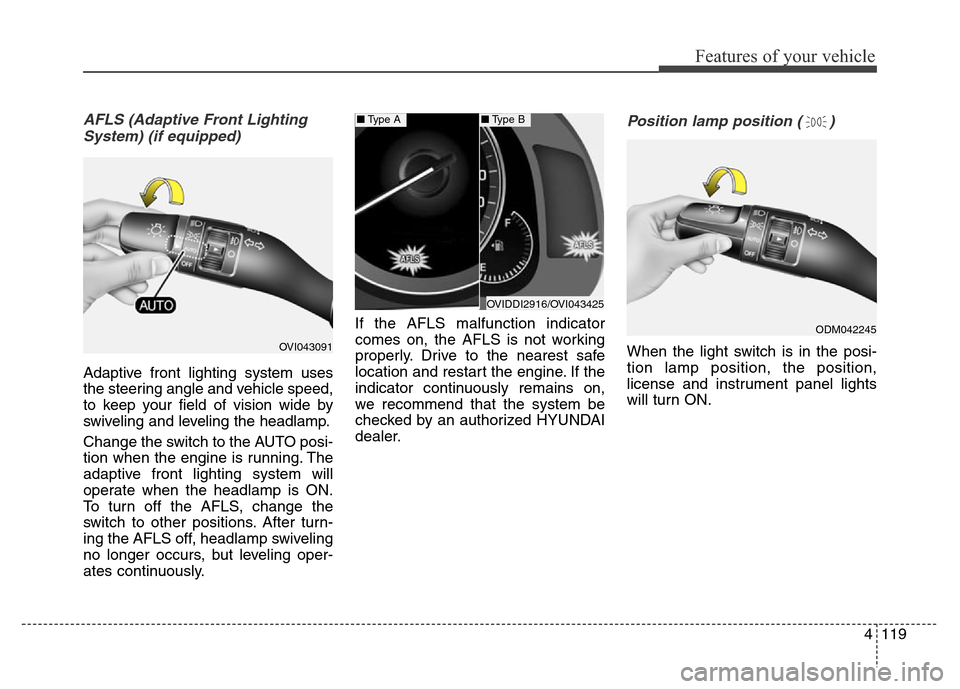
AFLS (Adaptive Front Lighting
System) (if equipped)
Adaptive front lighting system uses
the steering angle and vehicle speed,
to keep your field of vision wide by
swiveling and leveling the headlamp.
Change the switch to the AUTO posi-
tion when the engine is running. The
adaptive front lighting system will
operate when the headlamp is ON.
To turn off the AFLS, change the
switch to other positions. After turn-
ing the AFLS off, headlamp swiveling
no longer occurs, but leveling oper-
ates continuously.If the AFLS malfunction indicator
comes on, the AFLS is not working
properly. Drive to the nearest safe
location and restart the engine. If the
indicator continuously remains on,
we recommend that the system be
checked by an authorized HYUNDAI
dealer.
Position lamp position ( )
When the light switch is in the posi-
tion lamp position, the position,
license and instrument panel lights
will turn ON.OVI043091
OVIDDI2916/OVI043425
■Type A■Type B
ODM042245
Page 212 of 479
4123
Features of your vehicle
Daytime running light
(if equipped)
Daytime Running Lights (DRL) can
make it easier for others to see the
front of your vehicle during the day.
DRL can be helpful in many different
driving conditions, and it is especially
helpful after dawn and before sunset.
The DRL system will turn OFF when:
1. The parking light switch is ON.
2. Engine stops.
Headlamp leveling device
It is automatically adjusted the head-
lamp beam level according to the
number of the passengers and the
loading weight in the luggage area.
And it offers the proper headlamp
beam under the various conditions.
Headlamp washer
If your vehicle is equipped with the
headlamp washer it will be operating
at the same time when you operate
the windshield washer. It will operate
when the headlamp switch is in the
first or second position and the
engine start/stop button is in the ON
position.
The washer fluid will be sprayed on
to the headlamps.
✽NOTICE
• Check the headlamp washers peri-
odically to confirm that the wash-
er fluid is being sprayed properly
onto the headlamp lenses.
• The headlamp washer can be
operated 15 minutes after being
operated last time.
WARNING
If it does not work properly even
though your car is inclined
backward according to passen-
ger's posture, or the headlamp
beam is irradiated to the high or
low position, we recommend
that the system be inspected by
an authorized HYUNDAI dealer.
Do not attempt to inspect or
replace the wiring yourself.
Page 213 of 479
Features of your vehicle
124 4
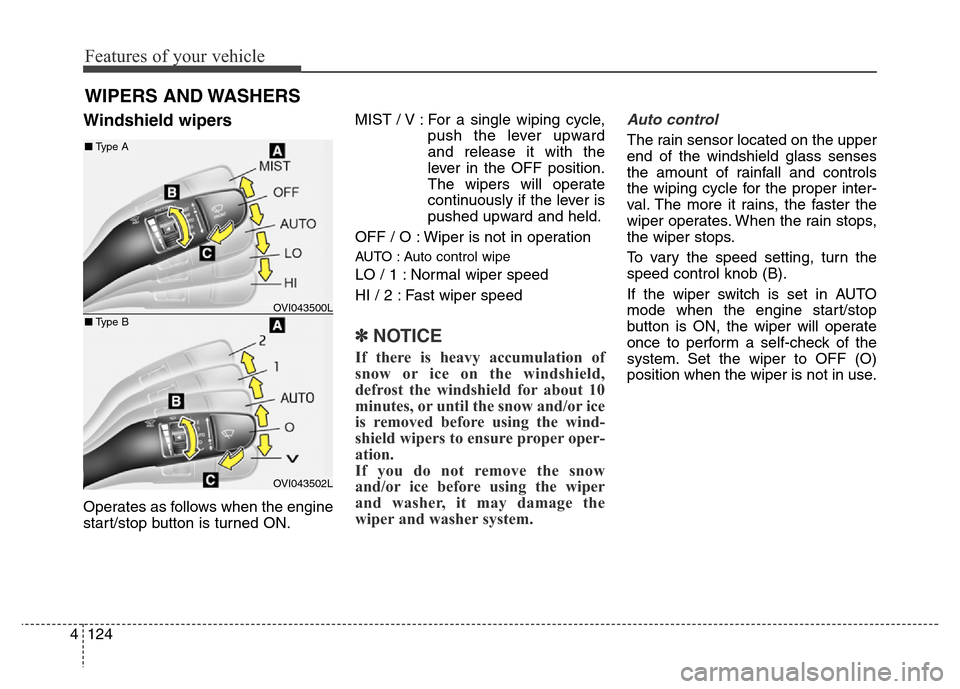
Windshield wipers
Operates as follows when the engine
start/stop button is turned ON.MIST / V : For a single wiping cycle,
push the lever upward
and release it with the
lever in the OFF position.
The wipers will operate
continuously if the lever is
pushed upward and held.
OFF / O : Wiper is not in operation
AUTO : Auto control wipe
LO / 1 : Normal wiper speed
HI / 2 : Fast wiper speed
✽NOTICE
If there is heavy accumulation of
snow or ice on the windshield,
defrost the windshield for about 10
minutes, or until the snow and/or ice
is removed before using the wind-
shield wipers to ensure proper oper-
ation.
If you do not remove the snow
and/or ice before using the wiper
and washer, it may damage the
wiper and washer system.
Auto control
The rain sensor located on the upper
end of the windshield glass senses
the amount of rainfall and controls
the wiping cycle for the proper inter-
val. The more it rains, the faster the
wiper operates. When the rain stops,
the wiper stops.
To vary the speed setting, turn the
speed control knob (B).
If the wiper switch is set in AUTO
mode when the engine start/stop
button is ON, the wiper will operate
once to perform a self-check of the
system. Set the wiper to OFF (O)
position when the wiper is not in use.
WIPERS AND WASHERS
OVI043500L
OVI043502L
■Type A
■Type B
Page 214 of 479
4125
Features of your vehicle
Windshield washers
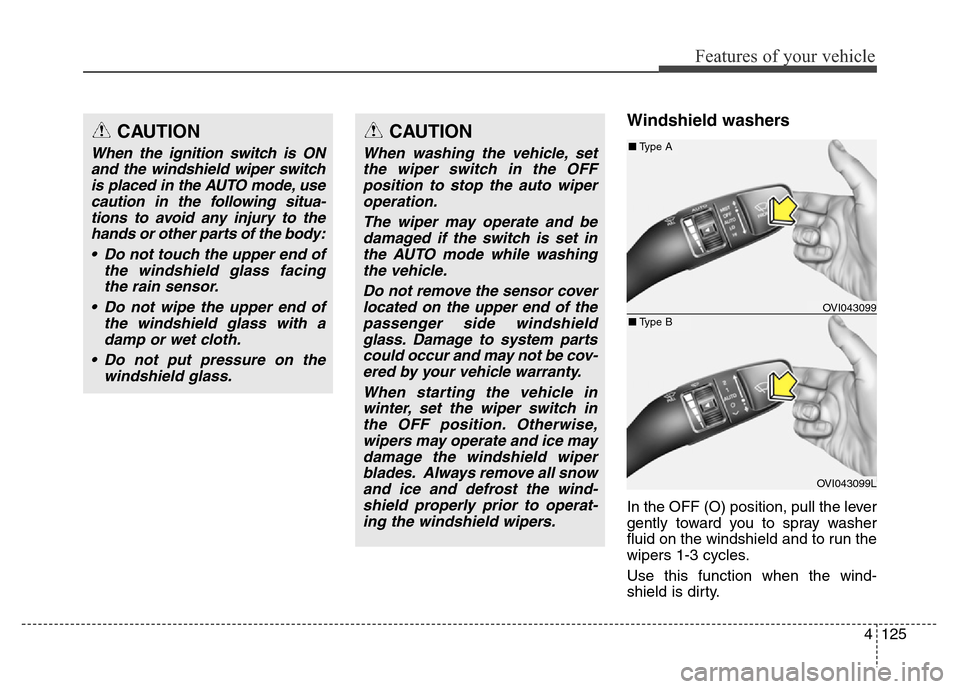
In the OFF (O) position, pull the lever
gently toward you to spray washer
fluid on the windshield and to run the
wipers 1-3 cycles.
Use this function when the wind-
shield is dirty.
CAUTION
When the ignition switch is ON
and the windshield wiper switch
is placed in the AUTO mode, use
caution in the following situa-
tions to avoid any injury to the
hands or other parts of the body:
• Do not touch the upper end of
the windshield glass facing
the rain sensor.
• Do not wipe the upper end of
the windshield glass with a
damp or wet cloth.
• Do not put pressure on the
windshield glass.
CAUTION
When washing the vehicle, set
the wiper switch in the OFF
position to stop the auto wiper
operation.
The wiper may operate and be
damaged if the switch is set in
the AUTO mode while washing
the vehicle.
Do not remove the sensor cover
located on the upper end of the
passenger side windshield
glass. Damage to system parts
could occur and may not be cov-
ered by your vehicle warranty.
When starting the vehicle in
winter, set the wiper switch in
the OFF position. Otherwise,
wipers may operate and ice may
damage the windshield wiper
blades. Always remove all snow
and ice and defrost the wind-
shield properly prior to operat-
ing the windshield wipers.
OVI043099
OVI043099L
■Type A
■Type B
Page 222 of 479
4133
Features of your vehicle
AUTOMATIC CLIMATE CONTROL SYSTEM (IF EQUIPPED)
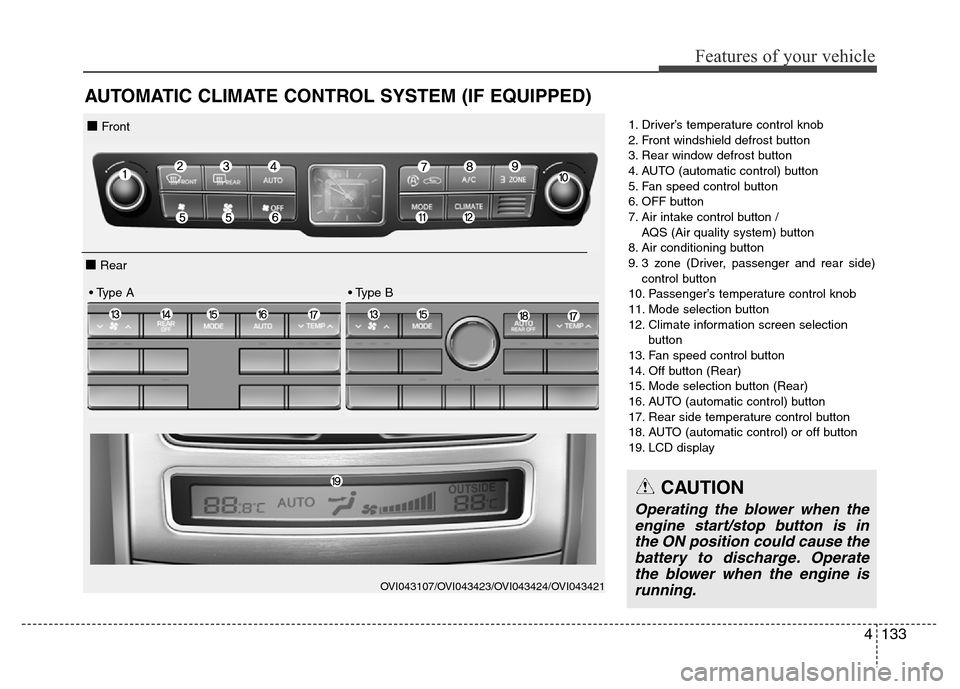
1. Driver’s temperature control knob
2. Front windshield defrost button
3. Rear window defrost button
4. AUTO (automatic control) button
5. Fan speed control button
6. OFF button
7. Air intake control button /
AQS (Air quality system) button
8. Air conditioning button
9. 3 zone (Driver, passenger and rear side)
control button
10. Passenger’s temperature control knob
11. Mode selection button
12. Climate information screen selection
button
13. Fan speed control button
14. Off button (Rear)
15. Mode selection button (Rear)
16. AUTO (automatic control) button
17. Rear side temperature control button
18. AUTO (automatic control) or off button
19. LCD display
OVI043107/OVI043423/OVI043424/OVI043421
■ Front
■ Rear
• Type A • Type B
CAUTION
Operating the blower when the
engine start/stop button is in
the ON position could cause the
battery to discharge. Operate
the blower when the engine is
running.
Page 224 of 479
4135
Features of your vehicle
✽NOTICE
Never place anything near the sensor
to ensure better control of the heating
and cooling system.
Manual heating and air condi-
tioning
The heating and cooling system can be
controlled manually by pushing buttons
other than the AUTO button. In this
case, the system works sequentially
according to the order of buttons select-
ed. When pressing any button except
the AUTO button while using automatic
operation, the functions not selected
will be controlled automatically.
1. Start the engine.
2. Set the mode to the desired position.
For improving the effectiveness of
heating and cooling;
- Heating:
- Cooling:
3. Set the temperature control to the
desired position.
4. Set the air intake control to the
outside (fresh) air position.
5. Set the fan speed control to the
desired speed.
6. If air conditioning is desired, turn
the air conditioning system on.
Press the AUTO button in order to
convert to full automatic control of
the system.
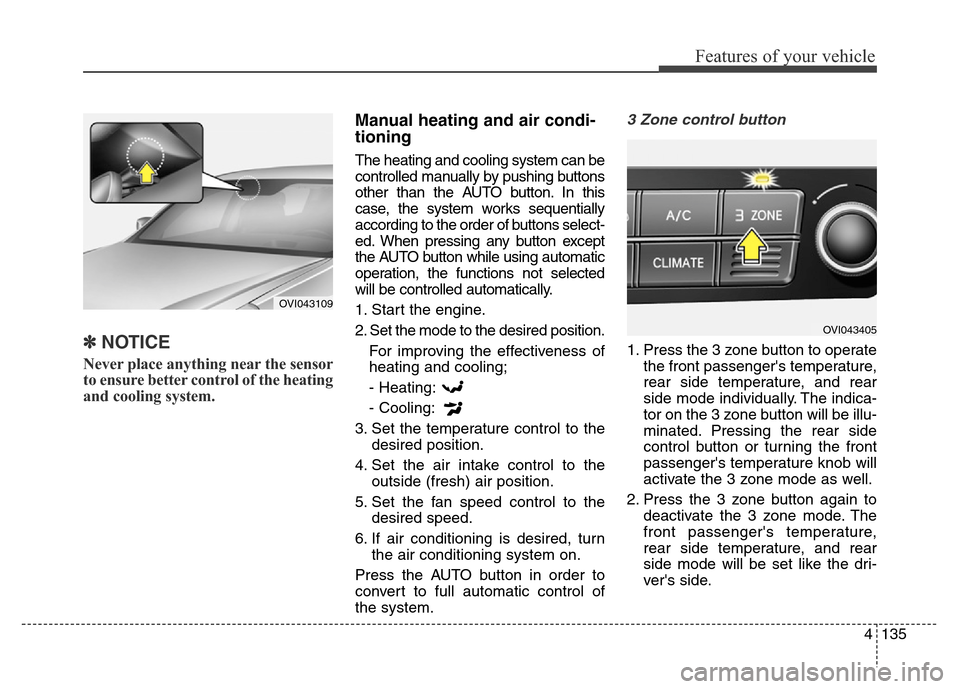
3 Zone control button
1. Press the 3 zone button to operate
the front passenger's temperature,
rear side temperature, and rear
side mode individually. The indica-
tor on the 3 zone button will be illu-
minated. Pressing the rear side
control button or turning the front
passenger's temperature knob will
activate the 3 zone mode as well.
2. Press the 3 zone button again to
deactivate the 3 zone mode. The
front passenger's temperature,
rear side temperature, and rear
side mode will be set like the dri-
ver's side.
OVI043109
OVI043405
Page 258 of 479
Driving your vehicle
Before driving . . . . . . . . . . . . . . . . . . . . . . . . . . . . . . 5-4
• Before entering vehicle . . . . . . . . . . . . . . . . . . . . . . . . . 5-4
• Necessary inspections . . . . . . . . . . . . . . . . . . . . . . . . . 5-4
• Before starting . . . . . . . . . . . . . . . . . . . . . . . . . . . . . . . 5-4
Engine start/stop button . . . . . . . . . . . . . . . . . . . . . 5-6
• Illuminated engine start/stop button . . . . . . . . . . . . . . 5-6
• Engine start/stop button position. . . . . . . . . . . . . . . . . 5-6
Starting the engine . . . . . . . . . . . . . . . . . . . . . . . . . . 5-9
Automatic transmission (Shift by wire) . . . . . . . . 5-11
• Automatic transmission operation . . . . . . . . . . . . . . . 5-11
• Good driving practices . . . . . . . . . . . . . . . . . . . . . . . . 5-20
Brake system . . . . . . . . . . . . . . . . . . . . . . . . . . . . . 5-23
• Power brakes . . . . . . . . . . . . . . . . . . . . . . . . . . . . . . . 5-23
• Electric parking brake (EPB) . . . . . . . . . . . . . . . . . . 5-26
• Emergency braking . . . . . . . . . . . . . . . . . . . . . . . . . . . 5-29
• Auto hold . . . . . . . . . . . . . . . . . . . . . . . . . . . . . . . . . . . 5-30
• Anti-lock brake system (ABS) . . . . . . . . . . . . . . . . . . 5-34
• Electronic Stability Control (ESC) . . . . . . . . . . . . . . 5-36
• Hill-start assist control (HAC) . . . . . . . . . . . . . . . . . . 5-41
• Emergency Stop Signal (ESS) . . . . . . . . . . . . . . . . . . 5-41
• Good braking practices. . . . . . . . . . . . . . . . . . . . . . . . 5-42
Drive mode integrated control system . . . . . . . . . 5-44
• Drive mode / Snow mode . . . . . . . . . . . . . . . . . . . . . . 5-44
Electronic controlled suspension (ECS) . . . . . . . . 5-46
• To control the vehicle height . . . . . . . . . . . . . . . . . . . 5-46• ECS (electronic controlled suspension) malfunction
warning message . . . . . . . . . . . . . . . . . . . . . . . . . . . . 5-47
• Towing your vehicle. . . . . . . . . . . . . . . . . . . . . . . . . . . 5-48
Cruise control system. . . . . . . . . . . . . . . . . . . . . . . 5-50
• Cruise control speed . . . . . . . . . . . . . . . . . . . . . . . . . . 5-51
Advanced smart cruise control system. . . . . . . . . 5-55
• Smart cruise control speed . . . . . . . . . . . . . . . . . . . . . 5-56
• Smart cruise control vehicle to vehicle distance. . . . 5-60
• Distance to distance vehicle sensor . . . . . . . . . . . . . . 5-62
• To convert to cruise control mode . . . . . . . . . . . . . . . 5-63
• Limitations of the system . . . . . . . . . . . . . . . . . . . . . . 5-64
Lane departure warning system (LDWS) . . . . . . 5-70
• LDWS operation . . . . . . . . . . . . . . . . . . . . . . . . . . . . . 5-71
Intelligent accelerator pedal . . . . . . . . . . . . . . . . . 5-74
Advanced vehicle safety management (AVSM) . . 5-75
Blind spot detection system (BSD) . . . . . . . . . . . . 5-78
• Operating conditions . . . . . . . . . . . . . . . . . . . . . . . . . . 5-79
• Warning type . . . . . . . . . . . . . . . . . . . . . . . . . . . . . . . . 5-79
• Detecting sensor . . . . . . . . . . . . . . . . . . . . . . . . . . . . . . 5-80
• Warning message . . . . . . . . . . . . . . . . . . . . . . . . . . . . . 5-81
• Rear cross traffic alert . . . . . . . . . . . . . . . . . . . . . . . . 5-81
• Operating conditions . . . . . . . . . . . . . . . . . . . . . . . . . . 5-81
• Warning type . . . . . . . . . . . . . . . . . . . . . . . . . . . . . . . . 5-82
• Non-operating condition . . . . . . . . . . . . . . . . . . . . . . . 5-83
5
Page 264 of 479
57
Driving your vehicle
ACC(Accessory)
Press the engine start/stop button
when it is in the OFF position without
depressing the brake pedal.
The steering wheel is unlocked and
electrical accessories are opera-
tional.
If the engine start/stop button is in
the ACC position for more than 1
hour, the button is off automatically
to prevent the battery discharge.
ON
Press the engine start/stop button
while it is in the ACC position without
depressing the brake pedal.
The warning lights can be checked
before the engine is started.
Do not leave the engine start/stop
button in the ON position for a long
time. The battery may discharge,
because the engine is not running.
START
To start the engine, depress the
brake pedal and press the engine
start/stop button with the shift lever in
the P(Park) or the N(Neutral) posi-
tion. For your safety, start the engine
with the shift lever in the P (Park)
position.
✽NOTICE
• If you press the engine start/stop
button without depressing the
brake pedal, the engine will not
start and the engine start/stop but-
ton changes as follow :
OFF
→ACC →ON →OFF
Page 273 of 479
Driving your vehicle
16 5
✽NOTICE
• In manaul mode, the driver must
execute upshifts in accordance
with road conditions, taking care
to keep the engine speed below the
red zone.
• In manaul mode, only the 8 for-
ward gears can be selected. To
reverse or park the vehicle, move
the shift lever to the R (Reverse)
or P (Park) position as required.
• In manaul mode, downshifts are
made automatically when the
vehicle slows down. When the
vehicle stops, 1st gear is automati-
cally selected.
• In manaul mode, when the engine
rpm approaches the red zone shift
points are varied to upshift auto-
matically.
• To maintain the required levels of
vehicle performance and safety,
the system may not execute cer-
tain gearshifts when the shift lever
is operated.
(Continued)(Continued)
• When driving on a slippery road,
push the shift lever forward into
the +(up) position. This causes the
transmission to shift into the 2nd
gear which is better for smooth
driving on a slippery road. Push
the shift lever to the -(down) side
to shift back to the 1st gear.
Shift lock system (if equipped)
For your safety, the automatic trans-
mission has a shift lock system
which prevents shifting the transmis-
sion from P (Park) into R (Reverse)
unless the brake pedal is depressed.
To shift the transmission from P
(Park) into R (Reverse) or D (Drive) :
1. Depress and hold the brake pedal.
2. Start the engine or turn the ignition
switch to the ON position.
3. Move the shift lever to R (Reverse)
or D (Drive) with pressing
[UNLOCK] button.
If the brake pedal is repeatedly
depressed and released with the
shift lever in the P (Park) position, a
chattering noise near the shift lever
may be heard. This is a normal con-
dition.