warning Hyundai Equus 2015 Owner's Manual
[x] Cancel search | Manufacturer: HYUNDAI, Model Year: 2015, Model line: Equus, Model: Hyundai Equus 2015Pages: 483, PDF Size: 13.26 MB
Page 188 of 483
499
Features of your vehicle
Engine Oil Pressure
Warning Light
This warning light illuminates:
• Once you set the ignition switch or
Engine Start/Stop Button to the ON
position.
- It remains on until the engine is
started.
• When the engine oil pressure is
low.
If the engine oil pressure is low:
1.Drive carefully to the nearest safe
location and stop your vehicle.
2.Turn the engine off and check the
engine oil level (For more details,
refer to “Engine Oil” in section 7). If
the level is low, add oil as required.
If the warning light remains on after
adding oil or if oil is not available,
we recommend that you have the
vehicle inspected by an authorized
HYUNDAI dealer as soon as possi-
ble.
Low Fuel Level Warning
Light
This warning light illuminates:
When the fuel tank is nearly empty.
If the fuel tank is nearly empty:
Add fuel as soon as possible.
CAUTION - Engine Oil
Pressure
Warning light
•
If the engine does not stop
immediately after the Engine
Oil Pressure Warning Light is
illuminated, severe damage
could result.
•If the warning light stays on
while the engine is running, it
indicates that there may be
serious engine damage or
malfunction. In this case,
1. Stop the vehicle as soon as
it is safe to do so.
2. Turn off the engine and
check the oil level. If the oil
level is low, fill the engine
oil to the proper level.
3. Start the engine again. If the
warning light stays on after
the engine is started, turn
the engine off immediately.
In this case, we recommend
that you have the vehicle
inspected by an authorized
HYUNDAI dealer.
CAUTION - Low Fuel
Level
Driving with the Low Fuel Level
warning light on or with the fuel
level below “E” can cause the
engine to misfire and damage
the catalytic converter (if
equipped).
Page 189 of 483
Features of your vehicle
100 4
Low Tire Pressure
Warning Light
(if equipped)
This warning light illuminates:
• Once you set the ignition switch or
Engine Start/Stop Button to the ON
position.
- It illuminates for approximately 3
seconds and then goes off.
• When one or more of your tires are
significantly underinflated (The
location of the underinflated tires
are displayed on the LCD display).
For more details, refer to “Tire
Pressure Monitoring System
(TPMS)” in chapter 6.This warning light remains on after
blinking for approximately 60 seconds
or repeats blinking and off at the
intervals of approximately 3 seconds:
• When there is a malfunction with
the TPMS.
In this case, we recommend that
you have the vehicle inspected by
an authorized HYUNDAI dealer as
soon as possible.
For more details, refer to “Tire
Pressure Monitoring System
(TPMS)” in chapter 6.
Door Ajar Warning Light
This warning light illuminates:
When a door is not closed securely.
Trunk Open Warning
Light
This warning light illuminates:
When the trunk lid is not closed
securely.
WARNING -Safe Stopping
• The TPMS cannot alert you to
severe and sudden tire damage
caused by external factors.
• If you notice any vehicle insta-
bility, immediately take your
foot off the accelerator pedal,
apply the brakes gradually with
light force, and slowly move to
a safe position off the road.
Page 190 of 483
4101
Features of your vehicle
Overspeed Warning
Light (if equipped)
This warning light blinks:
• When you drive the vehicle more
than 120 km/h.
- This is to prevent you from driving
your vehicle with overspeed.
- The overspeed warning chime
also sound for approximately 5
seconds.
Adaptive Front Lighting
System (AFLS) Warning
Light
This warning light blinks:
• Once you set the Engine Start/Stop
Button to the ON position.
- It illuminates for approximately 3
seconds and then goes off.
• When there is a malfunction with
the AFLS.
If there is a malfunction with the AFLS:
1. Drive carefully to the nearest safe
location and stop your vehicle.
2. Turn the engine off and restart the
engine. If the warning light
remains on, we recommend that
you have the vehicle inspected by
an authorized HYUNDAI dealer.
Electric Parking Brake
(EPB) Warning Light
This warning light illuminates:
• Once you set the ignition switch or
Engine Start/Stop Button to the ON
position.
- It illuminates for approximately 3
seconds and then goes off.
• When there is a malfunction with
the EPB.
In this case, we recommend that
you have the vehicle inspected by
an authorized HYUNDAI dealer.
✽NOTICE- Electric Parking
Brake (EPB)
Warning Light
The Electric Parking Brake (EPB)
Warning Light may illuminate when
the Electronic Stability control
(ESC) Indicator Light comes on to
indicates that the ESC is not work-
ing properly (This does not indicate
malfunction of the EPB).
AFLS120km/hEPB
Page 191 of 483
Features of your vehicle
102 4
LED Headlamp Warning
Light (if equipped)
This warning light illuminates:
• Once you set the Engine Start/Stop
Button to the ON position.
- It illuminates for approximately 3
seconds and then goes off.
• When there is a malfunction with
the LED headlamp.
In this case, we recommend that you
have the vehicle inspected by an
authorized HYUNDAI dealer.
This warning light blinks:
• When there is a malfunction with a
LED headlamp related part.
In this case, we recommend that you
have the vehicle inspected by an
authorized HYUNDAI dealer.
Master Warning Light
This indicator light illuminates
• when there is a malfunction on the
pre-safe seat belt, electronic con-
trol suspension, or advanced smart
cruise control. To identify the details
of the warning, look at the LCD dis-
play.
CAUTION - LED Headlamp
Warning Light
Continuous driving with the
LED Headlamp Warning Light
on or blinking can reduce LED
headlamp (low beam) life.
Page 195 of 483
![Hyundai Equus 2015 Owners Manual Features of your vehicle
106 4
Lane Departure Warning
System (LDWS)
Indicator Light
(if equipped)
This indicator light illuminates:
• [Green] When you activate the lane
departure warning system by](/img/35/14638/w960_14638-194.png "Hyundai Equus 2015 Owners Manual Features of your vehicle
106 4
Lane Departure Warning
System (LDWS)
Indicator Light
(if equipped)
This indicator light illuminates:
• [Green] When you activate the lane
departure warning system by")
Features of your vehicle
106 4
Lane Departure Warning
System (LDWS)
Indicator Light
(if equipped)
This indicator light illuminates:
• [Green] When you activate the lane
departure warning system by
pressing the LDWS button.
• [White] When system operating
conditions are not satisfied or
when the sensor does not detect
the lane line.
• [Yellow] When there is a malfunc-
tion with the lane departure warn-
ing system.
In this case, we recommend that
you have the vehicle inspected by
an authorized HYUNDAI dealer.
❈For more details, refer to “Lane
Departure Warning System
(LDWS)” in chapter 5.
Advanced Vehicle Safety
Management (AVSM)
OFF Indicator Light
(if equipped)
This indicator light illuminates:
• Once you set the Engine Start/Stop
Button to the ON position.
- It illuminates for approximately 3
seconds and then goes off.
• When you deactivate the AVSM sys-
tem by setting on the LCD display.
❈For more details, refer to “LCD
Display” in this chapter.
If this indicator stays on when VSM
OFF is not selected, the AVSM may
have malfunctioned.
In this case, we recommend that you
have the vehicle inspected by an
authorized HYUNDAI dealer.
❈For more details, refer to “Advanced
Vehicle Safety Management
(AVSM) System” in chapter 5.
SPORT/SNOW Mode
Indicator Light
This indicator light illuminates:
• When you select "SPORT/SNOW"
mode as drive mode.
❈For more details, refer to "Drive
mode integrated control system"
in chapter 5.
✽ NOTICE
If you activate the Driving Mode
Theme on the User Settings Mode of
the LCD display (if equipped), the
SPORT and SNOW indicators will
not turn on the instrument cluster.
VSM
OFFSPORT
Page 196 of 483
4107
Features of your vehicle
ECO Indicator Light
(if equipped)
The ECO indicator light informs you
to drive economically, and turns on
green in accordance with the driving
condition.
This indicator light illuminates:
• [Green] when you are driving eco-
nomically.
• The drive’s driving habit and road
condition can affect fuel efficiency.
• The light will not display :
- If the condition does not meet
economical driving such as P
(Park), N (Neutral), R (Reverse),
or sports mode.
- While the instant fuel Economy of
the trip computer is display on the
LCD display.
• On the "User Settings Mode" of the
LCD display, you can activate or
deactivate the ECO driving mode.❈For more details, refer to "LCD
Display" in this chapter.
Intelligent Accelerator
Pedal Indicator Light
(if equipped)
This indicator light illuminates:
• When you activate the intelligent
accelerator pedal on the "User
Setting Mode" of the LCD display.
❈For more details, refer to "LCD
Display" in this chapter.
When the ECO indicator light turns
on red, the intelligent accelerator
pedal (if equipped) becomes more
stiff to prevent a sudden accelerator.
❈For more details, refer to
"Intelligent Accelerator Pedal" in
chapter 5.
ECOECO-P
WARNING
Do not watch the ECO indicator
light while driving. This will dis-
tract you and may cause an
accident that results in severe
personal injury.
Page 197 of 483
Features of your vehicle
108 4
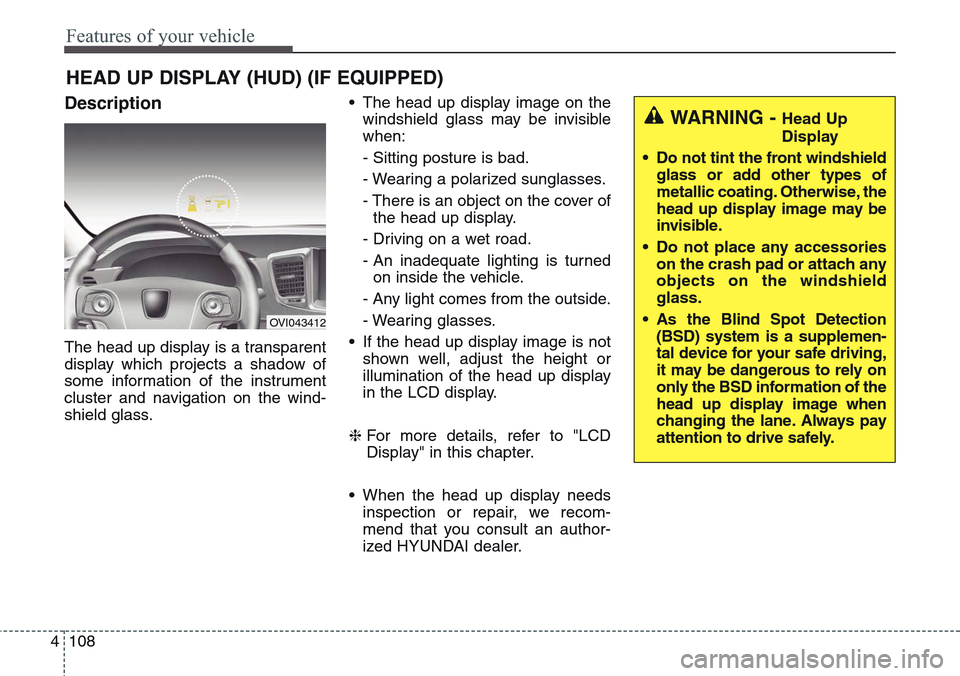
Description
The head up display is a transparent
display which projects a shadow of
some information of the instrument
cluster and navigation on the wind-
shield glass.• The head up display image on the
windshield glass may be invisible
when:
- Sitting posture is bad.
- Wearing a polarized sunglasses.
- There is an object on the cover of
the head up display.
- Driving on a wet road.
- An inadequate lighting is turned
on inside the vehicle.
- Any light comes from the outside.
- Wearing glasses.
• If the head up display image is not
shown well, adjust the height or
illumination of the head up display
in the LCD display.
❈For more details, refer to "LCD
Display" in this chapter.
• When the head up display needs
inspection or repair, we recom-
mend that you consult an author-
ized HYUNDAI dealer.
HEAD UP DISPLAY (HUD) (IF EQUIPPED)
OVI043412
WARNING - Head Up
Display
• Do not tint the front windshield
glass or add other types of
metallic coating. Otherwise, the
head up display image may be
invisible.
• Do not place any accessories
on the crash pad or attach any
objects on the windshield
glass.
• As the Blind Spot Detection
(BSD) system is a supplemen-
tal device for your safe driving,
it may be dangerous to rely on
only the BSD information of the
head up display image when
changing the lane. Always pay
attention to drive safely.
Page 198 of 483
4109
Features of your vehicle
Head Up Display ON/OFF
To activate the head up display,
press the HUD button.
If you press the HUD button again,
the head up display will be deactivat-
ed.
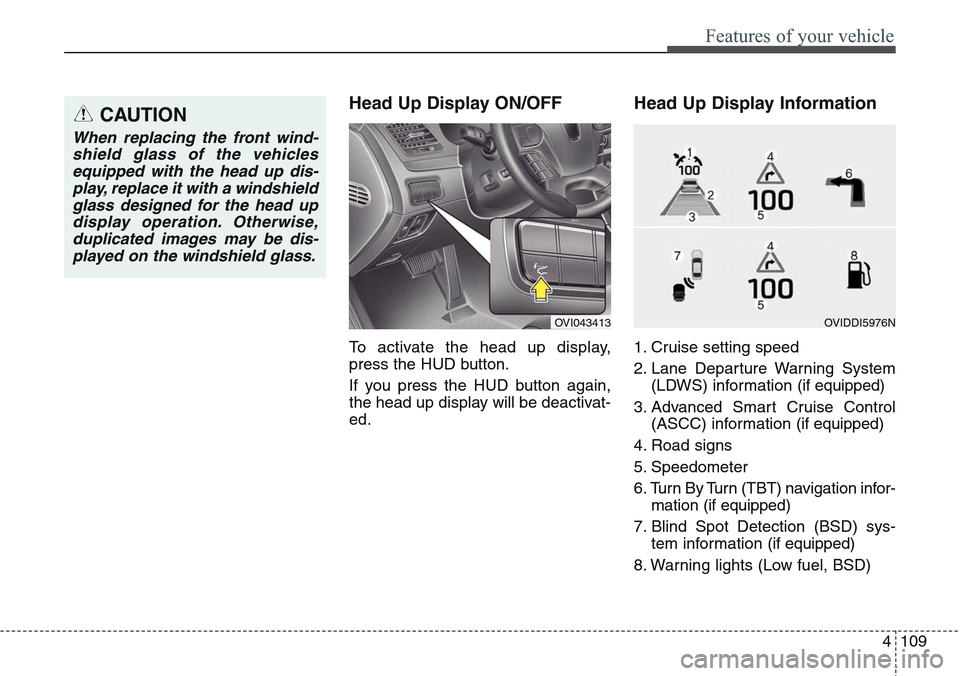
Head Up Display Information
1. Cruise setting speed
2. Lane Departure Warning System
(LDWS) information (if equipped)
3. Advanced Smart Cruise Control
(ASCC) information (if equipped)
4. Road signs
5. Speedometer
6. Turn By Turn (TBT) navigation infor-
mation (if equipped)
7. Blind Spot Detection (BSD) sys-
tem information (if equipped)
8. Warning lights (Low fuel, BSD)
CAUTION
When replacing the front wind-
shield glass of the vehicles
equipped with the head up dis-
play, replace it with a windshield
glass designed for the head up
display operation. Otherwise,
duplicated images may be dis-
played on the windshield glass.
OVI043413OVIDDI5976N
Page 199 of 483
Features of your vehicle
110 4
On the "User settings Mode" of the
LCD display, you can activate or
deactive the Turn By Turn (TBT) nav-
igation, Smart Cruise Control (SCC),
Lane Departure Warning System
(LDWS), and Blind Spot Detection
(BSD) system information.
✽NOTICE
If you select the Turn By Turn (TBT)
navigation information as HUD con-
tents, the Turn By Turn (TBT) navi-
gation information will not be dis-
played on the LCD Display.
Head Up Display Setting
On the LCD display, you can change
the head up display settings as fol-
lows.
1. Display height
2. Rotation
3. Font color
4. Font size
5. Illumination
6. Contents setting
❈For more details, refer to "LCD
Display" in this chapter.
Page 200 of 483
4111
Features of your vehicle
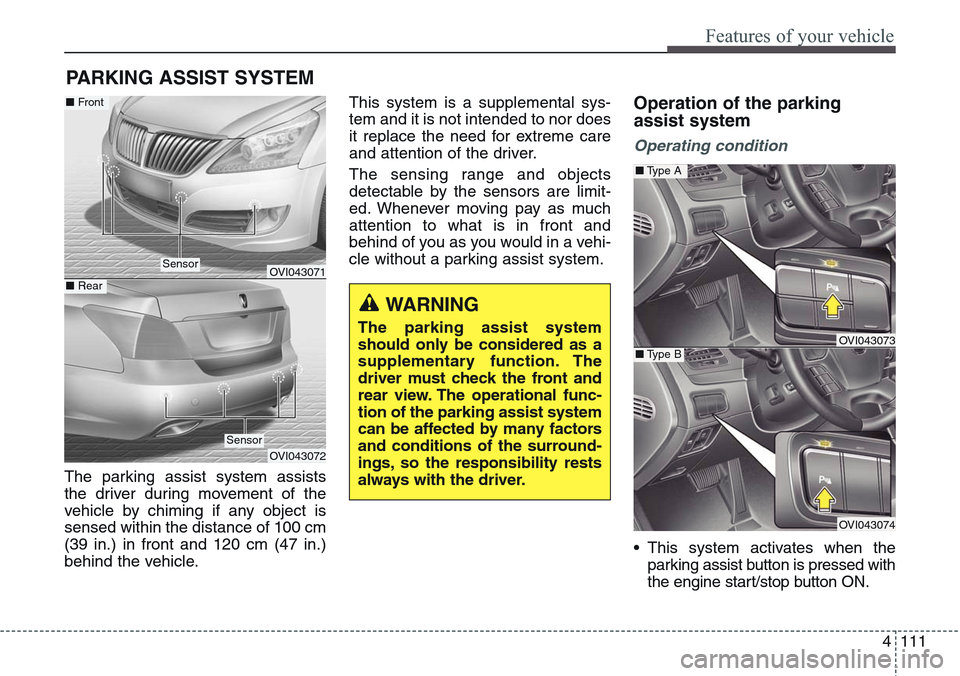
The parking assist system assists
the driver during movement of the
vehicle by chiming if any object is
sensed within the distance of 100 cm
(39 in.) in front and 120 cm (47 in.)
behind the vehicle.This system is a supplemental sys-
tem and it is not intended to nor does
it replace the need for extreme care
and attention of the driver.
The sensing range and objects
detectable by the sensors are limit-
ed. Whenever moving pay as much
attention to what is in front and
behind of you as you would in a vehi-
cle without a parking assist system.
Operation of the parking
assist system
Operating condition
• This system activates when the
parking assist button is pressed with
the engine start/stop button ON.
PARKING ASSIST SYSTEM
WARNING
The parking assist system
should only be considered as a
supplementary function. The
driver must check the front and
rear view. The operational func-
tion of the parking assist system
can be affected by many factors
and conditions of the surround-
ings, so the responsibility rests
always with the driver.
OVI043071
OVI043072
Sensor
■Front
■ Rear
Sensor
OVI043073
OVI043074
■Type A
■Type B