instrument panel Hyundai Equus 2015 User Guide
[x] Cancel search | Manufacturer: HYUNDAI, Model Year: 2015, Model line: Equus, Model: Hyundai Equus 2015Pages: 483, PDF Size: 13.26 MB
Page 212 of 483
4123
Features of your vehicle
AFLS (Adaptive Front Lighting
System) (if equipped)
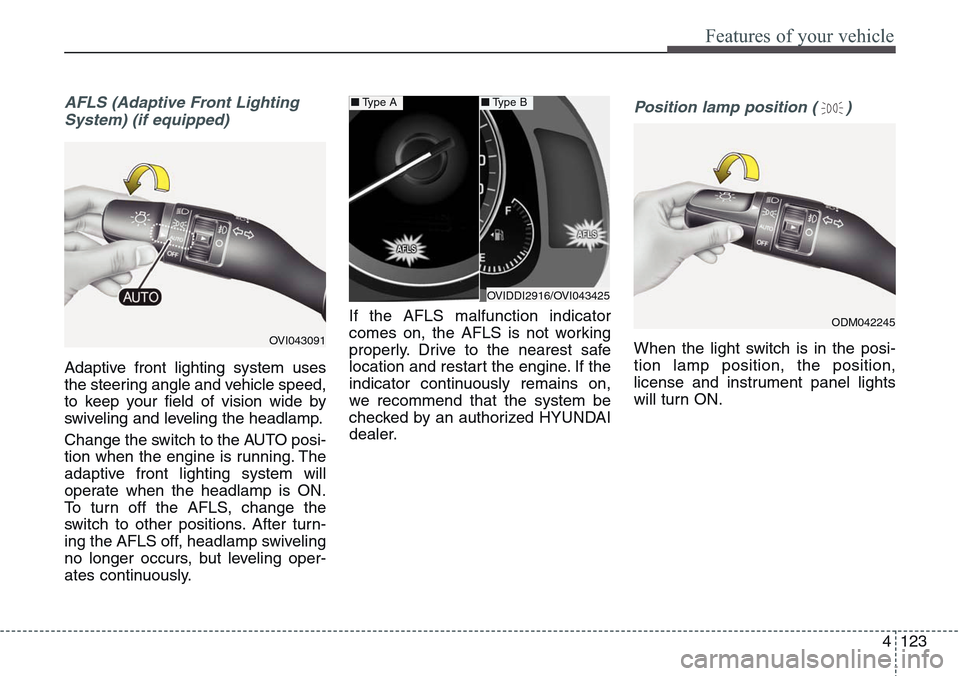
Adaptive front lighting system uses
the steering angle and vehicle speed,
to keep your field of vision wide by
swiveling and leveling the headlamp.
Change the switch to the AUTO posi-
tion when the engine is running. The
adaptive front lighting system will
operate when the headlamp is ON.
To turn off the AFLS, change the
switch to other positions. After turn-
ing the AFLS off, headlamp swiveling
no longer occurs, but leveling oper-
ates continuously.If the AFLS malfunction indicator
comes on, the AFLS is not working
properly. Drive to the nearest safe
location and restart the engine. If the
indicator continuously remains on,
we recommend that the system be
checked by an authorized HYUNDAI
dealer.
Position lamp position ( )
When the light switch is in the posi-
tion lamp position, the position,
license and instrument panel lights
will turn ON.OVI043091
OVIDDI2916/OVI043425
■Type A■Type B
ODM042245
Page 213 of 483
Features of your vehicle
124 4
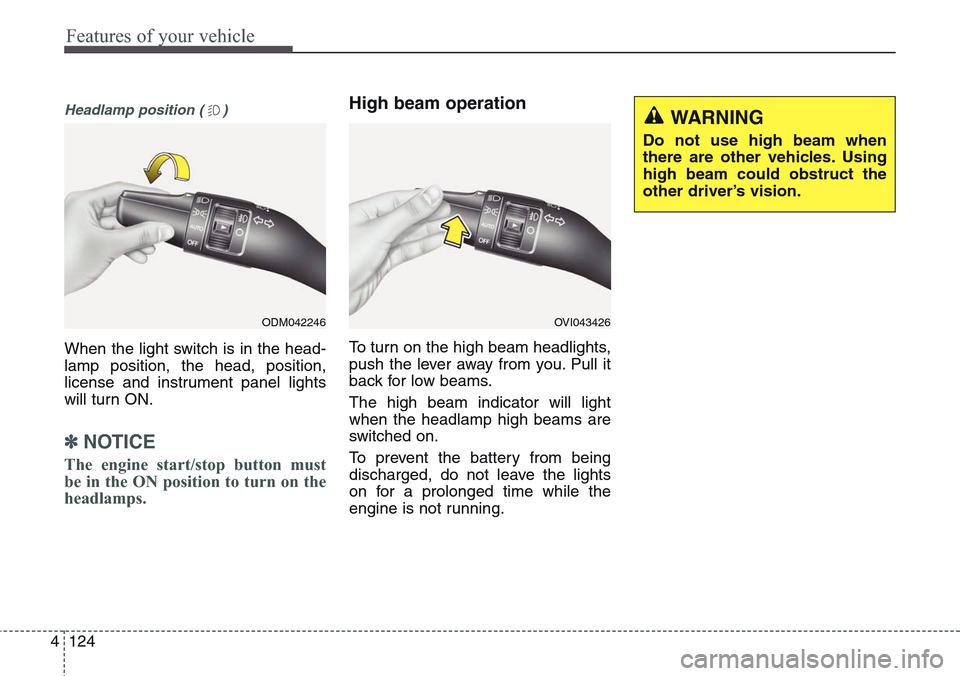
Headlamp position ( )
When the light switch is in the head-
lamp position, the head, position,
license and instrument panel lights
will turn ON.
✽NOTICE
The engine start/stop button must
be in the ON position to turn on the
headlamps.
High beam operation
To turn on the high beam headlights,
push the lever away from you. Pull it
back for low beams.
The high beam indicator will light
when the headlamp high beams are
switched on.
To prevent the battery from being
discharged, do not leave the lights
on for a prolonged time while the
engine is not running.
ODM042246OVI043426
WARNING
Do not use high beam when
there are other vehicles. Using
high beam could obstruct the
other driver’s vision.
Page 214 of 483
4125
Features of your vehicle
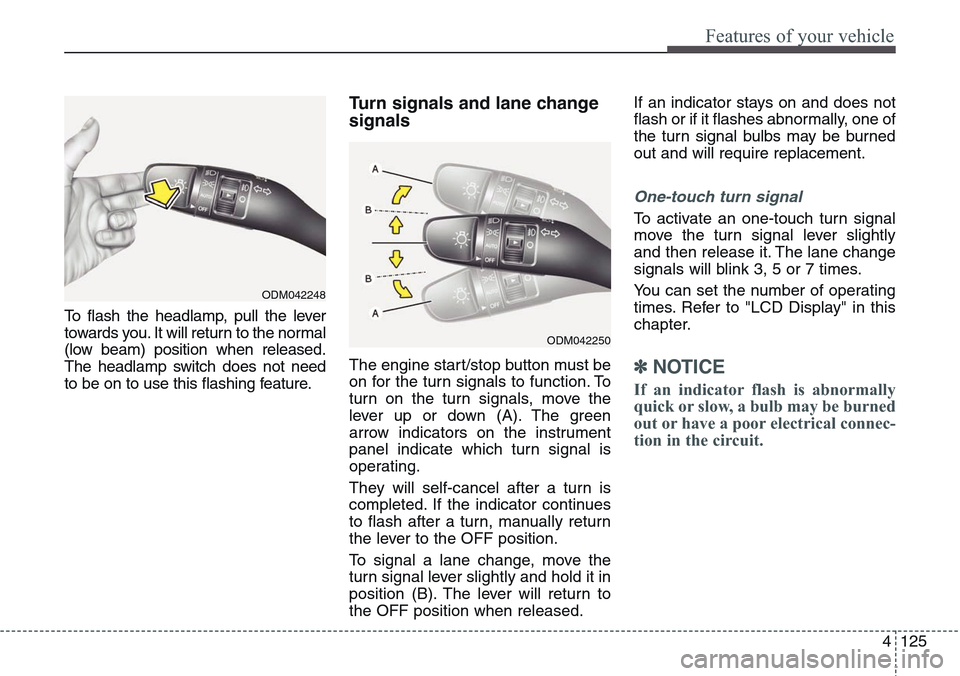
To flash the headlamp, pull the lever
towards you. It will return to the normal
(low beam) position when released.
The headlamp switch does not need
to be on to use this flashing feature.
Turn signals and lane change
signals
The engine start/stop button must be
on for the turn signals to function. To
turn on the turn signals, move the
lever up or down (A). The green
arrow indicators on the instrument
panel indicate which turn signal is
operating.
They will self-cancel after a turn is
completed. If the indicator continues
to flash after a turn, manually return
the lever to the OFF position.
To signal a lane change, move the
turn signal lever slightly and hold it in
position (B). The lever will return to
the OFF position when released.If an indicator stays on and does not
flash or if it flashes abnormally, one of
the turn signal bulbs may be burned
out and will require replacement.
One-touch turn signal
To activate an one-touch turn signal
move the turn signal lever slightly
and then release it. The lane change
signals will blink 3, 5 or 7 times.
You can set the number of operating
times. Refer to "LCD Display" in this
chapter.
✽NOTICE
If an indicator flash is abnormally
quick or slow, a bulb may be burned
out or have a poor electrical connec-
tion in the circuit.
ODM042248
ODM042250
Page 225 of 483
Features of your vehicle
136 4
✽NOTICE
If you want to defrost and defog the
front windshield, refer to
“Windshield defrosting and defog-
ging” in this section.
Rear window defroster
The defroster heats the window to
remove frost, fog and thin ice from
the rear window, while the engine is
running.
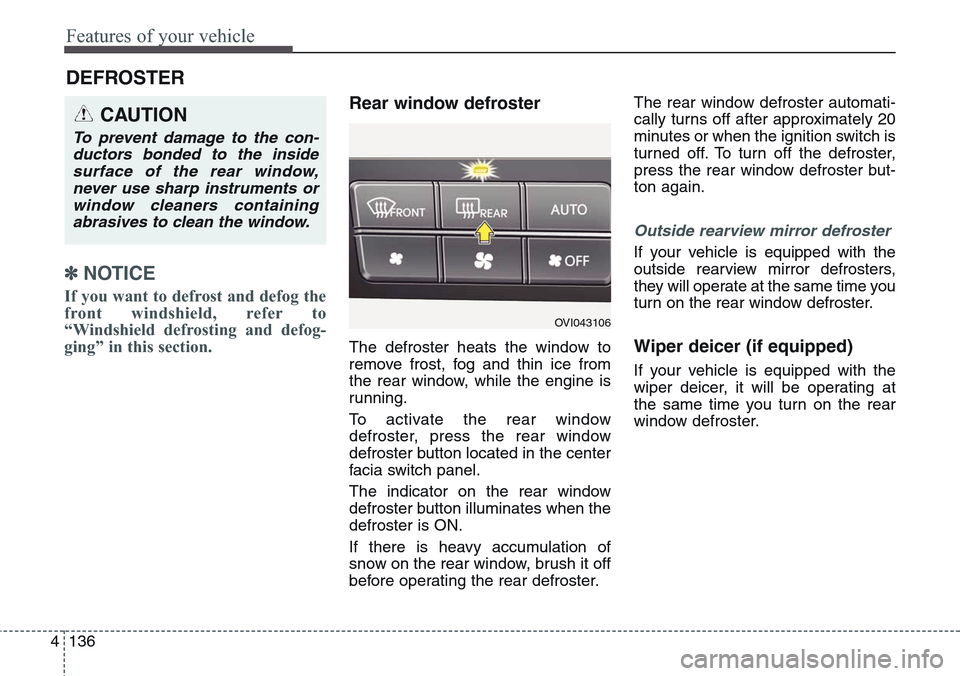
To activate the rear window
defroster, press the rear window
defroster button located in the center
facia switch panel.
The indicator on the rear window
defroster button illuminates when the
defroster is ON.
If there is heavy accumulation of
snow on the rear window, brush it off
before operating the rear defroster.The rear window defroster automati-
cally turns off after approximately 20
minutes or when the ignition switch is
turned off. To turn off the defroster,
press the rear window defroster but-
ton again.
Outside rearview mirror defroster
If your vehicle is equipped with the
outside rearview mirror defrosters,
they will operate at the same time you
turn on the rear window defroster.
Wiper deicer (if equipped)
If your vehicle is equipped with the
wiper deicer, it will be operating at
the same time you turn on the rear
window defroster.
DEFROSTER
CAUTION
To prevent damage to the con-
ductors bonded to the inside
surface of the rear window,
never use sharp instruments or
window cleaners containing
abrasives to clean the window.
OVI043106
Page 230 of 483
4141
Features of your vehicle
❈ Rear outlet vents (F)
• The air flow of the Rear outlet
vents is controlled by the front cli-
mate control system and delivered
through the inside air duct of the
front doors. If the door is open or
not closed completely, the air flow
of the Rear outlet vent is not deliv-
ered properly. Make sure the front
doors are closed completely.
• The air flow of the Rear outlet
vents may be weaker than the
instrument panel vents for the long
air duct in the front doors.Mode selection
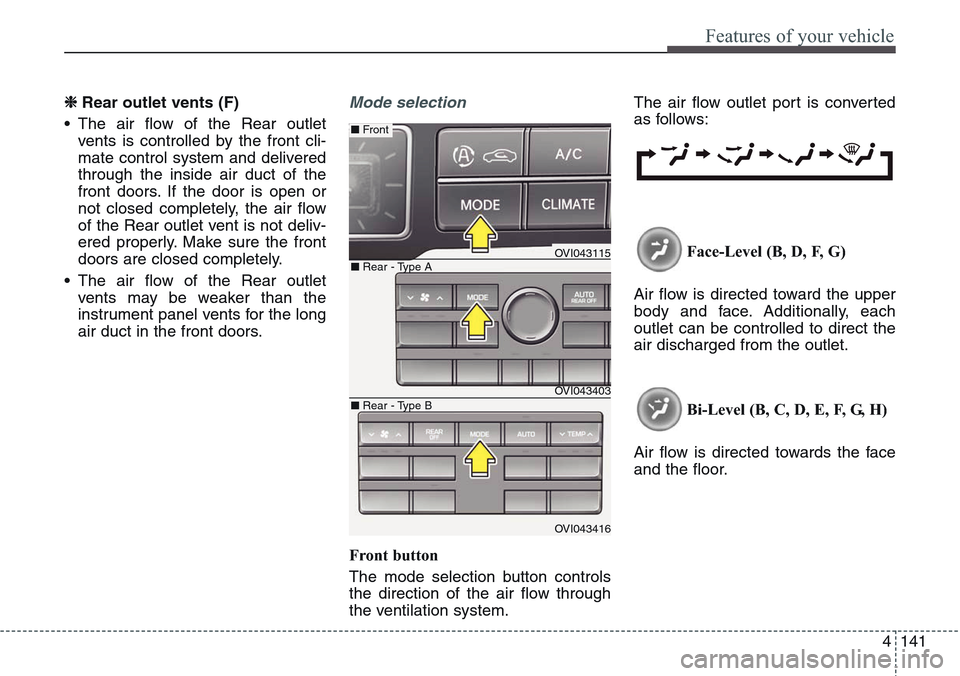
Front button
The mode selection button controls
the direction of the air flow through
the ventilation system.The air flow outlet port is converted
as follows:
Face-Level (B, D, F, G)
Air flow is directed toward the upper
body and face. Additionally, each
outlet can be controlled to direct the
air discharged from the outlet.
Bi-Level (B, C, D, E, F, G, H)
Air flow is directed towards the face
and the floor.
OVI043115
OVI043403
OVI043416
■ Rear - Type A
■ Front
■ Rear - Type B
Page 232 of 483
4143
Features of your vehicle
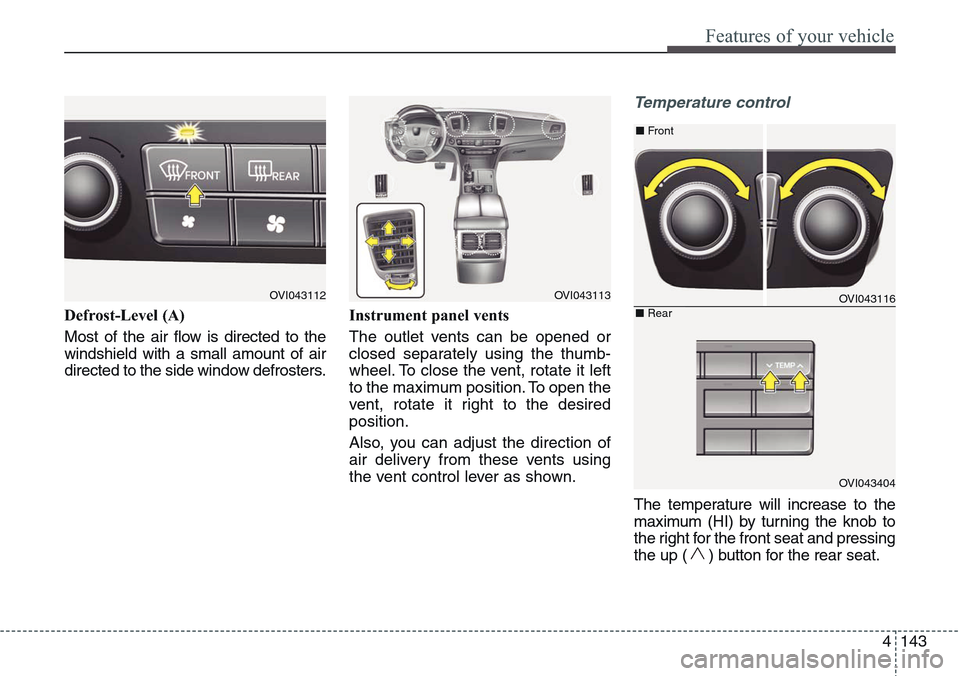
Defrost-Level (A)
Most of the air flow is directed to the
windshield with a small amount of air
directed to the side window defrosters.Instrument panel vents
The outlet vents can be opened or
closed separately using the thumb-
wheel. To close the vent, rotate it left
to the maximum position. To open the
vent, rotate it right to the desired
position.
Also, you can adjust the direction of
air delivery from these vents using
the vent control lever as shown.
Temperature control
The temperature will increase to the
maximum (HI) by turning the knob to
the right for the front seat and pressing
the up ( ) button for the rear seat.
OVI043112OVI043113OVI043116
OVI043404
■Front
■Rear
Page 391 of 483
Fuses . . . . . . . . . . . . . . . . . . . . . . . . . . . . . . . . . . . . 7-49
• Instrument panel fuse replacement . . . . . . . . . . . . . . 7-50
• Engine compartment fuse replacement. . . . . . . . . . . 7-52
• Fuse/relay panel description. . . . . . . . . . . . . . . . . . . . 7-53
Light bulbs . . . . . . . . . . . . . . . . . . . . . . . . . . . . . . . 7-65
• Headlamp, position lamp, turn signal lamp,
front fog lamp bulb replacement . . . . . . . . . . . . . . 7-66
• Side repeater light bulb replacement . . . . . . . . . . . . 7-72
• Rear combination light bulb replacement . . . . . . . . 7-73
• High mounted stop light replacement . . . . . . . . . . . . 7-73
• License plate light bulb replacement . . . . . . . . . . . . 7-74
• Interior light bulb replacement . . . . . . . . . . . . . . . . . 7-74
Appearance care . . . . . . . . . . . . . . . . . . . . . . . . . . . 7-75
• Exterior care . . . . . . . . . . . . . . . . . . . . . . . . . . . . . . . . 7-75
• Interior care . . . . . . . . . . . . . . . . . . . . . . . . . . . . . . . . . 7-80
Emission control system . . . . . . . . . . . . . . . . . . . . 7-82
7
Page 439 of 483
Maintenance
50 7
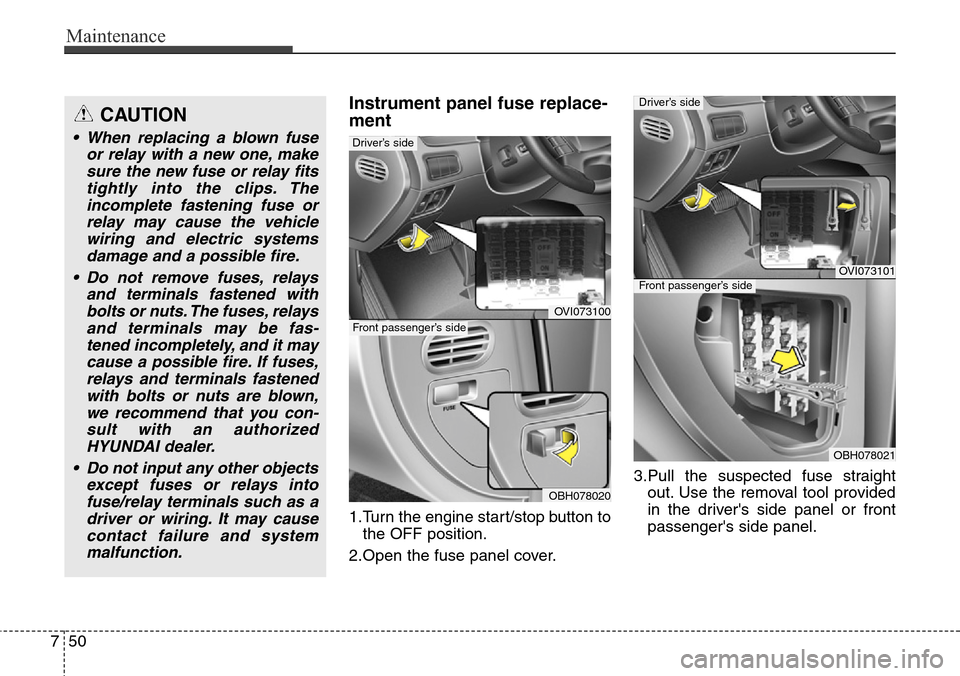
Instrument panel fuse replace-
ment
1.Turn the engine start/stop button to
the OFF position.
2.Open the fuse panel cover.3.Pull the suspected fuse straight
out. Use the removal tool provided
in the driver's side panel or front
passenger's side panel.
OVI073100
OBH078020
Front passenger’s side
Driver’s side
CAUTION
• When replacing a blown fuse
or relay with a new one, make
sure the new fuse or relay fits
tightly into the clips. The
incomplete fastening fuse or
relay may cause the vehicle
wiring and electric systems
damage and a possible fire.
• Do not remove fuses, relays
and terminals fastened with
bolts or nuts. The fuses, relays
and terminals may be fas-
tened incompletely, and it may
cause a possible fire. If fuses,
relays and terminals fastened
with bolts or nuts are blown,
we recommend that you con-
sult with an authorized
HYUNDAI dealer.
• Do not input any other objects
except fuses or relays into
fuse/relay terminals such as a
driver or wiring. It may cause
contact failure and system
malfunction.
OVI073101
OBH078021
Driver’s side
Front passenger’s side
Page 442 of 483
753
Maintenance
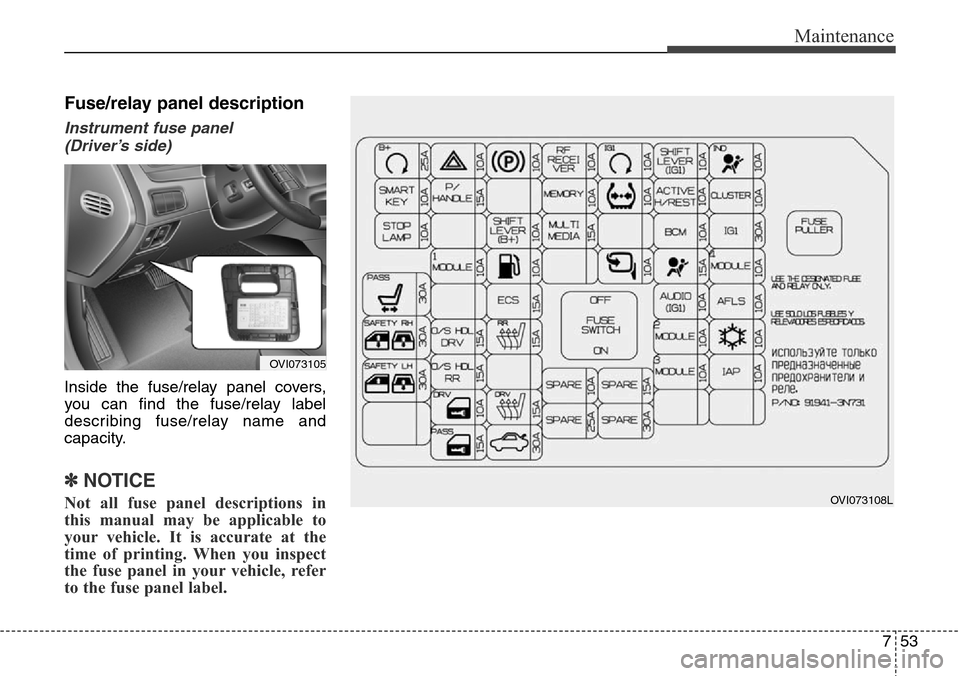
Fuse/relay panel description
Instrument fuse panel
(Driver’s side)
Inside the fuse/relay panel covers,
you can find the fuse/relay label
describing fuse/relay name and
capacity.
✽NOTICE
Not all fuse panel descriptions in
this manual may be applicable to
your vehicle. It is accurate at the
time of printing. When you inspect
the fuse panel in your vehicle, refer
to the fuse panel label.OVI073108L
OVI073105
Page 443 of 483
Maintenance
54 7
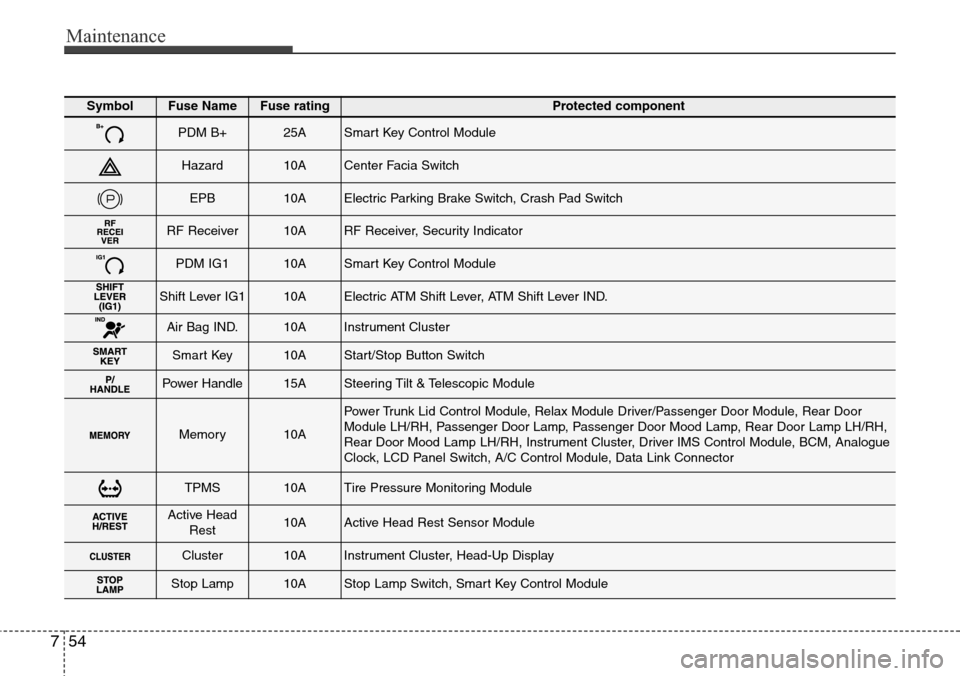
SymbolFuse NameFuse ratingProtected component
PDM B+25ASmart Key Control Module
Hazard10ACenter Facia Switch
EPB10AElectric Parking Brake Switch, Crash Pad Switch
RF Receiver10ARF Receiver, Security Indicator
PDM IG110ASmart Key Control Module
Shift Lever IG110AElectric ATM Shift Lever, ATM Shift Lever IND.
Air Bag IND.10AInstrument Cluster
Smart Key10AStart/Stop Button Switch
Power Handle15ASteering Tilt & Telescopic Module
Memory10A
Power Trunk Lid Control Module, Relax Module Driver/Passenger Door Module, Rear Door
Module LH/RH, Passenger Door Lamp, Passenger Door Mood Lamp, Rear Door Lamp LH/RH,
Rear Door Mood Lamp LH/RH, Instrument Cluster, Driver IMS Control Module, BCM, Analogue
Clock, LCD Panel Switch, A/C Control Module, Data Link Connector
TPMS10ATire Pressure Monitoring Module
Active Head
Rest10AActive Head Rest Sensor Module
Cluster10AInstrument Cluster, Head-Up Display
Stop Lamp10AStop Lamp Switch, Smart Key Control Module