reset Hyundai Equus 2015 User Guide
[x] Cancel search | Manufacturer: HYUNDAI, Model Year: 2015, Model line: Equus, Model: Hyundai Equus 2015Pages: 483, PDF Size: 13.26 MB
Page 181 of 483
Features of your vehicle
92 4
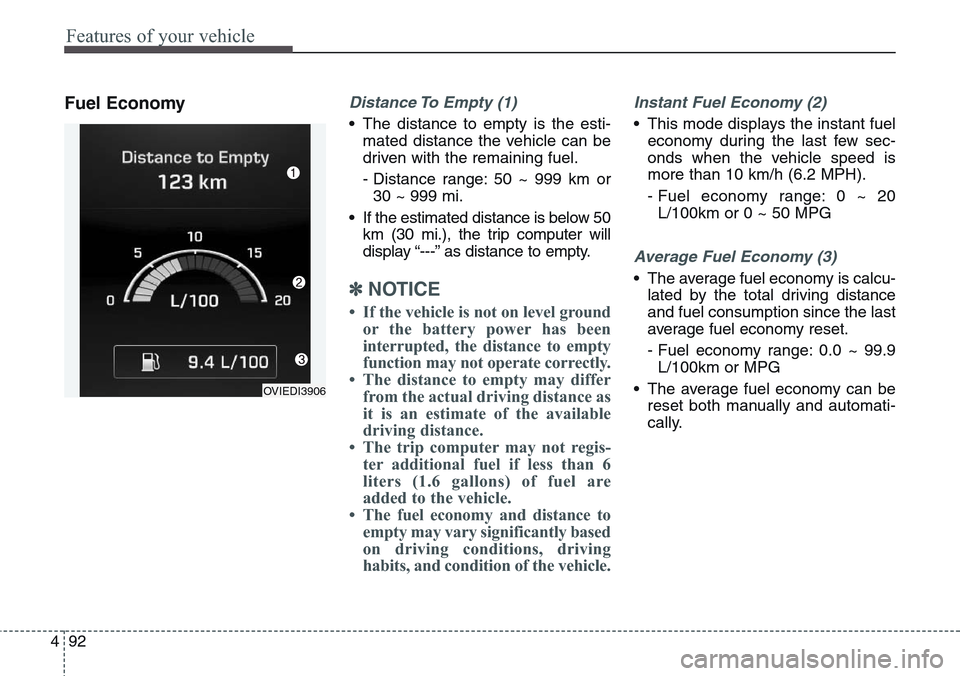
Fuel EconomyDistance To Empty (1)
• The distance to empty is the esti-
mated distance the vehicle can be
driven with the remaining fuel.
- Distance range: 50 ~ 999 km or
30 ~ 999 mi.
• If the estimated distance is below 50
km (30 mi.), the trip computer will
display “---” as distance to empty.
✽NOTICE
• If the vehicle is not on level ground
or the battery power has been
interrupted, the distance to empty
function may not operate correctly.
• The distance to empty may differ
from the actual driving distance as
it is an estimate of the available
driving distance.
• The trip computer may not regis-
ter additional fuel if less than 6
liters (1.6 gallons) of fuel are
added to the vehicle.
• The fuel economy and distance to
empty may vary significantly based
on driving conditions, driving
habits, and condition of the vehicle.
Instant Fuel Economy (2)
• This mode displays the instant fuel
economy during the last few sec-
onds when the vehicle speed is
more than 10 km/h (6.2 MPH).
- Fuel economy range: 0 ~ 20
L/100km or 0 ~ 50 MPG
Average Fuel Economy (3)
• The average fuel economy is calcu-
lated by the total driving distance
and fuel consumption since the last
average fuel economy reset.
- Fuel economy range: 0.0 ~ 99.9
L/100km or MPG
• The average fuel economy can be
reset both manually and automati-
cally.
OVIEDI3906
Page 182 of 483
493
Features of your vehicle
Manual reset
To clear the average fuel economy
manually, press the OK button on the
steering wheel for more than 1 sec-
ond when the average fuel economy
is displayed.
❈For more details of OK button,
refer to the "LCD Display Control"
in this chapterAutomatic reset
To make the average fuel economy
be reset automatically whenever refu-
eling, select the "Auto Reset" mode in
User Setting menu of the LCD display
(Refer to "LCD Display").
Under "Auto Reset" mode, the aver-
age fuel economy will be cleared to
zero (---) when the vehicle speed
exceeds 1 km/h after refueling more
than 6 liters (1.6 gallons).
✽NOTICE
The average fuel economy is not dis-
played for more accurate calculation
if the vehicle does not drive more
than 300 meters (0.19 miles) since
the Engine Start/Stop button is
turned to ON.
Page 233 of 483
Features of your vehicle
144 4
The temperature will decrease to the
minimum (Lo) by turning the knob to
the left for the front seat and pressing
the down ( ) button for the rear seat.
When turning the knob for the front
seat and pressing the button for the
rear seat, the temperature will
increase or decrease by 0.5°C/1°F.
When set to the lowest temperature
setting, the air conditioning will oper-
ate continuously.If you turn the front passenger's tem-
perature knob or if you press the rear
temperature button, the indicator on
the 3 Zone button will be illuminated,
and you can adjust the front passen-
ger's and rear temperature individual-
ly. If you press the 3 Zone button, the
indicator on the 3 Zone button will be
turned off, and the front passenger's
and rear temperature will be adjusted
like the driver's temperature.
Temperature conversion
If the battery has been discharged or
disconnected, the temperature mode
display will reset to Centigrade.
This is a normal condition. You can
switch the temperature mode between
Centigrade to Fahrenheit as follows;
While pressing the OFF button,
depress the AUTO button for 3 sec-
onds or more. The display will change
from Centigrade to Fahrenheit, or
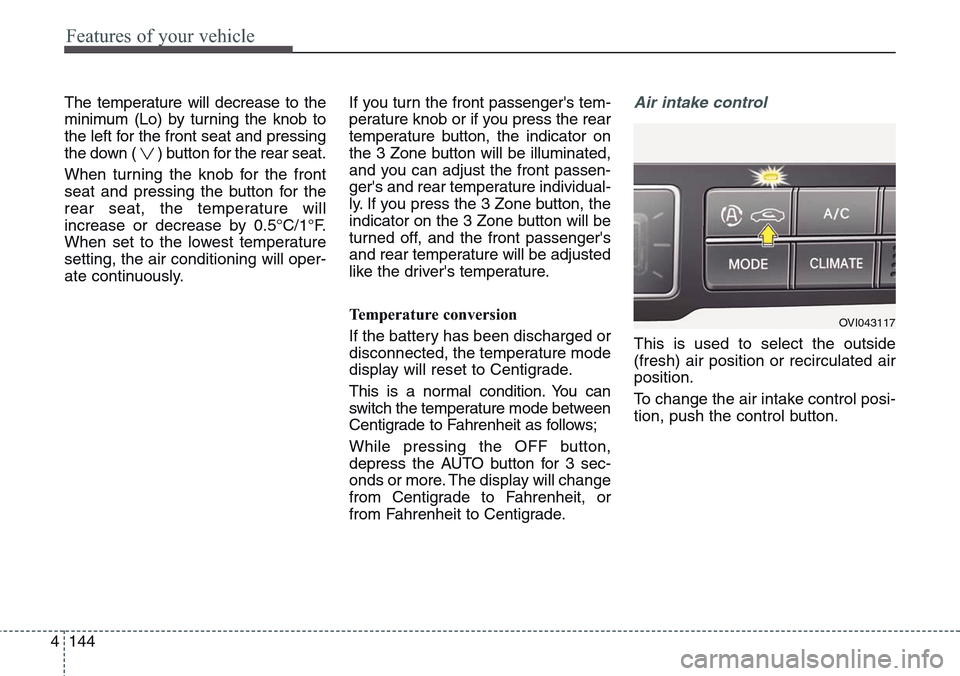
from Fahrenheit to Centigrade.Air intake control
This is used to select the outside
(fresh) air position or recirculated air
position.
To change the air intake control posi-
tion, push the control button.
OVI043117
Page 243 of 483
Features of your vehicle
154 4
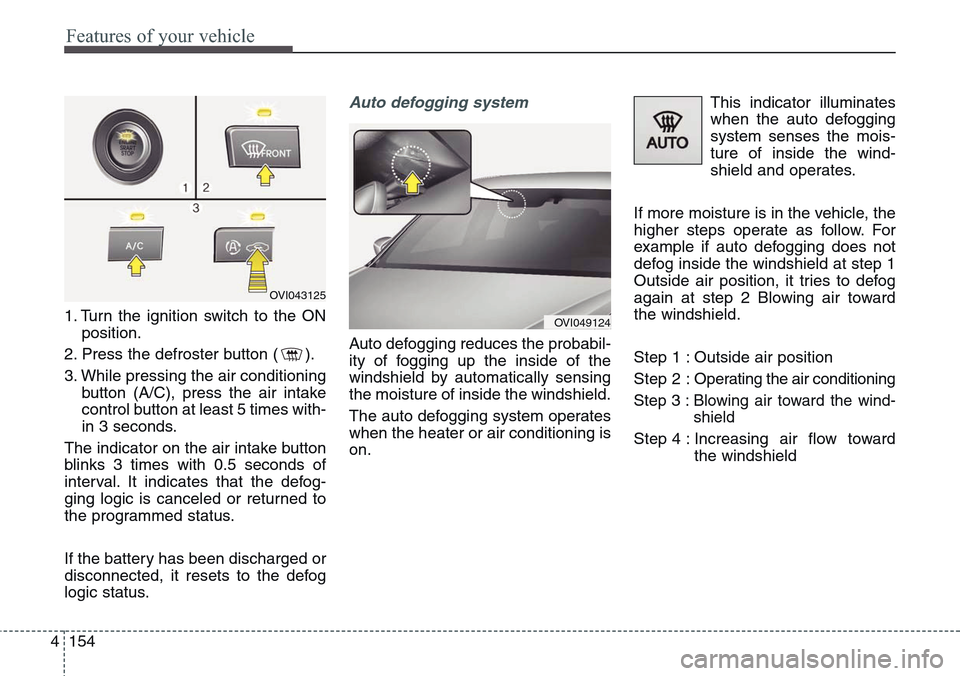
1. Turn the ignition switch to the ON
position.
2. Press the defroster button ( ).
3. While pressing the air conditioning
button (A/C), press the air intake
control button at least 5 times with-
in 3 seconds.
The indicator on the air intake button
blinks 3 times with 0.5 seconds of
interval. It indicates that the defog-
ging logic is canceled or returned to
the programmed status.
If the battery has been discharged or
disconnected, it resets to the defog
logic status.
Auto defogging system
Auto defogging reduces the probabil-
ity of fogging up the inside of the
windshield by automatically sensing
the moisture of inside the windshield.
The auto defogging system operates
when the heater or air conditioning is
on.This indicator illuminates
when the auto defogging
system senses the mois-
ture of inside the wind-
shield and operates.
If more moisture is in the vehicle, the
higher steps operate as follow. For
example if auto defogging does not
defog inside the windshield at step 1
Outside air position, it tries to defog
again at step 2 Blowing air toward
the windshield.
Step 1 : Outside air position
Step 2 :Operating the air conditioning
Step 3 :Blowing air toward the wind-
shield
Step 4 : Increasing air flow toward
the windshield
OVI043125
OVI049124
Page 244 of 483
4155
Features of your vehicle
If your vehicle is equipped with the
auto defogging system, it is automat-
ically activated when the conditions
are met. However, if you would like to
cancel the auto defogging system,
press the front defroster button 4
times within 2 seconds while press-
ing the AUTO button. The front
defroster indicator will blink 3 times
to notify you that the system is can-
celled. To use the auto defogging
system again, follow the procedures
mentioned above.
If the battery has been disconnected
or discharged, it resets to the auto
defogging status.✽NOTICE
• If the A/C off is manually selected
while the auto defogging system is
on, the auto defogging indicator
will blink 3 times to give notice
that manual operation is canceled.
• If the air quality system (AQS) is
selected while the auto defogging
system is operating at the step 1
outside air position, the recirculat-
ed air position may operate when
the outside air is polluted.
CAUTION
Do not remove the sensor cover
located on the upper end of the
passenger side windshield
glass. Damage to system parts
could occur and may not be cov-
ered by your vehicle warranty.
Page 261 of 483
VOLUME (VOL + / - ) (1)
• Press the up button (+) to increase
volume.
• Press the down button (-) to
decrease volume.
SEEK/PRESET ( / ) (2)
If the SEEK/PRESET button is
pressed for 0.8 second or more, it
will work as follows in each mode.
RADIO mode
It will function as the AUTO SEEK
select button. It will SEEK until you
release the button.
MEDIA mode
It will function as the FF/REW button.If the SEEK/PRESET button is
pressed for less than 0.8 second, it
will work as follows in each mode.
RADIO mode
It will function as the PRESET STA-
TION select buttons.
MEDIA mode
It will function as the TRACK UP/
DOWN button.
MODE (3)
Press the MODE button to select
Radio, disc, or AUX.
MUTE (4)
• Press the MUTE button to cancel
the sound.
• Press the MUTE button again to
activate the sound.
✽NOTICE
Detailed information is described in
a separately supplied manual.
4172
Features of your vehicle
Page 314 of 483
553
Driving your vehicle
• The ESC is operating.
• Downshifting to the 2nd gear with
sports mode.
• Operate the EPB switch. Do not
operate the parking brake while
driving except in an emergency sit-
uation.
Each of these actions will cancel
cruise control operation (the SET
indicator light in the instrument clus-
ter will go off), but it will not turn the
system off. If you wish to resume
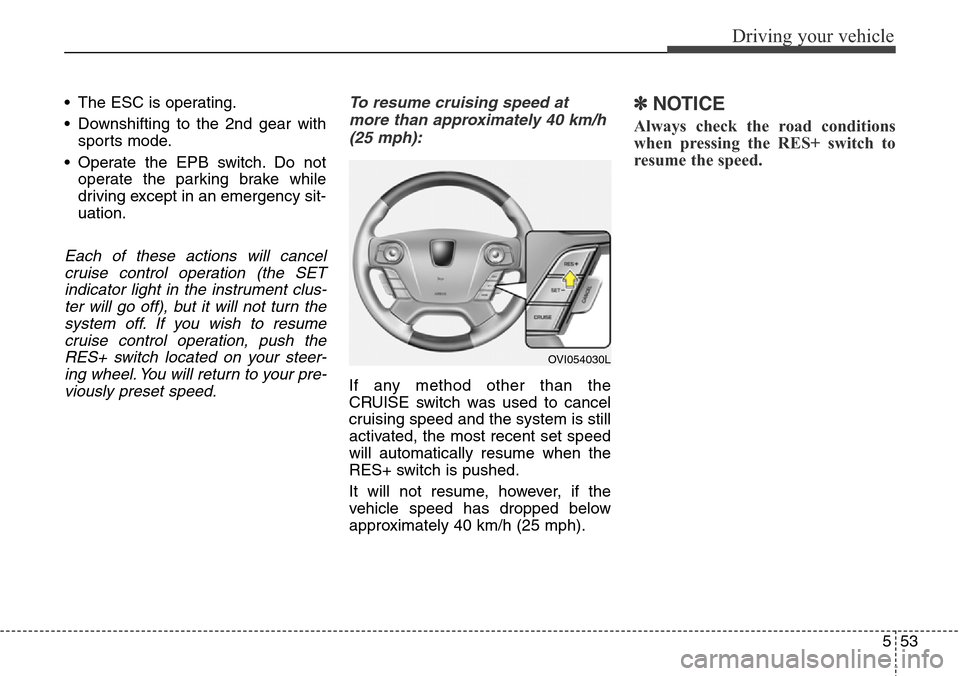
cruise control operation, push the
RES+ switch located on your steer-
ing wheel. You will return to your pre-
viously preset speed.To resume cruising speed at
more than approximately 40 km/h
(25 mph):
If any method other than the
CRUISE switch was used to cancel
cruising speed and the system is still
activated, the most recent set speed
will automatically resume when the
RES+ switch is pushed.
It will not resume, however, if the
vehicle speed has dropped below
approximately 40 km/h (25 mph).
✽NOTICE
Always check the road conditions
when pressing the RES+ switch to
resume the speed.
OVI054030L
Page 390 of 483
Maintenance
Engine compartment . . . . . . . . . . . . . . . . . . . . . . . . 7-3
Maintenance services . . . . . . . . . . . . . . . . . . . . . . . . 7-5
• Owner’s responsibility . . . . . . . . . . . . . . . . . . . . . . . . 7-5
• Owner maintenance precautions . . . . . . . . . . . . . . . . 7-5
Owner maintenance . . . . . . . . . . . . . . . . . . . . . . . . 7-7
Scheduled maintenance service. . . . . . . . . . . . . . . . 7-9
• Normal maintenance schedule . . . . . . . . . . . . . . . . . . 7-10
• Maintenance under severe usage conditions. . . . . . . 7-14
Explanation of scheduled maintenance items . . . 7-16
Engine oil. . . . . . . . . . . . . . . . . . . . . . . . . . . . . . . . . 7-19
• Checking the engine oil level . . . . . . . . . . . . . . . . . . 7-19
• Changing the engine oil and filter . . . . . . . . . . . . . . . 7-20
Engine coolant . . . . . . . . . . . . . . . . . . . . . . . . . . . . 7-21
• Checking the coolant level . . . . . . . . . . . . . . . . . . . . . 7-21
• Changing the coolant . . . . . . . . . . . . . . . . . . . . . . . . . 7-23
Brake fluid . . . . . . . . . . . . . . . . . . . . . . . . . . . . . . . 7-24
• Checking the brake fluid level . . . . . . . . . . . . . . . . . 7-24
Power steering fluid . . . . . . . . . . . . . . . . . . . . . . . . 7-25
• Checking the power steering fluid level . . . . . . . . . 7-25
• Checking the power steering hose . . . . . . . . . . . . . . . 7-26
Washer fluid . . . . . . . . . . . . . . . . . . . . . . . . . . . . . . 7-26
Air cleaner. . . . . . . . . . . . . . . . . . . . . . . . . . . . . . . . 7-27
• Filter replacement . . . . . . . . . . . . . . . . . . . . . . . . . . . 7-27
Climate control air filter . . . . . . . . . . . . . . . . . . . . 7-29
• Filter inspection . . . . . . . . . . . . . . . . . . . . . . . . . . . . . . 7-29
• Filter replacement . . . . . . . . . . . . . . . . . . . . . . . . . . . . 7-29
Wiper blades . . . . . . . . . . . . . . . . . . . . . . . . . . . . . . 7-31
• Blade inspection . . . . . . . . . . . . . . . . . . . . . . . . . . . . . . 7-31
• Blade replacement . . . . . . . . . . . . . . . . . . . . . . . . . . . 7-31
Battery . . . . . . . . . . . . . . . . . . . . . . . . . . . . . . . . . . . 7-35
• For best battery service . . . . . . . . . . . . . . . . . . . . . . . 7-35
• Battery capacity label . . . . . . . . . . . . . . . . . . . . . . . . 7-36
• Battery recharging . . . . . . . . . . . . . . . . . . . . . . . . . . 7-37
• Reset items . . . . . . . . . . . . . . . . . . . . . . . . . . . . . . . . . . 7-38
Tires and wheels . . . . . . . . . . . . . . . . . . . . . . . . . . . 7-39
• Tire care . . . . . . . . . . . . . . . . . . . . . . . . . . . . . . . . . . . 7-39
• Recommended cold tire inflation pressures . . . . . . 7-39
• Checking tire inflation pressure. . . . . . . . . . . . . . . . . 7-40
• Tire rotation . . . . . . . . . . . . . . . . . . . . . . . . . . . . . . . . 7-41
• Wheel alignment and tire balance . . . . . . . . . . . . . . 7-42
• Tire replacement . . . . . . . . . . . . . . . . . . . . . . . . . . . . . 7-42
• Wheel replacement . . . . . . . . . . . . . . . . . . . . . . . . . . . 7-44
• Tire traction . . . . . . . . . . . . . . . . . . . . . . . . . . . . . . . . . 7-44
• Tire maintenance . . . . . . . . . . . . . . . . . . . . . . . . . . . . 7-44
• Tire sidewall labeling . . . . . . . . . . . . . . . . . . . . . . . . . 7-44
• Low aspect ratio tire . . . . . . . . . . . . . . . . . . . . . . . . . . 7-48
7
Page 427 of 483
Maintenance
38 7
Reset items
Items should be reset after the bat-
tery has been discharged or the bat-
tery has been disconnected.
• Power trunk (See section 4)
• Sunroof (See section 4)
• Trip computer (See section 4)
• Climate control system
(See section 4)
• Clock (See DIS manual)
• Audio (See DIS manual)
• Auto up/down window
(See section 4)
• Driver position memory system
(See section 4)
• Rear door window curtains
(See section 4)
CAUTION
• Keep the battery away from
water or any liquid.
• The battery is in the trunk, so
you should be careful when
you load a container filled with
liquid into the trunk.
• For your safety, use the
authenticity by approved
authorized HYUNDAI dealer,
when you replace the battery.
WARNING
• Before performing mainte-
nance or recharging the bat-
tery, turn off all accessories
and stop the engine.
• The negative battery cable
must be removed first and
installed last when the battery
is disconnected.
• Operation related to the bat-
tery should be done in an
authorized HYUNDAI dealer.
Page 431 of 483
Maintenance
42 7
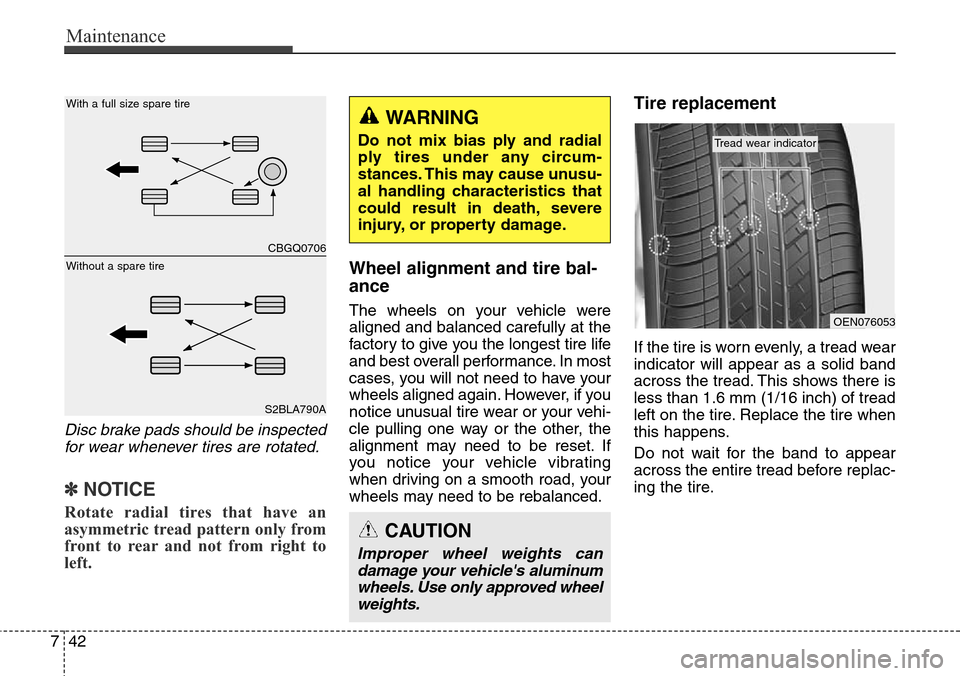
Disc brake pads should be inspected
for wear whenever tires are rotated.
✽NOTICE
Rotate radial tires that have an
asymmetric tread pattern only from
front to rear and not from right to
left.
Wheel alignment and tire bal-
ance
The wheels on your vehicle were
aligned and balanced carefully at the
factory to give you the longest tire life
and best overall performance. In most
cases, you will not need to have your
wheels aligned again. However, if you
notice unusual tire wear or your vehi-
cle pulling one way or the other, the
alignment may need to be reset. If
you notice your vehicle vibrating
when driving on a smooth road, your
wheels may need to be rebalanced.
Tire replacement
If the tire is worn evenly, a tread wear
indicator will appear as a solid band
across the tread. This shows there is
less than 1.6 mm (1/16 inch) of tread
left on the tire. Replace the tire when
this happens.
Do not wait for the band to appear
across the entire tread before replac-
ing the tire.
WARNING
Do not mix bias ply and radial
ply tires under any circum-
stances. This may cause unusu-
al handling characteristics that
could result in death, severe
injury, or property damage.
CAUTION
Improper wheel weights can
damage your vehicle's aluminum
wheels. Use only approved wheel
weights.
OEN076053
Tread wear indicator
CBGQ0706
S2BLA790A
Without a spare tireWith a full size spare tire