steering Hyundai Equus 2015 Owner's Guide
[x] Cancel search | Manufacturer: HYUNDAI, Model Year: 2015, Model line: Equus, Model: Hyundai Equus 2015Pages: 483, PDF Size: 13.26 MB
Page 166 of 483
477
Features of your vehicle
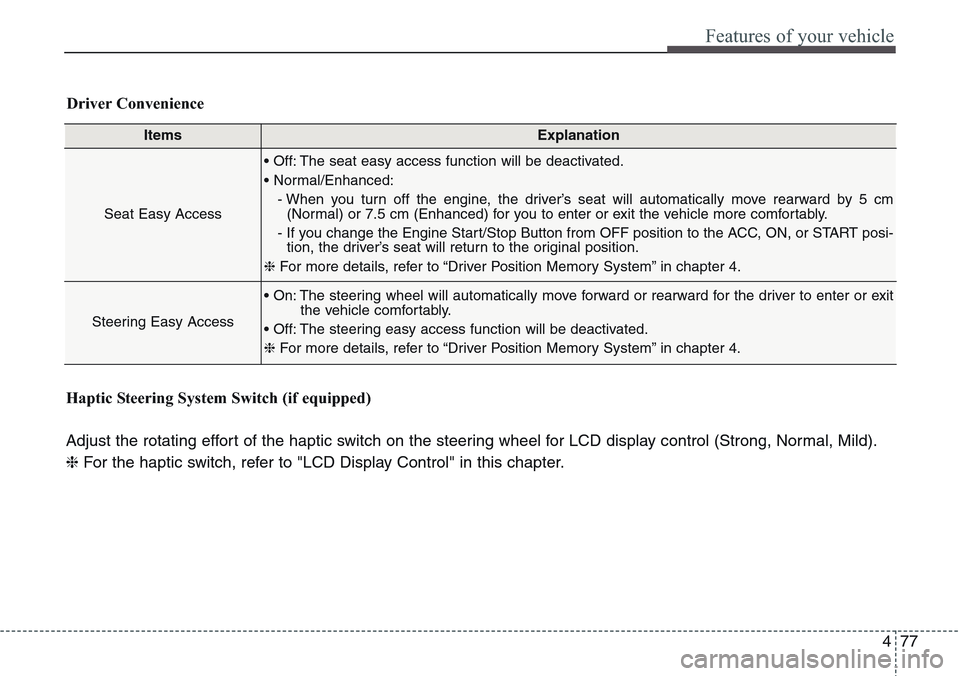
ItemsExplanation
Seat Easy Access
• Off: The seat easy access function will be deactivated.
• Normal/Enhanced:
- When you turn off the engine, the driver’s seat will automatically move rearward by 5 cm
(Normal) or 7.5 cm (Enhanced) for you to enter or exit the vehicle more comfortably.
- If you change the Engine Start/Stop Button from OFF position to the ACC, ON, or START posi-
tion, the driver’s seat will return to the original position.
❈For more details, refer to “Driver Position Memory System” in chapter 4.
Steering Easy Access
• On: The steering wheel will automatically move forward or rearward for the driver to enter or exit
the vehicle comfortably.
• Off: The steering easy access function will be deactivated.
❈For more details, refer to “Driver Position Memory System” in chapter 4.
Driver Convenience
Haptic Steering System Switch (if equipped)
Adjust the rotating effort of the haptic switch on the steering wheel for LCD display control (Strong, Normal, Mild).
❈For the haptic switch, refer to "LCD Display Control" in this chapter.
Page 171 of 483
Features of your vehicle
82 4
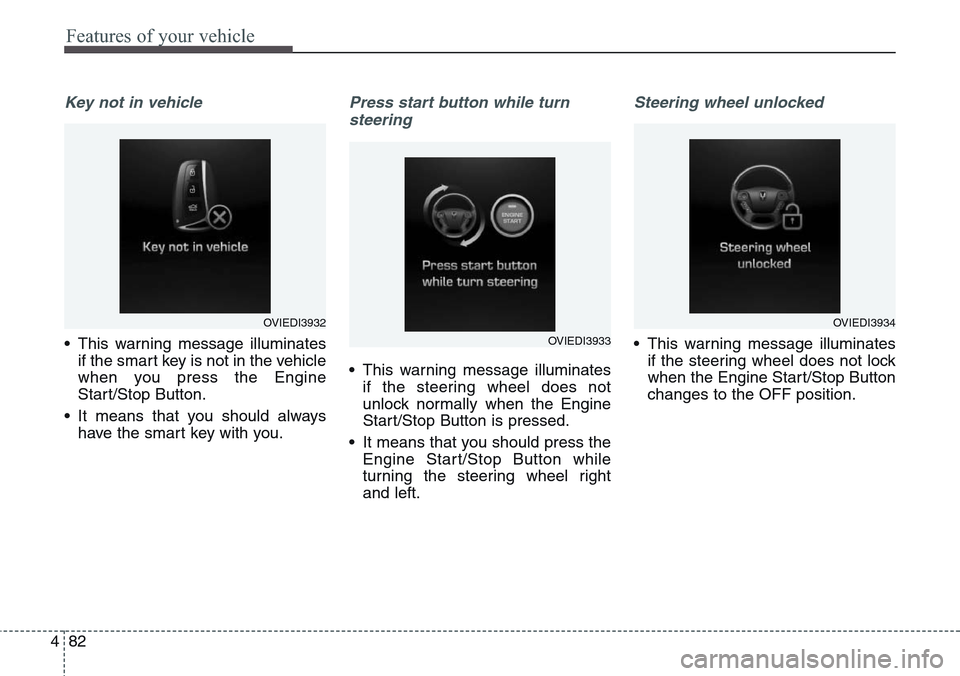
Key not in vehicle
• This warning message illuminates
if the smart key is not in the vehicle
when you press the Engine
Start/Stop Button.
• It means that you should always
have the smart key with you.
Press start button while turn
steering
• This warning message illuminates
if the steering wheel does not
unlock normally when the Engine
Start/Stop Button is pressed.
• It means that you should press the
Engine Start/Stop Button while
turning the steering wheel right
and left.
Steering wheel unlocked
• This warning message illuminates
if the steering wheel does not lock
when the Engine Start/Stop Button
changes to the OFF position.
OVIEDI3932
OVIEDI3933
OVIEDI3934
Page 172 of 483
483
Features of your vehicle
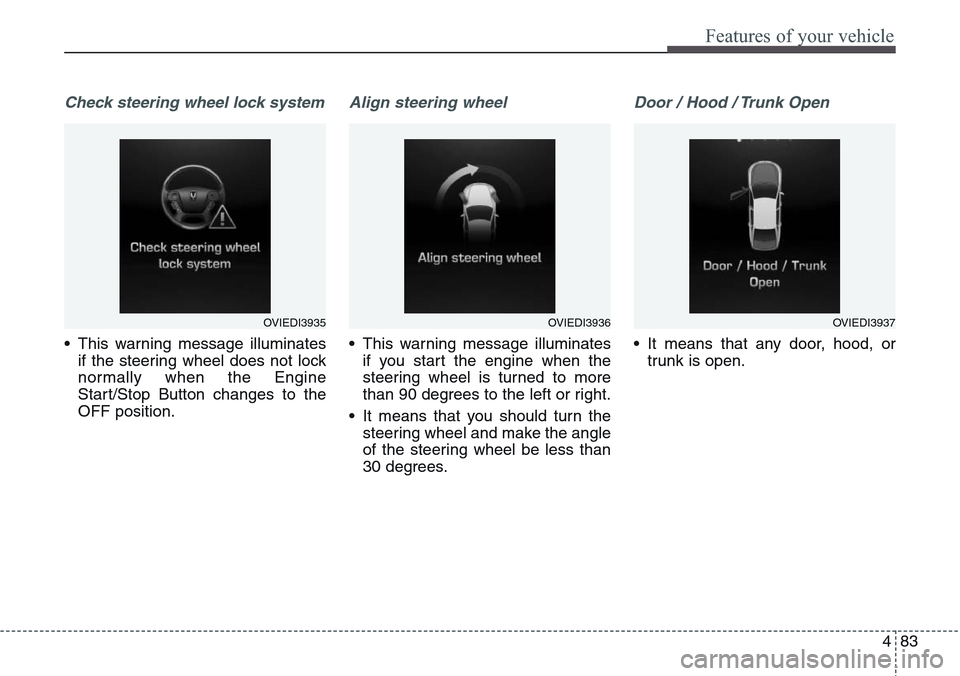
Check steering wheel lock system
• This warning message illuminates
if the steering wheel does not lock
normally when the Engine
Start/Stop Button changes to the
OFF position.
Align steering wheel
• This warning message illuminates
if you start the engine when the
steering wheel is turned to more
than 90 degrees to the left or right.
• It means that you should turn the
steering wheel and make the angle
of the steering wheel be less than
30 degrees.
Door / Hood / Trunk Open
• It means that any door, hood, or
trunk is open.
OVIEDI3935OVIEDI3936OVIEDI3937
Page 180 of 483
491
Features of your vehicle
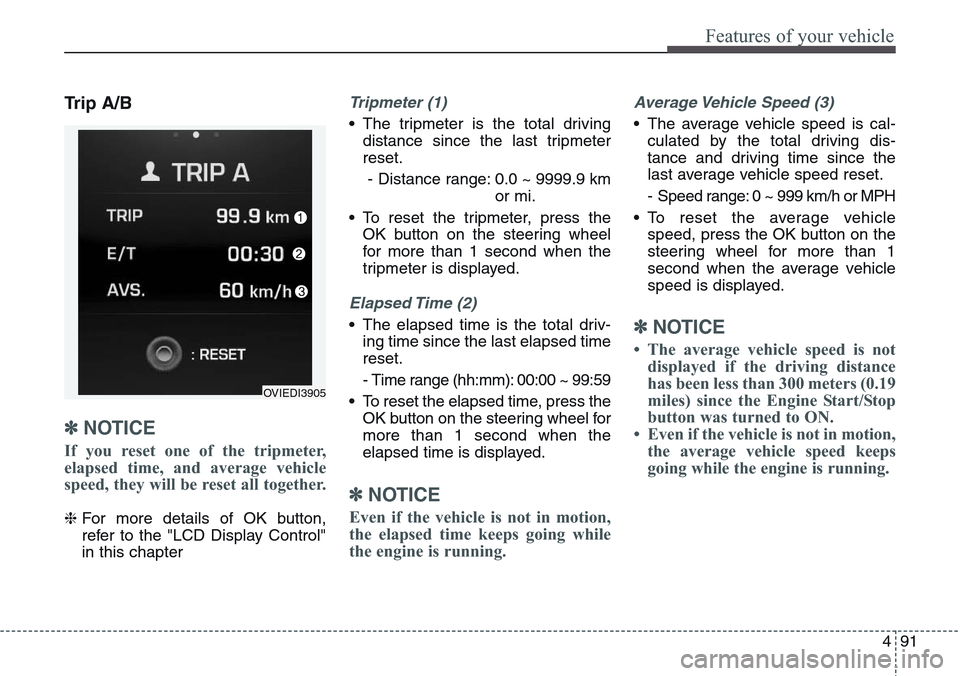
Trip A/B
✽NOTICE
If you reset one of the tripmeter,
elapsed time, and average vehicle
speed, they will be reset all together.
❈For more details of OK button,
refer to the "LCD Display Control"
in this chapter
Tripmeter (1)
• The tripmeter is the total driving
distance since the last tripmeter
reset.
- Distance range: 0.0 ~ 9999.9 km
or mi.
• To reset the tripmeter, press the
OK button on the steering wheel
for more than 1 second when the
tripmeter is displayed.
Elapsed Time (2)
• The elapsed time is the total driv-
ing time since the last elapsed time
reset.
- Time range (hh:mm): 00:00 ~ 99:59
• To reset the elapsed time, press the
OK button on the steering wheel for
more than 1 second when the
elapsed time is displayed.
✽NOTICE
Even if the vehicle is not in motion,
the elapsed time keeps going while
the engine is running.
Average Vehicle Speed (3)
• The average vehicle speed is cal-
culated by the total driving dis-
tance and driving time since the
last average vehicle speed reset.
- Speed range: 0 ~ 999 km/h or MPH
• To reset the average vehicle
speed, press the OK button on the
steering wheel for more than 1
second when the average vehicle
speed is displayed.
✽NOTICE
• The average vehicle speed is not
displayed if the driving distance
has been less than 300 meters (0.19
miles) since the Engine Start/Stop
button was turned to ON.
• Even if the vehicle is not in motion,
the average vehicle speed keeps
going while the engine is running.
OVIEDI3905
Page 182 of 483
493
Features of your vehicle
Manual reset
To clear the average fuel economy
manually, press the OK button on the
steering wheel for more than 1 sec-
ond when the average fuel economy
is displayed.
❈For more details of OK button,
refer to the "LCD Display Control"
in this chapterAutomatic reset
To make the average fuel economy
be reset automatically whenever refu-
eling, select the "Auto Reset" mode in
User Setting menu of the LCD display
(Refer to "LCD Display").
Under "Auto Reset" mode, the aver-
age fuel economy will be cleared to
zero (---) when the vehicle speed
exceeds 1 km/h after refueling more
than 6 liters (1.6 gallons).
✽NOTICE
The average fuel economy is not dis-
played for more accurate calculation
if the vehicle does not drive more
than 300 meters (0.19 miles) since
the Engine Start/Stop button is
turned to ON.
Page 186 of 483
497
Features of your vehicle
✽NOTICE- Electronic Brake
force Distribution
(EBD) System
Warning Light
When the ABS Warning Light is on
or both ABS and Parking Brake &
Brake Fluid Warning Lights are on,
the speedometer, odometer, or trip-
meter may not work. Also, the EPS
Warning Light may illuminate and
the steering effort may increase or
decrease.
In this case, we recommend you
have the vehicle inspected by an
authorized HYUNDAI dealer as
soon as possible.
Malfunction Indicator
Lamp (MIL)
This warning light illuminates:
• Once you set the ignition switch or
Engine Start/Stop Button to the ON
position.
- It remains on until the engine is
started.
• When there is a malfunction with
the emission control system.
In this case, we recommend that
you have the vehicle inspected by
an authorized HYUNDAI dealer.
CAUTION - Malfunction
Indicator
Lamp (MIL)
Driving with the Malfunction
Indicator Lamp (MIL) on may
cause damage to the emission
control systems which could
effect drivability and/or fuel
economy.
CAUTION - Gasoline
Engine
If the Malfunction Indicator
Lamp (MIL) illuminates, poten-
tial catalytic converter damage
is possible which could result in
loss of engine power.
In this case, we recommend that
you have the vehicle inspected
by an authorized HYUNDAI deal-
er as soon as possible.
Page 207 of 483
Features of your vehicle
118 4
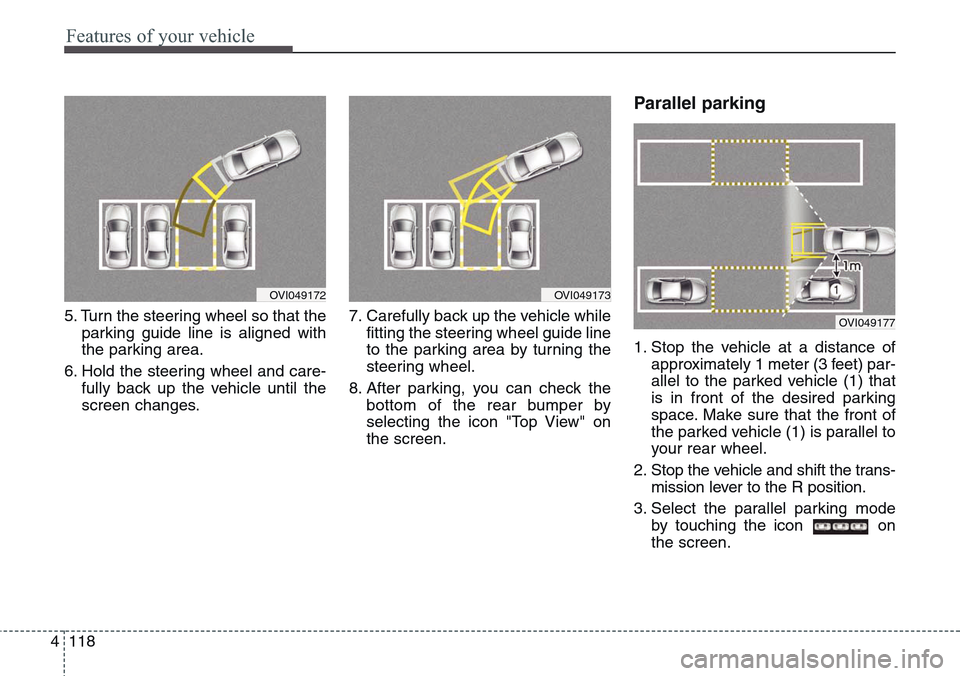
5. Turn the steering wheel so that the
parking guide line is aligned with
the parking area.
6. Hold the steering wheel and care-
fully back up the vehicle until the
screen changes.7. Carefully back up the vehicle while
fitting the steering wheel guide line
to the parking area by turning the
steering wheel.
8. After parking, you can check the
bottom of the rear bumper by
selecting the icon "Top View" on
the screen.
Parallel parking
1. Stop the vehicle at a distance of
approximately 1 meter (3 feet) par-
allel to the parked vehicle (1) that
is in front of the desired parking
space. Make sure that the front of
the parked vehicle (1) is parallel to
your rear wheel.
2. Stop the vehicle and shift the trans-
mission lever to the R position.
3. Select the parallel parking mode
by touching the icon on
the screen.
OVI049173OVI049172
OVI049177
Page 208 of 483
4119
Features of your vehicle
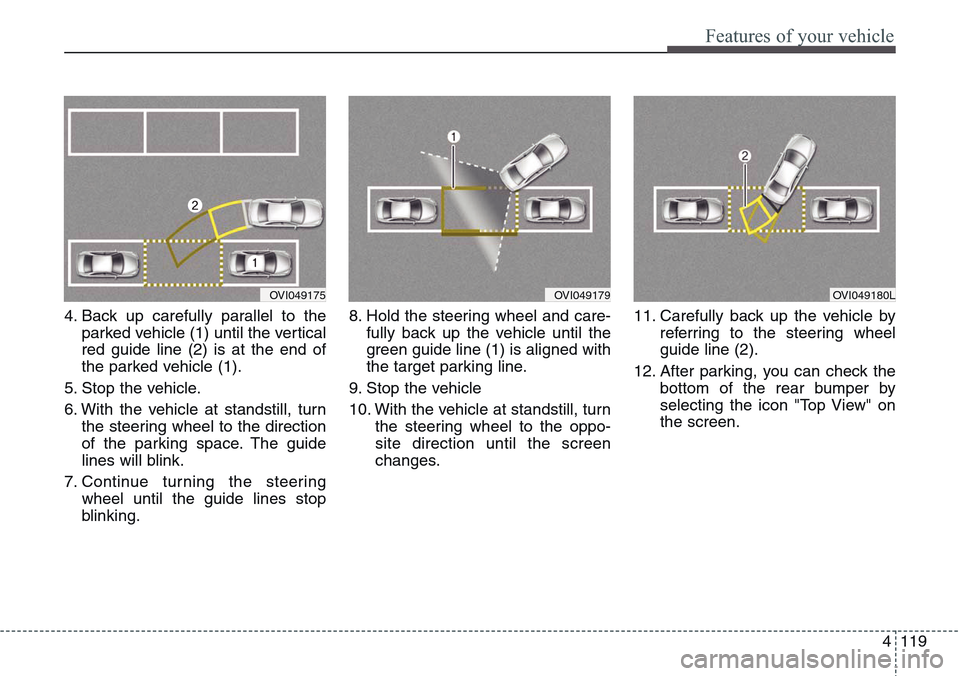
4. Back up carefully parallel to the
parked vehicle (1) until the vertical
red guide line (2) is at the end of
the parked vehicle (1).
5. Stop the vehicle.
6. With the vehicle at standstill, turn
the steering wheel to the direction
of the parking space. The guide
lines will blink.
7. Continue turning the steering
wheel until the guide lines stop
blinking.8. Hold the steering wheel and care-
fully back up the vehicle until the
green guide line (1) is aligned with
the target parking line.
9. Stop the vehicle
10. With the vehicle at standstill, turn
the steering wheel to the oppo-
site direction until the screen
changes.11. Carefully back up the vehicle by
referring to the steering wheel
guide line (2).
12. After parking, you can check the
bottom of the rear bumper by
selecting the icon "Top View" on
the screen.
OVI049175OVI049179OVI049180L
Page 212 of 483
4123
Features of your vehicle
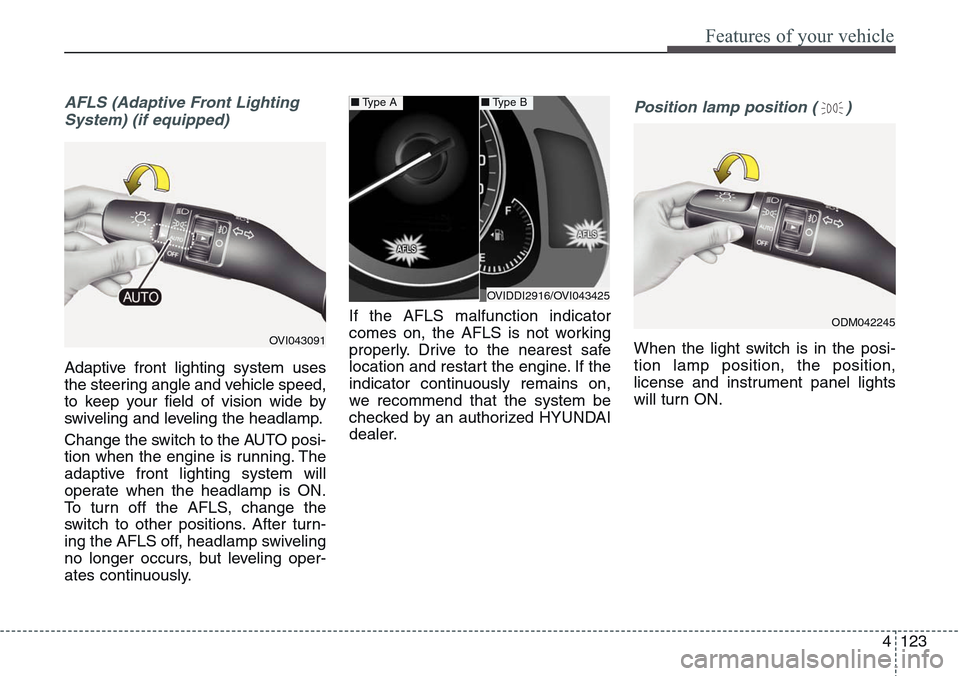
AFLS (Adaptive Front Lighting
System) (if equipped)
Adaptive front lighting system uses
the steering angle and vehicle speed,
to keep your field of vision wide by
swiveling and leveling the headlamp.
Change the switch to the AUTO posi-
tion when the engine is running. The
adaptive front lighting system will
operate when the headlamp is ON.
To turn off the AFLS, change the
switch to other positions. After turn-
ing the AFLS off, headlamp swiveling
no longer occurs, but leveling oper-
ates continuously.If the AFLS malfunction indicator
comes on, the AFLS is not working
properly. Drive to the nearest safe
location and restart the engine. If the
indicator continuously remains on,
we recommend that the system be
checked by an authorized HYUNDAI
dealer.
Position lamp position ( )
When the light switch is in the posi-
tion lamp position, the position,
license and instrument panel lights
will turn ON.OVI043091
OVIDDI2916/OVI043425
■Type A■Type B
ODM042245
Page 255 of 483
Features of your vehicle
166 4
Clock settings
With Navigation model
- GPS Time check
The clock is automatically updated
through the GPS time.
- GPS Time non-check
The clock can be manually adjusted.
1. Select the "System Settings" in the
"INFO" screen.
2. Select the "Clock Settings".
3. Select the "Time Settings" by
rotating the controller on the cen-
ter console panel.Without Navigation model
The clock can be manually adjusted.
1. Select the "System Settings" in the
"INFO" screen.
2. Select the "Clock Settings".
3. Select the "Time Settings" by
rotating the controller on the cen-
ter console panel.
For more details, please refer to the
Audio or Navigation Manual that was
supplied with your vehicle.
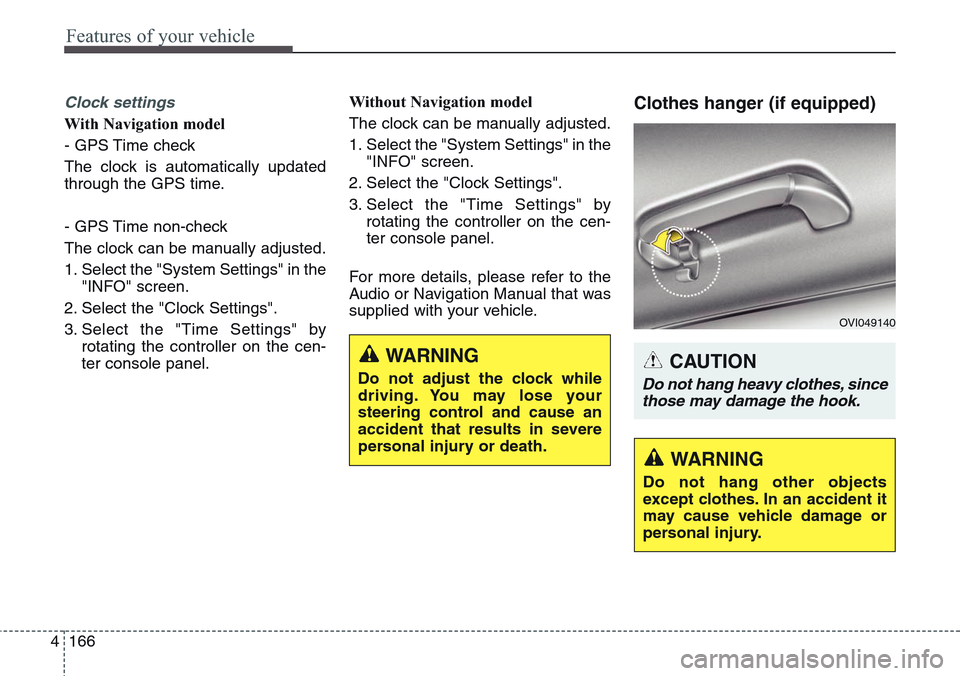
Clothes hanger (if equipped)
WARNING
Do not adjust the clock while
driving. You may lose your
steering control and cause an
accident that results in severe
personal injury or death.CAUTION
Do not hang heavy clothes, since
those may damage the hook.
OVI049140
WARNING
Do not hang other objects
except clothes. In an accident it
may cause vehicle damage or
personal injury.