warning Hyundai Equus 2015 Workshop Manual
[x] Cancel search | Manufacturer: HYUNDAI, Model Year: 2015, Model line: Equus, Model: Hyundai Equus 2015Pages: 483, PDF Size: 13.26 MB
Page 90 of 483
Features of your vehicle
Smart key . . . . . . . . . . . . . . . . . . . . . . . . . . . . . . . . . 4-4
• Smart key function . . . . . . . . . . . . . . . . . . . . . . . . . . . . 4-4
• Buttons on the smart key . . . . . . . . . . . . . . . . . . . . . . . 4-7
• Restrictions in handling keys . . . . . . . . . . . . . . . . . . . . 4-8
• Smart key precautions . . . . . . . . . . . . . . . . . . . . . . . . . 4-9
• Immobilizer system . . . . . . . . . . . . . . . . . . . . . . . . . . . 4-10
• Battery replacement . . . . . . . . . . . . . . . . . . . . . . . . . . 4-11
Theft-alarm system . . . . . . . . . . . . . . . . . . . . . . . . 4-13
Door locks . . . . . . . . . . . . . . . . . . . . . . . . . . . . . . . . 4-16
• From outside . . . . . . . . . . . . . . . . . . . . . . . . . . . . . . . . 4-16
• Power door latch . . . . . . . . . . . . . . . . . . . . . . . . . . . . . 4-17
• From inside . . . . . . . . . . . . . . . . . . . . . . . . . . . . . . . . . 4-17
• Child-protector rear door lock . . . . . . . . . . . . . . . . . 4-19
Trunk . . . . . . . . . . . . . . . . . . . . . . . . . . . . . . . . . . . . 4-20
• Non-powered trunk . . . . . . . . . . . . . . . . . . . . . . . . . . . 4-20
• Power trunk . . . . . . . . . . . . . . . . . . . . . . . . . . . . . . . . . 4-21
• Emergency trunk safety release . . . . . . . . . . . . . . . . . 4-26
Smart trunk . . . . . . . . . . . . . . . . . . . . . . . . . . . . . . 4-28
Windows . . . . . . . . . . . . . . . . . . . . . . . . . . . . . . . . . 4-32
Hood. . . . . . . . . . . . . . . . . . . . . . . . . . . . . . . . . . . . . 4-37
Fuel filler lid . . . . . . . . . . . . . . . . . . . . . . . . . . . . . . 4-39
• Emergency fuel filler lid release. . . . . . . . . . . . . . . . . 4-41
Sunroof . . . . . . . . . . . . . . . . . . . . . . . . . . . . . . . . . . 4-42
• Sliding the sunroof . . . . . . . . . . . . . . . . . . . . . . . . . . . 4-43
• Tilting the sunroof . . . . . . . . . . . . . . . . . . . . . . . . . . . . 4-43• Sunshade . . . . . . . . . . . . . . . . . . . . . . . . . . . . . . . . . . . 4-44
• Resetting the sunroof . . . . . . . . . . . . . . . . . . . . . . . . . 4-45
Driver position memory system . . . . . . . . . . . . . . 4-46
Steering wheel . . . . . . . . . . . . . . . . . . . . . . . . . . . . . 4-48
• Power steering . . . . . . . . . . . . . . . . . . . . . . . . . . . . . . . 4-48
• Tilt/Telescopic steering . . . . . . . . . . . . . . . . . . . . . . . . 4-49
• Heated steering wheel . . . . . . . . . . . . . . . . . . . . . . . . . 4-49
• Horn . . . . . . . . . . . . . . . . . . . . . . . . . . . . . . . . . . . . . . . 4-50
Mirrors . . . . . . . . . . . . . . . . . . . . . . . . . . . . . . . . . . 4-51
• Inside rearview mirror . . . . . . . . . . . . . . . . . . . . . . . . 4-51
• Outside rearview mirror . . . . . . . . . . . . . . . . . . . . . . . 4-55
Instrument cluster . . . . . . . . . . . . . . . . . . . . . . . . . 4-59
• Instrument cluster control . . . . . . . . . . . . . . . . . . . . . 4-60
• LCD display control . . . . . . . . . . . . . . . . . . . . . . . . . . 4-61
• Gauges . . . . . . . . . . . . . . . . . . . . . . . . . . . . . . . . . . . . . 4-62
LCD display . . . . . . . . . . . . . . . . . . . . . . . . . . . . . . 4-67
• LCD modes. . . . . . . . . . . . . . . . . . . . . . . . . . . . . . . . . . 4-67
• Trip computer mode . . . . . . . . . . . . . . . . . . . . . . . . . . 4-68
• ASCC/LDWS mode . . . . . . . . . . . . . . . . . . . . . . . . . . . 4-68
• A/V mode . . . . . . . . . . . . . . . . . . . . . . . . . . . . . . . . . . . 4-68
• Turn by turn mode . . . . . . . . . . . . . . . . . . . . . . . . . . . 4-69
• Information mode . . . . . . . . . . . . . . . . . . . . . . . . . . . . 4-69
• User settings mode. . . . . . . . . . . . . . . . . . . . . . . . . . . . 4-72
• Warning messages . . . . . . . . . . . . . . . . . . . . . . . . . . . . 4-79
4
Page 91 of 483
Trip computer . . . . . . . . . . . . . . . . . . . . . . . . . . . . . 4-90
• Overview. . . . . . . . . . . . . . . . . . . . . . . . . . . . . . . . . . . . 4-90
• Trip A/B . . . . . . . . . . . . . . . . . . . . . . . . . . . . . . . . . . . . 4-91
• Fuel economy . . . . . . . . . . . . . . . . . . . . . . . . . . . . . . . . 4-92
Warning and indicator lights . . . . . . . . . . . . . . . . 4-94
• Warning lights . . . . . . . . . . . . . . . . . . . . . . . . . . . . . . . 4-94
• Indicator lights. . . . . . . . . . . . . . . . . . . . . . . . . . . . . . 4-103
Head up display (HUD) . . . . . . . . . . . . . . . . . . . . 4-108
Parking assist system . . . . . . . . . . . . . . . . . . . . . . 4-111
• Operation . . . . . . . . . . . . . . . . . . . . . . . . . . . . . . . . . . 4-111
• Non-operational conditions . . . . . . . . . . . . . . . . . . . 4-113
• Self-diagnosis . . . . . . . . . . . . . . . . . . . . . . . . . . . . . . . 4-115
Rearview camera . . . . . . . . . . . . . . . . . . . . . . . . . 4-116
Parking guide system . . . . . . . . . . . . . . . . . . . . . . 4-117
Around view monitoring system . . . . . . . . . . . . . 4-120
Lighting . . . . . . . . . . . . . . . . . . . . . . . . . . . . . . . . . 4-121
• Battery saver function. . . . . . . . . . . . . . . . . . . . . . . . 4-121
• Headlamp escort function. . . . . . . . . . . . . . . . . . . . . 4-121
• Lighting control . . . . . . . . . . . . . . . . . . . . . . . . . . . . . 4-122
• High beam operation. . . . . . . . . . . . . . . . . . . . . . . . . 4-124
• Turn signals and lane change signals . . . . . . . . . . . 4-125
• Front fog light . . . . . . . . . . . . . . . . . . . . . . . . . . . . . . 4-126
• Rear fog light . . . . . . . . . . . . . . . . . . . . . . . . . . . . . . . 4-126
• Daytime running light . . . . . . . . . . . . . . . . . . . . . . . . 4-127
• Headlamp leveling device . . . . . . . . . . . . . . . . . . . . . 4-127
• Headlamp washer . . . . . . . . . . . . . . . . . . . . . . . . . . . 4-127
Wipers and washers . . . . . . . . . . . . . . . . . . . . . . . 4-128
• Windshield wipers . . . . . . . . . . . . . . . . . . . . . . . . . . . 4-128
• Windshield washers. . . . . . . . . . . . . . . . . . . . . . . . . . 4-129
Interior light . . . . . . . . . . . . . . . . . . . . . . . . . . . . . 4-131
• Front . . . . . . . . . . . . . . . . . . . . . . . . . . . . . . . . . . . . . . 4-131
• Rear . . . . . . . . . . . . . . . . . . . . . . . . . . . . . . . . . . . . . . 4-132
• Trunk room lamp . . . . . . . . . . . . . . . . . . . . . . . . . . . 4-133
• Door courtesy lamp . . . . . . . . . . . . . . . . . . . . . . . . . . 4-133
• Glove box lamp . . . . . . . . . . . . . . . . . . . . . . . . . . . . . 4-133
• Vanity mirror lamp . . . . . . . . . . . . . . . . . . . . . . . . . . 4-134
Welcome system . . . . . . . . . . . . . . . . . . . . . . . . . . 4-135
• Puddle lamp . . . . . . . . . . . . . . . . . . . . . . . . . . . . . . . . 4-135
• Headlight . . . . . . . . . . . . . . . . . . . . . . . . . . . . . . . . . . 4-135
• Interior light. . . . . . . . . . . . . . . . . . . . . . . . . . . . . . . . 4-135
Defroster . . . . . . . . . . . . . . . . . . . . . . . . . . . . . . . . 4-136
Automatic climate control system. . . . . . . . . . . . 4-137
Windshield defrosting and defogging . . . . . . . . . 4-152
Storage compartments . . . . . . . . . . . . . . . . . . . . . 4-156
• Center console storage . . . . . . . . . . . . . . . . . . . . . . . 4-156
• Glove box . . . . . . . . . . . . . . . . . . . . . . . . . . . . . . . . . . 4-156
• Sunglass holder . . . . . . . . . . . . . . . . . . . . . . . . . . . . . 4-157
• Rear console storage . . . . . . . . . . . . . . . . . . . . . . . . . 4-158
• Cool and warm box . . . . . . . . . . . . . . . . . . . . . . . . . . 4-158
4
Page 93 of 483
Features of your vehicle
4 4
Record your key number
The key code number
is stamped or printed
on the key code tag
attached to the key
set. Should you lose your keys, we
recommend that you contact an
authorized HYUNDAI dealer.
Remove the key code tag and store it
in a safe place. Also, record the key
code number and keep it in a safe
and handy place, but not in the vehi-
cle.
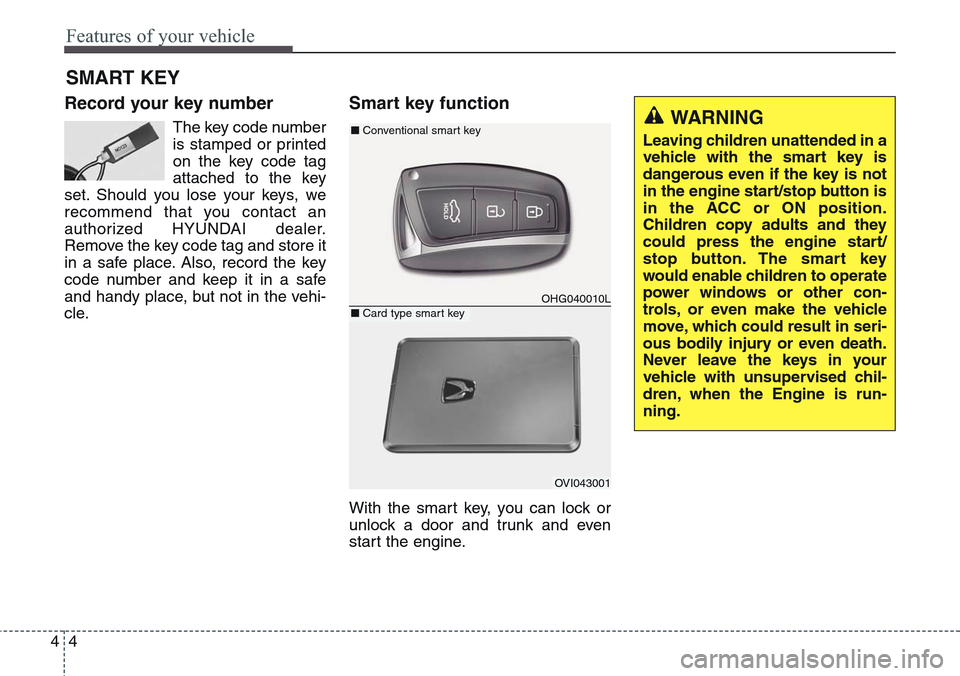
Smart key function
With the smart key, you can lock or
unlock a door and trunk and even
start the engine.
SMART KEY
OHG040010L
■Conventional smart key
OVI043001
■Card type smart key
WARNING
Leaving children unattended in a
vehicle with the smart key is
dangerous even if the key is not
in the engine start/stop button is
in the ACC or ON position.
Children copy adults and they
could press the engine start/
stop button. The smart key
would enable children to operate
power windows or other con-
trols, or even make the vehicle
move, which could result in seri-
ous bodily injury or even death.
Never leave the keys in your
vehicle with unsupervised chil-
dren, when the Engine is run-
ning.
Page 94 of 483
45
Features of your vehicle
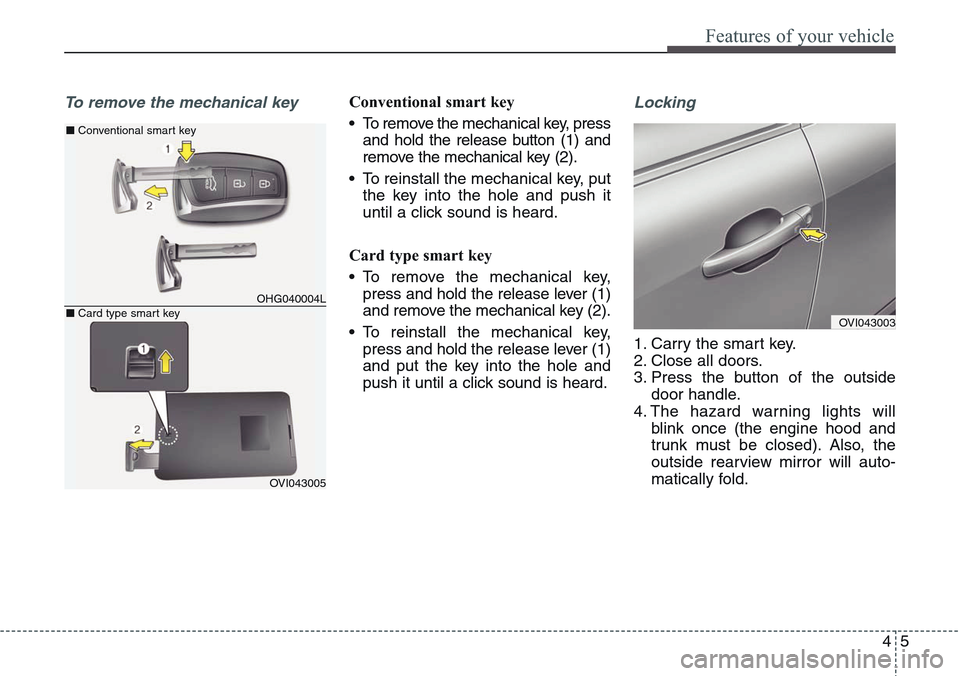
To remove the mechanical keyConventional smart key
• To remove the mechanical key, press
and hold the release button (1) and
remove the mechanical key (2).
• To reinstall the mechanical key, put
the key into the hole and push it
until a click sound is heard.
Card type smart key
• To remove the mechanical key,
press and hold the release lever (1)
and remove the mechanical key (2).
• To reinstall the mechanical key,
press and hold the release lever (1)
and put the key into the hole and
push it until a click sound is heard.Locking
1. Carry the smart key.
2. Close all doors.
3. Press the button of the outside
door handle.
4. The hazard warning lights will
blink once (the engine hood and
trunk must be closed). Also, the
outside rearview mirror will auto-
matically fold.
OHG040004L
■Conventional smart key
OVI043005
■Card type smart keyOVI043003
Page 95 of 483
Features of your vehicle
6 4
✽NOTICE
• The button will only operate when
the smart key is within 0.7 m (28
in.) from the outside door handle.
• Even though you press the outside
door handle button, the doors will
not lock and the chime will sound
for 3 seconds if any of following
occur:
- The smart key is in the vehicle.
- The engine start/stop button is
in ACC or ON position.
- Any door except the trunk is
opened.
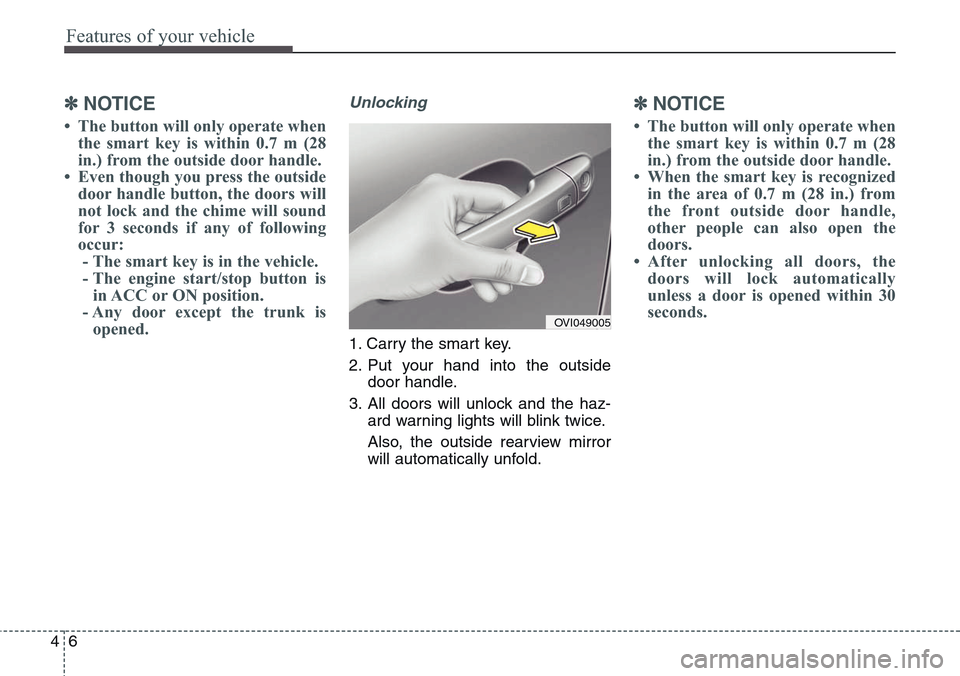
Unlocking
1. Carry the smart key.
2. Put your hand into the outside
door handle.
3. All doors will unlock and the haz-
ard warning lights will blink twice.
Also, the outside rearview mirror
will automatically unfold.
✽NOTICE
• The button will only operate when
the smart key is within 0.7 m (28
in.) from the outside door handle.
• When the smart key is recognized
in the area of 0.7 m (28 in.) from
the front outside door handle,
other people can also open the
doors.
• After unlocking all doors, the
doors will lock automatically
unless a door is opened within 30
seconds.
OVI049005
Page 96 of 483
47
Features of your vehicle
Trunk unlocking
Power trunk
1. Carry the smart key.
2. Press the trunk handle switch.
3. The trunk will unlock and open.
Non-powered trunk
1. Carry the smart key.
2. Press the trunk handle switch.
3. The trunk will unlock.
✽NOTICE
• Once the trunk is opened and then
closed, the trunk will lock auto-
matically.
• The button will only operate when
the smart key is within 0.7 m (28
in.) from the trunk handle.
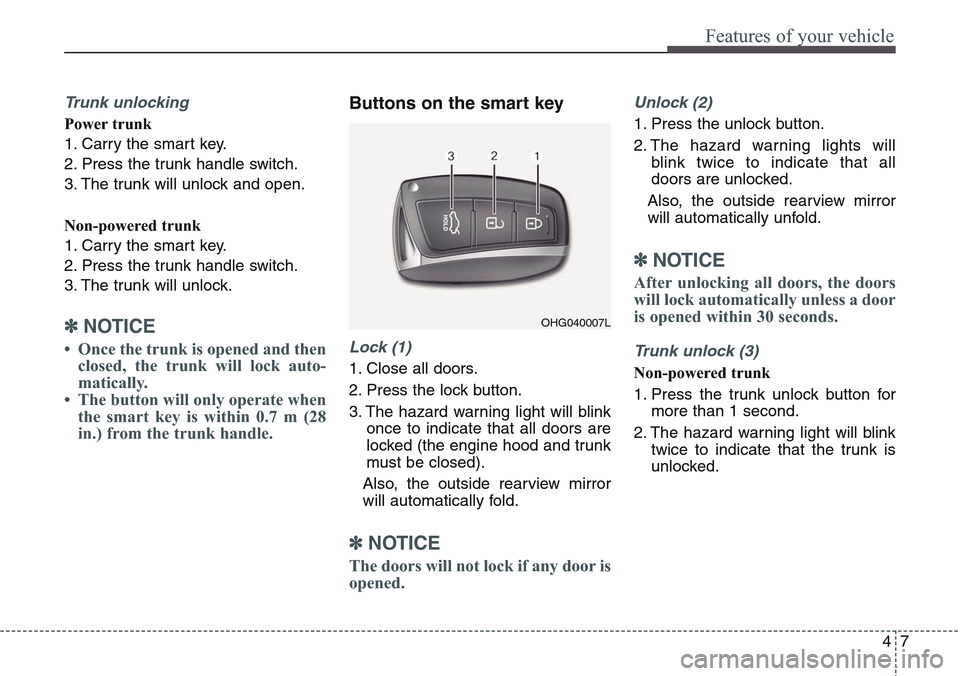
Buttons on the smart key
Lock (1)
1. Close all doors.
2. Press the lock button.
3. The hazard warning light will blink
once to indicate that all doors are
locked (the engine hood and trunk
must be closed).
Also, the outside rearview mirror
will automatically fold.
✽NOTICE
The doors will not lock if any door is
opened.
Unlock (2)
1. Press the unlock button.
2. The hazard warning lights will
blink twice to indicate that all
doors are unlocked.
Also, the outside rearview mirror
will automatically unfold.
✽NOTICE
After unlocking all doors, the doors
will lock automatically unless a door
is opened within 30 seconds.
Trunk unlock (3)
Non-powered trunk
1. Press the trunk unlock button for
more than 1 second.
2. The hazard warning light will blink
twice to indicate that the trunk is
unlocked.
OHG040007L
Page 97 of 483
Features of your vehicle
8 4
✽NOTICE
• After unlocking the trunk, the
trunk will lock automatically unless
it is opened within 30 seconds.
• Once the trunk is opened and then
closed, the trunk will lock auto-
matically.
• The word "HOLD" is written on
the button to inform you that you
must press and hold the button.
Power trunk
1. Press the trunk unlock button for
more than 1 second.
2. The hazard warning light will blink
twice to indicate the trunk is
unlocked and opened.
✽NOTICE
• Once the trunk is opened and then
closed, the trunk will lock auto-
matically.
• The word "HOLD" is written on
the button to inform you that you
must press and hold the button.
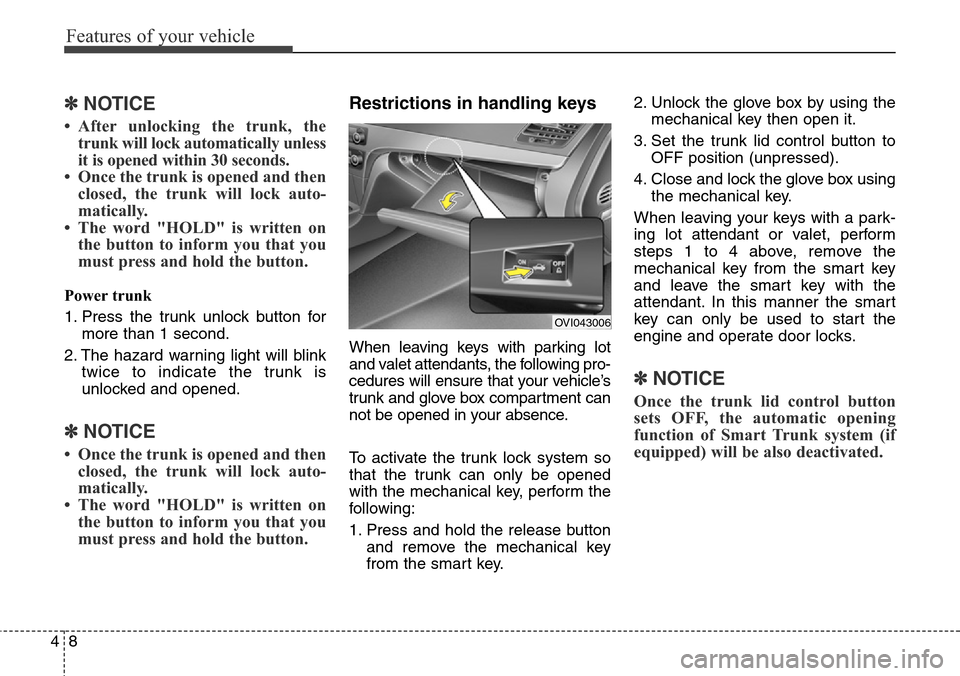
Restrictions in handling keys
When leaving keys with parking lot
and valet attendants, the following pro-
cedures will ensure that your vehicle’s
trunk and glove box compartment can
not be opened in your absence.
To activate the trunk lock system so
that the trunk can only be opened
with the mechanical key, perform the
following:
1. Press and hold the release button
and remove the mechanical key
from the smart key.2. Unlock the glove box by using the
mechanical key then open it.
3. Set the trunk lid control button to
OFF position (unpressed).
4. Close and lock the glove box using
the mechanical key.
When leaving your keys with a park-
ing lot attendant or valet, perform
steps 1 to 4 above, remove the
mechanical key from the smart key
and leave the smart key with the
attendant. In this manner the smart
key can only be used to start the
engine and operate door locks.
✽NOTICE
Once the trunk lid control button
sets OFF, the automatic opening
function of Smart Trunk system (if
equipped) will be also deactivated.
OVI043006
Page 99 of 483
Features of your vehicle
10 4
Immobilizer system
Your vehicle may be equipped with
an electronic engine immobilizer sys-
tem to reduce the risk of unautho-
rized vehicle use.
Your immobilizer system is com-
prised of a small transponder in the
key and electronic devices inside the
vehicle.
Whenever the engine start/stop but-
ton is changed to the ON position,
the immobilizer system checks and
verifies if the key is valid or not.
If the key is valid, the engine will
start.
If the key is invalid, the engine will
not start.
To deactivate the immobilizer
system
Change the engine start/stop button
to the ON position.
To activate the immobilizer system
Change the engine start/stop button
to the OFF position. The immobilizer
system activates automatically.
Without a valid smart key for your
vehicle, the engine will not start.
WARNING
In order to prevent theft of your
vehicle, do not leave spare keys
anywhere in your vehicle. Your
immobilizer password is a cus-
tomer unique password and
should be kept confidential. Do
not leave this number anywhere
in your vehicle.
CAUTION
Keep the smart key away from
water or any liquid and fire. If
the inside of the smart key gets
damp (due to drinks or mois-
ture), or is heated, internal cir-
cuit may malfunction, excluding
the car from the warranty.
CAUTION
Keep the smart key away from
electromagnetic materials that
blocks electromagnetic waves
to the key surface.
Page 102 of 483
413
Features of your vehicle
THEFT-ALARM SYSTEM (IF EQUIPPED)
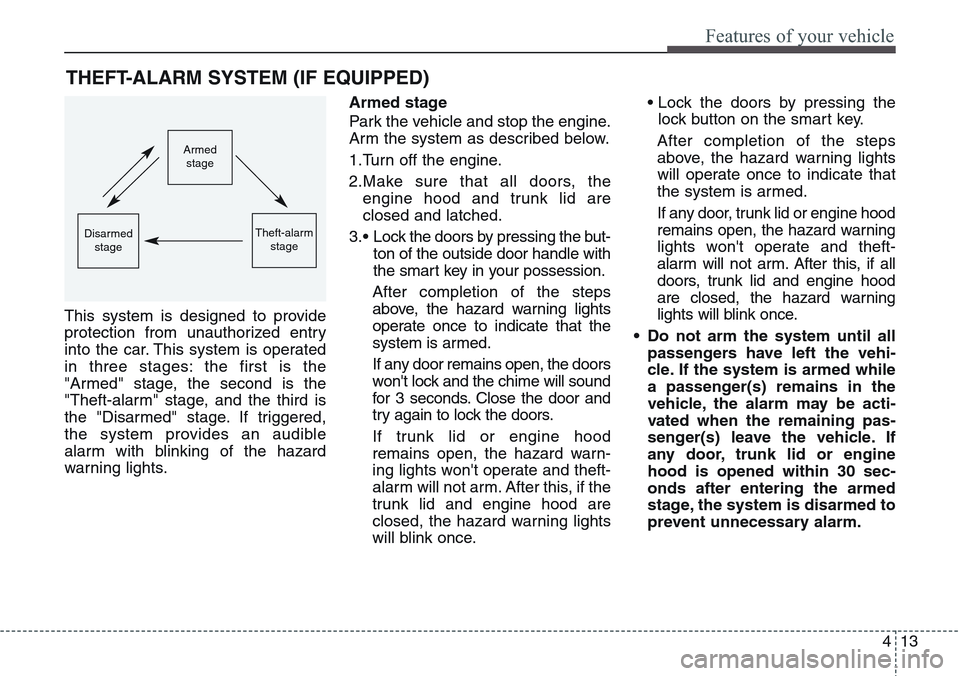
This system is designed to provide
protection from unauthorized entry
into the car. This system is operated
in three stages: the first is the
"Armed" stage, the second is the
"Theft-alarm" stage, and the third is
the "Disarmed" stage. If triggered,
the system provides an audible
alarm with blinking of the hazard
warning lights.Armed stage
Park the vehicle and stop the engine.
Arm the system as described below.
1.Turn off the engine.
2.Make sure that all doors, the
engine hood and trunk lid are
closed and latched.
3.• Lock the doors by pressing the but-
ton of the outside door handle with
the smart key in your possession.
After completion of the steps
above, the hazard warning lights
operate once to indicate that the
system is armed.
If any door remains open, the doors
won't lock and the chime will sound
for 3 seconds. Close the door and
try again to lock the doors.
If trunk lid or engine hood
remains open, the hazard warn-
ing lights won't operate and theft-
alarm will not arm. After this, if the
trunk lid and engine hood are
closed, the hazard warning lights
will blink once.• Lock the doors by pressing the
lock button on the smart key.
After completion of the steps
above, the hazard warning lights
will operate once to indicate that
the system is armed.
If any door, trunk lid or engine hood
remains open, the hazard warning
lights won't operate and theft-
alarm will not arm. After this, if all
doors, trunk lid and engine hood
are closed, the hazard warning
lights will blink once.
• Do not arm the system until all
passengers have left the vehi-
cle. If the system is armed while
a passenger(s) remains in the
vehicle, the alarm may be acti-
vated when the remaining pas-
senger(s) leave the vehicle. If
any door, trunk lid or engine
hood is opened within 30 sec-
onds after entering the armed
stage, the system is disarmed to
prevent unnecessary alarm.
Armed
stage
Theft-alarm
stageDisarmed
stage
Page 103 of 483
Features of your vehicle
14 4
Theft-alarm stage
The alarm will be activated if any of
the following occurs while the system
is armed.
• A door is opened without using the
smart key.
• The trunk is opened without using
the smart key.
• The engine hood is opened.
The horn will sound and the hazard
warning lights will blink continuously
for approximately 27 seconds. To turn
off the system, unlock the doors with
the smart key.
Opening the trunk with the
alarm armed (if equipped)
When the alarm is armed, the alarm
will not sound if the trunk lid is
opened with the smart key.
Once the trunk is opened and then
closed, the trunk will lock automatical-
ly and the system will be armed again.
Also, if any of the doors or hood is
opened while the trunk lid is opened
and the alarm armed, the alarm will
sound.
Disarmed stage
The system will be disarmed when
the doors are unlocked with the
smart key. The hazard warning lights
will blink twice to indicate that the
system is disarmed.
After unlocking the doors, if any door
(or trunk) is not opened within 30
seconds, the system will be rearmed.
✽NOTICE
• Avoid trying to start the engine
while the alarm is activated. The
vehicle starter motor is disabled
during the theft-alarm stage.
If the system is not disarmed with
the smart key, open the doors by
using the mechanical key and turn
the engine start/stop button to the
ON position. (except China)
• If you lose your keys, we recom-
mend that you consult an author-
ized HYUNDAI dealer.