start stop button Hyundai Equus 2015 Repair Manual
[x] Cancel search | Manufacturer: HYUNDAI, Model Year: 2015, Model line: Equus, Model: Hyundai Equus 2015Pages: 483, PDF Size: 13.26 MB
Page 214 of 483
4125
Features of your vehicle
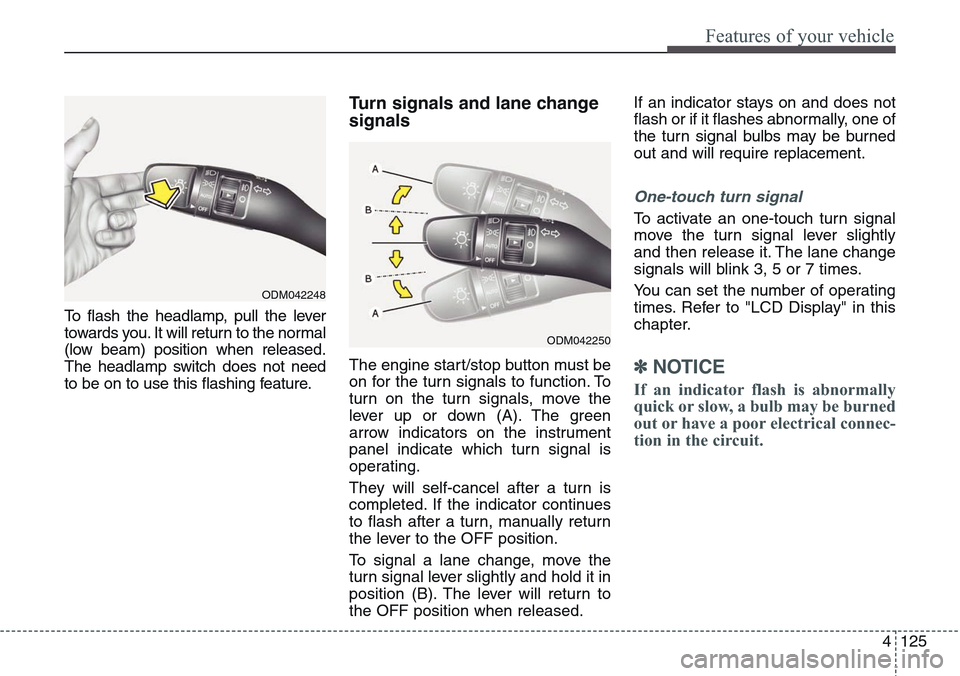
To flash the headlamp, pull the lever
towards you. It will return to the normal
(low beam) position when released.
The headlamp switch does not need
to be on to use this flashing feature.
Turn signals and lane change
signals
The engine start/stop button must be
on for the turn signals to function. To
turn on the turn signals, move the
lever up or down (A). The green
arrow indicators on the instrument
panel indicate which turn signal is
operating.
They will self-cancel after a turn is
completed. If the indicator continues
to flash after a turn, manually return
the lever to the OFF position.
To signal a lane change, move the
turn signal lever slightly and hold it in
position (B). The lever will return to
the OFF position when released.If an indicator stays on and does not
flash or if it flashes abnormally, one of
the turn signal bulbs may be burned
out and will require replacement.
One-touch turn signal
To activate an one-touch turn signal
move the turn signal lever slightly
and then release it. The lane change
signals will blink 3, 5 or 7 times.
You can set the number of operating
times. Refer to "LCD Display" in this
chapter.
✽NOTICE
If an indicator flash is abnormally
quick or slow, a bulb may be burned
out or have a poor electrical connec-
tion in the circuit.
ODM042248
ODM042250
Page 216 of 483
4127
Features of your vehicle
Daytime running light
(if equipped)
Daytime Running Lights (DRL) can
make it easier for others to see the
front of your vehicle during the day.
DRL can be helpful in many different
driving conditions, and it is especially
helpful after dawn and before sunset.
The DRL system will turn OFF when:
1. The parking light switch is ON.
2. Engine stops.
Headlamp leveling device
It is automatically adjusted the head-
lamp beam level according to the
number of the passengers and the
loading weight in the luggage area.
And it offers the proper headlamp
beam under the various conditions.
Headlamp washer
If your vehicle is equipped with the
headlamp washer it will be operating
at the same time when you operate
the windshield washer. It will operate
when the headlamp switch is in the
first or second position and the
engine start/stop button is in the ON
position.
The washer fluid will be sprayed on
to the headlamps.
✽NOTICE
• Check the headlamp washers peri-
odically to confirm that the wash-
er fluid is being sprayed properly
onto the headlamp lenses.
• The headlamp washer can be
operated 15 minutes after being
operated last time.
WARNING
If it does not work properly even
though your car is inclined
backward according to passen-
ger's posture, or the headlamp
beam is irradiated to the high or
low position, we recommend
that the system be inspected by
an authorized HYUNDAI dealer.
Do not attempt to inspect or
replace the wiring yourself.
Page 217 of 483
Features of your vehicle
128 4
Windshield wipers
Operates as follows when the engine
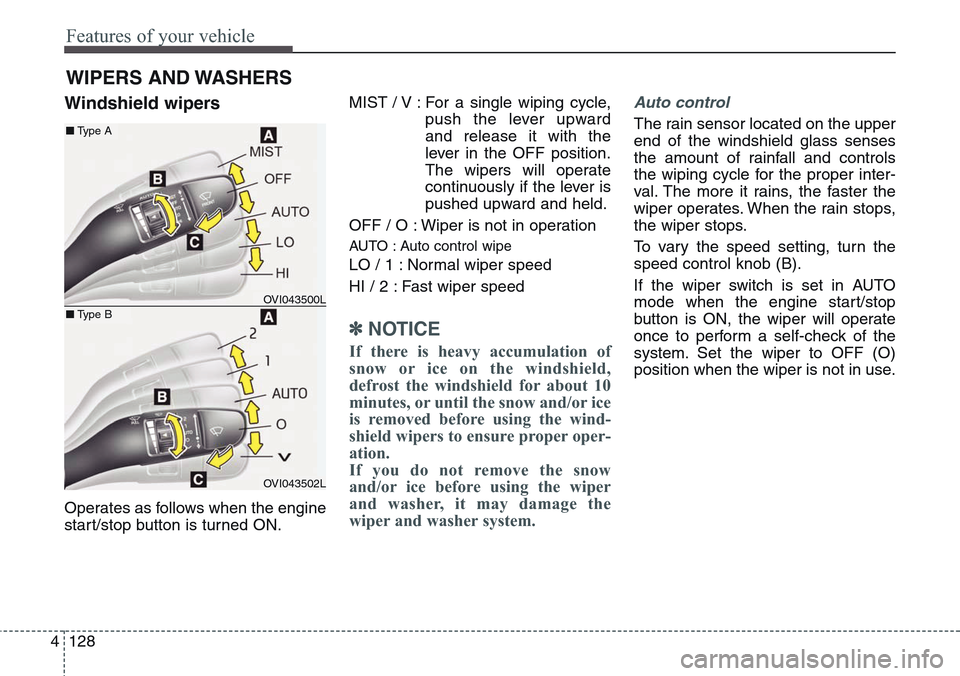
start/stop button is turned ON.MIST / V : For a single wiping cycle,
push the lever upward
and release it with the
lever in the OFF position.
The wipers will operate
continuously if the lever is
pushed upward and held.
OFF / O : Wiper is not in operation
AUTO : Auto control wipe
LO / 1 : Normal wiper speed
HI / 2 : Fast wiper speed
✽NOTICE
If there is heavy accumulation of
snow or ice on the windshield,
defrost the windshield for about 10
minutes, or until the snow and/or ice
is removed before using the wind-
shield wipers to ensure proper oper-
ation.
If you do not remove the snow
and/or ice before using the wiper
and washer, it may damage the
wiper and washer system.
Auto control
The rain sensor located on the upper
end of the windshield glass senses
the amount of rainfall and controls
the wiping cycle for the proper inter-
val. The more it rains, the faster the
wiper operates. When the rain stops,
the wiper stops.
To vary the speed setting, turn the
speed control knob (B).
If the wiper switch is set in AUTO
mode when the engine start/stop
button is ON, the wiper will operate
once to perform a self-check of the
system. Set the wiper to OFF (O)
position when the wiper is not in use.
WIPERS AND WASHERS
OVI043500L
OVI043502L
■Type A
■Type B
Page 220 of 483
4131
Features of your vehicle
INTERIOR LIGHT
Front
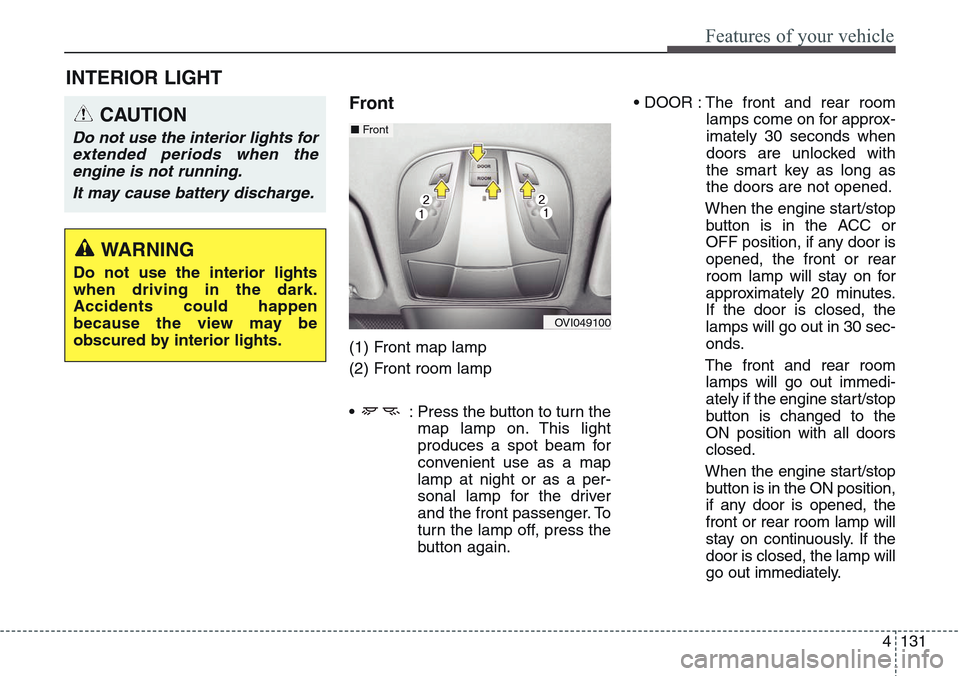
(1) Front map lamp
(2) Front room lamp
• : Press the button to turn the
map lamp on. This light
produces a spot beam for
convenient use as a map
lamp at night or as a per-
sonal lamp for the driver
and the front passenger. To
turn the lamp off, press the
button again.• DOOR : The front and rear room
lamps come on for approx-
imately 30 seconds when
doors are unlocked with
the smart key as long as
the doors are not opened.
When the engine start/stop
button is in the ACC or
OFF position, if any door is
opened, the front or rear
room lamp will stay on for
approximately 20 minutes.
If the door is closed, the
lamps will go out in 30 sec-
onds.
The front and rear room
lamps will go out immedi-
ately if the engine start/stop
button is changed to the
ON position with all doors
closed.
When the engine start/stop
button is in the ON position,
if any door is opened, the
front or rear room lamp will
stay on continuously. If the
door is closed, the lamp will
go out immediately.
CAUTION
Do not use the interior lights for
extended periods when the
engine is not running.
It may cause battery discharge.
OVI049100
■Front
WARNING
Do not use the interior lights
when driving in the dark.
Accidents could happen
because the view may be
obscured by interior lights.
Page 226 of 483
4137
Features of your vehicle
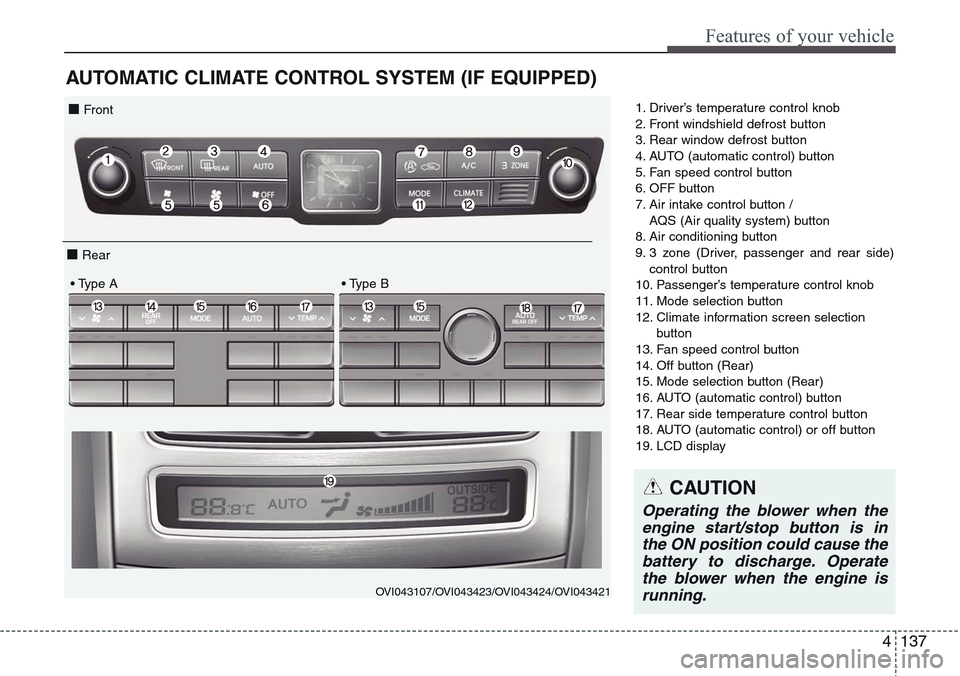
AUTOMATIC CLIMATE CONTROL SYSTEM (IF EQUIPPED)
1. Driver’s temperature control knob
2. Front windshield defrost button
3. Rear window defrost button
4. AUTO (automatic control) button
5. Fan speed control button
6. OFF button
7. Air intake control button /
AQS (Air quality system) button
8. Air conditioning button
9. 3 zone (Driver, passenger and rear side)
control button
10. Passenger’s temperature control knob
11. Mode selection button
12. Climate information screen selection
button
13. Fan speed control button
14. Off button (Rear)
15. Mode selection button (Rear)
16. AUTO (automatic control) button
17. Rear side temperature control button
18. AUTO (automatic control) or off button
19. LCD display
OVI043107/OVI043423/OVI043424/OVI043421
■ Front
■ Rear
• Type A • Type B
CAUTION
Operating the blower when the
engine start/stop button is in
the ON position could cause the
battery to discharge. Operate
the blower when the engine is
running.
Page 259 of 483
Features of your vehicle
170 4
✽NOTICE
• If you install an aftermarket HID
headlamp, your vehicle’s audio
and electronic device may mal-
function.
• Prevent chemicals such as per-
fume, cosmetic oil, sun cream,
hand cleaner, and air freshener
from contacting the interior parts
because they may cause damage
or discoloration.
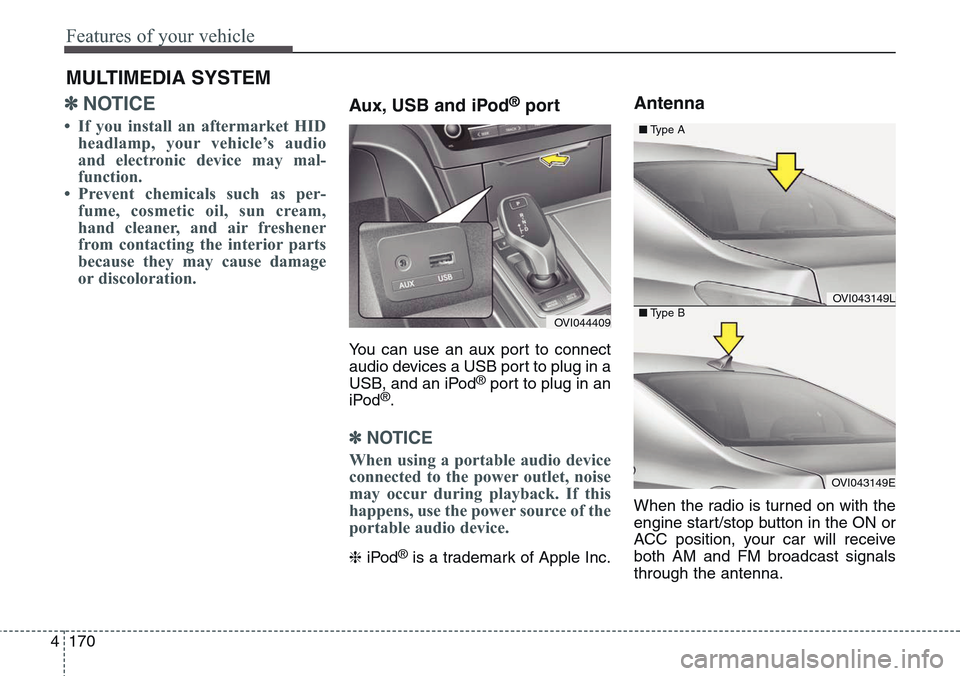
Aux, USB and iPod®port
You can use an aux port to connect
audio devices a USB port to plug in a
USB, and an iPod
®port to plug in an
iPod®.
✽NOTICE
When using a portable audio device
connected to the power outlet, noise
may occur during playback. If this
happens, use the power source of the
portable audio device.
❈iPod®is a trademark of Apple Inc.
Antenna
When the radio is turned on with the
engine start/stop button in the ON or
ACC position, your car will receive
both AM and FM broadcast signals
through the antenna.
MULTIMEDIA SYSTEM
OVI044409
OVI043149L
OVI043149E ■Type A
■Type B
Page 262 of 483
Driving your vehicle
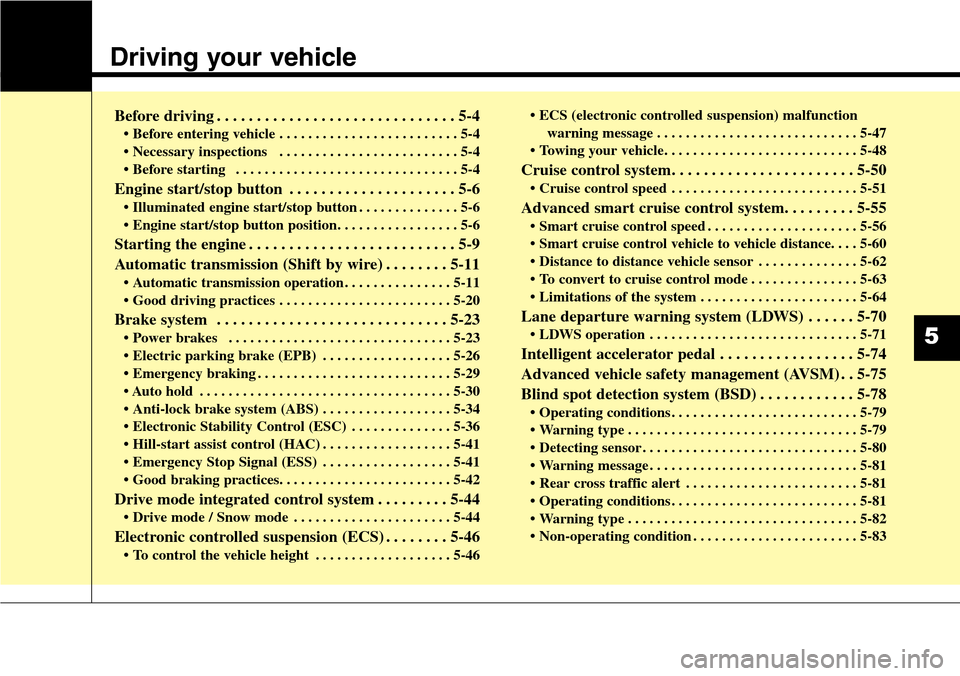
Before driving . . . . . . . . . . . . . . . . . . . . . . . . . . . . . . 5-4
• Before entering vehicle . . . . . . . . . . . . . . . . . . . . . . . . . 5-4
• Necessary inspections . . . . . . . . . . . . . . . . . . . . . . . . . 5-4
• Before starting . . . . . . . . . . . . . . . . . . . . . . . . . . . . . . . 5-4
Engine start/stop button . . . . . . . . . . . . . . . . . . . . . 5-6
• Illuminated engine start/stop button . . . . . . . . . . . . . . 5-6
• Engine start/stop button position. . . . . . . . . . . . . . . . . 5-6
Starting the engine . . . . . . . . . . . . . . . . . . . . . . . . . . 5-9
Automatic transmission (Shift by wire) . . . . . . . . 5-11
• Automatic transmission operation . . . . . . . . . . . . . . . 5-11
• Good driving practices . . . . . . . . . . . . . . . . . . . . . . . . 5-20
Brake system . . . . . . . . . . . . . . . . . . . . . . . . . . . . . 5-23
• Power brakes . . . . . . . . . . . . . . . . . . . . . . . . . . . . . . . 5-23
• Electric parking brake (EPB) . . . . . . . . . . . . . . . . . . 5-26
• Emergency braking . . . . . . . . . . . . . . . . . . . . . . . . . . . 5-29
• Auto hold . . . . . . . . . . . . . . . . . . . . . . . . . . . . . . . . . . . 5-30
• Anti-lock brake system (ABS) . . . . . . . . . . . . . . . . . . 5-34
• Electronic Stability Control (ESC) . . . . . . . . . . . . . . 5-36
• Hill-start assist control (HAC) . . . . . . . . . . . . . . . . . . 5-41
• Emergency Stop Signal (ESS) . . . . . . . . . . . . . . . . . . 5-41
• Good braking practices. . . . . . . . . . . . . . . . . . . . . . . . 5-42
Drive mode integrated control system . . . . . . . . . 5-44
• Drive mode / Snow mode . . . . . . . . . . . . . . . . . . . . . . 5-44
Electronic controlled suspension (ECS) . . . . . . . . 5-46
• To control the vehicle height . . . . . . . . . . . . . . . . . . . 5-46• ECS (electronic controlled suspension) malfunction
warning message . . . . . . . . . . . . . . . . . . . . . . . . . . . . 5-47
• Towing your vehicle. . . . . . . . . . . . . . . . . . . . . . . . . . . 5-48
Cruise control system. . . . . . . . . . . . . . . . . . . . . . . 5-50
• Cruise control speed . . . . . . . . . . . . . . . . . . . . . . . . . . 5-51
Advanced smart cruise control system. . . . . . . . . 5-55
• Smart cruise control speed . . . . . . . . . . . . . . . . . . . . . 5-56
• Smart cruise control vehicle to vehicle distance. . . . 5-60
• Distance to distance vehicle sensor . . . . . . . . . . . . . . 5-62
• To convert to cruise control mode . . . . . . . . . . . . . . . 5-63
• Limitations of the system . . . . . . . . . . . . . . . . . . . . . . 5-64
Lane departure warning system (LDWS) . . . . . . 5-70
• LDWS operation . . . . . . . . . . . . . . . . . . . . . . . . . . . . . 5-71
Intelligent accelerator pedal . . . . . . . . . . . . . . . . . 5-74
Advanced vehicle safety management (AVSM) . . 5-75
Blind spot detection system (BSD) . . . . . . . . . . . . 5-78
• Operating conditions . . . . . . . . . . . . . . . . . . . . . . . . . . 5-79
• Warning type . . . . . . . . . . . . . . . . . . . . . . . . . . . . . . . . 5-79
• Detecting sensor . . . . . . . . . . . . . . . . . . . . . . . . . . . . . . 5-80
• Warning message . . . . . . . . . . . . . . . . . . . . . . . . . . . . . 5-81
• Rear cross traffic alert . . . . . . . . . . . . . . . . . . . . . . . . 5-81
• Operating conditions . . . . . . . . . . . . . . . . . . . . . . . . . . 5-81
• Warning type . . . . . . . . . . . . . . . . . . . . . . . . . . . . . . . . 5-82
• Non-operating condition . . . . . . . . . . . . . . . . . . . . . . . 5-83
5
Page 265 of 483
Driving your vehicle
4 5
Before entering vehicle
• Be sure that all windows, outside
mirror(s), and outside lights are
clean.
• Check the condition of the tires.
• Check under the vehicle for any
sign of leaks.
• Be sure there are no obstacles
behind you if you intend to back up.
Necessary inspections
Fluid levels, such as engine oil,
engine coolant, brake fluid, and
washer fluid should be checked on a
regular basis, with the exact interval
depending on the fluid. Further
details are provided in section 7,
“Maintenance”.
Before starting
• Close and lock all doors.
• Position the seat so that all con-
trols are easily reached.
• Adjust the inside and outside
rearview mirrors.
• Be sure that all lights work.
• Check all gauges.
• Check the operation of warning
lights when the engine start/stop
button is turned to the ON position.
• Release the parking brake and
make sure the brake warning light
goes out.
For safe operation, be sure you are
familiar with your vehicle and its
equipment.
BEFORE DRIVING
WARNING
All passengers must be proper-
ly belted whenever the vehicle
is moving. Refer to “Seat belts”
in section 3 for more informa-
tion on their proper use.
WARNING
Driving while distracted can
result in a loss of vehicle con-
trol, that may lead to an acci-
dent, severe personal injury,
and death. The driver’s primary
responsibility is in the safe and
legal operation of a vehicle, and
use of any handheld devices,
other equipment, or vehicle sys-
tems which take the driver’s
eyes, attention and focus away
from the safe operation of a
vehicle or which are not permis-
sible by law should never be
used during operation of the
vehicle.
Page 267 of 483
Driving your vehicle
6 5
ENGINE START/STOP BUTTON
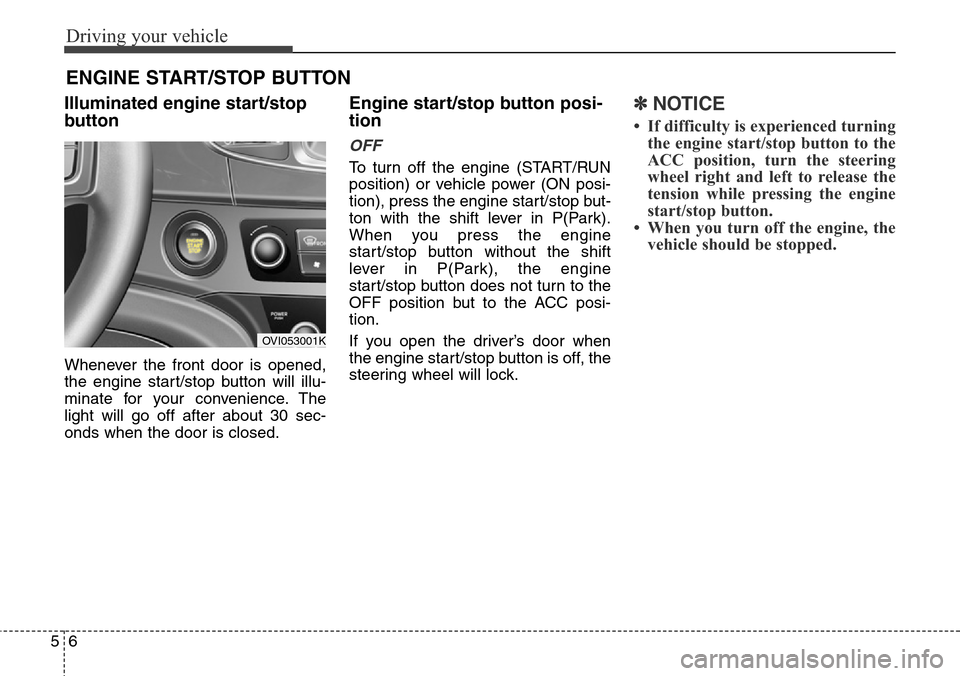
Illuminated engine start/stop
button
Whenever the front door is opened,
the engine start/stop button will illu-
minate for your convenience. The
light will go off after about 30 sec-
onds when the door is closed.
Engine start/stop button posi-
tion
OFF
To turn off the engine (START/RUN
position) or vehicle power (ON posi-
tion), press the engine start/stop but-
ton with the shift lever in P(Park).
When you press the engine
start/stop button without the shift
lever in P(Park), the engine
start/stop button does not turn to the
OFF position but to the ACC posi-
tion.
If you open the driver’s door when
the engine start/stop button is off, the
steering wheel will lock.
✽NOTICE
• If difficulty is experienced turning
the engine start/stop button to the
ACC position, turn the steering
wheel right and left to release the
tension while pressing the engine
start/stop button.
• When you turn off the engine, the
vehicle should be stopped.
OVI053001K
Page 268 of 483
57
Driving your vehicle
ACC(Accessory)
Press the engine start/stop button
when it is in the OFF position without
depressing the brake pedal.
The steering wheel is unlocked and
electrical accessories are opera-
tional.
If the engine start/stop button is in
the ACC position for more than 1
hour, the button is off automatically
to prevent the battery discharge.
ON
Press the engine start/stop button
while it is in the ACC position without
depressing the brake pedal.
The warning lights can be checked
before the engine is started.
Do not leave the engine start/stop
button in the ON position for a long
time. The battery may discharge,
because the engine is not running.
START
To start the engine, depress the
brake pedal and press the engine
start/stop button with the shift lever in
the P(Park) or the N(Neutral) posi-
tion. For your safety, start the engine
with the shift lever in the P (Park)
position.
✽NOTICE
• If you press the engine start/stop
button without depressing the
brake pedal, the engine will not
start and the engine start/stop but-
ton changes as follow :
OFF
→ACC →ON →OFF