Side mirror Hyundai Equus 2015 Owner's Manual
[x] Cancel search | Manufacturer: HYUNDAI, Model Year: 2015, Model line: Equus, Model: Hyundai Equus 2015Pages: 483, PDF Size: 13.26 MB
Page 14 of 483
Your vehicle at a glance
2 2
EXTERIOR OVERVIEW
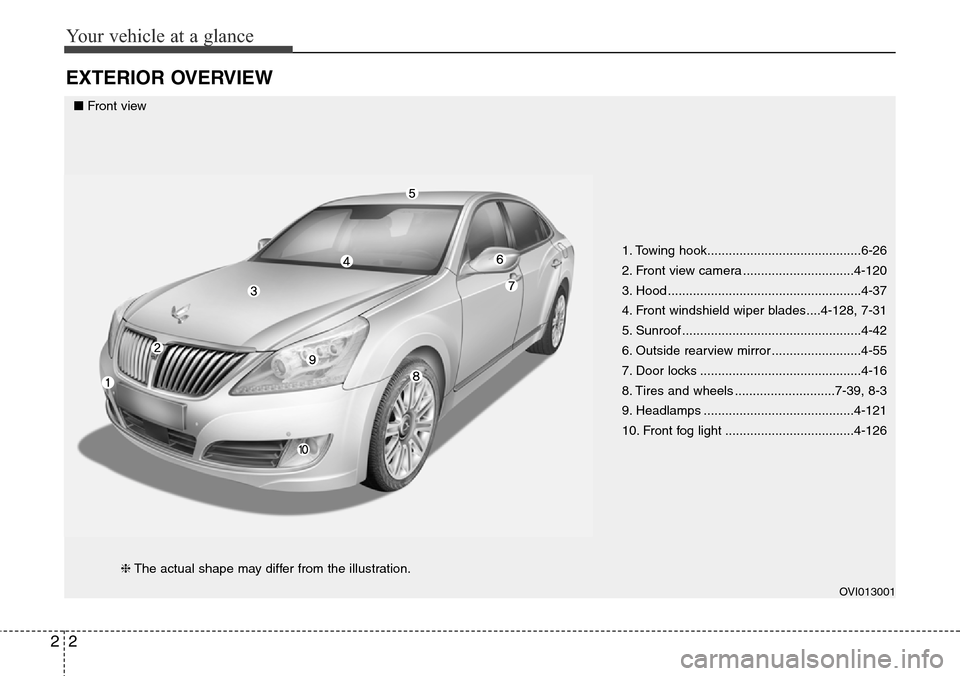
1. Towing hook...........................................6-26
2. Front view camera ...............................4-120
3. Hood ......................................................4-37
4. Front windshield wiper blades....4-128, 7-31
5. Sunroof ..................................................4-42
6. Outside rearview mirror .........................4-55
7. Door locks .............................................4-16
8. Tires and wheels ............................7-39, 8-3
9. Headlamps ..........................................4-121
10. Front fog light ....................................4-126
OVI013001
■Front view
❈The actual shape may differ from the illustration.
Page 16 of 483
Your vehicle at a glance
4 2
INTERIOR OVERVIEW
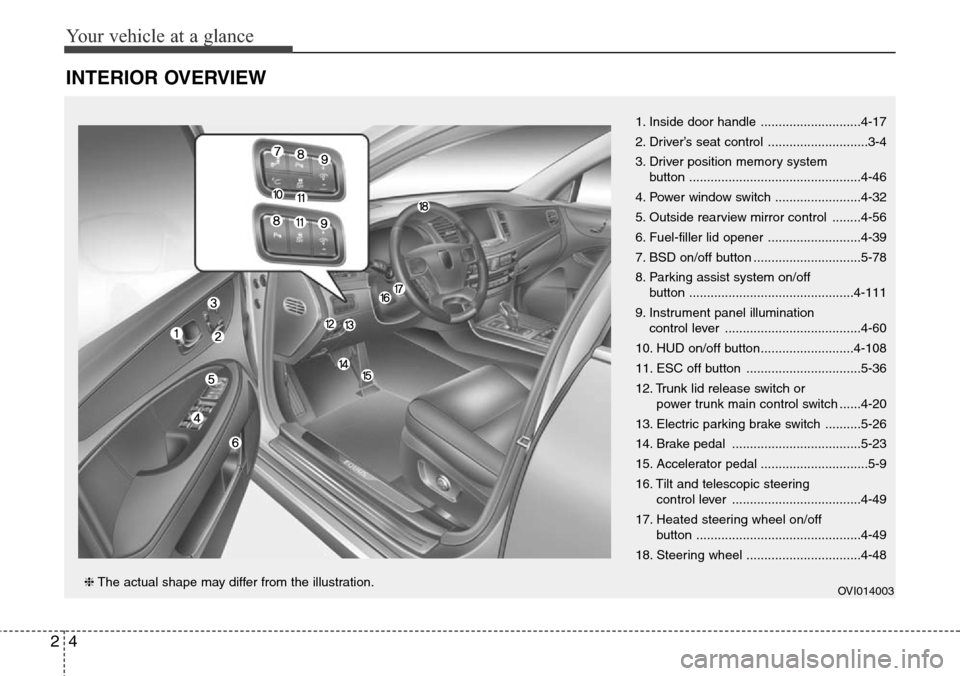
1. Inside door handle ............................4-17
2. Driver’s seat control ............................3-4
3. Driver position memory system
button ................................................4-46
4. Power window switch ........................4-32
5. Outside rearview mirror control ........4-56
6. Fuel-filler lid opener ..........................4-39
7. BSD on/off button ..............................5-78
8. Parking assist system on/off
button ..............................................4-111
9. Instrument panel illumination
control lever ......................................4-60
10. HUD on/off button..........................4-108
11. ESC off button ................................5-36
12. Trunk lid release switch or
power trunk main control switch ......4-20
13. Electric parking brake switch ..........5-26
14. Brake pedal ....................................5-23
15. Accelerator pedal ..............................5-9
16. Tilt and telescopic steering
control lever ....................................4-49
17. Heated steering wheel on/off
button ..............................................4-49
18. Steering wheel ................................4-48
OVI014003❈The actual shape may differ from the illustration.
Page 90 of 483
Features of your vehicle
Smart key . . . . . . . . . . . . . . . . . . . . . . . . . . . . . . . . . 4-4
• Smart key function . . . . . . . . . . . . . . . . . . . . . . . . . . . . 4-4
• Buttons on the smart key . . . . . . . . . . . . . . . . . . . . . . . 4-7
• Restrictions in handling keys . . . . . . . . . . . . . . . . . . . . 4-8
• Smart key precautions . . . . . . . . . . . . . . . . . . . . . . . . . 4-9
• Immobilizer system . . . . . . . . . . . . . . . . . . . . . . . . . . . 4-10
• Battery replacement . . . . . . . . . . . . . . . . . . . . . . . . . . 4-11
Theft-alarm system . . . . . . . . . . . . . . . . . . . . . . . . 4-13
Door locks . . . . . . . . . . . . . . . . . . . . . . . . . . . . . . . . 4-16
• From outside . . . . . . . . . . . . . . . . . . . . . . . . . . . . . . . . 4-16
• Power door latch . . . . . . . . . . . . . . . . . . . . . . . . . . . . . 4-17
• From inside . . . . . . . . . . . . . . . . . . . . . . . . . . . . . . . . . 4-17
• Child-protector rear door lock . . . . . . . . . . . . . . . . . 4-19
Trunk . . . . . . . . . . . . . . . . . . . . . . . . . . . . . . . . . . . . 4-20
• Non-powered trunk . . . . . . . . . . . . . . . . . . . . . . . . . . . 4-20
• Power trunk . . . . . . . . . . . . . . . . . . . . . . . . . . . . . . . . . 4-21
• Emergency trunk safety release . . . . . . . . . . . . . . . . . 4-26
Smart trunk . . . . . . . . . . . . . . . . . . . . . . . . . . . . . . 4-28
Windows . . . . . . . . . . . . . . . . . . . . . . . . . . . . . . . . . 4-32
Hood. . . . . . . . . . . . . . . . . . . . . . . . . . . . . . . . . . . . . 4-37
Fuel filler lid . . . . . . . . . . . . . . . . . . . . . . . . . . . . . . 4-39
• Emergency fuel filler lid release. . . . . . . . . . . . . . . . . 4-41
Sunroof . . . . . . . . . . . . . . . . . . . . . . . . . . . . . . . . . . 4-42
• Sliding the sunroof . . . . . . . . . . . . . . . . . . . . . . . . . . . 4-43
• Tilting the sunroof . . . . . . . . . . . . . . . . . . . . . . . . . . . . 4-43• Sunshade . . . . . . . . . . . . . . . . . . . . . . . . . . . . . . . . . . . 4-44
• Resetting the sunroof . . . . . . . . . . . . . . . . . . . . . . . . . 4-45
Driver position memory system . . . . . . . . . . . . . . 4-46
Steering wheel . . . . . . . . . . . . . . . . . . . . . . . . . . . . . 4-48
• Power steering . . . . . . . . . . . . . . . . . . . . . . . . . . . . . . . 4-48
• Tilt/Telescopic steering . . . . . . . . . . . . . . . . . . . . . . . . 4-49
• Heated steering wheel . . . . . . . . . . . . . . . . . . . . . . . . . 4-49
• Horn . . . . . . . . . . . . . . . . . . . . . . . . . . . . . . . . . . . . . . . 4-50
Mirrors . . . . . . . . . . . . . . . . . . . . . . . . . . . . . . . . . . 4-51
• Inside rearview mirror . . . . . . . . . . . . . . . . . . . . . . . . 4-51
• Outside rearview mirror . . . . . . . . . . . . . . . . . . . . . . . 4-55
Instrument cluster . . . . . . . . . . . . . . . . . . . . . . . . . 4-59
• Instrument cluster control . . . . . . . . . . . . . . . . . . . . . 4-60
• LCD display control . . . . . . . . . . . . . . . . . . . . . . . . . . 4-61
• Gauges . . . . . . . . . . . . . . . . . . . . . . . . . . . . . . . . . . . . . 4-62
LCD display . . . . . . . . . . . . . . . . . . . . . . . . . . . . . . 4-67
• LCD modes. . . . . . . . . . . . . . . . . . . . . . . . . . . . . . . . . . 4-67
• Trip computer mode . . . . . . . . . . . . . . . . . . . . . . . . . . 4-68
• ASCC/LDWS mode . . . . . . . . . . . . . . . . . . . . . . . . . . . 4-68
• A/V mode . . . . . . . . . . . . . . . . . . . . . . . . . . . . . . . . . . . 4-68
• Turn by turn mode . . . . . . . . . . . . . . . . . . . . . . . . . . . 4-69
• Information mode . . . . . . . . . . . . . . . . . . . . . . . . . . . . 4-69
• User settings mode. . . . . . . . . . . . . . . . . . . . . . . . . . . . 4-72
• Warning messages . . . . . . . . . . . . . . . . . . . . . . . . . . . . 4-79
4
Page 94 of 483
45
Features of your vehicle
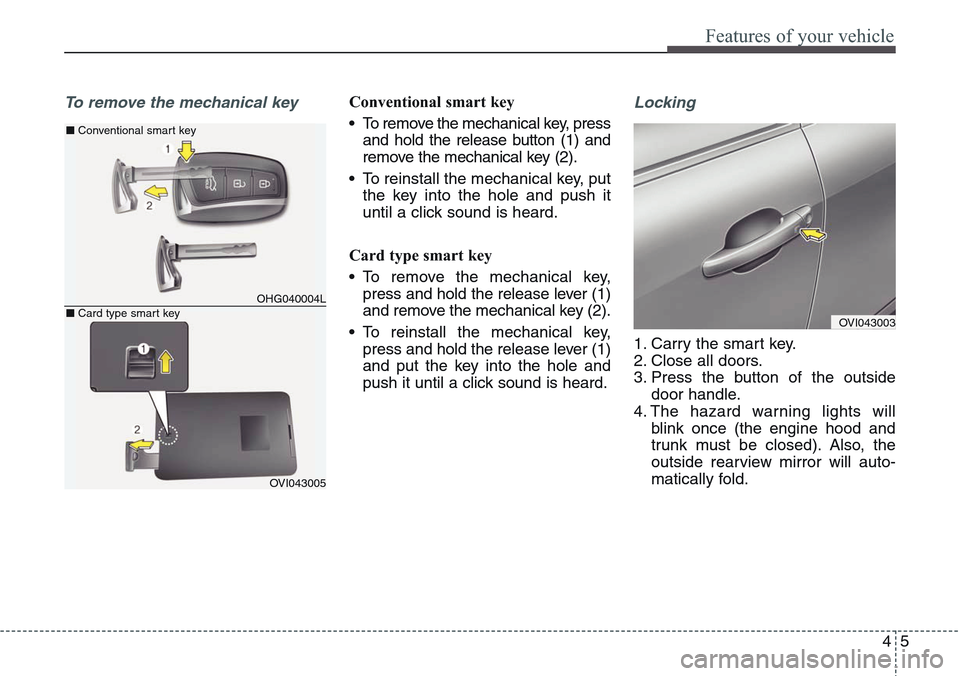
To remove the mechanical keyConventional smart key
• To remove the mechanical key, press
and hold the release button (1) and
remove the mechanical key (2).
• To reinstall the mechanical key, put
the key into the hole and push it
until a click sound is heard.
Card type smart key
• To remove the mechanical key,
press and hold the release lever (1)
and remove the mechanical key (2).
• To reinstall the mechanical key,
press and hold the release lever (1)
and put the key into the hole and
push it until a click sound is heard.Locking
1. Carry the smart key.
2. Close all doors.
3. Press the button of the outside
door handle.
4. The hazard warning lights will
blink once (the engine hood and
trunk must be closed). Also, the
outside rearview mirror will auto-
matically fold.
OHG040004L
■Conventional smart key
OVI043005
■Card type smart keyOVI043003
Page 95 of 483
Features of your vehicle
6 4
✽NOTICE
• The button will only operate when
the smart key is within 0.7 m (28
in.) from the outside door handle.
• Even though you press the outside
door handle button, the doors will
not lock and the chime will sound
for 3 seconds if any of following
occur:
- The smart key is in the vehicle.
- The engine start/stop button is
in ACC or ON position.
- Any door except the trunk is
opened.
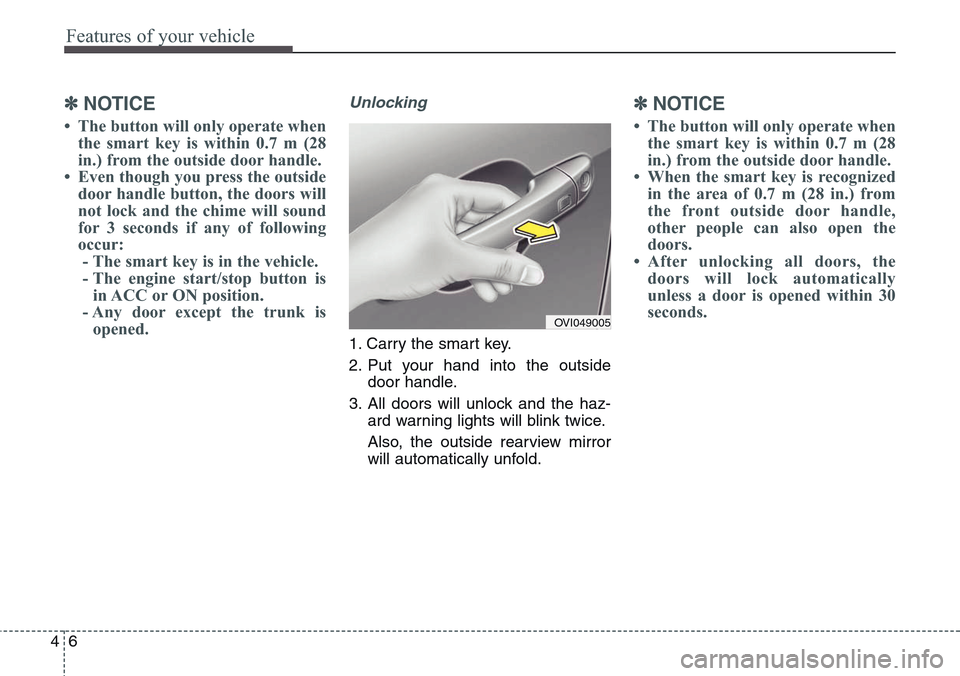
Unlocking
1. Carry the smart key.
2. Put your hand into the outside
door handle.
3. All doors will unlock and the haz-
ard warning lights will blink twice.
Also, the outside rearview mirror
will automatically unfold.
✽NOTICE
• The button will only operate when
the smart key is within 0.7 m (28
in.) from the outside door handle.
• When the smart key is recognized
in the area of 0.7 m (28 in.) from
the front outside door handle,
other people can also open the
doors.
• After unlocking all doors, the
doors will lock automatically
unless a door is opened within 30
seconds.
OVI049005
Page 96 of 483
47
Features of your vehicle
Trunk unlocking
Power trunk
1. Carry the smart key.
2. Press the trunk handle switch.
3. The trunk will unlock and open.
Non-powered trunk
1. Carry the smart key.
2. Press the trunk handle switch.
3. The trunk will unlock.
✽NOTICE
• Once the trunk is opened and then
closed, the trunk will lock auto-
matically.
• The button will only operate when
the smart key is within 0.7 m (28
in.) from the trunk handle.
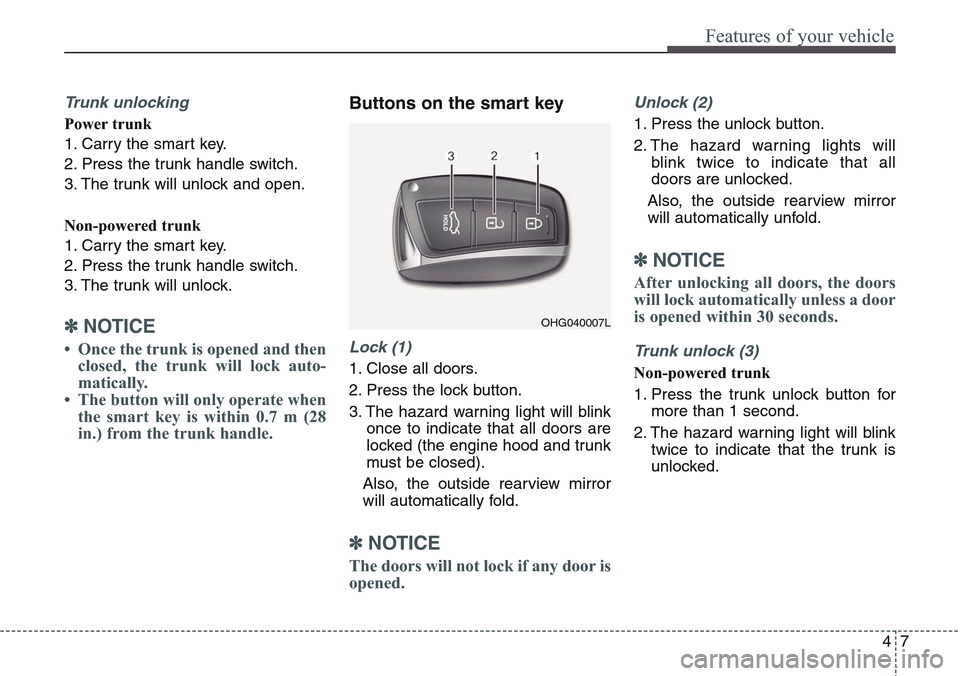
Buttons on the smart key
Lock (1)
1. Close all doors.
2. Press the lock button.
3. The hazard warning light will blink
once to indicate that all doors are
locked (the engine hood and trunk
must be closed).
Also, the outside rearview mirror
will automatically fold.
✽NOTICE
The doors will not lock if any door is
opened.
Unlock (2)
1. Press the unlock button.
2. The hazard warning lights will
blink twice to indicate that all
doors are unlocked.
Also, the outside rearview mirror
will automatically unfold.
✽NOTICE
After unlocking all doors, the doors
will lock automatically unless a door
is opened within 30 seconds.
Trunk unlock (3)
Non-powered trunk
1. Press the trunk unlock button for
more than 1 second.
2. The hazard warning light will blink
twice to indicate that the trunk is
unlocked.
OHG040007L
Page 135 of 483
Features of your vehicle
46 4
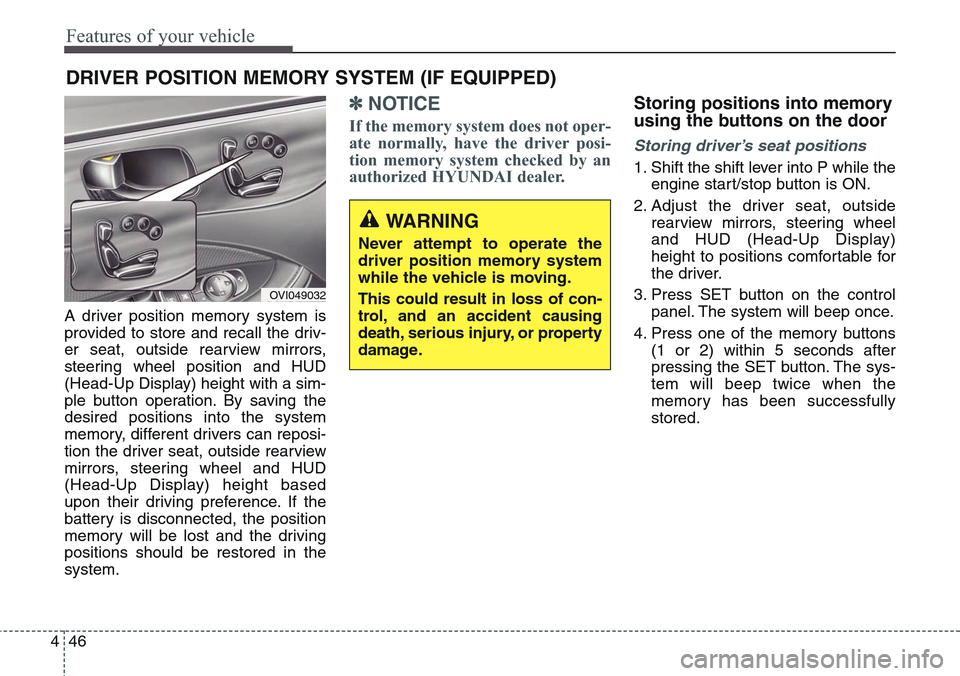
A driver position memory system is
provided to store and recall the driv-
er seat, outside rearview mirrors,
steering wheel position and HUD
(Head-Up Display) height with a sim-
ple button operation. By saving the
desired positions into the system
memory, different drivers can reposi-
tion the driver seat, outside rearview
mirrors, steering wheel and HUD
(Head-Up Display) height based
upon their driving preference. If the
battery is disconnected, the position
memory will be lost and the driving
positions should be restored in the
system.
✽NOTICE
If the memory system does not oper-
ate normally, have the driver posi-
tion memory system checked by an
authorized HYUNDAI dealer.
Storing positions into memory
using the buttons on the door
Storing driver’s seat positions
1. Shift the shift lever into P while the
engine start/stop button is ON.
2. Adjust the driver seat, outside
rearview mirrors, steering wheel
and HUD (Head-Up Display)
height to positions comfortable for
the driver.
3. Press SET button on the control
panel. The system will beep once.
4. Press one of the memory buttons
(1 or 2) within 5 seconds after
pressing the SET button. The sys-
tem will beep twice when the
memory has been successfully
stored.
DRIVER POSITION MEMORY SYSTEM (IF EQUIPPED)
WARNING
Never attempt to operate the
driver position memory system
while the vehicle is moving.
This could result in loss of con-
trol, and an accident causing
death, serious injury, or property
damage.
OVI049032
Page 136 of 483
447
Features of your vehicle
Recalling positions from memory
1. Shift the shift lever into P while the
engine start/stop button is ON.
2. To recall the position in memory,
press the desired memory button
(1 or 2). The system will beep
once, and then the driver seat,
outside rearview mirrors, steering
wheel and HUD (Head-Up
Display) height will automatically
adjust to the stored positions.
Adjusting one of the control knobs for
the driver seat, outside rearview mir-
ror and steering wheel while the sys-
tem is recalling the stored positions
will cause the movement for that
component to stop and move in the
direction that the control knob is
moved. Other components will con-
tinue to the recalled position.
Easy access function
(if equipped)
The steering wheel will move away
from the driver and the seat will
move rearward, when the engine
start/stop button is turned to the OFF
position.
The steering wheel will move toward
the driver and the seat will move for-
ward, when the engine start/stop but-
ton is turned to the ACC or ON posi-
tion.
WARNING
Use caution when recalling
adjustment memory while sitting
in the vehicle. Push the seat posi-
tion control knob to the desired
position immediately if the seat
moves too far in any direction.
Page 140 of 483
451
Features of your vehicle
Inside rearview mirror
Adjust the rearview mirror so that the
center view through the rear window
is seen. Make this adjustment before
you start driving.
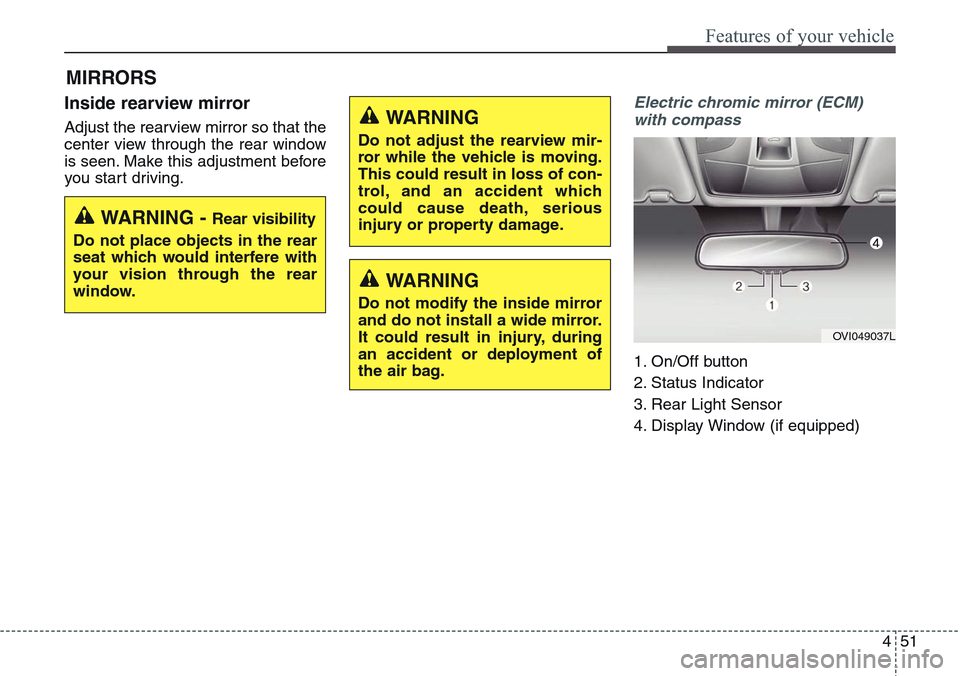
Electric chromic mirror (ECM)
with compass
1. On/Off button
2. Status Indicator
3. Rear Light Sensor
4. Display Window (if equipped)
MIRRORS
WARNING - Rear visibility
Do not place objects in the rear
seat which would interfere with
your vision through the rear
window.
WARNING
Do not adjust the rearview mir-
ror while the vehicle is moving.
This could result in loss of con-
trol, and an accident which
could cause death, serious
injury or property damage.
WARNING
Do not modify the inside mirror
and do not install a wide mirror.
It could result in injury, during
an accident or deployment of
the air bag.
OVI049037L
Page 143 of 483
Features of your vehicle
54 4
3. Press the button until the new zone
number appears in the display.
After you stop pressing the button
in, the display will show a compass
direction within a few seconds.
4. Changing Mirror Angle setting
(if equipped):
Due to mirror positions being angled
towards the driver, the compass mir-
ror can also compensate for drivers
seated on the Left Hand side of the
vehicle (steering wheel on the LH
side of the vehicle) or Right Hand
side of the vehicle (steering wheel on
the RH side of the vehicle).To adjust the Left Hand, “L” or Right
Hand, “R”, setting:
1. Press and hold the button for more
than 12 seconds.
2. Release then press the button to
toggle between “L” and “R”.
✽NOTICE
This procedure also causes the com-
pass to be de-calibrated.
3. To re-calibrate the compass, drive
the vehicle in 2 complete circles at
less than 8km/h (5mph).
CAUTION
1.Do not install the ski rack,
antenna, etc. which are
attached to the vehicle by
means of a magnet. They affect
the operation of the compass.
2.If the compass deviates from
the correct indication soon
after repeated adjustment, we
recommend that the system
be checked by an authorized
HYUNDAI dealer.
3.The compass may not indicate
the correct compass point in
tunnels or while driving up or
down a steep hill.
(The compass returns to the
correct compass point when
the vehicle moves to an area
where the geomagnetism is
stabilized.)
4.When cleaning the mirror, use
a paper towel or similar materi-
al dampened with glass clean-
er. Do not spray glass cleaner
directly on the mirror as that
may cause the liquid cleaner to
enter the mirror housing.