antenna Hyundai Equus 2015 Owner's Manual
[x] Cancel search | Manufacturer: HYUNDAI, Model Year: 2015, Model line: Equus, Model: Hyundai Equus 2015Pages: 483, PDF Size: 13.26 MB
Page 15 of 483
23
Your vehicle at a glance
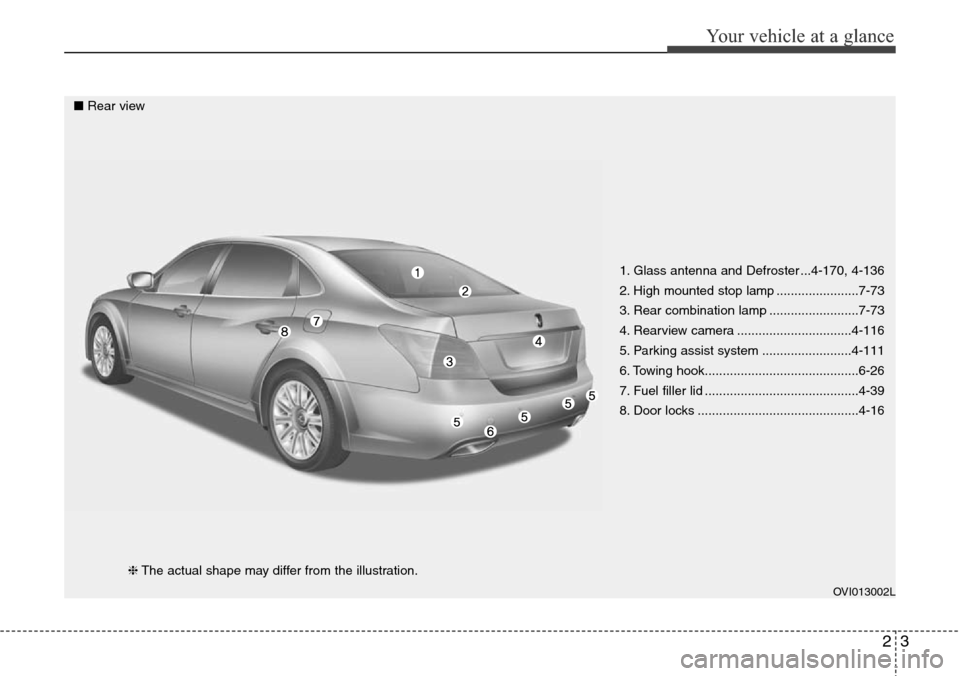
1. Glass antenna and Defroster ...4-170, 4-136
2. High mounted stop lamp .......................7-73
3. Rear combination lamp .........................7-73
4. Rearview camera ................................4-116
5. Parking assist system .........................4-111
6. Towing hook...........................................6-26
7. Fuel filler lid ...........................................4-39
8. Door locks .............................................4-16
OVI013002L
■Rear view
❈The actual shape may differ from the illustration.
Page 92 of 483
Interior features . . . . . . . . . . . . . . . . . . . . . . . . . . 4-161
• Ashtray . . . . . . . . . . . . . . . . . . . . . . . . . . . . . . . . . . . . 4-161
• Cup holder . . . . . . . . . . . . . . . . . . . . . . . . . . . . . . . . . 4-162
• Sunvisor . . . . . . . . . . . . . . . . . . . . . . . . . . . . . . . . . . . 4-163
• Rear vanity mirror . . . . . . . . . . . . . . . . . . . . . . . . . . 4-163
• Power outlet . . . . . . . . . . . . . . . . . . . . . . . . . . . . . . . . 4-164
• Clock . . . . . . . . . . . . . . . . . . . . . . . . . . . . . . . . . . . . . . 4-165
• Clothes hanger . . . . . . . . . . . . . . . . . . . . . . . . . . . . . . 4-166
• Bag hanger . . . . . . . . . . . . . . . . . . . . . . . . . . . . . . . . 4-167
• Floor mat anchor(s). . . . . . . . . . . . . . . . . . . . . . . . . . 4-167
• Luggage net (holder) . . . . . . . . . . . . . . . . . . . . . . . . . 4-168
• Rear curtain . . . . . . . . . . . . . . . . . . . . . . . . . . . . . . . . 4-168
Multimedia system . . . . . . . . . . . . . . . . . . . . . . . . 4-170
• Aux, USB and iPod®port . . . . . . . . . . . . . . . . . . . . . 4-170
• Antenna . . . . . . . . . . . . . . . . . . . . . . . . . . . . . . . . . . . 4-170
• Steering wheel audio control . . . . . . . . . . . . . . . . . . 4-171
4
Page 143 of 483
Features of your vehicle
54 4
3. Press the button until the new zone
number appears in the display.
After you stop pressing the button
in, the display will show a compass
direction within a few seconds.
4. Changing Mirror Angle setting
(if equipped):
Due to mirror positions being angled
towards the driver, the compass mir-
ror can also compensate for drivers
seated on the Left Hand side of the
vehicle (steering wheel on the LH
side of the vehicle) or Right Hand
side of the vehicle (steering wheel on
the RH side of the vehicle).To adjust the Left Hand, “L” or Right
Hand, “R”, setting:
1. Press and hold the button for more
than 12 seconds.
2. Release then press the button to
toggle between “L” and “R”.
✽NOTICE
This procedure also causes the com-
pass to be de-calibrated.
3. To re-calibrate the compass, drive
the vehicle in 2 complete circles at
less than 8km/h (5mph).
CAUTION
1.Do not install the ski rack,
antenna, etc. which are
attached to the vehicle by
means of a magnet. They affect
the operation of the compass.
2.If the compass deviates from
the correct indication soon
after repeated adjustment, we
recommend that the system
be checked by an authorized
HYUNDAI dealer.
3.The compass may not indicate
the correct compass point in
tunnels or while driving up or
down a steep hill.
(The compass returns to the
correct compass point when
the vehicle moves to an area
where the geomagnetism is
stabilized.)
4.When cleaning the mirror, use
a paper towel or similar materi-
al dampened with glass clean-
er. Do not spray glass cleaner
directly on the mirror as that
may cause the liquid cleaner to
enter the mirror housing.
Page 259 of 483
Features of your vehicle
170 4
✽NOTICE
• If you install an aftermarket HID
headlamp, your vehicle’s audio
and electronic device may mal-
function.
• Prevent chemicals such as per-
fume, cosmetic oil, sun cream,
hand cleaner, and air freshener
from contacting the interior parts
because they may cause damage
or discoloration.
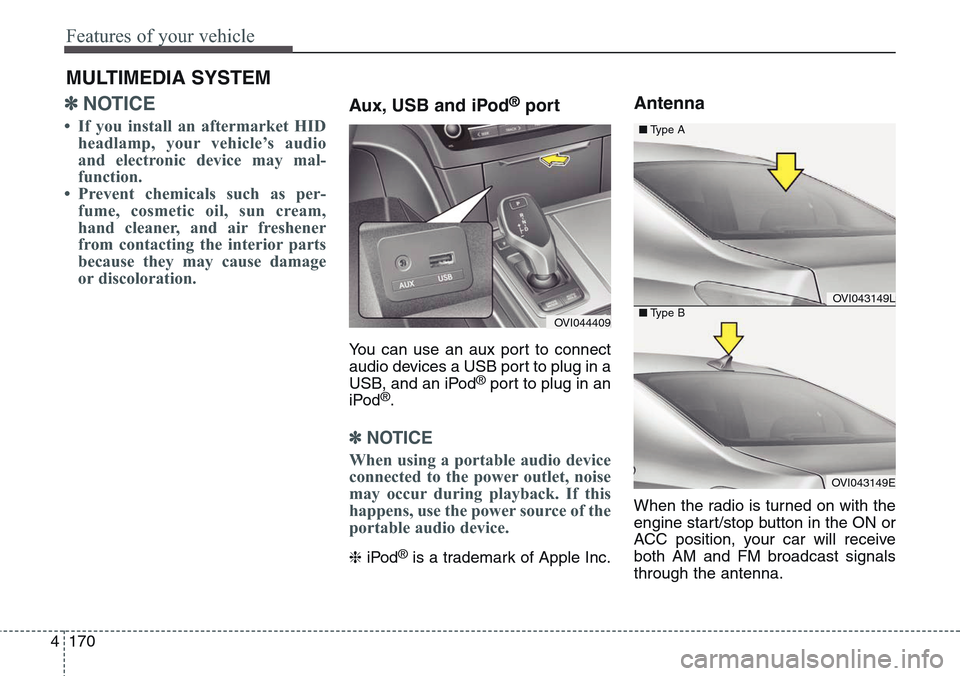
Aux, USB and iPod®port
You can use an aux port to connect
audio devices a USB port to plug in a
USB, and an iPod
®port to plug in an
iPod®.
✽NOTICE
When using a portable audio device
connected to the power outlet, noise
may occur during playback. If this
happens, use the power source of the
portable audio device.
❈iPod®is a trademark of Apple Inc.
Antenna
When the radio is turned on with the
engine start/stop button in the ON or
ACC position, your car will receive
both AM and FM broadcast signals
through the antenna.
MULTIMEDIA SYSTEM
OVI044409
OVI043149L
OVI043149E ■Type A
■Type B
Page 260 of 483
4171
Features of your vehicle
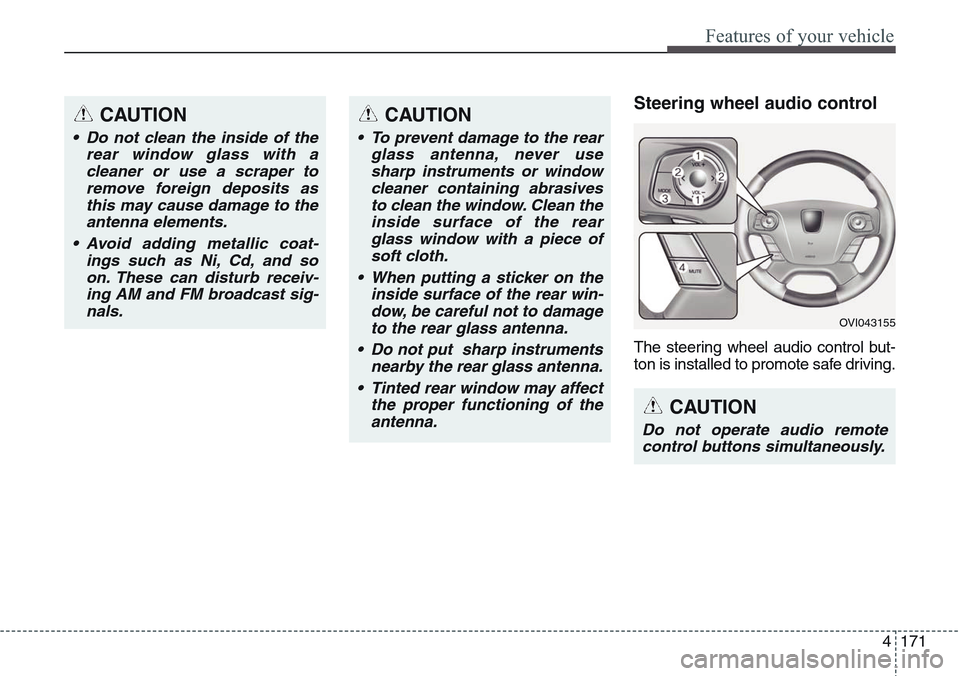
Steering wheel audio control
The steering wheel audio control but-
ton is installed to promote safe driving.
CAUTION
• Do not clean the inside of the
rear window glass with a
cleaner or use a scraper to
remove foreign deposits as
this may cause damage to the
antenna elements.
• Avoid adding metallic coat-
ings such as Ni, Cd, and so
on. These can disturb receiv-
ing AM and FM broadcast sig-
nals.
OVI043155
CAUTION
Do not operate audio remote
control buttons simultaneously.
CAUTION
• To prevent damage to the rear
glass antenna, never use
sharp instruments or window
cleaner containing abrasives
to clean the window. Clean the
inside surface of the rear
glass window with a piece of
soft cloth.
• When putting a sticker on the
inside surface of the rear win-
dow, be careful not to damage
to the rear glass antenna.
• Do not put sharp instruments
nearby the rear glass antenna.
• Tinted rear window may affect
the proper functioning of the
antenna.