instrument panel Hyundai Equus 2016 User Guide
[x] Cancel search | Manufacturer: HYUNDAI, Model Year: 2016, Model line: Equus, Model: Hyundai Equus 2016Pages: 477, PDF Size: 16.25 MB
Page 84 of 477
2-57
Safety system of your vehicle02
(Continued)
No objects should be placedover or near the air bag mod-
ules on the steering wheel,
instrument panel, and the
front panel above the glove
box, because such an object
may cause harm in a crash
severe enough to cause the
air bags to deploy.
Never place covers, blankets or seat warmers on the pas-
senger's seat. These may
interfere with the occupant
classification system.
Do not modify or disconnect the SRS wirings or other SRS
components.
Doing so may result in injury,
due to an accidental air bag
deployment or the deactivated
SRS.
When the SRS air bag warning light remains illuminated
while driving, have an author-
ized EQUUS dealer inspect
the air bag system as soon as
possible.
Air bags can be used only once – have an authorized
EQUUS dealer replace the air
bag immediately after deploy-
ment.
The SRS is designed to deploy front air bags only
when an impact is sufficiently
severe, and when the impact
angle is smaller than 30° from
the forward longitudinal axis.
In addition, air bags will inflate
only once. Seat belts must be
fastened at all times.
(Continued)(Continued)
Front air bags are notdesigned to deploy in
side/rear impacts or a rollover.
In addition, front air bags will
not deploy in a frontal crash,
when an impact severity is
below the deployment thresh-
old.
Even though your vehicle is equipped with the occupant
classification system, do not
install a child restraint system
in the front passenger's seat.
A child restraint system must
never be installed in front. An
infant or child may be severe-
ly injured or killed by an air
bag deployment in case of an
accident.
Children age 12 and under must always be properly
restrained in a rear seat.
Never allow children to ride in
the front passenger's seat. In
case that a child over the age
of 12 is seated in the front
passenger's seat, the child
must be properly fastened
and the seat should be moved
to the rearmost position.
To maximize protection and to minimize the possibility of
serious injury or death in all
types of crashes, all occu-
pants including the driver
should always fasten a seat
belt regardless of the air bag
installment in their seats. Do
not sit or lean unnecessarily
close to an air bag while the
vehicle is in motion.
(Continued)
Page 93 of 477
Additional safety precautions
All occupants should sit in anupright position, fully back in their
seats with their seat belts fastened
and their feet rested on the floor.
Occupants should not take an
inappropriate seating position,
while the vehicle is moving. An
unfastened occupant may strike
against the vehicle interior, against
other occupants, or out of the vehi-
cle, in a crash or emergency stop.
Each seat belt is designed to
restrain only one occupant.
When more than one person fas-
ten the same seat belt, they may
be seriously injured or killed in a
collision.
Do not put any accessories on
seat belts. Devices, which claims
to improve occupants' comfort,
may reduce the protection of a seat
belt and increase the chance of
serious injury in a crash.
Occupants should not place
hard or sharp objects between
themselves and the air bags.
Carrying hard or sharp objects on
your laps or in your mouth may
result in injuries, when an air bag
inflates.
Keep occupants away from the
air bags. All occupants should sit
upright, fully back in their seats
with their seat belts fastened and
their feet rested on the floor. When
the occupants are too close to the
air bag covers, they could be
injured if the air bags inflate.
Do not attach or place objects
on or near the air bag covers.
Any object attached to or placed
on the front or side impact air bag
covers could interfere with the
proper operation of the air bags.
2-66
Safety system of your vehicle
(Continued)
No objects should be placed over or near the air bag mod-
ules on the steering wheel,
instrument panel, and the
front panel above the glove
box, because such an object
may cause harm in a crash,
which is severe enough to
inflate the air bags.
After the air bags inflate, those must be replaced by an
authorized EQUUS dealer.
Do not modify or disconnect SRS wiring and other compo-
nents. Doing so may result in
injury, due to inadvertent air
bag inflation or the deactivat-
ed air bag system.
When components of the air bag system are to be discard-
ed, or when the vehicle must
be scrapped, certain safety
precautions must be
observed. An authorized
EQUUS dealer knows these
precautions and can give you
the necessary information.
Failure to follow these precau-
tions and procedures may
increase the risk of personal
injury.
When your vehicle is flooded and the floor mats are soaked,
you should not attempt to
start the engine. Have the
vehicle towed to an author-
ized EQUUS dealer.
Page 159 of 477
Instrument Cluster Control
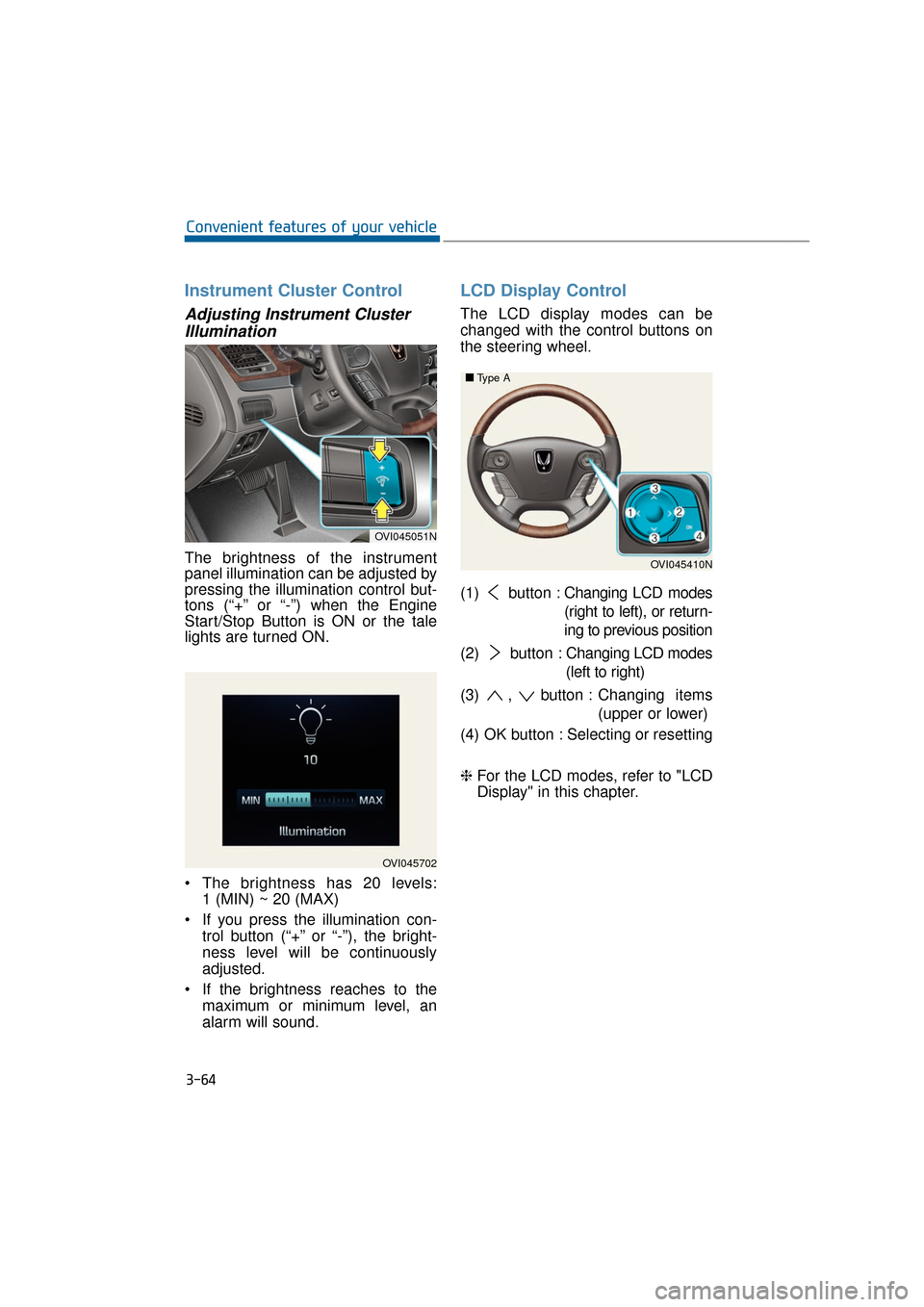
Adjusting Instrument ClusterIllumination
The brightness of the instrument
panel illumination can be adjusted by
pressing the illumination control but-
tons (“+” or “-”) when the Engine
Start/Stop Button is ON or the tale
lights are turned ON.
The brightness has 20 levels: 1 (MIN) ~ 20 (MAX)
If you press the illumination con- trol button (“+” or “-”), the bright-
ness level will be continuously
adjusted.
If the brightness reaches to the maximum or minimum level, an
alarm will sound.
LCD Display Control
The LCD display modes can be
changed with the control buttons on
the steering wheel.
(1) button : Changing LCD modes
(right to left), or return-
ing to previous position
(2) button : Changing LCD modes
(left to right)
(3) , button : Changing items
(upper or lower)
(4) OK button : Selecting or resetting
❈ For the LCD modes, refer to "LCD
Display" in this chapter.
3-64
Convenient features of your vehicle
OVI045702
OVI045051N
OVI045410N
■
■
Type A
Page 206 of 477
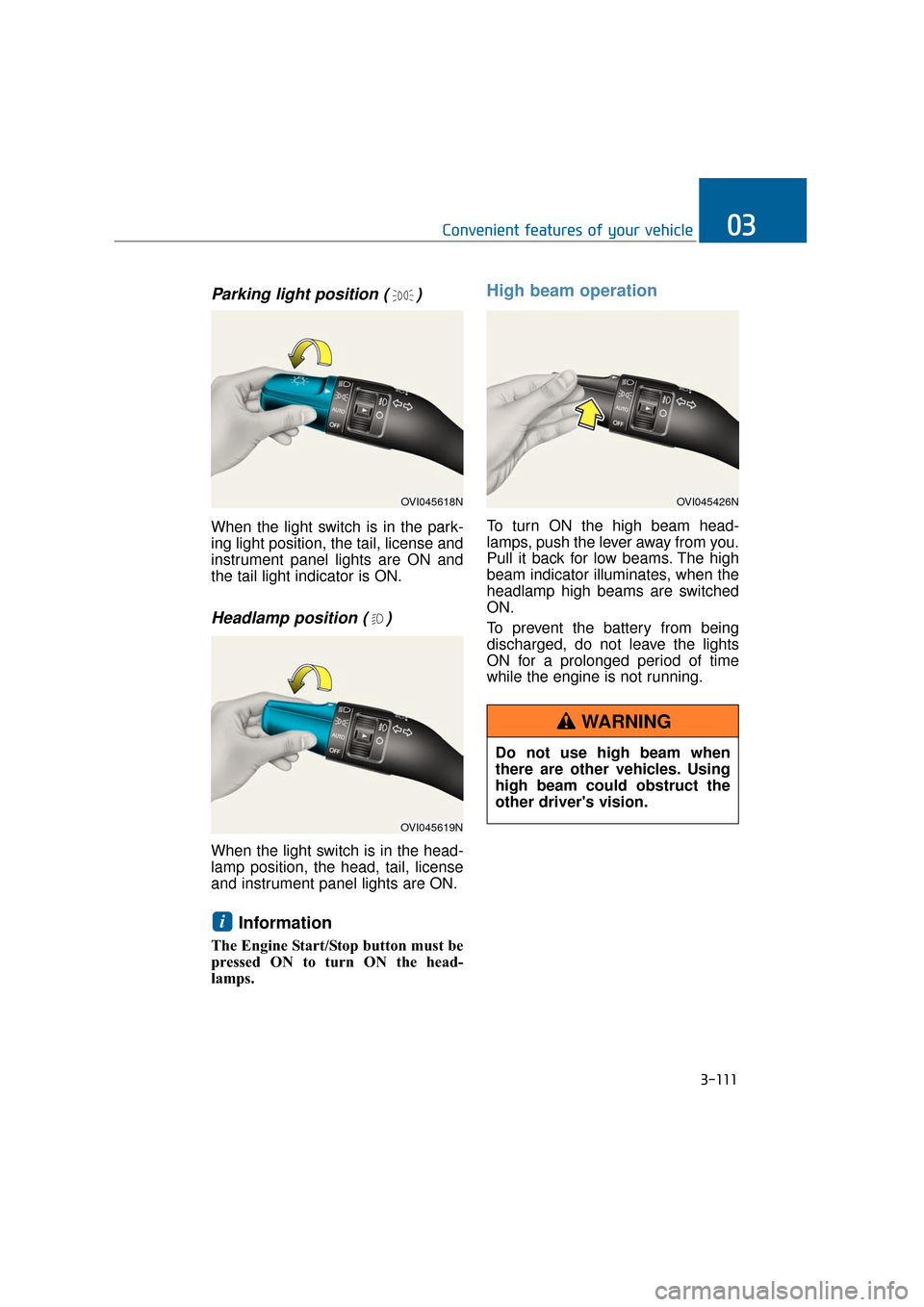
Parking light position ( )
When the light switch is in the park-
ing light position, the tail, license and
instrument panel lights are ON and
the tail light indicator is ON.
Headlamp position ( )
When the light switch is in the head-
lamp position, the head, tail, license
and instrument panel lights are ON.
Information
The Engine Start/Stop button must be
pressed ON to turn ON the head-
lamps.
High beam operation
To turn ON the high beam head-
lamps, push the lever away from you.
Pull it back for low beams. The high
beam indicator illuminates, when the
headlamp high beams are switched
ON.
To prevent the battery from being
discharged, do not leave the lights
ON for a prolonged period of time
while the engine is not running.
i
3-111
Convenient features of your vehicle03
OVI045618N
OVI045619N
OVI045426N
Do not use high beam when
there are other vehicles. Using
high beam could obstruct the
other driver's vision.
WARNING
Page 207 of 477
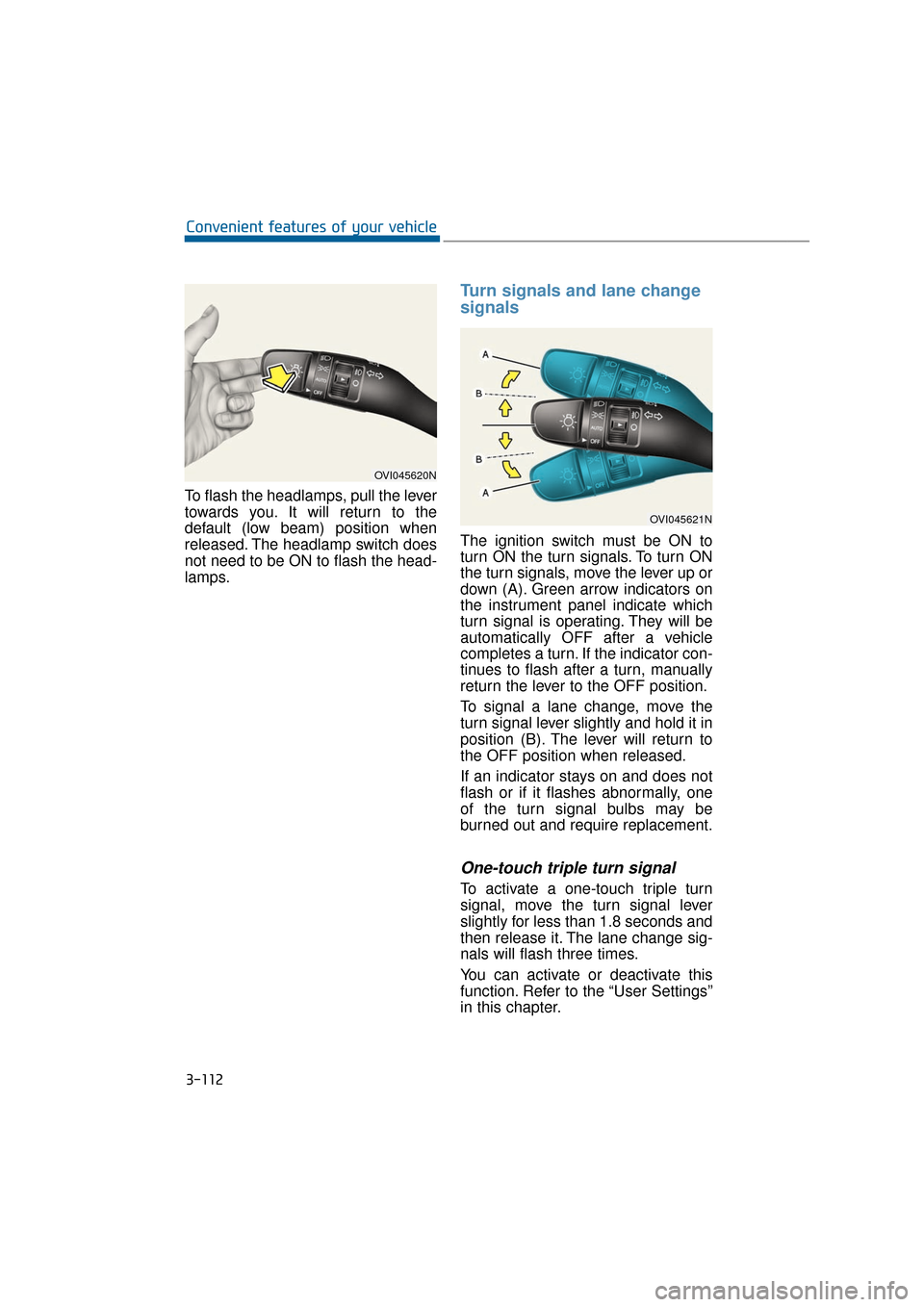
To flash the headlamps, pull the lever
towards you. It will return to the
default (low beam) position when
released. The headlamp switch does
not need to be ON to flash the head-
lamps.
Turn signals and lane change
signals
The ignition switch must be ON to
turn ON the turn signals. To turn ON
the turn signals, move the lever up or
down (A). Green arrow indicators on
the instrument panel indicate which
turn signal is operating. They will be
automatically OFF after a vehicle
completes a turn. If the indicator con-
tinues to flash after a turn, manually
return the lever to the OFF position.
To signal a lane change, move the
turn signal lever slightly and hold it in
position (B). The lever will return to
the OFF position when released.
If an indicator stays on and does not
flash or if it flashes abnormally, one
of the turn signal bulbs may be
burned out and require replacement.
One-touch triple turn signal
To activate a one-touch triple turn
signal, move the turn signal lever
slightly for less than 1.8 seconds and
then release it. The lane change sig-
nals will flash three times.
You can activate or deactivate this
function. Refer to the “User Settings”
in this chapter.
3-112
Convenient features of your vehicle
OVI045620N
OVI045621N
Page 217 of 477
To prevent damage to the conduc-
tors located under the rear win-
dow surface, never use sharp
instruments or window cleaners
containing abrasives to clean the
window.
Information
If you want to defrost and defog the
front windshield, refer to “Windshield
defrosting and defogging” in this chap-
ter.
Rear window defroster
The defroster heats the window to
remove frost, fog and thin ice from
the rear window, while the engine is
running.
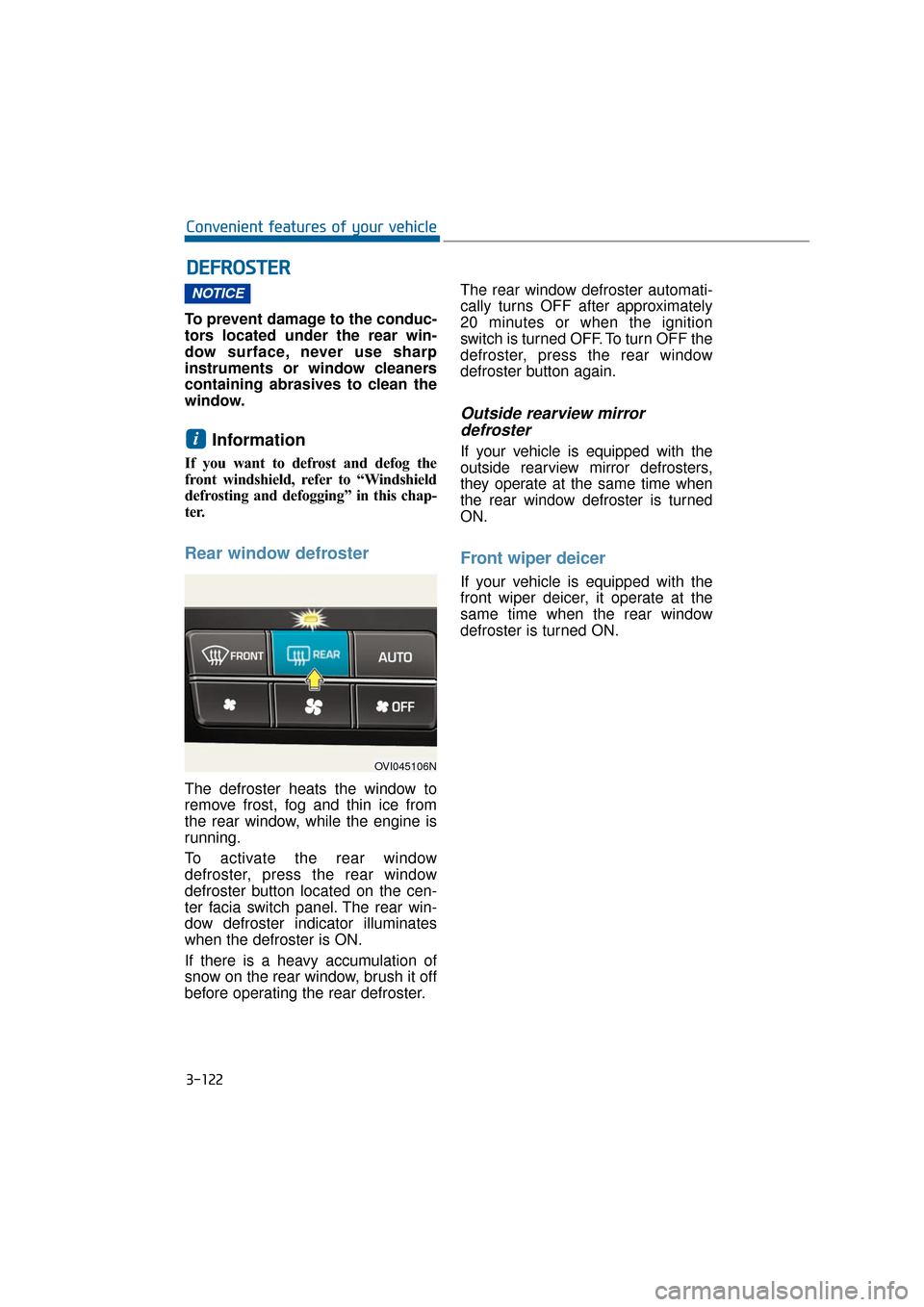
To activate the rear window
defroster, press the rear window
defroster button located on the cen-
ter facia switch panel. The rear win-
dow defroster indicator illuminates
when the defroster is ON.
If there is a heavy accumulation of
snow on the rear window, brush it off
before operating the rear defroster.The rear window defroster automati-
cally turns OFF after approximately
20 minutes or when the ignition
switch is turned OFF. To turn OFF the
defroster, press the rear window
defroster button again.
Outside rearview mirror
defroster
If your vehicle is equipped with the
outside rearview mirror defrosters,
they operate at the same time when
the rear window defroster is turned
ON.
Front wiper deicer
If your vehicle is equipped with the
front wiper deicer, it operate at the
same time when the rear window
defroster is turned ON.
i
NOTICE
D D E
EF
FR
R O
O S
ST
T E
ER
R
3-122
Convenient features of your vehicle
OVI045106N
Page 224 of 477
3-129
Convenient features of your vehicle03
Rear button
If you press the rear button, the 3
ZONE indicator will illuminate, and
you can adjust the rear mode individ-
ually. If you press the 3 ZONE button,
the 3 zone control indicator will be
turned OFF, and the rear mode will
be operated as the front mode.
The air flow outlet can be converted
as follows:
Face-level (G)
Air flow is directed toward the upper
body and face.
Bi-level (G, H)
Air flow is directed toward the face
and floor.
Floor level (G, H)
Air flow is directed toward the floor.
Information
When the front windshield defrost
button is pressed, the rear air flow will
be blocked.
Defrost-Level (A)
Most of the air flow is directed to the
windshield with a small amount of air
directed to the side window defrosters.
Instrument panel outlet
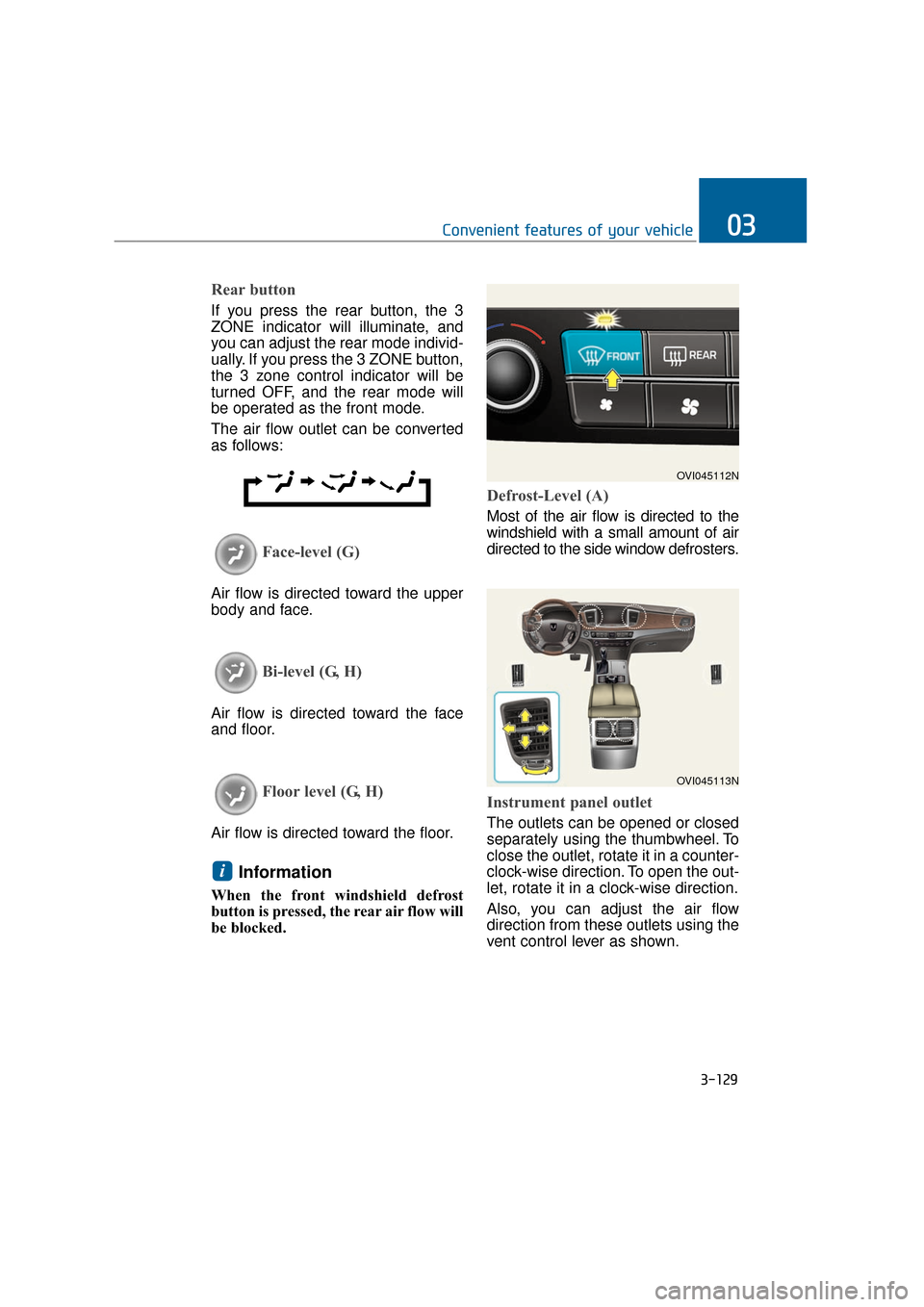
The outlets can be opened or closed
separately using the thumbwheel. To
close the outlet, rotate it in a counter-
clock-wise direction. To open the out-
let, rotate it in a clock-wise direction.
Also, you can adjust the air flow
direction from these outlets using the
vent control lever as shown.
i
OVI045112N
OVI045113N
Page 417 of 477
7-60
Maintenance
Instrument panel fuse panel Engine compartment fuse panel
OVI075105N
Driver’s side
OVI075178N
Front passenger’s side
OVI075104N
OVI075103N
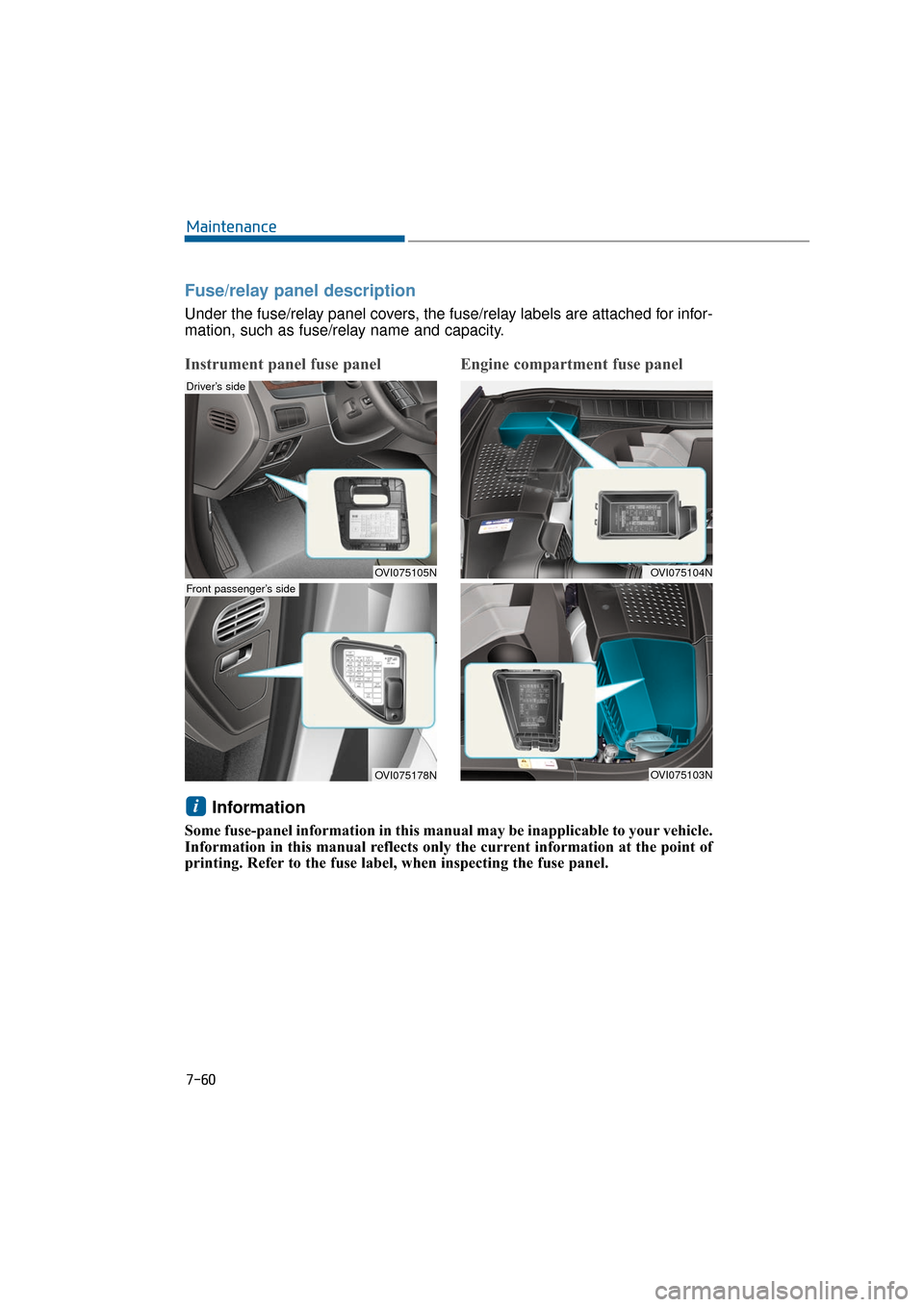
Fuse/relay panel description
Under the fuse/relay panel covers, the fuse/relay labels are attached for infor-
mation, such as fuse/relay name and capacity.
Information
Some fuse-panel information in this manual may be inapplicable to your vehicle.
Information in this manual reflects only the current information at the point of
printing. Refer to the fuse label, when inspecting the fuse panel.
i
Page 418 of 477
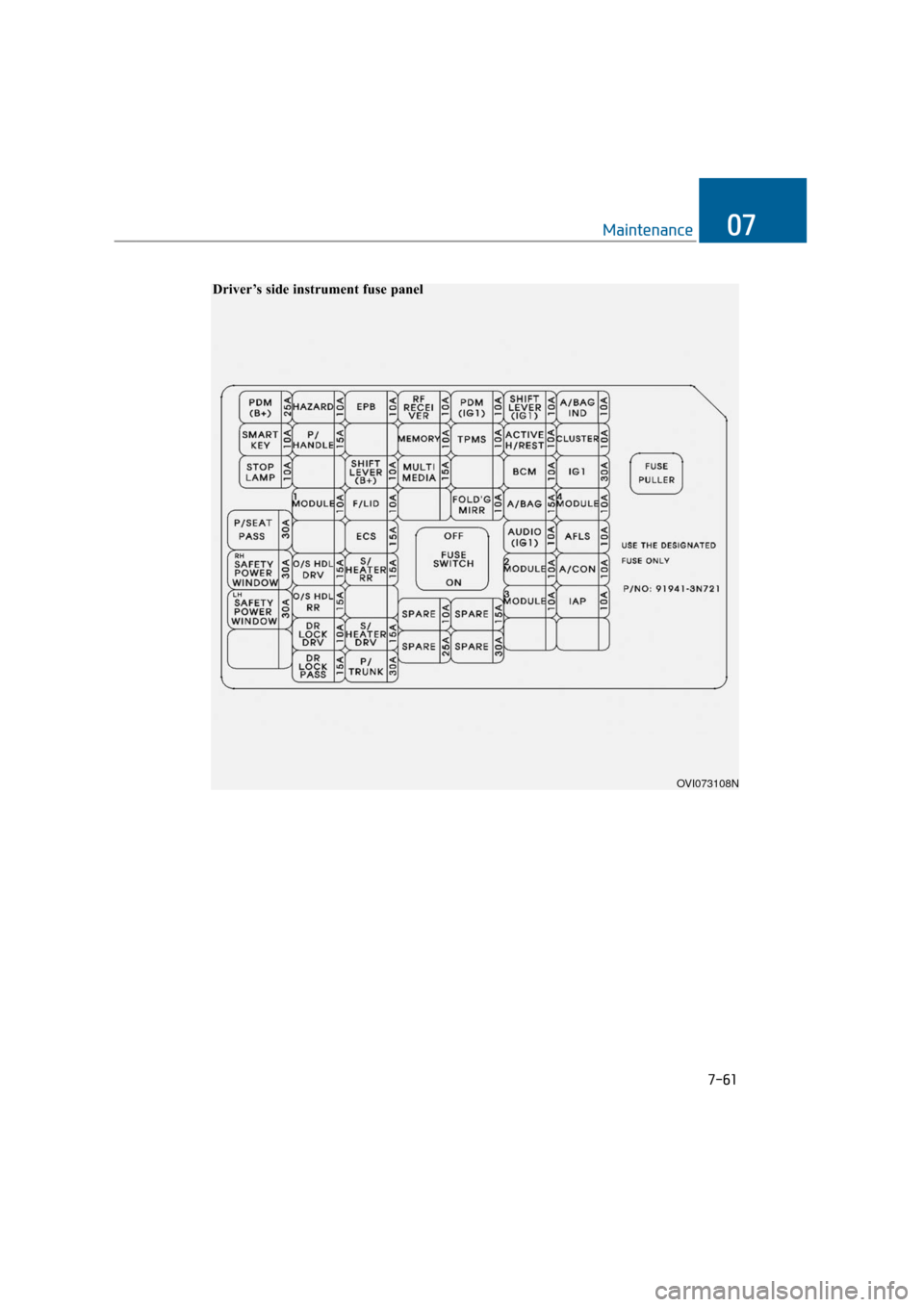
7-61
Maintenance07
OVI073108N
Driver’s side instrument fuse panel
Page 419 of 477
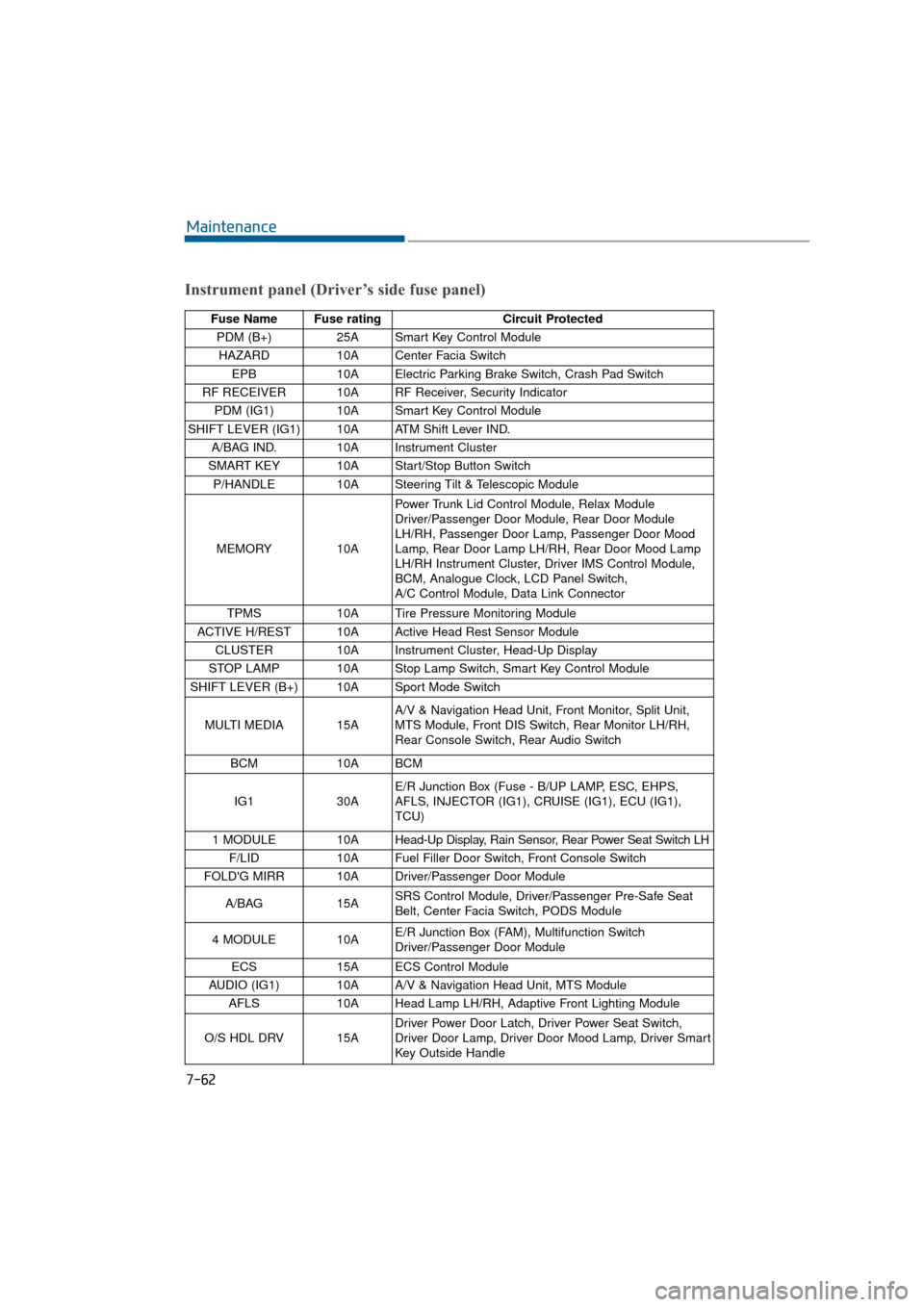
7-62
Maintenance
Instrument panel (Driver’s side fuse panel)
Fuse Name Fuse ratingCircuit Protected
PDM (B+) 25A Smart Key Control Module
HAZARD 10A Center Facia Switch
EPB 10A Electric Parking Brake Switch, Crash Pad Switch
RF RECEIVER 10A RF Receiver, Security Indicator PDM (IG1) 10A Smart Key Control Module
SHIFT LEVER (IG1) 10A ATM Shift Lever IND. A/BAG IND. 10A Instrument Cluster
SMART KEY 10A Start/Stop Button Switch P/HANDLE 10A Steering Tilt & Telescopic Module
MEMORY 10APower Trunk Lid Control Module, Relax Module
Driver/Passenger Door Module, Rear Door Module
LH/RH, Passenger Door Lamp, Passenger Door Mood
Lamp, Rear Door Lamp LH/RH, Rear Door Mood Lamp
LH/RH Instrument Cluster, Driver IMS Control Module,
BCM, Analogue Clock, LCD Panel Switch,
A/C Control Module, Data Link Connector
TPMS 10A Tire Pressure Monitoring Module
ACTIVE H/REST 10A Active Head Rest Sensor Module CLUSTER 10A Instrument Cluster, Head-Up Display
STOP LAMP 10A Stop Lamp Switch, Smart Key Control Module
SHIFT LEVER (B+) 10A Sport Mode Switch
MULTI MEDIA 15A A/V & Navigation Head Unit, Front Monitor, Split Unit,
MTS Module, Front DIS Switch, Rear Monitor LH/RH,
Rear Console Switch, Rear Audio Switch
BCM 10A BCM
IG1 30AE/R Junction Box (Fuse - B/UP LAMP, ESC, EHPS,
AFLS, INJECTOR (IG1), CRUISE (IG1), ECU (IG1),
TCU)
1 MODULE 10A Head-Up Display, Rain Sensor, Rear Power Seat Switch LH
F/LID 10A Fuel Filler Door Switch, Front Console Switch
FOLD'G MIRR 10A Driver/Passenger Door Module
A/BAG 15ASRS Control Module, Driver/Passenger Pre-Safe Seat
Belt, Center Facia Switch, PODS Module
4 MODULE 10A E/R Junction Box (FAM), Multifunction Switch
Driver/Passenger Door Module
ECS 15A ECS Control Module
AUDIO (IG1) 10A A/V & Navigation Head Unit, MTS Module AFLS 10A Head Lamp LH/RH, Adaptive Front Lighting Module
O/S HDL DRV 15A Driver Power Door Latch, Driver Power Seat Switch,
Driver Door Lamp, Driver Door Mood Lamp, Driver Smart
Key Outside Handle